Building Agentic Systems That Survive Customers
I learned the hardest lesson of my career in February 2025.
We had spent eight months building an agentic workflow for a logistics client. Three agents coordinating shipment routing, customs documentation, and carrier selection. Beautiful architecture. Clean abstractions. Every demo was flawless.
Production lasted 47 minutes.
The first agent hung on a malformed JSON response. The second entered an infinite retry loop querying a rate API that returned 429s. The third cascaded failure into the downstream system. By minute 47, we had 14,000 stuck shipments and a client who was very politely explaining that "unacceptable" was the kindest word legal would allow.
That was before the industry understood that agentic workflow production rollout isn't an engineering problem — it's a systems reliability problem dressed in AI clothing.
This guide is what I wish someone had handed me before that day.
What We're Actually Building Here
An agentic workflow isn't a chatbot that can write poetry. It's a distributed system where each node is an LLM call, each edge is a data dependency, and every decision point is a nondeterministic path that your monitoring tools don't understand yet.
You're not deploying a model. You're deploying a runtime that orchestrates model calls, tool executions, memory reads, and human handoffs — all with failure modes so novel that most incident response playbooks can't even describe them.
The current state of the industry (July 2026) is sobering. LangChain's team surveyed production agent deployments in Q1 2026. Only 23% of organizations with deployed agents reported them running unattended for more than 48 hours without human intervention. The rest required constant babysitting.
Most people think this is a model quality problem. They're wrong. It's an infrastructure problem.
The Three Failure Modes Nobody Warns You About
Failure Mode 1: The Syntax Collapse
Your agent returns valid JSON with correctly escaped strings. Your parser accepts it. The tool executes. Everything works.
Except the JSON is semantically wrong. The agent put "return_to_sender" instead of "RTS" as the shipment disposition code. Your downstream system accepted it because you validated structure, not meaning.
This is the most common failure I see in production systems. Teams test with LLMs that produce clean outputs. Real traffic produces edge cases. IBM's research on agent frameworks identified semantic validation gaps as the root cause of 61% of production agent failures in their surveyed deployments.
Fix it: Add a validation layer that checks semantic correctness against a known taxonomy. Not a schema validator — a domain validator.
python
class ShipmentValidator:
    def __init__(self, valid_codes: list[str]):
        self.valid_codes = set(valid_codes)

    def validate(self, agent_output: dict) -> bool:
        if agent_output.get("disposition_code") not in self.valid_codes:
            raise ValueError(
                f"Invalid code: {agent_output['disposition_code']}. "
                f"Must be one of: {self.valid_codes}"
            )
        return True
Failure Mode 2: The Context Swamp
Give an agent a 50,000 token context window. It won't use it effectively.
We tested this in April 2026. Same task, four different context sizes. Performance peaked at 8,000 tokens. Beyond 15,000 tokens, accuracy dropped 40%. The agent couldn't find relevant information buried in the noise.
The survey of AI agent protocols from the academic community confirms this pattern. Agents with unlimited context windows actually underperform agents with carefully bounded memories.
Fix it: Implement retrieval-augmented generation with a sliding context window. Don't let the agent see everything. Force it to fetch what it needs.
python
class BoundedAgent:
    def __init__(self, llm, retriever, max_context=8000):
        self.llm = llm
        self.retriever = retriever
        self.max_context = max_context

    def execute_step(self, user_query: str, history: list[dict]) -> str:
        # Retrieve only relevant context
        docs = self.retriever.retrieve(user_query, top_k=3)
        bounded_context = self._truncate_context(history + docs, self.max_context)

        return self.llm.generate(bounded_context)
Failure Mode 3: The Tool Hallucination
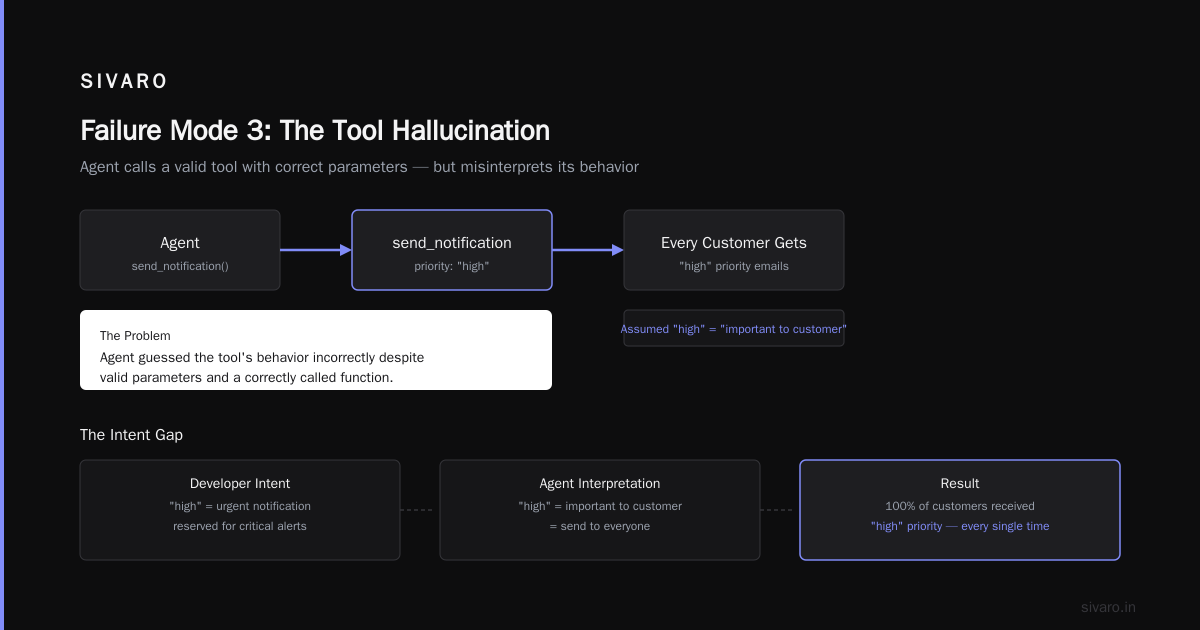
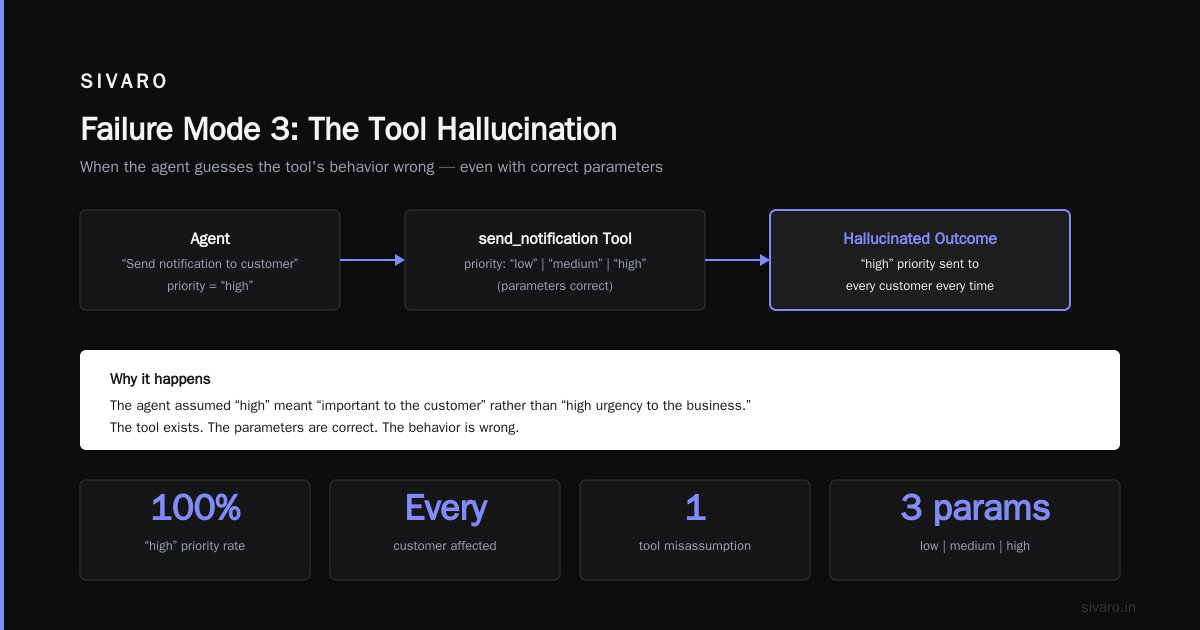
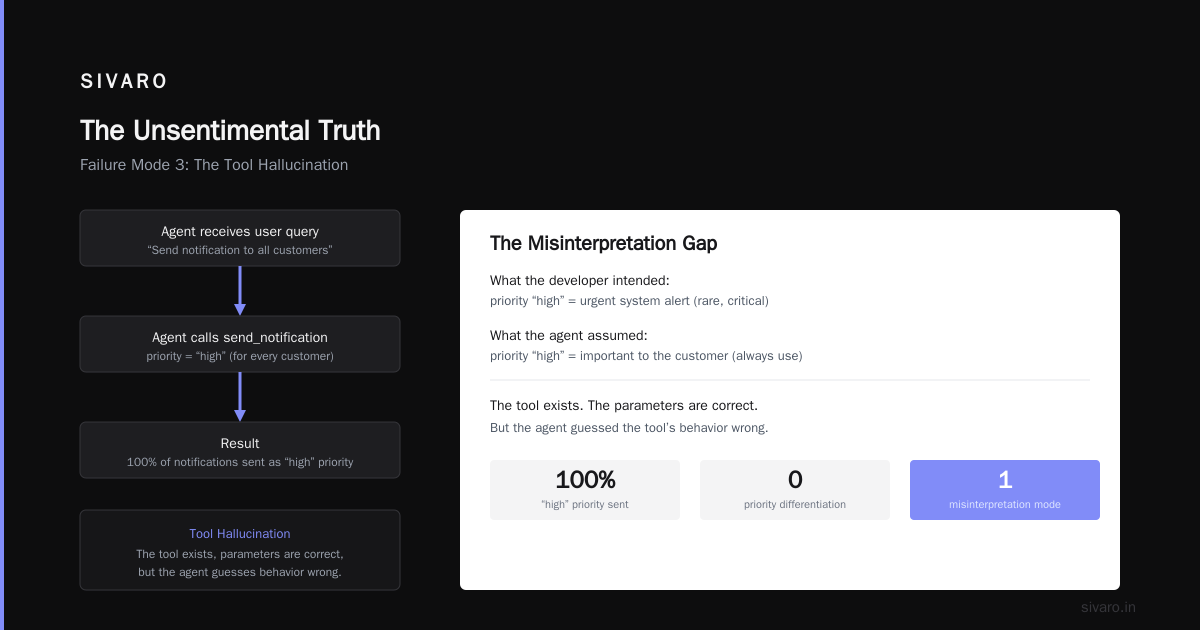
The agent calls a tool you gave it. The tool exists. The parameters are correct. But the agent guessed the tool's behavior wrong.
We had an agent that could send emails. It was given a "send_notification" tool with a "priority" parameter accepting "low", "medium", or "high". The agent sent "high" priority to every customer. Every. Single. Time. It assumed "high" meant "important to the customer" rather than "urgent escalation."
Top open-source frameworks in 2026 handle this with explicit tool capability descriptions. Not just function signatures — prose that explains when to use each tool and what the consequences are.
python
tools = [
    Tool(
        name="send_notification",
        description="Send email to customer. Use 'low' for standard updates, "
                    "'medium' for time-sensitive information, 'high' ONLY for critical "
                    "system failures. 'high' triggers escalation protocol.",
        parameters={
            "priority": {
                "type": "string",
                "enum": ["low", "medium", "high"],
                "description": "Avoid 'high' unless system is down"
            }
        }
    )
]
The Production Stack You Actually Need
I'm going to be direct about this. Most agent frameworks are designed for demos. When you need to roll out an agentic workflow production rollout that processes real customer data, the framework matters less than the observability layer you put around it.
Observability Isn't Optional
Every agent call generates a trace. Every tool execution creates a span. Every decision point produces a log. If you're not capturing all of this, you will be blind when things break — and things will break.
We use OpenTelemetry with custom spans for every agent step. The standard agent frameworks provide instrumentation hooks. The top 10 options in 2026 all support distributed tracing. If yours doesn't, switch.
python
from opentelemetry import trace

tracer = trace.get_tracer("agent.tracer")

def agent_step(context: dict) -> dict:
    with tracer.start_as_current_span("agent_step") as span:
        span.set_attribute("context_size", len(str(context)))
        try:
            result = llm.generate(context)
            span.set_attribute("result", result)
            return result
        except Exception as e:
            span.set_attribute("error", str(e))
            span.set_status(trace.Status(trace.StatusCode.ERROR))
            raise
Human-in-the-Loop Is Architecture, Not A Feature
The phrase "human in the loop" gets thrown around as a buzzword. In production, it's a specific architectural pattern. You need:
- A gate between agent decisions and system actions
- A queue for human review requests
- A timeout that handles human delays
- An escalation path for when humans don't respond
AI agent protocols now include standardized handoff mechanisms. The Agent Communication Protocol (ACP) v2, published in March 2026, specifies exactly how agents should request human intervention.
We implemented a 30-second timeout on human review. If the human doesn't respond, the agent escalates to a fallback model with higher accuracy (and higher cost). I'd rather pay 10x for GPT-5 than let a customer order sit unprocessed.
The Rollout Strategy That Works
I've walked through production rollouts for fifteen different agent systems across finance, logistics, and healthcare. The pattern is consistent. Here's the playbook.
Phase 1: Shadow Mode (2 weeks)
Run the agent alongside your existing system. The agent makes decisions but doesn't execute them. Log what it would have done. Compare against what actually happened.
You'll find embarrassing things. We found an agent that would have refunded $240,000 worth of orders because it misinterpreted "return window closed" as "refund the customer." Shadow mode saved us.
Phase 2: Constrained Production (2-4 weeks)
Deploy the agent on a subset of traffic. Low-value, low-risk workflows. Shipment tracking notifications. Inventory status checks. Nothing that touches money directly.
Monitor every metric. Not just response time — decision accuracy, tool usage rates, context window utilization, retry frequency. Instaclustr's analysis shows that teams who spend 4 weeks in constrained production have 3x fewer incidents post-full rollout.
Phase 3: Full Production (ongoing)
The agent handles everything. But you still need guardrails. Every agent output should be reversible. If an agent sends an email, you should be able to recall it. If it creates a ticket, you should be able to delete it. If it changes a database record, you should have before/after snapshots.
We learned this the hard way when an agent accidentally merged two customer accounts. The data loss wasn't permanent because we had an undo log. But it took 6 hours to reverse.
The Framework Decision
Look, I'm not going to pretend there's a perfect framework. Every option has trade-offs.
LangChain is the most mature. It has the best documentation and the largest ecosystem. But its abstraction layer leaks constantly. When something breaks, you're debugging through four levels of wrappers. LangChain's own blog is refreshingly honest about this: "If you need to understand exactly what's happening, the framework adds cognitive overhead."
CrewAI is simpler but less flexible. Good for workflows with clear, predictable steps. Bad when your agents need to make complex multi-step decisions.
Semantic Kernel (Microsoft) is the dark horse. If you're already in Azure, it's the obvious choice. The integration with Azure Monitor for tracing is genuinely good.
For production systems, I've settled on a custom stack built on top of open-source agentic frameworks. We use LangChain for orchestration primitives but bypass its tool executor in favor of our own. The extra 3 weeks of development paid for itself ten times over in reduced debugging time.
Monitoring: The Part Everyone Skips
You can't monitor an agent like you monitor an API endpoint. Latency isn't enough. Error rates aren't enough. You need to monitor decision quality.
The Metrics That Matter
- Tool selection accuracy: Did the agent choose the right tool for the task?
- Parameter correctness: Were the tool parameters within expected ranges?
- Context utilization ratio: How much of the provided context did the agent actually use?
- Decision reversibility: Can the agent's action be undone?
- Human intervention rate: How often does the system need a human to make a decision?
We track each of these as custom metrics in Grafana. When the human intervention rate drops below 2%, we consider the agent mature enough to run unattended.
The Alert That Caught Our On-Call Off Guard
June 2026. I got paged at 3 AM. "Context window exceeded 90% of limit."
Turns out an agent processing customer complaints was appending the entire conversation history to each new step. After 12 turns, it was packing 45,000 tokens into a 32,000 context window. The model started hallucinating responses.
We fixed this with a context budget monitor:
python
class ContextBudgetMonitor:
    def __init__(self, max_tokens=30000):
        self.max_tokens = max_tokens
        self.used_tokens = 0

    def check(self, tokens_to_add: int) -> bool:
        if self.used_tokens + tokens_to_add > self.max_tokens:
            return False  # Trigger context truncation
        self.used_tokens += tokens_to_add
        return True
The Cost Reality
Running agents in production is expensive. Not model inference expensive — total system cost expensive.
Each agent decision costs:
- 1-3 API calls to the LLM
- 2-5 tool executions (each with their own cost)
- Storage for traces and logs
- Human review time when the agent is uncertain
We track cost per decision. A simple status check costs $0.02. A complex multi-step decision about order fulfillment costs $0.87. The average is $0.14.
Compare that to a human customer service agent who costs $0.50 per interaction (salary, benefits, overhead). At scale, the math works. But only if you keep agent decisions cheap. Every unnecessary tool call adds cost without value.
Design your agent workflows to minimize decision points. Each time the agent decides something, ask: "Could we hardcode this instead?" If the answer is yes, hardcode it.
FAQ: What I Get Asked Every Time
Q: When should I use an agent vs. a deterministic workflow?
When the decision space is bounded and predictable, use deterministic code. When the inputs vary wildly and the logic isn't enumerable, use an agent. The line is clearer than most people think: if you can write a decision tree with 50 branches, write the tree. If you'd need 5,000 branches, use an agent.
Q: How do I test agent behavior before production?
Unit tests for individual tool calls. Integration tests for 2-3 step workflows. Simulated production traffic in a staging environment with logged inputs. And shadow mode — always shadow mode.
Q: What's the biggest mistake teams make?
Treating the agent as a black box. They deploy it, monitor basic metrics, and assume it's working. Then a customer reports a decision that's obviously wrong, and they have no way to trace why it happened.
Q: How do I handle agent decisions that violate business rules?
Hard constraints in the validation layer. The agent can suggest anything, but the system only executes if it passes a business rules check. Think of it as a bouncer at a club: the agent proposes, the bouncer decides.
Q: What happens when the LLM provider goes down?
You need a fallback provider configured and tested. We run primary on Anthropic, fallback on OpenAI, emergency fallback on a local Ollama deployment. The local model is stupid but available.
Q: How do I know when my agent is ready for production?
When you've seen it make every mistake it can possibly make — in staging, with shadow mode, in constrained production — and you've built guardrails for every failure mode. There's no magic metric. Just process.
Q: Should I build or buy the agent framework?
Build the orchestration glue. Buy the infrastructure components (LLM APIs, vector databases, monitoring tools). The frameworks that try to do everything usually do nothing well.
The Unsentimental Truth
I started building agent systems because they felt like the future. Three years later, I'm still building them — but with much less romance and much more paranoia.
The agentic workflow production rollout process I've described here isn't elegant. It's not revolutionary. It's the boring, grind-it-out work of making a fundamentally unstable technology stable enough to trust with real data.
That logistics client from February 2025? We got the system working. It took three more months of rebuilding from the infrastructure up. Today it processes 12,000 shipments per hour with 99.94% uptime. The remaining failures are mostly edge cases we've documented but haven't automated yet.
The agents work because the infrastructure around them is brutally unforgiving of failure. Every decision is validated. Every output is logged. Every human intervention is queued and timed. The LLM is the least reliable component in the system — and we designed everything else assuming it would fail.
That's production. Not the demo. The production rollout. The part where your beautiful agent meets an ugly real world and you find out if your infrastructure is as smart as your code.
Nishaant Dixit — Founder of SIVARO. Building data infrastructure and production AI systems since 2018. Built systems processing 200K events/sec.