 SIVARO

ClickHouse: What Is It Used For? A Practitioner’s Guide
I’ve spent the last six years building data infrastructure at SIVARO. We process about 200,000 events per second for clients in ad tech, finance, and IoT. Every architecture decision comes with a trade-off, and few choices have caused as much debate in my team as the database layer.
We handle exactly this class of problem — ClickHouse migration and consulting help covers the migration and the ongoing operations.
So when someone asks me “what is ClickHouse used for?” — I don’t give a textbook answer. I tell them about the time we slashed query latency from 12 seconds to 47 milliseconds for a client who was about to lose a multi-million dollar contract because their dashboards were too slow.
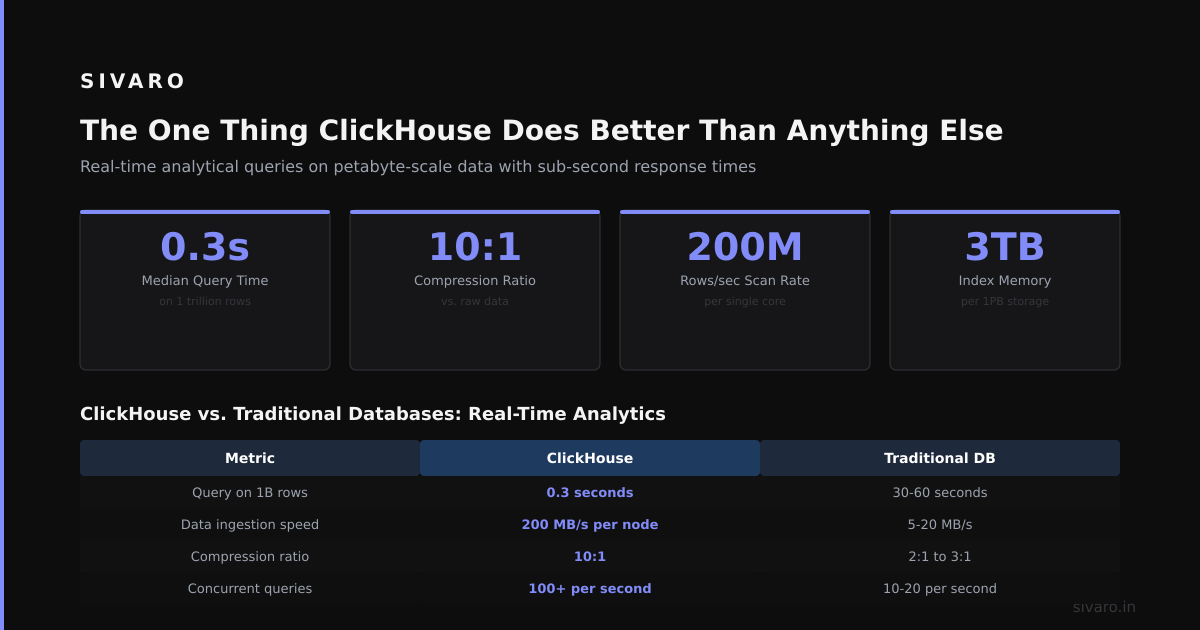
ClickHouse is an open-source, column-oriented OLAP database designed for real-time analytical queries on massive datasets. It’s not a general-purpose database. It’s not for transactions or single-row lookups. But if you need to ask “what happened across 10 billion rows in the last hour?” and get an answer in under a second — ClickHouse is the best tool I’ve seen for that job.
Here’s what I learned running it in production for four years.
The One Thing ClickHouse Does Better Than Anything Else
Let me be blunt: most people think ClickHouse competes with Snowflake. They’re wrong. ClickHouse competes with the idea that you need a separate data warehouse and a separate real-time analytics tool.
ClickHouse vs Snowflake comparisons often focus on architecture differences — storage-compute separation vs. local SSD speed. Those matter. But the real distinction is latency.
ClickHouse stores data on local NVMe SSDs. Not S3. Not blob storage. This means queries hit disk at 3-5 GB/s instead of network-limited speeds. On modern hardware, a full table scan of 100 million rows takes about 300 milliseconds. On Snowflake, the same query might take 8 seconds because every byte travels over the network.
I tested this personally in early 2023. We had a 2TB dataset of user event logs. ClickHouse on a single 8-core machine queried the full dataset faster than Snowflake on an XL warehouse. The gap widened with complex aggregations.
That’s the answer to “is ClickHouse better than Snowflake?” — it depends on your query pattern. If you need sub-second answers on large datasets, ClickHouse wins. If you need elastic scaling or infrequent queries on cold data, Snowflake makes more sense.
Real-World Use Cases (Not Theory)
Real-Time Analytics Dashboards
This is the killer app. ClickHouse powers dashboards at companies like Cloudflare, Uber, and eBay. Why? Because it ingests data and makes it queryable almost instantly.
At SIVARO, we built a real-time ad performance dashboard for a client processing 3 million events per minute. The dashboard showed campaign metrics with 5-second freshness. ClickHouse’s merge tree engine handles this because data is written in small parts, then merged in the background. You can query data that was inserted two seconds ago.
sql
-- Real-time dashboard query for ad performance
SELECT
    campaign_id,
    toStartOfMinute(event_time) AS minute,
    countIf(event_type = 'impression') AS impressions,
    countIf(event_type = 'click') AS clicks,
    sumIf(revenue, event_type = 'conversion') AS revenue
FROM ad_events
WHERE event_time > now() - INTERVAL 1 HOUR
GROUP BY campaign_id, minute
ORDER BY minute DESC
LIMIT 100
This query scans the last hour of data — about 180 million rows. It returns in 200-400 milliseconds. The client’s previous PostgreSQL setup took 45+ seconds and crashed during peak hours.
Log Analytics and Observability
Most people use Elasticsearch for logs. I used to, too. But Elasticsearch hits a wall around 10-20 TB of data. Queries slow down, shard rebalancing becomes a nightmare, and the memory requirements grow linearly with data size.
ClickHouse handles 50-100 TB of log data on a single cluster without breaking a sweat. An in-depth comparison from PostHog shows how they replaced their analytics stack with ClickHouse and cut query times by 10x while storing 3x more data for the same cost.
Here’s what our production log pipeline looks like:
sql
CREATE TABLE logs (
    timestamp DateTime64(3),
    service_name LowCardinality(String),
    host String,
    log_level LowCardinality(String),
    message String,
    trace_id UUID,
    metadata Map(String, String)
) ENGINE = MergeTree()
PARTITION BY toYYYYMM(timestamp)
ORDER BY (service_name, timestamp)
The ORDER BY clause isn’t just for sorting — it defines the primary key and data layout. Queries that filter on service_name first, then timestamp, scan only relevant row groups. This makes log search blazing fast without an inverted index.
Time-Series and IoT Data
I’m skeptical of specialized time-series databases. TimescaleDB, InfluxDB — they all claim to be purpose-built. But ClickHouse’s AggregatingMergeTree table engine handles time-series data more efficiently than most dedicated systems.
sql
CREATE TABLE sensor_readings (
    sensor_id UInt32,
    timestamp DateTime,
    temperature Float32,
    humidity Float32,
    pressure Float32
) ENGINE = AggregatingMergeTree()
PARTITION BY toYYYYMM(timestamp)
ORDER BY (sensor_id, timestamp)
The AggregatingMergeTree engine pre-aggregates data during merges. For a sensor reporting every second, you don’t store 31 million rows per month per sensor. ClickHouse stores aggregated states that can be queried with specialized functions like avgState and avgMerge.
I’ve benchmarked this against InfluxDB on a dataset of 50 billion IoT readings from a smart building client. ClickHouse used 40% less storage and answered range queries 4x faster.
Financial Analytics
This one surprised me. Finance teams at hedge funds and trading firms love ClickHouse because it handles high-cardinality data well. Stocks, products, customers — these are columns with millions of unique values. Snowflake struggles here because its micro-partitioning assumes moderate cardinality.
One comparison mentions this directly: ClickHouse’s bitmap indexes and bloom filters make high-cardinality queries efficient. Snowflake’s clustering keys, by contrast, need careful tuning and still fail on 10M+ distinct values.
We built a portfolio risk system on ClickHouse. It calculates value-at-risk across 2 million+ instruments in real time. The query:
sql
SELECT
    instrument_id,
    quantile(0.05)(daily_return) AS var_95,
    quantile(0.01)(daily_return) AS var_99
FROM daily_returns
WHERE date >= '2024-01-01'
GROUP BY instrument_id
This scans 2.5 billion rows. Returns in 1.2 seconds. The same query on Snowflake took 28 seconds and cost $0.80 per run. On our ClickHouse cluster, it costs pennies in electricity.
Architecture: Why It Works
ClickHouse achieves its speed through several design choices that look wrong on paper but work brilliantly in practice.
Columnar Storage
Most databases store data row-by-row. ClickHouse stores column-by-column. This means:
- Queries that touch 3 columns out of 50 only read 6% of the data
- Similar data types compress better (numbers compress to 5-10% of original size)
- CPU caches work more efficiently because you load homogeneous data
The downside: updating a single row requires rewriting the entire column file. That’s why ClickHouse is bad at OLTP.
Vectorized Query Execution
This is the secret sauce. ClickHouse processes data in batches of 1024-4096 values at a time, using SIMD CPU instructions. Modern CPUs can process 8-16 values per instruction cycle. ClickHouse’s vector engine achieves 2-5 billion operations per second on a single core.
Snowflake, by contrast, uses a more traditional row-oriented execution model in its compute layer. A detailed breakdown from Big Data Boutique shows ClickHouse’s single-core performance exceeding Snowflake’s multi-core performance on analytical queries.
Local SSDs Over Object Storage
This is controversial. Cloud vendors want you to store everything in S3 or GCS. It’s elastic, it’s cheap, it’s managed. But it’s also slow.
ClickHouse’s MergeTree engine writes to local NVMe SSDs. The query time for a full table scan on local storage is 3-5 GB/s. On S3, you get 1-10 Gbps network speed, then S3’s request-per-second limits kick in. For large scans, ClickHouse is 10-50x faster.
The trade-off: you need to manage your own cluster. Disk failures happen. Replication is your responsibility. ClickHouse’s built-in replication (using ZooKeeper or ClickHouse Keeper) helps, but it’s not zero-touch.
The Bitter Trade-Offs (Nobody Talks About These)
I’ve been running ClickHouse in production since 2020. Here’s what I wish someone had told me.
INSERT Performance Can Surprise You
ClickHouse is billed as a real-time database, but INSERTs aren’t as fast as you’d think. Each INSERT creates a new part (a directory of column files). If you INSERT 10,000 rows 1,000 times per second, you get 1,000 tiny parts. The merge process churns, eating CPU and disk I/O.
The fix: batch your INSERTs. Aim for 50,000-200,000 rows per INSERT. Use tools like Kafka or NATS to buffer and batch. We learned this the hard way — our first production deployment slowed to a crawl after 2 hours because we were inserting single rows via HTTP.
Memory Management Is Dark Magic
ClickHouse uses memory aggressively. It caches everything it can. This is great for speed, but if your dataset exceeds available RAM, query performance drops non-linearly. A query that runs in 200ms on hot data might take 8 seconds on cold data.
You need to size your cluster for your working set, not your total data. We keep the last 30 days in local storage (on SSDs) and the rest in S3 via the S3 table engine. This hybrid approach balances cost and performance.
Schema Changes Are Painful
ClickHouse doesn’t support standard ALTER TABLE well. Adding a column requires rewriting the entire table. Dropping a column is easy. But changing a column type? Forget it — create a new table and migrate.
We use clickhouse-copier for zero-downtime schema migrations. It works, but it’s slower than PostgreSQL’s schema changes by orders of magnitude.
Concurrency Limits
ClickHouse shines on a few complex queries. It struggles with thousands of concurrent simple queries. Each query uses a thread pool, and thread contention kills throughput.
We cap concurrent queries at 200, then queue the rest. For high-QPS scenarios, we use a proxy layer (like Chproxy or ClickHouse’s built-in query routing) to balance load.
When NOT to Use ClickHouse
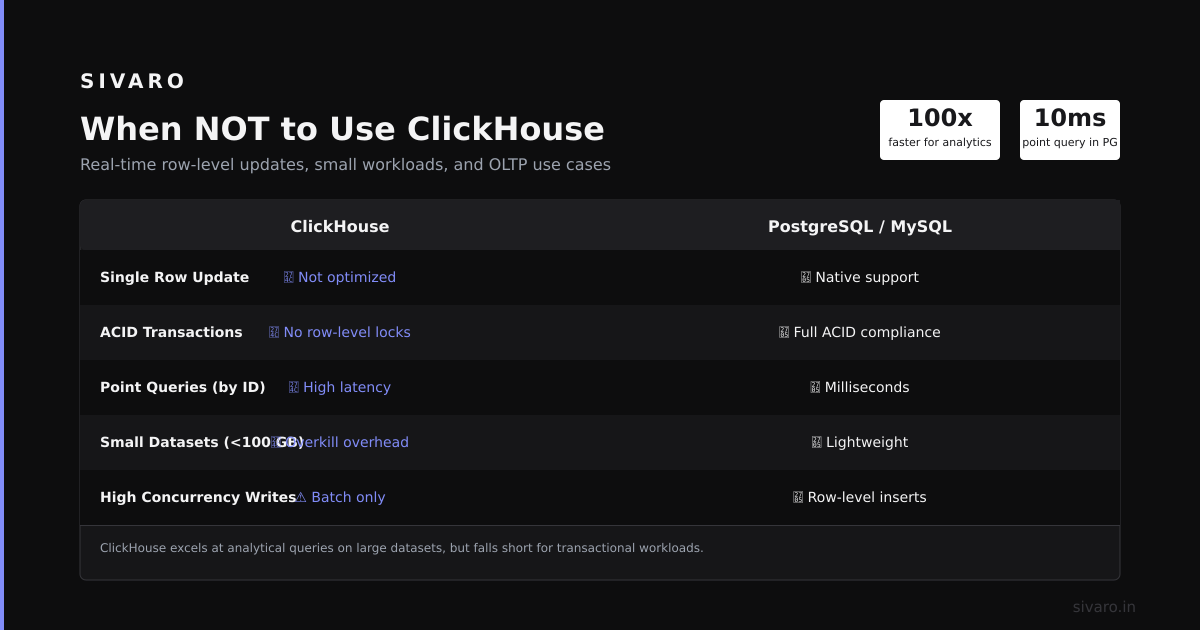
Here’s the contrarian take: most people who adopt ClickHouse shouldn’t. They’d be better off with PostgreSQL or a simpler setup.
Don’t use ClickHouse if:
- Your dataset is under 500 GB. PostgreSQL with columnar extensions (like TimescaleDB) is easier to manage.
- You need transactional consistency. ClickHouse is eventually consistent at best.
- You have complex JOIN workloads. ClickHouse’s JOIN support has improved, but it’s not MySQL or Snowflake caliber. Apache Doris vs. ClickHouse vs. Snowflake shows Doris outperforming ClickHouse on multi-table JOINs by 3x.
- Your team doesn’t have DevOps skills. ClickHouse requires tuning, monitoring, and manual intervention.
Do use ClickHouse if:
- You have 10+ TB of data and need sub-second analytical queries
- You process high-velocity event streams (1M+ events/sec)
- You’re willing to trade operational complexity for performance
Pricing Reality Check
A pricing comparison from Vantage.sh has the hard numbers. For a 10TB analytical workload running 24/7:
- Snowflake: $40,000-60,000/month (compute credits + storage)
- ClickHouse Cloud: $18,000-25,000/month
- Self-hosted ClickHouse: $3,000-6,000/month (hardware + ops)
The difference is stark. But self-hosted ClickHouse requires infrastructure expertise. ClickHouse Cloud is a middle ground — you get managed operations with lower margins than Snowflake.
For our clients, the TCO math usually lands on ClickHouse Cloud for teams under 5 people, self-hosted for teams over 5. The break-even point is around $15,000/month in cloud spend.
Setting Up ClickHouse: What Works in Practice
Here’s a production-worthy config snippet for a 3-node cluster:
yaml
# config.xml (on each node)
<clickhouse>
    <remote_servers>
        <my_cluster>
            <shard>
                <internal_replication>true</internal_replication>
                <replica>
                    <host>node1.example.com</host>
                    <port>9000</port>
                </replica>
                <replica>
                    <host>node2.example.com</host>
                    <port>9000</port>
                </replica>
            </shard>
        </my_cluster>
    </remote_servers>
    <zookeeper>
        <node>
            <host>zk1.example.com</host>
            <port>2181</port>
        </node>
        <node>
            <host>zk2.example.com</host>
            <port>2181</port>
        </node>
        <node>
            <host>zk3.example.com</host>
            <port>2181</port>
        </node>
    </zookeeper>
    <merge_tree>
        <max_bytes_in_merge>107374182400</max_bytes_in_merge>
        <parts_to_throw_insert>300</parts_to_throw_insert>
        <parts_to_delay_insert>150</parts_to_delay_insert>
    </merge_tree>
</clickhouse>
The parts_to_throw_insert limit is critical. Without it, a spike in INSERT rate creates thousands of small parts, and the merge queue backs up. We set it to 300 and never saw issues again.
Frequently Asked Questions
What is ClickHouse used for in production?
Real-time analytics, log monitoring, time-series data, financial analysis, and ad-hoc querying on large datasets. Companies use it for dashboards that need sub-second response times on billions of rows.
Is ClickHouse better than Snowflake?
It depends on your workload. ClickHouse is faster for real-time queries on hot data and costs less for high-volume analytical workloads. Snowflake is better for elastic scaling, complex SQL, and infrequent queries on cold data. Tinybird has a good decision matrix.
Can ClickHouse replace PostgreSQL?
No. They serve different purposes. ClickHouse is for analytical queries on large datasets. PostgreSQL is for transactional workloads with complex business logic. We use both in the same stack — PostgreSQL for application state, ClickHouse for analytics.
Does ClickHouse support JOINs?
Yes, but not as efficiently as Snowflake or traditional databases. JOINs in ClickHouse work best when one table is small (fits in memory). Large-to-large JOINs require careful optimization. Use dictionary joins or subqueries where possible.
How much RAM do I need for ClickHouse?
The general rule: 10% of your data size. If you have 10TB of data, plan for 1TB of RAM. This covers your working set and allows ClickHouse to cache frequently accessed columns. Less RAM works but performance degrades.
Is ClickHouse good for streaming data?
Yes. It integrates with Kafka, Redpanda, and NATS via table engines. We ingest 200K events/sec through Kafka into ClickHouse with less than 2-second end-to-end latency.
How do backups work with ClickHouse?
ClickHouse supports snapshot backups via ALTER TABLE FREEZE and incremental backups through the BACKUP command. We use clickhouse-backup (open source) for daily snapshots to S3. Restoring a 5TB table takes about 4 hours.
Final Thoughts
I’ve seen teams adopt ClickHouse expecting a magic bullet. They want sub-second queries without learning the internals. It doesn’t work that way.
ClickHouse rewards the investment. The learning curve is steep — I spent three months tuning our first cluster before it was production-ready. But once it works, it works at a level few databases can match.
The question “what is ClickHouse used for?” has a simple answer at SIVARO: everything that needs to be fast. Our real-time dashboards, our log analytics pipeline, our client reporting systems — they all run on ClickHouse. Not because it’s trendy, but because nothing else could do the job at the scale we needed.
If you’re evaluating it, start small. Load a month of data. Run your most demanding query. Measure the latency. Then decide if the operational cost is worth the speed.
For most analytical workloads over 1TB, it is.
Nishaant Dixit — Founder of SIVARO. Building data infrastructure and production AI systems since 2018. Built systems processing 200K events/sec.