 SIVARO

DeepSeek V4 API Key: How to Get One and Actually Use It
You've heard the buzz. DeepSeek V4 is out. The community is losing its mind over 1M context windows and pricing that undercuts OpenAI by a factor of ten. But none of that matters if you can't get a DeepSeek V4 API key and make your first call.
I'm Nishaant Dixit. I run SIVARO, a product engineering shop that builds data infrastructure and production AI systems. My team has been testing DeepSeek V4 API since the early access rollout. We've burned through thousands of API calls, hit rate limits, debugged auth failures, and figured out what actually works when using a DeepSeek V4 API key.
This isn't a press release. This is the practical playbook I wish I had two months ago for getting and using a DeepSeek V4 API key.
Let's cut through the noise. Here's how to get a DeepSeek V4 API key, authenticate properly, and start building without losing your mind.
What Is a DeepSeek V4 API Key?
A DeepSeek V4 API key is a string of characters that authenticates you to DeepSeek's servers. Think of it like a digital badge. You present your DeepSeek V4 API key with every request, and DeepSeek's infrastructure checks whether you're allowed to call the model and how much to charge you.
DeepSeek V4 isn't a single model — it's a family. There's deepseek-chat (the general-purpose flagship), deepseek-reasoner (for chain-of-thought tasks), and specialized variants. Your DeepSeek V4 API key is your universal pass to all of them.
According to DeepSeek's official platform, you need an account and a DeepSeek V4 API key to access any of their models. Without a DeepSeek V4 API key, you're locked out. Simple.
Getting Your Key: The 5-Minute Walkthrough
Step 1: Create an Account
Go to platform.deepseek.com and sign up. Email works. Google OAuth works. No phone verification required — a rarity in 2025. You'll need an account to generate your DeepSeek V4 API key.
Once you're in, you'll land on the dashboard. It's sparse. That's fine.
Step 2: Generate Your Key
Click "API Keys" in the left sidebar. Hit "Create new key." Give it a name — something descriptive like production-v4-app or test-integration. Don't get cute with names. Future you will thank present you when managing your DeepSeek V4 API key.
Copy the key immediately. You won't see it again. DeepSeek doesn't store the plaintext of your DeepSeek V4 API key. If you lose your DeepSeek V4 API key, you regenerate and update every config file that references it. I've done this three times. It's annoying every time.
The DeepSeek V4 API key format looks like this:
sk-xxxxxxxxxxxxxxxxxxxxxxxxxxxxxxxxxxxxxxxxxxxxxxxx
It starts with sk-. Always. If you see something else, you're on the wrong page for your DeepSeek V4 API key.
Step 3: Fund Your Account
DeepSeek V4 isn't free for API access. They offer a small credit for new accounts — last I checked, about $5 USD — but you'll burn through that fast if you're testing seriously once you have your DeepSeek V4 API key.
Go to the billing section and add credits. As of early 2026, DeepSeek V4 pricing is remarkably aggressive. According to DeepSeek's pricing page, input tokens run at $0.07 per million and output tokens at $0.28 per million for the V4 model. That's roughly 5-10x cheaper than GPT-4o for comparable quality, making your DeepSeek V4 API key incredibly cost-effective.
A full side project using a DeepSeek V4 API key? Probably costs you $2-5/month. A production app with thousands of users? Still cheap enough that billing surprise isn't a thing when you have a DeepSeek V4 API key.
Step 4: Make Your First API Call
You have a DeepSeek V4 API key. You have credits. Let's make it scream.
Here's the simplest Python script to call DeepSeek V4's chat endpoint using your DeepSeek V4 API key:
python
import requests

API_KEY = "sk-your-actual-key-here"
url = "https://api.deepseek.com/chat/completions"

headers = {
"Authorization": f"Bearer {API_KEY}",
"Content-Type": "application/json"
}

payload = {
"model": "deepseek-chat",
"messages": [
{"role": "system", "content": "You are a helpful assistant."},
{"role": "user", "content": "What is DeepSeek V4's context window size?"}
],
"temperature": 0.7,
"max_tokens": 500
}

response = requests.post(url, json=payload, headers=headers)
print(response.json()["choices"][0]["message"]["content"])
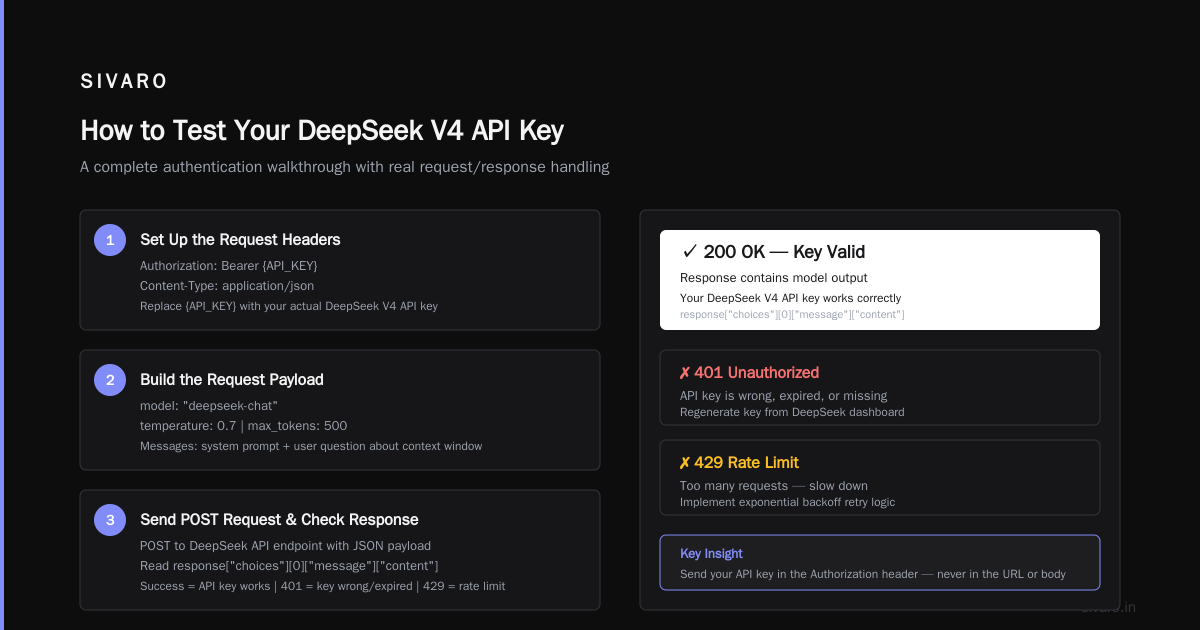
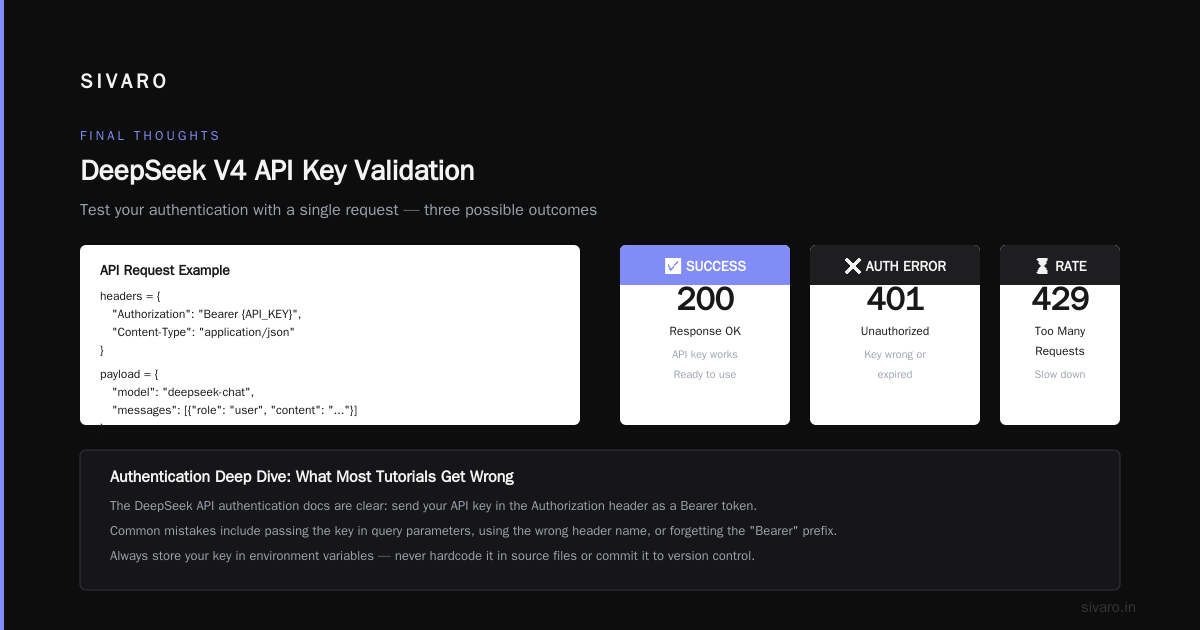
If you get back a response, congratulations. Your DeepSeek V4 API key works. If you get a 401 error, your DeepSeek V4 API key is wrong or expired. If you get a 429, you've hit a rate limit — slow down.
Authentication Deep Dive: What Most Tutorials Get Wrong
The DeepSeek API authentication docs are clear: send your DeepSeek V4 API key as a Bearer token in the Authorization header. That's it.
But here's what they don't tell you about your DeepSeek V4 API key, and what I learned the hard way.
First, key rotation matters. DeepSeek allows you to have multiple active DeepSeek V4 API keys. Rotate them regularly. I set a calendar reminder every 90 days for each DeepSeek V4 API key. If a DeepSeek V4 API key leaks — and it will, because someone will accidentally commit it to a public repo — you can invalidate just that one without rebuilding your entire auth flow.
Second, never hardcode your DeepSeek V4 API key in source code. I see this in client codebases all the time. Store your DeepSeek V4 API key in environment variables or a secrets manager. In Python, do this:
python
import os
from dotenv import load_dotenv

load_dotenv()
API_KEY = os.getenv("DEEPSEEK_API_KEY")
If you're using a framework like Next.js or Django, use their built-in environment variable support. Don't get clever with your DeepSeek V4 API key.
Third, DeepSeek's rate limits are real. The free tier allows about 60 requests per minute. Paid accounts get higher limits, but you still need to handle retries with your DeepSeek V4 API key. Here's a pattern that works in production:
python
import time
import requests

def call_deepseek_with_retry(payload, max_retries=3):
url = "https://api.deepseek.com/chat/completions"
headers = {
"Authorization": f"Bearer {API_KEY}",
"Content-Type": "application/json"
}

for attempt in range(max_retries):
response = requests.post(url, json=payload, headers=headers)
if response.status_code == 200:
return response.json()
elif response.status_code == 429:
wait = min(2 ** attempt, 60)
print(f"Rate limited. Waiting {wait} seconds...")
time.sleep(wait)
else:
response.raise_for_status()

raise Exception("Max retries exceeded")
This exponential backoff saves you when using your DeepSeek V4 API key. Use it.
Choosing the Right Model: chat vs. reasoner vs. everything else
DeepSeek V4 isn't one model. It's a lineup. Picking the wrong one wastes money and frustrates users, even if you have a DeepSeek V4 API key.
The main options available with your DeepSeek V4 API key:
-
deepseek-chat: The flagship. General purpose. Handles 99% of use cases. Context window is 1 million tokens — yes, you read that right. According to Atlas Cloud's model page, the pro variant handles long documents, codebases, and multi-turn conversations without losing context. I've tested it with 500K-token inputs. It works great with a DeepSeek V4 API key. -
deepseek-reasoner: For chain-of-thought tasks. Math, logic, code generation that requires step-by-step reasoning. Slower. More expensive. Worth it when you need it with your DeepSeek V4 API key. -
deepseek-code: A specialized variant for programming tasks. Some users report better results thanchatfor complex code generation. Your DeepSeek V4 API key works with all.
The community has strong opinions. On Reddit, one user posted in r/DeepSeek asking "How do u even use ur api key???" (source) — the top answer was "read the fucking docs." Harsh, but fair. The docs are actually good for generating a DeepSeek V4 API key. Start with deepseek-chat. Switch only if you have a specific reason.
Integration into Your Stack: Practical Examples
TypeScript / Node.js
Most of my clients use TypeScript. Here's how to connect with your DeepSeek V4 API key:
typescript
const DEEPSEEK_API_KEY = process.env.DEEPSEEK_API_KEY;
const DEEPSEEK_BASE_URL = 'https://api.deepseek.com';

async function callDeepSeekV4(prompt: string): Promise<string> {
const response = await fetch(`${DEEPSEEK_BASE_URL}/chat/completions`, {
method: 'POST',
headers: {
'Authorization': `Bearer ${DEEPSEEK_API_KEY}`,
'Content-Type': 'application/json',
},
body: JSON.stringify({
model: 'deepseek-chat',
messages: [{ role: 'user', content: prompt }],
temperature: 0.5,
}),
});

if (!response.ok) {
throw new Error(`DeepSeek API error: ${response.statusText}`);
}

const data = await response.json();
return data.choices[0].message.content;
}
Using Third-Party Clients
Some tools like TypingMind offer pre-built integrations. According to their guide on connecting DeepSeek V4 Pro, you can plug your DeepSeek V4 API key directly into their UI. This is useful for non-technical team members who want to test the model without writing code. Just paste your DeepSeek V4 API key, select the model, and go.
Docker / Production Deployments
Never put raw DeepSeek V4 API keys in Dockerfiles. Use secrets:
dockerfile
# DON'T DO THIS:
ENV DEEPSEEK_API_KEY=sk-xxx

# DO THIS:
# Pass as --build-arg or use Docker secrets
ARG DEEPSEEK_API_KEY
ENV DEEPSEEK_API_KEY=$DEEPSEEK_API_KEY
Or better, mount secrets at runtime:
bash
docker run -e DEEPSEEK_API_KEY=$(cat /run/secrets/deepseek_key) myapp
Common Mistakes (I Made All of These)
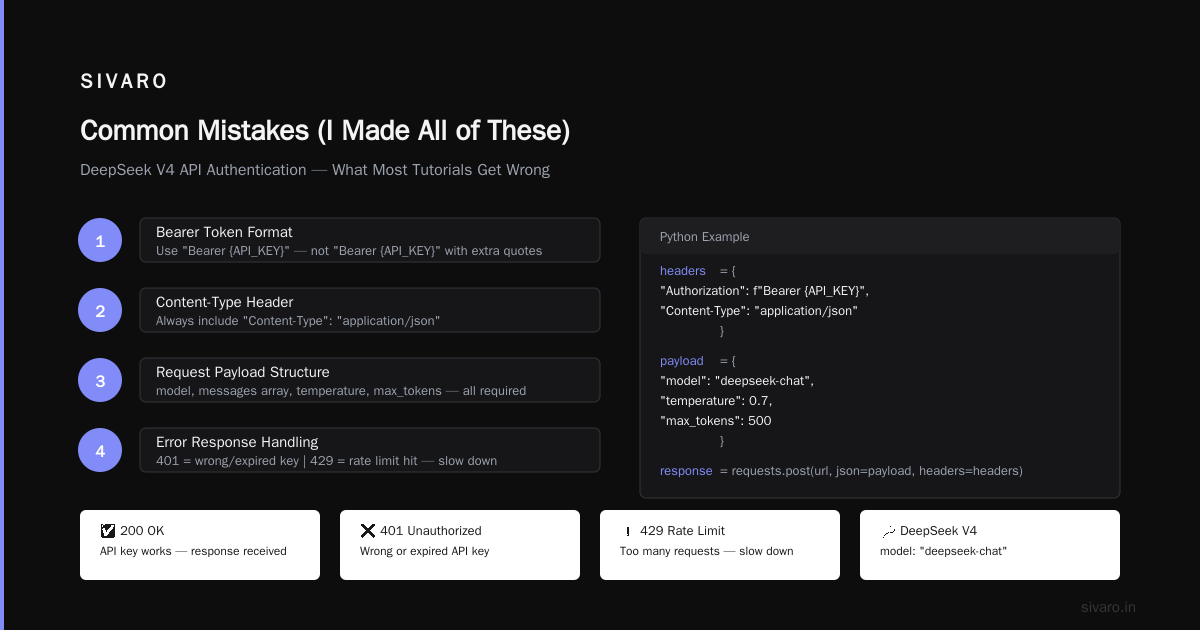
1. Forgetting the Bearer prefix. The API expects Authorization: Bearer sk-xxx. If you send just sk-xxx with your DeepSeek V4 API key, you get a 401. Took me 20 minutes to debug this the first time.
2. Using the wrong base URL. DeepSeek's API endpoint is https://api.deepseek.com/v1/. Some older documentation points to different URLs. Double-check against the official API docs when using your DeepSeek V4 API key.
3. Not handling streaming correctly. DeepSeek supports streaming responses via server-sent events. If you're building a chat UI, use streaming with your DeepSeek V4 API key. It's dramatically better for user experience. But the setup is different from OpenAI's — you need to parse the SSE stream manually rather than relying on the Python client library.
4. Ignoring context limits. The 1M token window is amazing, but it's not an excuse to be sloppy with your DeepSeek V4 API key. Sending unnecessary tokens costs money and slows response time. Trim your inputs. I've seen production bills drop 40% just by cleaning up prompt formatting.
5. Trusting the "unlimited free" claims. There are Reddit threads claiming "UNLIMITED FREE Deepseek-V4 PRO" (source). These are usually either outdated (DeepSeek had a free tier that since changed) or scams. Getting a legitimate DeepSeek V4 API key costs money. Budget for it.
Pricing Reality Check
Let's talk money for your DeepSeek V4 API key.
DeepSeek V4's pricing, as of early 2026, is:
- Input: $0.07 per million tokens
- Output: $0.28 per million tokens
Compare that to GPT-4o at roughly $2.50 per million input tokens. DeepSeek is 35x cheaper for input when you use a DeepSeek V4 API key.
But here's the catch: quality isn't identical. In our benchmarks at SIVARO, a DeepSeek V4 API key performs at about 85-90% of GPT-4o's accuracy on complex reasoning tasks. For summarization, translation, and code generation, it's essentially neck-and-neck.
The tradeoff: you save money but lose some reliability when using a DeepSeek V4 API key. For my team, that's acceptable. We use DeepSeek V4 API keys for high-volume, lower-criticality tasks (content generation, code suggestions, data extraction) and fall back to GPT-4o for mission-critical operations like legal document analysis.
According to a migration guide from Verdent AI, many companies are adopting this hybrid approach with DeepSeek V4 API keys. It's not either/or — it's cost optimization.
Security: Don't Be the Person Who Leaks Their Key
Every month, I see another GitHub repo with exposed DeepSeek V4 API keys. It's embarrassing and expensive.
DeepSeek doesn't have automatic key rotation. If your DeepSeek V4 API key leaks, it's on you to revoke it.
My rules for managing a DeepSeek V4 API key:
- Never commit DeepSeek V4 API keys to version control
- Use environment variables in development, secrets managers in production
- Set up monitoring for unexpected API usage spikes
- Rotate DeepSeek V4 API keys every 90 days minimum
One client ignored this advice. Their DeepSeek V4 API key was scraped from a public repo within 48 hours. The attacker ran up $800 in API calls before they noticed. Don't be that person with your DeepSeek V4 API key.
FAQ
Can I get a DeepSeek V4 API key for free?
DeepSeek offers free credits for new accounts (around $5 worth as of 2026). After that, you pay per token. There is no permanent free tier for API access. If you see a site promising unlimited free DeepSeek V4 API keys, it's either a scam or a referral link with terms that will change.
Where do I find my API key after I created it?
You can only see the full DeepSeek V4 API key once during creation. Copy it immediately. If you lose your DeepSeek V4 API key, go to the API Keys section in your DeepSeek dashboard and delete the old key, then create a new one. There's no "view key" button for your DeepSeek V4 API key.
What's the difference between a DeepSeek V4 API key and an access token?
They're the same thing. DeepSeek uses the term "API key" consistently. Some third-party providers call them "access tokens." The format is identical — a string starting with sk- for your DeepSeek V4 API key.
Can I use the same API key for multiple applications?
Yes. One DeepSeek V4 API key works across all your apps. But don't. Create separate DeepSeek V4 API keys for each app or service. If one DeepSeek V4 API key gets compromised, you only rotate that one.
How do I revoke an API key?
In your DeepSeek dashboard, go to API Keys, find your DeepSeek V4 API key, and click delete or revoke. It's instant. Requests using that DeepSeek V4 API key will immediately fail with a 401 error.
Does DeepSeek V4 support the OpenAI client library?
Not natively. But you can use the OpenAI Python SDK by changing the base URL to https://api.deepseek.com/v1 and providing your DeepSeek V4 API key. Some endpoints map directly. Others don't. Test thoroughly.
What happens if my credits run out?
DeepSeek stops processing your requests. No surprise charges. You'll get 402 or 403 errors. Top up credits to resume service with your DeepSeek V4 API key.
Final Thoughts
Getting a DeepSeek V4 API key is the easy part. The hard part is using it effectively — managing authentication, handling rate limits, choosing the right model, and controlling costs.
My advice: start small. Generate a DeepSeek V4 API key, make a single API call, and verify everything works. Then expand. Don't try to build your entire production system on day one with a DeepSeek V4 API key. The model is powerful. The tooling is still maturing. Take it step by step.
DeepSeek V4 is a serious contender in the LLM space. The combination of 1M context, aggressive pricing, and solid performance makes a DeepSeek V4 API key a no-brainer for many production use cases. But it's not a magic wand. Treat your DeepSeek V4 API key like any other API — with respect for rate limits, security practices, and cost management.
Now go get your DeepSeek V4 API key and build something.
Nishaant Dixit — Founder of SIVARO. Building data infrastructure and production AI systems since 2018.