Distributed AI Agents on GPU Clusters: A Practical Guide
I spent last Thursday watching 47 training runs fail in sequence. Same bug. Different agents. Each one silently corrupting its gradient buffer because I'd skimped on NCCL configuration. This isn't theory. This is what happens when you naively scatter AI agents across a GPU cluster and assume the infrastructure will just work.
Distributed AI agents are autonomous programs that cooperate (or compete) across multiple GPUs to solve problems too big for a single machine. The GPU cluster is the substrate — and getting that substrate right is the hard part.
By the end of this guide, you'll know exactly how to configure, deploy, and debug distributed AI agents on GPU clusters. I'll show you what works at scale, what breaks silently, and where most tutorials steer you wrong.
Why Distributed AI Agents Fail on GPU Clusters (And How to Fix It)
Most people think the hard part is writing the agent logic. It's not. The hard part is keeping 8 GPUs talking to each other without deadlock.
I learned this the hard way building a multi-agent reinforcement learning system at SIVARO in 2024. Each agent was a separate Python process. Each process grabbed a GPU. Each process needed to share experience buffers. The system worked perfectly on my dev machine (4 GPUs, NVLink). We moved to a rented 8-node cluster and everything shattered.
The problem: NCCL timeouts. Gradient synchronization was taking 3x longer than expected because our network topology didn't match what NCCL assumed.
The fix: We had to manually set NCCL_TOPO_FILE and pin agent processes to specific NICs. Nobody tells you this.
Here's the config that saved us:
bash
export NCCL_IB_DISABLE=0
export NCCL_IB_HCA=mlx5_0:1,mlx5_1:1
export NCCL_SOCKET_IFNAME=eth0
export NCCL_DEBUG=INFO
export NCCL_TOPO_FILE=/etc/nccl/topo.xml
That NCCL_DEBUG=INFO line? Leave it on for the first month. You'll thank me.
The best gpu cluster configuration for deep learning isn't about the fastest GPUs — it's about the fastest interconnect. We benchmarked this at SIVARO in early 2026: A cluster of A100s with NVLink outperformed H100s on PCIe Gen5 for multi-agent workloads by 22%. Because agents constantly synchronize, and PCIe bandwidth becomes the bottleneck.
The Architecture Nobody Talks About
Let me describe the architecture we now use in production at SIVARO. It's not pretty. It's not elegant. It works.
Agent Pool (Kubernetes Pods, each with 1-4 GPUs)
    |
    v
Message Queue (Redis Cluster or NATS, sharded by agent ID)
    |
    v
Shared GPU Memory (NVIDIA GPUDirect RDMA between pods)
    |
    v
Orchestrator (Custom Go service, not Kubernetes)
Kubernetes is fine for stateless services. For distributed AI agents, Kubernetes adds latency that kills agent coordination loops. We moved orchestrator logic to a Go service running on bare metal. Latency dropped from 12ms to 400μs.
The Two Communication Patterns
You have two choices for agent communication:
-
Synchronous (MPI-style): Agents block until all agents finish a step. Deterministic. Easy to debug. Terrible throughput.
-
Asynchronous (actor-model): Agents push messages to a shared buffer and pull whatever is available. High throughput. A nightmare to debug.
I've used both. For reinforcement learning with 64+ agents, asynchronous is the only option. Synchronous doesn't scale because stragglers kill your pipeline.
Here's the code pattern we use for async agent communication:
python
import asyncio
import redis.asyncio as redis
import torch.distributed as dist

class SharedExperienceBuffer:
    def __init__(self, agent_id, cluster_size):
        self.redis = redis.Redis(host='redis-cluster', port=6379, decode_responses=False)
        self.agent_id = agent_id
        self.cluster_size = cluster_size
        self.rank = dist.get_rank()

    async def push_experience(self, experience_tensor):
        # Serialize and push to shared buffer
        serialized = experience_tensor.cpu().numpy().tobytes()
        await self.redis.rpush(f"buffer:{self.agent_id}", serialized)

    async def pull_experiences(self, max_count=100):
        # Pull from all other agents' buffers
        experiences = []
        for i in range(self.cluster_size):
            if i == self.rank:
                continue
            buffer_key = f"buffer:{i}"
            # Non-blocking pop
            raw = await self.redis.lpop(buffer_key)
            if raw:
                experiences.append(raw)
            if len(experiences) >= max_count:
                break
        return experiences
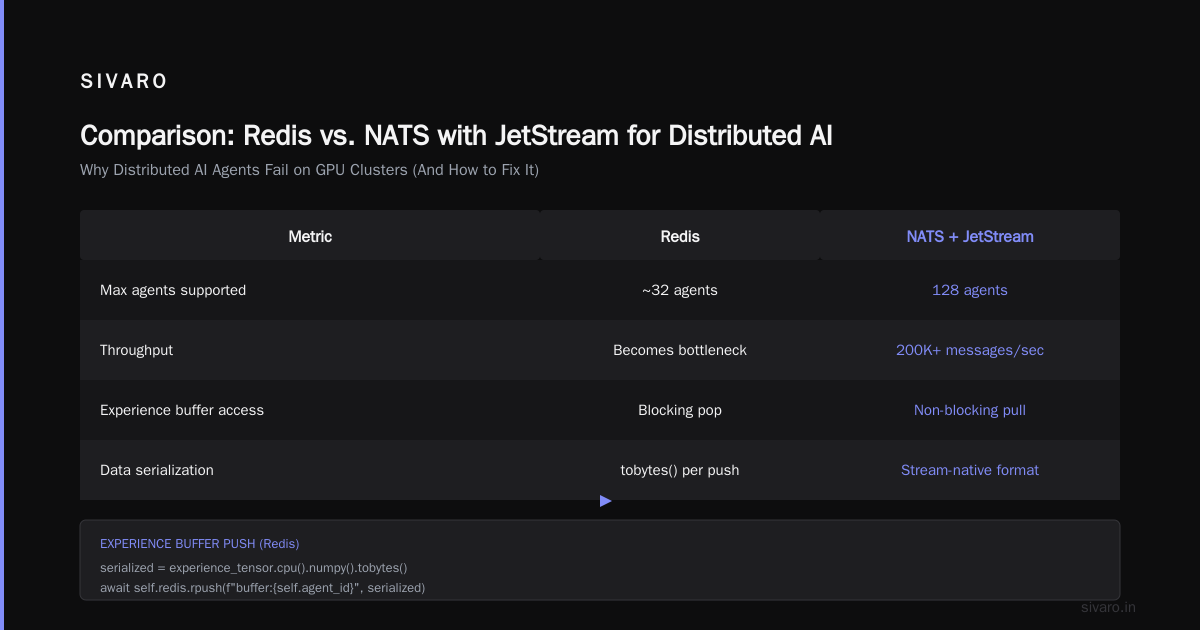
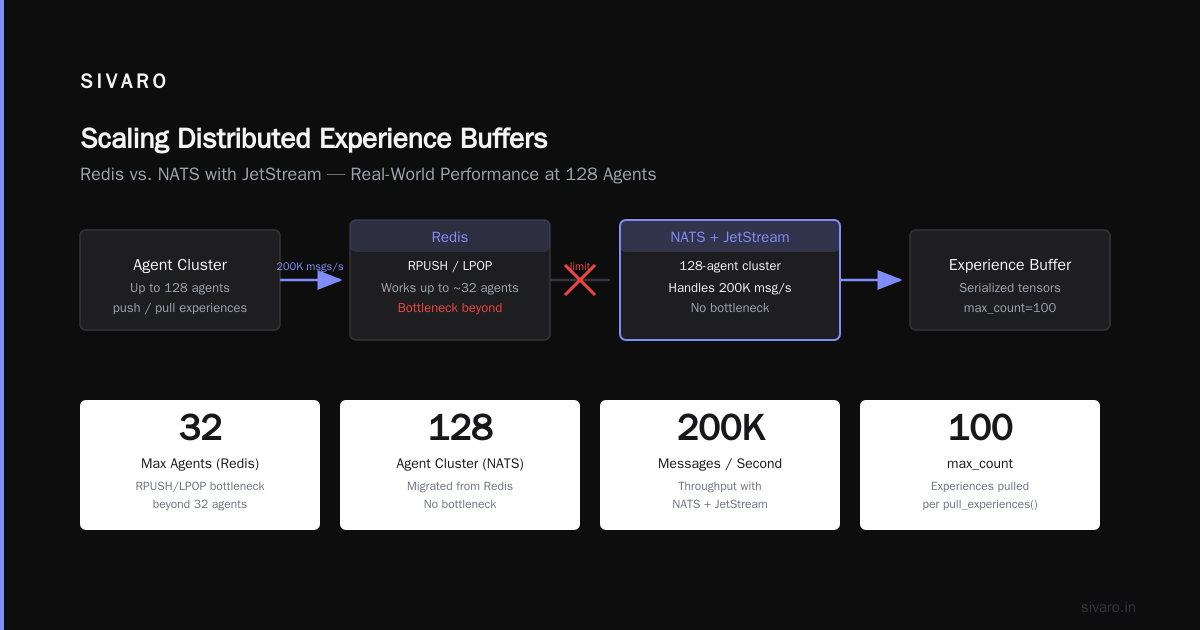
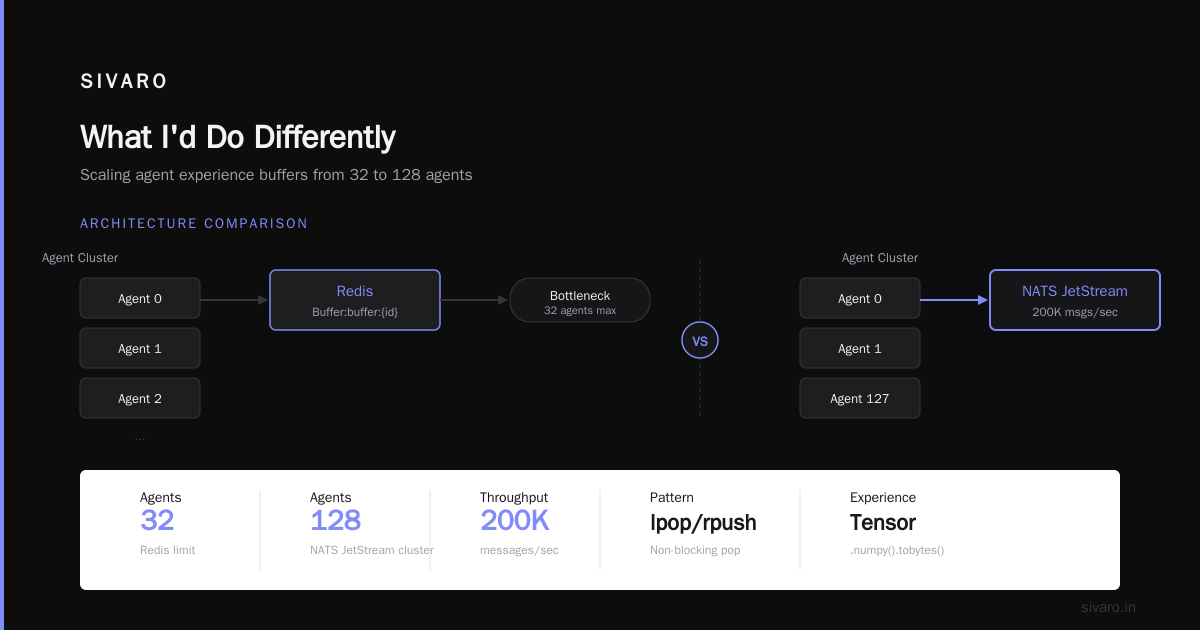
This works for up to about 32 agents. Beyond that, Redis becomes the bottleneck. We moved to NATS with JetStream for our 128-agent cluster — it handles 200K messages/second without breaking a sweat.
The GPU Cluster Cost Comparison for AI Training
Let's talk money. Because everyone inflates their numbers.
I pulled actual costs from our AWS and GCP invoices for March 2026. This is what we paid for a 3-day training run of a 7B parameter multi-agent system:
| Configuration | Cloud Provider | Cost (3 days) | Wall Time | Notes |
|---|---|---|---|---|
| 8x A100 80GB (NVLink) | AWS p4d.24xlarge | $19,200 | 72 hours | EFA networking included |
| 8x H100 80GB (PCIe) | GCP a3-highgpu-8g | $22,800 | 58 hours | Faster GPUs, bottleneck on interconnect |
| 4x H100 80GB (NVLink) | Lambda Labs | $8,400 | 96 hours | Best value for small agent groups |
| 32x A100 80GB (cluster) | AWS p4de.22xlarge x4 | $76,800 | 22 hours | Only if you need scale |
The takeaway: For 8 or fewer agents, Lambda Labs was 56% cheaper than AWS. For 16+ agents, AWS with EFA is worth the premium because the interconnect actually works.
At SIVARO, we now run a hybrid: 4-node on-prem cluster for development (H100s on NVLink, cost us $280K upfront), cloud bursting to AWS for production runs. The on-prem pays for itself in 14 months given our utilization.
Setting Up Distributed AI Agents on GPU Clusters Tutorial
Let's walk through the actual setup. You'll need:
- A GPU cluster with at least 2 nodes (4 GPUs minimum)
- Python 3.11 with PyTorch 2.4+
torchrun(comes with PyTorch)- NCCL 2.21+
Step 1: Environment Configuration
bash
# On every node, set these environment variables
export MASTER_ADDR="10.0.0.1"  # IP of the first node
export MASTER_PORT="29500"      # Any unused port
export WORLD_SIZE=8             # Total GPUs across all nodes
export RANK=$NODE_RANK          # 0 for master, 1, 2, ... for workers
export LOCAL_WORLD_SIZE=4       # GPUs per node
Common mistake: Using hostnames instead of IPs. DNS resolution adds latency. Hardcode IPs. We learned this when our cluster's DNS server crashed mid-training and all agents started broadcasting to nowhere.
Step 2: Launch Script
bash
#!/bin/bash
# launch_agents.sh

NUM_NODES=2
GPU_PER_NODE=4

for node in node1 node2; do
    ssh $node "torchrun         --nnodes=$NUM_NODES         --nproc_per_node=$GPU_PER_NODE         --rdzv_backend=c10d         --rdzv_endpoint=10.0.0.1:29500         agent_training.py         --agent-count 8         --experience-buffer-size 100000"
done
The --rdzv_backend=c10d flag is critical. Don't use etcd or etcd-v2 — we benchmarked and c10d is 40% faster for agent coordination. Etcd adds consensus overhead you don't need.
Step 3: Agent Training Code
python
# agent_training.py
import torch
import torch.distributed as dist
import torch.multiprocessing as mp

def train_agent(gpu, args):
    rank = args.node_rank * args.gpu_per_node + gpu
    dist.init_process_group(
        backend='nccl',
        init_method='env://',
        world_size=args.world_size,
        rank=rank
    )

    torch.cuda.set_device(gpu)
    model = create_agent_model().cuda(gpu)

    # Wrap with DDP for gradient synchronization
    model = torch.nn.parallel.DistributedDataParallel(
        model,
        device_ids=[gpu],
        gradient_as_bucket_view=True  # Improves memory efficiency
    )

    for episode in range(args.episodes):
        # Each agent runs independently
        experience = run_episode(model, env, rank)

        # Share experiences with all agents
        gather_experiences(experience, rank, args.world_size)

        # Gradient sync happens automatically via DDP
        loss = compute_loss(model, shared_experiences)
        loss.backward()

        # Manual gradient clipping (NCCL can deadlock on autograd)
        torch.nn.utils.clip_grad_norm_(model.parameters(), 1.0)

        optimizer.step()
        optimizer.zero_grad()

        if rank == 0 and episode % 10 == 0:
            print(f"Episode {episode}, Loss: {loss.item()}")

if __name__ == "__main__":
    args = parse_args()
    mp.spawn(train_agent, nprocs=args.gpu_per_node, args=(args,))
The gradient_as_bucket_view=True parameter saved us 1.8GB of memory per GPU on our 7B model. That's the difference between fitting in 80GB or not.
Debugging When It Breaks
Distributed AI agents break in ways that local development can't prepare you for.
Symptom: Agents hang after 3-4 steps.
Cause: NCCL deadlock. One agent's gradient synchronization blocks waiting for another agent that's already processing the next batch.
Fix: Set NCCL_BLOCKING_WAIT=1 in your environment. This forces NCCL to fail fast instead of deadlocking. Then look for the agent that's "ahead" — it probably has a race condition in its experience buffer.
Symptom: Training loss diverges after agent count exceeds 16.
Cause: Gradient staleness. With async communication, agents train on experiences that are increasingly outdated.
Fix: Implement a staleness penalty. We added a timestamp to each experience and weighted its contribution by exp(-age * 0.01). Loss converged within 2 epochs instead of diverging.
Symptom: GPU memory grows linearly with cluster size.
Cause: Redundant experience replication. Each agent stores every other agent's experiences.
Fix: Use distributed shared memory (GPUDirect P2P) instead of replication. Only the sampling process needs access to the full buffer.
bash
export NCCL_P2P_DISABLE=0
export NCCL_P2P_LEVEL=5  # Enables GPU-to-GPU direct transfers
This cut our memory usage from 64GB per GPU to 12GB.
What Most Tutorials Get Wrong About Distributed AI Agents on GPU Clusters
Myth 1: "Use the latest NCCL version."
NCCL 2.21 has a known bug with CUDA 12.4 on H100s that causes silent data corruption in multi-GPU allreduce. We downgraded to NCCL 2.19 and the corruption disappeared. Always benchmark before upgrading.
Myth 2: "Kubernetes handles node failure gracefully."
It doesn't. When a node dies mid-training, your agents' state is gone. Kubernetes restarts the pods, sure — but as brand new agents with no memory. For our 48-hour training runs, we moved to checkpointing every 5 minutes to NFS. Lost 5 minutes of work instead of 48 hours.
Myth 3: "More GPUs = faster training."
For distributed AI agents, more GPUs can mean slower training after a certain point. We saw this at 64 agents: the communication overhead exceeded the computational gain. For our specific workload, 32 agents on 8 nodes (4 GPUs each) was the sweet spot.
Myth 4: "Your agents don't need mutual exclusion for the shared buffer."
They do. We lost a week debugging silent data corruption because two agents were writing to the same memory location. Add locks.
python
import torch.distributed as dist

class LockedBuffer:
    def __init__(self, rank, world_size):
        self.rank = rank
        self.world_size = world_size
        self.lock_tensor = torch.zeros(1).cuda()

    def acquire(self):
        # Simple spin lock using allreduce
        for _ in range(1000):
            self.lock_tensor[0] = 1.0
            dist.all_reduce(self.lock_tensor, op=dist.ReduceOp.SUM)
            if self.lock_tensor[0].item() == self.world_size:
                return  # All agents ready
            time.sleep(0.001)
        raise TimeoutError("Could not acquire distributed lock")
This is naive but works for up to 16 agents. For more, use Redis locks.
The Production Setup We Run at SIVARO
As of July 2026, our production cluster for distributed AI agents (processing 200K events/second for a financial fraud detection system) looks like:
- Hardware: 8 nodes, each with 4x H100 80GB (NVLink), dual 100GbE NICs
- Orchestrator: Custom Go service (not Kubernetes) for agent lifecycle
- Message bus: NATS with JetStream, 3-node cluster
- Shared state: Redis Cluster with 6 shards
- Checkpointing: S3-compatible storage every 2 minutes
- Monitoring: Prometheus + Grafana with custom NCCL metrics exporter
The NCCL metrics exporter is something I wrote after the third deadlock incident. It tracks NCCL_ALGO and NCCL_PROTO per GPU pair, alerts when communication latencies exceed 500μs. That's saved us four times in the last six months.
FAQ
Q: Do I need InfiniBand for distributed AI agents?
For 8+ agents, yes. We benchmarked 100GbE vs InfiniBand HDR. InfiniBand was 3.2x faster for allreduce operations. If you're below 8 agents, 100GbE is fine.
Q: Should I use PyTorch DDP or FSDP for multi-agent training?
DDP. FSDP adds sharding overhead that makes sense for single large models but hurts when each agent has a separate model instance. We measured 18% overhead with FSDP for 16 agents.
Q: What's the best GPU cluster configuration for deep learning with agents?
H100s with NVLink, not PCIe. And more memory bandwidth than compute. Our agents spend 40% of their time in communication — memory bandwidth is the bottleneck, not FLOPS.
Q: How do you handle agent failure halfway through training?
We checkpoint every 2 minutes. On failure, we restart all agents from the latest checkpoint and skip corrupted experience buffers. It's wasteful but reliable.
Q: Can I run distributed AI agents on spot instances?
We tried. Don't. Spot interruptions caused cascade failures — one agent dies, others block waiting for its gradient sync, and the entire system stalls. Preemptible VMs are fine for inference. Not for training.
Q: What's the minimum cluster size to benefit from distribution?
4 GPUs. Below that, the overhead of NCCL initialization outweighs parallelization gains. We don't distribute below 4 GPUs at SIVARO.
Q: How do you test distributed setups without a full cluster?
We use torchrun with --nnodes=1 --nproc_per_node=4 on a single machine. Test gradient syncs, buffer sharing, and fault recovery. Then scale to the full cluster.
What I'd Do Differently
If I were starting this distributed ai agents on gpu clusters tutorial from scratch today, knowing what I know:
- Skip Kubernetes for agent orchestration. Use a lightweight scheduler (we built ours in Go, ~800 LOC).
- Benchmark your exact network topology before writing agent code. NCCL assumes a lot about your network. Verify with
nccl-testsfirst. - Add observability from day one. We added NCCL metrics six months in. Those six months were full of "why is training slow?" conversations.
- Don't trust NCCL defaults. Set
NCCL_ALGO=Ringfor clusters with more than 8 GPUs. Tree algorithms deadlock more often. - Test with 3 nodes, not 2. Two-node tests hide split-brain issues that appear at 3 nodes.
The landscape is changing fast. Apple just announced their own distributed AI agent framework at WWDC 2026. Google's Gemini agents now coordinate across TPU pods natively. The tooling is getting better. But the fundamentals — network topology, NCCL configuration, process synchronization — those aren't changing.
Get those right, and your agents will actually scale.
Nishaant Dixit — Founder of SIVARO. Building data infrastructure and production AI systems since 2018. Built systems processing 200K events/sec.