 SIVARO
Docker Explained: What the Hell Is It and Why Everyone Uses It
I remember the first time someone told me to "just containerize it." This was 2016. I was debugging a Python app that worked on my laptop but crashed on staging. The senior engineer shrugged. "Docker issue," he said.
I thought Docker was some kind of packaging tool. Like a ZIP file for code.
I was wrong. And so are most people who repeat "it's like a lightweight VM" without understanding what that actually means.
Let me cut through the noise.
What Is Docker and Why Is It Used?
Docker is a platform for running applications in isolated environments called containers. Each container packages your code with its dependencies — libraries, config files, environment variables — so it runs identically everywhere. What is Docker?
Why is it used? Because the "works on my machine" problem is real. I've seen production outages caused by a developer's laptop having Python 3.8 while the server ran 3.6. Docker kills that class of bug.
But here's the contrarian take: most teams don't need Docker. They need consistency. Docker just happens to be the best tool for that right now.
Let me show you what I mean.
The Core Problem Docker Solves
Before containers, deployment was a nightmare. You'd write a deployment script. The script would install packages. The server would have a different OS. Dependencies would conflict. You'd spend three days debugging why libssl version 1.0.2 broke your Ruby gem.
I worked at a startup in 2015 where we had a "deployment wiki" — 40 pages of manual steps. It worked exactly 60% of the time. The rest was panic.
Docker doesn't eliminate configuration management. What it does is freeze your environment into a recipe. You write a Dockerfile. That file is reproducible. Run it on any machine with Docker installed, and you get the same result. What is Docker?
Simple example. A Dockerfile for a Python app:
dockerfile
FROM python:3.11-slim
WORKDIR /app
COPY requirements.txt .
RUN pip install --no-cache-dir -r requirements.txt
COPY . .
CMD ["python", "app.py"]
That's it. Build the image:
bash
docker build -t myapp .
docker run -p 8000:8000 myapp
Works on your Mac. Works on the Linux server. Works on your coworker's Windows machine with WSL2. No more "but it worked on my machine."
Container vs Virtual Machine: The Real Difference
Most explanations suck here. They say "containers share the host OS kernel, VMs don't." Technically correct. Useless for practitioners.
Here's what matters: a VM emulates an entire computer. It boots an OS. It allocates memory. It simulates hardware. A container is just a process. It runs on your host OS, but with boundaries.
But boundaries around what?
From experience: if you're running a microservice that needs 50MB of memory and starts in 200ms, use a container. If you need to run Windows apps on Linux, use a VM. What's the Difference Between Docker and a VM?
Here's a concrete comparison from a project I worked on in 2022:
- VM approach: 4 services, each in a Ubuntu VM. Total memory: 12GB. Boot time: 4 minutes.
- Docker approach: same services, containerized. Total memory: 2.3GB. Boot time: 12 seconds.
But VMs have their place. If you need to run a legacy Oracle database that only works on Red Hat 6, good luck containerizing that. Use a VM.
Docker is not a VM replacement. It's a process isolator. How is Docker different from a virtual machine?
The Docker Architecture Nobody Explains Well
You don't need to understand the internals to use Docker. But understanding the internals prevents you from making stupid mistakes.
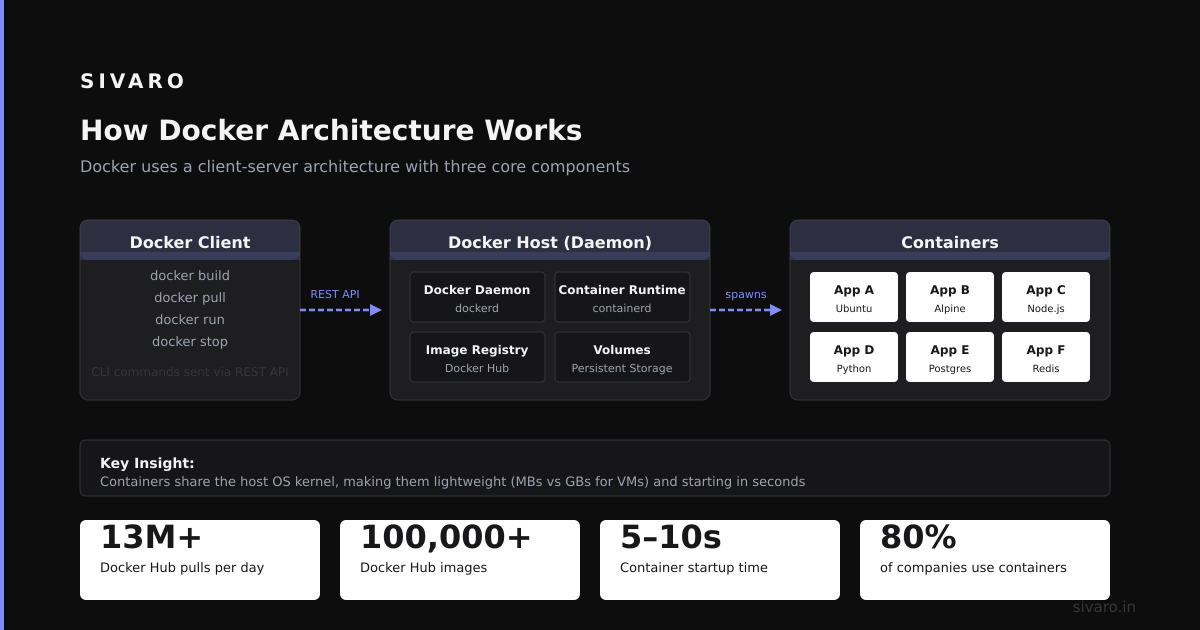
Docker uses Linux kernel features: cgroups for resource limits, namespaces for isolation, overlay filesystems for image layers.
Translation: Docker creates a box around your process. That box has its own filesystem, its own network interface, its own process tree. But it's still just a process on the host.
This matters because:
- Resource limits are real. If you don't set
--memory, a container can eat all host RAM. I've seen this bring down production servers. - Filesystem layers are shared. Two containers from the same image share read-only layers. Only the writable layer is unique. This saves disk space but can confuse people looking at disk usage.
- The network is virtual. Containers get their own IPs. But they can also share the host's network with
--network host.
Most people think Docker is magic. It's not. It's just well-designed Linux process isolation with a CLI on top.
Practical Docker: What You Actually Need to Know
Stop reading tutorials that teach you docker run hello-world and call it a day. Here's what matters in production.
Images Are Immutable
Once built, an image doesn't change. If you need a new version, you rebuild. This is intentional. Immutability means you can roll back to any version instantly.
bash
docker pull myapp:v1.2.3
docker run myapp:v1.2.3
Versions are just tags. Don't use latest in production. Ever. I learned this the hard way when latest pointed to a broken build and we had to dig through logs to find which tag actually worked. Docker Interview Questions and Answers — Beginner to Advanced
Data Persistence Is Your Job
Containers are ephemeral, but their data can persist beyond deletion through volumes or other storage mechanisms. This is by design.
Want persistent data? Use volumes.
bash
docker volume create mydata
docker run -v mydata:/app/data myapp
Or bind mounts:
bash
docker run -v /host/path:/container/path myapp
I once had a junior engineer ask why their database kept losing data after docker restart. That's the day they learned about volumes.
Networking Is Involved
By default, containers are isolated. They can talk to each other if you create a network:
bash
docker network create mynet
docker run --network mynet --name db postgres
docker run --network mynet --name web myapp
Now web can reach db by hostname. No IPs to manage.
But here's a trap: default bridge network vs user-defined network. Default bridge doesn't support DNS resolution by container name. User-defined does. Use user-defined networks.
Docker Compose: The Multi-Container Fix
Running single containers is easy. Running 5 services that need to talk to each other? That's where Compose shines.
yaml
version: '3.8'
services:
  web:
    build: .
    ports:
      - "8000:8000"
    depends_on:
      - db
  db:
    image: postgres:15
    environment:
      POSTGRES_DB: myapp
    volumes:
      - pgdata:/var/lib/postgresql/data
volumes:
  pgdata:
One command:
bash
docker compose up
Everything spins up. Dependencies are ordered. Logs are aggregated. This is how you develop locally without installing databases and caches on your machine.
At SIVARO, we use Compose for all local dev environments. Every team member gets the same stack. No more "but it works on your machine" — because now it works on every machine.
Docker in Production: What Gets Hard
Docker makes development easier. Production is a different beast.
Orchestration
Docker alone doesn't handle scaling, load balancing, or self-healing. That's where Kubernetes comes in. Or Docker Swarm if you want something simpler (most people end up on Kubernetes).
But here's what nobody tells you: if you don't need multi-node orchestration, don't use Kubernetes. Docker Compose on a single server works fine for 90% of use cases. I've run 20 services on a single $200/month VPS with Compose. Worked great.
Security
Containers share the host kernel. A break-out vulnerability (they exist) means an attacker can escape the container and access the host.
Mitigations:
- Don't run containers as root (use
USERin Dockerfile) - Use read-only root filesystem where possible
- Scan images for vulnerabilities (use Trivy or Snyk)
- Run with
--security-opt no-new-privileges:true
I once audited a production deployment where every container ran as root. Someone had connected a container's Docker socket to another container — it was a privilege escalation dream. Don't do this.
Logging
Containers are short-lived. Their logs disappear when they die.
Solution: use docker logs for debugging, but ship logs to a central system. We use the json-file log driver with Filebeat shipping to Elasticsearch. Or just use journald if you're on a smaller setup.
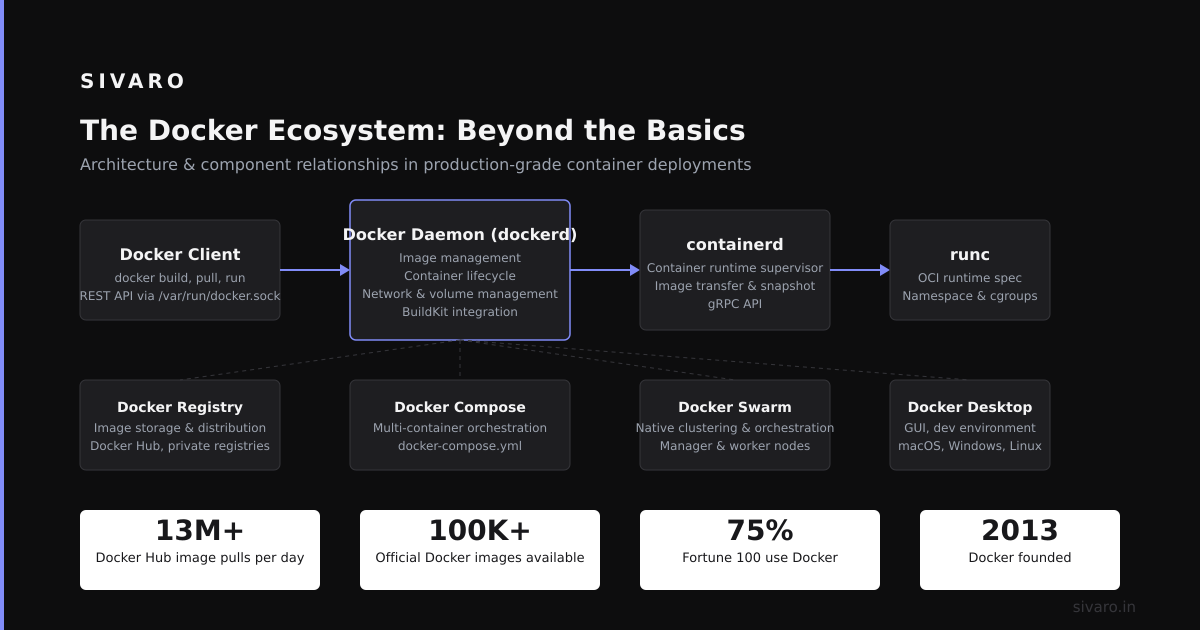
The Docker Ecosystem: Beyond the Basics
Docker isn't just about running containers. There's an entire ecosystem.
Registries
Docker Hub is the default. But for production, use a private registry. AWS ECR, Google Artifact Registry, or self-hosted Harbor. Don't store proprietary code on Docker Hub's public repos unless you want it leaked.
Multi-Stage Builds
This is a pro tip. Your build environment (compilers, dependencies) is separate from your runtime environment. Multi-stage builds let you use one Dockerfile for both.
dockerfile
# Build stage
FROM golang:1.21 AS builder
WORKDIR /app
COPY go.mod go.sum ./
RUN go mod download
COPY . .
RUN CGO_ENABLED=0 go build -o server

# Runtime stage
FROM alpine:3.18
COPY --from=builder /app/server /server
CMD ["/server"]
Final image size: 15MB instead of 800MB. This matters when pulling images across networks.
Health Checks
Docker can automatically restart containers that fail health checks.
dockerfile
HEALTHCHECK --interval=30s --timeout=3s   CMD curl -f http://localhost:8080/health || exit 1
Or in Compose:
yaml
healthcheck:
  test: ["CMD", "curl", "-f", "http://localhost:8080/health"]
  interval: 30s
I've seen too many production issues where a container was "running" but not serving traffic. Health checks catch this.
Common Mistakes (I've Made All of Them)
Mistake 1: Using Unnecessary Images
"Let's use ubuntu:latest for a static site." No. Use nginx:alpine or even scratch. Smaller images mean faster pulls and fewer vulnerabilities.
At SIVARO, we reduced deployment time from 4 minutes to 45 seconds by switching from ubuntu to alpine for our Python services.
Mistake 2: Hardcoding Environment Variables
dockerfile
ENV DATABASE_URL=postgres://user:pass@localhost:5432/db
This is baked into the image. Anyone who pulls the image sees your password. Use environment variables at runtime.
bash
docker run -e DATABASE_URL=postgres://user:pass@prod:5432/db myapp
Or use a .env file with Compose.
Mistake 3: Ignoring Layer Caching
Docker builds images in layers. Each command in your Dockerfile creates a layer. Docker caches layers when possible. Order matters.
Bad Dockerfile:
dockerfile
COPY . .
RUN pip install -r requirements.txt
Change any file, and the cache invalidates for both layers. You reinstall all dependencies.
Good Dockerfile:
dockerfile
COPY requirements.txt .
RUN pip install -r requirements.txt
COPY . .
Now dependencies only reinstall when requirements.txt changes. Builds go from 5 minutes to 30 seconds.
When Not to Use Docker
I said I'd be honest.
- Stateful databases in production? I'd think twice. Persistent volumes work, but managing database replication across containers is painful. A managed database service is often better.
- Desktop applications? Docker is CLI-friendly. GUI apps need X11 forwarding or VNC. It's doable but janky.
- Real-time systems? Containers add a thin layer of overhead. For hard real-time (millisecond latency), avoid Docker. For soft real-time (most web apps), it's fine.
Docker isn't a silver bullet. It's a tool for a specific job: packaging and running applications consistently.
The History: Why Docker Won
Before Docker, there was LXC (Linux Containers). LXC worked but was hard to use. Docker wrapped LXC with a great CLI, image format, and shareable images. Then they switched to their own runtime (runc) and libcontainer.
The killer feature wasn't the runtime. It was Docker Hub. The ability to docker pull nginx and have a working server in 2 seconds changed everything. No configuration. No compilation. Just a running service.
Other container systems (rkt, containerd) exist but Docker's ecosystem won because it was easy.
Today, Docker is the standard. Even Kubernetes uses Docker as a container runtime (though they support others). What is Docker?
Getting Started: Your First Week
If you're new to Docker, here's the order I'd learn:
- Install Docker Desktop (Mac/Windows) or Docker Engine (Linux)
- Run
docker run hello-world - Build a simple Dockerfile (Python or Node app)
- Use volumes to persist data
- Learn Docker Compose for multi-service apps
- Push an image to Docker Hub
- Pull that image on a different machine and run it
That's 80% of what you'll ever need.
The remaining 20% is orchestration, security, and optimization — things you'll learn when you hit specific problems.
FAQ
Q: What is Docker and why is it used in simple terms?
Docker packages your app with its dependencies into a container. That container runs the same way on your laptop, your coworker's machine, or a cloud server. It's used to eliminate "works on my machine" bugs and to make deployments predictable. What is Docker?
Q: Is Docker a virtual machine?
No. Docker containers share the host's operating system kernel. Virtual machines run a full guest OS. This makes containers lighter (faster startup, less memory) but less isolated. What's the Difference Between Docker and a VM?
Q: Can Docker run Windows containers?
Yes, but only if the host is Windows. Docker for Windows runs Linux containers via a Linux VM. True Windows containers require a Windows host with Windows containers support enabled.
Q: How large are Docker images?
It varies. Minimal images (scratch, alpine) can be under 10MB. Full OS images (Ubuntu with Python) can be 1GB+. Alpine-based images are typically the sweet spot for production.
Q: Do I need Docker to run containers?
No. You can use Podman, containerd, or rkt. But Docker is the most widely used and easiest to start with. Most cloud services (AWS ECS, Google Cloud Run) support Docker images natively.
Q: Is Docker free?
Docker Engine is open source. Docker Desktop requires a license for commercial use in larger companies. But the underlying engine and CLI are free.
Q: What's the difference between Docker and Kubernetes?
Docker runs containers. Kubernetes manages multiple containers across multiple machines. Think of Docker as runtime, Kubernetes as orchestration. You can use Docker without Kubernetes. You don't need Kubernetes for most applications.
Q: What is a Dockerfile?
A Dockerfile is a text file with instructions for building a Docker image. It specifies the base image, dependencies, configuration, and startup command. It's a reproducible recipe for your environment.
Final Thoughts
Docker changed how we build and ship software. It's not perfect. It adds complexity, has security considerations, and isn't right for every workload. But for most applications, it's the best tool we have.
The companies that adopt Docker come to the same conclusion: consistency beats convenience. A few hours learning Docker saves days of debugging environment issues.
Start small. Containerize one service. Get comfortable with the workflow. Then expand.
You don't need to master Kubernetes on day one. You don't need to understand overlay networks or cgroup internals. Just learn to write a Dockerfile, build an image, and run a container. That's enough to change how you work.
Nishaant Dixit — Founder of SIVARO. Building data infrastructure and production AI systems since 2018. Built systems processing 200K events/sec.