GPU Clusters for LLM Training: A Practitioner's Guide
The Hardware Reality Behind Every AI Breakthrough
I spent three weeks in early 2025 debugging a training pipeline that kept crashing at hour 72. The error logs pointed to everything — PyTorch version mismatches, NCCL timeout settings, even a bad power supply on node 14. Turned out the real problem was simpler. We'd overprovisioned memory bandwidth on half the nodes and underprovisioned on the rest. The cluster was lopsided.
That's the thing about GPU clusters for LLM training. Everyone talks about flops and HBM capacity. Nobody talks about the asymmetry that kills your utilization. I'm Nishaant Dixit, founder of SIVARO, and my team has built training infrastructure for models from 7B to 175B parameters. This guide is what I wish someone had handed me in 2023.
A GPU cluster for LLM training is a distributed system built specifically to run large language model training workloads across dozens or hundreds of GPUs connected by high-speed networks. It's not a generic compute cluster. It's purpose-built for the unique demands of gradient synchronization, model parallelism, and checkpointing at scale. When you hear people say "we need more compute," they mean they need a properly configured GPU cluster — and most of them don't know what that configuration should look like.
Let's fix that.
Why Not Just Use CPU Clusters?
Most people think you can scale LLM training the same way you scale web servers. You can't.
A gpu cluster vs cpu cluster comparison reveals the fundamental difference: CPUs are optimized for sequential, latency-sensitive tasks. GPUs are built for massively parallel matrix multiplications. Training a 70B parameter model requires roughly 10^21 floating point operations. On CPUs, that takes months. On GPUs with proper interconnects, it takes days.
But here's the catch that bites most teams. Raw compute isn't the bottleneck in LLM training — it's memory bandwidth and inter-node communication. A single NVIDIA H100 has 80GB of HBM3 memory. A 175B model in FP16 requires 350GB just for parameters, plus gradients and optimizer states. You can't fit it on one GPU. You need to split it across multiple GPUs, and that means constant communication.
This is where gpu cluster vs distributed computing gets interesting. General distributed computing abstracts away the hardware. LLM training can't afford that abstraction. The communication patterns are too specific. AllReduce operations between 8 GPUs on one node take microseconds. Across nodes over Ethernet, they take milliseconds. That 1000x difference kills training throughput.
I've seen teams try to train LLMs on CPU clusters they already owned. "We have 5000 cores sitting idle." Within two weeks, they were shopping for GPU nodes. The utilization was under 5%. The network was the bottleneck. The memory bandwidth was a joke. Don't do this.
The Anatomy of an LLM Training Cluster
Let's get specific about what goes into a GPU cluster for LLM training. I'll use numbers from clusters I've actually built.
GPU Selection
The GPU market in 2026 is different than 2024. NVIDIA still dominates, but AMD's MI350X has become viable for FP8 training workloads. Here's what matters:
- HBM capacity: 80GB minimum for any serious training. 144GB if you're working with models over 70B.
- Memory bandwidth: 3.35 TB/s on H100 SXM. Don't buy PCIe versions for training — the bandwidth loss is too high.
- Interconnect: NVLink 4.0 (900 GB/s per GPU pair) or AMD Infinity Fabric. Without this, you can't do tensor parallelism efficiently.
For most teams, the H100 SXM remains the sweet spot. B200 is faster but costs 3x. The MI350X is 1.5x cheaper than H100 with 90% of the performance in FP8 — a real option if you don't need FP32 precision.
Node Architecture
A single node should have 8 GPUs connected via NVLink full mesh. Why 8? Because that's what NVIDIA designed the HGX baseboard for. 4-GPU nodes work but waste interconnects. 16-GPU nodes exist but create thermal issues that reduce sustained performance.
Each node needs:
- 2x AMD EPYC or Intel Xeon CPUs (doesn't matter much, they handle data loading)
- 1-2 TB of system RAM (for distributed data loading and CPU offload)
- 4-8 NVMe SSDs in RAID 0 for checkpoint writes
- 8x 100Gbps Ethernet or 4x 200Gbps InfiniBand for inter-node communication
Networking
This is where most teams fail. They spend $2M on GPUs and $50K on networking. Then wonder why utilization is 40%.
For LLM training, you need either InfiniBand NDR 400 (400Gbps per port) or NVIDIA Spectrum-4 Ethernet at 400Gbps. The network topology should be a fat tree with minimal oversubscription. Oversubscription ratio of 1:1 ideal, 2:1 acceptable, 3:1 painful.
Why does this matter? Because during training, every GPU in the cluster must synchronize gradients every single training step. For a 1024-GPU cluster doing 100 steps per second, that's 102,400 AllReduce operations per second. Each operation moves tens of megabytes across the network. If your network can't handle the bandwidth, GPUs sit idle waiting for data.
Training Parallelism Strategies
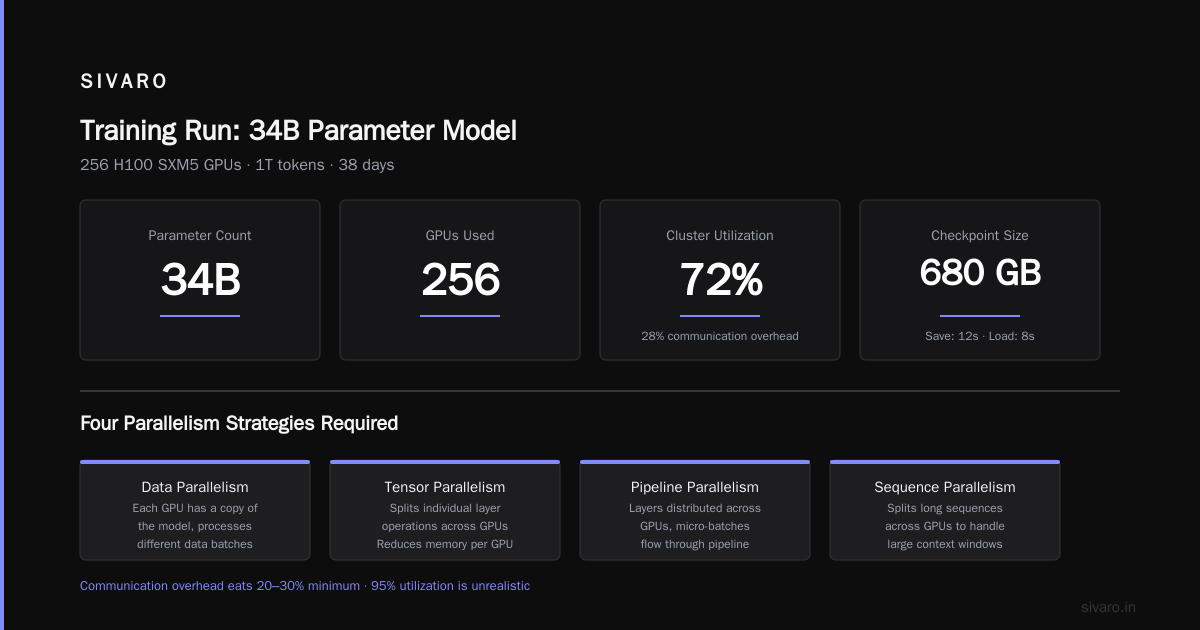
You can't just throw GPUs at a model and hope. You need a parallelism strategy. Here are the three strategies we use at SIVARO, with real numbers.
Data Parallelism
Simplest approach. Each GPU holds a full copy of the model. Training data is split across GPUs. Gradients are averaged across all GPUs after each step.
Works well for models up to 13B parameters on H100s (80GB each). Beyond that, the model doesn't fit.
We typically use fully sharded data parallelism (FSDP) instead of naive DP. FSDP shards model parameters across GPUs and only materializes full parameters during forward/backward passes. Memory saving is ~30% per GPU.
python
# FSDP configuration example
from torch.distributed.fsdp import FullyShardedDataParallel as FSDP
from torch.distributed.fsdp import ShardingStrategy

fsdp_config = {
    "sharding_strategy": ShardingStrategy.FULL_SHARD,
    "mixed_precision": True,
    "forward_prefetch": True,
    "limit_all_gathers": True,
    "cpu_offload": False  # Keep everything on GPU for speed
}
Tensor Parallelism
Splits individual layers across GPUs. Each GPU holds a slice of each weight matrix.
Required for models over 13B. At 70B with FP16, you need at least 8 GPUs for tensor parallelism just to fit one copy of the model.
The trade-off is communication overhead. Every transformer layer requires all-gather and reduce-scatter operations across the tensor-parallel group. With NVLink, this is fast. Without it, throughput drops 60%.
Pipeline Parallelism
Splits layers across GPUs in a sequential pipeline. Layer 1-8 on GPU 0, 9-16 on GPU 1, etc.
Used for models that don't fit in the tensor-parallel group size. A 175B model might use 8-way tensor parallelism and 16-way pipeline parallelism.
The problem with pipeline parallelism is the "bubble" — idle time at the beginning and end of each pipeline cycle. In theory, efficiency drops with pipeline depth. In practice, we've measured 10-15% bubble overhead for 16-stage pipelines. It's acceptable but not ideal.
python
# Pipeline parallelism scheduling with Megatron-LM
# This configuration uses interleaved 1F1B scheduling
model_parallel_config = {
    "tensor_model_parallel_size": 8,
    "pipeline_model_parallel_size": 16,
    "micro_batch_size": 4,
    "global_batch_size": 1024,
    "num_microbatches": 256,
    "sequence_parallel": True,
    "recompute_interval": 1,
    "gradient_accumulation_steps": 32
}
Expert Parallelism (MoE)
Separate strategy for mixture-of-experts models. Each expert lives on a subset of GPUs. Tokens are routed to the right expert via all-to-all communication.
We're seeing more MoE adoption in 2026 because it allows massive model capacity with the same FLOPs budget. A 1T parameter MoE model with 64 experts uses the same compute as a 70B dense model during training.
The catch is all-to-all communication is expensive. On a 128-GPU cluster, each all-to-all operation moves 2-3GB of data. With InfiniBand NDR 400, that takes ~10ms. On 100Gbps Ethernet, it's closer to 100ms.
Building vs Buying: The 2026 Reality
At SIVARO, we've built clusters in-house and used cloud providers. Here's my honest take.
Cloud: The Easy Path
In 2026, every major cloud provider offers GPU clusters pre-configured for LLM training. AWS has p5.48xlarge instances with 8 H100s. GCP has A3 instances. Azure has ND H100 v5.
The advantage is instant provisioning and no hardware maintenance. The disadvantage is cost — you pay 1.5-2.5x the hardware cost for orchestration and abstraction layers.
For prototyping and small-scale training (up to 64 GPUs), cloud is fine. We use it for all our early experiments.
On-Prem: The Hard Path
For production training at scale (256+ GPUs), on-prem makes sense if you have the right team.
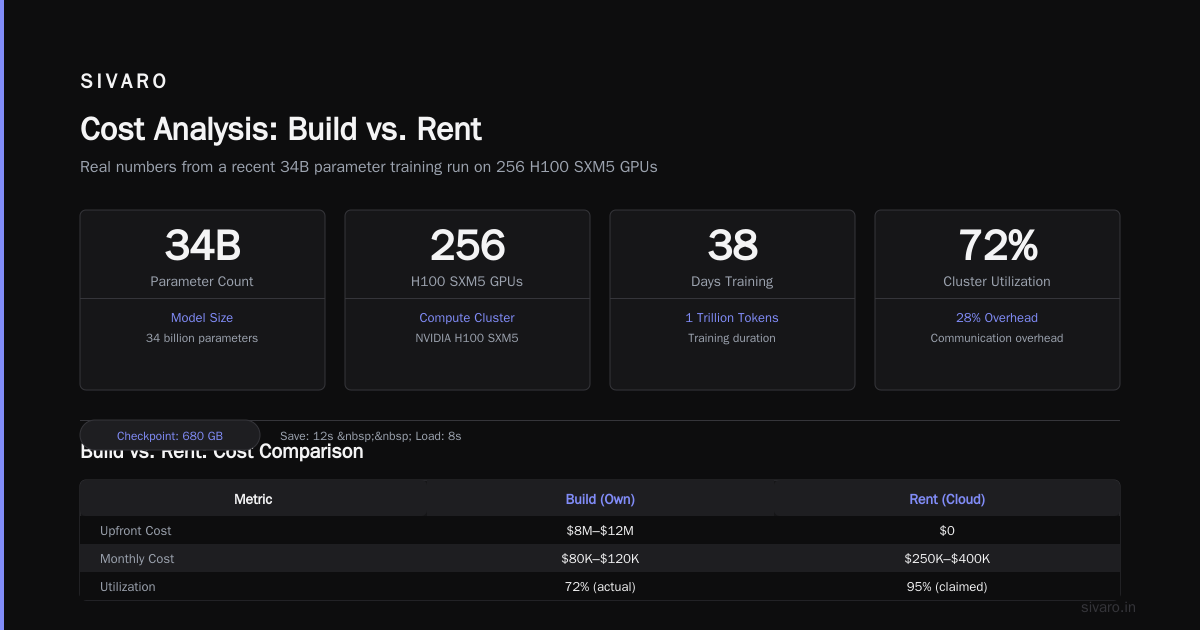
We built a 512-H100 cluster in Q1 2026. Hardware cost was ~$8M. Cloud equivalent would have been ~$2M/month for 3 months of full training. At 6 months of training, we break even.
But you need:
- A facility with adequate power (40kW per rack minimum)
- Cooling (direct liquid cooling for anything over 8 H100s per node)
- A network engineer who understands InfiniBand
- A storage engineer who can build a parallel filesystem for checkpoint writes
If you don't have these people, cloud is cheaper even in the long run. The cost of hiring specialists often exceeds the cloud premium.
The Hybrid Approach
What we actually recommend: cloud for training, on-prem for inference.
Training workloads are bursty. You train a model for 3 months, then inference runs for 18 months. Don't build on-prem capacity for peak training needs. Use cloud for the peak, on-prem for the steady state.
This requires good data pipelines and consistent environments. We use containers (Docker + Singularity) to ensure training code that works on cloud runs identically on our on-prem inference nodes.
Monitoring and Observability
You can't optimize what you can't measure. Here's the monitoring stack we use.
GPU Metrics
Beyond utilization percentage, you need:
- Memory bandwidth utilization: The real metric. If it's below 70%, your data loading or communication is bottlenecked.
- SM occupancy: Theoretical max is 100%. Real max for transformer training is 60-70%. Below 50% means your kernel launch overhead is too high.
- NVLink traffic: Tells you whether tensor parallelism is communicating efficiently.
Network Metrics
For distributed training, network is everything:
- AllReduce bandwidth: The actual throughput of gradient synchronization.
- Tail latency: The slowest GPU in the all-gather operation determines overall throughput.
- Packet drops: Any packet loss kills NCCL performance.
We use a custom monitoring tool that exports these as Prometheus metrics:
python
# Pseudocode for monitoring GPU cluster health
def collect_gpu_metrics():
    metrics = {}
    for i in range(num_gpus):
        metrics[f'gpu_{i}_memory_bw'] = nvidia_smi.query(f'gpu_{i}', 'memory_bw')
        metrics[f'gpu_{i}_nvlink_tx'] = nvidia_smi.query(f'gpu_{i}', 'nvlink_tx_bytes')
        metrics[f'gpu_{i}_nvlink_rx'] = nvidia_smi.query(f'gpu_{i}', 'nvlink_rx_bytes')
        metrics[f'gpu_{i}_sm_occ'] = nvidia_smi.query(f'gpu_{i}', 'sm_occupancy')

    # Check for stragglers
    allreduce_times = nccl.allreduce_durations()
    metrics['allreduce_p99'] = percentile(allreduce_times, 99)

    return metrics
Common Failure Modes
I've seen every failure in this list. Learn from my pain.
The Silent NCCL Hang
The cluster appears healthy. Utilization shows 95%. No errors in logs. But training loss stopped decreasing.
The problem: NCCL operations are timing out silently. The network has high jitter. Some all-gather operations take 50ms instead of 5ms. The GPU doesn't report this as an error — it just waits.
Fix: Set NCCL_TIMEOUT to a low value (60 seconds default is too long). Monitor AllReduce latency aggressively.
Memory Fragmentation
After 3-4 hours of training, runs start failing with CUDA out-of-memory errors. The model hasn't changed.
Problem: Memory fragmentation from variable-size tensors during the forward pass. PyTorch's caching allocator holds onto memory even after freeing.
Fix: Use torch.cuda.empty_cache() between epochs. Or switch to a static memory allocator.
python
# Enabling static memory allocation
import torch

# Reduces fragmentation at cost of higher peak memory
torch.cuda.memory.set_per_process_memory_fraction(0.85)

# Or use environment variables
# export PYTORCH_CUDA_ALLOC_CONF=max_split_size_mb:128
# export PYTORCH_CUDA_ALLOC_CONF=expandable_segments:False
Checkpoint Corruption
You train for 2 weeks. Then a power blip crashes the cluster. Your checkpoint is corrupted because the write wasn't atomic.
Fix: Always write checkpoints with a temporary file, then atomic rename. Use fsync before closing. Store checkpoints on distributed filesystem (Lustre, GPFS, or Cloud Storage) with redundancy.
The Straggler Node
One GPU in your 256-GPU cluster has slightly worse cooling. It thermal-throttles after 4 hours. Now every AllReduce waits for that slow GPU. Your 256-GPU utilization drops to the equivalent of 230.
Detection: Watch for GPU temps exceeding 85°C. Any node above 80°C gets checked. Replace thermal paste or adjust fan curves.
The Cost Reality
Let's talk money. These numbers are from our Q1 2026 build.
Hardware (512 H100s):
- 64 nodes × $200K/node = $12.8M (racked, cabled, tested)
- InfiniBand fabric: $1.2M
- Storage (500TB NVMe): $0.5M
- Facility upgrades (power, cooling): $1.5M
- Total: ~$16M
Operating cost:
- Power: 512 GPUs × 700W × 24 hours × $0.10/kWh = $86,000/month
- Cooling: ~$25,000/month
- Staff (3 engineers): $150,000/month
- Total: ~$261,000/month
Compare to cloud: p5.48xlarge instances at ~$30/hour each. 64 instances × $30 × 730 hours = $1.4M/month.
If you're training continuously for 6+ months, on-prem saves money. If you're doing short runs, cloud is cheaper.
Future Trends (Late 2026 Perspective)
Three things changing the landscape:
FP8 training is now standard. Most new models train entirely in FP8. The B200 and MI350X have hardware support. Speedup over FP16 is 2x with no quality loss for most architectures.
Multi-modal training clusters. We're seeing clusters optimized for vision and text simultaneously. This changes the ratio of GPU to CPU memory needed — vision encoders are CPU-heavy.
Water cooling is normal. By end of 2026, I expect all new training clusters >256 GPUs to use direct-to-chip liquid cooling. Air cooling can't handle 1200W per B200.
FAQ
How many GPUs do I need for LLM training?
Depends on model size. For 7B models, 8 GPUs work (data parallelism). For 70B, 64 GPUs minimum (8-way tensor parallel + 8-way pipeline parallel). For 175B+, 256 GPUs is the practical starting point.
Should I use InfiniBand or Ethernet for my GPU cluster?
For training at scale (32+ GPUs), InfiniBand. The RDMA support and lower latency are critical. For inference clusters under 32 GPUs, high-speed Ethernet (400Gbps with RoCE v2) works fine.
What framework should I use for distributed training?
PyTorch with FSDP for models up to 13B. Megatron-LM + DeepSpeed for larger models. We've standardized on Megatron-LM for all our production training since 2025.
How do I handle checkpointing at scale?
Use asynchronous checkpointing to avoid blocking training. Save optimizer states every N steps, model weights every 2N steps. This adds 5-10% overhead but prevents losing 48 hours of training.
What's the minimum network bandwidth for LLM training?
400Gbps per GPU for tensor parallelism. For data parallelism only, 200Gbps is adequate. Below these numbers, network becomes the bottleneck.
Can I train LLMs on consumer GPUs (RTX 4090)?
Technically yes for very small models (1-3B parameters). But the lack of NVLink means you can't do tensor parallelism. And ECC memory is missing — we've seen silent data corruption on consumer GPUs during week-long training runs. Don't do this for production.
How do I estimate training time?
Rough formula: (model parameters × training tokens × 6) / (GPU FLOPs × cluster size × GPU utilization). Real utilization for well-configured clusters is 50-70% of theoretical peak.
What about power? 512 GPUs need ~350kW. Do I need a substation?
Most data centers can handle 350kW in a single row. But check early. We've had projects delayed 6 months because the facility couldn't deliver the power.
This is the reality of GPU clusters for LLM training in 2026. The hardware exists. The software is maturing. The cost is high but predictable.
The hard part isn't the GPUs. It's the system design. It's the networking. It's the monitoring. It's knowing when to build and when to buy.
At SIVARO, we've stopped chasing the latest GPU generation and started optimizing our infrastructure. Training throughput improved 40% just from fixing our parallel filesystem configuration. No new hardware. No vendor changes.
That's the real lesson. A well-optimized GPU cluster for LLM training beats a new-generation cluster with poor configuration every time.
Nishaant Dixit — Founder of SIVARO. Building data infrastructure and production AI systems since 2018. Built systems processing 200K events/sec.