 SIVARO

How to Explain Docker in an Interview? The Framework That Actually Works
I've sat on both sides of the table. As a founder hiring for SIVARO, I've watched candidates tank the Docker question in under 30 seconds. Not because they didn't know Docker — but because they didn't know how to explain it. And as someone who's built production systems that process 200K events/second, I can tell you: the way you explain Docker reveals how you think about infrastructure.
Let me save you the pain. Here's exactly how to explain Docker in an interview — the framework, the gotchas, and the counterintuitive stuff that separates people who read docs from people who've debugged production at 3 AM.
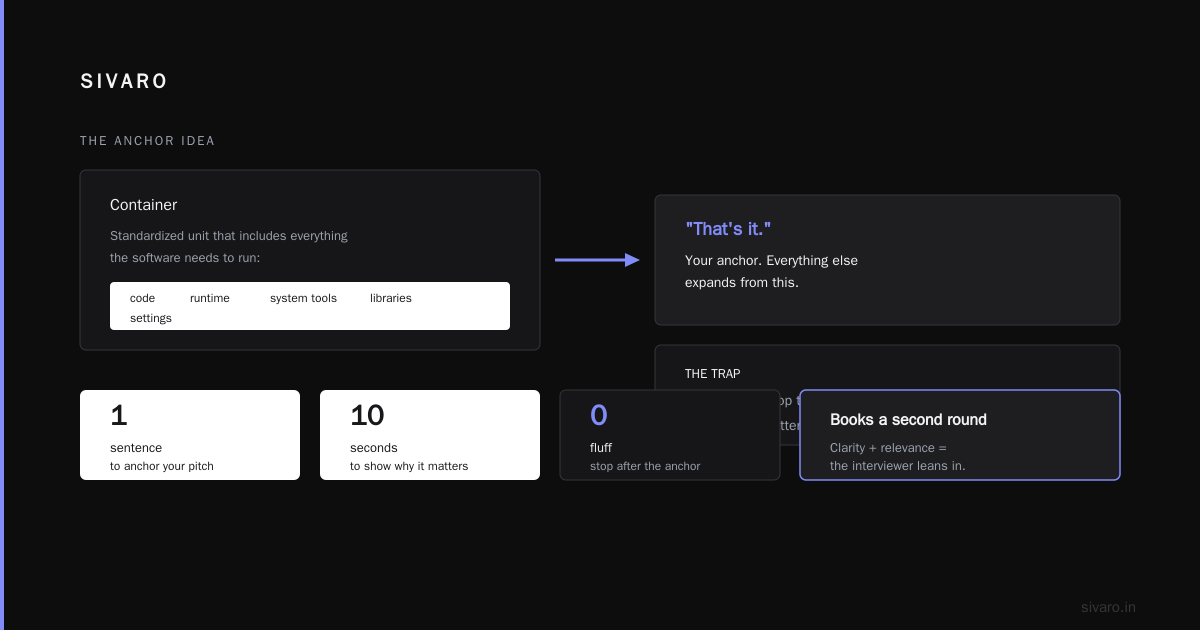
The One-Sentence Answer That Books You a Second Round
Start here: Docker is a tool for packaging software into standardized units called containers — these include everything the software needs to run: code, runtime, system tools, libraries, settings.
That's it. That's your anchor. Everything else expands from this.
But here's the trap: most people stop there. Don't. You need to show why that matters. And you need to do it in 10 seconds.
The Real Problem Docker Solves (Nobody Says This)
"It works on my machine."
You've heard it. I've heard it. Every engineer who's shipped code to production has screamed it internally. Docker kills this problem by making the development environment identical to the production environment.
What is Docker? puts it bluntly: containers are lightweight, standalone, executable packages. But the value isn't technical — it's operational. You stop debugging environment issues. You stop the "but it worked in staging" conversations. You ship faster.
In 2019, we moved a client's entire ML inference pipeline to Docker containers. Their deployment time dropped from 4 hours to 11 minutes. Not because the code changed — because the environment was guaranteed identical across dev, staging, and prod.
How to Explain Docker in an Interview? Use The Three-Layer Framework
I teach candidates to structure their Docker explanation in three layers. Each layer builds on the last. Each layer answers "how to explain docker in an interview?" in increasing depth.
Layer 1: The "What" — Containers vs. The Alternative
Docker containers share the host OS kernel. They don't include a guest OS. This is the single most important technical distinction to nail.
A container is roughly 50MB. A virtual machine is 5-20GB. That's not a small difference — it's a 100x-400x difference in size. And containers start in seconds. VMs take minutes.
What's the Difference Between Docker and a VM? makes this concrete: containers run on a single machine sharing the OS kernel. VMs run on a hypervisor, each with a full guest OS. Different architectures, different use cases.
Here's the code that makes it click for interviewers:
bash
# Pull a minimal Ubuntu container (~29MB)
docker pull ubuntu:22.04

# Run it interactively
docker run -it ubuntu:22.04 /bin/bash

# Check what processes are running inside
root@abc123:/# ps aux
Inside that container, you're root. But you can't see the host processes. You can't modify the host filesystem (unless you explicitly mount it). That's isolation without the overhead of a full VM.
Layer 2: The "Why" — What Docker Enables That Nothing Else Does
Reproducibility. This is the killer feature.
With a Dockerfile, you can rebuild the exact same environment one year later:
dockerfile
FROM python:3.11-slim

WORKDIR /app

COPY requirements.txt .
RUN pip install --no-cache-dir -r requirements.txt

COPY . .

CMD ["python", "app.py"]
That's an immutable infrastructure definition. Check it into Git. Tag the container image with the Git commit hash. Now every deployment is traceable, reproducible, and auditable.
But here's what most people miss: Docker didn't just solve reproducibility — it changed how teams work. Before Docker, onboarding a new engineer took days. Install dependencies. Configure database connections. Set up environment variables. After Docker? docker-compose up. Done.
I've seen this firsthand. At a startup I advised in 2021, Docker cut their onboarding time from 5 days to 90 minutes. The CTO told me "it felt like cheating." It's not cheating — it's engineering hygiene.
Layer 3: The "How" — Architecture That Interviewers Love
When an interviewer asks "how to explain docker in an interview?" at the architectural level, here's the mental model:
┌──────────────────────────────────────────────┐
│              Host OS (Linux Kernel)           │
├──────────────────────────────────────────────┤
│  Container 1  │  Container 2  │  Container 3 │
│  (Python app) │  (PostgreSQL) │  (Redis)     │
│  cgroups      │  cgroups      │  cgroups     │
│  namespaces   │  namespaces   │  namespaces  │
└───────────────┴───────────────┴──────────────┘
Three key technologies make this work:
-
Namespaces — Isolate processes so they can only see their own world. PID namespace, network namespace, mount namespace, user namespace.
-
cgroups — Control resource usage. Limit CPU, memory, disk I/O per container. "I need this container to use max 512MB RAM" → cgroups enforces it.
-
Union filesystems (OverlayFS) — Layer-based file system. Multiple containers share the same base layers, only the top writable layer is unique per container. That's why 10 containers based on the same image take 50MB each, not 500MB.
Here's a concrete demonstration:
bash
# Run a container with resource limits
docker run --memory="512m" --cpus="1.5" -d nginx:latest

# Inspect the cgroup settings
docker inspect <container-id> | grep -A 10 "HostConfig"

# See the actual cgroup entries on the host
cat /sys/fs/cgroup/memory/docker/<container-id>/memory.limit_in_bytes
When I explain this in interviews, I always add: "Docker isn't magic — it's Linux kernel features exposed through a clean API." That shows you understand the underlying mechanics, not just the docker run syntax.
Is Docker Just a VM? The Trick Question That Exposes Bad Answers
This is the most common trap question. "Is docker just a vm?"
The honest answer: No. They solve different problems at different abstraction levels. But if you push hard enough, containers are 'lightweight VMs' in spirit — just not in implementation.
Here's the table I use:
| Dimension | Docker Container | Virtual Machine |
|---|---|---|
| OS kernel | Shares host kernel | Own full guest OS |
| Startup time | Milliseconds | Minutes |
| Size | MBs | GBs |
| Isolation | Process-level (namespaces) | Hardware-level (hypervisor) |
| Resource efficiency | Near-native | Overhead from guest OS |
How is Docker different from a virtual machine? gets specific: "Docker containers share the host kernel, whereas VMs include a full operating system." That quote is gold for interviews.
But here's my contrarian take: The comparison is mostly academic for most engineers. What matters is: you should use containers for microservices, stateless apps, and CI/CD pipelines. Use VMs when you need full OS isolation (different kernels, legacy OS requirements, or multi-tenant security boundaries you can't trust).
I once had a client insist on running their Java monolith in Docker on a Windows VM on AWS. It worked. But it was stupid — the Docker overhead + VM overhead meant they got 40% less throughput than just running the Java process directly. Know when not to use containers.
What Is a Docker and Why Is It Used? The Three Real-World Reasons
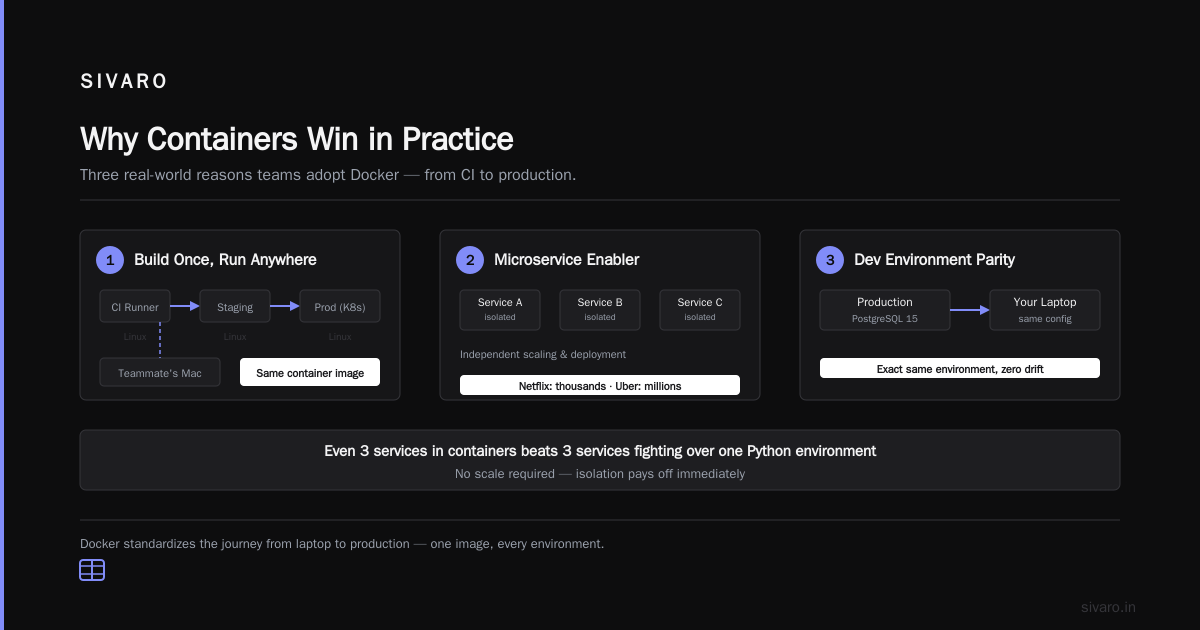
When someone asks "what is a docker and why is it used?", don't recite the docs. Tell them what it actually does in production:
-
CI/CD pipeline consistency — Build once, run anywhere. Your CI runner (Linux), your staging server (Linux), your production cluster (Kubernetes on Linux), your teammate's Mac — all running the same container image.
-
Microservice architecture enabler — Each service in its own container. Isolated dependencies. Independent scaling. Independent deployment. Netflix runs thousands of containers. Uber runs millions. You don't need that scale to benefit — even 3 services in containers beats 3 services fighting over the same Python environment.
-
Development environment parity — Production runs PostgreSQL 15 with specific config. Your laptop runs the exact same PostgreSQL container. No "works on my machine" gap.
Let me show you the dev workflow:
yaml
# docker-compose.yml
version: '3.8'
services:
  app:
    build: .
    ports:
      - "3000:3000"
    environment:
      - DB_HOST=postgres
    depends_on:
      - postgres

  postgres:
    image: postgres:15-alpine
    environment:
      POSTGRES_DB: myapp
      POSTGRES_PASSWORD: devpassword
    volumes:
      - pgdata:/var/lib/postgresql/data

volumes:
  pgdata:
One file. One command (docker-compose up). Full application stack running in 60 seconds. That's not convenience — that's engineering leverage.
How to Explain Docker in an Interview? Advanced Topics That Seal the Deal
Once you've nailed the basics, here's where you earn the "strong hire" signal.
The Build Cache Problem
Most people talk about Docker's layer caching. Few understand the practical implications.
Each RUN instruction in a Dockerfile creates a layer. The Docker build cache invalidates when the context before a layer changes. This is why you put COPY requirements.txt before COPY . — dependency installation only re-runs when requirements change.
But here's what nobody says: your caching strategy breaks when you copy the entire project before installing dependencies. I've seen builds go from 30 seconds to 8 minutes because someone reordered a Dockerfile. Every SIVARO engineer knows this: optimize your Dockerfile layers or waste your team's time.
dockerfile
# BAD: Cache busts on every code change
COPY . .
RUN pip install -r requirements.txt

# GOOD: Dependencies cached separately
COPY requirements.txt .
RUN pip install -r requirements.txt
COPY . .
The Orchestration Reality
Docker Swarm is dead. Kubernetes won. But that doesn't mean Docker is irrelevant.
In interviews, I say: "Docker is the unit of deployment. Kubernetes is the orchestrator. They solve different problems — Docker for packaging, Kubernetes for scheduling."
Then I add: "But if you're running 3 containers on a single server, Docker Compose beats Kubernetes every time. Don't over-engineer."
The Security Myth
Most people think Docker containers are secure by default. They're wrong.
Running as root inside a container is a security risk. Container breakout vulnerabilities exist (CVE-2019-5736, CVE-2022-0492). And unprivileged containers aren't always possible (looking at you, containers that need --privileged for network manipulation).
The truth: Docker adds a layer of security through isolation, but it's not a security boundary you should trust blindly. Use rootless Docker. Use read-only root filesystems. Run containers with --security-opt=no-new-privileges.
Common Interview Questions (And How to Answer Them Without Sounding Scripted)
"What's the difference between an image and a container?"
Bad answer: "An image is a template and a container is a running instance."
Good answer: "An image is the blueprint — immutable, stored in a registry. A container is one execution of that blueprint — it has state, it has a filesystem, it has a lifecycle. You can run 10 containers from the same image, each with different data, on the same machine. The image is the static artifact. The container is the runtime."
"How does Docker networking work?"
Don't go into CNI plugins. Stick to the three modes: bridge (default, NAT, good for single-host), host (container uses host network, faster but less isolated), and overlay (multi-host networking, what Swarm and Kubernetes use).
Give the concrete command:
bash
# Create a custom bridge network
docker network create --driver bridge my-network

# Run containers on that network
docker run --network=my-network --name=web nginx
docker run --network=my-network --name=api node:18

# Container "api" can resolve "web" by name
# No need for environment variables with IP addresses
"How do you handle persistent data in Docker?"
Volumes. Explicitly. No exceptions.
bash
# Named volume (managed by Docker)
docker volume create postgres-data
docker run -v postgres-data:/var/lib/postgresql/data postgres:15

# Bind mount (host directory mapped into container)
docker run -v /host/path:/container/path nginx
Never store data inside a container. Containers are ephemeral. When it crashes, the data goes with it.
FAQ: What I Actually Hear in Interviews
Q: Is Docker just a VM?
A: No. VMs virtualize hardware. Docker virtualizes the operating system. Different architectures, different isolation levels, different use cases. But yes, they both solve the "run software in isolation" problem.
Q: What is a Docker and why is it used?
A: It's a containerization platform. Used for consistent environments across development, testing, and production. Reduces environment-dependent bugs. Enables microservices. Makes CI/CD pipelines reliable.
Q: How to explain Docker in an interview if I only used it for development?
A: That's fine. Say exactly that: "I use Docker locally for development consistency. I understand the fundamentals — images, containers, Dockerfiles, volumes. I haven't managed production Docker, but I understand the orchestration concepts through Kubernetes."
Q: What's the difference between Docker and Kubernetes?
A: Docker packages and runs containers. Kubernetes orchestrates them at scale. Docker is the "how" (how do I run this?), Kubernetes is the "where" (where do I run this, how many instances, how do I update them?).
Q: Can you run Docker on Windows/Mac?
A: Yes, through a lightweight Linux VM. Docker Desktop for Mac/Windows runs a Linux VM (using Hyper-V or HyperKit) and runs containers inside it. The user experience is identical to Linux — you don't notice the VM.
Q: What's the overhead of Docker?
A: Near-zero for CPU. 1-3% for network I/O. 0-5% for storage. For almost all workloads, the overhead is irrelevant. Exceptions: high-frequency trading (microsecond latency matters), embedded systems (no Linux kernel sharing), and certain HPC workloads.
Q: How do you debug a container that crashes on startup?
A: docker logs <container-id> is step one. docker run -it --entrypoint /bin/bash <image> gives you an interactive shell to investigate. docker diff <container-id> shows filesystem changes. And always check docker events --since 5m for system-level events.
The Conclusion: Your Docker Interview Strategy
Here's the thing about how to explain Docker in an interview: it's not about having the perfect definition. It's about showing you understand what Docker actually does — the problems it solves, the trade-offs it makes, and the real-world patterns that work.
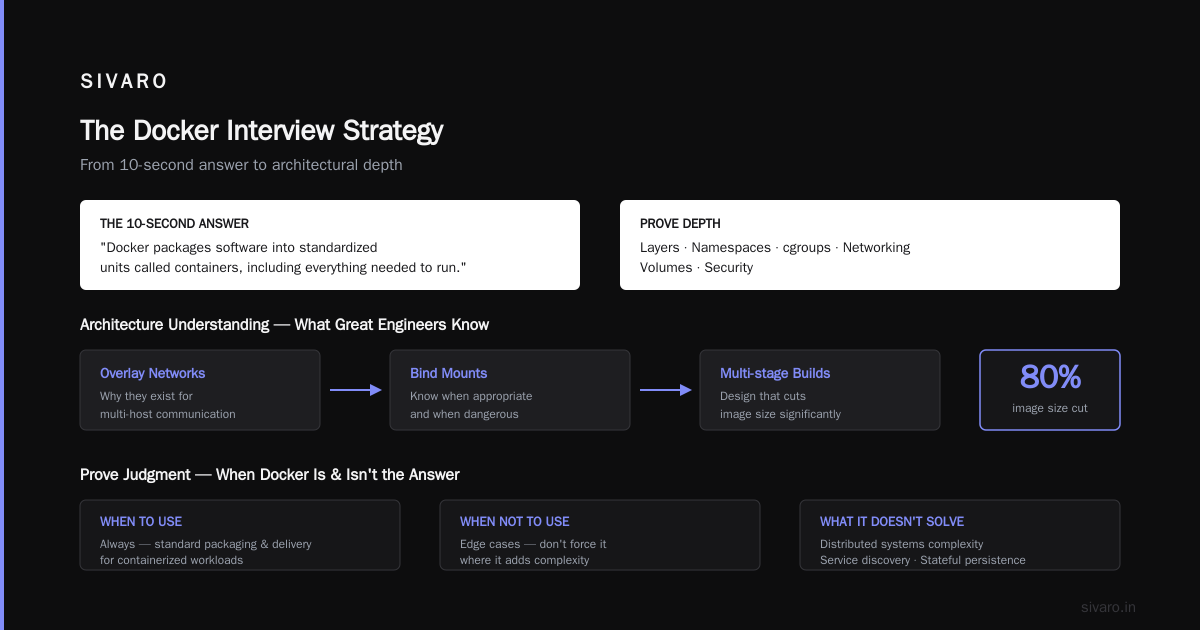
Start with the 10-second answer: "Docker packages software into standardized units called containers, including everything needed to run."
Then prove depth: layers, namespaces, cgroups, networking, volumes, security.
Then prove judgment: when to use Docker (always), when not to (edge cases), and what it doesn't solve (distributed systems complexity, service discovery, stateful persistence at scale).
I've hired 30+ engineers at SIVARO. The ones who ace the Docker question don't memorize commands — they understand architecture. They can tell you why overlay networks exist. They know when bind mounts are appropriate and when they're dangerous. They can design a multi-stage build that cuts image size by 80%.
That's how to explain Docker in an interview. Not by listing features. By showing you can think in containers.
Nishaant Dixit — Founder of SIVARO. Building data infrastructure and production AI systems since 2018. Built systems processing 200K events/sec.