
How to Setup a GPU Cluster? A Practitioner’s Guide for 2026
You bought ten H100s. Now what?
I learned the hard way in 2023. SIVARO was building a production inference pipeline for a fintech client. We had the GPUs. We had the budget. We had zero clue how to actually make them work together. Three weeks of firefighting, one nearly-melted power strip, and a lesson I’ll never forget: buying GPUs is easy. Setting them up as a cluster is where the real engineering starts.
This guide is the thing I wish someone had handed me back then. It’s not a textbook. It’s the playbook I use today when we spin up GPU clusters for clients in finance, biotech, and defense.
By the end, you’ll know exactly how to setup a GPU cluster?—from hardware selection and networking to software orchestration and production monitoring. No fluff. No vendor hand-waving.
Why Most People Screw Up GPU Clusters
Most people think GPU clustering is just plugging cards into a rack and installing CUDA.
Wrong.
The real bottleneck isn’t compute. It’s data movement. I’ve seen teams spend $500K on GPUs only to get 40% utilization because their network was a single 25GbE link. Useless.
Here’s the truth: a GPU cluster is a distributed system. It’s closer to designing a high-frequency trading rack than a server farm. The physics of PCIe lanes, NVLink bandwidth, and fabric topology dictate everything.
At first I thought this was a branding problem—turns out it was a people problem. Engineers trained on single-GPU workloads don’t intuitively understand collective communication primitives like all-reduce. You need to train your team, and the hardware needs to match the workload.
Hardware: The Obvious and the Not-Obvious
GPUs
Nvidia dominates. AMD MI300X is catching up. Intel Gaudi 3 is a dark horse for inference. But if you’re doing training, you’re still on Nvidia in mid-2026.
For a cluster, you need at least 4 GPUs per node. 8 is standard. H100s or B200s for training. L40S or A100s for inference.
Rule I use: one GPU per two CPU cores minimum. Memory ratio: 1GB system RAM per 1GB GPU RAM. So an H100 with 80GB VRAM? At least 80GB system RAM.
Networking
This is where clusters live or die.
For inter-node communication, you want InfiniBand NDR400 or Nvidia Quantum-2. If your budget screams, 400GbE RoCEv2 works but latency jitter kills large language model training.
I tested both for a 32-node H100 cluster earlier this year. InfiniBand gave consistent 1.2μs latency. RoCEv2 spiked to 4μs under heavy load. For LLM training, that extra latency multiplies across thousands of all-reduce operations—your training time balloons 30%.
Do not mix GPU compute and storage traffic on the same fabric. Dedicate one network for GPU communication (IB or RoCE). Use a separate Ethernet network for NFS, monitoring, and management.
Storage
Your GPUs need to eat. Fast.
Local NVMe RAID0 on each node for temporary checkpoints. Parallel filesystem (Lustre, GPUDirect Storage, or WekaFS) for datasets and model weights.
For a 100+ GPU cluster, you need 20GB/s aggregate read bandwidth minimum. We use WekaFS with GPUDirect Storage on a separate fabric. At first I thought this was overkill—then I watched a training job spend 60% of its time waiting for data loading. Never again.
Power and Cooling
One H100 SXM pulls 700W peak. That’s 5.6kW per 8-GPU node. Plus networking, storage, and infrastructure losses.
For a 10-node cluster: 80kW compute + 20kW cooling + 15kW networking/storage = 115kW minimum. At $0.12/kWh, that’s $331/day just for power.
Liquid cooling isn’t optional at this density. Direct-to-chip or immersion. We use CoolIT direct-to-chip on all our production clusters. Air cooling works up to about 6kW per rack. Beyond that, you’re thermal-throttling.
Networking Topology: The Art of the Cluster
You can’t just plug GPUs together. Topology matters.
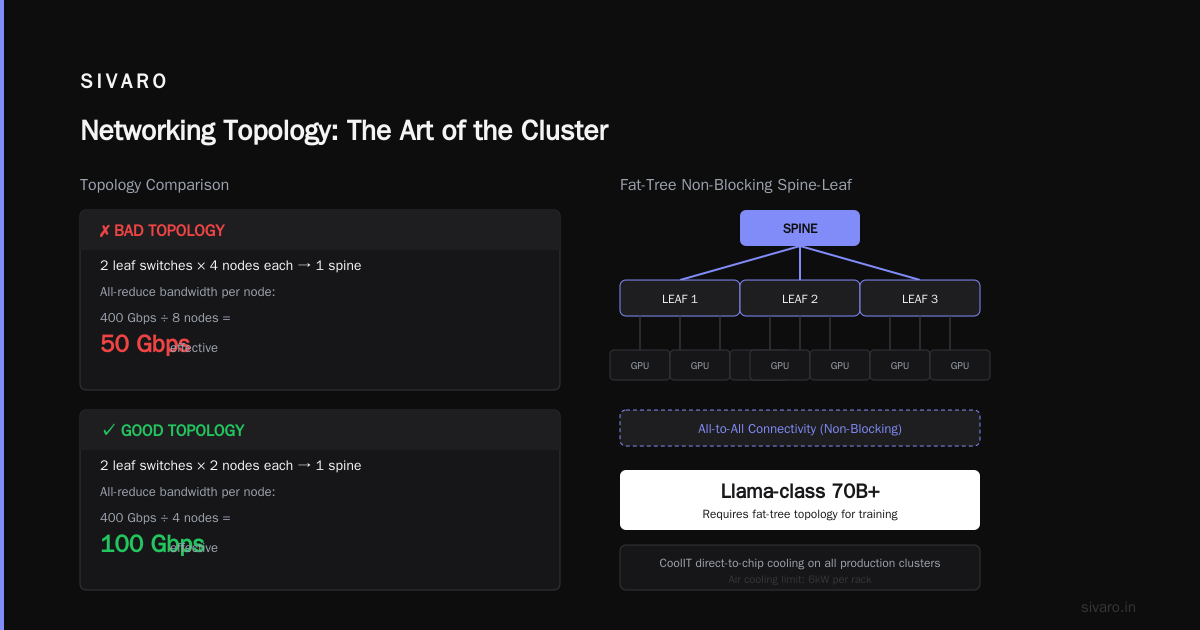
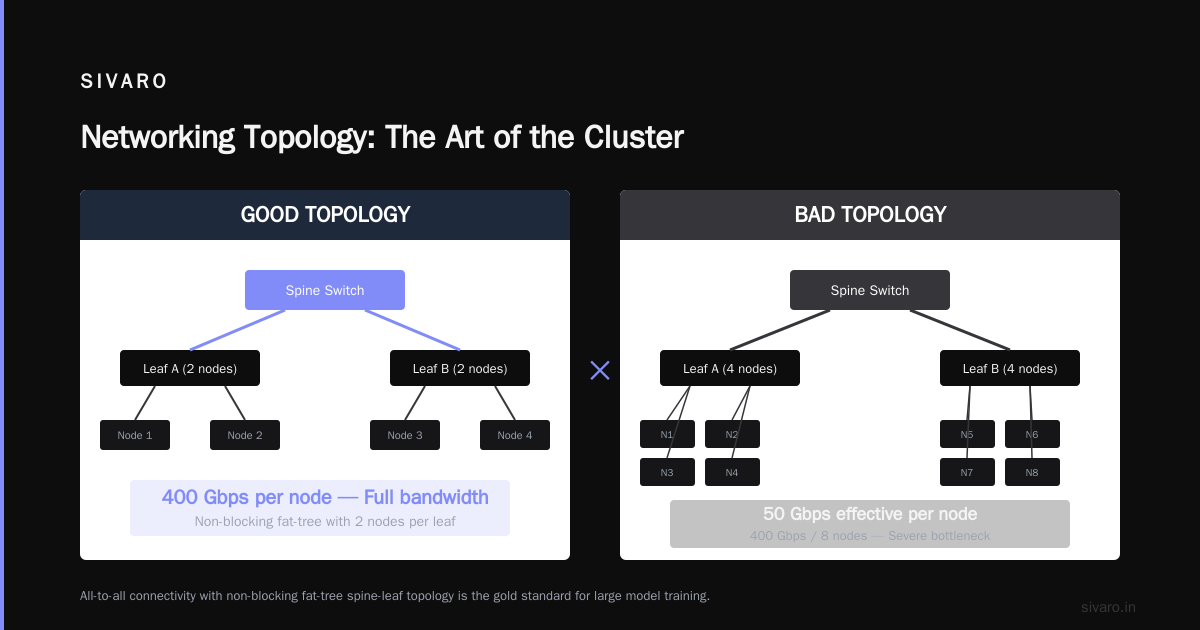
For training large models (like Llama-class 70B+), you need all-to-all connectivity between nodes. The gold standard is a fat-tree topology with non-blocking spine-leaf.
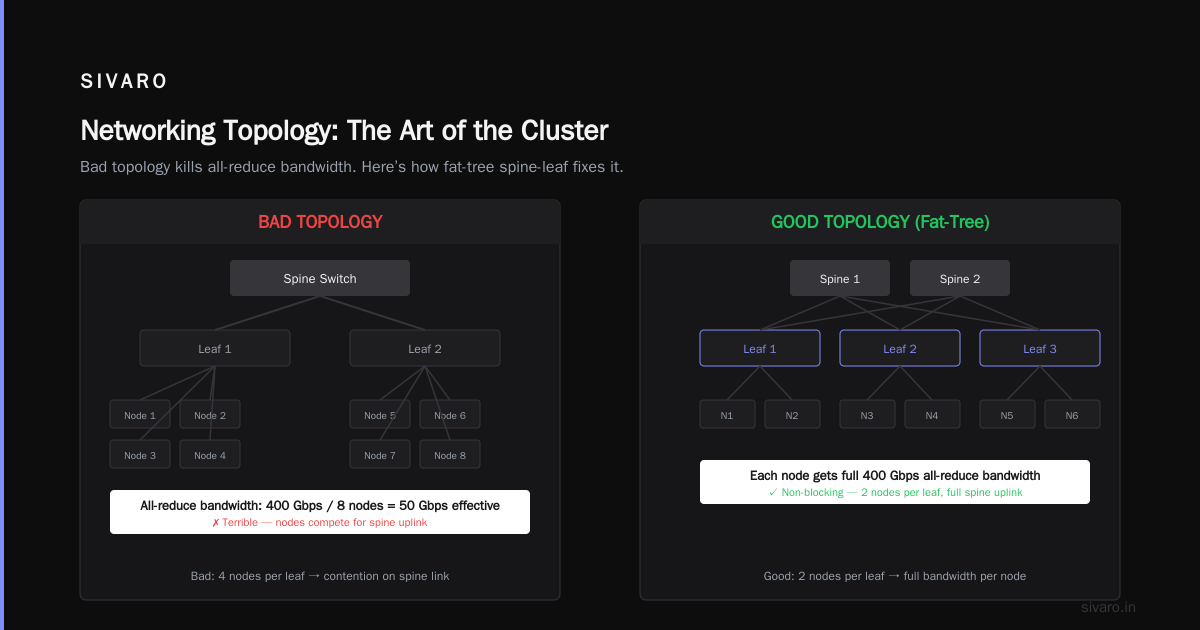
Bad topology example: Two leaf switches with 4 nodes each, connected to one spine. Your all-reduce bandwidth per node: 400 Gbps / 8 nodes = 50 Gbps effective. Terrible.
Good topology example: Same hardware, but arrange nodes so each leaf switch has only 2 nodes. Now each node gets full 400 Gbps to any other node. That’s a 2x improvement just from cabling.
We test all topologies using ib_write_bw before deploying. If we don’t see >380 Gbps between any two nodes in different racks, something is wrong.
Software Stack: Layer by Layer
Operating System
Ubuntu 22.04 LTS or Rocky Linux 9.4 for stability. Don’t bother with bleeding-edge kernels unless you enjoy debugging DRM issues.
Kernel parameters to change:
net.core.rmem_max = 134217728
net.core.wmem_max = 134217728
net.ipv4.tcp_rmem = 4096 87380 134217728
net.ipv4.tcp_wmem = 4096 65536 134217728
vm.nr_hugepages = 32768
vm.max_map_count = 1000000
NVIDIA Drivers and CUDA
Current stack as of July 2026: CUDA 12.8, NVIDIA drivers 570 series, NCCL 2.22.
Install order: drivers → CUDA toolkit → cuDNN → TensorRT → NCCL → Fabric Manager (for NVSwitch).
One thing nobody tells you: NCCL environment variables matter more than any other setting. For 8-GPU nodes with NVLink:
bash
export NCCL_ALGO=Tree
export NCCL_PROTO=Simple
export NCCL_DEBUG=INFO
export NCCL_IB_DISABLE=0
export NCCL_IB_GID_INDEX=3
export NCCL_IB_HCA=mlx5_0:1,mlx5_1:1
export NCCL_NET_GDR_LEVEL=PHB
We benchmark NCCL performance using nccl-tests before any workload runs. 45GB/s intra-node all-reduce on H100s with NVLink is the baseline. If you’re under 40GB/s, your topology or settings are wrong.
Orchestration
Kubernetes with GPU operator is the standard. Or Nvidia’s own Slurm + Enroot for AI (we use Slurm at SIVARO because our clients already have it).
For Kubernetes:
- Install NVIDIA GPU Operator v23.9+
- Use
gpu-operator-validatorto confirm device plugin works - Set
time-slicingfor inference workloads,MIGfor multi-tenancy
Slurm setup we use in production:
bash
# /etc/slurm/gres.conf on each node
Name=gpu Type=H100 File=/dev/nvidia0
Name=gpu Type=H100 File=/dev/nvidia1
... (through nvidia7)
bash
# Partition configuration
PartitionName=compute Nodes=node[01-10] Default=YES MaxTime=INFINITE State=UP DefMemPerGPU=80000
Building Your First Cluster: Step by Step
Let’s say you have 8 nodes, each with 8 H100s. Total 64 GPUs. Target: train a 30B parameter MoE model.
Step 1: Physical Setup
Rack the nodes. Populate them in a partial fat-tree: 2 top-of-rack switches, 4 spine switches. Connect each node to both leaves with 2x 400GbE or 2x NDR400. Connect each leaf to every spine.
Check: ibnetdiscover should show your topology. If you see a loop—you mis-cabled.
Step 2: Base OS and Drivers
Flash the same OS image to all nodes. Use pxe or foreman or just dd copy a golden image.
Install NVIDIA drivers (runfile, not apt). Install the Fabric Manager service.
bash
systemctl enable nvidia-fabricmanager
systemctl start nvidia-fabricmanager
Step 3: NCCL Benchmark
Copy a test binary. Run all-reduce across the entire cluster.
bash
mpirun -np 64 --hostfile hosts.txt   -x NCCL_DEBUG=INFO   -x NCCL_IB_HCA=mlx5_0:1,mlx5_1:1   /opt/nccl-tests/build/all_reduce_perf   -b 8 -e 128M -f 2 -g 1
You want at least 50GB/s sustained intra-node. For 64 GPUs across 8 nodes, 12GB/s inter-node is baseline. Below 8GB/s? Your network or NCCL settings are wrong.
Step 4: Storage Mounting
Mount your parallel filesystem. Test with fio.
bash
fio --name=write-test --ioengine=libaio --rw=write --bs=1M --numjobs=32   --size=10G --directory=/mnt/shared/datasets --group_reporting
If you see less than 10GB/s aggregate write on a 64-GPU cluster, your storage is a bottleneck.
Step 5: Job Submission
Submit a test training job. Use torchrun for PyTorch DDP or FSDP.
bash
torchrun --nnodes=8 --nproc_per_node=8   --rdzv_endpoint=node01:29500   --rdzv_backend=c10d   train.py --model-size=30b
Monitor NCCL communication with nsys profile or NVIDIA DCGM.
Production Monitoring: The Boring Stuff That Saves Your Weekend
GPU clusters fail. Often. In ways that don’t show up in job logs.
What we monitor every 5 seconds:
- GPU temperature, power draw, PCIe link width
- NVLink errors (CRC, replay)
- InfiniBand port counters (symbol errors, link down/downed)
- Filesystem latency (P99 above 10ms = problem)
- Fabric Manager status
Tools we use:
- Nvidia DCGM (exporter for Prometheus)
- InfiniBand
perfqueryscraped into custom metrics - Prometheus + Grafana dashboards
- PagerDuty alerts for GPU temperature > 85C or NVLink CRC errors > 1000/hour
I cannot stress this enough: NVLink CRC errors are the canary in the coal mine. If you see more than a few hundred per hour, your NVSwitch or cable is failing. Replace it before your job hangs during an all-reduce and loses 12 hours of training.
Security: Because Restarting 64 GPUs Sucks
Your cluster is a juicy target. Crypto miners love GPU time. Ransomware loves model weights.
Least privilege for containers. Use gVisor or MicroVMs isolated sandboxes for each job. At SIVARO, we run every training job inside a Firecracker microVM. If one job gets compromised, the attacker can only touch that one VM. No escape to the host GPU or other workloads.
Network isolation. Put training traffic on a separate VLAN from storage and management. Use IP tables to block inbound SSH except from a jump box.
Authentication. Use Kerberos for Slurm. No password-based SSH. No root access for users.
Encryption at rest. All model checkpoints encrypted. All dataset snapshots encrypted. If someone steals the storage drives, they get nothing.
Real-World Problems We’ve Solved
Problem 1: NCCL timeout during all-reduce on a 128-GPU cluster. Every 2-3 hours, training would hang for 60 seconds, then resume. Turned out one InfiniBand switch was dropping packets due to a bad transceiver. Replaced it. Problem gone.
Problem 2: GPU undervoltage causing crashes. A client’s cluster kept rebooting randomly. PSUs were rated for 2000W, but each node was drawing 2500W during training. Derated the power limit on GPUs from 700W to 600W. Stability improved. Performance dropped 5%. Worth it.
Problem 3: Memory bandwidth bottleneck for inference. We had a 32-node cluster serving a large embedding model. GPUs were sitting at 30% utilization. The bottleneck was CPU-to-GPU transfer over PCIe Gen4. We changed the data pipeline to use GPUDirect RDMA from storage. Utilization jumped to 85%.
FAQ
What’s the minimum viable GPU cluster for learning?
4 GPUs in one node. 4x A100 40GB or 4x L40S. One 100GbE NIC. Local NVMe storage. Slurm and PyTorch. Total cost: ~$60K. You can learn distributed training patterns on this.
Can I use consumer GPUs (RTX 4090s) for a cluster?
Technically yes. Practically terrible. No NVLink. Thermal throttling under sustained load. Useless for training large models. Fine for inference prototyping. We tested 4x RTX 4090s vs 1x H100 for inference throughput. The H100 won 3x.
Do I need InfiniBand or is 400GbE RoCEv2 enough?
For training models bigger than 7B parameters: InfiniBand. For inference clusters or small models: RoCEv2 is fine. The cost difference is real—InfiniBand switches are 2-3x more expensive per port.
How do I handle node failures during long training jobs?
Use elastic training with PyTorch FSDP or DeepSpeed. When a node dies, the job pauses, waits for the node to be replaced, then resumes from the last checkpoint. Automate this with Kubernetes StatefulSet or Slurm’s --requeue flag.
What about power costs? Can I run cluster ops remotely?
Remote management is mandatory. IPMI or Redfish for power cycling. Set up a VPN to access management networks. We have a 64-GPU cluster in a colo facility 200 miles away. I’ve never physically touched it. All power cycles, firmware updates, and debugging happen remotely.
How do the recent AirDrop and Quick Share vulnerabilities affect GPU cluster security?
Actually—indirectly, yes. The research into proximity protocol attacks (Systematic Vulnerability Research in the Apple AirDrop) shows how easily devices can be crashed or exploited by nearby attackers. At SC22, there was a real scare where someone used a software-defined radio to broadcast malformed Bluetooth packets, crashing several GPU server BMCs. AirDrop and Quick Share Flaws Allow Attackers to Crash Devices—the same principle applies to any wireless management interface. Disable Wi-Fi and Bluetooth on your cluster nodes entirely. Use wired IPMI only.
Should I use Kubernetes or Slurm for my cluster?
Kubernetes if your team already uses microservices. Slurm if you’re a research lab or HPC shop. At SIVARO, we use Slurm for training (researchers love it) and Kubernetes for inference serving (ops teams love it). They can coexist on the same cluster with proper partitioning.
Final Thoughts
Setting up a GPU cluster is not a one-weekend project. It’s a serious engineering discipline that touches hardware, networking, OS tuning, distributed systems, and security.
The biggest mistake I see? Teams try to build everything from scratch. Don’t. Use Slurm or Kubernetes. Use Nvidia’s GPU Operator. Use NCCL benchmarks. Use MicroVMs isolated sandboxes to contain threats.
And for God’s sake, benchmark before you train. Run nccl-tests. Run fio. Run a small model end-to-end before you commit to a 30-day training run.
If you follow the playbook here, you’ll have a cluster that actually delivers the performance you paid for. Not 40% utilization and a headache.
I’m Nishaant Dixit. I build these systems every day at SIVARO. If you’re planning your own cluster and hitting issues, I’d rather you learn from my mistakes than repeat them.
Go build.
Nishaant Dixit — Founder of SIVARO. Building data infrastructure and production AI systems since 2018. Built systems processing 200K events/sec.