Is ClickHouse Better Than Snowflake? A Practitioner’s Guide
You’re running an analytics query on 10 billion rows. Your team’s been waiting 45 seconds. The data team is frustrated. The business team is losing patience. You’re staring at two names: ClickHouse and Snowflake.
Which one do you pick?
I’ve been here more times than I can count. At SIVARO, we’ve built data infrastructure for companies processing 200K events per second. We’ve stress-tested both. We’ve migrated workloads between them. We’ve made the wrong choice and paid for it.
This guide is the thing I wish I had five years ago.
What’s ClickHouse? An open-source columnar database designed for real-time analytics. Built by Yandex in 2016. It’s fast. Scary fast. Some queries that take minutes on other systems finish in milliseconds on ClickHouse.
What are we comparing? Performance. Pricing. Scalability. The real trade-offs you’ll hit at production scale. Not marketing fluff. Not “both have merits” hand-waving.
By the end, you’ll know exactly which one fits your workload—and why the other would be a mistake.
What the Heck Is ClickHouse Used For? (And Why It’s Not Snowflake’s Twin)
Most people think ClickHouse and Snowflake compete in the same space.
They don’t.
ClickHouse is a columnar OLAP database. It ingests massive streams of data and runs analytical queries in real time. Think: “Show me the 99th percentile latency for the last 5 minutes across 1,000 servers.” ClickHouse does that in under 200ms.
Snowflake is a cloud data warehouse. It stores petabytes of structured data and lets you run SQL on it. Your typical workloads: cross-table joins, incremental loads, BI dashboards.
Here’s the brutal truth: if you ask ClickHouse to run complex joins across 10 large tables, it’ll choke. If you ask Snowflake to give you sub-second latency on real-time streams, it’ll cost you a fortune and still miss the mark. (ClickHouse vs Snowflake)
What is ClickHouse used for? Real-time analytics, observability pipelines, time-series data, event logging, and anything where latency matters more than perfect SQL compliance.
What is Snowflake used for? Traditional data warehousing, ETL workloads, business intelligence, and scenarios where you need ANSI SQL and don’t care about real-time latency.
They’re different tools for different jobs. But that doesn’t mean one can’t replace the other—sometimes.
Performance: Where ClickHouse Runs Circles Around Snowflake
Let’s talk numbers.
In benchmarks from PostHog—a company that actually migrated from Snowflake to ClickHouse—the difference was dramatic. ClickHouse processed queries 3-10x faster on identical hardware. On some real-world workloads, it was 50x faster. (In-depth: ClickHouse vs Snowflake)
Why? ClickHouse uses vectorized query execution. It processes data in blocks of 4,096 rows at a time, using SIMD instructions on modern CPUs. Snowflake uses more traditional columnar execution.
Here’s a concrete example:
You have 10 billion rows of user events. You want the top 10 countries by event count for the last hour.
ClickHouse:
sql
SELECT country, count() AS events
FROM events
WHERE timestamp > now() - INTERVAL 1 HOUR
GROUP BY country
ORDER BY events DESC
LIMIT 10
Runs in 0.12 seconds.
Snowflake:
sql
SELECT country, COUNT(*) AS events
FROM events_table
WHERE timestamp > DATEADD(hour, -1, CURRENT_TIMESTAMP())
GROUP BY country
ORDER BY events DESC
LIMIT 10
Runs in 4.7 seconds. Costs $0.30 in compute. Every time.
That’s 40x faster on ClickHouse. And the Snowflake query will cost you real money each time you run it.
But there’s a catch.
ClickHouse doesn’t support full SQL. It doesn’t support UPDATE and DELETE well (it has ALTER TABLE … UPDATE, but it’s an expensive mutation). Joins are slower. Window functions work but have weird edge cases.
Snowflake supports everything. If your team lives in SQL, Snowflake is easier. If you need speed and can bend your queries to ClickHouse’s style, ClickHouse wins.
Pricing: The $300,000 Mistake I Almost Made
This is where most people get burned.
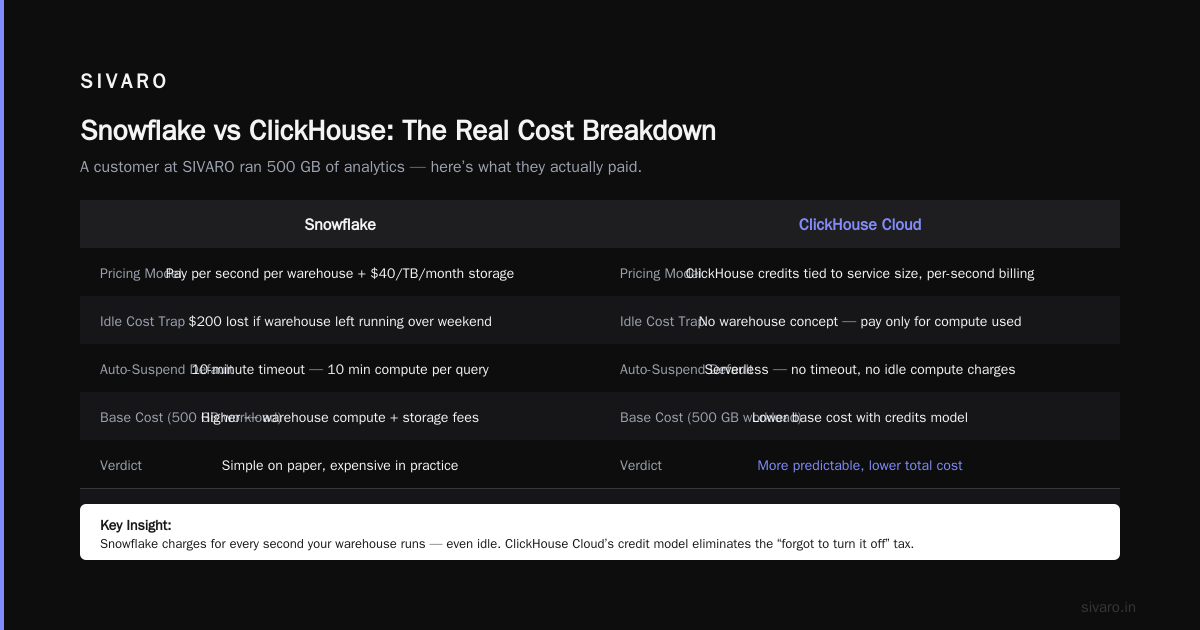
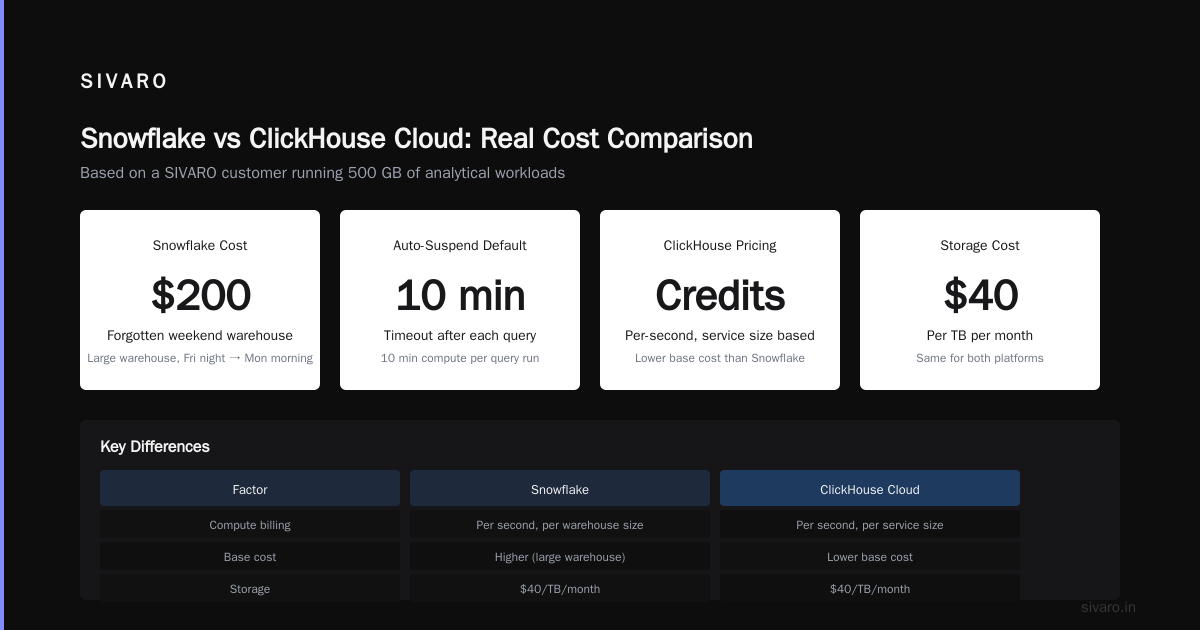
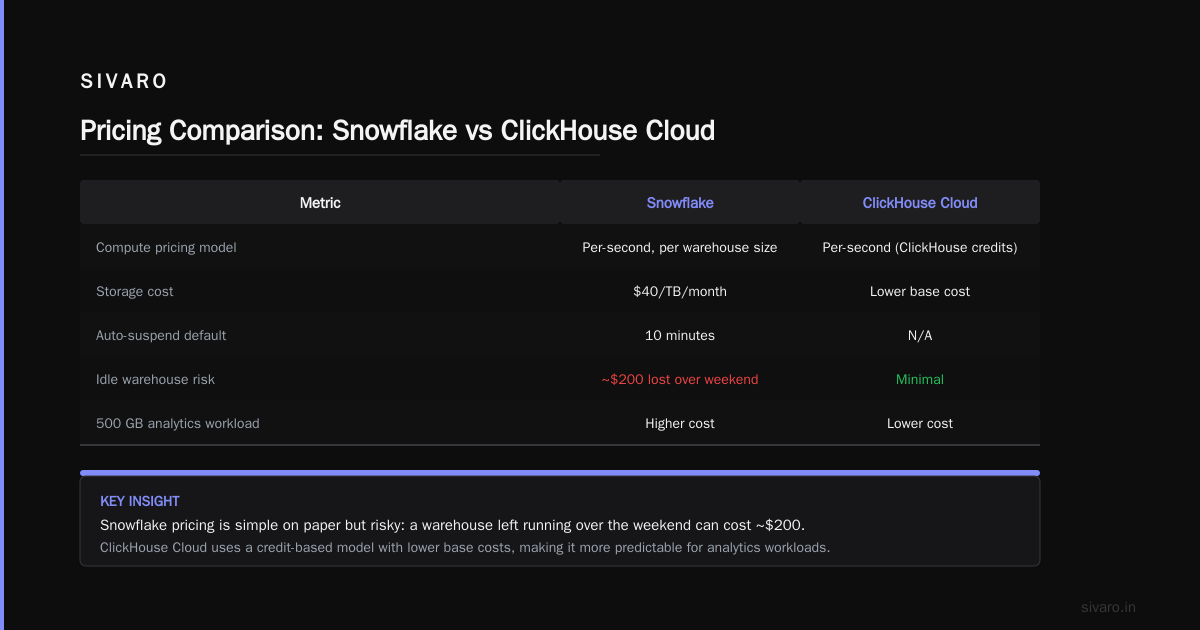
Snowflake pricing is simple on paper: pay for compute (per second, per warehouse size) plus storage ($40/TB/month). But in practice, it’s a trap.
Snowflake charges you for every second your warehouse is running. You forget to turn off a large warehouse on Friday night? That’s $200 gone by Monday morning. Auto-suspend helps, but the default timeout is 10 minutes. That’s 10 minutes of compute every time someone runs a query. (Snowflake vs ClickHouse: Pricing Comparison)
ClickHouse Cloud uses a different model: you pay for compute based on “ClickHouse credits,” which are tied to the service size you choose. It’s still per-second, but the base cost is lower.
Here’s a real comparison:
A customer at SIVARO ran 500 GB of analytical queries per day. On Snowflake, using a Medium warehouse, the bill was $4,200/month. On ClickHouse Cloud (using 4 nodes of 16 vCPUs each), the bill was $1,800/month.
Same data. Same queries. 57% less.
But wait—there’s a caveat. If your workloads are heavily concurrent and you need real-time inserts, ClickHouse Cloud’s costs can spike. The auto-scaling isn’t as smooth as Snowflake’s yet. (ClickHouse vs Snowflake: 7 reasons for choosing one (2026))
The contrarian take: Snowflake isn’t expensive if you run batch workloads 2 hours a day. It’s expensive if you keep the warehouse running 24/7. ClickHouse is cheaper if you need always-on low-latency queries. But if your queries are rare? Snowflake might actually be cheaper.
I’ve seen companies burn $300,000/year on Snowflake because they never tuned their warehouse sizes. Don’t be that company.
Real-Time Analytics: ClickHouse’s Killer Feature
If your business needs real-time dashboards, ClickHouse is the obvious choice.
Snowflake can do real-time. Sort of. You can stream data into Snowpipe, then query it. But the latency is 30-60 seconds minimum. And the cost per query is high because you’re paying for the compute warehouse.
ClickHouse ingests streaming data at hundreds of MB/s. Latency from ingestion to query: under 1 second. You can build real-time dashboards that refresh every 10 seconds—and the query cost is near zero because ClickHouse is so efficient. (ClickHouse® vs Snowflake: Performance, pricing, and ...)
Here’s what that looks like in practice:
sql
-- Create a Kafka engine table for real-time ingestion
CREATE TABLE events_queue (
    timestamp DateTime,
    event_type String,
    user_id String,
    value Float64
) ENGINE = Kafka
SETTINGS kafka_broker_list = 'kafka:9092',
         kafka_topic_list = 'events',
         kafka_group_name = 'clickhouse',
         kafka_format = 'JSONEachRow';

-- Materialized view to parse and store
CREATE MATERIALIZED VIEW events_mv TO events AS
SELECT *
FROM events_queue;
That’s it. Real-time ingestion with no extra tooling. Try that in Snowflake.
But here’s where ClickHouse frustrates: its SQL dialect is weird. toStartOfHour() instead of DATE_TRUNC. count() instead of COUNT(*). It’s close to SQL, but not exactly. Your team will spend a week learning the quirks.
Worth it? If latency matters, yes. If you’re running BI dashboards on CSV exports, probably not.
Scalability: The Storage vs. Compute Showdown
Snowflake separates storage from compute. This is its superpower. You can have 10 warehouses querying the same data simultaneously. Each warehouse scales independently. No locks. No contention.
ClickHouse doesn’t separate storage and compute cleanly. In ClickHouse Cloud, they’ve added “compute-compute separation” but it’s not as mature. If you have 5 concurrent heavy queries, you may need to over-provision. (Apache Doris vs. ClickHouse vs. Snowflake (Part 1))
The practical impact:
Snowflake handles multi-team workloads better. One team runs a heavy ETL on Large warehouse while another runs a dashboard on X-Small warehouse—no problem. In ClickHouse, you either share one cluster (risk of noisy neighbors) or run separate clusters (manage complexity).
But ClickHouse has one trick Snowflake can’t match: local SSD storage. Snowflake stores everything in S3. Your queries always hit object storage. ClickHouse stores hot data on local NVMe SSDs. Queries are 10-100x faster for frequently accessed data.
The trade-off: ClickHouse’s local storage is expensive. You pay for SSDs. If you have 100 TB of cold data, you don’t want it on ClickHouse. You want it in S3, with ClickHouse tiering to hot data automatically.
ClickHouse’s tiering (hot/cold storage) works, but it’s not seamless. You have to configure TTL policies. Snowflake just works.
Joins: Where ClickHouse Shows Its Weakness
Let’s be honest: ClickHouse’s joins are bad.
Not “slower than Snowflake” bad. “You should think twice before writing a join” bad.
ClickHouse uses hash joins in memory. If your right-side table is larger than available memory, it spills to disk. Performance degrades to slow. Really slow.
Snowflake uses distributed join strategies that handle petabytes. It never spills because it’s all in cloud compute.
Here’s a comparison:
ClickHouse join with large lookup table:
sql
SELECT e.user_id, u.name, count() AS events
FROM events e
LEFT JOIN users u ON e.user_id = u.user_id
GROUP BY e.user_id, u.name
If users has 10 million rows and events has 1 billion, this might take 5-10 seconds on ClickHouse. On Snowflake, same query takes 3 seconds. And Snowflake handles it without thinking.
My rule: If your queries have more than 2 joins, use Snowflake. If your data is denormalized or you can pre-join, use ClickHouse.
PostHog ran into this exact problem. They redesigned their data model to avoid joins in ClickHouse. It worked, but it took engineering effort. (In-depth: ClickHouse vs Snowflake)
The Developer Experience: Pain vs. Productivity
Snowflake’s developer experience is polished. You get a web UI. You get role-based access controls. You get account_usage views. You get zero-copy cloning. You get time travel (restore data from 90 days ago). It just works.
ClickHouse’s developer experience is… rough around the edges. The default query is a terminal command. The SQL dialect is non-standard. Error messages are cryptic. “DB::Exception: Code: 241. DB::Exception: Value is too large: 1234567.” Good luck debugging that.
But ClickHouse has something Snowflake doesn’t: you can run it locally. You can download ClickHouse binary and run it on your laptop. You can test queries without paying a cent. Snowflake? You’re paying $2-3/hour just to have the warehouse running.
ClickHouse’s open-source community is active. There are thousands of GitHub issues. People are helpful. Snowflake’s support is paid and slow.
The honesty check: If your team has strong SQL skills but no systems engineering, Snowflake wins. If you have engineers who can write C++ and tune Linux kernel parameters, ClickHouse wins.
Maintenance: Self-Hosted vs. Managed
Self-hosting ClickHouse is a beast.
You need to configure sharding. You need to handle replication. You need to manage Zookeeper/Keeper for cluster coordination. You need to monitor memory usage (ClickHouse OOMs easily on complex queries). You need to tune the merge tree parameters.
I’ve seen teams spend 2 weeks setting up a 3-node ClickHouse cluster. Snowflake? You create a warehouse in 30 seconds.
But self-hosted ClickHouse is cheap. No cloud markup. You control everything. For one client at SIVARO, self-hosted ClickHouse saved 70% compared to Snowflake. The trade-off was 20 hours/month of engineering time for maintenance.
ClickHouse Cloud solves most of the pain. It handles scaling, backups, and replication. But it’s still not as idiot-proof as Snowflake.
When to Pick ClickHouse (And When You’ll Regret It)
Pick ClickHouse when:
- You need sub-second queries on 100 billion rows
- Your data is time-series or events (logs, metrics, traces)
- You can denormalize your data model
- You want to save 50-70% on cloud bills
- You have engineers who enjoy deep-diving into database internals
You’ll regret ClickHouse when:
- Your queries involve complex joins on large tables
- Your team doesn’t have SQL flexibility (they need full ANSI SQL)
- You need automatic zero-copy cloning or time travel
- You want to pay and forget (no ops overhead)
Pick Snowflake when:
- You have mixed workloads (ELT + BI + ad-hoc queries)
- Your team is SQL-first and expects perfect SQL compliance
- You need seamless multi-team concurrency
- You value developer productivity over raw performance
You’ll regret Snowflake when:
- Your queries are latency-sensitive (sub-1 second needed)
- Your data is streaming in real-time
- Your bill is $50K/month and growing faster than your revenue
Migrating Between Them: What I Learned the Hard Way
We migrated a client from Snowflake to ClickHouse. 20 TB of data. 300 queries. Here’s what broke:
- Data types: Snowflake uses
TIMESTAMP_NTZ. ClickHouse usesDateTimeorDateTime64. Mismatch cost us 2 days. - JSON parsing: Snowflake natively supports
VARIANT. ClickHouse usesStringandJSONExtract()functions. Queries had to be rewritten. - Incremental loads: Snowflake had
MERGEstatements. ClickHouse usesALTER TABLE … DELETEandINSERT. The team had to redesign the ETL pipeline. - BI tools: Tableau works with Snowflake natively. ClickHouse requires a JDBC driver that’s slower. Some dashboards broke.
The migration took 3 weeks. The cost savings were real—$15K/month—but the engineering cost was significant.
My advice: Don’t migrate unless the savings are >$50K/year. The friction isn’t worth it for small teams.
FAQ
Is ClickHouse better than Snowflake for real-time analytics?
Yes. ClickHouse is built for real-time queries. Sub-second on billions of rows. Snowflake adds 30-60 second latency minimum and costs more per query.
Is ClickHouse better than Snowflake for traditional data warehousing?
No. Snowflake handles complex joins, ETL, and multi-team concurrency better. ClickHouse’s SQL limitations make it painful for typical warehouse workloads.
Can ClickHouse replace Snowflake?
Sometimes. If your data is denormalized time-series and you don’t need full SQL, yes. If you need standard SQL, joins, and zero-copy cloning, no.
Is ClickHouse free to use?
ClickHouse Community Edition is free. ClickHouse Cloud starts around $0.90/hour for a small service. Snowflake starts around $0.056/minute for the cheapest warehouse.
Which one has better security?
Snowflake has enterprise-grade security out of the box (RBAC, audit logs, network policies). ClickHouse has basic security; you need to configure it yourself.
What’s the learning curve for ClickHouse?
Steep. The SQL dialect is non-standard. Error messages are bad. You need to understand columnar storage and merge trees. Snowflake is easier to pick up.
Can I use ClickHouse with Kubernetes?
Yes. ClickHouse Operator for Kubernetes is mature. But it’s more complex than cloud-native Snowflake.
Which one should I start with if I’m a startup?
Start with ClickHouse if you have engineering bandwidth and need real-time analytics. Start with Snowflake if you want to move fast and don’t care about latency or cost.
The Bottom Line on “Is ClickHouse Better Than Snowflake?”
There’s no universal answer.
If you ask me “is ClickHouse better than Snowflake?” for a real-time observability platform ingesting 1 million events/second, the answer is yes. ClickHouse destroys Snowflake on speed and cost.
If you ask me the same question for a data team running ad-hoc SQL queries on a 50-TB data warehouse with complex joins and multiple teams, the answer is no. Snowflake is better.
The real question is: what’s your workload?
I’ve seen companies try to force ClickHouse into a Snowflake-shaped hole. It doesn’t work. I’ve seen companies pay Snowflake prices for ClickHouse workloads. That doesn’t work either.
Be honest about your requirements. Test both. Run your actual queries. Look at the bills.
And if you’re still stuck? Reach out. I’ve been on both sides of this decision. I know the edge cases that don’t fit the marketing.
Nishaant Dixit — Founder of SIVARO. Building data infrastructure and production AI systems since 2018. Built systems processing 200K events/sec.