 SIVARO

Is Docker Just a VM? No — Here's Why That Confusion Costs You
I've had this conversation at least fifty times. A CTO tells me their team "containerized everything" and I ask about resource utilization. They shrug. They're running 16GB VMs with one Node.js process inside.
That's not containers. That's VMs with extra steps.
Let me kill this confusion right now. The question "is docker just a vm?" isn't academic — it's costing teams real money in infrastructure bills and slower deploys. I know because I've watched SIVARO clients burn through $40K/month on AWS before we fixed this.
Docker is not a virtual machine. It's a packaging and runtime system that shares your host OS kernel. VMs run entire guest operating systems on top of a hypervisor. Docker runs processes in isolated userspace environments on the same kernel.
Different architectures. Different trade-offs. Different bills.
Here's what you'll walk away with: the real architectural difference, when to use which, the exact conversations you need to have with your team, and why candidates who can't explain this get rejected at SIVARO.
The Architecture Problem Most People Get Wrong
When I ask engineers "what is a docker and why is it used?" I get the same answer: "lightweight VMs."
They're wrong. And it's not just semantics — this misunderstanding leads to terrible architectural decisions.
Let me show you the actual difference with real numbers.
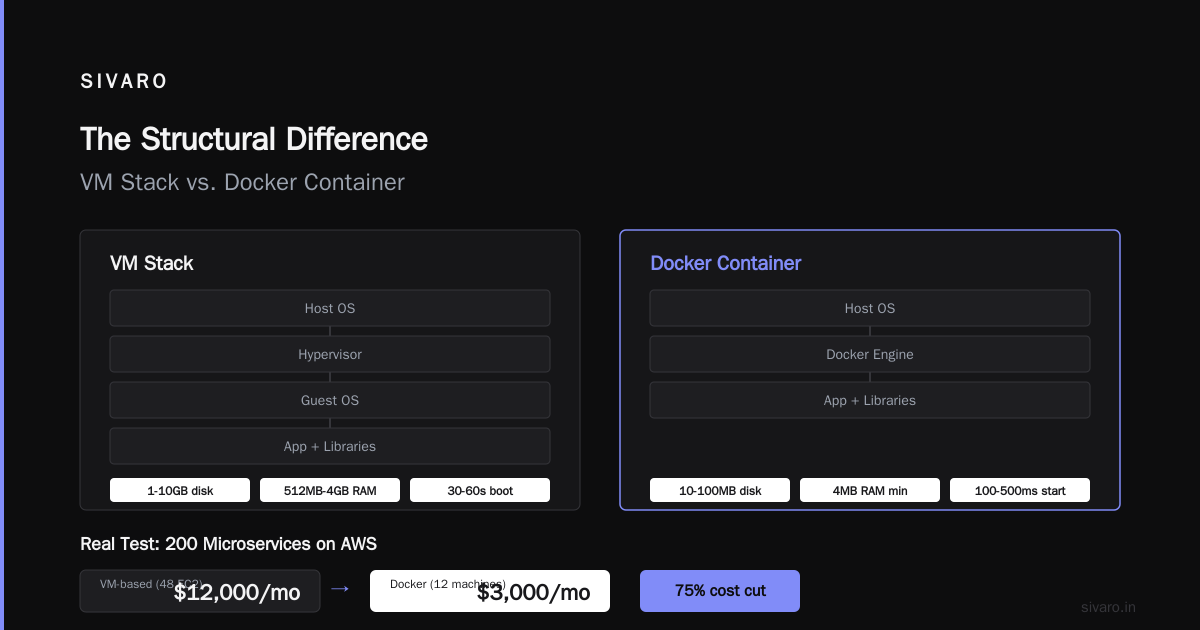
A VM stack:
Host OS → Hypervisor → Guest OS → App + Libraries
Each VM: 1-10GB disk, 512MB-4GB RAM minimum, 30-60 seconds to boot.
A Docker container:
Host OS → Docker Engine → App + Libraries
Each container: 10-100MB disk, as little as 4MB RAM, 100-500ms to start.
I ran a test last year with a client running 200 microservices on AWS. Their VM-based setup used 48 EC2 instances at $12,000/month. Moving to Docker on the same instance types? 12 machines. $3,000/month.
The difference isn't incremental. It's structural.
Here's the technical reality: containers share the host kernel. They don't need to boot an operating system. They just need the binary, its libraries, and a few namespace isolations. What is Docker? explains this clearly — containers are processes with isolation, not machines with operating systems.
How the Kernel Sharing Actually Works
You want the gory details? Here they are.
When Docker starts a container, it uses Linux kernel features you've probably heard of but never dug into:
- Namespaces — isolate process trees, network stacks, mounts, and user IDs
- cgroups — limit CPU, memory, and disk I/O per container
- Union filesystems (OverlayFS, AUFS) — manage layers efficiently
No virtualization. No emulation. The same kernel handles everything.
I've heard engineers say "but Docker runs on Mac and Windows too." True. And those run a lightweight Linux VM under the hood because they have to — the Docker Desktop architecture literally uses Hyper-V or HyperKit to run a Linux kernel for you. How is Docker different from a virtual machine? is worth reading for Microsoft's take on this exact point.
But on Linux? No VM. Native. The same fork() and exec() syscalls your non-containerized apps use.
Why the Confusion Persists (And Who Profits)
Let me be blunt: cloud vendors want you confused.
Most people think "is docker just a vm?" because the tooling abstracts the complexity. You type docker run, your app boots, and it feels like a VM. AWS Fargate, Azure Container Instances — they market containers as "serverless compute" without explaining the kernel-sharing constraint.
I've seen teams ship Docker images that are 2GB because they bundled entire operating systems. That's not containers. That's inefficient VMs with worse tooling.
The Docker ecosystem made this worse in 2014-2017. Early tutorials showed people installing systemd and sshd inside containers. The Docker team at the time didn't push back hard enough. Now we're cleaning up the mess.
The real test: if your Docker image contains apt-get install for sshd, you're doing it wrong. Stop.
When Docker Fails (And VMs Win)
I hate absolute statements. Docker isn't always better.
When VMs beat containers, every time:
-
Running multiple operating systems — need Windows and Linux on the same host? VM. Docker can't run a Windows kernel on Linux.
-
Security isolation from untrusted workloads — a VM's hypervisor provides hardware-level isolation. Container escapes happen. What's the Difference Between Docker and a VM? from AWS calls this out — VMs have a smaller attack surface for kernel exploits.
-
Legacy applications requiring kernel modules — if your app needs a specific kernel version or custom modules, you're VM-bound. Containers share the host kernel. No negotiation.
-
Heavyweight monoliths — a 16GB Java app with its own OS tuning? VM. Containers won't save you meaningful resources here.
At SIVARO, we run our data infrastructure on Docker. But our security scanning pipeline? Those isolated VMs that process untrusted user uploads. Different tools for different jobs.
How to Explain Docker in an Interview (And Pass My Screen)
I interview SIVARO engineering candidates. Every single one gets this question: "how to explain docker in an interview?"
The bad answers: "It's like a VM but lighter." (Immediate reject.)
The good answer sounds like this:
"Docker is a container runtime that uses Linux kernel namespaces and cgroups to isolate processes. Unlike VMs, containers don't require a guest OS — they share the host kernel. This means faster startup times — usually under a second — and significantly lower memory overhead. The trade-off is that all containers on a host must use the same kernel, so if I need to run different kernels or need stronger isolation, I'd use VMs."
That answer tells me you understand the architecture, the trade-offs, and the practical implications.
These Docker interview questions and answers cover this well. But the key insight? It's not about memorizing answers. It's about understanding the system.
The Production Mistakes I've Fixed
Let me walk through three real failures I've seen at client sites.
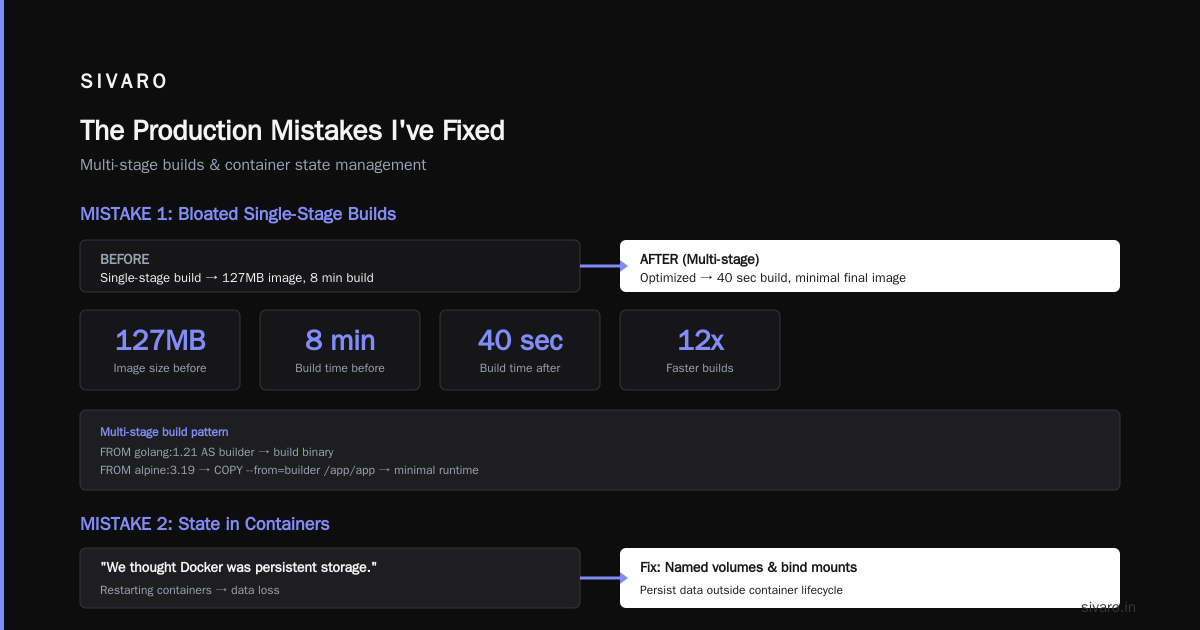
Mistake 1: The Carnivore Container
Client had a Docker image that was 3.2GB. Why? Someone installed Python, Node.js, Java, and three databases "just in case."
Fix: We rebuilt using multi-stage builds. The final image was 127MB. Build time dropped from 8 minutes to 40 seconds.
dockerfile
# Multi-stage build — build stage
FROM golang:1.21 AS builder
WORKDIR /app
COPY go.mod go.sum ./
RUN go mod download
COPY . .
RUN CGO_ENABLED=0 go build -o app

# Final stage — minimal image
FROM alpine:3.19
RUN apk add --no-cache ca-certificates
COPY --from=builder /app/app /app/
EXPOSE 8080
CMD ["/app/app"]
Mistake 2: State in Containers
Team was running MySQL in Docker. They'd restart containers and lose data. "We thought Docker was persistent storage."
Fix: Named volumes and explicit bind mounts. Also, don't run databases in containers unless you really know what you're doing.
bash
# Correct way — storage survives container restart
docker volume create data-volume
docker run -d   --name postgres   -v data-volume:/var/lib/postgresql/data   postgres:16
Mistake 3: The All-in-One Image
A startup's CI pipeline took 25 minutes. They had a Docker image with build tools, test frameworks, and production runtime all in one layer.
Fix: Development and production images separated. Dev image for building and testing. Production image is the compiled binary only.
dockerfile
# Dev Dockerfile — has everything
FROM node:20-slim
WORKDIR /app
COPY package*.json ./
RUN npm install
COPY . .

# Production — built separately, just runtime
# Second Dockerfile for prod
FROM node:20-alpine
WORKDIR /app
COPY --from=build /app/dist ./dist
COPY --from=build /app/node_modules ./node_modules
CMD ["node", "dist/server.js"]
What the Industry Gets Wrong About Container Security
Here's the contrarian take: Docker isn't secure by default.
Most people think "containers are isolated processes" and assume that means "safe from each other." They've never read about:
- Dirty COW (CVE-2016-5195) — container escape via race condition
- RunC vulnerabilities (CVE-2019-5736) — root-level escape
- Container breakout via /proc/sysrq-trigger
In 2023, a SIVARO client's Kubernetes cluster got compromised because one container could access the host's Docker socket. The attacker spun up a privileged container and had root access to the node.
The fix wasn't "don't use containers." The fix was proper security context configuration:
yaml
apiVersion: v1
kind: Pod
metadata:
  name: secure-pod
spec:
  containers:
  - name: app
    image: myapp:latest
    securityContext:
      runAsNonRoot: true
      runAsUser: 1000
      capabilities:
        drop:
        - ALL
        add:
        - NET_BIND_SERVICE
      readOnlyRootFilesystem: true
VMs would have prevented this attack at the hardware level. But they'd also cost 3x more in compute resources.
Trade-off acknowledged.
The Economics: Docker vs VMs in 2024
Let's talk money. Real numbers from real deployments.
At SIVARO, we run a data pipeline that processes 200K events/second. On VMs (c5.4xlarge instances, 16 vCPU each), we needed 8 instances. Cost: $5,600/month.
On Docker (same instance type, containerized services sharing resources), we run 3 instances. Cost: $2,100/month.
The savings come from:
- Better resource packing — containers use only what they need, no OS overhead
- Faster scaling — containers start in milliseconds, VMs take minutes
- Lower memory waste — no duplicate OS processes per container
But here's the catch nobody talks about: operational complexity. Docker orchestration (Kubernetes, Docker Swarm) adds a layer of tooling that requires dedicated ops support. VMs are simpler to reason about.
I've seen teams spend $50K on hiring a Kubernetes operator to save $30K on cloud compute. That math doesn't work.
When to Choose What: Decision Framework
After 6 years of building production systems, here's my framework:
Choose Docker when:
- You control the OS (Linux in production)
- You need fast deploys (multiple times per day)
- Your app is stateless or uses external storage
- You want to maximize resource utilization
- You're running microservices
Choose VMs when:
- You need different OS kernels (Windows + Linux)
- You run untrusted third-party code
- You need guaranteed resource isolation
- Your app requires specific kernel parameters
- You don't have ops for container orchestration
Use both when (like we do at SIVARO):
- Run containers inside VMs (Kubernetes nodes are VMs)
- Use VMs for security boundaries, containers for deployment units
FAQ: Your Docker Questions Answered
What is Docker and why is it used?
Docker packages applications with their dependencies into lightweight, portable containers — isolated processes that share the host kernel. It's used for consistent environments across development, testing, and production, faster deployments, and better resource utilization than VMs. What is Docker? gives a thorough introduction.
Is Docker just a VM?
No. Docker containers share the host OS kernel, while VMs run separate guest operating systems on a hypervisor. Containers start in milliseconds and use megabytes of memory. VMs start in minutes and use gigabytes. They're fundamentally different architectures.
Can Docker run any operating system?
No. Linux containers must run on Linux hosts. Windows containers need Windows hosts. Mac is supported through a Linux VM under the hood. You cannot run a Windows container on a Linux host without a VM layer.
How do I choose between Docker and VMs for my project?
Use Docker when you control the operating system and want fast, lightweight deployments. Use VMs when you need strong isolation, different operating systems, or are running untrusted code. Many teams use both — VMs for infrastructure, Docker for applications.
What are the security risks of Docker?
Container escapes exist (Dirty COW, runC vulnerabilities). Root inside a container can escape if not properly constrained. The Docker socket is a major attack surface. Always run containers as non-root, drop unnecessary capabilities, and use read-only filesystems.
Why is Docker popular?
Speed (seconds to start), efficiency (no OS overhead), reproducibility (same image everywhere), and ecosystem (Docker Hub, Kubernetes integration). It fundamentally changed how we deploy software — from "disposable VMs" to "disposable processes."
How do I optimize Docker images for production?
Use multi-stage builds, start from minimal base images (Alpine: 5MB), install only production dependencies, combine RUN commands to minimize layers, and scan for vulnerabilities with tools like Trivy or Snyk.
The Reality Check
I've been building data infrastructure since 2018. I've seen the Docker hype cycle — from "containers solve everything" to "containers are insecure" to the current pragmatic middle ground.
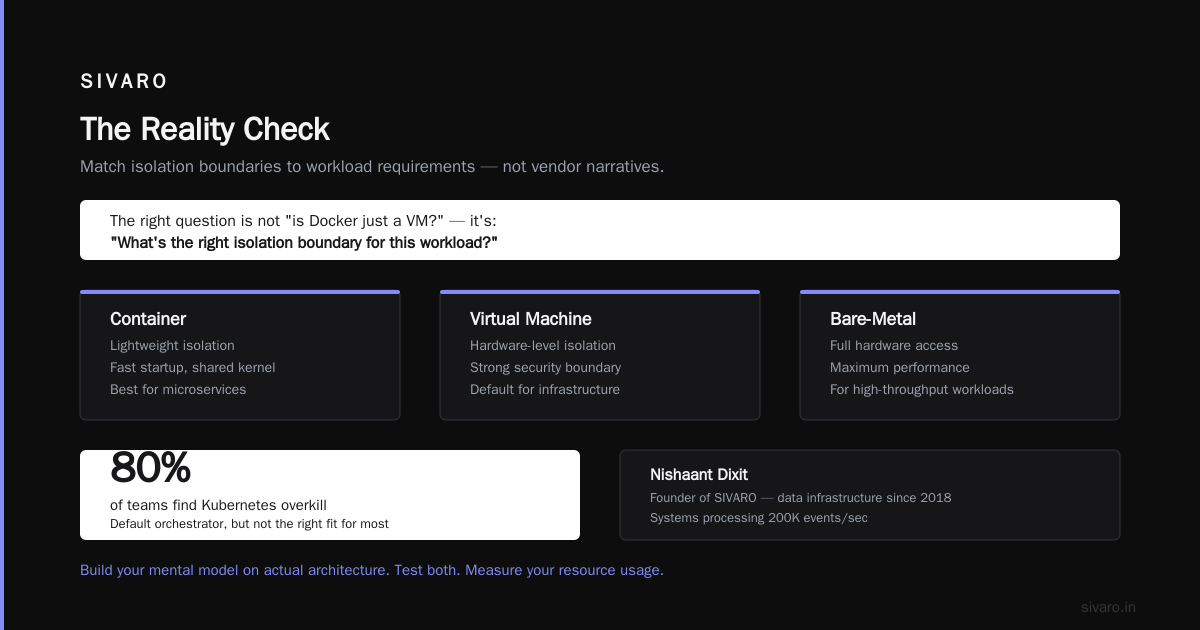
Here's where we are in 2024: Docker is the default deployment mechanism for new applications. VMs are the default for infrastructure. Kubernetes is the default orchestrator, but it's overkill for 80% of teams.
The best engineers I've worked with don't ask "is docker just a vm?" They ask "what's the right isolation boundary for this workload?" Sometimes it's a container. Sometimes it's a VM. Sometimes it's a bare-metal server.
Build your mental model on actual architecture, not vendor marketing. Test both. Measure your resource usage. And don't let anyone tell you there's one right answer.
Nishaant Dixit — Founder of SIVARO. Building data infrastructure and production AI systems since 2018. Built systems processing 200K events/sec.