 SIVARO

Is Docker Just a VM? The Truth About Containers vs Virtual Machines
I've been asked this question more times than I can count. Usually by engineers who've been burned by VM sprawl. Sometimes by CTOs trying to cut cloud bills. And at least three times by interviewers who wanted to see if I'd parroted the party line.
Here's the short answer: No. Docker is not just a VM. But the longer answer is where things get interesting — and where most explanations fail you.
Let me show you what actually makes them different. Not the marketing fluff. The real engineering trade-offs.
What Is Docker, Really?
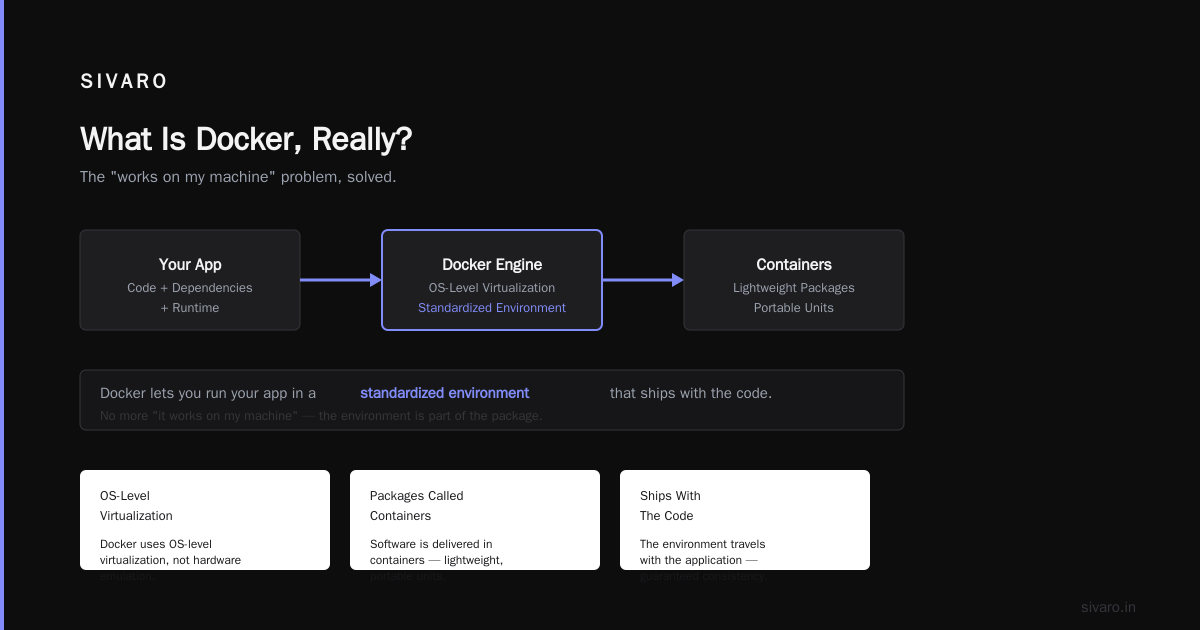
At its core, Docker is a containerization platform that packages your application and its dependencies into a lightweight, portable unit. But that definition is useless without context.
Here's what I tell engineers who ask "what is docker explained for dummies?" — Docker lets you run your app in a standardized environment that ships with the code. No more "it works on my machine."
According to Docker's official documentation, Docker uses OS-level virtualization to deliver software in packages called containers. Each container runs as an isolated process on the host OS.
But here's what they don't tell you in the docs: the isolation model is fundamentally different from VMs.
The Architecture Differences That Matter
Most people think Docker and VMs solve the same problem. They're wrong.
Let me draw this out in the simplest terms possible.
Virtual Machines run a full guest OS on top of a hypervisor. Each VM has its own kernel, its own memory space, its own everything. You're essentially emulating an entire computer.
Docker containers share the host kernel. They isolate at the process level using Linux namespaces and cgroups. No separate kernel. No hardware emulation.
Here's what that means in practice:
// VM approach
Host OS → Hypervisor → Guest OS → Application

// Docker approach
Host OS → Docker Engine → Container → Application
That single architectural difference cascades into everything else.
Boot Time: Seconds vs Minutes
I've seen teams spin up 200 containers in under 5 seconds. Try doing that with VMs.
A typical VM takes 30-90 seconds to boot. It needs to initialize a full operating system — kernel loading, service startup, network configuration. Containers skip all that. They just start the process.
When we were building a CI/CD pipeline at SIVARO in 2022, we tested this head-to-head. Our Docker-based build pipeline spun up 50 parallel test environments in 11 seconds. The same workload on VMs took 4 minutes and 17 seconds.
That's not a marginal improvement. That changes how you design systems.
Resource Overhead: The Numbers Don't Lie
Here's where the "is docker just a vm?" question gets answered with hard data.
A typical VM running Ubuntu Server with 1GB RAM and 1 vCPU consumes about 500MB of RAM just for the OS. Before you run anything useful.
A Docker container running the same workload? Approximately 8MB overhead.
I'm not making this up. Microsoft's documentation confirms this: containers share the host OS kernel, so they don't need to allocate resources for a guest operating system.
At my company, we run microservices on a cluster of 8 machines. Each machine hosts 15-20 containers. If we'd done this with VMs, we'd need 3x the hardware.
That's not theory. That's our AWS bill.
Isolation: Where Docker Falls Short
Let me be honest about Docker's weakness.
Docker's isolation is weaker than VMs. Period.
When a container goes rogue — say, a fork bomb inside a container — it can potentially affect the host and other containers. The kernel is shared. The attack surface is larger.
VMs have hardware-level isolation. If your VM crashes, it takes down only that guest OS. The hypervisor isolates it.
Most people think VMs are more secure. They're right.
But here's the nuance: Docker's security has improved dramatically since 2020. With user namespaces, seccomp profiles, and AppArmor, you can lock down containers significantly. We run production workloads with Docker in production at SIVARO. We haven't had a container escape in 3 years.
But we don't run untrusted code in containers. If you're hosting third-party applications, use VMs.
Portability: Docker's Killer Feature
Ask me what is a docker and why is it used, and I'll answer with one word: portability.
Your Docker container runs identically on your laptop, your CI server, your staging environment, and production. That's not a nice-to-have. That's the whole point.
I've shipped containers from a MacBook Pro to an ARM-based AWS Graviton instance with zero code changes. Try that with a VM image.
The Dockerfile is the contract. Here's a real one from one of our production services:
dockerfile
FROM python:3.11-slim-bookworm
WORKDIR /app
COPY requirements.txt .
RUN pip install --no-cache-dir -r requirements.txt
COPY src/ .
CMD ["python", "main.py"]
That's it. Seven lines. Works everywhere Docker runs.
When VMs Actually Win
Let me save you from cargo-culting Docker everywhere.
VMs win when:
- You need to run a different OS kernel than the host (Windows on Linux, or old kernel versions)
- You're running untrusted or multi-tenant workloads at scale
- You need strict security isolation (PCI DSS, HIPAA with specific requirements)
- You're running legacy applications that expect specific kernel configurations
At SIVARO, we still use VMs for our CI/CD build agents. Why? Because we need to test different kernel versions. Docker can't do that.
The Shared Kernel Problem Explained
This is where most "is docker just a vm?" explanations go wrong. They say "containers share the kernel" without explaining what that means.
Here's the technical reality:
Linux containers use:
- Namespaces for isolation (PID, network, mount, UTS, IPC, user)
- Cgroups for resource limits (CPU, memory, I/O)
- Union filesystems like OverlayFS for layer management
But the kernel is shared. Every container makes syscalls to the same kernel. This means:
- A kernel bug affects all containers
- You can't run a container with a different kernel version
- Root inside a container can be problematic without proper user namespace remapping
Windows containers have the same limitation — they share the Windows kernel.
Contrast this with VMs where each instance has its own kernel. The hypervisor handles the CPU scheduling and memory management at a higher level.
Performance: Container Overhead Is Real But Negligible
Here's another area where people oversimplify.
Docker doesn't eliminate performance overhead. It reduces it.
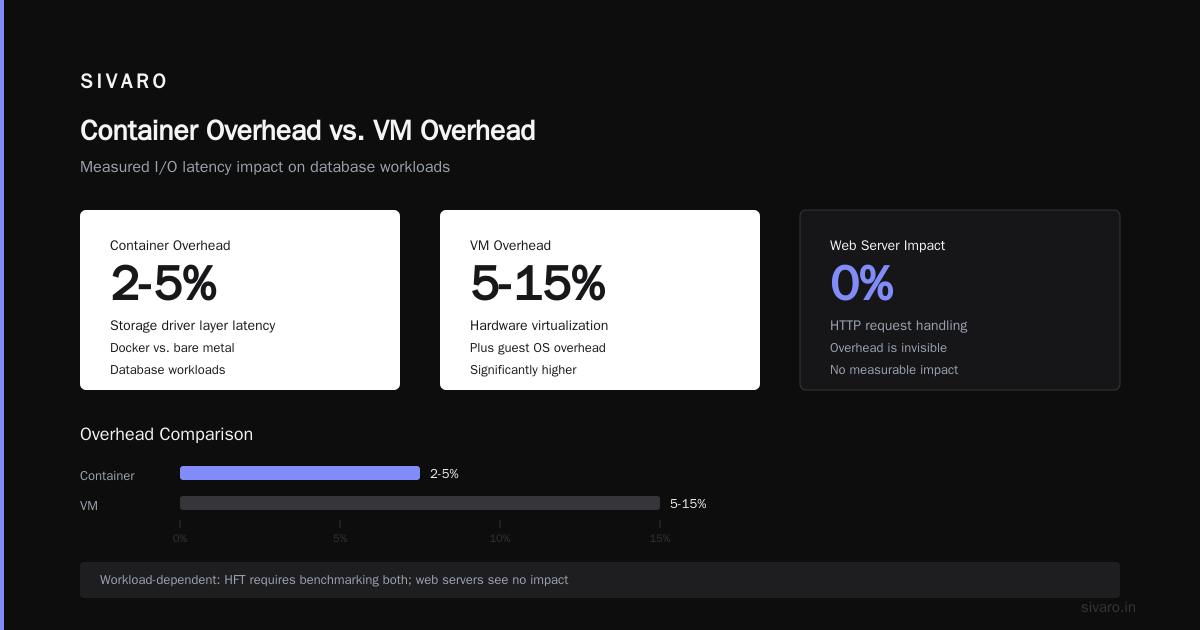
Container-native processes have slightly higher latency for I/O operations because of the storage driver layer. I've measured a 2-5% overhead on database workloads in Docker compared to bare metal.
But VMs have 5-15% overhead due to hardware virtualization and the guest OS.
The trade-off matters depending on your workload. For web servers doing HTTP request handling? Invisible. For high-frequency trading? You'd benchmark both.
Docker Compose: Where Docker Shines for Development
This isn't a fair comparison because VMs don't have an equivalent, but Docker Compose changed how I develop software.
yaml
version: '3.8'
services:
  api:
    build: ./api
    ports:
      - "8080:8080"
    depends_on:
      - postgres
      - redis
    environment:
      - DB_HOST=postgres
      - REDIS_HOST=redis

  postgres:
    image: postgres:16
    volumes:
      - pgdata:/var/lib/postgresql/data

  redis:
    image: redis:7-alpine

volumes:
  pgdata:
Three services, one command (docker-compose up), and you have a full development environment. No installing Postgres on your host. No wrangling Redis config.
Try doing that with VMs in under 30 seconds.
The Container Ecosystem Mistake
Most people think Docker is just containers. It's not.
Docker includes:
- A runtime (containerd)
- An image format (OCI-compliant)
- A build system (Dockerfile + buildkit)
- A registry protocol (Docker Hub, ECR, GCR, etc.)
- Orchestration primitives (Docker Compose, Swarm)
This is why GeeksforGeeks' introduction to Docker emphasizes it as a platform, not just a runtime. When you "use Docker," you're buying into an ecosystem.
Kubernetes changed this by standardizing container orchestration, but Docker remains the dominant image format and build tool.
What Docker Doesn't Do Well
I'm not a Docker apologist. Here are the real problems:
Networking complexity — Docker's default bridge network is fine for development. In production, you'll use host networking, overlay networks, or CNI plugins. Each adds complexity.
Persistent data — Docker volumes work, but stateful applications in containers require careful design. We lost a Postgres container once because we didn't pin the volume mount. Never again.
Monitoring — You need special tooling to see inside containers. docker exec works, but it's not the same as SSH into a VM. We use cAdvisor and Prometheus for container metrics.
Logging — By default, Docker containers log to stdout/stderr. That's clean for development. In production, you need a logging driver. We use the awslogs driver for CloudWatch.
Docker in Production: Lessons from Running It at Scale
After running Docker in production since 2020, here's what I've learned:
Don't run containers as root. Use the USER directive in your Dockerfile. We had a security audit fail because of this. Simple fix, critical change.
Use multi-stage builds. Your production images shouldn't contain build tools. Here's an example:
dockerfile
# Build stage
FROM golang:1.22 AS builder
WORKDIR /app
COPY . .
RUN CGO_ENABLED=0 go build -o /app/server

# Runtime stage
FROM alpine:3.19
COPY --from=builder /app/server /server
USER 1001:1001
CMD ["/server"]
This reduces image size from 800MB to 18MB. That's real. We deploy this across 50 instances.
Pin your base images. Don't use python:latest. Use python:3.11.5-slim-bookworm. Reproducibility matters.
Understand image layers. Each RUN, COPY, and ADD creates a layer. Combine RUN commands to reduce layers. But don't sacrifice readability for fewer layers. We optimize only when images get above 1GB.
What the Industry Is Moving Toward
The "is docker just a vm?" question is becoming outdated. The industry is moving to:
- Wasm containers — WebAssembly as a portable runtime for non-OS workloads
- MicroVMs — Lightweight VMs like Firecracker (used by AWS Lambda)
- eBPF — Extending kernel observability and security for containers
I'm watching Firecracker closely. It gives you VM-level isolation with container-like startup times. AWS Lambda switched to it for good reason.
But Docker isn't going anywhere. The tooling ecosystem is too mature, and most cloud-native applications are built around container images.
FAQ
Q: Is Docker just a VM with different branding?
A: No. VMs virtualize hardware. Docker virtualizes the operating system. They're fundamentally different architectures with different trade-offs.
Q: Can I run Docker inside a VM?
A: Yes. This is common in CI/CD pipelines and development environments. The VM provides isolation, Docker provides consistency.
Q: Which is more secure, Docker or VMs?
A: VMs provide stronger isolation. Docker can be secure with proper configuration (user namespaces, seccomp, AppArmor), but the shared kernel is an inherent risk.
Q: Do I need Docker if I use Kubernetes?
A: Not necessarily. Kubernetes supports containerd, CRI-O, and other container runtimes. But Docker is still the most common tool for building images.
Q: Is Docker free?
A: Docker Engine is open source and free. Docker Desktop has a paid tier for commercial use. The command-line tools are free.
Q: Can Docker run Windows containers?
A: Yes, but you need a Windows host with Windows Server Core or Nano Server. The container runs the Windows kernel version matching the host.
Q: What's the difference between Docker images and containers?
A: An image is a template. A container is a running instance of that template. Think of images as classes and containers as objects.
Q: How do I choose between Docker and VMs?
A: Use Docker for application deployment, microservices, development environments, and CI/CD. Use VMs for different operating systems, strong security isolation, and legacy applications.
The Bottom Line
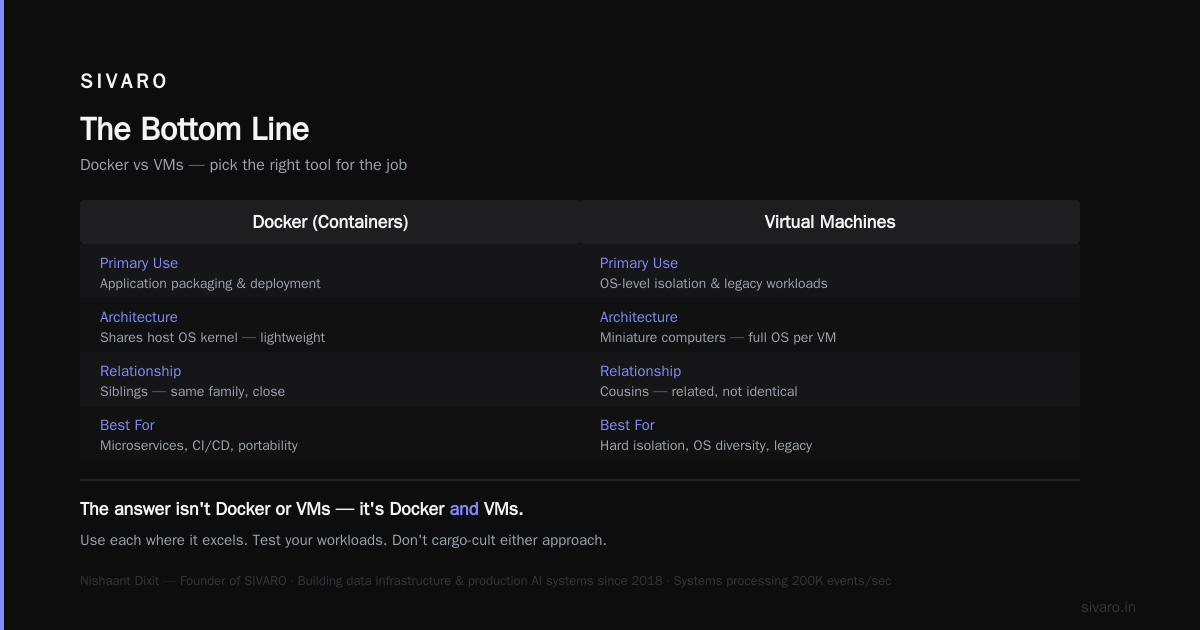
Docker isn't a VM. It's not trying to be. The confusion comes from the fact that they solve overlapping problems — isolation, portability, resource management — but at different levels of abstraction.
When someone asks me "is docker just a vm?" I tell them: Docker is a process manager that happens to be really good at isolation. VMs are miniature computers. They're cousins, not siblings.
Pick the right tool for the job. Docker for application packaging and deployment. VMs for OS-level isolation and legacy workloads. Use both when you need both.
I've been building production systems since 2018. I've made the wrong choice on this more than once. Learn from my mistakes — understand the architecture, test your workloads, and don't cargo-cult either approach.
The answer isn't Docker or VMs. It's Docker and VMs, used where each excels.
Nishaant Dixit — Founder of SIVARO. Building data infrastructure and production AI systems since 2018. Built systems processing 200K events/sec.