 SIVARO
Is Kubernetes the Same as AWS?
I get this question every week. A founder at a Series A startup asks me, "Is Kubernetes the same as AWS?" A CTO at a mid-market company asks the same thing, slightly embarrassed. A junior engineer in our Slack community asks it with genuine confusion.
Here's the short answer: No. They're not the same thing. Not even close.
But here's why the question keeps coming up: the lines blur. Hard. AWS runs a managed Kubernetes service called EKS. Kubernetes runs on AWS. AWS sells compute, storage, and networking — and Kubernetes orchestrates all of that. The two are tangled so tightly that newcomers (and even some veterans) can't tell where one ends and the other begins.
I'm Nishaant Dixit, founder of SIVARO. I've spent the last 7 years building data infrastructure and production AI systems. We run Kubernetes on AWS, GCP, and bare metal. We've also helped companies leave Kubernetes. I've seen the confusion firsthand.
This guide will clear that up. You'll learn what each thing actually is, why people confuse them, and — most importantly — whether you need either one.
Let me start with a story.
How I Got Here: The "Is This AWS or Kubernetes?" Moment
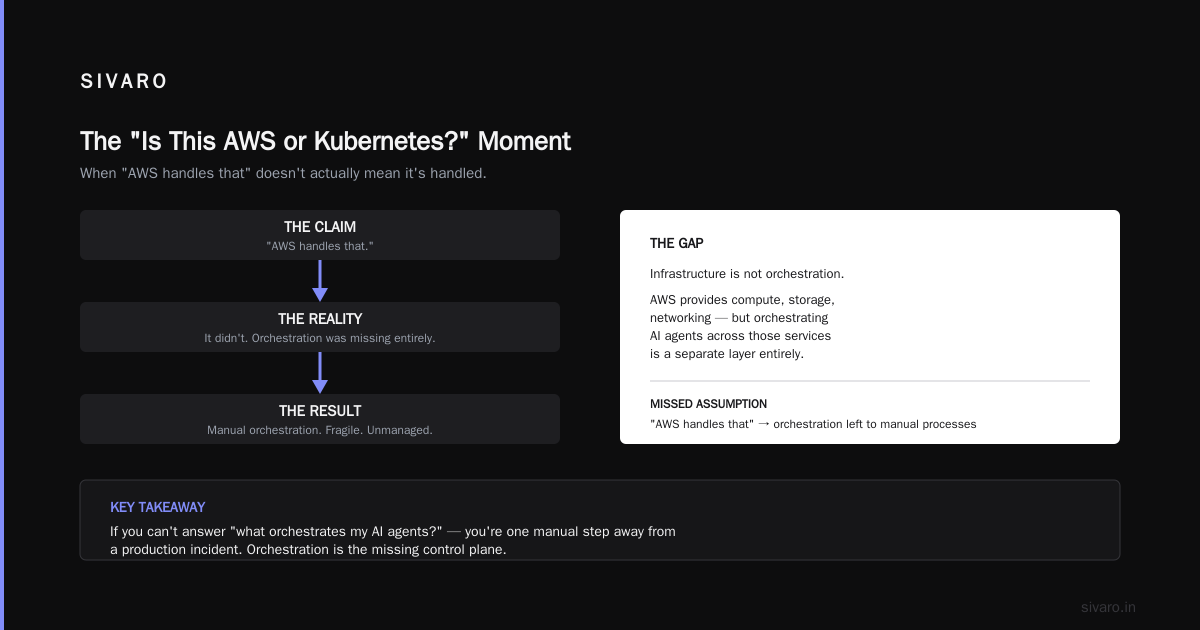
In 2019, SIVARO was helping a fintech company migrate their ML pipeline from a monolith to microservices. The CTO, smart guy, told me: "We're moving everything to AWS. We bought three reserved instances, and we're using Lambda for the API layer."
I asked what they were doing for orchestration. He said: "AWS handles that."
It didn't. He had manually SSH'd into EC2 instances to start containers. His "AWS migration" was a manual server deployment with zero automation. He thought AWS was Kubernetes. He thought the "cloud" meant "it just works."
We spent the next month untangling that. I saw then how the confusion starts: AWS is a platform. Kubernetes is a tool that runs on top of that platform. They're in different layers of the stack.
What Exactly Is AWS?
Amazon Web Services is a collection of over 200 cloud services. Compute (EC2), storage (S3), databases (RDS, DynamoDB), networking (VPC), machine learning (SageMaker), and yes — container orchestration (EKS, ECS, Fargate).
AWS sells infrastructure. You rent servers. You rent storage. You rent networking. You pay by the hour or by the gigabyte.
Most people think AWS is "the cloud." They're not wrong — AWS is the dominant cloud provider. But here's the key: AWS is a utility, like electricity. You don't think about how the power plant works. You plug in your appliances.
Kubernetes is not a utility. It's an appliance that happens to be very complex.
What Exactly Is Kubernetes?
Kubernetes is an open-source system for automating deployment, scaling, and management of containerized applications (Kubernetes Overview).
That's the official definition. Here's what it means in practice:
You have containers (Docker, containerd, etc.). You need to run them somewhere. You need to restart them when they crash. You need to scale them up when traffic spikes. You need to load-balance traffic between them. You need to roll out new versions without downtime.
Kubernetes does all of that. It's a control plane that sits on top of your infrastructure — whether that infrastructure is AWS, GCP, Azure, or your own servers in a colo.
Think of it this way: AWS gives you raw building materials (bricks, steel, wiring). Kubernetes gives you a blueprint and a robotic foreman that builds and maintains the structure.
Why People Ask "Is Kubernetes the Same as AWS?"
Three reasons.
Reason 1: AWS sells Kubernetes. Elastic Kubernetes Service (EKS) is a managed Kubernetes offering. You click a button, and AWS spins up a cluster. The control plane is managed by AWS. The worker nodes run on EC2. You pay for both. It feels like an AWS service — but it's still Kubernetes under the hood.
Reason 2: Most Kubernetes knowledge is AWS-specific. When you learn Kubernetes, almost every tutorial assumes you're on AWS. "Create a LoadBalancer service and it provisions an ELB." "Use EBS for persistent volumes." "IAM roles for pod identities." You learn Kubernetes through AWS. It's hard to separate them.
Reason 3: The phrase "Kubernetes in the cloud" gets sloppy. People say "we run Kubernetes in AWS" and another person hears "we run AWS." The blur is real.
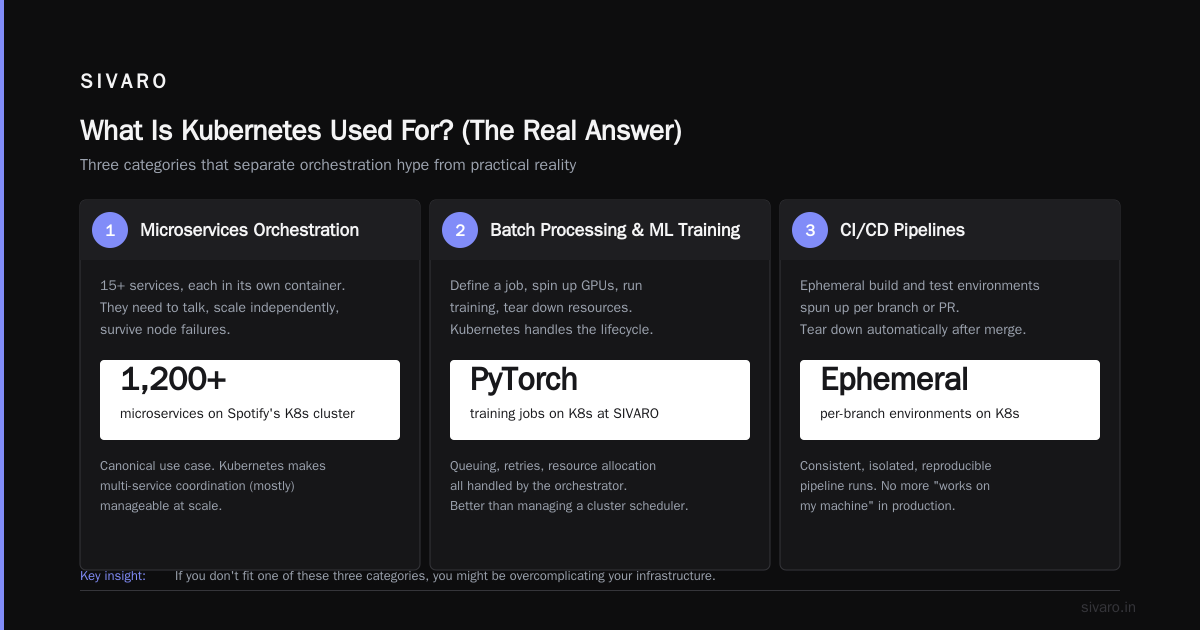
What Is Kubernetes Used For? (The Real Answer)
Three categories.
Category 1: Microservices orchestration. You have 15 services, each in its own container. They need to talk to each other, scale independently, survive node failures. Kubernetes makes this (mostly) manageable. Spotify ran 1,200+ microservices on Kubernetes. That's the canonical use case.
Category 2: Batch processing and ML training. We run PyTorch training jobs on Kubernetes at SIVARO. You define a job, it spins up GPUs, runs the training, tears down the resources. Kubernetes handles queuing, retries, resource allocation. Better than managing a cluster scheduler yourself.
Category 3: CI/CD pipelines and ephemeral environments. Spin up a full environment for each pull request. Run tests. Destroy it. Kubernetes makes this cheap and fast. GitLab, for example, runs 10,000+ Kubernetes pods daily just for CI.
That's what it's used for. The Red Hat Kubernetes overview says it's "a portable, extensible, open-source platform for managing containerized workloads and services." That's accurate but vague. The reality is: Kubernetes is a container operating system for your data center.
Is Netflix Using Kubernetes?
I love this question because the answer surprises people.
No. Netflix does not use Kubernetes for their core streaming infrastructure.
Netflix runs on AWS. They use their own internal system called Titus. Titus is a container orchestration platform built by Netflix engineers. It runs on top of EC2 and integrates deeply with AWS services.
Why didn't Netflix use Kubernetes? Because Kubernetes didn't exist when they built Titus. Kubernetes v1.0 came out in 2015. Netflix had been running containers in production since 2012. By the time Kubernetes was stable, Netflix had invested millions in their own system.
But here's the interesting part: Netflix now runs some workloads on Kubernetes. Their data pipeline team uses Kubernetes for batch processing. Their ML infrastructure uses Kubernetes for training jobs. The core streaming pipeline? Still Titus.
The lesson: even at Netflix scale, the question isn't "Kubernetes or not." It's "which workloads benefit from Kubernetes and which don't."
When You Should NOT Use Kubernetes
I built a rule at SIVARO: If you can run it on a single server, don't use Kubernetes.
That sounds obvious. But teams keep ignoring it.
Let me be blunt: Most companies don't need Kubernetes. I've seen startups with 3 engineers spend 6 months setting up clusters. I've seen mid-market companies with 50 microservices burn their entire engineering velocity on cluster maintenance.
Here's my test: Do you have 10+ services that need independent scaling? Do you have multiple teams deploying independently? Do you need to run the same software in multiple environments (dev, staging, prod)? If the answer to all three is no, skip Kubernetes.
Ona, a digital health company, left Kubernetes in 2023. They said: "Kubernetes was adding complexity without adding value." They moved back to simpler infrastructure. That's honest. Most people won't admit it.
I've seen the same pattern: a team adopts Kubernetes because it's trendy. Six months later, they're drowning in YAML, debugging networking issues, and their developers can't ship code. The complexity tax exceeds the orchestration benefit.
A Practical Kubernetes Example
Let me show you what "using Kubernetes" actually looks like. This is a basic deployment — a web app with 3 replicas, exposed via a load balancer.
yaml
apiVersion: apps/v1
kind: Deployment
metadata:
  name: web-app
spec:
  replicas: 3
  selector:
    matchLabels:
      app: web
  template:
    metadata:
      labels:
        app: web
    spec:
      containers:
      - name: web
        image: nginx:latest
        ports:
        - containerPort: 80
---
apiVersion: v1
kind: Service
metadata:
  name: web-service
spec:
  type: LoadBalancer
  selector:
    app: web
  ports:
  - port: 80
    targetPort: 80
You apply this with kubectl apply -f deployment.yaml. If you're on AWS EKS, the LoadBalancer service provisions an ELB. If you're on GCP GKE, it provisions a TCP load balancer. If you're on bare metal, it... does nothing special, unless you have a MetalLB or similar.
That's Kubernetes. It's a generic abstraction layer. The same YAML runs on any cloud or on-prem.
Now compare that to an AWS-native approach using ECS:
json
{
  "family": "web-app",
  "containerDefinitions": [{
    "name": "web",
    "image": "nginx:latest",
    "portMappings": [{
      "containerPort": 80,
      "hostPort": 0,
      "protocol": "tcp"
    }]
  }],
  "requiresCompatibilities": ["FARGATE"],
  "networkMode": "awsvpc",
  "executionRoleArn": "arn:aws:iam::123456789012:role/ecsTaskExecutionRole"
}
This is AWS-specific. It won't work on GCP. It won't work on-prem. It uses IAM roles, VPC networking, and Fargate — all AWS concepts.
That's the core difference: Kubernetes is portable. AWS-native tools are not.
The Cloud Provider Lock-In Debate
Most people think Kubernetes solves vendor lock-in. They're half right.
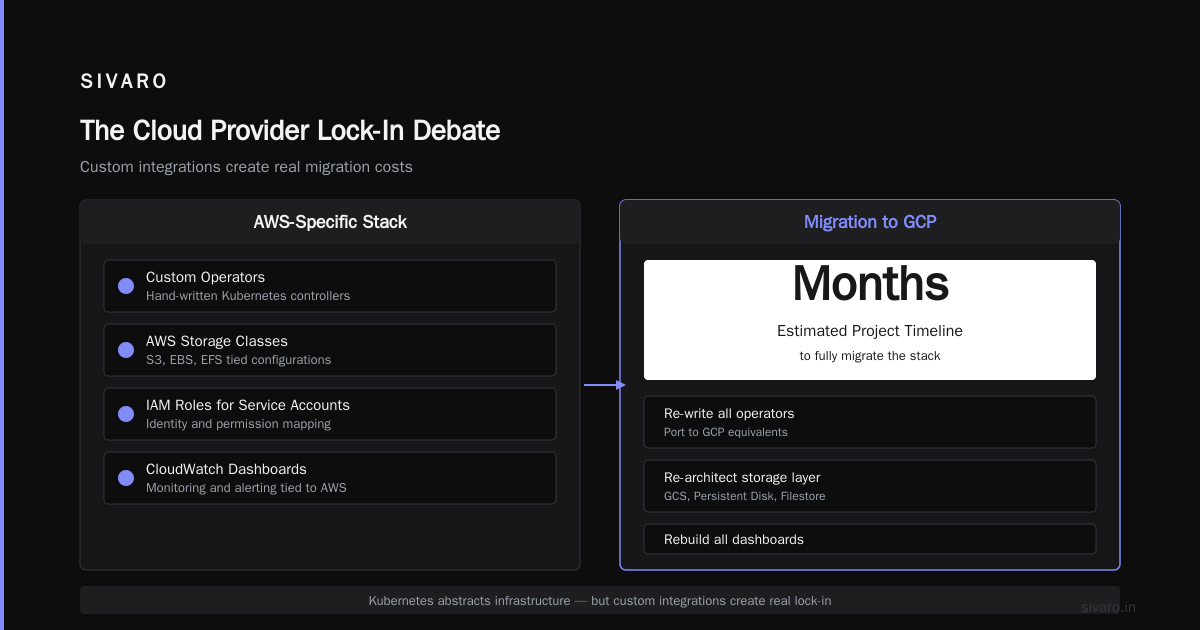
If you run Kubernetes on AWS EKS, you CAN move to GCP GKE. The Kubernetes API stays the same. Your YAML files don't change. Your container images don't change.
But here's the reality: your team has probably written custom operators, used AWS-specific storage classes, configured IAM roles for service accounts, and built monitoring dashboards tied to CloudWatch. Moving that to GCP is a months-long project.
Cloud Google's Kubernetes overview notes that Kubernetes abstracts the infrastructure layer. That's true. But the operational abstractions — monitoring, logging, networking, security — are still cloud-specific.
At SIVARO, we recommend this: Use Kubernetes for portability at the deployment level. Accept that your operational tooling is cloud-specific. That's the honest middle ground.
The Complexity Curve of Kubernetes
Let me be direct: People hate Kubernetes for good reasons.
The complexity curve is brutal. For the first 20 pods, Kubernetes is overkill. For 200 pods, it's manageable. For 2,000 pods, you need a dedicated platform team.
Here's what I've seen break teams:
Networking messes. Calico, Cilium, Flannel. Service meshes (Istio, Linkerd, Consul). Ingress controllers (NGINX, Traefik, HAProxy). Each layer adds config surface area. One misconfigured network policy and your services can't talk to each other. Debugging that at 2 AM is not fun.
Storage complexity. Persistent volumes, persistent volume claims, storage classes, CSI drivers. In AWS, that means EBS, EFS, or FSx. Each has different performance characteristics and pricing models. One wrong choice and your database runs 10x slower.
Resource allocation games. CPU and memory requests vs. limits. Priority classes. Pod disruption budgets. Horizontal pod autoscaling. Cluster autoscaling. If you get requests wrong, either you waste money or your pods get OOM-killed.
The YouTuber who asked "Do You Actually NEED Kubernetes?" got it right: Kubernetes solves problems you don't have until you have them. And by then, it's too late to switch.
When Kubernetes Makes Sense
I'm not anti-Kubernetes. I've built production systems on it for half a decade. When it fits, it's transformative.
You should use Kubernetes if:
You have multiple teams deploying independently. Each team needs to ship containers without stepping on each other. Kubernetes namespaces, RBAC, and resource quotas make this work.
You need to run workloads across multiple environments with consistency. Dev, staging, canary, prod — same YAML, different config. Kubernetes environments (namespaces, contexts, kustomize overlays) enforce that consistency.
You're running ML training at scale. We run PyTorch jobs on Kubernetes with GPU partitioning. Each training run gets its own set of GPUs, and Kubernetes handles queuing and preemption. Without Kubernetes, we'd be managing a custom scheduler. That's not worth it.
You need to survive node failures without human intervention. Kubernetes reschedules pods automatically. On AWS, that means pods move to healthy EC2 instances. Without Kubernetes, you'd need custom scripts to do the same thing.
A More Complex Example: Stateful Workloads
Let's show a stateful set for a database — this is where Kubernetes actually adds value:
yaml
apiVersion: apps/v1
kind: StatefulSet
metadata:
  name: postgres
spec:
  serviceName: postgres
  replicas: 3
  selector:
    matchLabels:
      app: postgres
  template:
    metadata:
      labels:
        app: postgres
    spec:
      containers:
      - name: postgres
        image: postgres:15
        ports:
        - containerPort: 5432
          name: db
        volumeMounts:
        - name: data
          mountPath: /var/lib/postgresql/data
  volumeClaimTemplates:
  - metadata:
      name: data
    spec:
      storageClassName: gp3
      accessModes: [ "ReadWriteOnce" ]
      resources:
        requests:
          storage: 100Gi
This creates 3 PostgreSQL pods, each with its own 100GB EBS volume. Kubernetes handles the ordering: pod-0 starts first, then pod-1, then pod-2. If a pod crashes, it gets the same volume reassigned.
On AWS without Kubernetes, you'd have a multi-AZ RDS instance. That's easier. But it costs more. And you can't run custom extensions or tuning. Kubernetes gives you control at the cost of operational complexity.
The "Is Kubernetes the Same as AWS?" Decision Framework
Here's the framework I use with clients:
If you have 0-5 microservices: Don't use either Kubernetes or AWS-specific container tools. Use a single server with Docker Compose. Or use a PaaS like Heroku or Railway. You'll move faster.
If you have 5-20 microservices: Use ECS Fargate. It's simpler than Kubernetes. It's integrated with AWS. It handles scaling and deployments without the YAML hell. I've built systems on ECS that handle 10,000 requests/second. It works.
If you have 20+ microservices, multiple teams, or ML workloads: Use Kubernetes. But only if you have at least one engineer who understands it deeply. Don't learn Kubernetes by running production on it. That ends badly.
The Reddit thread asking about the main reason to use Kubernetes had a consistent answer: "Standardization." If you need one standard way to deploy, operate, and scale all your services across any environment, Kubernetes provides that. But you pay for it with complexity.
The Philosophical Difference
AWS is a business. It sells services. It wants you to use more services. It makes money when you do.
Kubernetes is a project. It's maintained by CNCF. It wants you to have a consistent API across any infrastructure. It doesn't care how much you spend.
That's the deepest difference: AWS wants to own your stack. Kubernetes wants to provide a common language.
When you use ECS, you're locked into AWS. The API is proprietary. The concepts are AWS concepts. Moving to GCP means rewriting everything.
When you use Kubernetes, you can move. The API stays the same. The concepts are generic. The storage backend changes (EBS to Persistent Disk), the networking changes (VPC to VPC), but the pod definition is identical.
But let's be real: most teams don't move clouds. The portability argument is theoretical for 90% of companies. You'll never migrate from AWS to GCP. So the question becomes: do you want the abstraction layer, or do you want the simpler AWS-native tools?
My Recommendation (Updated 2025)
At SIVARO, we've been through this cycle three times.
First, we used Kubernetes on AWS EKS. It worked. It was complex. Our team spent 30% of their time on cluster operations.
Second, we tried ECS Fargate for a new project. It was simpler. Deployments were faster. But we hit limits with custom networking and storage.
Third, we went back to Kubernetes — but with a managed control plane and a dedicated platform team. That's our current setup.
Here's what I'd tell you today:
For most companies, the answer to "is Kubernetes the same as AWS?" is no — and you shouldn't care about the distinction. Pick the simplest thing that works.
For a startup with 10 engineers, that's ECS Fargate or a PaaS. For a mid-market company with 50 engineers and ML workloads, that's Kubernetes on EKS or GKE. For an enterprise with 500 engineers and multiple clouds, that's Kubernetes everywhere with a platform team.
Don't confuse the tool with the platform. Don't adopt Kubernetes because it's trendy. Adopt it because you need its specific features — and you have the team to run it.
FAQ
Q: Is Kubernetes the same as AWS?
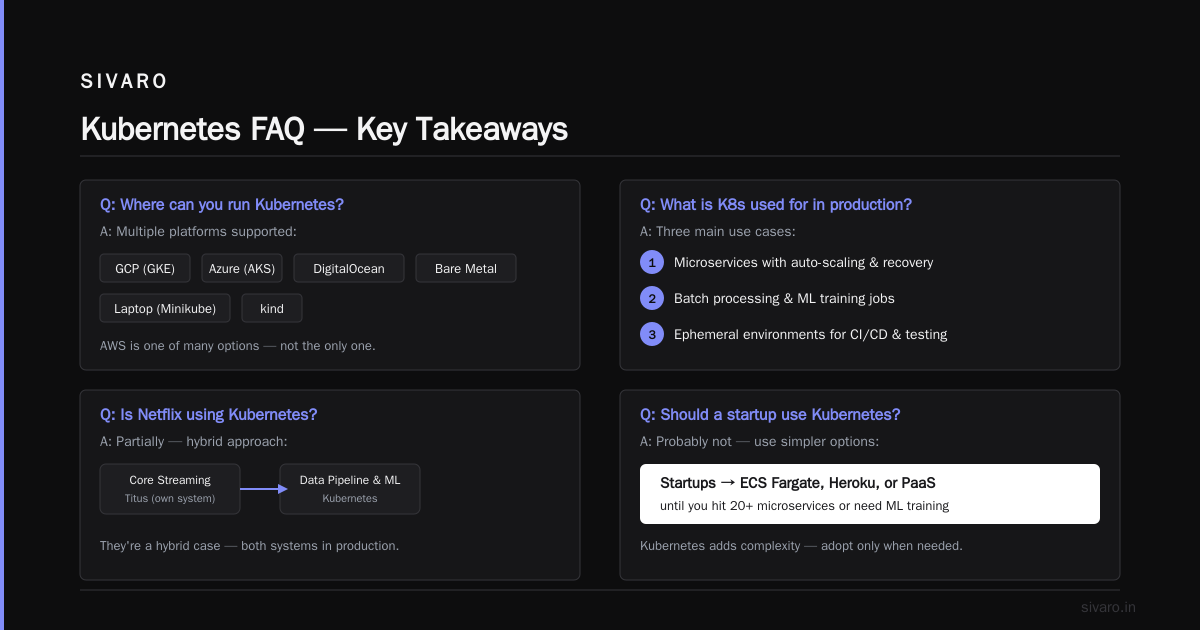
A: No. Kubernetes is an open-source container orchestration platform. AWS is a cloud computing provider. AWS offers a managed Kubernetes service called EKS, but Kubernetes itself runs on any cloud or on-prem.
Q: Can you use Kubernetes without AWS?
A: Yes. You can run Kubernetes on GCP (GKE), Azure (AKS), DigitalOcean (DOKS), bare metal (kubeadm), or even your laptop (Minikube, kind). AWS is one of many options.
Q: What exactly is Kubernetes used for in production?
A: Three main things: 1) Running microservices with automated scaling and recovery. 2) Batch processing and ML training jobs. 3) Ephemeral environments for CI/CD and testing.
Q: Is Netflix using Kubernetes?
A: Partially. Netflix uses their own container orchestration system (Titus) for core streaming, but uses Kubernetes for data pipeline and ML training workloads. They're a hybrid case.
Q: Should a startup use Kubernetes?
A: Probably not. Startups should use ECS Fargate, Heroku, or a PaaS until they hit 20+ microservices or need ML training infrastructure. Kubernetes will slow you down early.
Q: Does Kubernetes reduce cloud costs?
A: Sometimes. Kubernetes can improve resource utilization through bin-packing and autoscaling. But the operational overhead (engineering time, monitoring, cluster management) often outweighs the savings.
Q: What's the hardest part of Kubernetes?
A: Networking and storage. Service meshes, ingress controllers, network policies, and persistent volume management are complex. Debugging these issues requires deep expertise.
Nishaant Dixit — Founder of SIVARO. Building data infrastructure and production AI systems since 2018. Built systems processing 200K events/sec.