 SIVARO

Is Kubernetes the Same as Docker? No, and Here’s Why That Confusion Costs You
I got this question three times last week. Two from founders, one from a CTO who’d already spent $80K on infrastructure that didn’t work.
Is Kubernetes the same as Docker? No. They’re not even the same category of thing. But the confusion isn’t your fault — the industry did a terrible job explaining this.
Here’s the short answer: Docker is a container engine. Kubernetes is a container orchestrator. One builds and runs containers. The other manages hundreds or thousands of them across machines.
But that’s like saying “a brick is different from a blueprint.” Technically true. Practically useless.
In 2018, I watched a startup deploy their entire ML pipeline on Kubernetes because “everyone uses it.” They had three microservices. Total traffic: 200 requests per day. They spent six weeks configuring networking. The Docker Compose setup would’ve taken two hours.
That’s the real cost of this confusion — wasted time, burned budget, overengineered nonsense that solves problems you don’t have.
By the end of this, you’ll know exactly when to use each, when to avoid both, and how to spot the difference without guessing.
What Docker Actually Is
Docker is a tool that packages software into containers. That’s it. It’s not complex. It’s not magical.
A container is just a running process with its own filesystem, isolated from everything else on the host. Docker makes creating, running, and sharing these containers repeatable.
dockerfile
# Dockerfile — the simplest example I can give you
FROM python:3.11-slim
WORKDIR /app
COPY requirements.txt .
RUN pip install -r requirements.txt
COPY . .
CMD ["python", "app.py"]
That’s Docker. You build it with docker build, run it with docker run. Done.
What Docker isn’t: it doesn’t handle scaling, load balancing, service discovery, or failure recovery. It’s a single-host tool. If the machine dies, your container dies.
What Kubernetes Actually Is
Kubernetes is a system for running containers across multiple machines. It decides where each container lives, restarts them when they crash, scales them up under load, and manages network traffic between them.
Here’s the minimum YAML to run one container in Kubernetes:
yaml
apiVersion: apps/v1
kind: Deployment
metadata:
  name: my-app
spec:
  replicas: 3
  selector:
    matchLabels:
      app: my-app
  template:
    metadata:
      labels:
        app: my-app
    spec:
      containers:
      - name: my-app
        image: my-app:latest
        ports:
        - containerPort: 8080
Three replicas. Port 8080. Auto-restart on failure. That’s Kubernetes adding reliability on top of Docker’s packaging.
But notice — this YAML doesn’t do anything with traffic yet. You need a Service and an Ingress controller too. That’s where the complexity lives.
Why People Think They’re the Same
I’ll tell you exactly why.
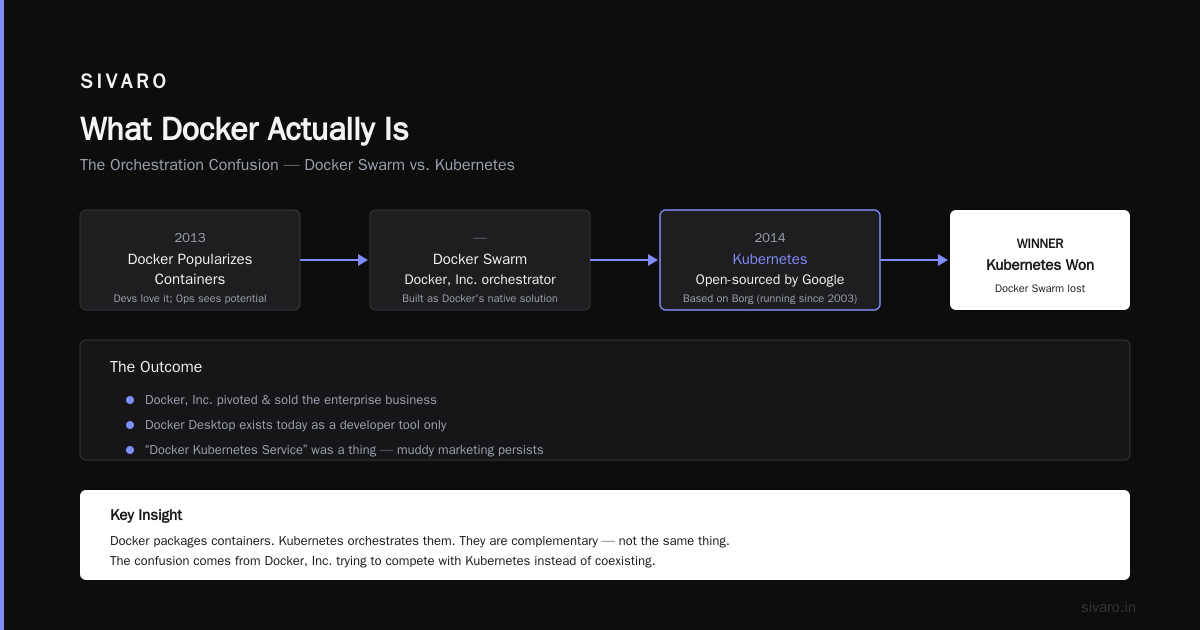
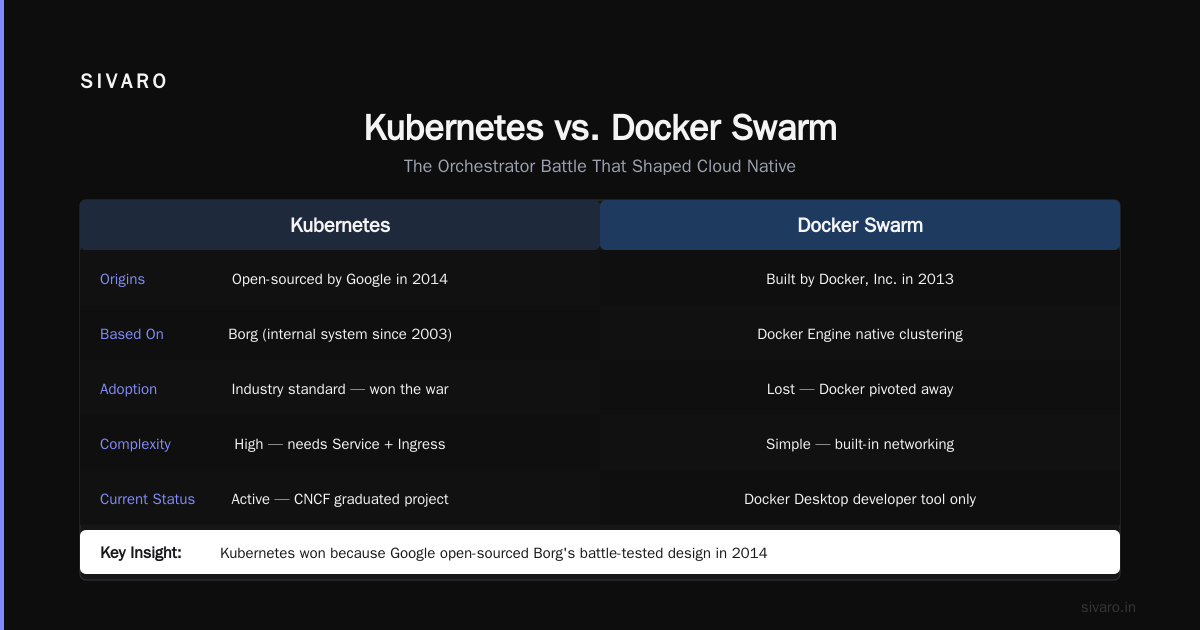
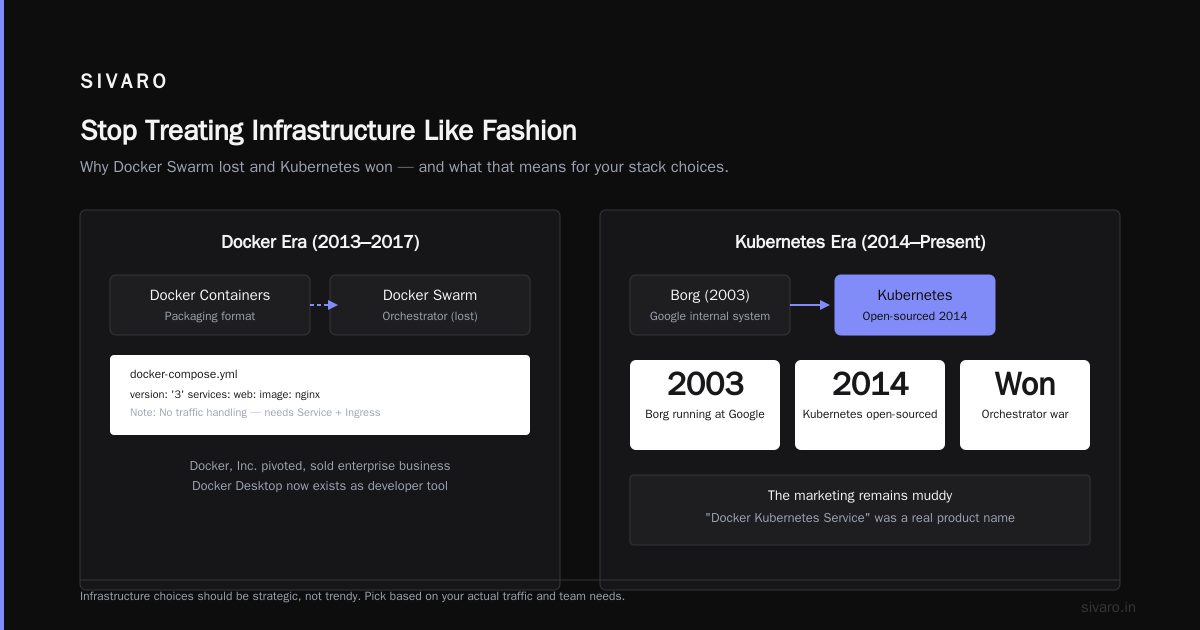
In 2013, Docker popularized containers. Devs loved it. Ops teams saw the potential. Docker, Inc. built Docker Swarm — their own orchestrator. Then Google open-sourced Kubernetes in 2014, based on Borg (their internal system running since 2003).
Kubernetes won. Docker Swarm lost. Docker, Inc. pivoted, sold the enterprise business, and now Docker Desktop exists as a developer tool.
But the marketing remains muddy. “Docker Kubernetes Service” was a thing for a while. Job postings ask for “Kubernetes and Docker” as if they’re two products to compare. They’re not — Kubernetes uses Docker (or containerd or CRI-O) to run containers.
The relationship is simple:
Docker builds the containers. Kubernetes runs them at scale.
That’s it. There’s no “Kubernetes vs Docker” debate unless you’re comparing orchestrators, in which case you mean Docker Swarm vs Kubernetes. And that debate ended in 2018 — Kubernetes won.
What Happens When You Confuse Them
I’ve seen three recurring failure patterns.
Pattern 1: The Kubernetes Honeypot — A team with 2 microservices and no traffic jumps into Kubernetes because “it’s the standard.” They spend 3 months on cluster setup, RBAC, and ingress controllers. Their MVP gets delayed. Their competitor ships first.
Pattern 2: The Docker Desktop Illusion — “We run Docker on our laptops, so Kubernetes in production should be easy.” Wrong. Docker Desktop gives you a single-node Kubernetes cluster. Production Kubernetes is multi-node, multi-region, with persistent storage, Secrets management, and network policies. The gap between local and production is massive.
Pattern 3: The Vendor Lock-in Swerve — One startup I advised in 2022 chose Amazon EKS because “AWS manages Kubernetes.” They didn’t realize they still needed to configure node groups, pod security policies, and VPC CNI plugins. They weren’t running Kubernetes — Kubernetes was running them.
When to Use Docker Only
Simple rule: if your app fits on one machine, you don’t need Kubernetes.
Docker Compose handles multi-container setups beautifully. I use it for:
- Local development environments
- CI/CD test runners
- Small SaaS apps with < 10K users
- Batch processing jobs that run once per day
- Prototypes and MVPs
yaml
# docker-compose.yml — all you need for a small app
version: '3.8'
services:
  web:
    build: .
    ports:
      - "5000:5000"
    depends_on:
      - db
  db:
    image: postgres:16
    environment:
      POSTGRES_PASSWORD: secret
    volumes:
      - pgdata:/var/lib/postgresql/data
volumes:
  pgdata:
That’s 20 lines. It runs. If you need to scale, you increase web replicas to 2. That works until you hit the host machine’s limits — usually around 50-100 containers depending on resource usage.
When to Use Kubernetes
Kubernetes becomes valuable when you cross these thresholds:
- Multiple machines — 3+ servers running containers
- Zero-downtime deployments — can’t take the app down
- Auto-scaling — traffic varies by 10x or more daily
- Microservices — 10+ services that need to find each other
- Stateful workloads — databases, queues, caches (though these are harder)
I helped a fintech company migrate to Kubernetes in 2021. They had 12 microservices, 8 databases, and traffic that spiked 50x on payday. With Docker Swarm, they hit a wall at 20 instances. With Kubernetes, they scaled to 200 without breaking a sweat.
But here’s the catch — their Kubernetes cluster costs $4,000/month in infrastructure alone. Their old setup cost $800. For them, the reliability justified the cost. For you? Maybe not.
The Real Difference: Complexity vs Capability
Kubernetes adds capability. It also adds complexity.
Docker: learn Dockerfile syntax, compose file, 3 CLI commands. Done.
Kubernetes: learn Pods, Deployments, StatefulSets, Services, Ingress, ConfigMaps, Secrets, PersistentVolumeClaims, Namespaces, RBAC, NetworkPolicies, HorizontalPodAutoscalers, and about 40 more objects. Plus you need a cluster — either self-managed or from a cloud provider.
Here’s what a production deployment looks like:
bash
# Deploying to Kubernetes isn't "docker run" — it's a process
kubectl apply -f namespace.yaml
kubectl apply -f configmap.yaml
kubectl create secret generic app-secrets --from-literal=api-key=${API_KEY}
kubectl apply -f deployment.yaml
kubectl apply -f service.yaml
kubectl apply -f ingress.yaml
kubectl rollout status deployment/my-app
Seven steps. Each can fail. Each has security implications.
This isn’t to scare you — it’s to set expectations. If you need Kubernetes, learn it properly. If you don’t need it, save yourself the pain.
Containerd, CRI-O, and the Docker Dependency
Here’s something most articles don’t tell you: modern Kubernetes doesn’t actually require Docker.
In 2021, Kubernetes deprecated Docker as a container runtime. Kubernetes 1.24 removed dockershim entirely.
Today, Kubernetes works with any CRI-compliant runtime — containerd, CRI-O, or Docker (through a shim). Most cloud providers default to containerd because it’s lighter.
Does that matter to you? Not really. You still build containers with Dockerfiles. You still push images to registries. The runtime underneath is an implementation detail.
But it proves the point: Kubernetes is an orchestrator, not a container engine. It doesn’t care how containers are built — it cares how they’re scheduled and managed.
Practical Test: Do You Need Kubernetes?
Ask yourself these three questions:
- Can your app run on a single server? If yes, use Docker Compose.
- Can you tolerate 5 minutes of downtime for deployments? If yes, Docker Compose + load balancer works.
- Are you already handling > 10,000 requests per second? If not, Kubernetes is probably overkill.
I’ve seen teams justify Kubernetes with “but we might scale later.” That’s cargo cult thinking. You don’t build a highway for a bicycle lane. Migrate to Kubernetes when you need it, not before.
FAQ: Is Kubernetes the Same as Docker?
Can you use Kubernetes without Docker?
Yes. Kubernetes works with containerd, CRI-O, and other CRI-compliant runtimes. Docker is optional.
Is Docker Swarm the same as Kubernetes?
No. Docker Swarm is Docker’s own orchestrator. It’s simpler but less capable. Kubernetes has won the orchestrator war.
Do you need to know Docker to learn Kubernetes?
Yes. You need to understand container images, Dockerfiles, and running containers. Kubernetes manages those containers — you need to know what you’re managing.
Is Kubernetes harder than Docker?
Kubernetes is an order of magnitude harder. Docker takes hours to learn. Kubernetes takes months to become productive.
Can you run Docker containers in Kubernetes?
Yes. Kubernetes runs any OCI-compliant container image. Your Docker images work natively.
Is Kubernetes just Docker at scale?
No. Docker is a packaging and runtime tool. Kubernetes is a distributed systems orchestrator. They solve different problems.
Does Kubernetes replace Docker?
No. Kubernetes complements Docker. You build with Docker, orchestrate with Kubernetes.
Is Kubernetes worth learning for small projects?
No. Unless you’re learning for a job or long-term skill, small projects don’t need Kubernetes operational overhead.
My Take: Stop Treating Infrastructure Like Fashion
Kubernetes is popular. Docker is popular. That doesn’t mean both are right for your problem.
I run SIVARO’s data infrastructure on a mix — Docker Compose for development, Kubernetes for production systems that handle 200K events per second. Each tool fits its context.
Most people think “is Kubernetes the same as Docker?” is a technical question. It’s not. It’s a question about understanding what problem you’re solving.
If you’re building a SaaS with 100 users, Docker Compose on a $40/month VPS works fine. I’ve done it. It scales to 10K users before you hit limits.
If you’re building a real-time data pipeline processing millions of events daily, Kubernetes will save you from operational hell. I’ve seen that too.
Choose based on your actual constraints — traffic, team size, downtime tolerance, budget. Not because a blog post or conference talk said Kubernetes is cool.
Is Kubernetes the same as Docker? No. And the sooner you internalize that, the sooner you’ll stop overengineering your infrastructure.
Nishaant Dixit — Founder of SIVARO. Building data infrastructure and production AI systems since 2018. Built systems processing 200K events/sec.