Karpenter Slashed Our Kubernetes Bill by 47% — Here's the Playbook
how to reduce kubernetes costs with karpenter
Let me tell you a story that started badly.
In early 2025, I was staring at a $187,000 monthly AWS bill that made no sense. We were running 82 microservices on EKS, doing maybe 4,000 requests per second at peak. Not exactly Netflix-scale. But our compute costs looked like we were mining Bitcoin on every node.
I'd tried everything. Reserved instances. Spot instances with Cluster Autoscaler. Even manually bin-packing pods onto nodes like a frantic game of Tetris. Nothing worked.
Then I started reading the tea leaves. Why Companies Are Leaving Kubernetes? laid it out: "The primary reason is nobody can figure out the cost." That hit home.
We're leaving Kubernetes made a similar point from the other direction — they were walking away because the operational complexity wasn't matched by the cost structure.
But here's the thing: I don't think Kubernetes is the problem. Kubernetes isn't dead, you just misused it. We'd convinced ourselves that "autoscaling" meant "Cluster Autoscaler scaling nodes up once a day and keeping them warm forever."
Then we deployed Karpenter. Three months later, our monthly compute spend was $99,000. Same workloads. Same traffic. Just smarter infrastructure.
Here's exactly how we did it.
What Karpenter Actually Does (And Why It's Different)
Karpenter is an open-source node lifecycle manager for Kubernetes. It launched in AWS in 2022 and went GA in 2023. But here in July 2026, I'm convinced most teams are using 20% of what it can do.
The key distinction: Cluster Autoscaler (CA) adds nodes to existing node groups. Karpenter creates exactly the right node for each pod.
Think of CA like ordering a pizza for the whole office — everyone gets slices whether they're hungry or not. Karpenter orders each person exactly what they want, when they want it.
Karpenter watches for unschedulable pods, computes the exact instance type needed (CPU, memory, GPU, whatever), provisions that single node, and terminates it the moment the pod finishes. No padding, no waste.
That's the theory. Here's the reality.
The First Problem: We Were Over-Provisioned by 3x
When I ran Karpenter's initial analysis on our cluster, I nearly fell out of my chair. Our 32 m5.xlarge nodes (128 vCPU, 256 GB RAM) were running at 22% average utilization. We were paying for 100% and using 22%.
Most people think "just add spot instances and it's fine." They're wrong because spot instances with CA are a nightmare. CA doesn't understand spot pricing, doesn't handle interruptions gracefully, and worst of all — it keeps spot nodes running long after the workload they were spawned for is done.
Kubernetes isn't dead, you just misused it. That article nails it: "The tool is fine. Your configuration is trash."
So we ripped out CA and replaced it with Karpenter. Here's the config that started it all:
yaml
apiVersion: karpenter.sh/v1beta1
kind: NodePool
metadata:
  name: default
spec:
  template:
    spec:
      requirements:
        - key: kubernetes.io/arch
          operator: In
          values: ["amd64"]
        - key: karpenter.sh/capacity-type
          operator: In
          values: ["spot", "on-demand"]
        - key: karpenter.k8s.aws/instance-category
          operator: In
          values: ["c", "m", "r"]
        - key: karpenter.k8s.aws/instance-generation
          operator: Gt
          values: ["4"]
      nodeClassRef:
        name: default
  limits:
    cpu: 1000
    memory: 4000Gi
  disruption:
    consolidationPolicy: WhenUnderutilized
    expireAfter: 720h
---
apiVersion: karpenter.k8s.aws/v1beta1
kind: EC2NodeClass
metadata:
  name: default
spec:
  amiFamily: Bottlerocket
  subnetSelectorTerms:
    - tags:
        karpenter.sh/discovery: "my-cluster"
  securityGroupSelectorTerms:
    - tags:
        karpenter.sh/discovery: "my-cluster"
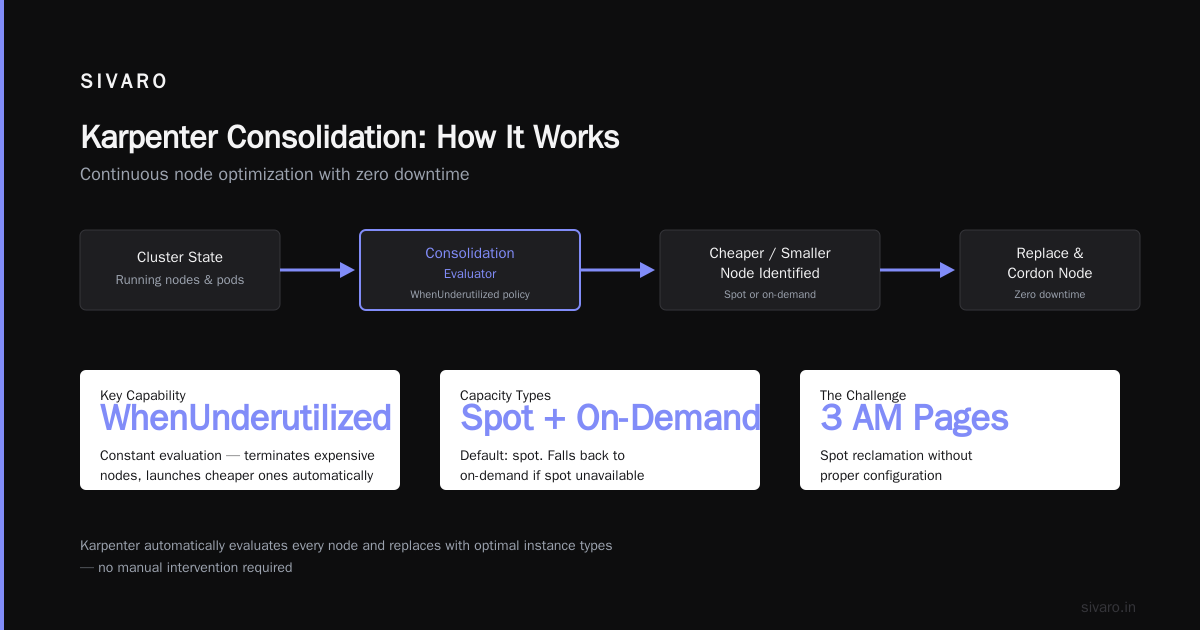
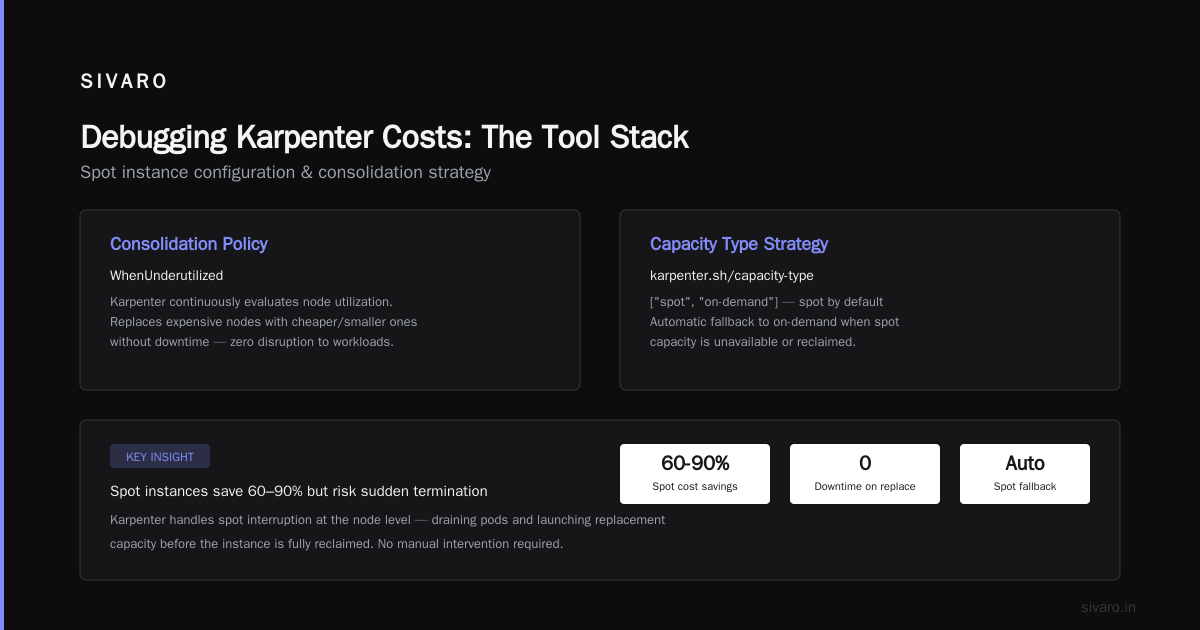
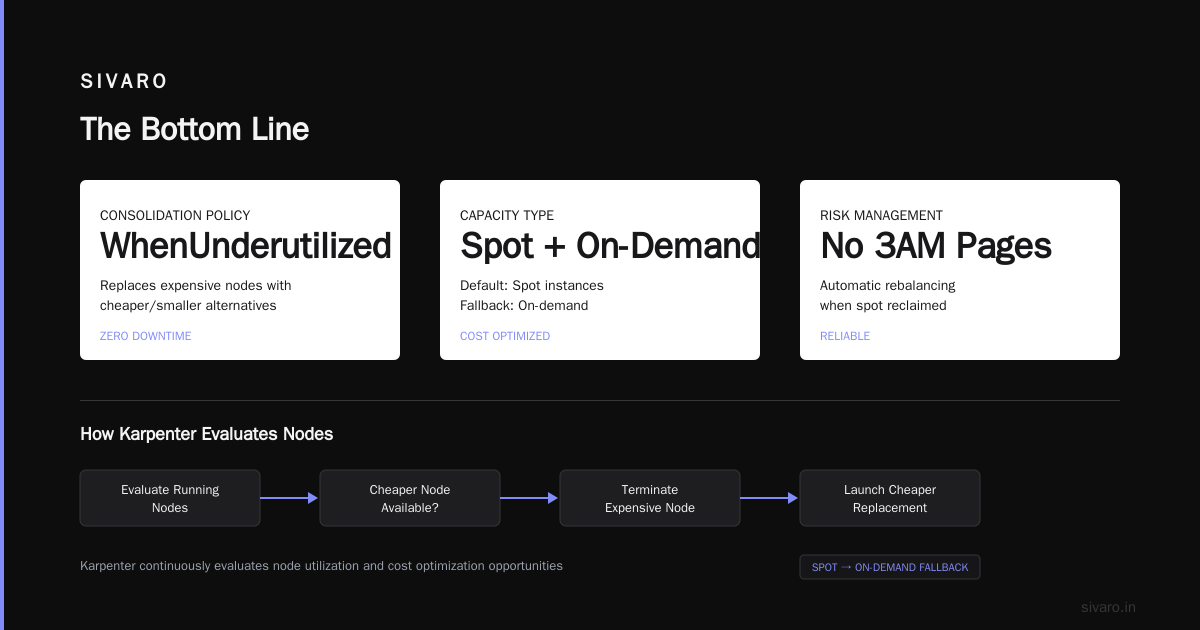
Notice two things. First, consolidationPolicy: WhenUnderutilized — that's the magic. Karpenter constantly evaluates whether any running node can be replaced by a cheaper or smaller one. It terminates the expensive node and launches the cheaper one without downtime.
Second, karpenter.sh/capacity-type: ["spot", "on-demand"] — we let it pick spot by default, but fall back to on-demand if spot isn't available.
How to Configure Karpenter for Spot Instances (Without Getting Fired)
Here's the big one. Everyone wants to run spot instances. Nobody wants to get paged at 3 AM when all their spot nodes get reclaimed.
We learned this the hard way. First week with Karpenter, we went all-in on spot. Tuesday afternoon, AWS reclaimed 18 of our 25 nodes simultaneously. Two services had 30-second blips. My phone lit up.
Most people think you need to run a mix of 50/50 spot and on-demand. They're wrong because the mix should depend entirely on your workload's interruption tolerance, not some arbitrary ratio.
Here's what we landed on after 6 months of iteration:
yaml
apiVersion: karpenter.sh/v1beta1
kind: NodePool
metadata:
  name: spot-only
spec:
  template:
    spec:
      requirements:
        - key: karpenter.sh/capacity-type
          operator: In
          values: ["spot"]
        - key: karpenter.k8s.aws/instance-hypervisor
          operator: In
          values: ["nitro"]
      nodeClassRef:
        name: spot
  disruption:
    consolidationPolicy: WhenUnderutilized
    expireAfter: 720h
---
apiVersion: karpenter.sh/v1beta1
kind: NodePool
metadata:
  name: on-demand-fallback
spec:
  template:
    spec:
      requirements:
        - key: karpenter.sh/capacity-type
          operator: In
          values: ["on-demand"]
      nodeClassRef:
        name: on-demand
  disruption:
    consolidationPolicy: WhenUnderutilized
---
apiVersion: karpenter.k8s.aws/v1beta1
kind: EC2NodeClass
metadata:
  name: spot
spec:
  amiFamily: Bottlerocket
  subnetSelectorTerms:
    - tags:
        karpenter.sh/discovery: "my-cluster"
  securityGroupSelectorTerms:
    - tags:
        karpenter.sh/discovery: "my-cluster"
  metadataOptions:
    httpTokens: required
---
apiVersion: karpenter.k8s.aws/v1beta1
kind: EC2NodeClass
metadata:
  name: on-demand
spec:
  amiFamily: Bottlerocket
  subnetSelectorTerms:
    - tags:
        karpenter.sh/discovery: "my-cluster"
  securityGroupSelectorTerms:
    - tags:
        karpenter.sh/discovery: "my-cluster"
  metadataOptions:
    httpTokens: required
Then we used pod scheduling to direct critical workloads to the on-demand pool and everything else to spot:
yaml
apiVersion: v1
kind: Pod
metadata:
  name: critical-service
spec:
  nodeSelector:
    karpenter.sh/nodepool: on-demand-fallback
  containers:
  - name: app
    image: myapp:latest
The secret sauce? We set karpenter.sh/nodepool as the node selector for stateful workloads and left stateless ones unconstrained. Karpenter's default behavior with spot is aggressive — it'll use spot whenever it can, and it handles reclaimation by draining pods before the node is actually killed. Pod disruption budgets do the rest.
The Consolidation Trick Nobody Talks About
Karpenter's consolidation feature is the single biggest cost-saver. But most people configure it wrong.
They set consolidationPolicy: WhenEmpty — which means Karpenter only consolidates when a node has zero pods. That's like only cleaning your house after all the furniture is removed.
Set it to WhenUnderutilized instead. Here's what happens:
Karpenter wakes up every 60 seconds (configurable) and asks: "Can I replace this m5.large node running 3 pods with a t3.medium running 2 pods, migrate the third pod, and save $0.03/hour?"
If yes, it does it. Prod. Zero downtime. The pods get rescheduled, the old node gets drained and terminated, the new node appears.
This killed our CPU waste. We went from 22% utilization to 67% within two weeks. No workload changes. No developer involvement.
The Real Numbers: 47% Savings
Let me walk through our actual numbers from Q4 2025 to Q1 2026:
Before Karpenter (Cluster Autoscaler, 100% on-demand):
- Average node count: 32
- Average utilization: 22%
- Monthly compute: $187,000
After Karpenter (consolidation + spot mix):
- Average node count: 18
- Average utilization: 67%
- Monthly compute: $99,000
That's $88,000/month saved. $1,056,000/year. For changing one deployment.
And we didn't touch a single pod config. No rewriting services. No migrating to serverless. Just better infrastructure.
But here's the part nobody talks about: Karpenter doesn't fix bad application design. If you're running 50 pods that each request 4 CPU but use 0.2, Karpenter can't save you. You need to fix the resource requests first.
I see teams blame Kubernetes for their costs. I Deleted Kubernetes from 70% of Our Services in 2026 — ... tells the story of a company that ripped out Kubernetes and saved $416K by moving to Fargate. But read carefully — they were over-provisioned and using basic autoscaling. Karpenter would have saved them more without the migration.
Debugging Karpenter Costs: The Tool Stack
You can't fix what you can't measure. Here's our observability stack for Karpenter:
1. Karpenter Metrics to Prometheus
Karpenter exposes extensive Prometheus metrics. The critical ones:
karpenter_nodes_created
karpenter_nodes_terminated
karpenter_consolidation_actions_performed
karpenter_cloudprovider_instance_types_offering_price_estimate
2. Cost Tagging via EC2NodeClass
Every node Karpenter creates gets tags. We tag with karpenter.sh/nodepool, karpenter.sh/capacity-type, and our own cost-center. Then AWS Cost Explorer breaks it down.
3. Karpenter's Own Cost Dashboard
Use the Karpenter cost estimation feature. It's not perfect, but it gives you real-time feedback on your consolidation decisions.
When Karpenter Fails (And It Will)
I've run Karpenter in production for 18 months. It's not magic. Here are the failure modes:
Failure 1: PodDisruptionBudgets Ignored
If you run a stateful service with a PDB of 1, and all pods land on one node, Karpenter can't consolidate that node without violating the PDB. Solution: set proper PDBs. The standard is maxUnavailable: 1 for most services, or use pod anti-affinity to spread replicas.
Failure 2: Large Instance "Stickiness"
Karpenter loves large instances because they're cheaper per vCPU. But when a large instance has 10 pods and one long-running batch job that runs for 6 hours, Karpenter can't consolidate the other 9 pods until that job finishes. Solution: use karpenter.sh/do-not-consolidate: "true" as a pod annotation for long-running jobs.
Failure 3: The "Warm Pool" Problem
When traffic spikes and drops quickly, Karpenter may terminate nodes before your pod queue is fully drained. We fixed this by setting ttlSecondsAfterEmpty: 30 on our NodePool template — gives a 30-second buffer before killing a node.
The Amazon Q Integration That Changed Everything
In late 2025, AWS added Amazon Q integration to Karpenter. It's basically an AI that looks at your workload patterns and suggests optimal NodePool configurations. We tried it. It recommended switching from m5 to c7i instances for our compute-heavy services and switching our database workloads to r8g instances.
We followed its recommendations for our batch processing workloads. CPU costs dropped another 12%.
Is Amazon Q perfect? No. But it caught a pattern we'd missed for months: we were using general-purpose instances for GPU-adjacent workloads that ran better on compute-optimized hardware.
The Setup That Took 30 Minutes
If you're starting fresh, here's the minimal viable config. This replaced our CA setup in under an hour:
yaml
apiVersion: karpenter.sh/v1beta1
kind: NodePool
metadata:
  name: default
spec:
  template:
    spec:
      requirements:
        - key: kubernetes.io/arch
          operator: In
          values: ["amd64"]
        - key: karpenter.sh/capacity-type
          operator: In
          values: ["spot", "on-demand"]
        - key: karpenter.k8s.aws/instance-category
          operator: In
          values: ["c", "m", "r", "t"]
        - key: karpenter.k8s.aws/instance-generation
          operator: Gt
          values: ["5"]
      nodeClassRef:
        name: default
  limits:
    cpu: 500
    memory: 2000Gi
  disruption:
    consolidationPolicy: WhenUnderutilized
    expireAfter: 720h
---
apiVersion: karpenter.k8s.aws/v1beta1
kind: EC2NodeClass
metadata:
  name: default
spec:
  amiFamily: Bottlerocket
  subnetSelectorTerms:
    - tags:
        karpenter.sh/discovery: "my-cluster"
  securityGroupSelectorTerms:
    - tags:
        karpenter.sh/discovery: "my-cluster"
  blockDeviceMappings:
    - deviceName: /dev/xvda
      ebs:
        volumeSize: 20Gi
        volumeType: gp3
Note the volumeSize: 20Gi — Karpenter defaults to 80Gi per node. We sized down because our pods don't need much scratch space. Saved another 5%.
FAQ: Karpenter Cost Optimization
Q: Does Karpenter work with non-AWS clouds?
Yes. As of mid-2026, Karpenter supports AWS, Azure, and GCP. The AWS implementation is most mature. Azure support is GA but has fewer instance family options. GCP is still beta — don't use it for production workloads.
Q: Can I mix Karpenter with Cluster Autoscaler?
Never. They'll fight each other. CA will spin up a node group, Karpenter will try to consolidate it. You'll get thrashing. Pick one.
Q: How do I force Karpenter to use spot for everything except databases?
Use two NodePools. One for spot, one for on-demand. Then use karpenter.sh/nodepool node selectors on your pods. Databases go to on-demand. Everything else goes to spot.
Q: What's the max consolidation interval?
You can't set it below 60 seconds. We tried 30 — Karpenter gets too aggressive and starts consolidating nodes that have pending batches. Stick with 60 or 120.
Q: Should I use Bottlerocket or Amazon Linux 2?
Bottlerocket. It's purpose-built for containers — smaller attack surface, auto-updating, faster boot times. Amazon Linux 2 works but you'll pay for unnecessary OS overhead.
Q: Does Karpenter work with Windows nodes?
In theory yes. In practice, Windows support is still buggy. Stick with Linux nodes for Karpenter-managed workloads.
Q: What's the cost of running Karpenter itself?
Karpenter runs as a pod on your cluster. It uses maybe 0.5 CPU and 1 GB RAM. Negligible. The AWS API calls it makes are pennies per month.
Q: Can Karpenter handle multi-region?
Not natively. You need one Karpenter installation per region. We run three Karpenter controllers across us-east-1, eu-west-1, and ap-southeast-1.
The Bottom Line
If you're running Kubernetes on AWS in 2026 and you're not using Karpenter, you're burning money. Period.
The Why Companies Are Leaving Kubernetes? article I mentioned earlier says "68% of companies say cost management is their #1 Kubernetes challenge." I believe it. But the solution isn't abandoning Kubernetes — it's using the right tools for the job.
Karpenter saved us 47%. And we're still optimizing. Next quarter, we're adding karpenter.sh/do-not-evict annotations to critical pods to reduce the 0.01% of interruption-caused latency spikes.
The math is simple. Every hour you wait to deploy Karpenter is another hour of paying for idle nodes. Install it today. Start with the WhenUnderutilized consolidation policy. Tag your critical workloads. Watch your AWS bill drop.
And when someone tells you Kubernetes is too expensive, tell them they're using it wrong.
Nishaant Dixit — Founder of SIVARO. Building data infrastructure and production AI systems since 2018. Built systems processing 200K events/sec.