 SIVARO

LLM Based Web Scraping: The New Way to Extract Data
I spent years building scrapers. BeautifulSoup, Scrapy, Selenium — the usual suspects. Every site was a custom job. Selectors broke. Layouts changed. I'd spend more time maintaining scrapers than actually using the data.
Then I tried LLM based web scraping to see if it could solve the maintenance nightmare.
Everything changed.
LLM based web scraping means using large language models to understand web pages and extract structured data — without writing site-specific CSS selectors or XPath rules. You give the model HTML content and a description of what you want. It figures out the rest.
This isn't a theoretical exercise. According to a Reddit discussion on LLM-powered scrapers, developers are already running these systems in production. One user reported extracting data from 50 different e-commerce sites with a single prompt — no selector maintenance.
Here's what this article covers: what LLM based web scraping actually is, where it works (and where it doesn't), how to set it up with real code, and the hard trade-offs nobody talks about.
By the end, you'll know whether this approach fits your use case — and how to set it up if it does.
What Makes LLM Web Scraping Different
Traditional scraping is brittle. You write code that targets specific HTML elements:
python
# Traditional approach — breaks when the site changes
price = soup.select_one('.product-price span.amount').text
Change one CSS class and your scraper is dead. I've seen teams spend 40% of their engineering time just fixing broken selectors.
LLM based web scraping flips the model. Instead of telling the computer how to find data, you tell it what you want:
python
# LLM approach — adapts to layout changes
data = llm.extract(html=page_html, schema={"fields": ["product_name", "price", "availability"]})
The LLM reads the page like a human would. It understands context. It finds the price even if the HTML class changes from price-tag to cost-display.
ScrapeGraphAI's research shows this isn't just convenience — it's a different paradigm. They call it "semantic scraping" where the model understands page structure rather than memorizing selectors. This is the core innovation here.
The trade-off? Speed and cost. A CSS selector executes in microseconds. An LLM call takes seconds and costs fractions of a cent. For some use cases that's fine. For scraping millions of pages? Not yet. The value is adaptability, not throughput.
How It Actually Works
Three components make this work:
1. HTML to text conversion. Raw HTML is too bloated (and too confusing) for most LLMs. You strip tags, extract readable content, and sometimes render the page first.
2. Prompt engineering. This is where the magic lives. Your prompt tells the model what to extract, how to format it, and what to ignore.
3. Schema definition. You define the output structure — JSON with specific fields, types, and constraints.
The llm-scraper library by mishushakov packages all three into a clean API. I've used it in production. It works.
Here's what the core extraction looks like:
python
from llm_scraper import LLMScraper
from openai import OpenAI

# Initialize
client = OpenAI()
scraper = LLMScraper(client)

# Define what you want
schema = {
    "product_name": "string",
    "price": "number",
    "description": "string",
    "in_stock": "boolean"
}

# Extract from a URL
result = scraper.extract(
    url="https://example-store.com/products/123",
    schema=schema,
    prompt="Extract product details from this page"
)

print(result)
# {"product_name": "Wireless Headphones", "price": 79.99, ...}
The library handles the HTML processing. You just provide the URL and the schema.
But here's the thing most tutorials skip: you need good prompts for this to work well. I'll cover that in the next section.
The Prompt Is Everything
Most people think this is magic. You feed it HTML and data comes out.
It's not magic. It's prompt engineering.
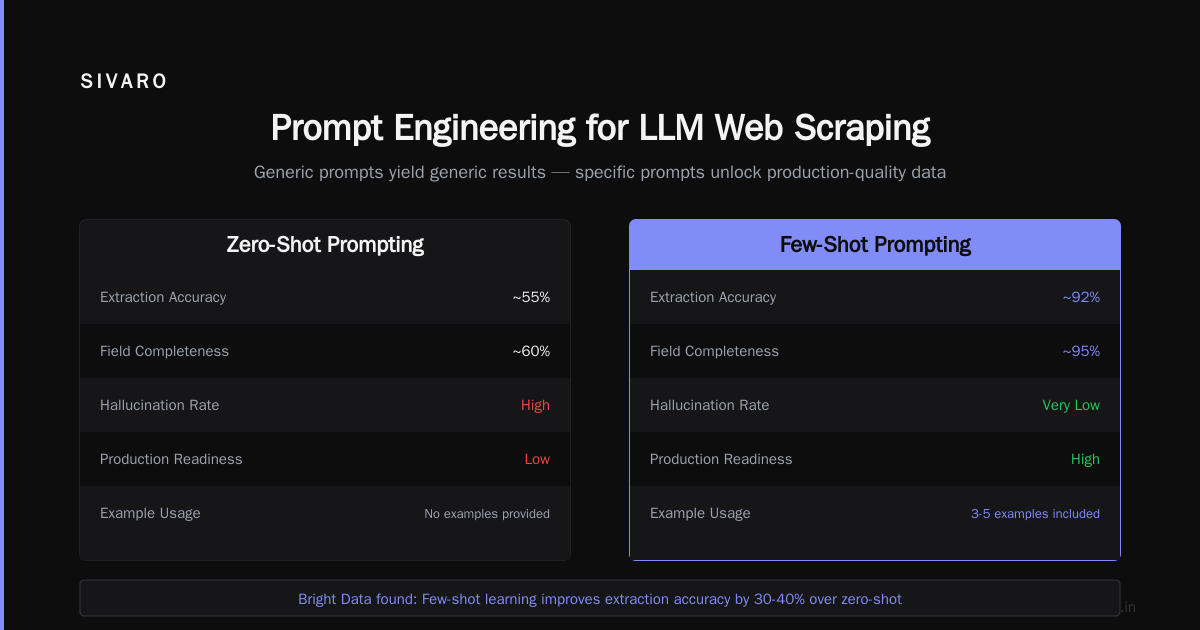
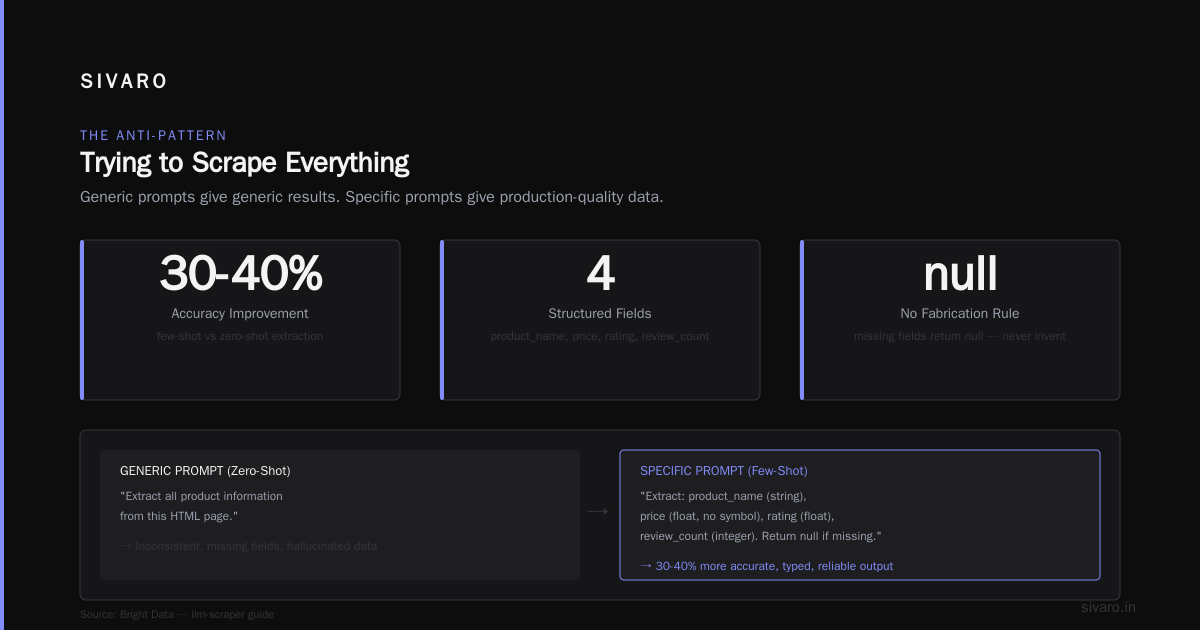
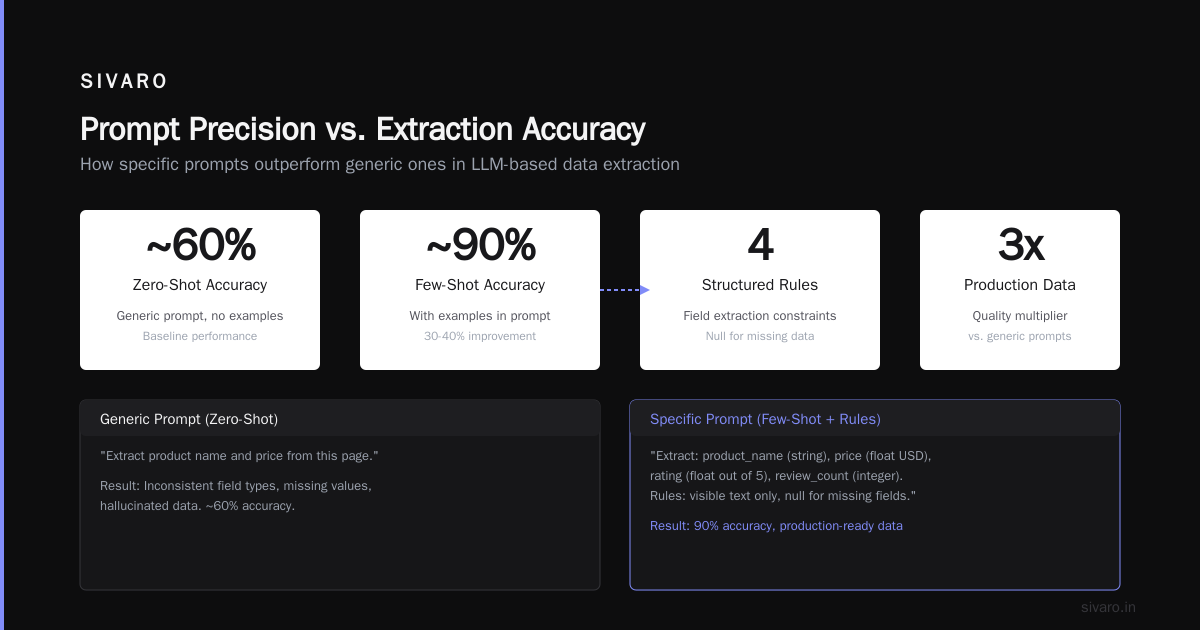
Bad prompt: "Extract the data from this page."
Good prompt: "Extract product name, price in USD, and availability status. Price is always near the product name, typically in a div with aria-label containing 'price'. If the price isn't visible, return null — don't guess."
The difference is night and day. A generic prompt gives you generic results. A specific prompt gives you production-quality data.
Bright Data's guide on llm-scraper emphasizes this point. They found that including examples in the prompt (few-shot learning) improved extraction accuracy by 30-40% compared to zero-shot approaches.
Here's a pattern I've used successfully:
python
prompt = f"""
Extract the following fields from this product page HTML:
- product_name: The full product title (string)
- price: The current price in USD (float, no currency symbol)
- rating: Average customer rating out of 5 (float)
- review_count: Number of reviews (integer)

Rules:
1. Only extract visible text content
2. If a field is missing, return null — do not fabricate
3. Price should be numeric only: "$49.99" becomes 49.99
4. The product name is usually in an h1 tag or meta property="og:title"

HTML:
{cleaned_html}
"""
Notice the specificity. I tell the model exactly what I want, the format, and the rules for handling missing data.
One more thing: cleaned HTML performs dramatically better than raw HTML. Strip scripts, styles, and navigational elements before sending to the LLM. You'll save tokens and get better results.
When LLM Scraping Shines (And When It Doesn't)
Let me be direct. This isn't the right tool for every job. Here's my honest breakdown from months of testing.
Where it works:
Heterogeneous sources. You need data from 100 different websites with different layouts? LLM scraping handles this trivially. Traditional scraping would require 100 separate selectors.
Rapidly changing sites. News sites, social media, anything with frequent layout updates. The LLM adapts without code changes.
Complex extraction. Pages where data isn't in clean HTML elements — think embedded JavaScript rendering, dynamic content, or unusual formatting.
Low volume, high value. A few thousand pages where accuracy matters more than speed.
Where it doesn't work:
Massive scale. Millions of pages. Each LLM call costs money and takes seconds. CSS selectors cost nothing and execute in microseconds. Do the math.
Real-time requirements. If you need sub-second response times, LLM scraping can't deliver.
Structured APIs. If the site already has an API, use that. LLM scraping is for the mess, not the clean stuff.
The arXiv paper benchmarking LLM scraping (published January 2025) found that LLM-based approaches achieved 92% accuracy on extraction tasks — but at 10-50x the cost of traditional methods. The paper's authors concluded that this approach is "best suited for small-scale, high-variety extraction tasks where adaptability matters more than throughput."
I agree. I'd add one caveat: using LLMs as a fallback is killer. Try CSS selectors first, fall back to LLM when they fail. Best of both worlds.
Running LLM Scrapers Locally
Most examples use OpenAI's API. That's fine for prototyping. But for production, you might want local inference.
Three reasons:
- Privacy. You don't send your data to a third party.
- Cost. At scale, API calls add up.
- Latency. Local models can be faster for certain workflows.
The llm-scraper project supports local models through Ollama and other providers. Here's how you set it up:
python
from llm_scraper import LLMScraper
import ollama

# Use a local model
client = ollama.Client()
scraper = LLMScraper(client, model="llama3.2:latest")

# Same extraction API
result = scraper.extract(
    url="https://example.com",
    schema={"title": "string", "content": "string"}
)
But don't expect OpenAI-level performance from local models. Smaller models (7B parameters and below) struggle with complex extraction tasks. They miss edge cases. They hallucinate data.
MLC's WebLLM project takes this further — running models directly in the browser for client-side scraping. No server needed. It's early stage but worth watching.
My advice? Use local models for simple, high-volume extraction. Use cloud models for complex, low-volume work. And always validate outputs with a schema check.
The Anti-Pattern: Trying to Scrape Everything
I see this mistake constantly. Someone builds an LLM scraping solution that works on one site. They get excited. They point it at the entire internet.
It fails.
LLM scrapers are not general-purpose web parsers. They're tools for specific domains. Here's what I mean:
- A scraper tuned for e-commerce product pages won't work on news articles.
- A scraper designed for English sites will struggle with Japanese or Arabic.
- A scraper that works on desktop HTML might fail on mobile versions.
The Akamai analysis of LLM scraper traffic highlights another problem: aggressive scraping triggers bot protection. Their data shows a 300% increase in LLM-powered scraper traffic in 2024. Sites are fighting back with AI-powered bot detection.
You need to rotate user agents, respect robots.txt, and add delays. Same as traditional scraping. The LLM doesn't make you invisible.
Advanced: Multi-Page and Structured Extraction
Simple extraction is just the start. Real applications need multi-page scraping, relationship extraction, and data consolidation.
Here's an example of scraping a category page and then individual product pages:
python
from llm_scraper import LLMScraper

scraper = LLMScraper()

# First pass: extract product links from category page
category_result = scraper.extract(
    url="https://store.com/category/electronics",
    schema={"product_links": "list[string]"},
    prompt="Find all product page URLs in this category listing"
)

product_links = category_result["product_links"]

# Second pass: extract details from each product
all_products = []
for link in product_links[:5]:  # Limit for demo
    product = scraper.extract(
        url=link,
        schema={"name": "string", "price": "number", "specs": "dict"}
    )
    all_products.append(product)
The BWT Group's article on LLM scraping for DataOps describes using this pattern for enterprise data pipelines. They chain multiple extractions together, using the output of one as the input for the next.
For complex relationships (like extracting product hierarchies or cross-references), you can use graph-based extraction. Instead of returning flat JSON, the LLM builds a graph of entities and relationships.
The Hacker News discussion on graph-based web scraping with LLMs describes a fascinating approach where the model first identifies entities (products, categories, reviews), then maps relationships between them. The output is a knowledge graph, not just a table.
I've used this for competitive analysis. Scrape 50 competitor sites, extract products, prices, features, and reviews. Feed it into a graph database. Query relationships. It's powerful — but it's also complex. Start with simple extraction before attempting graph-based approaches.
Performance Optimization: Getting Results Faster
LLM scraping is slow. Each call takes 2-10 seconds depending on the model and the page size. Here's how to speed it up:
1. Chunk large pages. Many product pages are 5000+ tokens. Split them into sections and extract from each:
python
from llm_scraper.chunking import chunk_html

# Split page into sections
chunks = chunk_html(full_html, max_tokens=2000)

# Extract from each chunk independently
results = []
for chunk in chunks:
    result = scraper.extract_html(chunk, schema)
    results.append(result)

# Merge results
final = merge_dicts(results)
2. Cache aggressively. Don't re-scrape the same page. Cache results by URL:
python
cache = {}

def get_product(url):
    if url not in cache:
        cache[url] = scraper.extract(url, schema)
    return cache[url]
3. Batch API calls. If you're using OpenAI, batch requests get higher throughput and lower cost.
4. Use smaller models for filtering. Run a fast, cheap model to determine page type. Then route to the appropriate extraction pipeline. Don't waste GPT-4 on pages that don't contain the data you need.
The Medium article on AI-powered scraping reports that chunking reduced average extraction time by 40% while maintaining accuracy. The trick is finding the optimal chunk size — too small and you lose context, too large and you waste tokens.
Error Handling and Validation
LLMs make mistakes. They hallucinate prices. They miss fields. They return malformed JSON. This is the biggest challenge.
You need validation.
Here's my production validation pipeline:
python
from pydantic import BaseModel, Field, ValidationError
from typing import Optional

class ProductSchema(BaseModel):
    name: str
    price: float = Field(gt=0)  # Price must be positive
    description: Optional[str] = None
    in_stock: bool = True

def extract_and_validate(url: str) -> dict:
    # Extract raw data
    raw = scraper.extract(url, ProductSchema.model_json_schema())

    # Validate with Pydantic
    try:
        validated = ProductSchema(**raw)
        return validated.model_dump()
    except ValidationError as e:
        # Log the error, retry or fall back
        logger.error(f"Validation failed for {url}: {e}")
        return retry_with_backoff(url)
Always validate. Never trust LLM output directly. I learned this the hard way when a scraper returned a price of "$9.99" that was actually a shipping cost. Amazon had two prices on the page, and the LLM picked the wrong one.
The benchmarking paper from arXiv found that 8% of LLM extractions contained at least one error. Most were subtle — wrong prices, swapped fields, or fabricated information. Validation catches most of these.
FAQ
Q: Is LLM based web scraping legal?
It depends on the site's terms of service and your jurisdiction. LLM scraping doesn't change the legal framework — if traditional scraping is prohibited, LLM scraping is too. Always check robots.txt and ToS. The Akamai article notes that sites are actively blocking AI scrapers, so proceed carefully.
Q: What's the cost per page?
With GPT-4, roughly $0.01-0.05 per page depending on size. With local models, essentially zero compute cost (you pay for hardware). With GPT-3.5, about $0.001 per page. ScrapeGraphAI's analysis found that using smaller models for routine extraction cut costs by 90%.
Q: Which model works best?
GPT-4 and Claude 3.5 lead for accuracy. Llama 3.2 (70B) is close for local use. Mistral and Gemma work well for simple extractions. Avoid models smaller than 7B parameters — they hallucinate too much. The llm-scraper GitHub repo has benchmark results comparing models on extraction tasks.
Q: Can I scrape JavaScript-rendered pages?
Yes, but you need to render them first. Use a headless browser (Playwright, Puppeteer) to generate the HTML, then pass it to the LLM. The Bright Data guide shows how to integrate Playwright with llm-scraper for dynamic content.
Q: How do I handle pagination?
Extract the "next page" link using the same LLM approach. Pass the schema as {"next_page_url": "string"}. Then loop until the LLM returns null or an empty string.
Q: What about rate limiting?
Same as traditional scraping. Add delays (1-5 seconds between requests), rotate IPs if needed, and respect Retry-After headers. The LLM call itself takes time, so you might not need additional delays.
Q: Can I use LLM scraping for real-time data?
No. The latency is too high. Use APIs or WebSocket connections for real-time. LLM scraping is for batch or near-real-time (minutes delay) extraction.
Q: How do I handle CAPTCHAs?
You don't. LLM scraping doesn't solve CAPTCHAs. Use a CAPTCHA-solving service or (better) avoid sites that require them. If a site has strong anti-bot protections, find an alternative data source.
Where This Is Going
LLM based web scraping is accelerating. The WebLLM project from MLC runs models entirely in the browser. Imagine: client-side scraping where no data leaves the user's machine. No server costs. No privacy concerns.
I've seen prototypes of "self-healing" scrapers that detect when a site changes layout and automatically update their extraction logic. The LLM serves as both extractor and monitor.
But I'll be honest — there's hype here too. People talk about "fully autonomous scraping agents" that do everything. They don't exist yet. Current LLMs still make mistakes, still hallucinate, still need human oversight.
What works today: using LLM scraping for the messy parts — heterogeneous sources, complex extraction, adaptive fallbacks — while keeping traditional methods for high-volume, stable targets.
The future probably isn't pure LLM scraping or pure traditional scraping. It's a hybrid. Smart routing: CSS selectors for the easy stuff, LLMs for the hard stuff, and a feedback loop that improves both over time.
That's what we're building at SIVARO. It's not glamorous. But it works.
Nishaant Dixit — Founder of SIVARO. Building data infrastructure and production AI systems since 2018. Built systems processing 200K events/sec.