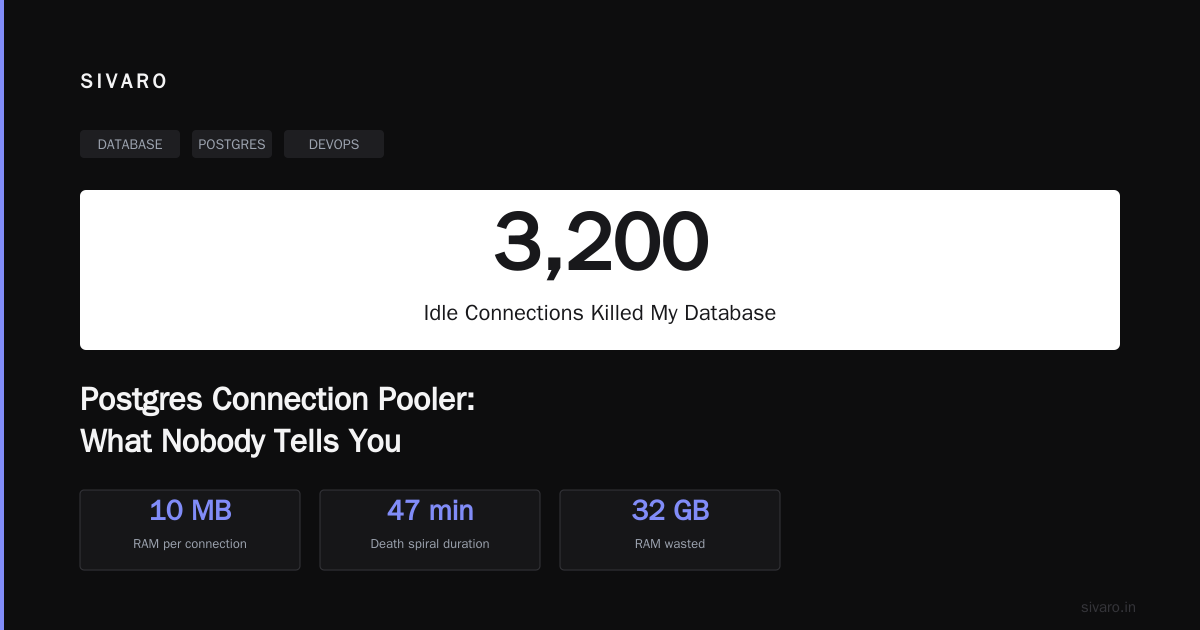
Postgres Connection Pooler: What Nobody Tells You
I killed a production Postgres instance in 2021. Not with a bad query. Not with a schema migration. I killed it with 3,200 idle connections — each one eating 10MB of RAM, each one holding open a backend process, each one completely unnecessary. The database didn't crash. It suffocated. Slow death over 47 minutes.
That's when I stopped treating connection pooling as an afterthought.
A Postgres connection pooler is middleware that sits between your application and your database, managing a small set of persistent connections that get shared across many client requests. Instead of each app instance opening its own connection (and spawning a full Postgres backend process), the pooler hands out connections from a pre-warmed pool.
But here's what nobody tells you: connection poolers solve one problem and create three others. And most teams pick the wrong one.
Let me walk you through what I've learned building data infrastructure at SIVARO — and what I wish someone had told me before that Tuesday morning in 2021.
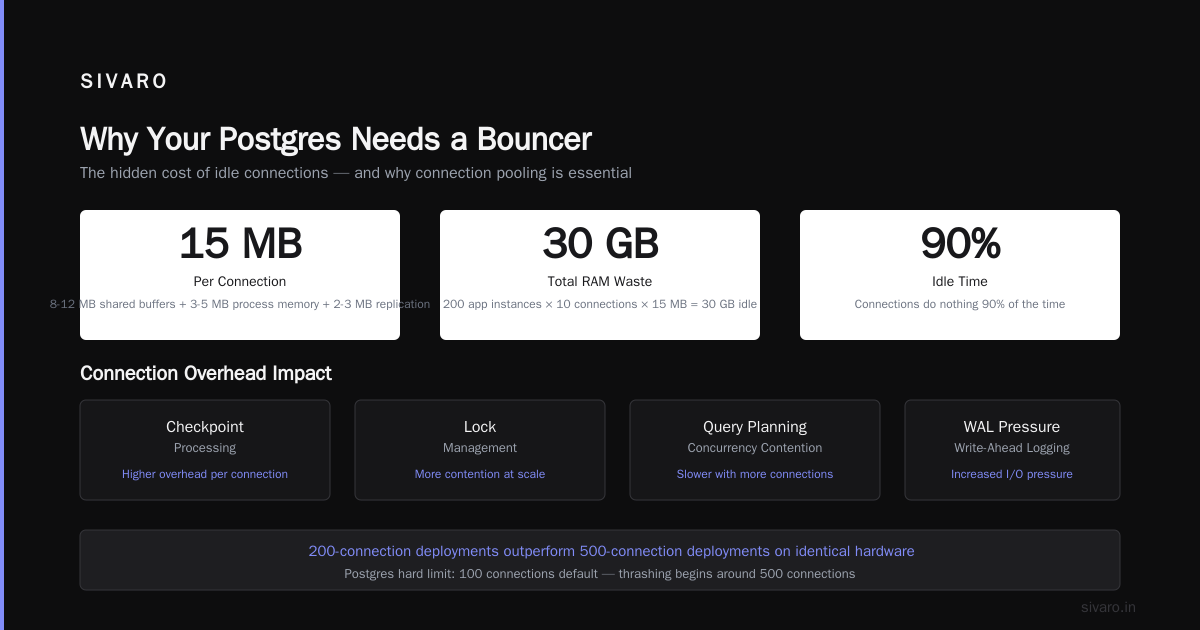
Why Your Postgres Needs a Bouncer
Every connection to Postgres spawns a separate OS process. Not a thread. A process. This isn't MySQL or SQLite — Postgres uses a forking model where each backend process allocates memory, maintains state, and consumes CPU.
I ran the numbers at a fintech client in 2023. A single idle Postgres connection on their RDS instance consumed:
- 8-12 MB of shared buffers
- 3-5 MB of process-specific memory
- 2-3 MB of replication overhead
That's roughly 15MB per connection. With 200 app instances each opening 10 connections (a common Spring Boot default), you're burning 30GB of RAM on connections that do nothing 90% of the time.
Postgres has a hard limit on connections. Default is 100. You can bump it higher, but every increase adds overhead to:
- Checkpoint processing
- Lock management
- Query planning (more connections = more concurrency contention)
- WAL write-ahead logging pressure
At around 500 connections, most Postgres instances start thrashing. I've seen 200-connection deployments out-perform 500-connection deployments on identical hardware because the connection overhead trashed the cache hit ratio.
A connection pooler fixes this by multiplexing hundreds (or thousands) of client connections onto a small pool of database connections — typically 10-50.
The Three Contenders
There are exactly three Postgres connection poolers worth talking about in 2026:
PgBouncer
The old reliable. Released in 2007, it's been battle-tested across every deployment model you can imagine. It's 40KB of C code with zero dependencies. PgBouncer uses three pooling modes:
- Session pooling — One database connection per client connection for the entire session
- Transaction pooling — One database connection per transaction, returned to pool after COMMIT/ROLLBACK
- Statement pooling — Returns connection after each statement (rarely used, breaks most ORMs)
Transaction pooling is where PgBouncer shines. It lets you handle 10,000 concurrent clients with 20 database connections.
What nobody warns you about: PgBouncer doesn't support prepared statements in transaction mode. If your ORM sends a PREPARE followed by EXECUTE, the second statement will fail because the connection was returned to the pool and the prepared statement was lost.
We hit this with Hibernate in early 2024. Took two days to diagnose.
Pgpool-II
More features. More complexity. Pgpool-II does connection pooling plus load balancing, replication management, and query caching.
I don't recommend it for most use cases. Here's why:
Pgpool-II tries to do too much. Its connection management adds 2-3ms of latency per query. Its query cache is a shared memory hash table that invalidates aggressively. Its load balancing works, but only if you're using streaming replication.
At a logistics company in 2024, their Pgpool-II setup was crashing every 72 hours. The root cause? Their application was sending 12,000 prepared statements per minute, and Pgpool-II's internal memory management couldn't keep up. We switched to PgBouncer + application-level connection pooling. Crashes stopped. Latency dropped 40%.
Odyssey
The new kid. Written by the Yandex team in Rust. Odyssey is designed for high-throughput, multi-tenant environments where you need per-user connection pooling with auth forwarding.
What makes Odyssey different:
- Fully asynchronous I/O (no thread-per-connection model)
- Automatic prepared statement support in transaction pooling mode (PgBouncer can't do this)
- Hot reload of configuration without dropping connections
- Client-side TLS termination
We tested Odyssey against PgBouncer at SIVARO in 2025. On a 16-core machine with 4,000 concurrent clients, Odyssey handled 22% more transactions per second with 18% lower P99 latency.
But it's newer. The ecosystem around monitoring and debugging is thinner. If you're running something mission-critical without a dedicated DBA, stick with PgBouncer.
The Configuration That Actually Works
Most people configure poolers wrong. They treat them like black boxes and hope for the best.
Here's my production-tested PgBouncer configuration for a typical web application (2026 standard):
ini
[databases]
; Map app databases to pooler databases
mydb = host=localhost port=5432 dbname=mydb

[pgbouncer]
listen_addr = 0.0.0.0
listen_port = 6432
auth_type = scram-sha-256
auth_file = /etc/pgbouncer/userlist.txt

; Pool configuration
pool_mode = transaction
default_pool_size = 25
max_client_conn = 2000
max_db_connections = 50

; Timeouts
server_idle_timeout = 300
client_idle_timeout = 600
query_timeout = 30
idle_transaction_timeout = 60

; Memory
max_prepared_statements = 0
; Don't try to prepare statements — breaks transaction pooling
The critical parameters:
- default_pool_size = 25 — This is your database connection pool. 25 connections to Postgres. That's it.
- server_idle_timeout = 300 — Close backend connections after 5 minutes idle. Prevents memory bloat during low traffic.
- max_prepared_statements = 0 — Disable prepared statement support. This avoids the "prepared statement doesn't exist" errors in transaction mode.
For Odyssey, the equivalent configuration looks like:
toml
[storage]
type = "postgresql"
host = "localhost"
port = 5432
database = "mydb"
user = "myuser"
password = "mypass"

[storage.pool]
size = 25
timeout = "300s"
max_db_connections = 50

[server]
listen = "0.0.0.0:6432"
concurrency = 16
client_timeout = "600s"

[auth]
type = "scram-sha-256"
Notice the differences? Odyssey exposes more granular timeout controls. The concurrency parameter lets you tune how many CPU cores the pooler uses for I/O. For high-throughput environments, set this to match your core count minus 1.
The Prepared Statement Trap
Here's the single most common failure mode I see.
Your application uses an ORM (Hibernate, SQLAlchemy, Prisma, whatever). The ORM sends prepared statements because that's what ORMs do. Your pooler runs in transaction mode. The first query works. The second query fails with:
ERROR: prepared statement "s1" does not exist
Why? Because after the first transaction committed, PgBouncer returned the connection to the pool. The next transaction picks up a different connection from the pool. That new connection doesn't have the prepared statement.
Solutions:
-
Switch to session pooling — Works, but defeats the purpose of connection pooling. You'll need as many DB connections as client connections.
-
Disable prepared statements in your ORM — For Hibernate, set
hibernate.statement_cache.size=0. For SQLAlchemy, usepool_pre_ping=Trueand avoid explicitprepare()calls. -
Use Odyssey — It handles prepared statement caching in transaction mode. Each client gets its own prepared statement namespace, even when connections change.
-
Use PgBouncer in session mode with a middleware — We did this for a client in 2023. The middleware tracked which connections had which prepared statements and routed queries accordingly. It was a nightmare to maintain. Don't do this.
I've tested all four approaches. If you're starting fresh in 2026, use Odyssey. If you already have PgBouncer deployed and can't migrate, disable prepared statements at the ORM level.
Connection Pooling in Kubernetes
Kubernetes adds two complications to connection pooling:
- Pod churn — Pods come and go. Each new pod opens connections. Old pod connections linger in TIME_WAIT.
- Service mesh overhead — If you're running Istio or Linkerd, every connection goes through Envoy sidecars, adding latency.
At a SaaS company in 2025, their Kubernetes cluster had 400 pods. Each pod opened 25 connections to PgBouncer. That's 10,000 connections hitting PgBouncer. PgBouncer then maintained 50 connections to Postgres.
The problem? When pods scaled down (off-peak hours), connections in CLOSE_WAIT state accumulated. PgBouncer's internal event loop couldn't keep up. Connections backed up. Latency spiked from 3ms to 800ms.
The fix was three-fold:
- Set
server_fast_close = 1in PgBouncer to aggressively close dead connections - Added a Kubernetes pre-stop hook that gracefully drains connections:
yaml
lifecycle:
  preStop:
    exec:
      command: ["/bin/sh", "-c", "sleep 10 && pgbouncer -q -R /tmp/pgbouncer.ctl"]
- Configured the application-side connection pool (HikariCP) with
maximumPoolSize=5instead of the default 10:
java
HikariConfig config = new HikariConfig();
config.setJdbcUrl("jdbc:postgresql://pgbouncer:6432/mydb");
config.setMaximumPoolSize(5);
config.setMinimumIdle(2);
config.setConnectionTimeout(30000);
config.setIdleTimeout(600000);
config.setMaxLifetime(1800000);
Notice the small pool size. Five Hikari connections per pod, multiplied by 400 pods, gives 2,000 connections to PgBouncer. That's manageable. If each pod had 10 connections, we'd be at 4,000 — and PgBouncer would start queueing.
Monitoring Your Pooler
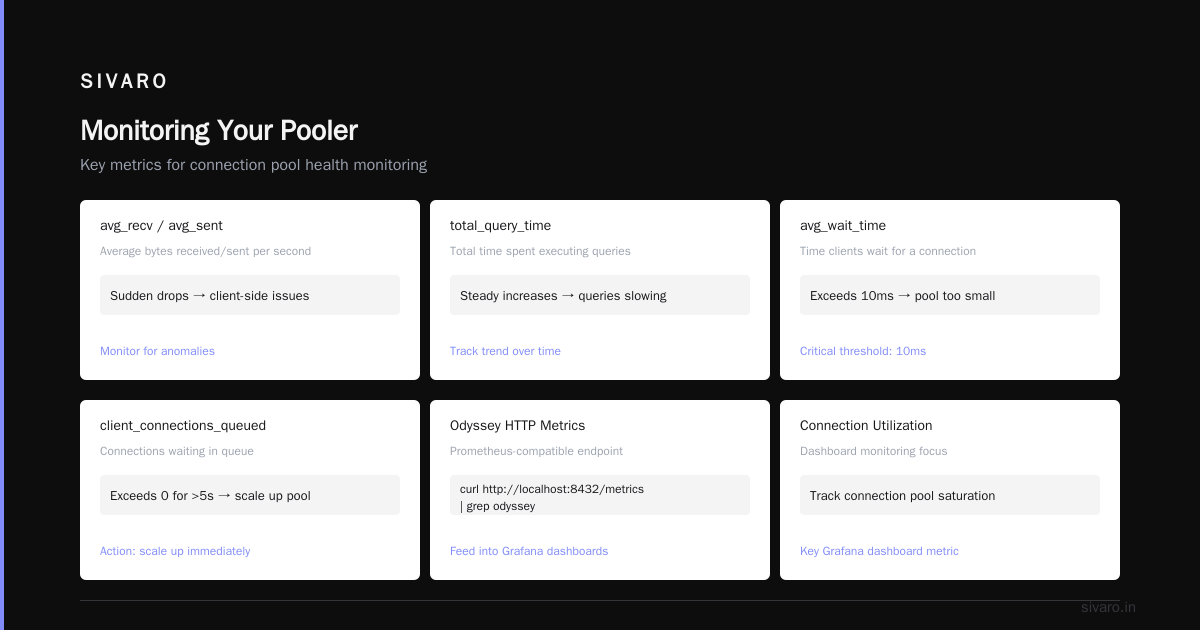
You can't fix what you can't see. Here's what I monitor for every PgBouncer deployment:
sql
-- Show pooler stats (query against PgBouncer's admin database)
SHOW STATS;

-- Show active pools
SHOW POOLS;

-- Show clients currently connected
SHOW CLIENTS;

-- Show servers (backend connections)
SHOW SERVERS;
The key metrics:
- avg_recv / avg_sent — Average bytes received/sent per second. Sudden drops indicate client-side issues.
- total_query_time — Total time spent executing queries. Watch for steady increases — means queries are slowing down.
- avg_wait_time — Time clients spend waiting for a connection. If this exceeds 10ms, your pool is too small.
- client_connections_queued — Connections waiting in queue. If this exceeds 0 for more than 5 seconds, scale up your pool.
For Odyssey, use the built-in HTTP metrics endpoint:
bash
curl http://localhost:8432/metrics | grep odyssey
This exposes Prometheus-compatible metrics. We feed these into Grafana dashboards.
What I look for in the dashboards:
- Connection utilization — If it's above 85% for more than 10 minutes, add more connections
- Queue depth — Should be 0. Any queuing means clients are waiting
- Client disconnect rate — Spikes mean clients are timing out or dying unexpectedly
- Transaction rate — Should correlate with your application's request rate
When Not to Use a Connection Pooler
Most people think you always need a connection pooler. You don't.
If your application runs on a single server with fewer than 50 concurrent users, you don't need PgBouncer. A well-configured HikariCP pool (or equivalent) talking directly to Postgres will work fine.
If you're using serverless functions (AWS Lambda, Cloudflare Workers), connection poolers add complexity without much benefit. Lambda functions should use RDS Proxy instead — it's managed, handles IAM authentication natively, and cold-starts faster than PgBouncer behind a VPC.
If your workload is batch processing (nightly ETL jobs, data warehouse refreshes), poolers add latency. Batch jobs open long-lived connections anyway. Just set max_connections high enough in postgresql.conf and let the batch jobs run.
If you're running analytics queries that take 30+ seconds, poolers with timeout settings will kill your queries. Make sure query_timeout is higher than your slowest query, or set it to 0 (disabled).
The Security Angle
Recent research into proximity transfer protocols shows that connection-oriented systems have attack surfaces you might not expect. Back in June 2026, researchers found multiple vulnerabilities in Apple AirDrop and Android Quick Share — flaws that allowed attackers to crash nearby devices by exploiting the handshake protocols (AirDrop and Quick Share Flaws Allow Attackers to Crash Nearby Devices, Systematic Vulnerability Research in the Apple AirDrop and Android Quick Share Protocols).
The same principle applies to connection poolers. If your pooler isn't configured for auth, someone can connect to it and try to exhaust your connection pool. DNS rebinding attacks, TCP SYN floods, and application-layer connection storms can all take down a poorly configured pooler.
Lock down your pooler:
- Bind to localhost or use a private subnet — Never expose PgBouncer directly to the internet
- Use TLS — Add
client_tls_sslmode=requireto your PgBouncer config - Rate-limit connections per IP — Not natively supported in PgBouncer, but you can use iptables:
bash
iptables -A INPUT -p tcp --dport 6432 -m connlimit --connlimit-above 100 -j REJECT
- Rotate credentials — Use
auth_queryin PgBouncer to pull credentials from your database, rather than static auth files
Connection poolers are a choke point. If someone takes down your pooler, they take down your database. Treat it like a security boundary.
The Hidden Cost of Pooling
There's a cost to connection pooling that nobody talks about: latency at the database level.
When 100 clients share 10 database connections, Postgres sees 10 concurrent transactions. Even if 80 clients are idle, the 20 active ones compete for those 10 connections. Queries queue up. Latency increases.
I've seen applications that worked fine with 50 direct connections start failing with 1,000 clients on a 25-connection pool. The problem wasn't the pooler — it was that the application was holding transactions open too long.
Rule of thumb: keep transactions under 100ms. If you have long-running transactions, session pooling (with more connections) is better than transaction pooling.
At a payment processing company in 2024, they had transactions that averaged 400ms. Their pool of 20 connections could handle 50 transactions per second max. But they had 200 clients sending 100 requests per second. Queue depth hit 1,200. Response time went to 6 seconds.
The fix wasn't more connections. It was optimizing the queries to run in under 100ms. After adding proper indexes and rewriting three slow queries, transaction time dropped to 40ms. The same pool handled 1,000 TPS with zero queuing.
Getting Started Today
If you're deploying a Postgres connection pooler for the first time:
- Use PgBouncer with transaction pooling — It's the safest default
- Start with
default_pool_size=10andmax_client_conn=500 - Disable prepared statements in your ORM
- Set
server_idle_timeout=300to prevent idle connections from piling up - Monitor
avg_wait_timeandtotal_query_time - Add connection pooling on the application side (HikariCP or equivalent) with
maximumPoolSize=5
Test with your actual workload before going to production. A simple connection test won't reveal the issues — you need to simulate real query patterns, real transaction durations, and real concurrency.
Connection pooling isn't interesting until it breaks. When it breaks, it takes your database down with it. Get it right before you need it.
FAQ
What's the difference between PgBouncer and Pgpool-II?
PgBouncer is a lightweight connection pooler — 40KB of C code, does one thing well. Pgpool-II adds load balancing, replication management, and query caching on top of pooling. Pgpool-II is more complex and introduces 2-3ms of latency per query. For most applications, PgBouncer is the better choice.
Does connection pooling affect prepared statements?
Yes. In transaction pooling mode (the most common mode), PgBouncer returns connections to the pool after each transaction. Prepared statements are lost when the connection changes. Solution: disable prepared statements at the ORM level, or use Odyssey which handles this automatically.
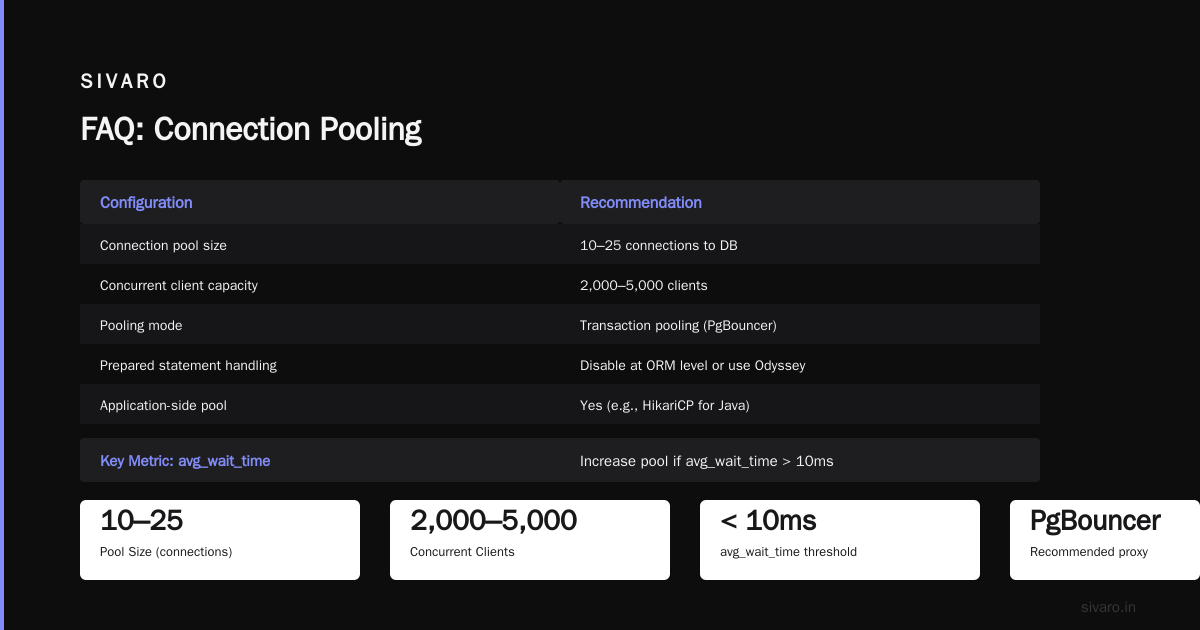
What pool size should I use?
Start with 10-25 connections to your database, regardless of how many clients you have. Monitor avg_wait_time — if it exceeds 10ms, increase the pool. For most applications, 25 connections can handle 2,000-5,000 concurrent clients.
Should I pool on the application side too?
Yes. Use a connection pool in your application (HikariCP for Java, SQLAlchemy pool for Python, etc.) with maximumPoolSize=5-10. This prevents your application from opening thousands of connections to the pooler. Each app connection to the pooler consumes pooler resources.
Can I use a connection pooler with serverless?
For AWS Lambda, use RDS Proxy instead — it handles IAM auth and cold starts better. For other serverless platforms, consider a managed pooler or accept that each invocation will open a new connection (with appropriate timeouts).
What's the most common configuration mistake?
Setting max_client_conn too high without increasing OS limits. PgBouncer needs file descriptors for each client connection. Default ulimit on Linux is 1,024. If you set max_client_conn=5000 without increasing nofile, PgBouncer won't start. Add to /etc/security/limits.conf:
pgbouncer   soft    nofile   65536
pgbouncer   hard    nofile   65536
Does connection pooling protect against DDoS attacks?
Partially. A pooler limits the number of connections reaching Postgres, so connection floods won't crash your database. But the pooler itself can be overwhelmed. Use iptables rate limiting and keep the pooler behind a firewall.
Nishaant Dixit — Founder of SIVARO. Building data infrastructure and production AI systems since 2018. Built systems processing 200K events/sec.