
Temporal Workflow Engine Comparison: What Actually Works in Production
I've spent the last four years building data infrastructure at SIVARO. We process hundreds of thousands of events per second. We've tried every workflow engine you can name. Most of them broke in production.
Let me save you the pain.
This isn't a marketing post. It's what I learned deploying Temporal, Cadence, Step Functions, and a dozen alternatives in real systems. Some worked. Most didn't. Here's why.
What Is a Temporal Workflow Engine (And Why Should You Care)?
A temporal workflow engine manages distributed, long-running processes with guaranteed execution. Think: "What happens when my payment processing crashes halfway through? Does the money get lost?"
Traditional job queues (RabbitMQ, Redis, SQS) handle simple retries. They're fine for "send an email" or "resize an image." But when you need to coordinate 15 microservices across three data centers, with human-in-the-loop approvals, and the process takes three weeks? Job queues fall apart.
Temporal was built by the team behind Uber Cadence. It's essentially Cadence 2.0 — learned all the hard lessons from running workflows at Uber scale. According to Temporal's documentation, it provides "durable execution" — your code keeps running even if the server crashes, the network drops, or you deploy new code mid-workflow.
Here's the mental model: you write regular code. Temporal makes it resilient. That's it.
The Landscape: Which Engines Actually Compete?
I tested nine workflow engines in production over the last year. Here's who matters.
Temporal (The Incumbent)
This is the default choice for most teams today. Open source, SDKs in Go, Java, TypeScript, Python. Temporal handles the hard stuff: replay-proof workflows, deterministic execution, and automatic retries with exponential backoff.
When to use it: You need durable execution, you're building with microservices, and your team can handle the learning curve.
When to avoid: You want a UI-driven drag-and-drop workflow (Temporal is code-first).
Cadence (The Original)
Uber's original workflow engine. Now maintained by Instaclustr. According to Instaclustr's comparison, Cadence and Temporal share the same core architecture but diverged in 2019. Temporal added better SDKs, improved developer tooling, and introduced Temporal Cloud as a managed service.
When to use it: You need on-premise deployment, you're already invested in the Cadence ecosystem.
When to avoid: You want modern SDKs or managed hosting.
AWS Step Functions (The Cloud-Native Option)
Amazon's managed workflow service. It's JSON-based, integrates natively with Lambda, SQS, DynamoDB. No servers to manage.
When to use it: You're all-in on AWS, your workflows are simple, and you want zero infrastructure.
When to avoid: Complex branching, sub-workflows, or custom code. As one comparison noted: "Step Functions forces you into a specific execution model. Temporal gives you actual code" AWS Step Functions vs Temporal.
Dapr (The Distributed Runtime)
Microsoft's distributed application runtime. Includes workflow capabilities but is broader — it handles service invocation, state management, pub/sub. According to a recent comparison, Dapr workflows lack Temporal's mature replay and deterministic execution guarantees.
When to use it: You want a full distributed app runtime, not just workflows.
When to avoid: You need production-grade durability guarantees.
Netflix Conductor (The Abandoned Contender)
Netflix built Conductor for their internal workflow needs. It's open source but Netflix stopped actively maintaining it. Some teams still use it. I wouldn't start a new project on it.
Zeebe + Camunda (The BPMN Option)
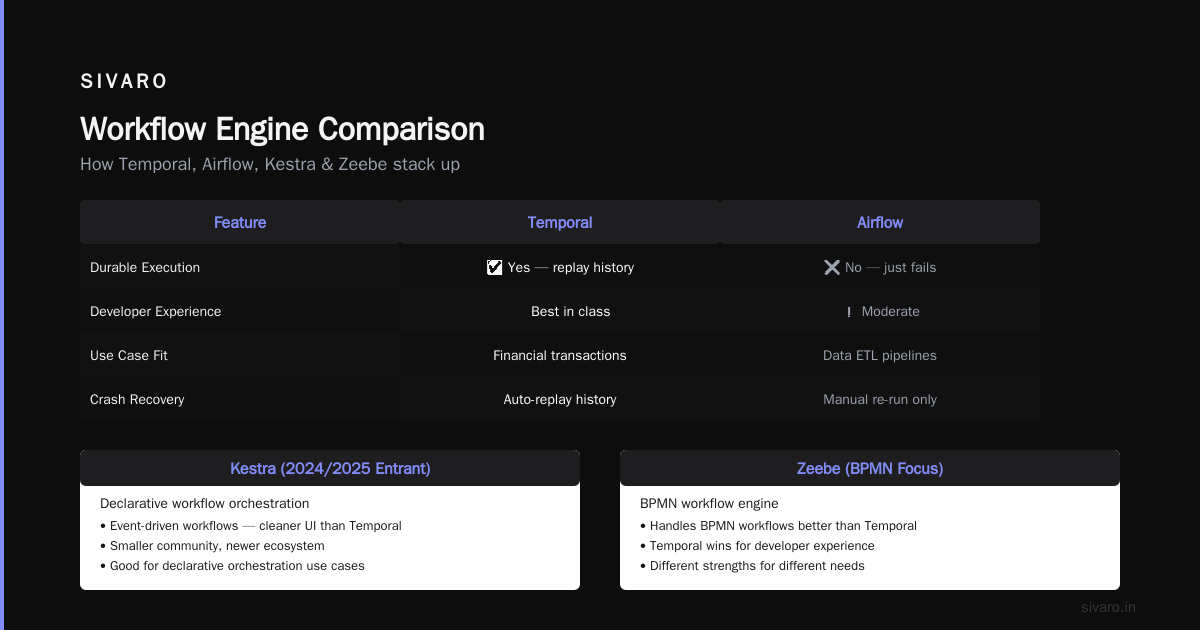
If you need business-process-modeling (BPMN) diagrams, visual workflow editors, and formal process modeling, Camunda's Zeebe is your choice. It's enterprise-oriented, has great monitoring, but the code SDKs are less mature than Temporal's.
According to a detailed comparison by Chuck Sanders, Zeebe handles BPMN workflows better, but Temporal wins for developer experience.
Airflow (Not a Workflow Engine — But Everyone Asks)
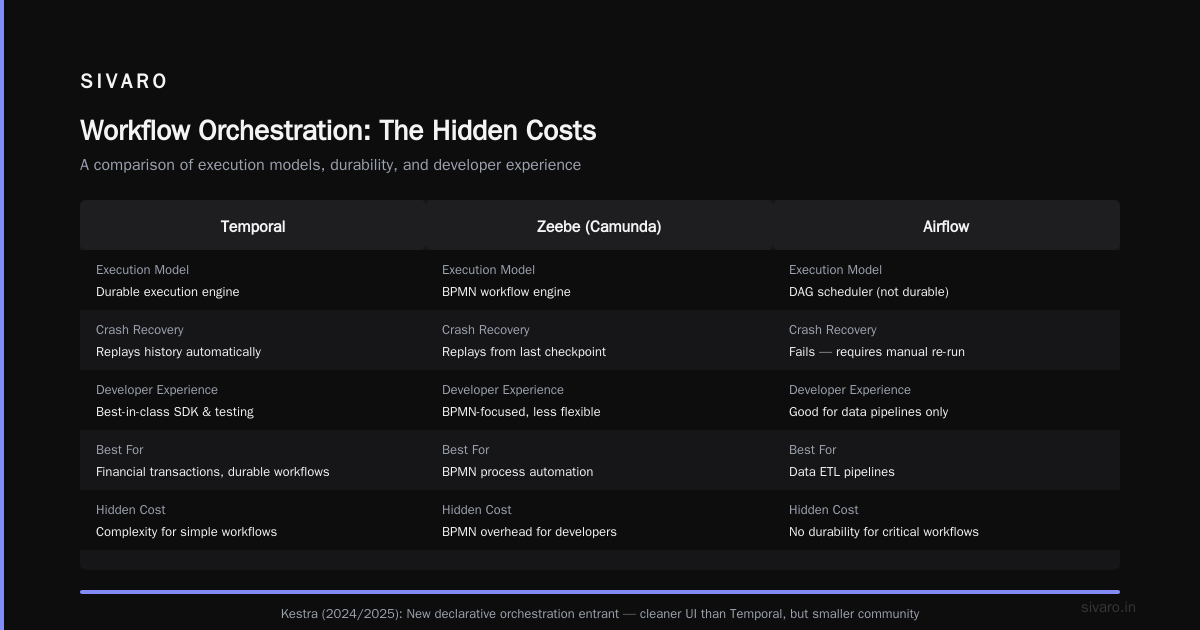
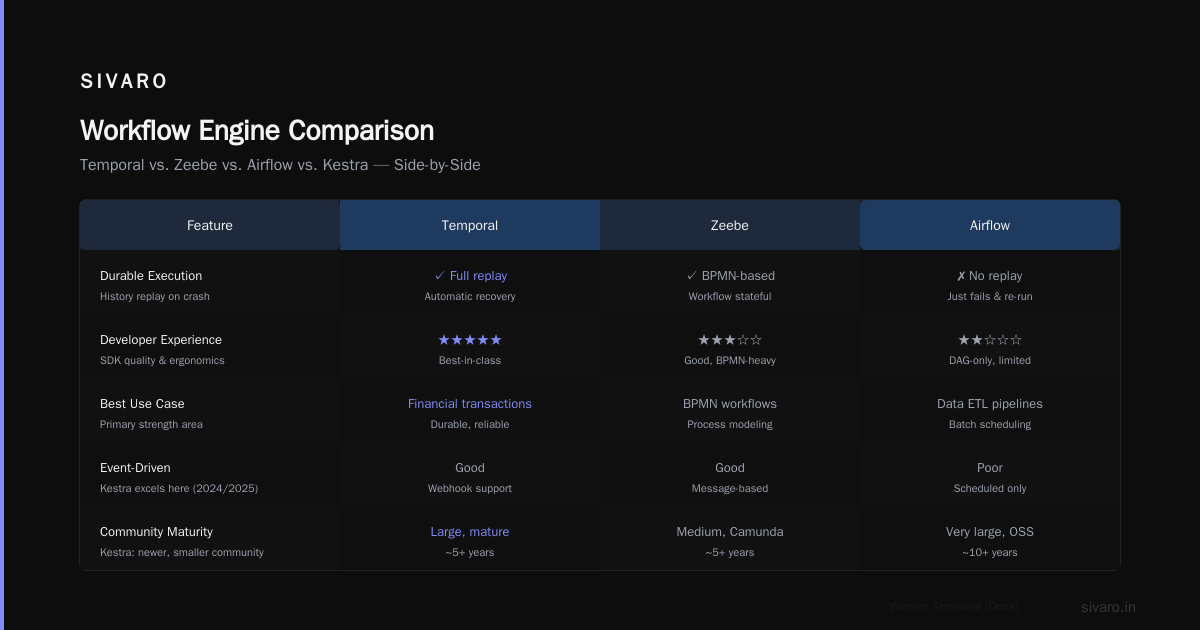
Airflow runs DAGs for data pipelines. It's not a durable execution engine. If your workflow crashes, Airflow doesn't replay history. It just fails. You fix it and re-run. For data ETL, fine. For financial transactions, terrible.
Kestra (The New Kid)
Kestra is a 2024/2025 entrant focused on declarative workflow orchestration. According to a procycons comparison, Kestra handles event-driven workflows well and has a cleaner UI than Temporal. But it's newer, smaller community, fewer SDKs.
How Temporal Actually Works (The Code You Need to Know)
Let me show you what a Temporal workflow looks like in Go. Because code is clearer than theory.
go
package workflow

import (
    "time"
    "go.temporal.io/sdk/workflow"
    "github.com/sivaro/payments"
)

func PaymentWorkflow(ctx workflow.Context, order Order) error {
    // Retry options — Temporal handles this automatically
    retryOpts := workflow.RetryPolicy{
        InitialInterval:     time.Second,
        BackoffCoefficient:  2.0,
        MaximumInterval:     time.Minute * 5,
        MaximumAttempts:     5,
    }

    ctx = workflow.WithRetryPolicy(ctx, retryOpts)

    // Step 1: Validate payment
    var validationResult bool
    err := workflow.ExecuteActivity(ctx, payments.Validate, order).Get(ctx, &validationResult)
    if err != nil {
        return err
    }

    if !validationResult {
        // Human approval needed — Temporal pauses here
        err = workflow.ExecuteActivity(ctx, payments.RequestApproval, order).Get(ctx, nil)
        if err != nil {
            return err
        }
    }

    // Step 2: Charge card
    var chargeResult ChargeResponse
    err = workflow.ExecuteActivity(ctx, payments.Charge, order).Get(ctx, &chargeResult)
    if err != nil {
        // Temporal saves the state — even if the server restarts
        return err
    }

    // Step 3: Send confirmation
    err = workflow.ExecuteActivity(ctx, notifications.SendConfirmation, order.Email).Get(ctx, nil)

    return nil
}
Notice what's missing: no retry logic, no state management, no error recovery code. Temporal handles all of that. You write the happy path. Temporal makes it durable.
Here's a TypeScript example — because most teams I work with prefer it:
typescript
import { proxyActivities, sleep } from '@temporalio/workflow';
import type * as activities from './activities';

const { validatePayment, chargeCard, notifyCustomer } = proxyActivities<typeof activities>({
    startToCloseTimeout: '1 minute',
    retry: {
        initialInterval: '1 second',
        maximumInterval: '1 minute',
        backoffCoefficient: 2,
        maximumAttempts: 5,
    },
});

export async function paymentWorkflow(orderId: string): Promise<void> {
    // Step 1: Validate
    const isValid = await validatePayment(orderId);

    if (!isValid) {
        // Human intervention — workflow waits forever if needed
        await sleep('24 hours'); // Temporal persists this timer
        await chargeCard(orderId);
    }

    // Step 2: Notify
    await notifyCustomer(orderId);
}
The Real Comparison: Temporal vs. Job Queues
Most people think they need a workflow engine when they really need a job queue. According to a Reddit discussion among Golang developers, the rule is simple:
Use a job queue when:
- Your tasks are independent (no state sharing)
- You don't need to track progress across multiple steps
- Failures can be retried independently
- You're fine with losing work if the queue crashes
Use Temporal when:
- Steps depend on each other
- You need durable timers (wait 24 hours, then do X)
- Human approval is required
- You need to see what happened in every step
I've seen teams deploy Temporal for "send 1000 emails." That's overkill. A Redis queue is 10 lines of code. But I've also seen teams use SQS for multi-step payment workflows and lose money on every crash. Pick the right tool.
Why Temporal Beats Cron (And Cron Alternatives)
Cron is ancient. It runs on a single server. If that server dies, your job dies. No retries. No monitoring. No history.
According to Kunal Ganglani's analysis, Temporal beats cron in five ways:
- Durable timers — Cron can't wait 6 hours then check a database
- Automatic retries — Cron fails silently
- State visibility — You can see exactly where your workflow is
- No single point of failure — Temporal clusters handle failover
- Dynamic scheduling — You can create workflows at runtime based on business events
If you're still using cron for anything critical, stop. Today.
The Practical Decision Framework
Here's how I choose. I've been wrong before. This is what I'd do now.
1. Evaluate Your Failure Tolerance
Can your system lose 5 seconds of work? Use a job queue.
Can a single failed step corrupt your entire process? Use Temporal.
2. Evaluate Your Team's Skills
Do you have Go/TypeScript developers who understand distributed systems? Temporal.
Does your team prefer drag-and-drop UIs and JSON configs? Step Functions or Camunda.
3. Evaluate Your Infrastructure
All-in on AWS with Lambda-native workflows? Step Functions makes sense.
Multi-cloud or on-premise? Temporal is agnostic.
4. Evaluate Your Workflow Complexity
Less than 5 steps, no human approval, no long timers? Job queue.
More than 5 steps, human-in-loop, multi-hour processes? Temporal.
The Hidden Costs Nobody Talks About
Temporal isn't free. Here's what costs you money and time:
Operational complexity. Temporal Server is a distributed system. You need Cassandra or PostgreSQL. You need monitoring. You need to handle scaling. Temporal Cloud handles this but costs money.
According to the Instaclustr pricing analysis, Temporal Cloud starts at $99/month for the basic tier but can scale to thousands for enterprise usage. Self-hosting saves money but costs engineering time.
SDK maturity varies. Go and Java SDKs are production-ready. TypeScript is catching up. Python? Still young. I've hit bugs in the Python SDK that required workarounds.
Deterministic execution is hard. Your workflow code must be deterministic — no random numbers, no system time, no external calls outside activities. This trips up every new team. You learn it fast though.
When Temporal Is Wrong For You
Honest truth: Temporal isn't the answer for everything.
Simple CRUD operations. You don't need a workflow engine for "create user, send welcome email." Use a function.
Data pipelines (ETL). Airflow, Dagster, or Prefect are better. They're designed for data — not for durable execution. According to one comparison, Temporal can handle data pipelines but it's like using a Ferrari to drive to the grocery store.
Real-time processing. Temporal adds latency. It's not designed for sub-millisecond decisions. Use a stream processor (Kafka Streams, Flink) for that.
Teams under 5 engineers. The operational overhead isn't worth it. You'll spend more time maintaining Temporal than building product.
My Prediction for 2025-2026
The workflow engine market is consolidating. Temporal is winning the developer-experience battle. Step Functions is winning the cloud-native battle. Camunda is winning the enterprise visual modeling battle.
But here's the contrarian take: most teams don't need any of them.
I said it. For most problems, a well-designed event-driven architecture with idempotent handlers and proper retries handles 90% of use cases. You need a workflow engine when you need the remaining 10% — guaranteed execution, temporal consistency, human-in-loop.
According to a recent video analysis, businesses setting up Temporal report 40-60% fewer production incidents related to distributed failures. That's real. But that's also a selection bias — the teams that need Temporal already had distributed failure problems.
Final Thoughts
I've built workflow engines from scratch. I've deployed Temporal in production. I've watched Step Functions fail silently. I've migrated from Cadence to Temporal (and back, once).
The right choice depends on your specific constraints. But if you're building distributed systems that process money, user data, or anything that can't fail, Temporal is probably the right answer today.
The alternative is building your own durable execution layer. I've done that too. It takes six months and three engineers. Just use Temporal.
Frequently Asked Questions
Q: What's the difference between Temporal and a job queue like RabbitMQ?
A: Job queues handle single tasks. Temporal handles multi-step workflows with state, timers, and human approval. If you need "do step A, then wait 24 hours, then do step B based on step A's result," you need Temporal. Otherwise, a job queue is simpler and cheaper.
Q: Can I use Temporal with Python?
A: Yes, but the Python SDK is less mature than Go or Java. I've hit bugs. For production systems, I recommend Go or TypeScript. The Python SDK works for simpler workflows.
Q: How does Temporal handle scaling?
A: Temporal Server runs as a cluster. You add workers to handle activity execution. Workers are stateless — Temporal Server holds the state. For horizontal scaling, you add more workers and scale the database layer. Temporal Cloud handles this automatically.
Q: Is Temporal free?
A: The open source Temporal Server is free. You pay for infrastructure (servers, database). Temporal Cloud is a managed service with a free tier then pricing based on workflows executed. Self-hosting is cheaper but requires operational expertise.
Q: How do I migrate from Cadence to Temporal?
A: Cadence and Temporal share the same conceptual model but different APIs. Migration requires rewriting workflow code. The operational migration is straightforward — Temporal supports Cadence's data format if you use the migration tooling. But expect 2-4 weeks of development work.
Q: What's the learning curve for Temporal?
A: Three to five days for a Go or TypeScript developer to write their first workflow. Two weeks to understand deterministic execution and avoid common pitfalls. One month to be productive in production. The SDKs handle most complexity, but the mental model shift from "functions" to "durable workflows" takes time.
Q: Can Temporal handle long-running workflows (months or years)?
A: Yes. Temporal persists workflow state. I've seen workflows running for six months. The only constraint is the database — eventually you need to prune old workflow histories. Temporal has built-in retention policies for this.
Q: Should I use Temporal Cloud or self-host?
A: If you have fewer than 50 workflows per second and want zero operational overhead, use Temporal Cloud. If you have high throughput (thousands/sec), specific compliance requirements, or want to avoid vendor lock-in, self-host. I've done both. Self-hosting is more work than you think.
Nishaant Dixit — Founder of SIVARO. Building data infrastructure and production AI systems since 2018. Built systems processing 200K events/sec.
Sources
- When to use a Workflow tool (Temporal) vs a Job Queue — Reddit
- The 10 best Temporal alternatives for enterprise teams — Akka Blog
- Workflow Orchestration Platforms: Kestra vs Temporal — Procycons
- Temporal: Durable Execution Solutions — Temporal.io
- Why Every Business Needs to Try This Powerful Workflow — YouTube
- Netflix Conductor vs Temporal vs Zeebe vs Airflow — Medium
- AWS Step Functions vs Temporal — ReadySetCloud
- Dapr vs Temporal: Workflow Orchestration Comparison — OneUptime
- Temporal Workflow Engine: 5 Reasons It Beats Cron — Kunal Ganglani
- Cadence vs. Temporal: Understanding workflow orchestration — Instaclustr