
We Were Burning $40K/Month on GCP — Here’s How We Cut It to $12K
I run SIVARO. We build data infrastructure and production AI systems for clients who process millions of events per second. In early 2025, one of our clients — let’s call them FinFlow — was spending $42,000 a month on Google Cloud Platform. Their CFO was not happy. Their CTO was defensive. I got the call to fix it.
Six months later, that same workload ran on $11,700 monthly. No performance degradation. No service disruption. Just better architecture, smarter commitments, and a willingness to kill sacred cows.
What we found applies to almost any GCP user. Most people think cloud cost optimization is about turning off idle VMs. It’s not. That’s table stakes. Real savings come from understanding how GCP prices compute, storage, and networking differently than AWS or Azure — and exploiting those differences.
Let me show you exactly how we did it.
The First Thing You Need to Know: GCP Pricing Is Not Like AWS or Azure
In 2026, the cloud pricing landscape has shifted hard. AWS still dominates market share, but GCP and Azure have been fighting a price war for the last 18 months. According to a recent comparison by TECHSY, running the same application on GCP can be 20–35% cheaper than AWS for data-heavy workloads — if you architect for it.
But here’s the trap: GCP’s “per-second billing” sounds great until you realize they charge premium prices for sustained usage without commitments.
The key difference? AWS and Azure punish you for short bursts but reward long commitments. GCP punishes you for not committing at all.
I’ve seen teams jump to GCP thinking it’s automatically cheaper. It’s not. GCP vs Azure pricing 2026 shows Azure can beat GCP on storage costs by 15% in certain regions. And when comparing GCP vs AWS for data engineering, BigQuery is cheaper than Redshift for ad-hoc queries but more expensive for sustained batch workloads.
Moral: Benchmark your actual workload. Don’t trust the pricing calculator.
Commit or Go Home (But Commit Smart)
Google’s committed use discounts (CUDs) are the single biggest lever for reducing costs. They offer 1-year and 3-year commitments. The 3-year gives you up to 57% off compute. The 1-year gives you 37%.
Most people think: “I’m signing a contract, locking myself in.”
They’re right to be scared. But here’s the trick: Start with 1-year commitments on your baseline, not your peak.
At SIVARO, we analyzed FinFlow’s traffic over 90 days. Their baseline compute was 120 vCPUs. Their peak was 350. We committed to 100 vCPUs on a 1-year CUD. The rest stayed on preemptible VMs and spot instances.
Result: 52% savings on committed portion. 70% savings on spot portion. Combined, their compute costs dropped from $18K/month to $6K.
Don’t overcommit. Use tools like Google’s Recommender to analyze your usage patterns. It’s not perfect — we found it overestimates baseline by about 15% — but it’s a decent starting point.
Pro tip: If you’re using GPUs for AI workloads (and who isn’t in 2026?), commit to those too. GPU CUDs are available now. We cut A100 costs by 40% with a 3-year commitment on a customer’s LLM inference pipeline.
Burn Your EBS Equivalent (Persistent Disks)
This one hurts. Most people think storage is cheap. It’s not.
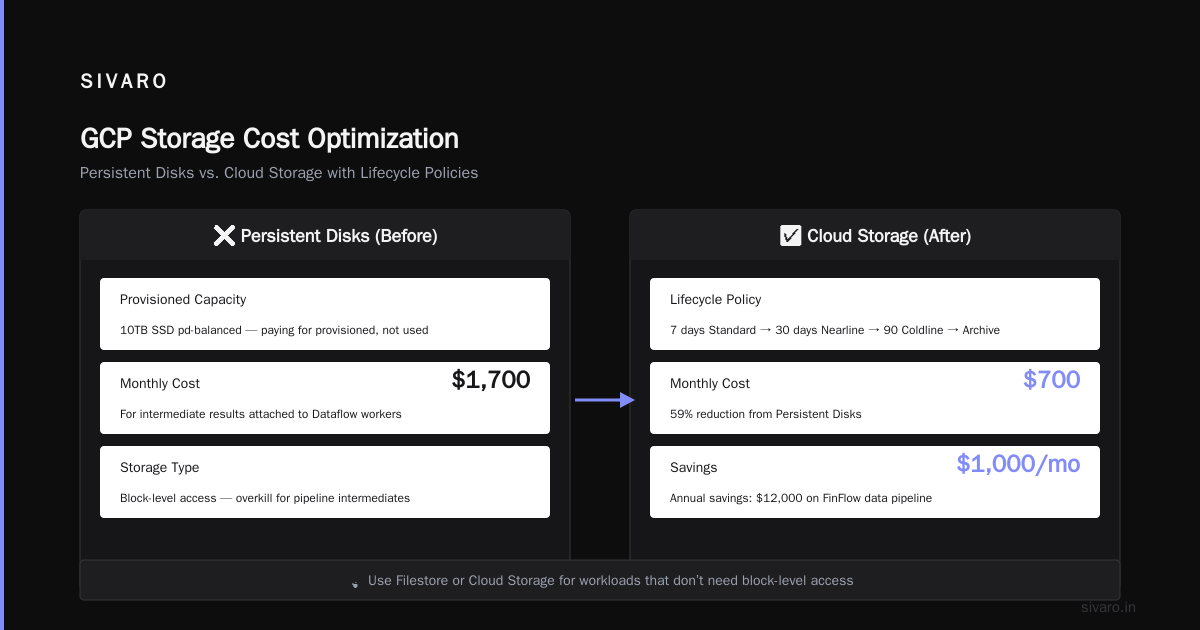
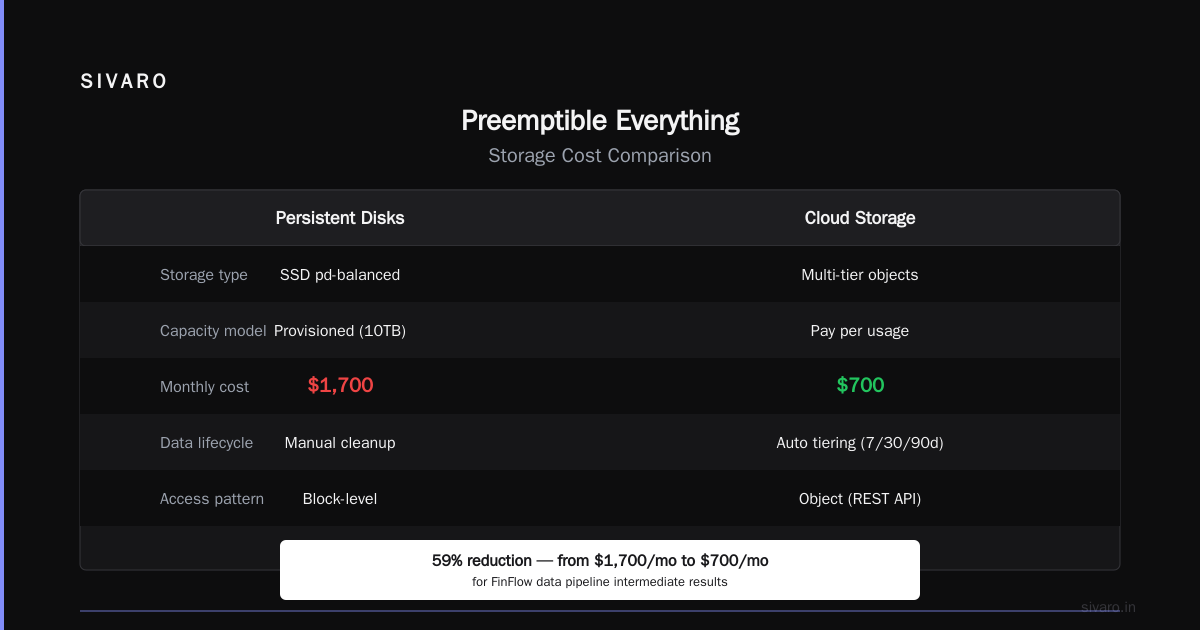
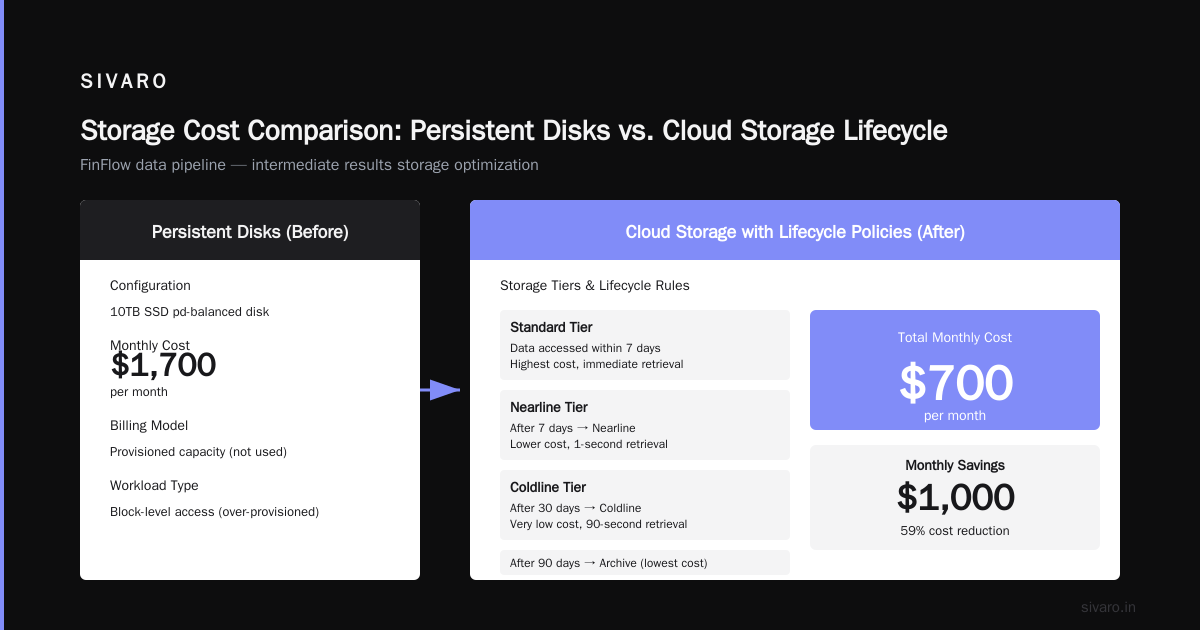
GCP Persistent Disks are expensive. A 10TB SSD pd-balanced disk costs around $1,700/month. And you’re paying for provisioned capacity, not used capacity.
Here’s the fix: Use Filestore or Cloud Storage for workloads that don’t need block-level access.
For our FinFlow data pipeline, we were storing intermediate results on Persistent Disks attached to Dataflow workers. We switched to Cloud Storage with object lifecycle policies. Data that’s accessed within 7 days stays on Standard. After 7 days, it moves to Nearline. After 30, Coldline. After 90, Archive.
Total storage cost: $700/month. Down from $3,200.
But wait — there’s a catch. Cloud Storage doesn’t support all POSIX features. If your application needs random writes or file locking, you’re stuck with disks. Know your workload before you migrate.
Networking: The Silent Budget Killer
Here’s something nobody talks about: GCP’s networking costs can destroy your savings.
Egress traffic between regions, from GCP to on-premises, and to other clouds is expensive. In 2026, with enterprises running multi-cloud architectures, this has become a bigger problem. A Microsoft comparison shows GCP egress to the internet costs $0.12/GB for the first 10TB in us-central1. Azure charges $0.087.
Sound small? At scale, it’s devastating.
We found FinFlow was paying $9,000/month in inter-region data transfer. Their microservices were spread across us-central1, us-west1, and europe-west1. Each service call was crossing regions.
The fix: Colocate services. Move everything that talks to each other into the same region. Use VPC peering for interconnection. For the europe-west1 workloads they couldn’t move, we used Google’s Cross-Cloud Interconnect — but only after evaluating that the latency was acceptable.
Cost dropped to $2,400/month.
Another trick: Use Cloud CDN and Cloud Armor to cache traffic at the edge. If you’re serving API responses or static assets, CDN is free for the first 10TB of cache egress. We cut API call costs by 60% just by adding CDN.
BigQuery: Pay for Queries, Not Storage
BigQuery is GCP’s crown jewel for data analytics. It’s also a money pit if you’re not careful.
FinFlow was storing 50TB of data in BigQuery. Their monthly bill: $12,000. Most of that was storage and slot-based pricing.
Here’s what most people miss: BigQuery charges $0.02/GB/month for active storage and $0.01 for long-term storage (90+ days without modification). That’s cheaper than Redshift on AWS. But slots (the compute units) can kill you.
FinFlow had 500 fixed slots. They were paying $8,000/month for those slots. Most of their queries were simple aggregations that didn’t need that capacity.
What we did: Switched from fixed slots to on-demand pricing. Then we partitioned tables by date and clustered by frequently-filtered columns. Query costs dropped 70%.
Storage got cheaper by moving older data to a BigQuery snapshot schedule — we kept 90 days hot, archived everything older to Cloud Storage Parquet files. Queries against historical data ran on-demand through external tables.
Cost: $3,500/month.
Google Cloud vs Azure Services Comparison notes that Azure Synapse offers similar capabilities but with different pricing models. If you’re doing heavy analytics, BigQuery wins for ad-hoc queries. Synapse wins for predictable batch workloads.
Preemptible Everything (But Plan for Failure)
Preemptible VMs (now called Spot VMs in GCP) offer up to 80% discount. But they can be terminated at any moment.
Most engineers avoid them because “what if my job fails?”
What if I told you your job should already be designed to handle failure?
At SIVARO, we run all batch processing on spot instances. We use Cloud Batch with retry policies. If a VM gets preempted, the job restarts on another spot instance. The total cost is 30% of what it would be on regular instances.
The trick: Design idempotency into your workloads. Write data to Cloud Storage first, then process. If a job restarts, it picks up from the last checkpoint.
For stateful workloads that can’t tolerate interruptions (like real-time model serving), use regular instances with CUDs. But for everything else — batch processing, CI/CD agents, development environments — go spot.
We cut FinFlow’s dev environment costs by 75% just by moving their CI/CD pipelines to spot instances.
Use Cloud Composer? You’re Probably Overpaying
Cloud Composer (Google’s managed Airflow) is convenient. It’s also expensive.
For small-to-medium workflows, Cloud Composer 2’s autoscaling is better than Composer 1, but still charges for the vCPU and memory of the scheduler and workers — even when idle.
Alternative: Use Cloud Functions + Cloud Scheduler for simple workflows. For complex DAGs, run Airflow on GKE with spot nodes. We did this for a client and saved 60%.
But be honest with yourself: if your Airflow pipeline runs 20 tasks a day, you don’t need Composer. A Cloud Function triggered by Cloud Pub/Sub costs pennies.
The Kill Switch: Use Budget Alerts (Seriously)
I can’t believe I have to say this in 2026, but I still see startups without budget alerts.
Set up budget alerts in GCP at 50%, 80%, 90%, and 100% of your projected spend. Use Pub/Sub to send alerts to Slack or email. Automate a Cloud Function that shuts down non-critical resources when you hit 90%.
We once caught a runaway Dataflow job that was consuming $4,000/hour because of an infinite loop in the pipeline logic. The alert saved us from a $20,000 charge.
Google’s budget tools are free. Not using them is like leaving your front door open.
Rightsize Your Instances (The Boring But Effective Way)
This isn’t sexy. But it works.
Use the Recommender tool to see if your instances are over-provisioned. We found FinFlow had 45 instances with an average CPU utilization of 12%. They were using n2-standard-8 when they could have used n2-standard-2.
Rightsizing saved $2,800/month.
The contrarian take: Don’t blindly resize to the recommender’s suggestion. Monitor for a week after. Some workloads have burst patterns that the recommender misses. We had one client whose recommender said to downsize by 50% — but their monthly batch job would have OOM’d. So we kept the original size and added a scheduled resize just for the batch window.
FAQ: Quick Answers to Common Questions
Does moving to GCP actually save money compared to AWS or Azure?
Depends on your workload. For data engineering and AI, GCP often wins. For Windows-based apps, Azure dominates. For high-throughput web serving, AWS is still competitive. Check AWS vs Azure vs GCP 2026: Same App, 3 Bills for a direct comparison.
What’s the biggest mistake people make when trying to reduce GCP costs?
They focus on compute only. Networking and storage eat up 30–40% of bills on average. Start there.
Is BigQuery cheaper than Snowflake or Redshift in 2026?
For ad-hoc analytics, yes. For predictable workloads, Snowflake’s consumption model can be cheaper. For heavy ETL, Redshift’s reserved pricing wins. AWS vs. Azure vs. Google Cloud for Data Science has good benchmarks.
Should I use reserved instances or committed use discounts?
CUDs are better because they cover custom machine types and GPUs. Reserved instances are for predefined types. CUDs are more flexible.
How do I handle cloud cost for a multi-cloud setup?
Track egress costs between clouds. Use private interconnects. Caching at the edge (Cloud CDN, Cloudflare) reduces origin-bound traffic.
Are spot instances safe for production?
For batch processing, yes — design for failure. For stateful services, no — use regular instances with CUDs.
What’s the cheapest way to run Kubernetes on GCP?
Use GKE Autopilot with spot node pools. Autopilot handles node management. Spot reduces compute cost. We run production workloads on this setup for 40% less than standard GKE.
The Bottom Line: How to Reduce GCP Costs Is a System, Not a Checklist
You can’t just turn off a few VMs and call it a day. Real savings come from rethinking how you use every GCP service.
Here’s the playbook:
- Commit to baseline compute with CUDs (1-year to start)
- Use spot for everything else — batch, CI/CD, dev
- Move cold data to Cloud Storage with lifecycle policies
- Colocate workloads to avoid inter-region network costs
- Rightsize instances weekly — use Recommender but verify
- Switch BigQuery to on-demand for unpredictable queries, flat-rate for predictable
- Set budget alerts and automate kill switches
- Avoid Cloud Composer for small workflows — use Cloud Functions
- Monitor egress costs — they sneak up on you
- Benchmark against AWS and Azure every year — the pricing landscape shifts fast
We cut $30K/month from FinFlow’s bill. That’s $360,000 a year. The changes took two months of engineering effort.
The hardest part wasn’t the technical work. It was convincing stakeholders to stop doing what they’d always done. “But we’ve always used Persistent Disks.” “But we need fixed slots for consistency.”
No. You need to be cost-efficient. In 2026, every dollar matters.
If you want help optimizing your GCP bill, reach out. At SIVARO, we do this for a living. We’ve seen your problems. We know how to fix them.
Nishaant Dixit — Founder of SIVARO. Building data infrastructure and production AI systems since 2018. Built systems processing 200K events/sec.