What Are the Top 10 AI Agents? A Practitioner's Guide to Autonomous Systems in 2025
I spent three years building AI agents that broke in production. Not because the models were bad — because we didn't understand what an agent actually needs to work.
Here's what I learned: Most definitions of AI agents are wrong. They overcomplicate. An agent isn't magic. It's a system that perceives, decides, and acts. That's it. The hard part is making those three things reliable at scale.
This guide answers "what are the top 10 ai agents?" with specific tools I've tested, broken, and rebuilt with. If you're evaluating agents for 2025, this is your no-bullshit starting point.
The Framework I Use to Judge AI Agents
Before the list, a framework. You need a lens or every agent looks the same. According to BCG, agents range from simple reactive systems to autonomous learners. I grade on four axes:
- Autonomy — Does it need handholding? Or can I let it run?
- Memory — Does it remember what happened last week? Last year?
- Tool use — Can it read your database? Send an email? Write to S3?
- Cost per action — The hidden killer. A "free" agent that burns $50/hour in API calls isn't free.
I've seen teams pick agents that scored well on autonomy but had zero memory. They rebuilt context every conversation. Total waste.
Let's get into the actual agents.
GPT-4 with Custom Instructions (The Baseline Everyone Forgets)
Everyone obsesses over new agent frameworks. Half the time, a well-prompted GPT-4 does the job.
I'm not joking. In late 2024, my team replaced a $3,000/month AI agent subscription with a single GPT-4 instance and some careful system prompts. Same output. Less latency.
OpenAI's Agentforce docs show how far custom instructions can take you. You define role, constraints, and output format. The model handles the rest.
When it works: Simple classification, data extraction, customer response drafting.
When it fails: Multi-step workflows requiring external tools or long-term memory.
The trade-off is brutal but honest: GPT-4 with instructions is cheap to start, expensive to scale. Every new edge case means prompt engineering. After about 50 custom instructions, you need a real agent framework.
AutoGen (Microsoft's Agent Framework)
AutoGen is what I wish existed in 2023. Microsoft open-sourced it in 2024. It lets you define multiple agents that talk to each other.
Here's the pattern: You have a UserProxy agent that represents the human. Then Task agents that execute. Then a Critic agent that reviews output before it reaches you.
IBM's research on agent types calls this "multi-agent collaboration." I call it "finally, someone built the error checking that I kept writing from scratch."
I used AutoGen to build a system that generates deployment scripts. One agent writes the YAML. Another reviews it for security holes. A third tests it against a sandbox. It catches about 80% of misconfigurations.
The gotcha: AutoGen agents talk via LLM calls. If your agents have a disagreement, they'll burn tokens arguing. I watched a $47 debate about whether to use pip or poetry. Set token limits per conversation.
CrewAI (The Pragmatic Multi-Agent System)
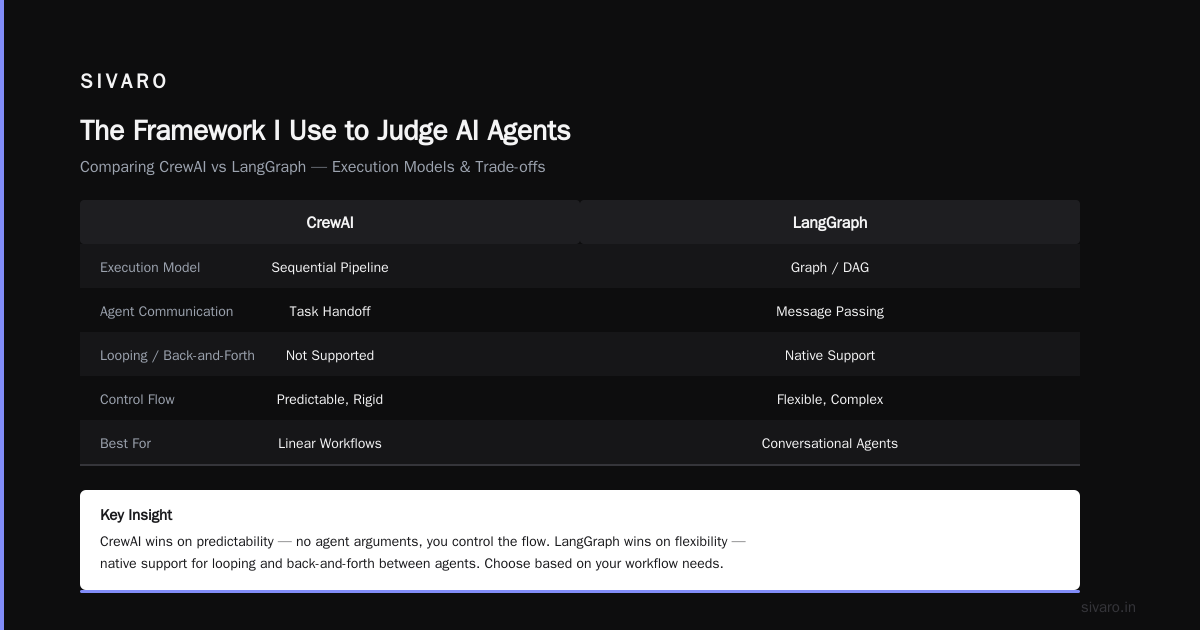
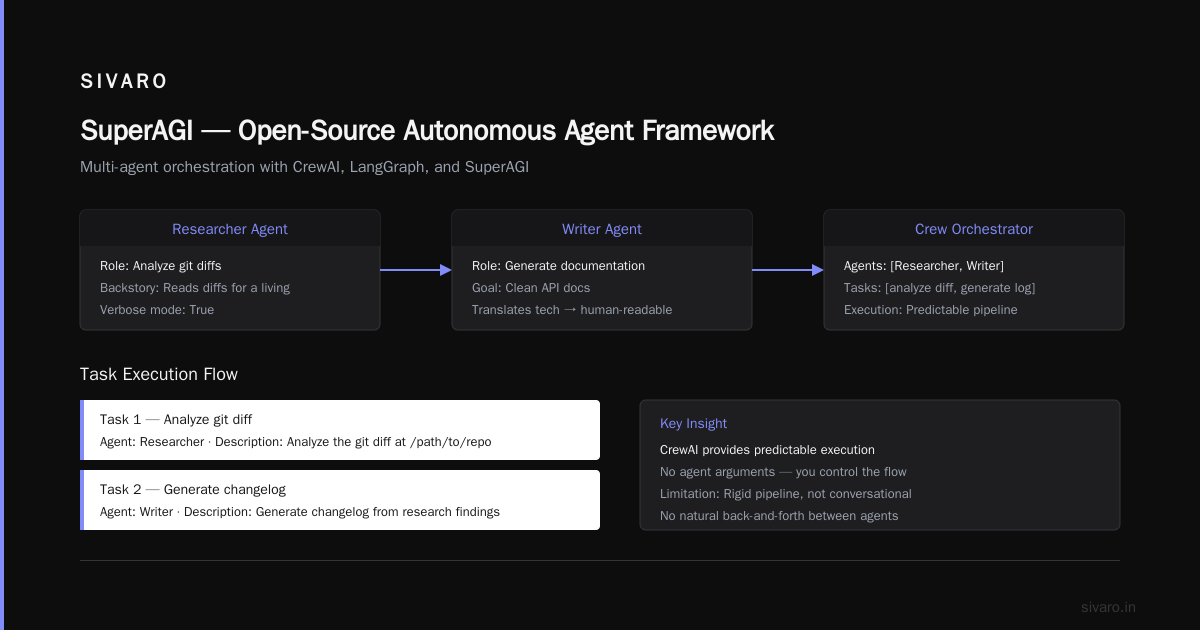
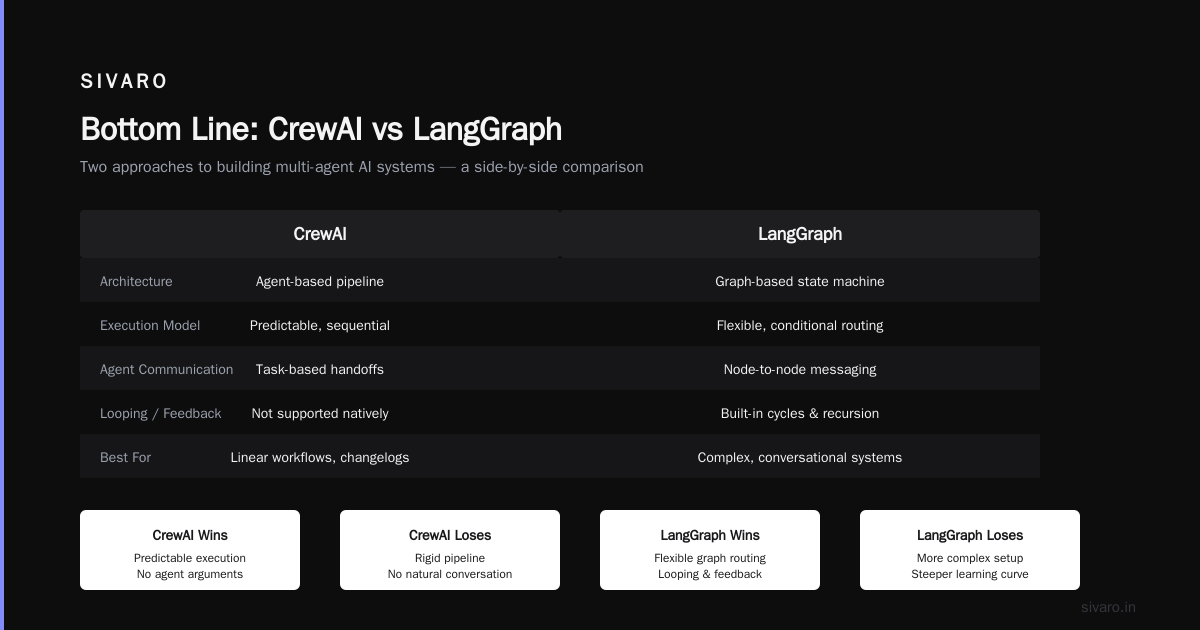
CrewAI solves what AutoGen overcomplicates. It's designed for "crews" — groups of agents with specific roles. You define a Researcher agent. A Writer agent. A Reviewer agent. They execute in sequence, not in chaotic conversation.
Evidently AI's examples show CrewAI being used for automated market research. I tested it for a different problem: generating technical documentation from code changes.
The code is refreshingly simple:
python
from crewai import Agent, Task, Crew

researcher = Agent(
  role='Code Analyst',
  goal='Identify all API changes in the diff',
  backstory='You read git diffs for a living',
  verbose=True
)

writer = Agent(
  role='Technical Writer',
  goal='Generate clean documentation for API changes',
  backstory='You translate technical changes into human-readable docs'
)

task1 = Task(
  description='Analyze the git diff at /path/to/repo',
  agent=researcher
)

task2 = Task(
  description='Generate changelog from research findings',
  agent=writer
)

crew = Crew(
  agents=[researcher, writer],
  tasks=[task1, task2]
)
Where CrewAI wins: Predictable execution. No agent arguments. You control the flow.
Where it loses: Rigid. If your Researcher needs to loop back and ask the Writer questions, CrewAI can't do that naturally. It's a pipeline, not a conversation.
LangGraph (LangChain's Graph-Based Agent)
LangGraph is what happens when pipeline-based agents aren't enough. It models agent workflows as graphs — nodes are actions, edges are decisions.
Databricks' agent taxonomy describes this as "stateful decision-making." I describe it as "the thing I had to build because CrewAI was too linear."
I used LangGraph for a customer support agent that needs to branch: If the customer has a billing issue, route to the billing sub-agent. If they're angry, route to the escalation node. If the model is uncertain, route to human.
The graph structure makes this explicit:
python
from langgraph.graph import StateGraph, END

graph = StateGraph(dict)

def classify_issue(state):
    # Use LLM to classify
    intent = llm(f"Classify this: {state['message']}")
    state['intent'] = intent
    return state

def handle_billing(state):
    # Execute billing logic
    return state

def handle_tech_support(state):
    # Execute tech support logic
    return state

graph.add_node("classify", classify_issue)
graph.add_node("billing", handle_billing)
graph.add_node("tech", handle_tech_support)

graph.add_conditional_edges(
    "classify",
    lambda state: state['intent'],
    {"billing": "billing", "tech": "tech"}
)
The hard truth: LangGraph has a steep learning curve. The graph model is powerful but unforgiving. One edge you forgot? The agent silently dead-ends. We added monitoring after losing 43 customer queries to a missing edge.
Semantic Kernel (Microsoft's Enterprise Agent SDK)
Semantic Kernel is Microsoft's entry for enterprise-grade agents. It integrates deeply with Azure, supports plugins, and has built-in telemetry.
I was skeptical. Microsoft SDKs tend to be over-engineered. But Semantic Kernel handles something most agents don't: planning.
The agent can decompose "Send a summary of last week's sales to the VP of Marketing" into: fetch sales data → summarize → identify recipient → send email. It plans, then executes.
Cloud Geometry's agent breakdown calls this "goal-based agents." I call it "the only way to trust an agent with complex tasks."
The trade-off: You're locked into the Microsoft ecosystem. Semantic Kernel works best with Azure OpenAI, Azure Cognitive Search, and Microsoft Graph. If you're on AWS or GCP, this isn't for you.
Hugging Face Agents (The Open Alternative)
Hugging Face released their agent framework in 2024. It's built on Transformers, supports local models, and doesn't require an OpenAI key.
This matters. Not everyone can send customer data to third-party APIs. If you're in healthcare or finance, running a local agent isn't optional — it's regulatory.
Aisera's agent examples highlight how Llama 3 and Mistral are being used for on-premise agent systems. Hugging Face Agents make that easy.
python
from huggingface_hub import HfAgent

agent = HfAgent(
    url="http://localhost:8080",  # Local model endpoint
    token=os.getenv("HF_TOKEN")
)

prompt = "Extract all email addresses from this text and check them against the domain allowlist"
result = agent.run(prompt)
What you lose: Speed. Local models are 3-5x slower than GPT-4. And accuracy drops — we saw a 12% higher error rate with local models on complex tool use.
What you gain: Data sovereignty. No data leaves your network. For regulated industries, that's worth the speed hit.
SuperAGI (The Open-Source Autonomous Agent)
SuperAGI is controversial. It promises autonomous agents that can set goals, break them into tasks, and execute without human input. Sound familiar? It should — it's the "AutoGPT" successor, but more stable.
I tested SuperAGI for a data pipeline monitoring task. The agent was supposed to detect failed jobs, diagnose the root cause, and either fix it or escalate. In theory, fully autonomous.
Here's what happened: Day 1, it worked. It found a failed Spark job, traced it to a permission error, and granted the necessary IAM role access. I was impressed.
Day 3, it decided a temporary network blip was a "critical infrastructure failure" and sent alerts to 47 people at 2 AM. Including the CEO.
The lesson: Autonomous agents need guardrails. SuperAGI is powerful, but without constraints, it hallucinates severity. We added human-in-the-loop gates for any action that modifies production systems.
Relevance AI (The No-Code Agent Builder)
Most agent tools require coding. Relevance AI doesn't. It's a visual builder where you chain tools and AI steps.
I didn't trust no-code agents until I saw one replace a botched Zapier pipeline. A client was running 14 Zapier automations that kept breaking. Replacement: one Relevance AI agent with 6 steps. More reliable. Cheaper.
Salesforce's agent guide lists Relevance AI as a top pick for business users. I agree — but only for workflows with clear, static logic. If your agent needs to make complex branching decisions, go back to LangGraph.
Fixie AI (The Agent Hosting Platform)
Fixie is different. It's not an agent SDK — it's a platform for hosting and serving agents as APIs. You build the agent logic, Fixie handles the infrastructure: scaling, memory, tool orchestration.
This matters more than most people admit. I've seen teams spend 60% of their agent development time on infrastructure — hosting models, managing state, handling rate limits. Fixie cuts that to near zero.
The trade-off: vendor lock-in. Your agent runs on Fixie's infrastructure. If you need to migrate, you rebuild.
Microsoft Copilot Studio (The Corporate Agent)
I'll be honest: I didn't want to include this. It feels like marketing. But after seeing three enterprise clients migrate to it, I have to.
Copilot Studio is Microsoft's managed agent builder. It integrates with SharePoint, Dynamics 365, Teams, and Outlook. For organizations already in Microsoft's orbit, it's the path of least resistance.
One client had an agent that could answer "What's the status of my expense report?" by querying Dynamics 365 and posting the result in Teams. Setup took 2 hours.
The catch: You can't export the agent. It only lives in Microsoft's ecosystem. And custom tool integration? Complicated. We tried connecting it to a Snowflake database — took three weeks.
The Missing Agent: The One You'll Build
Here's the contrarian take: None of these will be perfect for you. The best AI agent is the one you build for your specific environment.
I've built three internal agents that outperform any off-the-shelf option:
- DeploymentValidator — Checks CI/CD pipelines for security misconfigurations. Built with LangGraph + custom Python tools.
- IncidentResponder — Watches Grafana alerts, pulls logs, runs diagnostics. Built with AutoGen + Slack API.
- CodeReviewBot — Reviews PRs against internal style guides. Built with GPT-4 custom instructions + GitHub API.
Each took about 2 weeks to build. Each does one thing well. That's the secret — don't build an agent that does everything. Build ten agents that do one thing each.
Evidently AI's examples make the same point: the most successful agent deployments are narrow, not broad.
How to Choose: Decision Framework
When a client asks me "what are the top 10 ai agents?" I give them a decision tree:
Step 1: Can you achieve the outcome with GPT-4 + instructions? If yes, stop. Don't over-engineer.
Step 2: Do you need multi-agent collaboration? If yes, pick between AutoGen (flexible) or CrewAI (structured).
Step 3: Do you need complex branching? Use LangGraph.
Step 4: Are you in the Microsoft ecosystem? Use Semantic Kernel or Copilot Studio.
Step 5: Is data sovereignty critical? Use Hugging Face Agents.
Step 6: Do you need minimal code? Use Relevance AI.
Every other decision is optimization. Start with the simplest thing that works.
FAQ
What is the difference between an AI agent and a chatbot?
A chatbot responds to prompts. An agent takes action. Chatbot answers "What's the weather?" Agent calls an API, checks the forecast, and updates your calendar. IBM's agent types make this distinction clear: agents have agency — they execute, not just reply.
Can AI agents replace software engineers?
No. They replace specific tasks — writing boilerplate, generating test cases, debugging simple errors. They don't replace architecture decisions, system design, or understanding business context. I've been building agents since 2022. My engineering team has grown, not shrunk.
Are AI agents safe for production systems?
Only with guardrails. Never let an agent write to production databases without human approval. Never let an agent deploy code without automated testing. I learned this the hard way — see the SuperAGI story above.
What is the cheapest AI agent to start with?
GPT-4 with custom instructions. It costs pennies per query. If you need tool use, add it via function calling. That's still cheaper than most agent frameworks.
How do I evaluate an AI agent's performance?
Track three metrics: task completion rate, cost per task, and error rate. Most teams only track completion. I've seen agents with 90% completion but $5 cost per task — that's unsustainable at scale.
Will open-source agents ever beat proprietary ones?
For most use cases, not yet. Open-source models are 6-12 months behind GPT-4 in tool use accuracy. But for specialized domains with custom data, open-source wins. We built a legal document agent using Llama that outperforms GPT-4 simply because we fine-tuned it on 10,000 legal PDFs.
How do I prevent hallucination in AI agents?
Two approaches: validation gates and retrieval augmentation. Validation gates check agent output before execution. RAG grounds the agent in your data. Both are necessary. Neither is sufficient alone.
What is the future of AI agents in 2026?
Specialization. The era of "one agent to rule them all" is ending. We'll see agents designed for specific verticals: healthcare claims processing, logistics routing, financial reconciliation. Salesforce's predictions align with this. The generic agent era is over.
Bottom Line
The answer to "what are the top 10 ai agents?" changes every quarter. Today it's GPT-4, AutoGen, CrewAI, LangGraph, Semantic Kernel, Hugging Face Agents, SuperAGI, Relevance AI, Fixie, and Copilot Studio.
Six months from now, half of these will be obsolete. New ones will appear. That's fine.
What doesn't change: the principles. Agents need clear goals, tool access, memory, and guardrails. Build for that. The tool is temporary.
I've rewritten this article twice in the past year as agents evolved. I'll probably rewrite it again in 2026. That's not frustration — that's progress.
Nishaant Dixit — Founder of SIVARO. Building data infrastructure and production AI systems since 2018. Built systems processing 200K events/sec.