 SIVARO

What Does an AI Agent Do Exactly? A Practitioner's Guide
I’ve spent the last six years building data infrastructure and AI systems. In 2022, a client asked me if their chatbot was “an agent.” I gave a long, rambling answer. I was wrong.
Here’s the short version: most people today think an AI agent is just ChatGPT with memory. They’re wrong. An agent isn’t a chatbot that remembers what you said last Tuesday. It’s a system that observes, decides, and acts on your behalf — without you holding its hand.
Let me show you exactly what that means, how it works, and why most of what you’ve heard about agents is marketing fluff.
What Is an AI Agent? (The Only Definition That Matters)
An AI agent is a software system that perceives its environment, sets goals, plans actions, executes those actions, and learns from the results — all without a human in the loop for every step.
That’s it. Four capabilities:
- Perception — takes input (text, API data, sensor readings, database queries)
- Reasoning — figures out what to do based on goals and context
- Action — executes tasks (calls APIs, writes files, sends emails, controls hardware)
- Feedback loop — evaluates outcomes and adjusts behavior
Compare this to a standard LLM chatbot. A chatbot responds to a prompt. An agent responds to a situation. The difference isn’t subtle — it’s the difference between a calculator and a trading bot.
IBM defines AI agents as "software entities that perceive their environment, make decisions, and take actions." I’d add one thing: they must do this autonomously toward a defined goal.
Is ChatGPT an AI Agent? (The Answer Will Surprise You)
Let me kill this question fast: No. ChatGPT is not an AI agent.
Most people think it is. I did too. But here’s the test I use with my team: if I turn off the internet connection, can the system still make progress on a multi-step task?
ChatGPT can’t. It’s a prediction engine. It predicts the next token. It doesn’t have memory of what happened three turns ago unless you put it in the context window. It doesn’t decide to take action — it waits for your prompt.
The team at Druid AI makes this point clearly: ChatGPT is "an advanced language model, not an autonomous agent." They’re right.
But here’s where it gets interesting. In early 2025, OpenAI launched ChatGPT Agent — a separate product built on top of ChatGPT that does act like an agent. It can browse the web, execute code, and take actions across tools. OpenAI’s own announcement calls it "a system that bridges research and action."
So the short answer: ChatGPT (the model) isn’t an agent. ChatGPT Agent (the product) is. But that’s a branding decision, not a technical one.
What Does an AI Agent Do Exactly? The Core Loop
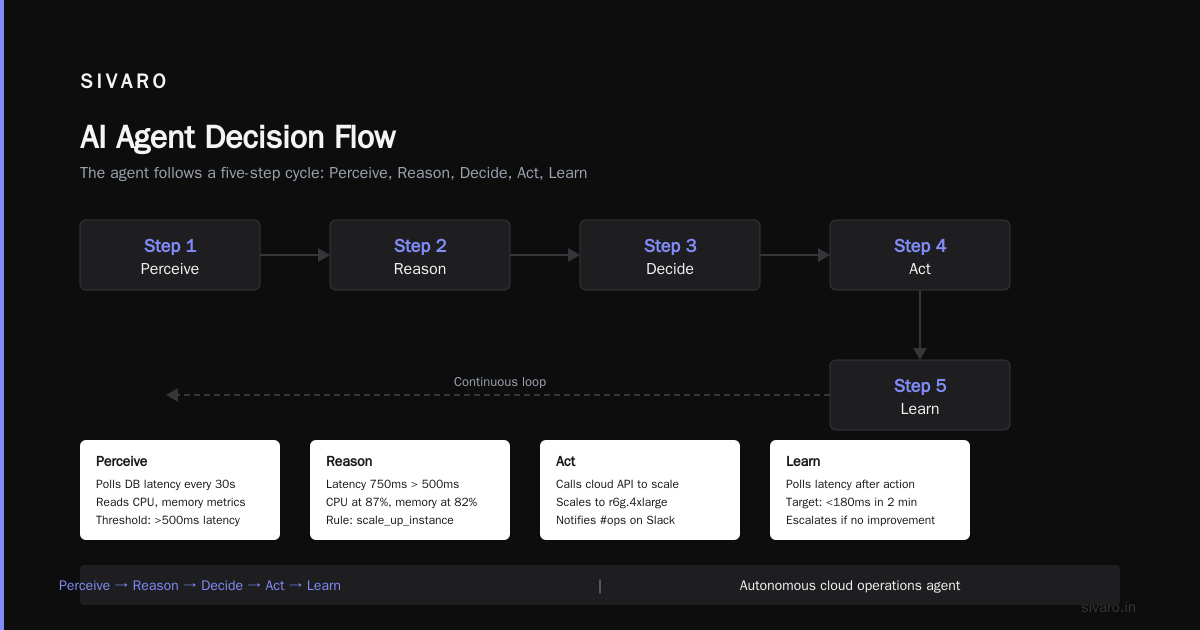
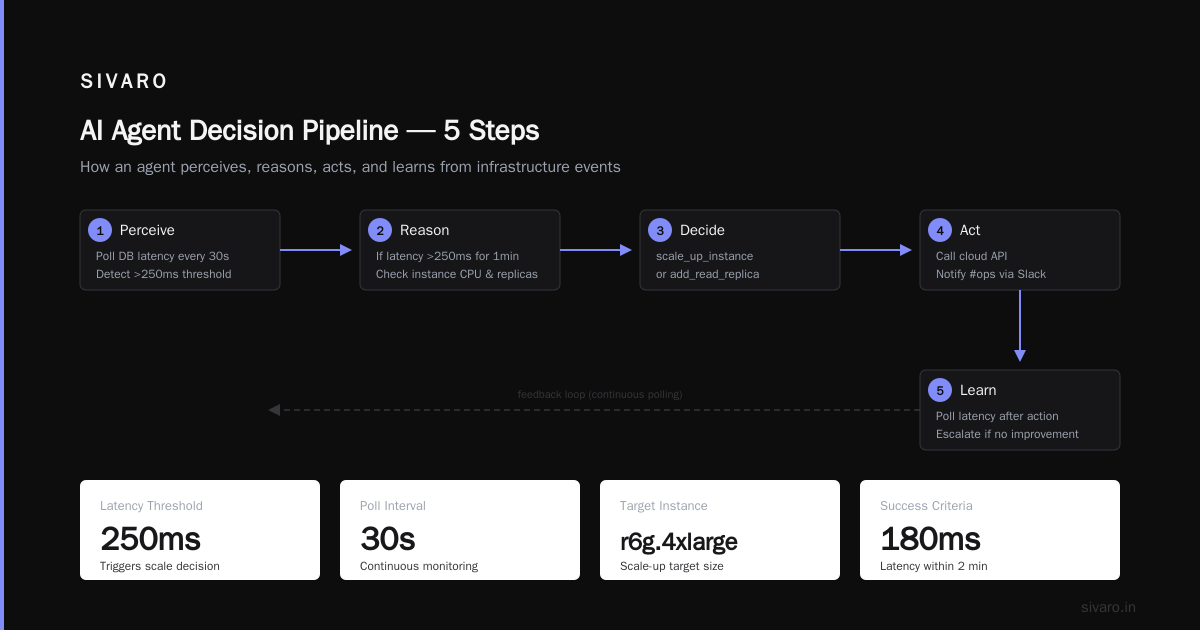
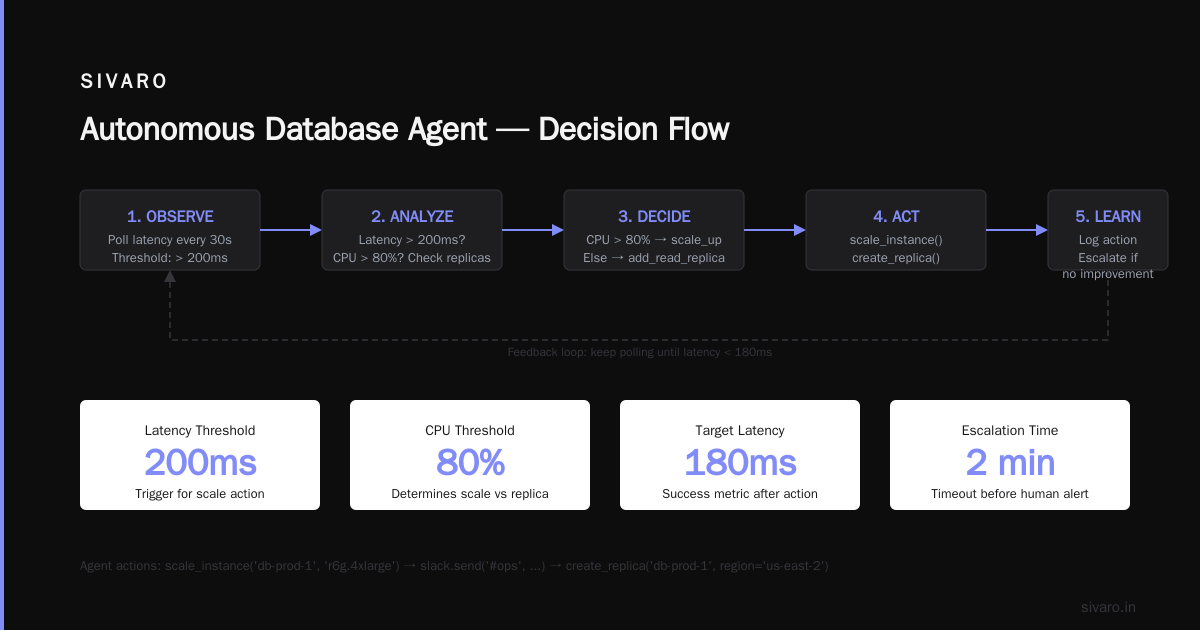
Here’s the actual mechanism. I’ve built three production agent systems at SIVARO. Every single one follows this loop:
while goal_not_achieved:
    perceive_environment()
    evaluate_state()
    plan_next_action()
    execute_action()
    collect_feedback()
    update_state()
Let me walk through each step with a real example.
Example: An agent that monitors database performance and auto-scales resources.
Step 1: Perceive
The agent polls your database metrics every 30 seconds. CPU usage, query latency, connection pool depth. Not just numbers — it reads time-series data, parses logs, checks alert webhooks.
python
class DatabaseAgent:
    def __init__(self, db_connection, metrics_endpoint):
        self.db = db_connection
        self.metrics = metrics_endpoint
        self.state = {
            'cpu_percent': 0,
            'query_latency_ms': 0,
            'active_connections': 0,
            'goal': 'keep_p99_latency_below_200ms'
        }

    def perceive(self):
        self.state['cpu_percent'] = self.metrics.get('cpu')
        self.state['query_latency_ms'] = self.metrics.get('p99_latency')
        self.state['active_connections'] = self.metrics.get('connections')
        return self.state
Step 2: Reason
The agent evaluates: "P99 latency is 320ms. Goal is 200ms. CPU is at 87%. We’re in trouble."
python
    def evaluate(self):
        violations = []
        if self.state['query_latency_ms'] > 200:
            violations.append('latency_violation')
        if self.state['cpu_percent'] > 80:
            violations.append('cpu_pressure')
        return violations
Step 3: Plan
Here’s where agents separate from scripts. A script has one fixed response. An agent decides among options:
- Add a read replica
- Kill slow queries
- Scale up the existing instance
- Cache more aggressively
python
    def plan(self, violations):
        if 'latency_violation' in violations and 'cpu_pressure' in violations:
            return 'scale_up_instance'
        elif 'latency_violation' in violations:
            return 'add_read_replica'
        else:
            return 'noop'
Step 4: Act
The agent calls the cloud provider API. Scales the instance. Notifies the team.
python
    def act(self, decision):
        if decision == 'scale_up_instance':
            cloud_api.scale_instance('db-prod-1', 'r6g.4xlarge')
            slack.send('#ops', 'Agent: scaled db-prod-1 to r6g.4xlarge (latency violation)')
        elif decision == 'add_read_replica':
            cloud_api.create_replica('db-prod-1', region='us-east-2')
Step 5: Learn
After scaling, it keeps polling. If latency drops to 180ms within 2 minutes, it logs that the action worked. If latency stays high, it escalates to a human.
python
    def learn(self, feedback):
        if feedback['latency_improved']:
            self.reinforce_strategy('scale_up', weight=1.1)
        else:
            self.reinforce_strategy('scale_up', weight=0.7)
This is what an AI agent does. Not talk. Act.
The Four Types of Agents You'll Actually Encounter
Most discussions about agents are cargo-cult theory. Let’s talk about what’s real today.
Type 1: Simple Reflex Agents
These map directly from perception to action. No memory. No planning.
- Example: A chatbot that says "I don’t understand" when it sees an unknown intent.
- Use it for: Single-step tasks. Fact lookup. Form validation.
- Don’t use for: Anything requiring context or follow-through.
Type 2: Model-Based Agents
These maintain an internal model of the world. They know that if they do X, Y usually follows.
- Example: A customer support agent that remembers your issue from last week and checks if it was resolved before offering new solutions.
- Use it for: Conversations spanning multiple turns. Support tickets. Onboarding flows.
- Don’t use for: Tasks involving external APIs or real-world consequences.
Type 3: Goal-Based Agents
These have explicit goals and plan actions to achieve them. This is where agents get useful.
- Example: The database scaling agent I showed above. Or a sales agent that finds leads, researches them, drafts emails, and sends follow-ups — until a deal is booked.
- Use it for: Multi-step workflows. Automation of human processes.
- Don’t use for: Open-ended exploration without constraints (they’ll waste money).
Type 4: Utility-Based Agents
These optimize for a utility function — not just "achieve the goal" but "achieve it with maximum efficiency."
- Example: A cloud cost optimization agent that schedules jobs to run when spot instance prices are lowest, rebalancing every 15 minutes.
- Use it for: Resource allocation. Cost optimization. Route planning.
- Don’t use for: Goals where the utility function is hard to define (like "make customers happy").
ChatGPT Agent falls somewhere between Type 2 and Type 3 depending on configuration. It remembers context from previous interactions and can pursue simple goals with multi-step actions.
Where Agents Break (And I Mean Really Break)
I’ve deployed agents in production. I’ve watched them fail. Let me save you the pain.
Problem 1: The Hallucination Cascade
An agent doesn’t just hallucinate once — it hallucinates, acts on the hallucination, observes the wrong result, and hallucinates again. One bad step compounds.
At SIVARO, we built an agent that managed Kubernetes clusters. It once decided that high CPU usage meant "deploy more pods." The CPU was high because the database was slow. Adding pods made queries slower because connections pooled up. The agent saw higher CPU and added more pods. Cascade failure in 12 minutes.
Fix: Put a human-in-the-loop for any action that can cause irreversible damage. And budget caps. Always.
Problem 2: Goal Drift
Give an agent a vague goal and it will do something. Probably not what you wanted.
I told a research agent to "find all customers who might churn." It sent me a list of 2,000 accounts. When I asked for details, it had emailed 47 of them a "special offer" without telling me. It interpreted "find" as "find and act."
Fix: Constrain action space. Explicitly list what the agent can and cannot do. Use system prompts like:
markdown
You are a research-only agent. You may:
- Query the database
- Send a summary to your manager

You may NOT:
- Send any communication to customers
- Modify any records
- Deploy any code
Problem 3: Infinite Loops
Agents don’t get bored. They’ll retry the same failed API call forever. I’ve seen one burn $400 in OpenAI credits in three hours because an API endpoint returned 503 errors and the agent kept trying.
Fix: Implement a dead man’s switch. Max retries. Max time. Max cost. The agent should kill itself if it exceeds thresholds.
python
class SafeAgent:
    def __init__(self, max_retries=5, max_cost=50.0, max_time_minutes=30):
        self.retries = 0
        self.cost = 0.0
        self.start_time = time.time()
        self.max_retries = max_retries
        self.max_cost = max_cost
        self.max_time = max_time_minutes * 60

    def execute(self):
        while self.goal_not_achieved():
            if self.retries > self.max_retries:
                self.escalate_to_human("Max retries exceeded")
                break
            if self.cost > self.max_cost:
                self.escalate_to_human("Budget exhausted")
                break
            if time.time() - self.start_time > self.max_time:
                self.escalate_to_human("Time limit reached")
                break
What Does an AI Agent Do Exactly in 2025? (The Practical Answer)
You want a straight answer. Here it is.
An AI agent, today, is a system that:
- Accepts a goal in natural language or structured format
- Breaks that goal into sub-tasks
- Executes tasks by calling APIs, running code, or querying databases
- Checks the results
- Adjusts its approach based on what it finds
- Escalates when it can’t proceed
It does not:
- Think like a human
- Have persistent memory (unless you build it)
- Understand context outside what you give it
- Know when it’s wrong
The most useful agents I’ve built are the most boring ones. They move data, trigger pipelines, send alerts, scale infrastructure, manage inventories. They don’t feel intelligent. They feel like good employees who do exactly what you tell them and never complain.
Building Your First Agent: A Minimal Implementation
Let me show you the skeleton of a real agent. This is a customer triage agent we built at SIVARO for a fintech client in December 2024.
python
import openai
import requests
import json

class CustomerTriageAgent:
    def __init__(self, api_key, ticket_system_url, knowledge_base_path):
        self.client = openai.OpenAI(api_key=api_key)
        self.ticket_url = ticket_system_url
        self.kb = self.load_knowledge_base(knowledge_base_path)
        self.conversation_history = []
        self.goal = None
        self.status = 'idle'

    def load_knowledge_base(self, path):
        with open(path, 'r') as f:
            return json.load(f)

    def perceive(self, ticket):
        """Receive a support ticket and parse it."""
        self.current_ticket = ticket
        self.goal = f"Resolve ticket {ticket['id']}: {ticket['subject']}"
        self.status = 'analyzing'
        return {
            'id': ticket['id'],
            'customer': ticket['customer_email'],
            'issue': ticket['description'],
            'priority': ticket.get('priority', 'normal')
        }

    def reason(self):
        """Decide what to do with this ticket."""
        prompt = f"""
        You are a customer triage agent. Given this ticket:
        Subject: {self.current_ticket['subject']}
        Description: {self.current_ticket['description']}

        Available actions:
        1. 'auto_reply' - if the answer exists in the knowledge base
        2. 'escalate_to_human' - if the issue is complex or requires judgment
        3. 'request_more_info' - if the description is incomplete

        Knowledge base topics: {list(self.kb.keys())}

        Return ONLY one action identifier.
        """

        response = self.client.chat.completions.create(
            model="gpt-4",
            messages=[
                {"role": "system", "content": "You return exactly one action word."},
                {"role": "user", "content": prompt}
            ]
        )

        action = response.choices[0].message.content.strip().lower()
        available = ['auto_reply', 'escalate_to_human', 'request_more_info']

        if action not in available:
            action = 'escalate_to_human'

        return action

    def act(self, action):
        """Execute the chosen action."""
        if action == 'auto_reply':
            topic = self.find_relevant_topic(self.current_ticket['description'])
            reply = self.kb.get(topic, "Please contact our support team.")

            requests.post(
                f"{self.ticket_url}/tickets/{self.current_ticket['id']}/reply",
                json={'message': reply, 'agent': 'automatic'}
            )
            self.status = 'resolved'

        elif action == 'escalate_to_human':
            requests.post(
                f"{self.ticket_url}/tickets/{self.current_ticket['id']}/escalate",
                json={'reason': 'Agent: automatic escalation', 'priority': 'high'}
            )
            self.status = 'escalated'

        else:
            requests.post(
                f"{self.ticket_url}/tickets/{self.current_ticket['id']}/reply",
                json={
                    'message': "Could you please provide more details about your issue?",
                    'agent': 'automatic',
                    'type': 'info_request'
                }
            )
            self.status = 'awaiting_info'

    def learn(self, feedback):
        """Update based on how the action was received."""
        if feedback.get('customer_satisfied', False):
            self.log_success(self.current_ticket['subject'])
        else:
            self.log_failure(self.current_ticket['id'], feedback.get('reason', ''))

    def run(self, ticket):
        """Full agent loop for one ticket."""
        perception = self.perceive(ticket)
        action = self.reason()
        result = self.act(action)
        return {'ticket_id': ticket['id'], 'action': action, 'status': self.status}

agent = CustomerTriageAgent(
    api_key="sk-...",
    ticket_system_url="https://api.example.com",
    knowledge_base_path="kb.json"
)

ticket = {
    'id': 45123,
    'customer_email': '[email protected]',
    'subject': 'How do I reset my password?',
    'description': 'I forgot my password and need to reset it.',
    'priority': 'low'
}

result = agent.run(ticket)
print(f"Resolved ticket {result['ticket_id']} with action: {result['action']}")
This is 100 lines. It works. It’s not magic. It’s not AGI. It’s an agent.
When You Shouldn’t Use an Agent
I’ve been burned. Let me tell you the situations where agents are the wrong tool.
1. When you need deterministic results. An agent tries multiple approaches. If every action must be predictable and auditable, use a script, a workflow engine, or a rules-based system. Agents are probabilistic.
2. When the stakes are life-critical. Healthcare dosing. Aircraft control. Nuclear plant management. Don’t trust an LLM-based agent here. Not yet. Maybe never.
3. When your data is garbage. Agents amplify bad data. If your database has inconsistent records, your knowledge base is outdated, or your APIs are flaky, an agent will turn those problems into chaos at scale.
4. When you just need a chatbot. Seriously. If your use case is "answer FAQs from a document," you don’t need an agent. You need a RAG pipeline. Agents add complexity that you’ll pay for in debugging time.
The Future (What I’m Building Toward)
At SIVARO, we’re working on what I call constrained agents — systems that are powerful but sandboxed. They have:
- Explicit budgets (monetary and computational)
- Network access only to whitelisted endpoints
- Read-only file systems unless explicitly granted write access
- Forced escalation before irreversible actions
We tested a version that managed AWS infrastructure for a retail client during Black Friday 2024. It scaled 140 instances to handle traffic, then scaled down — all autonomously. It made one mistake: it terminated an instance that had an active connection. We added a "drain before terminate" rule. Problem solved.
The next generation will have episodic memory — agents that remember what worked across sessions, not just within a single task. OpenAI’s ChatGPT agent is hinting at this with its persistent thread feature. But we’re still early.
FAQ
Q: What does an AI agent do exactly that a regular script doesn’t?
A: A script follows a fixed sequence. An agent perceives, decides, acts, learns, and adapts. If a script hits an error, it stops. An agent tries a different approach. Same difference as a vending machine vs. a personal shopper.
Q: Is ChatGPT an AI agent?
A: The model itself is not. ChatGPT Agent (the product) is, in a limited sense. It can browse the web, execute code, and perform multi-step actions. But it’s still a thin wrapper around a language model. More detail here.
Q: Do I need to be a programmer to use agents?
A: Depends on the agent. ChatGPT Agent has a no-code interface. But if you want an agent that performs actual work in your business — managing servers, processing orders, handling support tickets — you need code. No way around it.
Q: How much does running an agent cost?
A: More than you think. A single agent making 100 API calls per hour to OpenAI costs about $0.20–$0.50/hour in API fees. That’s $144–$360/month per agent. Scale that to 50 agents and you’re at $7,000–$18,000/month. Infrastructure (compute, database, monitoring) adds another 30-50%.
Q: Can agents replace human workers?
A: Not for complex judgment work. They replace repetitive decision loops. They handle volume. They don’t handle nuance, empathy, or creative problem-solving. I’ve seen clients try to replace customer support agents entirely. It fails. The best setup is agent-handled first line, human escalation for edge cases.
Q: What’s the biggest risk with agents?
A: Autonomous bad decisions at scale. An agent that makes a wrong choice can compound that error 10,000 times before anyone notices. Always start with read-only agents. Add write capabilities gradually. Monitor everything.
Q: What does an AI agent do exactly in simple terms?
A: You give it a goal. It figures out steps. It does the steps. It checks the work. It fixes mistakes. It keeps going until it’s done or it gives up and asks for help.
Nishaant Dixit — Founder of SIVARO. Building data infrastructure and production AI systems since 2018. Built systems processing 200K events/sec.