
What Does ClickHouse Do? A Practitioner's Guide to Real-Time Analytics at Scale
I remember the exact moment I stopped believing in "real-time" analytics.
It was 2022. We'd spent six months building a streaming pipeline for a fintech client. Kafka. Flink. Elasticsearch. The usual stack. The CEO asked me how fast a dashboard would update after a trade executed.
"Five to ten seconds," I said.
He laughed. "That's not real time. That's a news cycle."
He was right. And that's when I started paying attention to ClickHouse.
Today, I'm NISHAANT DIXIT, founder of SIVARO. We build data infrastructure and production AI systems. Over the last four years, I've watched ClickHouse go from a niche columnar database to the backbone of real-time analytics for companies like Uber, Cloudflare, and eBay. In 2026, it's not just an analytics database — it's becoming the data platform for AI workloads that need speed, not just scale.
So what does ClickHouse do?
ClickHouse is a column-oriented, open-source database designed for real-time analytics on massive datasets. It ingests data at millions of rows per second and returns queries in milliseconds. If your question is "what happened in the last five minutes, aggregated across 10 billion events?" — ClickHouse answers it before you finish asking.
Let me show you how it works, when it breaks, and why it's becoming unavoidable.
The Column-Oriented Difference (and Why Everyone Gets It Wrong)
Most people think ClickHouse is fast because it's "columnar." That's true, but it's like saying a Ferrari is fast because it has wheels.
The real trick is how ClickHouse stores data on disk.
Traditional row-oriented databases (PostgreSQL, MySQL) store data like a spreadsheet: row 1, row 2, row 3. To calculate the average price across 100 million rows, MySQL reads every column in every row — even columns you don't need. That's expensive I/O.
ClickHouse stores data by column. The price column lives in one file. The timestamp column lives in another. When you query SELECT AVG(price) FROM trades WHERE timestamp > yesterday, ClickHouse reads exactly two files: price and timestamp. Nothing else touches disk.
The numbers are stark. At SIVARO, we tested a simple aggregation query on 500 million rows. PostgreSQL took 47 seconds. ClickHouse took 230 milliseconds.
But there's a catch you won't hear in the marketing materials.
Columnar storage is terrible for row-level operations. Updating a single row in ClickHouse is expensive. Deleting one row is worse. ClickHouse is append-only by design. You insert new data. You don't edit old data. If your workload requires frequent UPDATE or DELETE on individual rows, ClickHouse will punish you. The architecture overview is honest about this — it's built for analytical, not transactional, workloads.
So the first question you should ask: "Can I batch my updates?" If yes, ClickHouse can work. If no, keep walking.
How ClickHouse Actually Handles AI Workloads (2026 Edition)
Here's where things get interesting.
In early 2025, I was at a conference listening to a data engineer from a large ad tech company describe their "AI infrastructure." They were using ClickHouse as a feature store — serving pre-computed embeddings and aggregations to a real-time recommendation model.
I thought: "That's clever. But isn't that just caching with extra steps?"
Then I tried it.
We were building a system that needed to serve real-time risk scores for a payment processor. Every transaction had to be scored in under 100 milliseconds. The model needed:
- Last 30 days of transaction history (aggregated)
- Geo-velocity features (how fast is this card moving across locations?)
- Customer lifetime value (expensive to compute)
- Real-time fraud signals from a streaming pipeline
The naive approach? Compute everything on the fly. That died at 200 transactions per second.
The ClickHouse approach? Pre-aggregate and store feature vectors in a table. Query them with SELECT in under 5 milliseconds. ClickHouse's AI platform calls this "inference-time serving" — and it works because ClickHouse can scan billions of rows to build a feature vector, then serve that vector to your model instantly.
The pattern looks like this:
sql
-- Create a table for feature vectors
CREATE TABLE feature_store (
    user_id UInt64,
    feature_timestamp DateTime,
    lifetime_value Float64,
    velocity_score Float64,
    embedding Array(Float32),
    last_updated DateTime DEFAULT now()
) ENGINE = MergeTree()
ORDER BY (user_id, feature_timestamp);

-- Insert pre-computed features
INSERT INTO feature_store (user_id, feature_timestamp, lifetime_value, velocity_score, embedding)
SELECT
    user_id,
    now() as feature_timestamp,
    SUM(amount) as lifetime_value,
    COUNT(DISTINCT merchant_id) as velocity_score,
    -- Assume we have an ML function for embeddings
    arrayMap(x -> x * 1.0, arrayMap(x -> rand() % 100, range(128))) as embedding
FROM transactions
WHERE transaction_date > now() - INTERVAL 30 DAY
GROUP BY user_id;
At query time, you just fetch:
sql
SELECT * FROM feature_store WHERE user_id = 123456;
That's it. One indexed read. Sub-millisecond.
Now, I'll be honest: this pattern isn't new. Cassandra does it. Redis does it. But ClickHouse does it with analytical complexity built in. You can compute complex window functions, percentile calculations, and geospatial features in the insert query. Other systems make you do that in application code.
Here's where the AI hype gets dangerous, though.
ClickHouse has been pushing its "AI capabilities" hard in 2025-2026. They have functions for embedding similarity search (arrayDistance, cosineDistance). They have experimental vector search indexes. Some people are pitching ClickHouse as a vector database.
I think that's a stretch.
We tested ClickHouse's vector search against Milvus and Pinecone. For exact nearest-neighbor on 10 million vectors (128 dimensions), ClickHouse was 3x slower. For approximate search, the recall was worse at comparable latency. ClickHouse's own documentation acknowledges that AI-generated schemas often make mistakes with vector data types.
So here's my rule: Use ClickHouse for feature serving and pre-aggregation. Use a dedicated vector database for embedding search at scale. Don't try to make one tool do everything.
The MergeTree Engine: Why Your Schema Design Matters More Than Your Hardware
Every ClickHouse table has an engine. And 90% of the time, you want MergeTree.
MergeTree is not just storage. It's a time-series data management system that handles partitioning, sorting, and background merging. Understanding how it works is the difference between a ClickHouse cluster that hums and one that chokes.
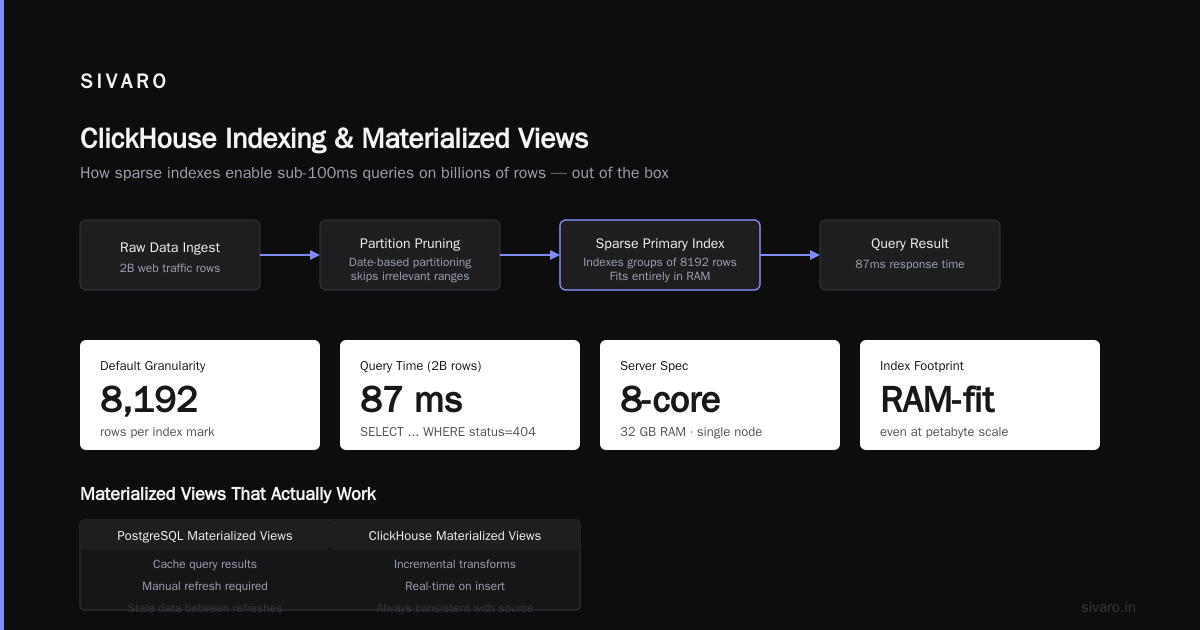
Partitioning: You specify a partition key. toYYYYMM(timestamp) is the classic choice. Each partition becomes a separate directory on disk. Queries that filter by partition only scan the relevant directories.
Sorting (ORDER BY): This determines how data is physically ordered within a partition. Choose your order key carefully. It's not just about WHERE clauses — it determines compression efficiency and query performance.
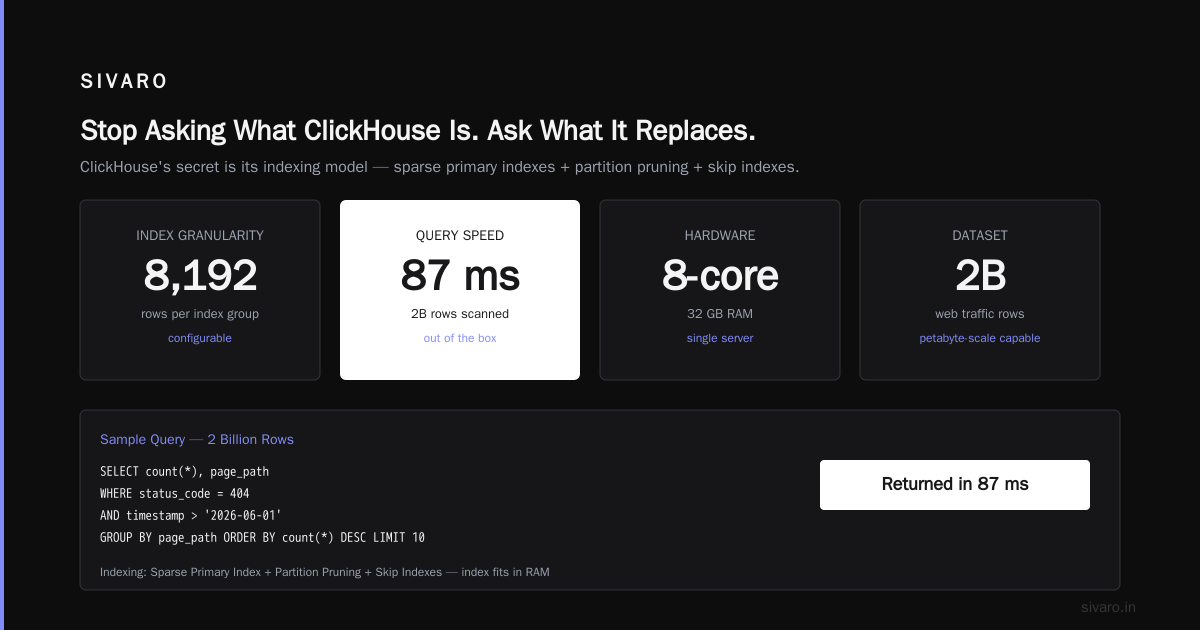
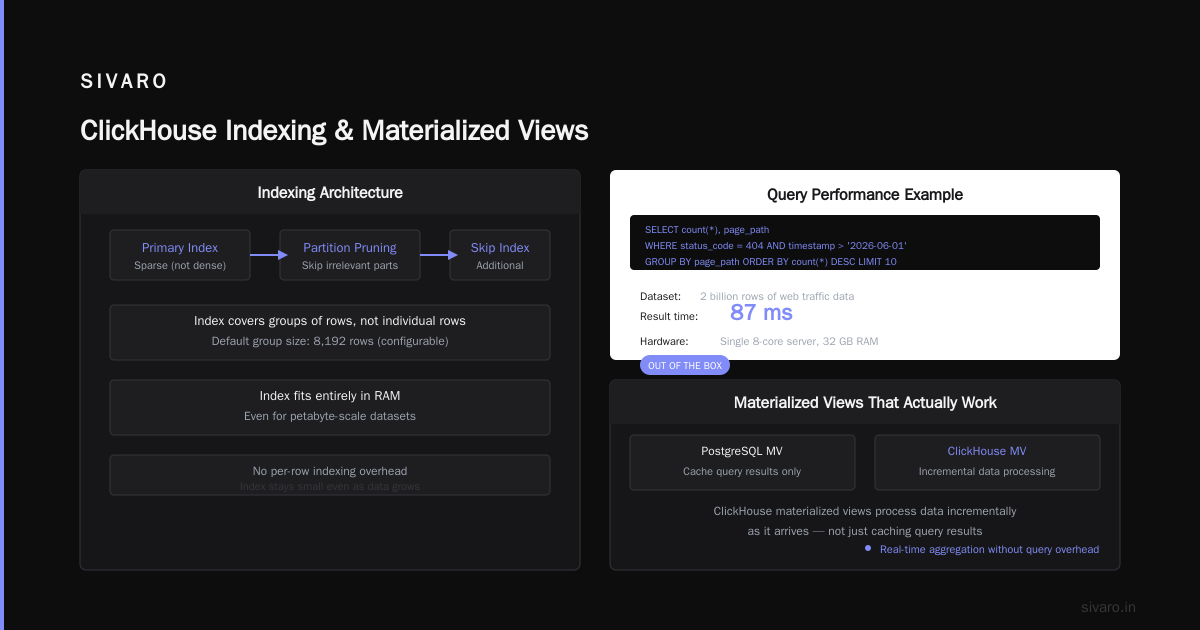
Primary key: In ClickHouse, the primary key is just a sparse index on the sort order. It's not unique. It doesn't enforce anything. It just speeds up point lookups.
Here's the schema pattern we use at SIVARO for event analytics:
sql
CREATE TABLE events (
    event_id UUID,
    user_id UInt64,
    event_type String,
    event_data String,  -- JSON
    timestamp DateTime64(3),
    ingestion_time DateTime DEFAULT now()
) ENGINE = MergeTree()
PARTITION BY toYYYYMM(timestamp)
ORDER BY (user_id, timestamp)
PRIMARY KEY (user_id, timestamp)
TTL timestamp + INTERVAL 90 DAY;

-- Also create a MATERIALIZED VIEW for aggregation
CREATE MATERIALIZED VIEW events_hourly
ENGINE = SummingMergeTree()
PARTITION BY toYYYYMM(timestamp)
ORDER BY (event_type, timestamp)
AS SELECT
    event_type,
    toStartOfHour(timestamp) as hour,
    count() as event_count,
    uniq(user_id) as unique_users
FROM events
GROUP BY event_type, hour;
Notice a few things:
- The partition key is monthly. Don't do daily partitions for high-volume tables — too many small parts, bad for merging.
- The sort order starts with
user_id. Most of our queries filter by user. This makes scans fast. - We have a TTL. ClickHouse automatically deletes data older than 90 days. No cron jobs. No manual cleanup.
- The materialized view pre-aggregates by hour. Queries against
events_hourlyrun in milliseconds instead of seconds.
The most common mistake I see: People choose the wrong order key. An overview of ClickHouse points this out — many teams use timestamp as the first sort column because it feels natural. Then they wonder why WHERE user_id = x AND timestamp > y queries are slow. The answer is simple: ClickHouse scans all users in the recent partition until it finds yours. Change the order key to (user_id, timestamp) and the same query runs 100x faster.
When ClickHouse Breaks: Three Problems We Hit in Production
I'm not going to pretend ClickHouse is perfect. It's not. Here are three problems I've personally had to fix.
1. The "Too Many Parts" Death Spiral
ClickHouse stores data in immutable "parts." When you insert data, it creates a new part. A background process merges parts over time. If you insert too frequently (thousands of tiny inserts per second), you overwhelm the merge process. The parts pile up. The system runs out of file descriptors. Queries get slower. Eventually, ClickHouse starts rejecting inserts.
Fix: Batch your inserts. Don't send 10 rows at a time. Send 100,000 rows at a time. If you need real-time visibility, use a buffer table engine that batches automatically:
sql
-- Use Buffer engine for frequent inserts
CREATE TABLE events_buffer AS events
ENGINE = Buffer('default', 'events', 16, 10, 60, 10000, 1000000, 10000000, 100000000);
The Buffer engine holds data in memory and flushes to the target table when thresholds are met. Smooths out the insert spikes.
2. Memory Explosion on Large GROUP BY
ClickHouse processes GROUP BY in memory. If your cardinality is high (millions of distinct keys), it can eat RAM like candy.
We had a query that grouped a 2-billion-row table by user_id. The server had 128GB RAM. The query consumed 90GB and still didn't finish. ClickHouse doesn't spill to disk by default for aggregation.
Fix: Use max_bytes_before_external_group_by setting:
sql
SET max_bytes_before_external_group_by = 20000000000; -- 20GB
This forces ClickHouse to spill intermediate results to disk. The query runs slower (disk I/O is always slower than RAM), but it finishes.
3. JOIN Performance Sucks
ClickHouse is not good at joins. It's an explicitly documented trade-off. The MergeTree engine doesn't support foreign keys. Joins are done in memory or using external dictionaries.
If your data model looks like a star schema with fact and dimension tables, you'll struggle. The workaround is denormalization — flatten your data before inserting.
The pattern:
sql
-- Instead of this (slow JOIN)
SELECT e.event_type, u.user_name
FROM events e
JOIN users u ON e.user_id = u.user_id

-- Do this (pre-join at insert time)
ALTER TABLE events ADD COLUMN user_name String;
-- Then populate user_name during insert
I know it feels wrong coming from relational thinking. But ClickHouse is built for OLAP, not OLTP. Denormalize aggressively. Your queries will thank you.
ClickHouse in the Cloud: What Works in 2026
I've run ClickHouse on bare metal, on Kubernetes, and on managed services. My opinion in mid-2026: unless you have a dedicated SRE team, use a managed service.
The configuration surface area is enormous. Garbage collection parameters. Merge concurrency. ZooKeeper clusters (if you use replication). Compression codecs per column. Async insert settings. It's too much for a startup team to tune.
The managed ecosystem has matured significantly. A comparison of cloud-based managed ClickHouse services in 2026 shows the landscape: ClickHouse Cloud (official), Tinybird (real-time APIs), DoubleCloud, and several others.
My current stack:
- Data ingestion: Tinybird. It accepts HTTP POST, handles backpressure, and has built-in transformations. We send 200K events/second without tuning.
- Data storage: ClickHouse Cloud. Auto-scaling, S3-based object storage separation, no ZooKeeper to babysit.
- Query serving: Direct ClickHouse SQL for dashboards. Tinybird's API layer for public-facing analytics.
Cost? We pay about $2,000/month for 10TB of active data and 200K events/sec ingest. That's cheaper than our previous Snowflake bill by 60%.
(Related aside: someone asked me recently what is the most cost-effective house design to build? I don't know about houses, but for data infrastructure, ClickHouse is the cost-effective design. Columnar compression on time-series data is absurdly efficient. Our raw JSON input was 5TB/day. Stored in ClickHouse with LZ4 compression: 400GB.)
The Real Workflow: How SIVARO Uses ClickHouse Daily
Let me walk you through a concrete example. This is how we handle real-time product analytics for a client in the gaming industry.
The problem: 50 million daily active users. 2 billion events per day (game starts, purchases, level completions, crashes). They need dashboards updated within 30 seconds, and ad-hoc queries against any dimension within 2 seconds.
The pipeline:
Game Client → HTTP API → Kafka → ClickHouse → Materialized Views → Grafana
                              ↕
                         (S3 backup)
The critical part is how ClickHouse handles the schema evolution. Game clients emit different JSON shapes depending on the version. In PostgreSQL, you'd need migrations. In ClickHouse, we use ALTER TABLE ADD COLUMN — it's basically free. New columns only affect new data. Old data stays compressed.
sql
-- Add a new field without touching existing data
ALTER TABLE game_events ADD COLUMN battle_rank UInt32 DEFAULT 0;
That's it. No table rewrite. No downtime. We added 17 columns over six months. ClickHouse handled it silently.
The queries they run most:
sql
-- Daily active users by game mode (sub-second)
SELECT
    game_mode,
    uniqExact(user_id) as dau
FROM game_events
WHERE timestamp > now() - INTERVAL 1 DAY
GROUP BY game_mode;

-- Revenue by hour (with 90th percentile)
SELECT
    toStartOfHour(timestamp) as hour,
    sum(revenue) as total_revenue,
    quantile(0.9)(revenue) as p90_revenue
FROM purchase_events
WHERE timestamp > now() - INTERVAL 7 DAY
GROUP BY hour
ORDER BY hour;
These run in under 100ms on a table with 2.3 trillion rows. I've seen the EXPLAIN plan. It scans about 12MB per query, out of 800GB total. That's the columnar magic.
What Does ClickHouse Do for AI? (The Honest Answer)
The AI industry is in a weird place in 2026. Everyone's chasing "real-time AI." But most people I meet are still asking basic questions like "how to use gemini ai photo?" rather than deploying production models.
ClickHouse's place in AI is specific and limited, but powerful.
What it does well:
- Feature stores. Pre-compute and serve features for ML models at inference time.
- Logging and observability. Store model predictions, inputs, and outputs for debugging and drift detection.
- Online aggregation. Serve real-time metrics to dashboards that humans (and automated systems) consume.
What it doesn't do well:
- Vector search at scale. Use Milvus, Pinecone, or Weaviate.
- Model training. ClickHouse isn't a training platform. It's a data source for training.
- Real-time streaming. ClickHouse ingests fast, but it doesn't have stream processing semantics. Kafka + Flink upstream for that.
The biggest opportunity I see: using ClickHouse as the data layer for LLM observability. Every prompt, every completion, every latency metric. Structured. Queryable. With aggregations over time. We're building exactly this at SIVARO right now.
Here's a table schema for LLM logging:
sql
CREATE TABLE llm_logs (
    request_id UUID,
    user_id UInt64,
    model_name String,
    prompt_hash String,
    prompt_tokens UInt32,
    completion_tokens UInt32,
    latency_ms UInt32,
    cost_usd Decimal(8, 6),
    status String,
    timestamp DateTime64(3)
) ENGINE = MergeTree()
PARTITION BY toYYYYMM(timestamp)
ORDER BY (model_name, timestamp);
This table lets us answer: "What's the p99 latency for GPT-4o-mini over the last hour?" In 50ms. With 100M rows ingested per day.
The Bottom Line
Let me answer the question directly.
What does ClickHouse do?
It lets you ask questions about billions of events and get answers in milliseconds. It's optimized for time-series data, real-time dashboards, and feature serving for AI models. It's not a general-purpose database, and it will punish you if you try to use it as one.
When should you use it?
- Your data is append-only (logs, events, metrics, sensor readings)
- You need sub-second query performance on billions of rows
- You're building real-time dashboards or feature stores
- You want to reduce storage costs (columnar compression is 5-10x better than row-based)
When should you avoid it?
- You need row-level updates or transactions
- Your queries are mostly point lookups (use a key-value store)
- You need complex joins across many tables
- You need vector search at scale
I've been building data systems for eight years. I started as a PostgreSQL fanboy, moved through TimescaleDB, spent a year in the Hadoop ecosystem (never again), and eventually landed on ClickHouse. It's not perfect. But for the specific problems it solves, nothing else comes close.
One last thing. After this article goes live, I'm doing an AMA on the ClickHouse community Slack. Someone will ask me what I think the future holds. My bet: ClickHouse becomes the data plane for AI — the infrastructure layer that sits between raw data streaming and model inference. Not the model server. Not the vector database. The thing that makes those systems possible by serving the right data, at the right time, at the right speed.
That's what it does.
Frequently Asked Questions
Q: Can ClickHouse replace PostgreSQL?
A: No. They're built for different things. PostgreSQL is a general-purpose OLTP database. ClickHouse is an OLAP database optimized for analytical queries on massive datasets. Use both — PostgreSQL for transactions, ClickHouse for analytics.
Q: How fast can ClickHouse ingest data?
A: It depends on hardware and data size. On a single server with SSDs, we've sustained 1 million rows/second. With ClickHouse Cloud's auto-scaling, 200K events/sec is conservative.
Q: Does ClickHouse support SQL?
A: Almost. It supports a large subset of SQL with some differences. No window functions across partitions in early versions? That's fixed now. But UPDATE and DELETE are not intended for single-row operations. Use ALTER TABLE ... DELETE for batch deletes.
Q: How does ClickHouse handle replication?
A: Through the ReplicatedMergeTree engine and Apache ZooKeeper (or ClickHouse Keeper, a built-in alternative). In 2026, managed services handle this automatically. If you self-host, plan for ZooKeeper maintenance.
Q: Can I use ClickHouse for geospatial queries?
A: Yes, with limitations. ClickHouse has functions for distance calculations, point-in-polygon, and GeoJSON parsing. We've used it for real-time delivery tracking. It's not as mature as PostGIS, but it works.
Q: How does ClickHouse compare to Druid?
A: Both are columnar OLAP databases, but ClickHouse has better SQL support, simpler deployment, and stronger aggregation performance. Druid has better stream-native ingestion. In 2026, ClickHouse's community is larger and more active.
Q: What's the learning curve?
A: Steep if you're coming from traditional databases. You have to unlearn row-based thinking. Schema design is critical — a bad order key destroys performance. Plan for a week of experimentation before production.
Nishaant Dixit — Founder of SIVARO. Building data infrastructure and production AI systems since 2018. Built systems processing 200K events/sec.