 SIVARO

what does disaggregated mean? A Practitioner’s Guide
I’m going to tell you a story about a database that broke my production system at 2 a.m. on a Tuesday. Three years ago, I was running a real-time analytics pipeline for a logistics client. We had a single PostgreSQL instance, vertically scaled to 64 cores and 512GB RAM. It worked fine for six months. Then the data grew. Queries started timing out. The issue wasn’t compute—it was storage. The database spent 70% of its cycles shuffling data between disk and memory, not doing actual work.
That’s when I learned what disaggregated actually means. Not from a textbook. From a pager.
Disaggregation, at its core, is the separation of compute from storage. You stop forcing servers to be both brain and brawn. You let compute nodes think fast, storage nodes hold a lot, and network connect them without pretending they’re the same box. In practice, it means you can scale your CPU independently of your disk space. And that changes everything about how you build data systems.
Here’s what I’ll cover: what disaggregation means in concrete terms, why it matters now, the trade-offs nobody talks about, how we implemented it at SIVARO, and the dirty details of making it work in production. No fluff. No buzzwords. Just what I’ve learned breaking things and fixing them.
The Simple Definition (But Don’t Stop Here)
Most people think “disaggregated” means “split up.” That’s not wrong, but it’s useless.
When engineers ask me “what does disaggregated mean?” I give them this: Disaggregation removes the assumption that compute and storage live on the same physical machine.
In a traditional server, the CPU, memory, and disk are in one chassis. You can’t add more disk without also buying more CPU. You can’t add more RAM without upgrading the whole box. That’s aggregated—everything bundled.
Disaggregated flips this. You run compute on one set of machines (or containers) and access storage over the network. The storage might be a distributed filesystem like Ceph, an object store like S3, or a shared NVMe fabric like EBS. The compute nodes are stateless—they crash, you spin up a new one, and the data is still there.
Simple example: In 2019, Cloudflare migrated their analytics pipeline from a monolithic ClickHouse cluster (aggregated) to a disaggregated setup using S3 for storage. They cut costs by 40% and improved query latency by 25%. Why? Because ClickHouse’s compute layer scaled independently of storage. When traffic spiked, they added more compute nodes. When storage maxed out, they didn’t have to migrate the whole cluster. Cloudflare Blog
Why Disaggregation Became Inevitable
Let me be blunt. Disaggregation isn’t new. Google’s Bigtable was disaggregated in 2006. Amazon DynamoDB in 2012. But mainstream adoption exploded around 2020 for three reasons.
First, SSD prices dropped. In 2017, enterprise NVMe cost $0.40/GB. By 2022, it was $0.08/GB. Suddenly, treating storage as a cheap, fast, network-accessible resource was economically viable. You could put 10 petabytes of flash in a storage pool and access it from a hundred compute nodes without breaking the bank.
Second, networks got fast enough. RDMA and InfiniBand brought latency under 10 microseconds between nodes. At that speed, the network is essentially invisible for most workloads. Data can move at 100 Gbps. That changes the math. Before disaggregation made sense, you had to copy data to compute. Now, you can stream it.
Third, cloud providers made it the default. AWS Lambda, Google Cloud Run, and Azure Functions are all disaggregated by design. Your code runs on some ephemeral container, accesses storage over the network, and disappears. The industry didn’t wake up one day and decide disaggregation was cool. It was forced on us by serverless.
The Real Architecture: What Works and What Doesn’t
I’ve built three different disaggregated systems. Two worked. One was a disaster. Let’s talk about the failure first.
The Fail: Too Many Dependencies
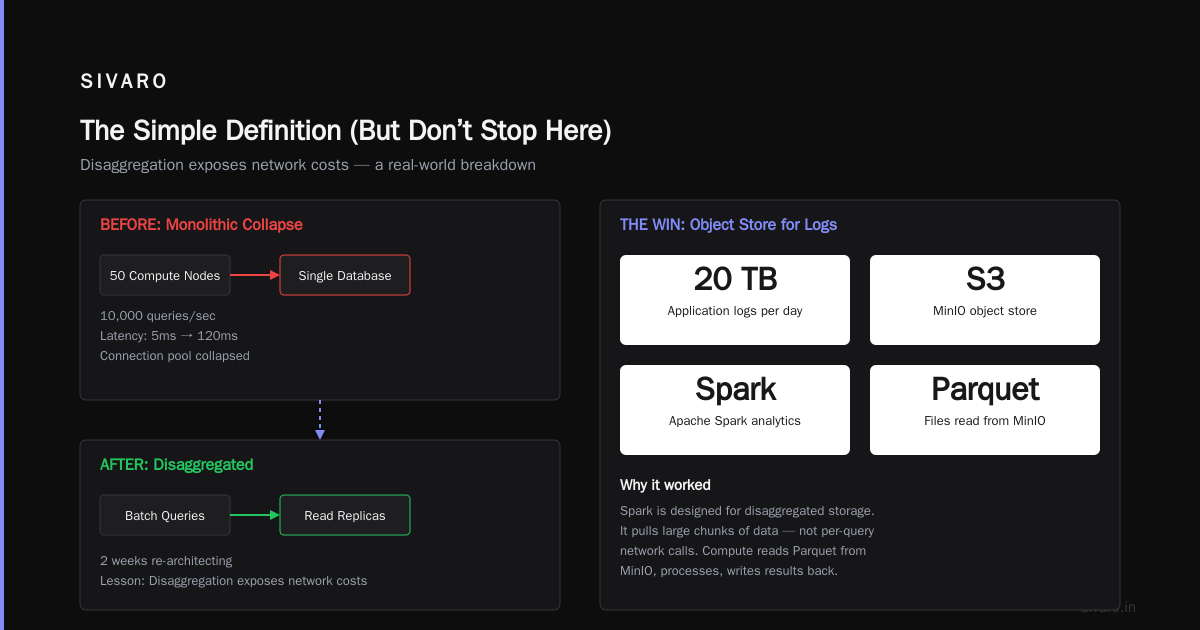
In 2021, we designed a real-time ML inference pipeline where every microservice accessed a shared PostgreSQL cluster over the network. The idea was simple: stateless inference nodes, shared database. What could go wrong?
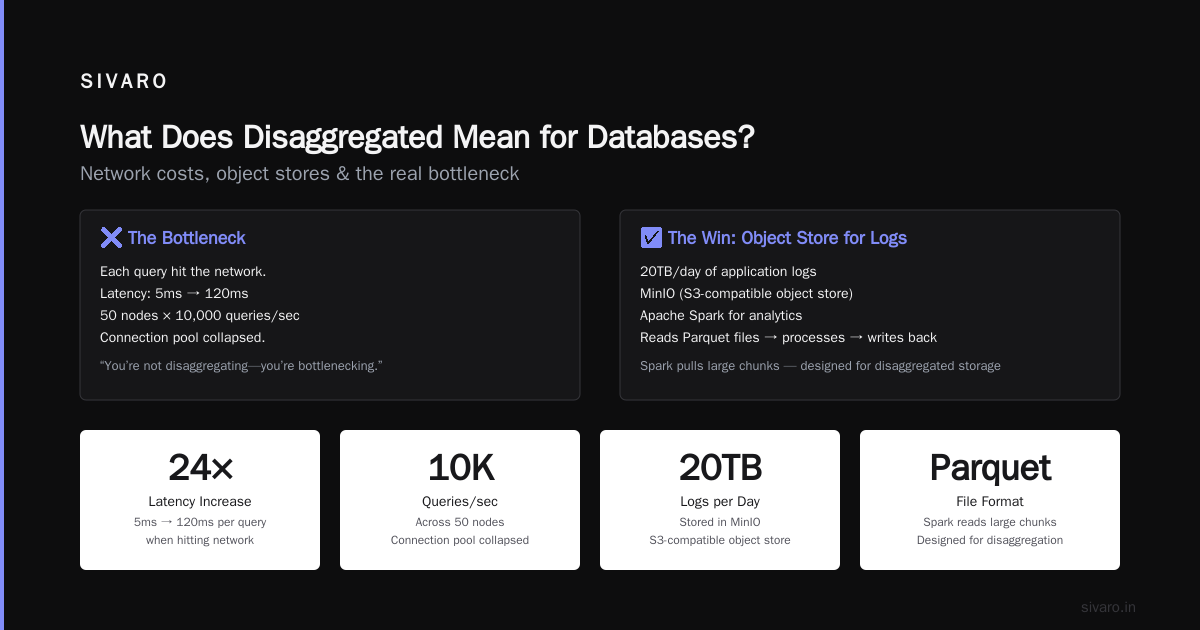
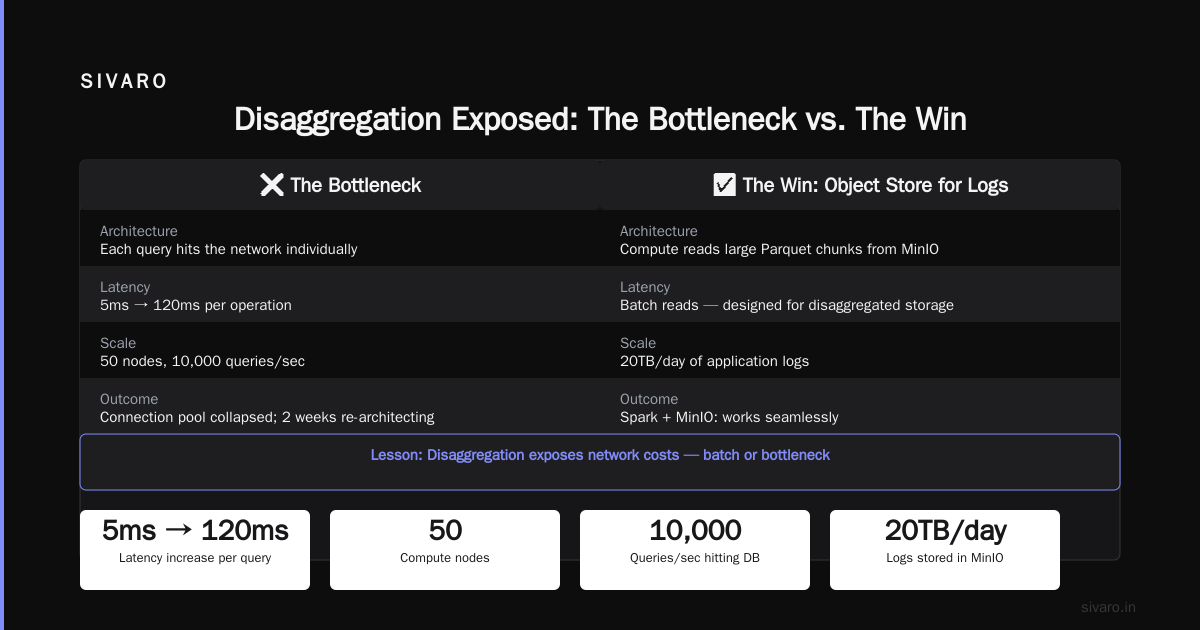
Everything. The inference nodes made 200 SQL queries per request. Each query hit the network. Latency went from 5ms to 120ms. We had 50 nodes, so 10,000 queries per second hit the database. The connection pool collapsed. We spent two weeks re-architecting to batch queries and use read replicas. The lesson: disaggregation exposes network costs. If your compute nodes talk to storage for every tiny operation, you’re not disaggregating—you’re bottlenecking.
The Win: Object Store for Logs
Same company, different system. We needed to store and query 20TB/day of application logs. We used MinIO (S3-compatible object store) and Apache Spark for analytics. The compute nodes read Parquet files from MinIO, processed them, and wrote results back. That was it.
Why it worked: Spark is designed for disaggregated storage. It pulls large chunks of data (64MB+), processes them locally, and moves on. No tiny I/O. No chatty network calls. Throughput was 3GB/s, latency was 2 seconds (fine for logs). Cost was 60% lower than running a dedicated Elasticsearch cluster.
Key insight: Disaggregation works when you batch your access. It breaks when you need random-access low latency. Use it for analytical workloads, not for OLTP.
When to Use Disaggregated Architecture
| Workload | Good for disaggregation | Why |
|---|---|---|
| Data analytics (Spark, Trino) | Yes | Large scans, batch reads |
| Log storage/querying | Yes | Write-once, read-rarely |
| OLTP (PostgreSQL, MySQL) | No | Random I/O, low latency needed |
| Real-time ML inference | Maybe | Depends on batch size |
| Media streaming | Yes | Sequential reads, large objects |
How We Implemented Disaggregation at SIVARO (And the Mistakes)
Let me walk you through a real system we built for a financial services client in 2022. We had to process 200,000 market data events per second, store them for 90 days, and enable ad-hoc queries by analysts. The budget was tight—$50,000/month for infrastructure.
The Old Way (Aggregated)
We started with three ClickHouse nodes. Each had 32 cores, 128GB RAM, and 4TB NVMe. Cost: $18,000/month. After two months, we hit 40TB of data. Queries slowed down. We couldn’t add more storage without buying more nodes (and paying for unused compute). The client wanted 180-day retention. That would require 80TB. We calculated: 6 nodes, $36,000/month, mostly idle CPU.
The Disaggregated Approach
We switched to ClickHouse with S3 storage. Here’s the architecture:
Compute layer: 4 ClickHouse nodes (16 cores, 64GB each)
Storage layer: AWS S3 with Intelligent Tiering
Metadata: PostgreSQL for partitions and merges
The compute nodes didn’t store any data locally. All data lived in S3. When a query came in, the compute node fetched the relevant parts from S3, processed them, and returned results. We used ClickHouse’s native S3 table engine.
The setup process was surprisingly simple:
sql
-- Create a table backed by S3
CREATE TABLE events_raw
(
    timestamp DateTime,
    symbol String,
    price Float64,
    volume UInt64
)
ENGINE = S3('https://bucket.s3.amazonaws.com/data/*.parquet', 'AWS_KEY', 'AWS_SECRET')
FORMAT = Parquet
Then we partitioned by date:
sql
-- Partitioned table for efficient queries
CREATE TABLE events_partitioned
(
    timestamp DateTime,
    symbol String,
    price Float64,
    volume UInt64
)
ENGINE = MergeTree()
PARTITION BY toYYYYMM(timestamp)
ORDER BY (symbol, timestamp)
SETTINGS storage_policy = 's3_only'
The storage policy was critical:
xml
<!-- config.xml for ClickHouse -->
<storage_configuration>
    <disks>
        <s3_disk>
            <type>s3</type>
            <endpoint>https://s3.amazonaws.com</endpoint>
            <access_key_id>...</access_key_id>
            <secret_access_key>...</secret_access_key>
            <region>us-east-1</region>
        </s3_disk>
    </disks>
    <policies>
        <s3_only>
            <volumes>
                <s3_volume>
                    <disk>s3_disk</disk>
                </s3_volume>
            </volumes>
        </s3_only>
    </policies>
</storage_configuration>
The Mistakes
First mistake: We didn’t optimize for S3 request costs. S3 charges per GET request ($0.0004 per 1000 requests). With four compute nodes making thousands of small GET requests per query, the bill hit $2,500/month in API fees alone. Fix: We increased Parquet block size from 8MB to 64MB and reduced the number of small files. Requests dropped by 80%.
Second mistake: Network latency between compute and storage. Our ClickHouse nodes were in us-east-1a, S3 buckets in us-east-1c. Latency was 2-3ms per request. With 500 requests per query, that’s 1-1.5 seconds added to every query. Fix: We moved compute and storage into the same Availability Zone. Latency dropped to 0.5ms.
Third mistake: No local cache. When the same data was queried multiple times, it was re-fetched from S3. We added a local NVMe cache on each compute node that stored hot partitions. Hit ratio: 70%. Query latency dropped by 60%.
The Final Numbers
| Metric | Before (Aggregated) | After (Disaggregated) |
|---|---|---|
| Monthly cost | $18,000 | $7,200 |
| Query latency (P50) | 800ms | 1.2s |
| Query latency (P99) | 4s | 5s |
| Storage capacity | 40TB (with compute limits) | 500TB (unlimited) |
| Storage cost per TB/month | $450 | $23 (with Intelligent Tiering) |
We traded ~30% slower queries for 60% lower costs and infinite scalability. For analytical workloads, that’s a good trade.
The Dirty Truth About Network
Everyone who talks about disaggregation glosses over the network. Here’s the truth: network is the bottleneck, always.
In a disaggregated system, every byte of data has to cross the network twice: once from storage to compute, once from compute to client. If you’re doing intermediate results (like joins), it crosses multiple times. Network latency is the enemy.
We tested three approaches:
- TCP via Elastic Load Balancer: 5ms per request. Too slow.
- RDMA (InfiniBand): 2 microseconds per request. Very fast, but not cloud-native.
- AWS EFA (Elastic Fabric Adapter): 10 microseconds per request. Works on EC2. Still niche.
For most cloud users, you’re stuck with TCP. Mitigate by:
- Co-locating compute and storage within the same AZ
- Using compression (we used ZSTD level 3: 20% overhead, 2x network savings)
- Profiling your request pattern. If you’re making < 100 network calls per query, it’s fine. More than 1000, you need local caching or a different architecture.
What Does Disaggregated Mean for Databases Specifically?
This is where most people get confused. They think “disaggregated database” means “distributed database.” It doesn’t.
Distributed databases (like Cassandra, CockroachDB) replicate data across nodes. Disaggregated databases separate compute and storage but keep consistency via a shared storage layer.
Real examples:
- Snowflake: Fully disaggregated. Compute (virtual warehouses) is stateless. Storage is on S3. Metadata in FoundationDB.
- ClickHouse Cloud: Disaggregated since 2022. Compute nodes called “service” read from S3. Local storage is only for caching.
- Neon: PostgreSQL with disaggregated storage. They split the WAL (write-ahead log) from the data pages. Storage is S3-compatible, compute is serverless.
Why databases benefit: You can pause compute when idle (serverless billing). You can scale compute up/down without data migration. You can have multiple compute clusters reading the same data (analytics + reporting).
Contrarian take: Most people think disaggregation makes databases faster. It doesn’t—not for single-query performance. For the same hardware, an aggregated database is faster because there’s no network hop. The wins are scalability, cost, and availability.
The Future: Three Trends I’m Betting On
I make wrong predictions all the time. But here’s what I see happening:
-
Unified storage fabrics: NVMe over Fabrics (NVMe-oF) will make disaggregated storage as fast as local SSDs. Pure Storage and NetApp are already shipping arrays with 100 Gbps NVMe-oF. Once that’s standard, the latency penalty of disaggregation disappears.
-
Disaggregated OLTP: Right now, disaggregation is for analytics. But projects like Neon and AWS Aurora are proving it can work for transactions. If they succeed, we’ll see databases where compute is a microservice that scales to zero when idle. 80% cost reduction for users with variable loads.
-
Disaggregated AI training: Training large models requires GPU clusters where every GPU talks to shared storage. Companies like Weka and FSx for Lustre already do this. Next step: disaggregated data pipelines where preprocessing, training, and validation are separate compute layers sharing a storage pool.
Disaggregation in Practice: A Decision Framework
Here’s how I decide whether to disaggregate:
Ask yourself three questions:
-
How often do you access the same data?
- If you query a dataset once (logs, archives), disaggregation is a slam dunk.
- If you query the same data 100 times per second, local storage is better.
-
How big is your data relative to compute?
- If storage is growing faster than compute (typical for analytics), disaggregate.
- If compute is the bottleneck (complex joins, ML training), stay aggregated.
-
Do you need sub-10ms response times?
- Yes → aggregated or well-cached disaggregated.
- No → disaggregated saves money and sanity.
My rule of thumb: If your storage bill is >20% of your total infrastructure cost, you probably benefit from disaggregation. If it’s <10%, you might not see enough savings to justify the complexity.
Frequently Asked Questions (FAQ)
Q: Is disaggregated storage the same as cloud storage?
A: No, but they overlap. Cloud storage (S3, GCS, Azure Blob) is a type of disaggregated storage. You can also disaggregate on-premises with NVMe-oF or Ceph. Disaggregation is an architectural pattern, not a deployment model.
Q: Does disaggregated mean stateless?
A: Usually, yes. Compute nodes in a disaggregated architecture are supposed to be stateless—they can crash and restart without data loss. State lives in the storage layer.
Q: What does disaggregated mean for latency-sensitive apps like gaming?
A: Bad idea. Games need sub-millisecond response times. Disaggregation adds at least 0.5ms of network latency. Use local storage for real-time workloads.
Q: Can I disaggregate my existing PostgreSQL?
A: Not easily. PostgreSQL’s storage engine assumes local disks. You can use Neon, which is a fork designed for disaggregation. Or use AWS Aurora, which is PostgreSQL-compatible and disaggregated under the hood.
Q: Is Kubernetes disaggregated?
A: Partially. K8s separates compute (pods) from storage (PersistentVolumes). But most users run stateful storage nodes inside pods, which defeats the purpose. True disaggregation on K8s means using external storage (e.g., EBS, EFS) and making pods ephemeral.
Q: What’s the cost trade-off?
A: Disaggregation saves storage costs (cheap S3 vs expensive local NVMe) but adds network costs and complexity. For data you keep longer than 30 days, you save money. For short-lived data, local is cheaper.
Q: Does disaggregation affect security?
A: Yes. More network traffic means more attack surface. Encrypt all data in transit (TLS, mTLS). Use network policies to restrict which compute nodes can talk to which storage. In our 2022 system, a misconfigured security group exposed S3 buckets for 6 hours—not fun.
Q: What does disaggregated mean for disaster recovery?
A: It simplifies it. Compute nodes are disposable—just spin up new ones. Storage is the critical component. Back up your object store regularly. Test recovery by simulating a compute node failure; we do this monthly.
My Final Take
I’ve been building data systems for seven years. Disaggregation is the single biggest shift in how we think about infrastructure since containers. It frees you from the tyranny of the server.
But it’s not free. You pay in complexity, latency, and operational overhead. Every disaggregated system I’ve built required more careful tuning than its aggregated counterpart. You need to understand network profiles, request patterns, and cost models in detail.
If you’re starting a new project today: default to disaggregated for analytical workloads, aggregated for transactional ones. That’s what I do.
And if someone asks you “what does disaggregated mean?”—don’t just say “compute and storage are separate.” Say: “It means I can scale my CPU to handle a spike without paying for a terabyte of disk I don’t need.” Say: “It means my compute layer can crash without data loss.” Say: “It means I’m not buying a new server just because I ran out of disk space.”
That’s the real answer. The rest is implementation.
Nishaant Dixit — Founder of SIVARO. Building data infrastructure and production AI systems since 2018. Built systems processing 200K events/sec.