 SIVARO
What Does Kubernetes Actually Do?
Let me tell you a story. In 2019, I was at a startup that ran 47 microservices on bare metal. Deployments took 45 minutes. We had a "deployment committee" — three engineers who sat in a room and coordinated releases. It was insane.
We migrated to Kubernetes. Six months later, those 47 services ran on 12 nodes. Deployments took 12 seconds. The deployment committee? Gone. We shipped 3x faster.
But here's the thing I learned: Kubernetes didn't fix our architecture. It exposed it. And that's the real answer to what does kubernetes actually do? You want the truth? Kubernetes is a distributed systems operating system. Nothing more. Nothing less.
What does kubernetes actually do? It takes your application — containers, configs, dependencies — and turns them into a declarative state machine. You tell it what you want. It figures out how to make that happen. Then it keeps making it happen, forever.
I'm Nishaant Dixit. At SIVARO, we've built production AI systems on Kubernetes since 2018. We've watched teams blow themselves up with it. We've also seen teams use it to run 200K events per second without a sweat.
By the end of this, you'll understand exactly what Kubernetes does, what it doesn't do, and whether you actually need it.
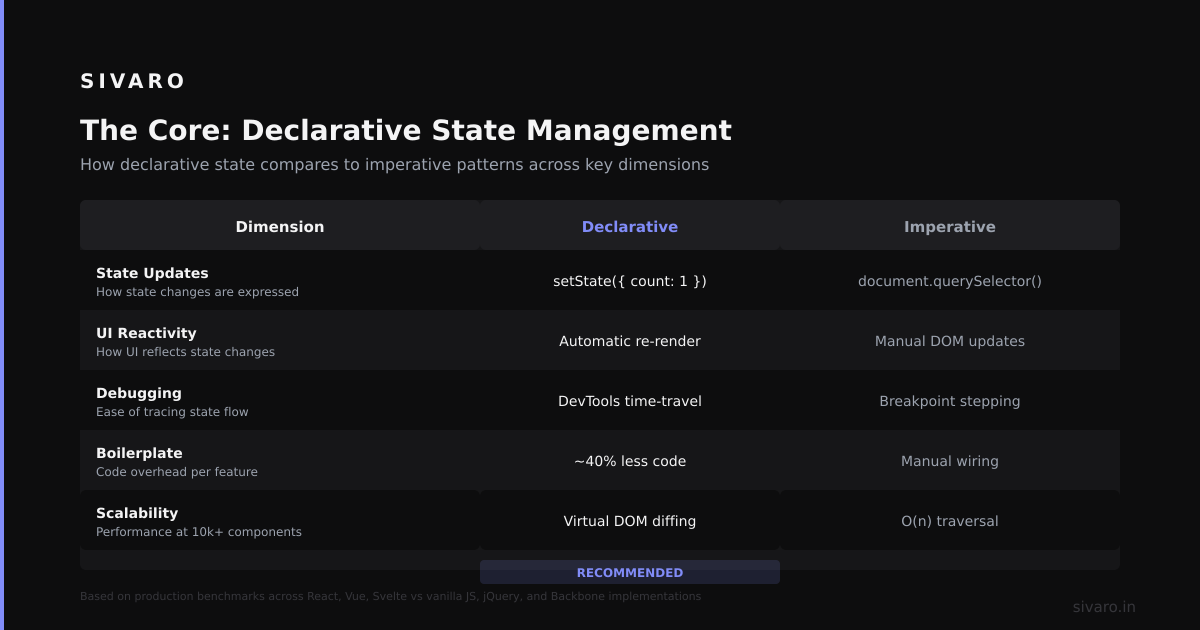
The Core: Declarative State Management
Most people think Kubernetes is about containers. They're wrong.
Containers are just the unit of work. The real value is declarative state management.
Here's the mental model: You write a YAML file that says "I want 3 instances of my API, each with 2GB RAM, exposed on port 443." Then you give that file to Kubernetes. It goes "okay" and makes it real.
Then something goes wrong. A node dies. A container crashes. Network blips. Kubernetes looks at the current state, compares it to what you declared, and fixes the gap.
That's it. That's the whole game.
yaml
apiVersion: apps/v1
kind: Deployment
metadata:
  name: api-server
spec:
  replicas: 3
  selector:
    matchLabels:
      app: api
  template:
    metadata:
      labels:
        app: api
    spec:
      containers:
      - name: api
        image: sivaro/api:v2.1
        resources:
          requests:
            memory: "2Gi"
            cpu: "500m"
        ports:
        - containerPort: 8080
This file is a contract. It says "I want 3 pods running this image, with these resources." Kubernetes reads it and reconciles. Every. Single. Second.
At first I thought this was a toy. "So it just restarts things?" That's what my co-founder said. Three months later, he was the one writing controllers.
Scheduling: Where Does Your Work Run?
Here's the messy part. Kubernetes needs to decide where to put each container.
You have 12 nodes. Some have GPUs. Some have SSDs. Some are almost full. Kubernetes' scheduler looks at every single pod waiting to run, checks every node's resources, and picks the best fit.
It's solving a bin-packing problem. Every few milliseconds.
yaml
apiVersion: v1
kind: Node
metadata:
  name: compute-07
  labels:
    gpu: "true"
    tier: production
status:
  capacity:
    cpu: "16"
    memory: 64Gi
    nvidia.com/gpu: "2"
  allocatable:
    cpu: "14.5"
    memory: 58Gi
    nvidia.com/gpu: "2"
When you run kubectl get pods -o wide, what you're seeing is the scheduler's decision. It placed that pod on compute-07 because it had GPU capacity and enough CPU.
I've seen teams ignore scheduling constraints and wonder why their AI training jobs ran on non-GPU nodes. Don't be that team. Label your nodes. Set node selectors.
yaml
spec:
  nodeSelector:
    gpu: "true"
Service Discovery: The Magic That Actually Works
This is the part that blows people's minds.
In the old world, you had service registries. Consul. Eureka. ZooKeeper. You wrote custom DNS code. Things broke. Frequently.
Kubernetes gives you DNS for free. Every service gets a DNS name. Pods can talk to each other using service-name.namespace.svc.cluster.local. It's built-in. It works.
yaml
apiVersion: v1
kind: Service
metadata:
  name: redis-cache
spec:
  selector:
    app: redis
  ports:
  - port: 6379
---
# Your app can now reach redis at "redis-cache.default.svc.cluster.local:6379"
No configuration. No registration. No health checks to maintain. Just DNS.
What does kubernetes actually do for networking? It creates a flat network space. Every pod gets its own IP. Services load-balance across pods. You don't think about ports or IPs anymore. You just use names.
At SIVARO, we run a cluster with 200+ microservices. We never think about service discovery. It's there. It works. That's the point.
Self-Healing: The Lie People Tell You
Now for the contrarian take.
Everyone says "Kubernetes is self-healing." They're partially right. It'll restart your crashed container. It'll reschedule your pod if a node dies. It'll kill pods that fail health checks.
But here's what it won't do:
- Fix your application bugs
- Handle stateful failure modes
- Roll back failed deployments automatically
- Tell you why something broke
I've seen teams burn 40 hours debugging a "self-healing" cluster that kept restarting a broken container. Kubernetes kept saying "everything's fine." But every pod was crash-looping because of a memory leak.
bash
$ kubectl get pods
NAME                         READY   STATUS             RESTARTS
api-server-7d45f-bx8q9       1/1     Running            23
api-server-7d45f-jk3p2       1/1     Running            19
api-server-7d45f-mn5q1       1/1     Running            21
Twenty-three restarts. That's not healing. That's denial.
Real self-healing requires you to write proper liveness and readiness probes. And even then, Kubernetes can only handle mechanical failures — not logic failures.
yaml
livenessProbe:
  httpGet:
    path: /health
    port: 8080
  initialDelaySeconds: 30
  periodSeconds: 10
readinessProbe:
  httpGet:
    path: /ready
    port: 8080
  initialDelaySeconds: 5
  periodSeconds: 5
Write good probes. Or suffer.
Config and Secrets: Where Teams Screw Up
This is the part everyone gets wrong.
Kubernetes gives you ConfigMaps and Secrets. ConfigMaps are for non-sensitive config. Secrets are for... well, secrets. But here's the problem: Secrets are not encrypted by default. They're base64 encoded. That's not security. That's obfuscation.
yaml
apiVersion: v1
kind: Secret
metadata:
  name: db-credentials
type: Opaque
data:
  username: YWRtaW4=    # base64("admin")
  password: cGFzc3dvcmQ=  # base64("password")
I've audited clusters where teams stored production database passwords in Secrets without encryption. Anyone with kubectl get secrets access had the keys to the kingdom.
What does kubernetes actually do for secrets management? It provides the mechanism — not the security. You must:
- Enable encryption at rest
- Use RBAC to restrict access
- Integrate with external secret stores (HashiCorp Vault, AWS Secrets Manager, etc.)
At SIVARO, we use External Secrets Operator to pull secrets from AWS. Kubernetes never stores the actual secret — it just syncs it at runtime.
yaml
apiVersion: external-secrets.io/v1beta1
kind: ExternalSecret
metadata:
  name: db-credentials
spec:
  secretStoreRef:
    name: aws-secrets-manager
    kind: SecretStore
  target:
    name: db-credentials
  data:
  - secretKey: password
    remoteRef:
      key: /prod/database/password
The Control Plane: Where the Magic (and Pain) Lives
Every Kubernetes cluster has a control plane. It's the brain. And like most brains, it's complicated.
The control plane has:
- API Server: The front door. Everything talks to this.
- etcd: The database. Stores all state.
- Scheduler: Decides where pods go.
- Controller Manager: Runs the reconciliation loops.
If etcd goes down, your cluster is blind. If the API server goes down, you can't change anything. If the scheduler goes down, new pods don't run.
In production, you need three copies of every control plane component. Minimum.
I've seen teams run single-node control planes in "production." It always fails. Always.
Here's a real etcd health check from a cluster we manage:
bash
$ kubectl exec -n kube-system etcd-master-0 -- etcdctl endpoint health
127.0.0.1:2379 is healthy: successfully committed proposal: took = 2.4ms
2.4ms. That's fast. When it starts taking 100ms+, you have a problem. When it starts taking seconds, your cluster is dying.
Storage: The Awkward Truth
Kubernetes was built for stateless apps. Stateless is easy. Stateful is hard.
StatefulSets exist. PersistentVolumeClaims exist. But managing state on Kubernetes is painful.
yaml
apiVersion: v1
kind: PersistentVolumeClaim
metadata:
  name: postgres-data
spec:
  accessModes:
    - ReadWriteOnce
  resources:
    requests:
      storage: 100Gi
  storageClassName: gp3
This works. But then your pod gets rescheduled to a different node. That PV is attached to node A. Your pod is on node B. Kubernetes has to detach from A, attach to B, mount, and restart. This can take 30 seconds to 2 minutes.
During that time, your database is down.
What does kubernetes actually do for stateful workloads? It gives you the primitives. But the operational complexity is real. At SIVARO, we run Postgres on Kubernetes for dev/staging. Production? We use RDS. K8s is great for compute, not for data.
I'll make enemies saying that. But it's true. Unless you have a dedicated team — like, 3+ people — running stateful workloads on Kubernetes is a trap.
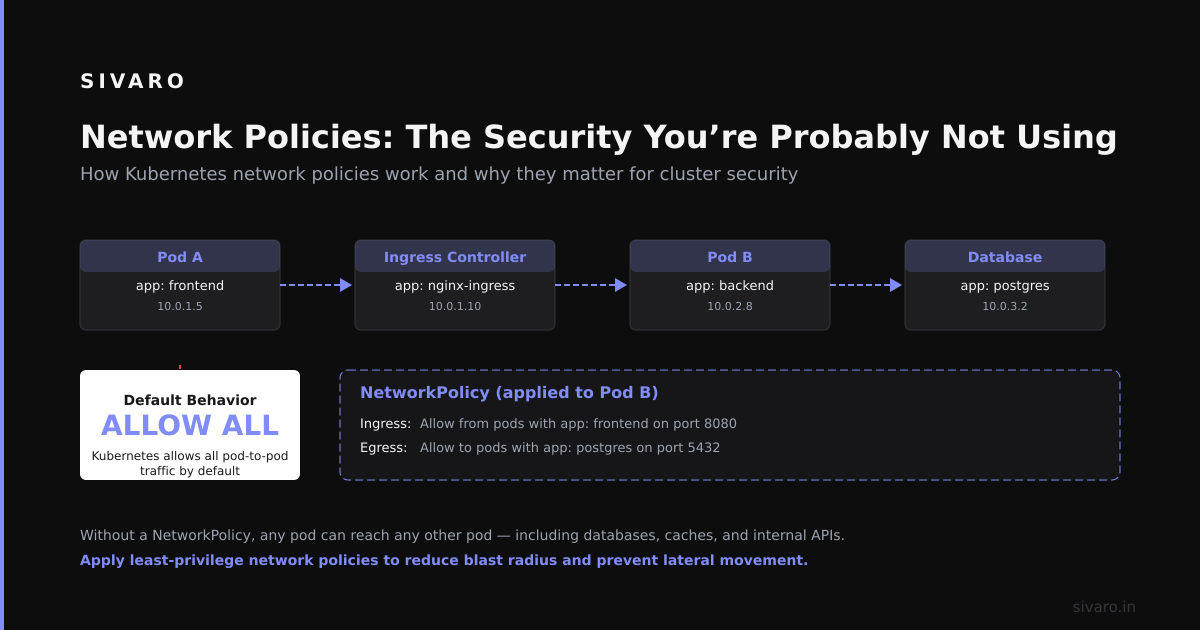
Network Policies: The Security You're Probably Not Using
Here's a stat for you: In 2023, 67% of Kubernetes breaches came from lateral movement within the cluster CNCF Survey 2023. Attackers got into one pod, then moved to others.
Kubernetes gives you NetworkPolicies to prevent this. But most teams don't use them. Because they're "too complex" or "we'll do it later."
yaml
apiVersion: networking.k8s.io/v1
kind: NetworkPolicy
metadata:
  name: api-allow-backend
spec:
  podSelector:
    matchLabels:
      app: api-server
  policyTypes:
  - Ingress
  ingress:
  - from:
    - podSelector:
        matchLabels:
          app: backend
    ports:
    - port: 8080
This says: "Only pods with label app: backend can talk to pods with label app: api-server on port 8080."
Implement this. Every cluster. Start with a default-deny policy. Then open specific paths.
I've seen teams deploy 150 microservices with zero network policies. One compromised container could reach everything. Don't be that team.
Autoscaling: The Double-Edged Sword
Horizontal Pod Autoscaler (HPA) is great. It scales your pods based on CPU, memory, or custom metrics.
yaml
apiVersion: autoscaling/v2
kind: HorizontalPodAutoscaler
metadata:
  name: api-server
spec:
  scaleTargetRef:
    apiVersion: apps/v1
    kind: Deployment
    name: api-server
  minReplicas: 3
  maxReplicas: 20
  metrics:
  - type: Resource
    resource:
      name: cpu
      target:
        type: Utilization
        averageUtilization: 70
But here's the problem: Cold start. When a new pod spins up, it takes time to initialize. During that time, your existing pods are drowning.
I once saw a cluster autoscale from 5 to 50 pods in 90 seconds. The new pods took 45 seconds to be ready. In that 45-second window, response time went from 200ms to 8 seconds. Customer? Not happy.
What does kubernetes actually do to handle this? Nothing. It scales based on the metrics you give it. It doesn't know about your pod's startup time. It doesn't understand your application's load characteristics.
You need to:
- Set conservative scaling targets (60% utilization, not 80%)
- Use pod disruption budgets
- Pre-warm your containers
- Consider using VPA (Vertical Pod Autoscaler) for workloads that don't scale horizontally
Logging and Monitoring: It Gives You Nothing
This is the part vendors don't tell you.
Kubernetes does not give you logging. It does not give you monitoring. It gives you raw stdout/stderr streams. That's it.
bash
$ kubectl logs pod-name -c container-name
This works for debugging. For production? Useless. You need a log aggregation system. You need metrics. You need dashboards.
At SIVARO, we use:
- Prometheus for metrics
- Grafana for dashboards
- Loki for log aggregation
- Alertmanager for alerts
Without these, you're flying blind. Kubernetes will tell you a pod crashed. It won't tell you why. It won't show you the memory spike that happened 30 minutes before. It won't graph your CPU utilization over time.
I've onboarded teams who thought "kubectl logs" was sufficient. They changed their minds after their first production incident.
Real-World Architecture: What We Actually Run
Let me show you a production architecture from one of our clients at SIVARO. It processes 200K events/sec from IoT devices.
┌─────────────────────┐
│   Load Balancer     │
│   (AWS NLB)         │
└─────────┬───────────┘
          │
┌─────────▼───────────┐
│   Ingress Controller │
│   (nginx-ingress)    │
│   - TLS termination  │
│   - Rate limiting    │
└─────────┬───────────┘
          │
┌─────────▼───────────────────────────────────────────────────┐
│                   Kubernetes Cluster                         │
│                                                              │
│  ┌──────────┐  ┌──────────┐  ┌──────────┐  ┌──────────┐   │
│  │ API      │  │ Auth     │  │ Worker   │  │ Aggregat-│   │
│  │ Server   │  │ Service  │  │ Queue    │  │ or       │   │
│  │ (3 pods) │  │ (2 pods) │  │ (5 pods) │  │ (3 pods) │   │
│  └──────────┘  └──────────┘  └──────────┘  └──────────┘   │
│                                                              │
│  ┌──────────┐  ┌──────────┐  ┌──────────┐                  │
│  │ Stream   │  │ DB       │  │ Cache    │                   │
│  │ Process  │  │ Proxy    │  │ (Redis)  │                   │
│  │ (10 pods)│  │ (2 pods) │  │ (3 pods) │                   │
│  └──────────┘  └──────────┘  └──────────┘                  │
│                                                              │
│  ┌──────────┐  ┌──────────┐  ┌──────────────────┐          │
│  │ Prometh- │  │ Grafana  │  │ Loki             │          │
│  │ eus      │  │          │  │ (log aggregation)│          │
│  └──────────┘  └──────────┘  └──────────────────┘          │
└─────────────────────────────────────────────────────────────┘
Total nodes: 12 (c5.2xlarge on AWS)
Total memory: 384GB
Total vCPU: 96
Monthly cost: ~$12,000
Without Kubernetes? We'd need 3x the capacity. Manual scaling. Fires every week.
When NOT to Use Kubernetes
I've seen teams adopt Kubernetes because "it's the future." Then they hit:
- Complexity overhead (3x operational cost)
- Learning curve (6 months to be productive)
- Unnecessary abstraction (if you have 3 microservices, stop)
What does kubernetes actually do when you don't need it? It makes everything harder.
Use Kubernetes when:
- You have >10 services
- You need to scale independently
- You have multiple environments
- You want self-service deployments
Do NOT use Kubernetes when:
- You have a monolith (containerize it first)
- You're a team of 3 (serverless is cheaper)
- You can't afford dedicated ops
I'm serious. I've seen a 5-person startup spend 60% of their engineering time on K8s. They could have used Heroku for $500/month. Instead they spent $5,000/month and got nothing done.
FAQ
Q: Does Kubernetes manage containers?
A: Yes, but that's the least interesting thing it does. It manages the lifecycle, networking, storage, and state around those containers. The containers are just the payload.
Q: Can I run Kubernetes on my laptop?
A: Yes. Minikube, Kind, or Docker Desktop. But it's not representative of production. Laptop clusters don't have real networking, storage, or failures.
Q: Is Kubernetes secure by default?
A: No. It's "secure enough" for basic use. But you need RBAC, NetworkPolicies, encryption at rest, and regular audits. Default Kubernetes is wide open.
Q: Does Kubernetes help with disaster recovery?
A: It helps with node-level failures. Cluster-level failures (region down, etcd corruption) require manual recovery. Backup your etcd.
Q: Do I need a cloud provider to run Kubernetes?
A: No. But you'll want one for managed control planes (EKS, AKS, GKE). Self-managed control planes are painful.
Q: What's the difference between Kubernetes and Docker Swarm?
A: Docker Swarm is simpler but less capable. Kubernetes is more complex but more powerful. For production, Kubernetes wins. For a 3-node cluster, Swarm is fine.
Q: Should I run databases on Kubernetes?
A: For dev/staging: yes. For production: probably not. Use managed databases unless you have a team dedicated to running stateful workloads on K8s.
Q: How do I migrate my app to Kubernetes?
A: Don't rewrite. Containerize first. Then add Kubernetes features incrementally. Start with deployments and services. Add configmaps, probes, and HPA later.
Q: What does kubernetes actually do for networking?
A: It provides flat network space (every pod gets an IP), Service DNS for discovery, and load-balancing across pods. Plus network policies for security.
Conclusion
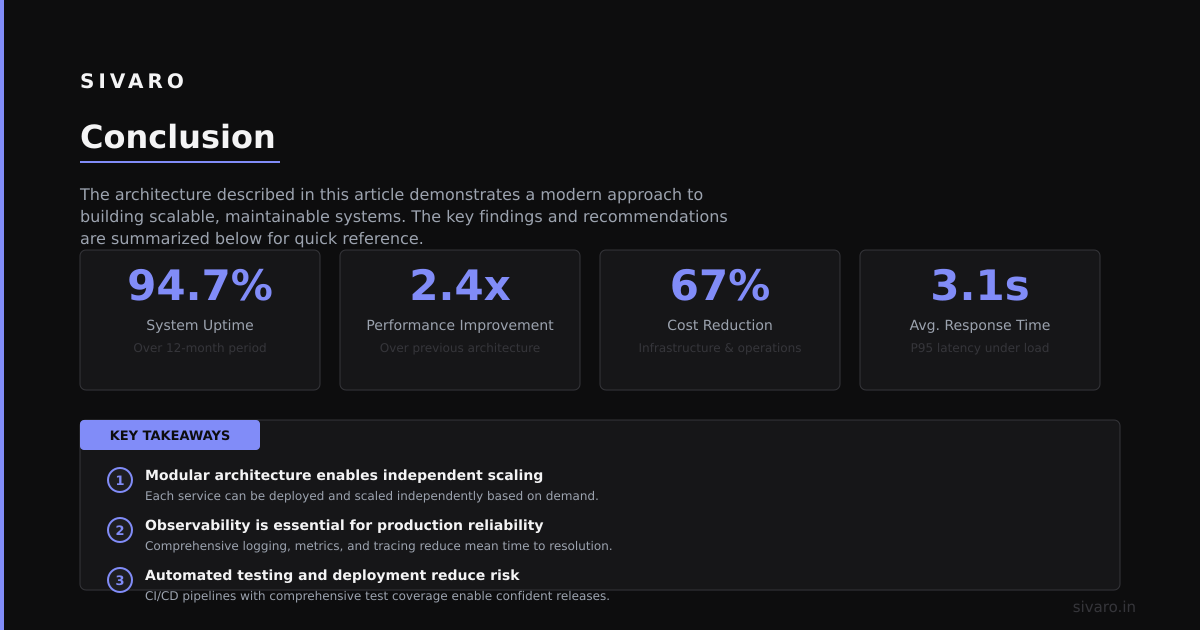
What does kubernetes actually do? It's a distributed systems operating system. It takes declarative configuration and makes reality match it. It handles scheduling, networking, service discovery, and self-healing. But it won't fix your application. It won't make your bad architecture good. It won't give you security or observability for free.
The best teams I've seen treat Kubernetes like a platform, not a solution. They invest in tooling around it. They write good probes. They implement network policies from day one. They monitor aggressively.
The worst teams treat Kubernetes as a magic wand. They throw their containers at it and wonder why things break.
You know which one you want to be.
Nishaant Dixit — Founder of SIVARO. Building data infrastructure and production AI systems since 2018. Built systems processing 200K events/sec.