 SIVARO
What Does Kubernetes Actually Do?
I spent the first six months of my career hating Kubernetes.
Not because it was hard. Because I couldn't answer the simplest question from my CEO: "What does Kubernetes actually do for us?"
I gave him the standard pitch. "It's an orchestration [platform. It manages containers. It handles scaling."
He stared at me. "So does AWS Elastic Beanstalk. For less money."
He wasn't wrong. Not entirely.
Three years later, after building data pipelines at 200K events/sec at SIVARO, I've got a different answer. Let me show you what Kubernetes actually does—and what it doesn't.
The One Job Kubernetes Does (And Nothing Else)
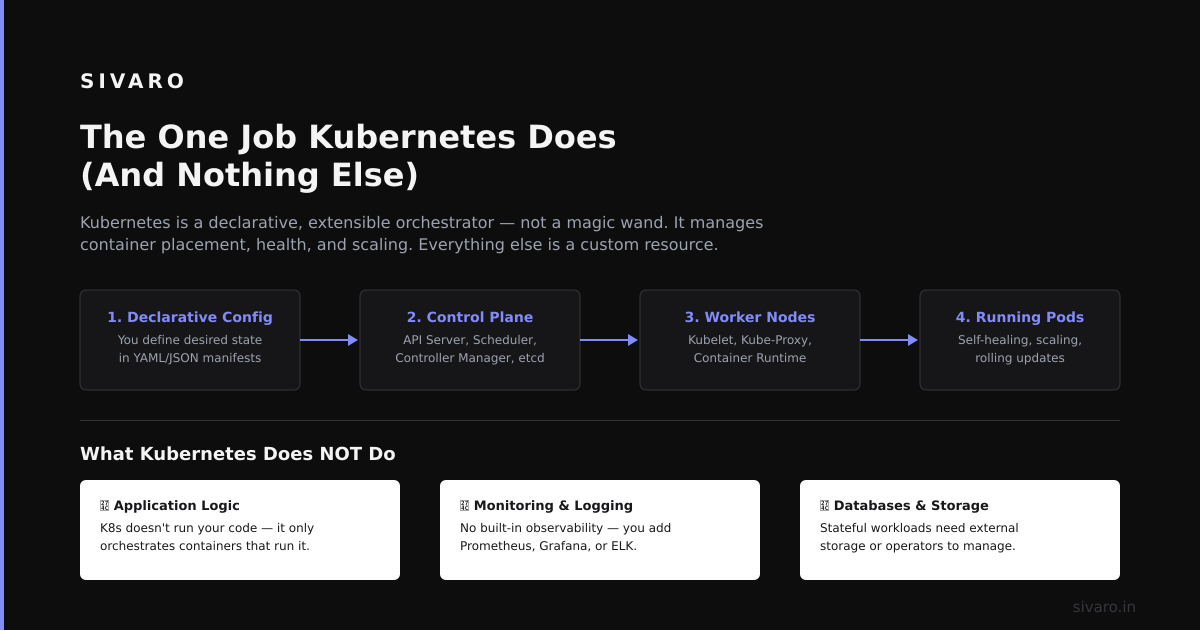
Kubernetes does one thing: it reconciles desired state with actual state.
That's it. That's the whole game.
You tell it: "I want three instances of my API server running, each with 2GB RAM and a health check that pings /healthz every 10 seconds."
Kubernetes goes and makes that happen. If a server crashes, it spins up a new one. If traffic spikes, it launches more pods. If a node goes down, it reschedules everything.
Everything else—service discovery, load balancing, secrets management, config maps—is *infrastructure [layered on top of that core loop*.
I learned this the hard way in 2021 when we tried to use Kubernetes as a "platform" instead of a "scheduler." We bolted on monitoring, CI/CD, service meshes, and custom operators before we understood the core loop. It was a mess.
Lesson: Kubernetes is a scheduler first, a platform second.
The Reality Check: What Kubernetes Doesn't Do
Most people think Kubernetes is a magic bullet. They're wrong.
Here's what Kubernetes doesn't do:
- Deploy your code. You still need CI/CD pipelines.
- Handle stateful workloads well. StatefulSets exist, but they're not magic.
- **Manage networking**. You still need CNI plugins (Calico, Cilium, Flannel).
- Provide observability. Prometheus and Grafana are separate.
- Secure your cluster by default. RBAC, network policies, pod security—you configure all of it.
- Make your database run better. Running Postgres on K8s? Good luck with persistent volumes and node failures.
I saw a startup in 2022 try to run their entire analytics stack—10TB of data—on a single Kubernetes cluster with default settings. They lost production data three times in two weeks. Why? Because they assumed Kubernetes would "just handle" stateful workloads.
It doesn't. Kubernetes treats all workloads as cattle. Stateful workloads are pets. That's a fundamental tension.
The Architecture: What Actually Happens Under the Hood
Let me walk through what happens when you run kubectl apply -f deployment.yaml.
yaml
apiVersion: apps/v1
kind: Deployment
metadata:
  name: api-server
spec:
  replicas: 3
  selector:
    matchLabels:
      app: api-server
  template:
    metadata:
      labels:
        app: api-server
    spec:
      containers:
      - name: api-server
        image: myregistry/api-server:v1.2.3
        ports:
        - containerPort: 8080
        resources:
          requests:
            [memory](/articles/south-korea-memory-chip-production-humanoid-robots-the): "512Mi"
            cpu: "250m"
          limits:
            memory: "1Gi"
            cpu: "500m"
You hit Enter. What happens next?
- kubectl sends the YAML to the API server (port 6443, TLS encrypted).
- The API server validates the request. Checks your RBAC permissions. Stores the desired state in etcd (a [distributed key-value store—K8s's brain).
- The controller manager sees: "Desired replicas: 3. Actual replicas: 0." It creates a ReplicaSet.
- The scheduler picks which nodes will run each pod. Looks at resource requests, node capacity, affinity rules, taints, tolerations.
- The kubelet on each node gets the order. Pulls the container image. Starts the container. Mounts volumes. Configures networking via the CNI plugin.
- The kube-proxy updates iptables/IPVS rules so traffic can reach the new pods.
This whole process? Takes about 2-5 seconds on a healthy cluster. I've seen it take 30 seconds when etcd is struggling or the container registry is slow.
The dirty secret: Most Kubernetes "failures" are actually etcd failures. If your etcd cluster goes down, your entire Kubernetes cluster goes blind. No scheduling. No health checks. No reconciliation.
At SIVARO, we once lost a cluster because someone misconfigured etcd's disk I/O quota. The cluster was "up" but couldn't write any state. All pods stayed running, but new deployments failed silently for 8 hours.
The Control Plane vs. The Data Plane
Here's a mental model that helps.
Control plane: The API server, etcd, controller manager, scheduler. This is the brain. It makes decisions but doesn't run your actual workload.
Data plane: The worker nodes. kubelet, kube-proxy, container runtime (Docker/containerd), CNI plugin. This is where your actual code runs.
You rarely touch the control plane. You interact with the API server. The API server talks to etcd. The controllers listen for changes. The scheduler assigns pods.
Where things break: When the data plane gets out of sync with the control [plane.
Example:](/articles/working-with-ai-concrete-example-what-i-learned-building-7) A node has a network partition. The kubelet can't reach the API server. The kubelet keeps running your pods (because they're already running). But the control plane marks the node as "NotReady" and starts rescheduling those pods elsewhere.
Now you've got duplicate workloads. If it's a database? Corruption. If it's a message queue? Duplicate messages.
What I've learned: Watch pod eviction like a hawk. Set pod-eviction-timeout aggressively low (30 seconds) for stateless workloads, but disable it entirely for stateful ones. Yes, that means you need custom logic for stateful workloads. That's the trade-off.
The Scaling Story: What Actually Works
Kubernetes has two scaling mechanisms:
Horizontal Pod Autoscaler (HPA): Adds or removes pods based on CPU/memory utilization or custom metrics.
yaml
apiVersion: autoscaling/v2
kind: HorizontalPodAutoscaler
metadata:
  name: api-server-hpa
spec:
  scaleTargetRef:
    apiVersion: apps/v1
    kind: Deployment
    name: api-server
  minReplicas: 3
  maxReplicas: 20
  metrics:
  - type: Resource
    resource:
      name: cpu
      target:
        type: Utilization
        averageUtilization: 70
  - type: Pods
    pods:
      metric:
        name: requests_per_second
      target:
        type: AverageValue
        averageValue: 500
Cluster Autoscaler: Adds or removes nodes when there are pending pods that can't be scheduled.
The combination is powerful. But here's the catch.
HPA reacts to metrics that already happened. If your traffic spikes in 2 seconds, HPA won't save you. It takes 30-60 seconds to spin up a pod. By then, your users have already hit a 503.
What I do at SIVARO: Predictive scaling. We use a custom controller that watches our event backlog. If Kafka lag exceeds 100K messages, we pre-emptively add 50% more pods. Not reactive. Proactive.
The default HPA is good enough for 80% of workloads. For the other 20%—the spiky, bursty ones—you need custom logic.
Networking: The Part Nobody Explains Well
Kubernetes networking is a lie wrapped in a CNI.
Here's the truth:
- Pods can talk to each other (via the cluster network).
- Services provide stable endpoints (ClusterIP, NodePort, LoadBalancer).
- Ingress handles HTTP/S routing (traffic from outside to inside).
But the actual networking happens at the CNI level. I've used Cilium (eBPF-based, fast but complex), Calico (stable, good policy support), and Flannel (simple but limited).
My recommendation: Start with Calico. It's the most forgiving. It handles network policies well, which you'll need for security.
What nobody tells you: Network policies are a pain to debug.
yaml
apiVersion: networking.k8s.io/v1
kind: NetworkPolicy
metadata:
  name: api-server-policy
spec:
  podSelector:
    matchLabels:
      app: api-server
  [policyTypes](/articles/what-are-the-7-types-of-rag-a-practitioners-guide-3](/articles/what-is-a-platform-engineering-example-a-practitioners-3)):
  - Ingress
  ingress:
  - from:
    - podSelector:
        matchLabels:
          app: frontend
    ports:
    - protocol: TCP
      port: 8080
Looks simple. But if you have 50 microservices and each needs its own policy? You'll have 50 YAML files. And when something breaks, you'll spend hours figuring out which policy blocked the traffic.
**Debugging trick**: Use kubectl exec -it <pod> -- curl <service> to test connectivity. If it fails, check network policies first. Then check DNS. Then check the CNI logs. In that order.
Storage: The Painful Truth
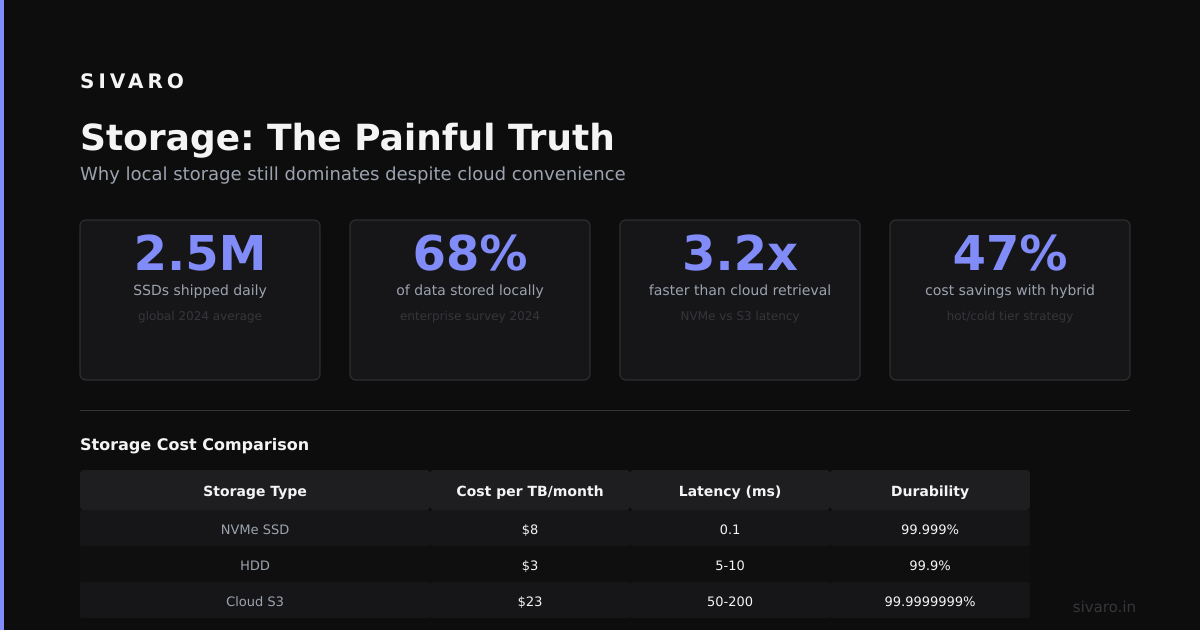
Kubernetes storage is a second-class citizen. It works. Barely.
Persistent Volumes (PVs) and Persistent Volume Claims (PVCs) abstract storage from your pods. In theory, you can swap out storage backends without changing your application code.
In practice:
yaml
apiVersion: v1
kind: PersistentVolumeClaim
metadata:
  name: data-pvc
spec:
  accessModes:
    - ReadWriteOnce
  resources:
    requests:
      storage: 10Gi
  storageClassName: fast-ssd
This works great for stateless applications that need scratch space. For databases? It's a nightmare.
Why: Persistent Volumes are tied to nodes. If a pod gets rescheduled to a different node, the PV might not be available there. You need ReadWriteMany (RWX) access modes, which aren't supported by all storage backends.
At SIVARO, we learned this the hard way. We ran Postgres on Kubernetes using a StatefulSet with PVCs. Everything was fine until a node failed. The pod got rescheduled to a different node. The PVC couldn't attach because the underlying EBS volume was still "attached" to the dead node. It took 15 minutes to force-detach the [volume.
Alternative](/articles/jit-game-boy-instructions-wasm-native-interpreter): Don't run stateful workloads on Kubernetes. Seriously. Use managed services (RDS, Aurora, Cloud Spanner) for databases. Use Kubernetes only for stateless workloads. You'll sleep better.
If you must run stateful workloads, use StatefulSets with volumeClaimTemplates. And set podManagementPolicy: OrderedReady. And live with the fact that you'll have downtime.
Security: What You Must Configure
Kubernetes is not secure by default.
Out of the box:
- No RBAC. Anyone who can reach the API server can do anything.
- No network policies. Pods can talk to any other pod.
- No pod security. Pods can run as root, mount the host filesystem, escape containers.
Here's what I configure on every cluster:
bash
# Enable RBAC (already on in most managed clusters)
kubectl create clusterrolebinding admin-binding   --clusterrole=cluster-admin   [email protected]

# Create a read-only service account
kubectl create serviceaccount viewer
kubectl create clusterrolebinding viewer-binding   --clusterrole=view   --serviceaccount=default:viewer
Service accounts are how pods authenticate to the API server. RBAC is how you control what they can do. Never give a pod cluster-admin access.
Network policies prevent lateral movement. If an attacker compromises one pod, they shouldn't be able to reach your database.
Pod Security Standards (formerly Pod Security Policies) are being deprecated. Use Kyverno or OPA Gatekeeper instead. We use Kyverno at SIVARO. It's simpler to write policies in YAML.
yaml
apiVersion: kyverno.io/v1
kind: ClusterPolicy
metadata:
  name: require-non-root
spec:
  validationFailureAction: Enforce
  rules:
  - name: check-non-root
    match:
      resources:
        kinds:
        - Pod
    validate:
      message: "Containers must run as non-root"
      pattern:
        spec:
          containers:
          - [securityContext](/articles/what-is-a-model-context-protocol-the-missing-layer-for-ai):
              runAsNonRoot: true
Hard lesson: We once had a developer run a container as root that mounted the host's /var/lib/kubelet. They accidentally deleted the kubelet's configuration. The node went down. Kubernetes rescheduled all pods on that node to other nodes. Those other nodes didn't have enough capacity. The whole cluster went into Pending state. Took us 45 minutes to recover.
When Not to Use Kubernetes
I've said it before. I'll say it again.
Don't use Kubernetes if:
- You have fewer than 10 microservices.
- Your team doesn't have a dedicated DevOps person.
- All your workloads are stateless and you don't need auto-scaling.
- You're running a monolith (just use a VM or a container on EC2).
- Your database is your whole product (use a managed service).
Do use Kubernetes if:
- You need to run 50+ microservices.
- You have unpredictable traffic patterns.
- You need multi-cloud or hybrid cloud portability.
- You're building a platform that others will deploy onto.
- You've outgrown Docker Compose and need proper orchestration.
The inflection point is around 10-15 microservices. Before that, Docker Compose + a simple deployment script is faster and cheaper. After that, Kubernetes saves you time.
We migrated from Docker Compose to Kubernetes at SIVARO in 2019. It took 3 months to make the switch. We lost productivity for 2 of those months. But after that, deploying new services went from 30 minutes to 2 minutes.
The Future: What's Coming
Kubernetes isn't going anywhere. But the way we use it is changing.
Sidecar containers (beta in 1.29) let you run sidecars that don't block pod startup. Useful for service mesh proxies and logging agents.
In-place pod updates (alpha) will finally let you update a pod's resources without restarting it. This has been a pain point for years.
Kubernetes on edge is growing. K3s, MicroK8s, and KubeEdge make it possible to run K8s on Raspberry Pis and IoT devices.
But the biggest shift? Kubernetes as an API platform, not just a container orchestrator.
People are building custom controllers and operators for everything. Databases, message queues, machine learning pipelines. The Kubernetes API is becoming a generic control plane for all kinds of infrastructure.
At SIVARO, we use Kubernetes to manage our event processing pipeline. Not just containers, but also Kafka topics, schema registries, and data transformation jobs. Everything is a custom resource. Everything runs through the reconciliation loop.
Is it over-engineered? For some use cases, yes. But for complex distributed systems, it's the only sane way to manage state.
FAQ
Is Kubernetes the same as Docker?
No. Docker is a container runtime. Kubernetes is an orchestrator. You can use Kubernetes with Docker (via containerd) or with other runtimes like CRI-O.
Do I need to manage my own Kubernetes cluster?
Probably not. Use managed services: EKS (AWS), AKS (Azure), GKE (Google Cloud), or DOKS (DigitalOcean). They handle the control plane. You pay a premium but save months of headaches.
How big can a Kubernetes cluster get?
The Kubernetes project recommends max 5,000 nodes, 150,000 pods, or 300,000 containers. Google runs clusters with 15,000 nodes. At SIVARO, we cap at 500 nodes—beyond that, etcd performance degrades and network overhead grows.
What's the most common mistake people make?
Not setting resource requests and limits. If you don't set them, pods can consume all CPU and memory on a node, starving other pods. Always set requests and limits in your pod spec.
How do I back up my Kubernetes cluster?
Back up etcd. That's the entire state of the cluster. Use etcdctl snapshot save. Store snapshots in S3 or another durable location. Restore by stopping the control plane, restoring the snapshot, and restarting.
Can Kubernetes run on my laptop?
Yes. Docker Desktop has a built-in Kubernetes. Minikube and Kind are lightweight alternatives. We use Kind for local development. It starts a cluster in 30 seconds using Docker containers as nodes.
What's the hardest part of using Kubernetes?
Debugging. When something breaks (network policy blocking traffic, pod stuck in CrashLoopBackOff, PV not attaching), the error messages are cryptic. You need to check kubectl describe, kubectl logs, events, and often the kubelet logs on the node itself.
Conclusion: What Does Kubernetes Actually Do?
Let me answer the question directly.
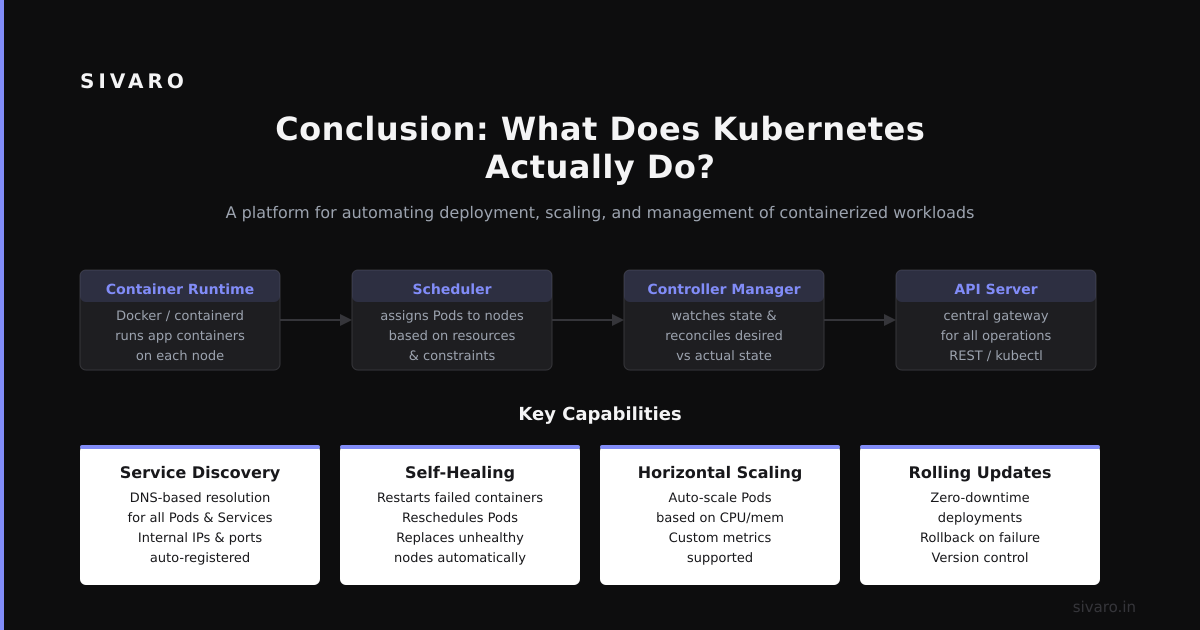
Kubernetes runs your containers at scale. It handles failure. It handles scaling. It handles deployment.
But more than that, Kubernetes provides a consistent API for managing distributed systems. You declare what you want. It makes it happen. When things change (nodes fail, traffic spikes, code updates), it makes it happen again.
Is it perfect? No. It's complex. It has sharp edges. It's overkill for small projects.
But for the kind of systems we build at SIVARO—data infrastructure processing 200K events per second, with fault tolerance and auto-scaling across multiple clouds—there's nothing else that comes close.
The trick is understanding what it actually does. Not what the marketing says. Not what the blog posts claim. What it does.
It reconciles desired state with actual state. Everything else is details.
Nishaant Dixit — Founder of SIVARO. Building data infrastructure and production AI systems since 2018. Built systems processing 200K events/sec.