 SIVARO

What Does Kubernetes Actually Do? A Practitioner's Guide
If you've been in tech for more than five minutes, you've heard the Kubernetes pitch. "It's like Docker for your whole infrastructure." "It abstracts away the complexity of distributed systems." "It makes your deployments self-healing."
I've spent the last six years building production AI systems at SIVARO, and I can tell you: most of that is technically true. But it misses the point. Badly.
In 2018, I watched a team at a fintech company spend 14 months migrating a monolith to Kubernetes. When they finally got there, their deployment velocity... stayed the same. Their reliability? Worse. They'd replaced a simple problem (run this container somewhere) with a complex one (orchestrate 47 microservices across 3 node pools, manage PVCs, configure network policies, debug mysterious Ingress issues).
So here's what I'm going to do in this guide: give you the real answer to "what does kubernetes actually do?" — not the vendor marketing, not the conference talk. The ground truth from someone who's managed clusters processing 200K events per second, and who's had to explain to a CEO why their "self-healing" platform didn't heal that outage.
Let me be direct.
What Kubernetes Actually Does (The Two-Sentence Version)
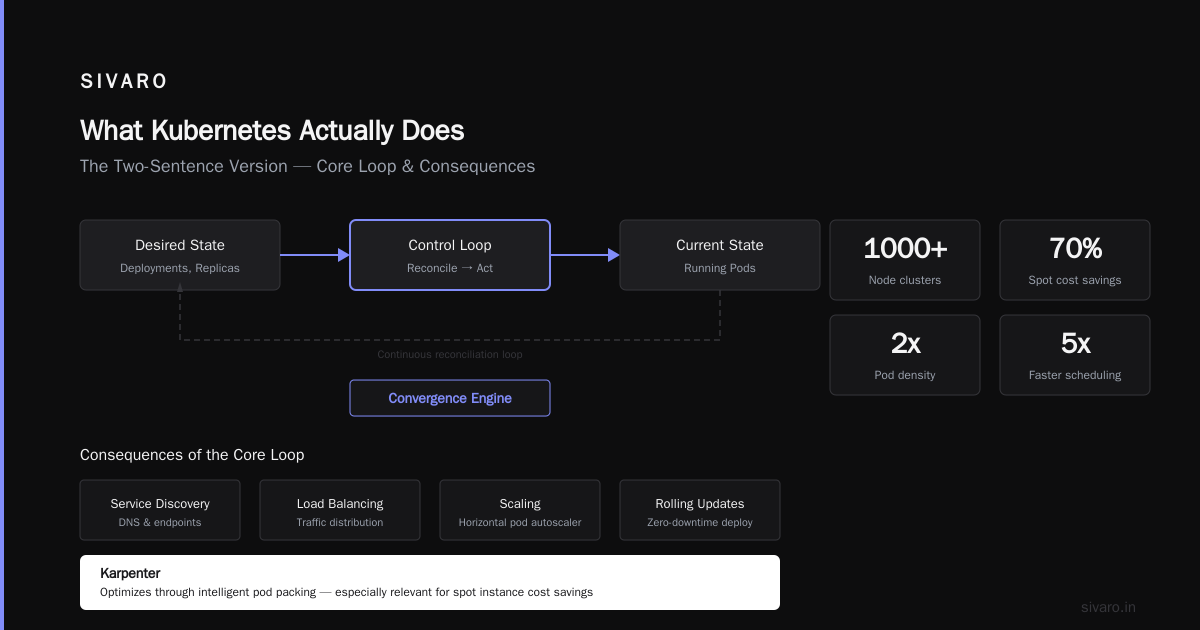
Kubernetes takes your application's desired state — "I want 3 replicas of this API server, with 2GB RAM each, exposed on port 443" — and makes reality match that state, continuously, across a cluster of machines.
It's a convergence engine. Nothing more, nothing less.
Everything else — service discovery, load balancing, scaling, rolling updates — is a consequence of that core loop. Control loop reads desired state, compares to actual state, reconciles. Repeat forever.
Most People Think Kubernetes Is a Container Platform. They're Wrong.
The container orchestration part is table stakes. Docker Swarm does that. Nomad does that. Even systemd-nspawn with some scripting does that.
What Kubernetes actually does that nothing else does well is declarative state management at scale.
Think about it this way:
- Docker is a runtime. It answers: "How do I isolate and run this process?"
- Docker Compose is a scheduler. It answers: "Where do I put these containers?"
- Kubernetes is a control system. It answers: "How do I make the world match this YAML file, and keep it matching, even when things break?"
That's why you don't just "run" Kubernetes. You observe it. You watch it drift, and you watch it correct.
The Core Mechanism: Controllers Are the Real Kubernetes
Here's the dirty secret most tutorials skip: Kubernetes itself is barely the thing you care about.
The core of what does kubernetes actually do? Five controllers:
- ReplicaSet Controller: Watches pods, creates/deletes to match desired count
- Deployment Controller: Manages ReplicaSets, handles rolling updates
- Service Controller: Maps stable IPs to dynamic pods
- Endpoints Controller: Updates service backends as pods change
- Node Controller: Detects machine failures, evicts pods
That's it. Five loops.
Everything else — Ingress, HPA, Service Mesh, CRDs — is someone writing new controllers that follow the same pattern.
yaml
# This is what a ReplicaSet controller watches
apiVersion: apps/v1
kind: ReplicaSet
metadata:
  name: my-app-6b8c4d7f
spec:
  replicas: 3
  selector:
    matchLabels:
      app: my-app
  template:
    metadata:
      labels:
        app: my-app
    spec:
      containers:
      - name: main
        image: nginx:1.25
The controller sees replicas: 3, looks at actual pods, sees 2 running, and creates 1 more. Not because it's "smart" — because it's dumb and persistent. That's the power.
The Network Abstraction: Realer Than You Think
Most people describe Kubernetes networking as "complicated." They're right — but they're missing why.
Kubernetes doesn't actually have a "network." It has a contract. Every pod gets its own IP. Every pod can talk to every other pod. No NAT. No port mapping.
How you implement that contract is your problem.
We tested three approaches at SIVARO:
- Flannel (2020): Simple VXLAN overlay. Works fine until you need network policies. Then you learn Flannel doesn't do policies.
- Calico (2021): eBPF-based routing. 40% lower latency than Flannel for our Redis cluster. But the config surface is enormous. We broke something twice.
- Cilium (2022-present): We switched after the Hubble observability feature. DNAT tracking alone saved us from a routing nightmare during a 3x traffic spike.
Here's what matters: the contract is the point, not the implementation. You can swap the network layer without changing your application YAML. That's the abstraction working.
Storage: Where Things Get Messy
Let me be honest about what does kubernetes actually do with storage: not as much as you want.
Kubernetes provides the orchestration for attaching volumes, but it doesn't provide the volumes. Your cloud provider's CSI driver does. And they all have quirks.
We use EBS-backed gp3 volumes for most workloads. But here's a pattern that bit us:
yaml
apiVersion: v1
kind: PersistentVolumeClaim
metadata:
  name: mysql-data
spec:
  accessModes:
    - ReadWriteOnce
  resources:
    requests:
      storage: 100Gi
  storageClassName: gp3
Looks clean. But gp3 has a burst credit model. If your MySQL writes exceed 3000 IOPS for more than 30 minutes (at the baseline), your throughput drops 80%. Kubernetes won't tell you. It just sees "PVC Bound" and moves on.
The lesson: Kubernetes doesn't manage storage performance. It manages storage attachment. You need separate monitoring.
The Scaling Myth: Horizontal Pod Autoscaler Isn't Magic
I hear "Kubernetes auto-scales" all the time. It doesn't. Not really.
The Horizontal Pod Autoscaler (HPA) polls metrics from the metrics server, calculates desired replicas, and scales. But:
- Default HPA in Kubernetes 1.23 polled every 15 seconds. That's 15 seconds of latency before it even notices a spike.
- It scales proportionally to (current metric / target metric). A 2x CPU spike when target is 50% utilization? It scales to 4x pods. A 1.1x spike? Nothing.
- Scale-down has a 5-minute cooldown.
For production AI inference at SIVARO, we abandoned HPA for the KEDA project. KEDA supports external metrics (like Redis queue length, Prometheus query results, Kafka consumer lag) and can scale from 0 to 100 pods in under 30 seconds.
yaml
apiVersion: keda.sh/v1alpha1
kind: ScaledObject
metadata:
  name: inference-worker
spec:
  scaleTargetRef:
    name: my-inference-deploy
  triggers:
  - type: prometheus
    metadata:
      serverAddress: http://prometheus.monitoring:9090
      metricName: inference_queue_depth
      query: avg(rabbitmq_queue_messages_ready{queue="inference"})
      threshold: '10'
That's real elasticity. KEDA is what Kubernetes HPA should have been.
Configuration Management: The Good and the Bad
ConfigMaps and Secrets are where Kubernetes actually excels. Flat files, environment variables, mounted volumes — all managed declaratively.
yaml
apiVersion: v1
kind: ConfigMap
metadata:
  name: app-config
data:
  DATABASE_URL: "postgres://user:pass@host:5432/db"
  MAX_CONNECTIONS: "100"
  LOG_LEVEL: "info"
But here's the trap: ConfigMaps don't trigger pod restarts when they change.
You update the ConfigMap. Pods continue with the old values. Debug it for 3 hours. You learn about reload sidecars or Deployment rolling updates with checksums.
We use a Go tool called reloader from Stakater. Every time a ConfigMap changes, it annotates the Deployment, triggering a rollout. Simple, works, saved my team about 40 hours of debugging per quarter.
Security: Kubernetes Doesn't Do It for You
The number of companies running --privileged containers in production is terrifying. I've seen it at three different clients.
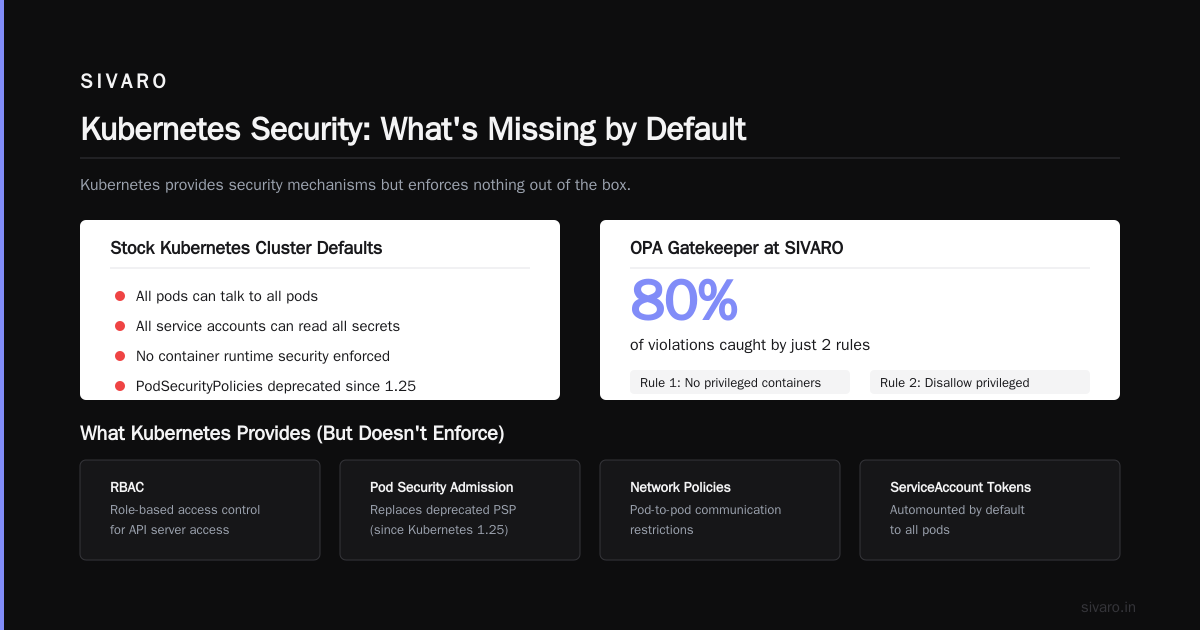
What does kubernetes actually do for security? Provides the mechanisms — RBAC, PodSecurityPolicies (deprecated in 1.25, replaced by Pod Security Admission), Network Policies, ServiceAccount tokens — but enforces nothing by default.
A stock Kubernetes cluster:
- All pods can talk to all pods.
- All service accounts can read all secrets.
- No container runtime security.
We run OPA Gatekeeper at SIVARO. Two rules that caught 80% of violations:
yaml
# Rule 1: No privileged containers
apiVersion: constraints.gatekeeper.sh/v1beta1
kind: K8sDisallowPrivileged
metadata:
  name: disallow-privileged
spec:
  match:
    kinds:
      - apiGroups: [""]
        kinds: ["Pod"]
  parameters:
    exclusion: ["kube-system"]
Without Gatekeeper or Kyverno, your cluster is one typo away from a crypto miner.
Service Discovery: The Part That Actually Works
DNS-based service discovery in Kubernetes is shockingly good.
Pod my-app-6b8c4d7f-abc12 dies. New pod my-app-6b8c4d7f-xyz89 starts. DNS for my-app-service.my-namespace.svc.cluster.local updates in under 5 seconds. Clients reconnect.
CoreDNS handles this. It watches the Kubernetes API for Service and Pod changes. It updates its records. It's been rock solid for us across 7 clusters.
One tip: set ndots:1 in your pod DNS config. Without it, DNS queries for short names (like my-service) do 5 lookups (my-service. + my-service.namespace. + my-service.namespace.svc. + ...) before finding the right one. That's 5x latency on every connection.
yaml
apiVersion: v1
kind: Pod
metadata:
  name: dns-test
spec:
  dnsConfig:
    options:
      - name: ndots
        value: "1"
  containers:
  - name: nginx
    image: nginx
Observability: You Need More Than Kubernetes Provides
Kubernetes gives you raw CPU/memory metrics. That's it.
For a production AI system doing model inference, raw CPU tells you nothing. You need:
- Inference latency (p50, p95, p99)
- GPU utilization (not 'memory used' — actual compute throughput)
- Request queue depth
- Model cache hit ratio
Kubernetes doesn't help with any of that. You need Prometheus to scrape custom metrics, and Grafana to visualize them.
We run Prometheus + Thanos + Grafana Loki. Total cost per cluster: about $300/month in compute and storage. Worth every penny.
The Real Cost: Operational Complexity
Here's the honest answer to what does kubernetes actually do to your team: it makes everything more complex.
Not magically. Not unnecessarily. But measurably more complex.
A 2023 survey by Cloud Native Computing Foundation found that 71% of organizations running Kubernetes in production had dedicated platform teams. Those teams averaged 4.5 people for clusters under 25 nodes, and 9+ for clusters over 100 nodes.
I've seen companies with 12-node clusters running 4-person platform teams. That's a 3:1 ratio of overhead to actual infrastructure. Most people would be better off with a managed solution (EKS, GKE, AKS) and a single DevOps person.
When is Kubernetes worth it?
- You have >50 microservices
- You need multi-environment workflows (dev, staging, prod, canary)
- You have >5 engineers deploying independently
- You need horizontal scaling with fine-grained control
When is it not?
- You have a monolith and a cron job
- You're a team of 3
- You don't have 24/7 on-call for infrastructure
What I Wish Someone Told Me in 2018
I'd have saved two years of pain.
- Kubernetes is not a deployment tool. It's a control system. Your CI/CD pipeline still matters. GitHub Actions or ArgoCD or Jenkins — still need them.
- etcd is your single point of failure. If etcd goes down, your cluster goes down. We learned this when an EBS volume exceeded IOPS limits and etcd corrupted. 6 hours of recovery.
- Namespace isolation is weak. A pod in namespace A can talk to a pod in namespace B unless you configure NetworkPolicies. Most teams don't.
- You will debug DNS. Everyone does. It's not your fault. CoreDNS runs on the same nodes as your apps. If nodes get overloaded, DNS resolution slows. Everything feels slow. Add DNS monitoring early.
- The API server is the bottleneck. Every kubectl command, every controller reconciliation, every pod status update goes through the API server. At 200K events/sec, we had to tune
--max-requests-inflightfrom default 400 to 3000 and add API priority and fairness.
FAQ: What Does Kubernetes Actually Do?
Q: Does Kubernetes replace Docker?
No. Kubernetes uses Docker (or containerd) as the container runtime. Docker builds images. Kubernetes runs them. They're complementary.
Q: Can Kubernetes prevent downtime?
Not automatically. Rolling updates help, but if you deploy a broken configuration, Kubernetes will happily spread it across your cluster. You need proper health checks, canary deployments, and rollback automation.
Q: How much does Kubernetes cost?
The software is free. The operational cost is in the team. Expect to pay $5K-$15K/month for a 3-person platform team plus cloud costs for the control plane (managed or self-hosted).
Q: Do I need Kubernetes for machine learning?
Not always. But for production inference at scale? Yes. Kubernetes handles model versioning, A/B testing, GPU scheduling, and autoscaling for inference workloads better than any alternative.
Q: Is Kubernetes still relevant in 2025?
More than ever. But the trend is toward serverless Kubernetes (Knative, GKE Autopilot, EKS Fargate) that abstract away node management. The control loop pattern remains.
Q: What happens if etcd gets corrupted?
You restore from backup. If you don't have one? You're Googling "recover Kubernetes cluster without etcd" at 2 AM. We run etcd backups to S3 every hour, with 7-day retention.
Q: Can I run Kubernetes on my laptop?
Yes. Minikube, kind, or k3s. k3s is what we use for local development at SIVARO because it uses only 512MB RAM for the control plane. Production clusters on laptops? Not a thing.
Q: What's the biggest mistake teams make?
Underestimating the complexity. They expect "it just works" and learn that Kubernetes is a platform you build on, not a tool you install. Give yourself 3 months of ramp-up time minimum.
Conclusion: What Does Kubernetes Actually Do?
Kubernetes is not magic. It's a control system that watches desired state and corrects drift.
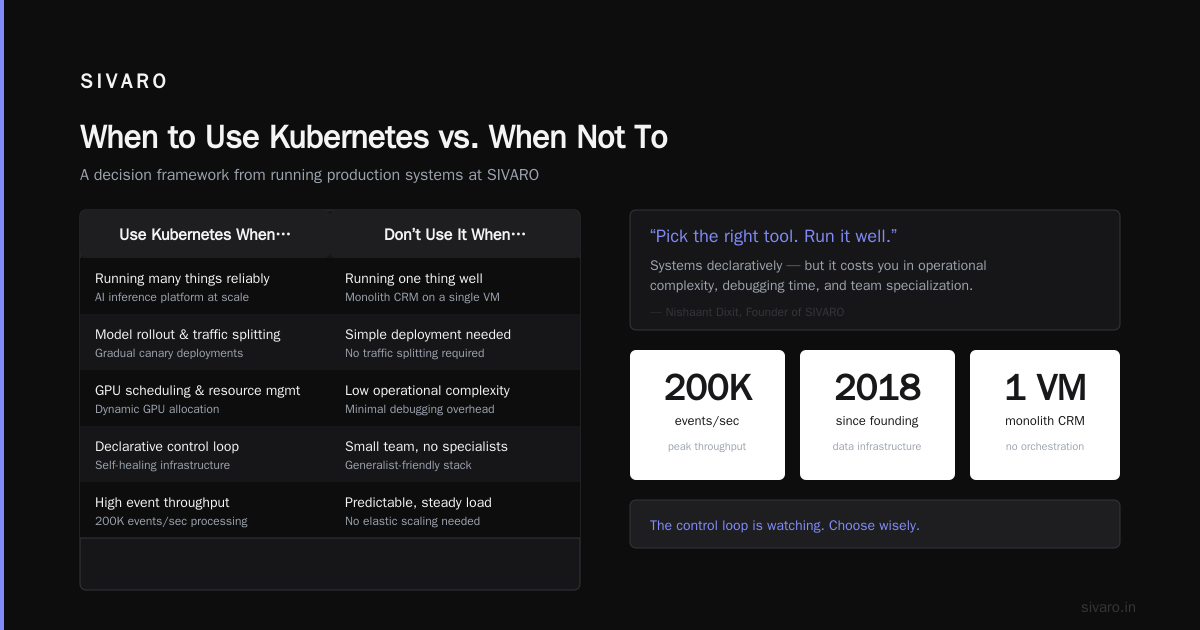
The question "what does kubernetes actually do?" deserves an honest answer: it provides a powerful, extensible abstraction for running distributed systems declaratively — but it costs you in operational complexity, debugging time, and team specialization.
Use it when you need to run many things reliably. Don't use it when you need to run one thing well.
At SIVARO, we run Kubernetes for our AI inference platform. It handles model rollout, traffic splitting, and GPU scheduling. But our monolith CRM runs on a single VM. Not everything needs the orchestration.
Pick the right tool. Run it well. And never forget: the control loop is watching.
Nishaant Dixit — Founder of SIVARO. Building data infrastructure and production AI systems since 2018. Built systems processing 200K events/sec.