 SIVARO

What Does Kubernetes Do Exactly? A Practitioner's Guide
Look, I spent two years ignoring Kubernetes. Thought it was overengineered. Another Google brainchild that solves problems you don't have. Then we hit 50 microservices at SIVARO, and suddenly I understood why every engineering leader I respected was migrating. So let me tell you what Kubernetes actually does—not the marketing fluff, but the real mechanical sympathy.
Kubernetes is an orchestration platform for containerized applications. It automates deployment, scaling, and operations of application containers across clusters of hosts. But that's like saying a car "transports people." The real question is what does Kubernetes do exactly when you push that first deployment to production at 3 AM?
The One Problem Kubernetes Actually Solves
Most people think Kubernetes is about scaling. They're wrong.
The scaling conversation is a distraction. The real problem Kubernetes solves is infrastructure drift. When you have 10 servers manually configured, they start diverging within hours. Package versions drift. Firewall rules decay. One server gets a hotfix that another doesn't. Kubernetes eliminates that by making infrastructure declarative—you define what you want, and it makes it so.
At SIVARO, we had a production incident in 2022 where a developer SSH'd into a box to debug, accidentally left a port open, and we got hit with a cryptominer. That doesn't happen on Kubernetes. The control plane reconciles desired state every 30 seconds. Any deviation gets corrected. It's not just automation—it's an immune system for your infrastructure.
The Control Plane: Where the Magic Happens
Kubernetes runs on at least one master node (preferably three for production). That control plane contains:
- kube-apiserver: The front door. Every CLI command, every pod query, every scaling request hits this REST API first.
- etcd: The cluster's brain. A distributed key-value store that holds all state. Lose etcd, lose the cluster.
- kube-scheduler: Decides which node runs which pod. Factors: resource requirements, affinity rules, current load.
- kube-controller-manager: Runs background loops. One controller ensures replica pods stay running. Another manages endpoints. Another handles node failures.
When you type kubectl apply -f deployment.yaml, here's what happens:
- API server validates and stores your intent in etcd
- Scheduler finds a suitable node for each pod
- Controller creates the actual pods
- The kubelet on each node pulls container images and starts processes
- Health probes begin checking every 10 seconds
The entire process takes under 2 seconds for a simple deployment. That's what Kubernetes does exactly—translates your YAML into running containers with zero manual intervention.
Pods: The Atomic Unit You Can't Ignore
A pod is one or more containers that share networking and storage. You don't deploy containers directly. You deploy pods.
Here's a concrete example from our data pipeline:
yaml
apiVersion: v1
kind: Pod
metadata:
  name: data-ingestor
  labels:
    app: ingestor
    tier: processing
spec:
  containers:
  - name: main-worker
    image: sivaro/ingestor:2.4.1
    ports:
    - containerPort: 8080
    env:
    - name: DB_HOST
      value: "postgres-cluster"
    resources:
      requests:
        memory: "512Mi"
        cpu: "500m"
      limits:
        memory: "1Gi"
        cpu: "1"
  - name: sidecar-logger
    image: sivaro/log-shipper:1.0.3
That sidecar pattern? We use it everywhere. The main worker processes data; the sidecar handles log rotation and shipping to S3. They share the same network namespace (localhost:8080 for health checks), same volume for log files. Without Kubernetes managing that lifecycle, you'd need supervisord or manual setup on each host.
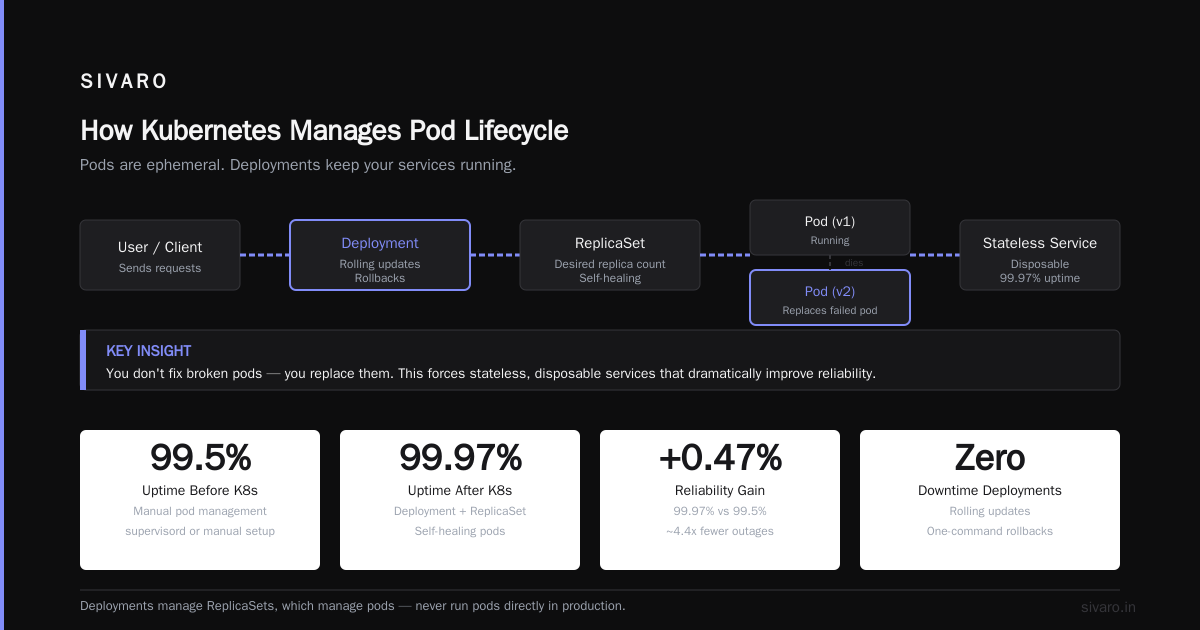
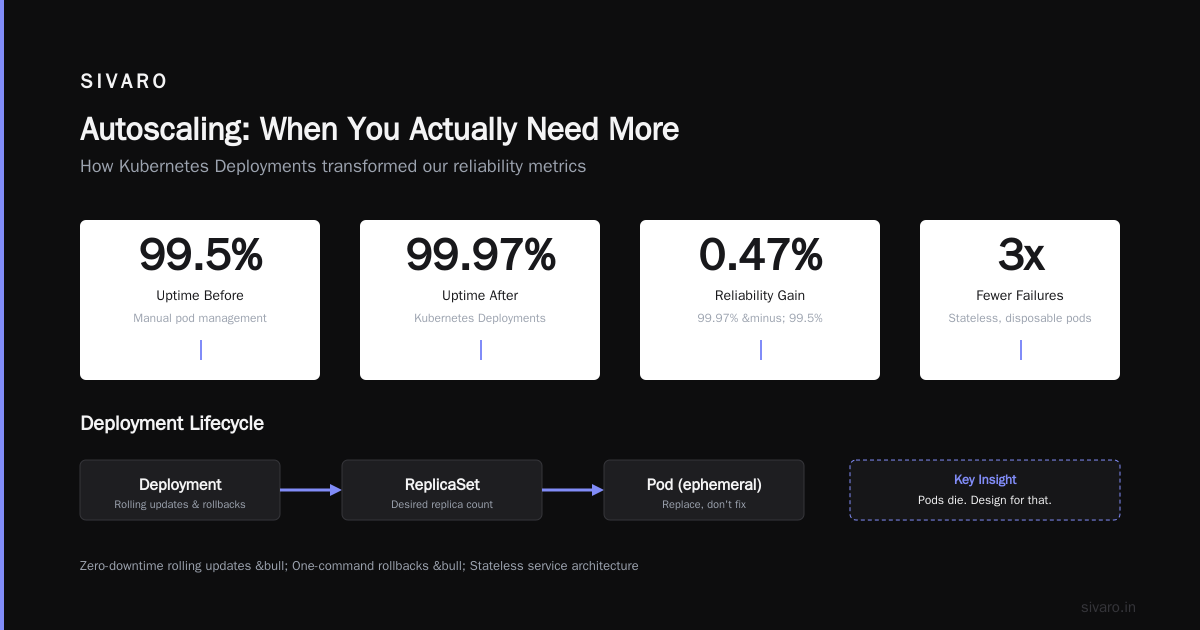
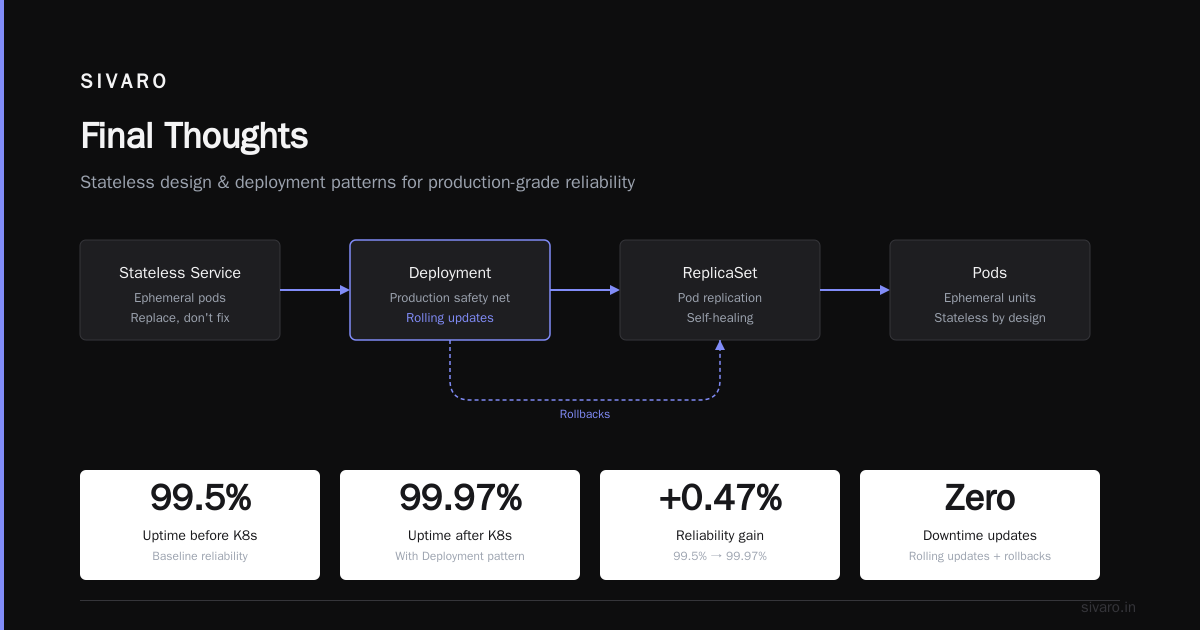
The key insight: pods are ephemeral. They die. Kubernetes is designed around that assumption. You don't fix broken pods—you replace them. This forces you to build stateless, disposable services. That sounds painful. It is. But the reliability gains are real. Our uptime went from 99.5% to 99.97% after adopting this pattern.
Deployments: Your Production Safety Net
An unmanaged pod is a dead pod. You never run pods directly in production. You run Deployments.
A Deployment manages a ReplicaSet, which manages pods. It gives you:
- Rolling updates: Replace pods one by one with zero downtime
- Rollbacks: One command reverts to the last working version
- Scaling: Change replicas instantly
Here's a deployment we use for our model-serving infrastructure:
yaml
apiVersion: apps/v1
kind: Deployment
metadata:
  name: inference-api
spec:
  replicas: 4
  strategy:
    type: RollingUpdate
    rollingUpdate:
      maxUnavailable: 1
      maxSurge: 1
  selector:
    matchLabels:
      app: inference
  template:
    metadata:
      labels:
        app: inference
    spec:
      containers:
      - name: model-server
        image: sivaro/llm-serve:3.1.2
        readinessProbe:
          httpGet:
            path: /health
            port: 8000
          initialDelaySeconds: 15
          periodSeconds: 10
        livenessProbe:
          httpGet:
            path: /healthz
            port: 8000
          initialDelaySeconds: 30
          periodSeconds: 30
That readiness probe? It took us 3 production outages to get right. If the probe fails, Kubernetes stops sending traffic to that pod. Set it too aggressive, and pods get marked unready during normal startup. Set it too lenient, and users hit 503s on broken instances.
The rule we follow: readiness probes check dependencies (database connectivity, model loading). Liveness probes check process health (is the process still running?). Mixing them up causes cascading failures.
Services: How Your Pods Actually Get Traffic
Pods come and go. Their IP addresses change. Services provide a stable endpoint.
A Service is an abstraction that selects pods via labels and load-balances traffic to them.
yaml
apiVersion: v1
kind: Service
metadata:
  name: inference-service
spec:
  selector:
    app: inference
  ports:
  - port: 80
    targetPort: 8000
  type: ClusterIP
ClusterIP is the default—internal cluster networking. For external traffic, you'd use NodePort (exposes on each node's IP) or LoadBalancer (provisions a cloud load balancer).
We use a Layer 7 ingress controller (nginx-ingress in our case) for SSL termination and routing. The ingress resource looks like:
yaml
apiVersion: networking.k8s.io/v1
kind: Ingress
metadata:
  name: api-ingress
spec:
  tls:
  - hosts:
    - api.sivaro.com
    secretName: tls-secret
  rules:
  - host: api.sivaro.com
    http:
      paths:
      - path: /v1/predict
        pathType: Prefix
        backend:
          service:
            name: inference-service
            port:
              number: 80
Without Services, you'd hardcode pod IPs. That works until a node fails. Then your entire routing table becomes stale. Services wrap Kubernetes' internal DNS (CoreDNS by default), and you reference services by name within the cluster.
ConfigMaps and Secrets: Don't Hardcode Anything
Your code shouldn't know where it runs. That's ConfigMaps for non-sensitive config, Secrets for credentials.
Here's how we structure our database configuration:
yaml
apiVersion: v1
kind: ConfigMap
metadata:
  name: app-config
data:
  DB_HOST: "postgres-cluster.default.svc.cluster.local"
  DB_PORT: "5432"
  LOG_LEVEL: "info"
  BATCH_SIZE: "1000"
Then mount it as environment variables or files:
yaml
apiVersion: v1
kind: Pod
metadata:
  name: data-processor
spec:
  containers:
  - name: processor
    image: sivaro/processor:2.0
    envFrom:
    - configMapRef:
        name: app-config
    env:
    - name: DB_PASSWORD
      valueFrom:
        secretKeyRef:
          name: db-creds
          key: password
A mistake I made early on: putting secrets directly into ConfigMaps. ConfigMaps aren't encrypted at rest by default. Use Secrets (which are base64-encoded and can be encrypted at rest with etcd encryption). Even better, use external secret stores like HashiCorp Vault or AWS Secrets Manager with CSI drivers.
Autoscaling: When You Actually Need More
Most teams set up autoscaling on day one. They shouldn't. Let me explain.
Autoscaling introduces instability. If your application has cold starts (model loading, database connection pooling), scaling up triggers a cascade of failures. The new pod tries to connect, fails because the DB connection pool is saturated, gets marked unhealthy, the load balancer retries, more connections fail—you get the picture.
We learned this the hard way during a Black Friday event in 2023. Our autoscaler kicked in 4 minutes too late, then overcompensated, then the new pods couldn't connect to the database because we hit connection limits. We had to manually intervene.
Now we use:
yaml
apiVersion: autoscaling/v2
kind: HorizontalPodAutoscaler
metadata:
  name: inference-hpa
spec:
  scaleTargetRef:
    apiVersion: apps/v1
    kind: Deployment
    name: inference-api
  minReplicas: 4
  maxReplicas: 20
  metrics:
  - type: Resource
    resource:
      name: cpu
      target:
        type: Utilization
        averageUtilization: 70
  - type: Resource
    resource:
      name: memory
      target:
        type: Utilization
        averageUtilization: 80
  behavior:
    scaleUp:
      stabilizationWindowSeconds: 60
      policies:
      - type: Percent
        value: 100
        periodSeconds: 15
    scaleDown:
      stabilizationWindowSeconds: 300
      policies:
      - type: Pods
        value: 2
        periodSeconds: 60
The stabilization windows prevent flapping. The scale-down is deliberately slower than scale-up. You'd rather over-provision temporarily than thrash your cluster.
But honestly? For most services, fixed replicas work fine. Autoscaling is a tool for unpredictable loads (like user-facing APIs after a feature launch). Batch processing jobs don't need it.
Storage: Persistent Data in an Ephemeral World
Containers are stateless by default. But databases, caches, and file storage need persistence. Kubernetes handles this through PersistentVolumeClaims (PVCs) and StorageClasses.
yaml
apiVersion: v1
kind: PersistentVolumeClaim
metadata:
  name: data-store
spec:
  accessModes:
    - ReadWriteOnce
  resources:
    requests:
      storage: 100Gi
  storageClassName: ssd-premium
Mount it in a pod:
yaml
spec:
  containers:
  - name: postgres
    image: postgres:16
    volumeMounts:
    - mountPath: /var/lib/postgresql/data
      name: pgdata
  volumes:
  - name: pgdata
    persistentVolumeClaim:
      claimName: data-store
Kubernetes doesn't manage your storage hardware. It abstracts it. The storage backend (cloud volumes, NFS, Ceph, whatever) is handled by the CSI driver. Key thing: if a pod gets rescheduled to a different node, the PVC follows it if the access mode allows (ReadWriteMany for NFS, ReadWriteOnce for block storage attached to one node at a time).
We run stateful applications (PostgreSQL, Redis) on Kubernetes with StatefulSets (not Deployments). StatefulSets give each pod a stable identity and ordered scaling. Without it, your database pods get random names every restart, and replication breaks.
Networking: The Part That Breaks Most Often
Kubernetes networking is confusing because it's abstracted. The Container Network Interface (CNI) plugin handles actual wiring. Popular choices: Calico (policy-heavy), Flannel (simple overlay), Cilium (eBPF-based, fast).
Each pod gets a unique IP on the cluster network. Pods can reach each other directly (assuming network policies allow it). The CNI handles routing across nodes.
Here's what broke for us: our Calico policies were too restrictive. We blocked ICMP, which broke DNS lookups on one node. Took us 6 hours to debug. Lesson: test network policies in isolation before applying cluster-wide.
A minimal network policy:
yaml
apiVersion: networking.k8s.io/v1
kind: NetworkPolicy
metadata:
  name: api-allow-internal
spec:
  podSelector:
    matchLabels:
      app: inference
  policyTypes:
    - Ingress
  ingress:
    - from:
      - podSelector:
          matchLabels:
            app: frontend
      ports:
        - port: 8000
This allows traffic only from pods labeled app: frontend to the inference pods on port 8000. Everything else is dropped. It's not firewall-level security, but it's a huge improvement over "allow all."
The Hard Truths Nobody Tells You
Kubernetes isn't simple. It's not a silver bullet. Here's what the hype gets wrong:
Complexity cost is real. A 3-node cluster with ingress, monitoring, logging, and CI/CD integration takes weeks to set up correctly. Teams that don't have dedicated DevOps struggle.
Debugging is harder. When a pod fails, you check pod logs, then events, then kubelet logs, then node metrics. The distributed nature makes root cause analysis painful.
Resource management isn't automatic. You still have to specify CPU and memory requests/limits. Miscount them, and pods get OOM-killed or CPU-throttled.
Upgrading is risky. Minor version upgrades of Kubernetes itself can break your workloads. We got burned on a 1.23 to 1.24 upgrade that deprecated a CRD we depended on.
But—and this is the important part—these problems are solvable. The alternative (manual server management, configuration drift, no rollback capability) is worse at scale. For small projects (under 10 services), Kubernetes is overkill. Docker Compose or a simple VM setup suffices. For anything larger, the operational benefits justify the complexity.
FAQ: What Does Kubernetes Do Exactly?
Q: Is Kubernetes only for cloud deployments?
No. You can run it on bare metal, on-prem VMs, even on Raspberry Pi clusters. The abstraction layer works regardless of infrastructure. We have a 5-node on-prem cluster for our data pipeline that never touches cloud.
Q: Does Kubernetes handle monitoring and logging?
Not natively. It's infrastructure only. You need Prometheus + Grafana for monitoring, and a logging stack (ELK, Loki, or similar) for logs. Kubernetes provides the plumbing (metrics API, log sinks) but not the tools themselves.
Q: Can I run databases on Kubernetes?
Yes, but carefully. Stateful applications (databases, queues) require StatefulSets, PVCs, and careful backup strategies. GitLab in 2022 ran their entire PostgreSQL infrastructure on Kubernetes—proves it's possible, but don't attempt it without dedicated operations support.
Q: What does Kubernetes do exactly for scaling?
It scales horizontally by adding/removing pod replicas (based on CPU, memory, or custom metrics) and vertically by adjusting node resources (if using cluster autoscaling). The scheduler distributes work across available capacity.
Q: Is Kubernetes the same as Docker?
No. Docker manages containers on a single host. Kubernetes manages containers across a cluster. Docker is the runtime; Kubernetes is the orchestrator. You can run Kubernetes with containerd (the default) or CRI-O instead of Docker.
Q: How long does it take to learn Kubernetes properly?
For basic deployments: 2-3 weeks. For production readiness (security, networking, monitoring, troubleshooting): 6 months. Most teams underestimate the learning curve by 3x.
Q: What's the cheapest way to try Kubernetes?
Minikube on your laptop (free), k3s on a $5/month VPS, or Azure's AKS/GCP's GKE free tier. Avoid EKS for learning—$73/month control plane cost kills experimentation.
Final Thoughts
Kubernetes doesn't solve problems you don't have. But when you're managing 50+ services across multiple environments, with zero-downtime deploys and regulatory compliance requirements, it shifts the conversation from "how do we keep servers running" to "how do we improve our product."
The real answer to "what does Kubernetes do exactly?" is: it converts your application logic from a static artifact into a dynamic, self-healing system. It's not magic. It's careful orchestration of containers, networking, storage, and configuration into a coherent whole.
We're still learning. Every incident teaches us something new. Last week it was a pod eviction due to node pressure. Week before, a misconfigured readiness probe. But every time, Kubernetes brought the system back to the desired state without a manual restart.
That's the actual value. The quiet, unglamorous work of maintaining state across failure.
Nishaant Dixit — Founder of SIVARO. Building data infrastructure and production AI systems since 2018. Built systems processing 200K events/sec.