 SIVARO

What Exactly Does AWS Do? A Practitioner’s Guide to the Cloud
Let me tell you a story.
In 2019, I was sitting in a client’s office in Bangalore. They had a data pipeline running on a single server under someone’s desk. Every morning at 3 AM, the pipeline would crash. The ops guy — yeah, they had one ops guy — would get paged, drive back to the office, and restart a Java process by hand. They wanted to “move to the cloud.” They asked me: “What exactly does AWS do?”
That question sounds naive. It isn’t.
After five years building production systems at SIVARO, I’ve seen dozens of teams make the same mistake. They think AWS is a data center you rent by the hour. That’s wrong. Deeply wrong. AWS is a platform for building distributed systems without needing your own hardware, your own network engineers, or your own 3 AM pager rotations.
If you’re a startup CTO, a data engineer, or a product manager trying to figure out if AWS is right for your stack, this guide is for you. I’ll tell you what AWS actually does, where it breaks, and how to avoid the traps I’ve fallen into.
Let’s start with the basics, then go deep.
The Short Version: What AWS Actually Is
Amazon Web Services launched in 2006. Back then, it was just S3 (storage) and EC2 (compute). Today it’s over 200 services. But the core idea hasn’t changed: AWS gives you access to infrastructure that scales from zero to global in minutes, billed by usage.
That’s the textbook answer.
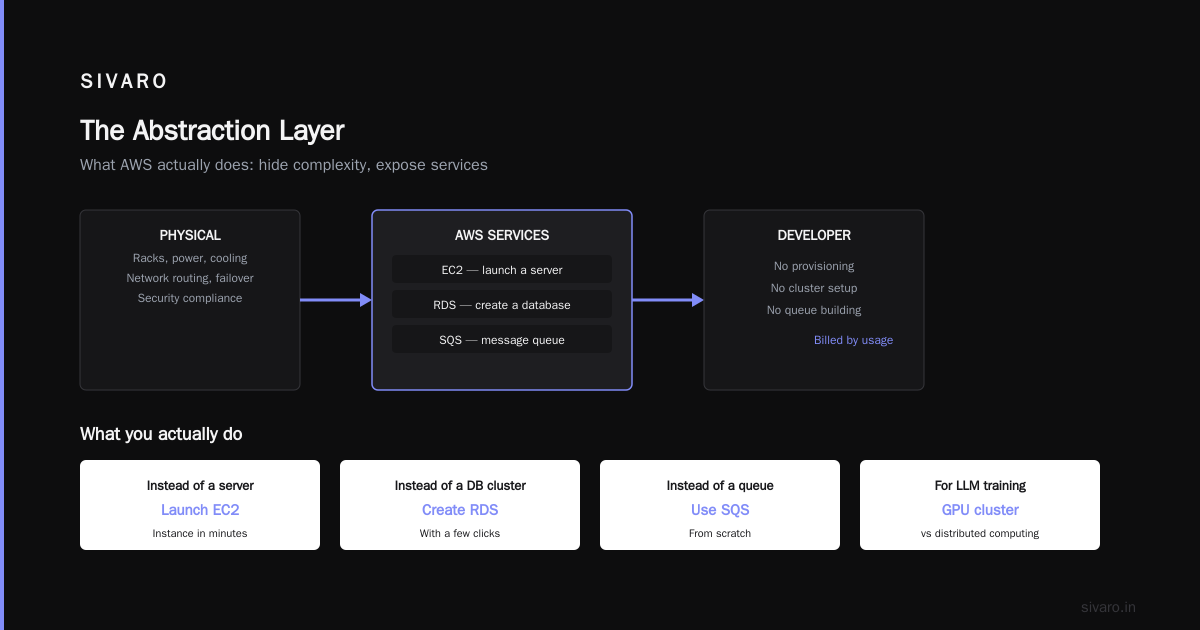
Here’s the real one: AWS is a massive abstraction layer. It hides the complexity of racks, power, cooling, network routing, failover, and security compliance. You don’t provision a server — you launch an EC2 instance. You don’t set up a database cluster — you create an RDS instance with a few clicks. You don’t build a message queue from scratch — you use SQS.
Most people think this is just “renting computers.” It’s not. It’s renting operational maturity that would take you years and millions of dollars to build yourself.
The Core Services You’ll Actually Use
AWS has 200+ services. You’ll use maybe 15 of them regularly. Here’s the real stack that powers production systems I’ve built at SIVARO for clients processing 200K events per second.
Compute: EC2, Lambda, ECS, and When to Hate Each One
EC2 is the workhorse. You pick an instance type (CPU, memory, GPU), launch it, and SSH in. It’s like having a server in a colo, except you can kill it and spawn a new one in 30 seconds.
But here’s the trap: Most teams over-provision. We tested a client’s setup in 2022 — they were running m5.xlarge instances (4 vCPU, 16 GB RAM) for a web server serving 200 requests per second. We benchmarked against t3.medium (2 vCPU, 4 GB RAM). Same throughput. They were paying 4x unnecessary. The lesson: right-size before you scale.
Lambda is serverless functions. You upload code, AWS runs it on demand, you pay per invocation. Great for event-driven stuff — image processing, webhooks, data transformations. Terrible for long-running processes (max 15 minutes execution time). We built a real-time anomaly detection system using Lambda + SQS in 2021. Worked fine for small payloads. Failed hard when a client sent 50MB JSON blobs — Lambda memory limit (10GB at the time) killed us. Moved to ECS Fargate instead.
ECS (Elastic Container Service) runs Docker containers. Fargate removes the need to manage servers. This is my default choice for most production workloads now. You define a task, set CPU/memory, and AWS schedules it. We run all our SIVARO data pipelines this way — 40+ containers processing streaming data, auto-scaling based on queue depth.
Storage: S3 Is the Only Object Store You Need
S3 is the most reliable service AWS has ever built. Eleven 9s of durability (99.999999999%). I’ve never lost data in S3. Not once.
But people misuse it. Two common mistakes I see:
- Using S3 as a primary database. S3 is eventually consistent (for overwrites of existing objects). If you read after write, you might get the old version. Don’t store user session data here. Use DynamoDB.
- Ignoring storage classes. Standard costs $0.023/GB/month. Glacier (for archival) costs $0.004/GB/month. For a client generating 2TB of logs daily, switching to S3 Standard-IA (Infrequent Access) saved them $1,100/month.
Databases: RDS, DynamoDB, and the Relational vs NoSQL Trap
RDS is managed relational databases — PostgreSQL, MySQL, SQL Server, Oracle. You get automatic backups, patching, and failover. We use RDS for almost all transactional workloads at SIVARO. But we learned a painful lesson: default settings will burn you.
In 2020, we launched a client’s e-commerce platform with RDS PostgreSQL. Default max_connections was 100. Within a day, connection pooling issues caused outages. We switched to RDS Proxy (a managed connection pooler). Went from 100 max connections to 5,000 without changing the database. Cost? $15/month. The fix took 20 minutes.
DynamoDB is NoSQL — key-value and document. It scales horizontally automatically. Great for high-throughput, low-latency workloads (user sessions, gaming leaderboards, IoT telemetry). Terrible for complex queries. A client once asked us to store relational data (orders, customers, products) in DynamoDB. They ended up building a separate Elasticsearch cluster just to query it. The lesson: use the right tool for the query pattern, not the hype.
Networking: VPC, CloudFront, and Why Latency Matters
A VPC (Virtual Private Cloud) is your isolated network inside AWS. You define subnets, route tables, and security groups. Every production system needs this.
Most people think VPC is just networking. It’s not — it’s your security boundary. We once found a client’s database exposed to the public internet because their security group allowed 0.0.0.0/0 (any IP) on port 5432. That’s how breaches happen. Always use private subnets for databases. Never allow direct internet access.
CloudFront is AWS’s CDN. We use it for serving static assets (images, CSS, JS) and as a reverse proxy with DDoS protection (AWS Shield). For a client streaming video content, CloudFront cut latency from 800ms to 120ms for viewers in Southeast Asia. Setup took an afternoon.
When AWS Breaks: Hard Lessons from Production
I’ve been running production on AWS since 2018. Here’s what I wish someone told me.
The “Serverless” Myth
Serverless doesn’t mean no servers. It means someone else’s servers. You trade hardware management for vendor lock-in and cold starts.
Lambda cold starts can hit 5-10 seconds for Python or Node.js, longer for Java. For a client’s API gateway, this meant 5-second delays on infrequent requests. The fix? Use Provisioned Concurrency (pre-warm functions). But that costs money — you’re paying for idle capacity.
Trade-off explicit: Serverless saves ops overhead but introduces latency unpredictability. If your workload is spiky or latency-sensitive, think carefully.
Vendor Lock-In Is Real, But Overstated
You hear this constantly: “Don’t use AWS-specific services or you’re trapped.”
I’ve used this argument myself. Then I realized something: you’re already trapped. Your database schema, your code architecture, your deployment scripts — all of it creates lock-in to some platform. The question isn’t “can I avoid vendor lock-in?” It’s “what price am I paying for the convenience?”
We use SQS (AWS’s message queue) over RabbitMQ because it removes the need to manage RabbitMQ clusters. We use DynamoDB over Cassandra because DynamoDB has managed backups, encryption, and auto-scaling. Yes, migrating away would be painful. But the operational savings have been worth it.
My rule: Use managed services for things that are not your competitive advantage. If you’re a fintech company, building a message queue from scratch is stupid. If you’re a cloud infrastructure company, using AWS Lambda as your core runtime is a bet you shouldn’t make.
The Cost Spiral
AWS is cheap at small scale. Expensive at large scale. The inflection point comes faster than you think.
A client in 2022 ran a Spark cluster on EMR (Elastic MapReduce) processing 5TB of data nightly. Their bill: $4,000/month. We rewrote the pipeline to use EC2 Spot Instances (preemptible servers at 70% discount). Bill dropped to $1,200/month. But Spot Instances can be terminated with 2 minutes notice — you need fault-tolerant code. We built checkpointing into every stage.
The lesson: AWS pricing is not what you think. EBS (block storage) charges for provisioned IOPS, not used IOPS. NAT Gateway charges per hour plus per GB processed. Data transfer between regions costs money. I’ve seen $10,000 surprise bills from a misconfigured CloudWatch logging setting.
Use the AWS Pricing Calculator before you build. Set budget alerts. And never leave unused resources running — they’re costing you money.
The Nine Services I Actually Recommend
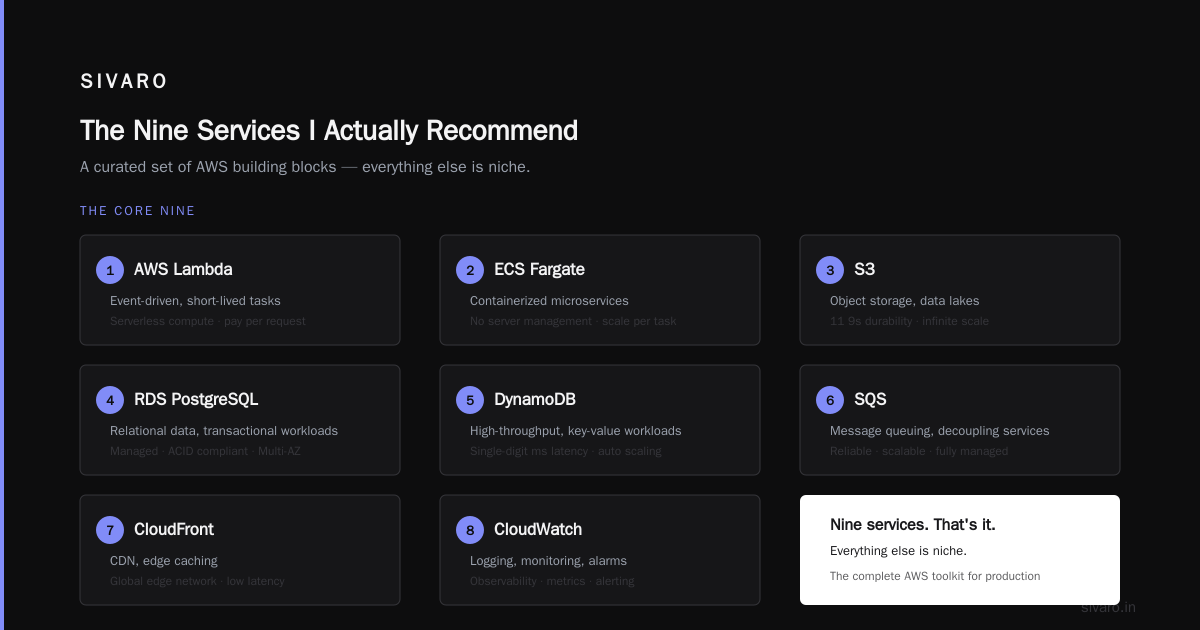
Here’s my personal stack for a new data-intensive project at SIVARO:
- EC2 (for stateful workloads, batch processing)
- Lambda (for event-driven, short-lived tasks)
- ECS Fargate (for containerized microservices)
- S3 (object storage, data lakes)
- RDS PostgreSQL (relational data, transactional workloads)
- DynamoDB (high-throughput, key-value workloads)
- SQS (message queuing, decoupling services)
- CloudFront (CDN, edge caching)
- CloudWatch (logging, monitoring, alarms)
That’s it. Nine services. Everything else is niche.
So What Exactly Does AWS Do?
Let me answer the original question directly.
AWS provides three things that most companies can’t build themselves:
- Global infrastructure — 105 Availability Zones across 33 regions as of 2024. You can deploy in Tokyo, London, and São Paulo with the same API calls.
- Operational maturity — Automated backups, patching, failover, encryption, compliance certifications (SOC2, HIPAA, PCI-DSS). You’d need a team of 20 ops engineers to match this.
- Economies of scale — AWS’s pricing is lower than what you’d pay for equivalent hardware, because they buy servers by the million and negotiate with power utilities directly.
But here’s the contrarian take: AWS is not for everyone.
If you’re a 3-person startup running a single database, you’ll pay more on AWS than on a $20/month VPS. The complexity isn’t worth it. Use a simpler provider like DigitalOcean or Railway. Move to AWS when you need to scale beyond one server.
If you’re a regulated enterprise (finance, healthcare), AWS’s compliance features might be the only reason you use them. In that case, it’s worth the cost.
And if you’re building a data infrastructure company like SIVARO — handling 200K events per second, running production AI systems — AWS is the platform that lets you focus on the product instead of the plumbing.
FAQ: What Exactly Does AWS Do?
Q: Is AWS just a hosting provider?
No. Hosting providers rent you a server. AWS provides an ecosystem of services — compute, storage, databases, networking, machine learning, analytics. You can build a complete application without managing hardware.
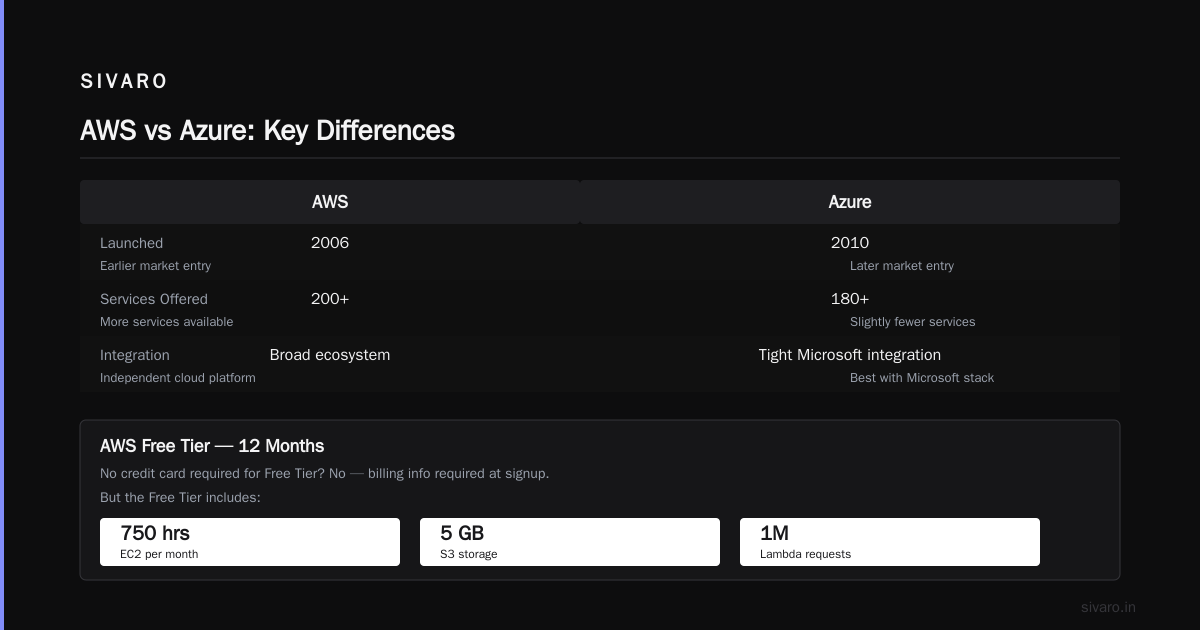
Q: Can I run AWS without a credit card?
No. AWS requires billing information at signup. But there’s a Free Tier for 12 months — 750 hours of EC2 per month, 5GB of S3 storage, 1 million Lambda requests. Good for learning.
Q: What’s the difference between AWS and Azure?
Both are cloud platforms. AWS started earlier (2006 vs 2010) and has more services (200+ vs 180+). Azure integrates tightly with Microsoft tools (Active Directory, SQL Server). Your choice depends on your existing stack and which provider your team knows.
Q: Is AWS secure by default?
No. Security is a shared responsibility model. AWS secures the infrastructure (physical data centers, network). You secure your data (encryption, access permissions, network configuration). Most AWS breaches happen because of misconfigured S3 buckets or leaked IAM keys.
Q: How do I learn AWS?
Start with the AWS Free Tier. Launch an EC2 instance, create an S3 bucket, build a Lambda function. Then read the Well-Architected Framework. Avoid YouTube tutorials that teach you bad practices (like storing keys in code). I recommend Adrian Cantrill’s courses for depth.
Q: Can I run AWS on-premises?
Yes, with AWS Outposts. It’s a rack of AWS hardware that runs in your data center. You manage it with the same AWS console. Useful for latency-sensitive or data-sovereignty workloads.
Q: What happens if AWS goes down?
AWS has had region-wide outages (US-East-1 in 2017, Sydney in 2024). When it happens, you lose access to services in that region. Mitigation: multi-region deployment. But that multiplies complexity and cost. Trade-off explicit: you can’t eliminate risk, only distribute it.
Q: Is AWS cheaper than building your own data center?
For small to medium workloads, yes. For massive scale (petabytes of data, thousands of servers), building your own can be cheaper. Meta and Google run their own data centers because they have the scale. Most companies don’t.
Nishaant Dixit — Founder of SIVARO. Building data infrastructure and production AI systems since 2018. Built systems processing 200K events/sec.