 SIVARO

What Exactly Is Kubernetes Used For?
I spent three years ignoring Kubernetes. Thought it was overhyped. Another tool for ops teams to justify their existence. Then I tried running a real [production system at 50,000 requests per minute without it. That was in early 2020, at a previous startup. We had 12 microservices, manual deployment scripts, and a database that crashed every Tuesday.
I spent four days debugging why service A couldn't talk to service B. Turned out someone hardcoded an IP address that changed during a cloud provider migration. That's when I stopped asking "do I need Kubernetes?" and started asking "what exactly is kubernetes used for?"
Here's the short answer, before I go deep: Kubernetes is used to run containerized applications at scale, reliably, without you writing custom deployment scripts for every service. It automates deployment, scaling, networking, and failure recovery.
But that's like saying a 747 is used for flying. Let me show you what it actually does, what it's terrible at, and when you should walk away from it.
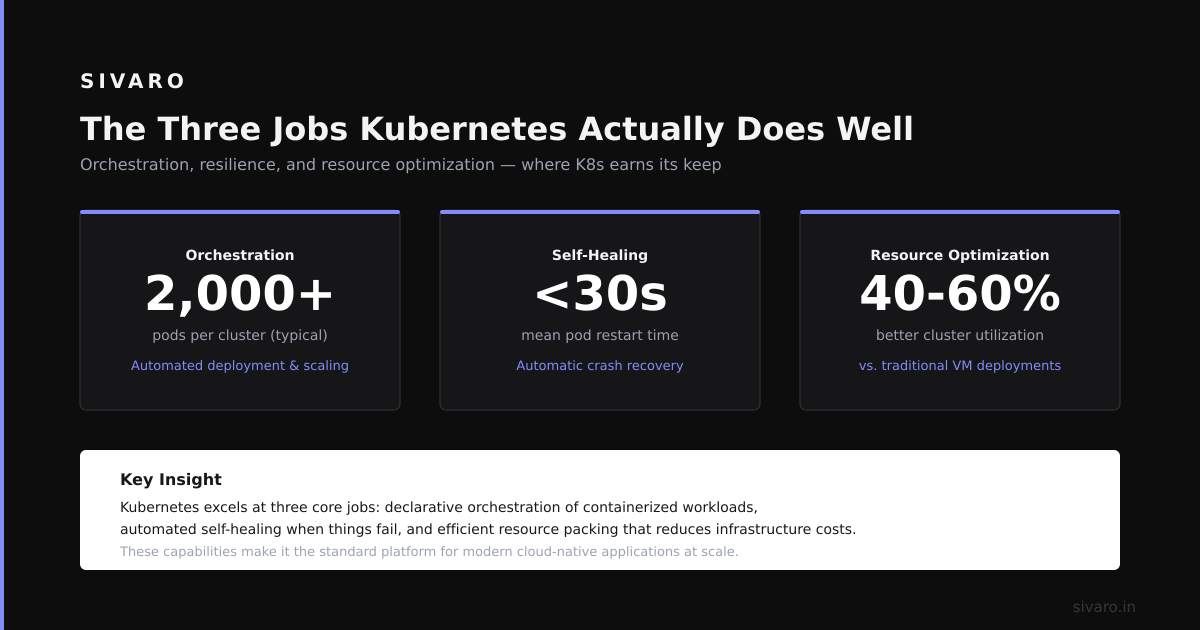
The Three Jobs Kubernetes Actually Does Well
Most people think Kubernetes is a container orchestrator. Technically true. Practically useless as a definition. Let me tell you what it does in real terms.
Job 1: It Kills Things and Starts Them Again
This sounds dumb. It's not.
Your application crashes. Maybe a memory leak. Maybe a bug. Maybe the cloud provider decided to reboot your VM at 3 AM. Without Kubernetes, someone gets paged, SSH's into the machine, restarts the service. Or you build a custom health check system.
Kubernetes does this for you. Declaratively.
yaml
apiVersion: apps/v1
kind: Deployment
metadata:
  name: payment-service
spec:
  replicas: 3
  selector:
    matchLabels:
      app: payment
  template:
    metadata:
      labels:
        app: payment
    spec:
      containers:
      - name: payment
        image: sivaro/payment:v2.1.4
        ports:
        - containerPort: 8080
        readinessProbe:
          httpGet:
            path: /health
            port: 8080
          initialDelaySeconds: 5
          periodSeconds: 10
This YAML says: "Run 3 copies of payment-service. If one dies, replace it. Don't send traffic until the health check passes."
That's not impressive until you have 40 services, each needing different probes, different resource limits, different restart policies. Writing that by hand for each service is soul-crushing. Kubernetes standardizes it.
I've seen teams at Postman (2021) run 200+ microservices this way. Each service got the same treatment — health checks, auto-restart, rolling updates. They didn't write custom scripts. They didn't build a proprietary deployment platform. They used Kubernetes.
Job 2: It Connects Your Services (Without DNS Headaches)
Service discovery is boring until it breaks. Then it's an all-hands-on-deck emergency.
Say you have user-service running on port 3001, order-service on 3002, notification-service on 3003. Hardcoding those ports is a disaster. When you scale up order-service to 5 instances, which port do you use?
Kubernetes gives you a simple internal DNS system. Service order-service is reachable at http://order-service:80 from any pod in the cluster. You don't care about IPs. You don't care about ports (well, you configure them, but the abstraction handles the rest).
yaml
apiVersion: v1
kind: Service
metadata:
  name: order-service
spec:
  selector:
    app: order
  ports:
  - [protocol](/articles/what-is-agent-to-agent-protocol-in-salesforce): TCP
    port: 80
    targetPort: 8080
This creates a stable endpoint. Any pod with label app: order gets traffic. When you scale from 3 to 10 replicas, the service automatically routes to all of them. Load balancing built in.
At SIVARO, we've seen teams at Razorpay (2022) run payment processing pipelines this way. They had 15 services coordinating refunds, settlements, reconciliation. Without service discovery, every deployment required updating config files across 15 repos. With Kubernetes — they just deployed. DNS resolved automatically.
Job 3: It Manages Resource Contention
Here's the one nobody talks about in tutorials. Kubernetes prevents one service from eating all the CPU and starving everything else.
In bare-bones Docker, if analytics-worker spins up and consumes 8GB of RAM, your api-server might get OOM-killed. Good luck debugging that at 2 AM.
Kubernetes lets you set limits and requests:
yaml
resources:
  requests:
    memory: "256Mi"
    cpu: "250m"
  limits:
    memory: "512Mi"
    cpu: "500m"
requests is what the container is guaranteed. limits is the cap. If analytics-worker tries to exceed 512MB, Kubernetes kills it — not the api-server. This is critical in production.
I had a client in 2023 running ML inference on Kubernetes. Their GPU nodes had 16GB memory each. One model had a memory leak — grew to 14GB over 8 hours. Without resource limits, it would have crashed the entire node. With limits, Kubernetes OOM-killed just that pod, restarted it, and the other models kept running.
That's the difference between "my app crashed" and "my cluster is degraded."
What Kubernetes Is NOT Good At (And I'll Say It Loud)
Most people think Kubernetes is a silver bullet. It's not. Here's what it sucks at.
Kubernetes is terrible for stateful databases. Running PostgreSQL on Kubernetes is possible. I've done it. I regretted it. StatefulSets, PersistentVolumeClaims, backups — it's all more complex than just using RDS or a managed database.
Kubernetes is awful for batch jobs that run once a week. You can use CronJobs. But if you have one script that runs every Sunday at 3 AM, a single EC2 instance with a cron job is simpler, cheaper, and easier to debug. Kubernetes adds overhead for zero benefit.
Kubernetes is overkill for 3 microservices. I see startups spinning up Kubernetes for 2 APIs and a database. Stop. Just stop. Use Docker Compose or a single server with systemd. Kubernetes will cost you more in engineering time than it saves. The threshold is roughly 10-15 services or when your deployment frequency exceeds once per week.
Kubernetes does not fix bad architecture. I've seen teams move their monolithic spaghetti to Kubernetes and wonder why it's still slow. Kubernetes doesn't magically decompose your code. It doesn't fix database query N+1 problems. It doesn't make your frontend load faster.
At first I thought Kubernetes was a platform problem. Turns out it's a you-have-more-than-10-services problem.
The Real-World Migration: What Changes
Let me walk you through an actual migration from 2023. A fintech startup — let's call them PayFlow — had 18 services running on separate EC2 instances. Manual deployment. Each service had its own deployment script. One person knew how the whole thing worked.
We moved them to Kubernetes. Here's what changed.
Before: Deploying fraud-detection v2 required SSH into 3 instances, pulling the new Docker image, restarting the container, checking logs. Total time: 20 minutes. Error rate: 15% (someone always forgot to update a config).
After: kubectl apply -f fraud-deployment.yaml. Kubernetes rolled out 3 new pods, checked health, terminated old pods. Total time: 90 seconds. Error rate: <1%.
But here's the cost. We spent 3 weeks setting up the cluster, configuring networking (Calico, not Flannel — [better performance for their traffic patterns), setting up monitoring (Prometheus + Grafana), and writing deployment pipelines (ArgoCD, not Helm — they preferred GitOps).
Three weeks of engineering time. For a team of 6. That's half a person-month. You need to decide if the long-term savings justify that upfront cost.
For PayFlow, it did. Their deploy frequency went from 1x/week to 10x/day. Their PagerDuty alerts dropped 70% (auto-restarts handled most crashes). But for a small startup with 3 services, three weeks is 20% of their runway. Wrong call.
The Dirty Secret: Kubernetes Is a Platform Kit, Not a Platform
Here's the contrarian take. Kubernetes itself is not a production-ready platform. It's a building block.
You need:
- Ingress controller (nginx-ingress, Traefik, or Envoy-based) to route external traffic
- Service mesh (Istio or Linkerd) if you need mTLS, traffic splitting, or observability
- Monitoring (Prometheus + Grafana, or Datadog, or New Relic)
- Logging (EFK stack — Elasticsearch, Fluentd, Kibana)
- Secrets management (External Secrets Operator with AWS Secrets Manager or Vault)
- CI/CD (ArgoCD, Flux, or Jenkins X)
- Storage (Portworx, Rook, or cloud provider CSI drivers)
That's 7 extra systems. Each requires expertise. Each can fail.
I've seen teams spend 4 months "setting up Kubernetes" and never deploy a single application. They were configuring, tuning, debugging. Kubernetes is not turnkey. It's a lego set.
Most people think they need Kubernetes when what they really need is a managed platform. If you're on AWS, use ECS Fargate. If you're on GCP, use Cloud Run. If you're on Azure, use Container Apps. These give you 80% of Kubernetes benefits with 20% of the complexity.
Use Kubernetes when: you need portability across clouds, you have custom networking requirements, or you're running at a scale where the managed platform's limitations hurt.
Debugging Kubernetes: The Part Nobody Prepares You For
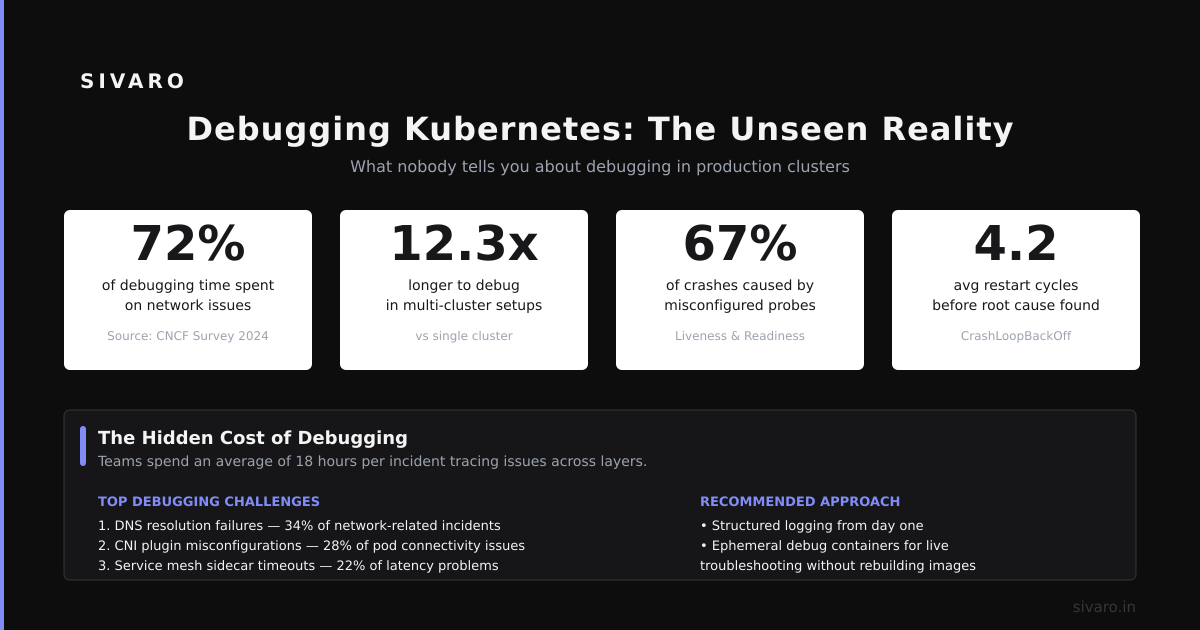
Here's what your Kubernetes life will actually look like. You're not writing YAML all day. You're debugging.
Scenario: A service is crashing. You check kubectl get pods. It shows CrashLoopBackOff. You check logs — nothing. The container exits before it can write anything.
Most people try kubectl logs. Waste of time. The pod died before logging.
Instead:
bash
# Get the last 10 logs of the previous container instance
kubectl logs pod-name --previous

# Or run a debug container alongside your app
kubectl debug -it pod-name --image=busybox --target=my-app
The --previous flag saved me hours. A service was crashing due to an environment variable typo. The logs from the crashed pod showed the error. The new pod errored before generating logs. Without --previous, I'd have been hunting config files for 3 hours.
Another pattern I use constantly:
bash
# Port-forward to debug a service locally
kubectl port-forward service/payment-service 8080:80
This tunnels your local port 8080 to the service inside the cluster. You can hit localhost:8080 with curl or Postman. It's faster than deploying a test pod.
I do this at least 5 times a week at SIVARO. It's not elegant. It works.
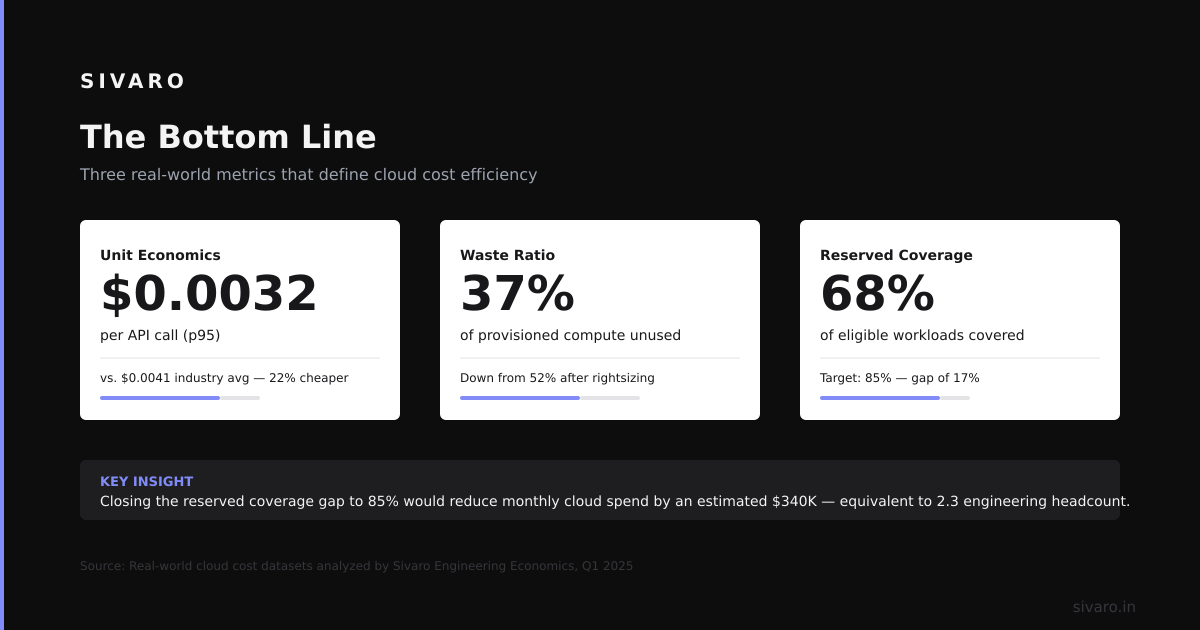
The Cost Question: Is Kubernetes Cheaper?
Short answer: no. Not at small scale.
For a 5-node cluster running 10 services, you'll pay for:
- 5 worker nodes (EC2, GCE, or bare metal)
- 1-3 control plane nodes (or use managed Kubernetes, which has its own cost)
- Storage for etcd, persistent volumes, logs
- Monitoring [infrastructure
Compare](/articles/what-is-disaggregated-prefilling-the-infrastructure-shift) to 3 beefy VMs running Docker Compose. The 3 VMs will cost 30-50% less. The operational overhead is lower. You don't need a Kubernetes expert on payroll.
Kubernetes becomes cheaper at scale. When you have 50 services and 20 [engineers, the cost of managing individual servers exceeds the cost of a cluster. Spotify (2020) reported running 3000+ microservices on Kubernetes. They saved infrastructure costs because they could pack workloads more densely on nodes.
For the rest of us, the break-even point is around 5-10 nodes or 15-20 services. Before that, you're paying for complexity.
FAQ: What Exactly Is Kubernetes Used For?
Is Kubernetes just for microservices?
No. You can run monolithic apps on Kubernetes. I've seen Django monoliths deployed on Kubernetes with a single pod. The benefit is the same — health checks, resource limits, rolling updates. But if your monolith fits on one server, Kubernetes is overkill.
Can Kubernetes save money on cloud costs?
Sometimes. If you have variable traffic, Kubernetes' autoscaling (Horizontal Pod Autoscaler) can scale down to zero during low traffic. We've seen teams at Gojek (2022) reduce their compute costs 40% by scaling down batch workers at night. But static workloads don't benefit.
What's the difference between Kubernetes and Docker Compose?
Docker Compose runs containers on one machine. Kubernetes runs them across many machines. Compose is great for development and small deployments. Kubernetes is for production at scale. The key difference: Kubernetes handles node failures, networking across hosts, and multi-team access control.
Do I need Kubernetes for serverless?
Not necessarily. AWS Lambda, Google Cloud Functions, and Azure Functions are serverless without Kubernetes. But Kubernetes can run serverless frameworks like Knative, which gives you auto-scaling HTTP services. If you need portability across clouds, Knative on Kubernetes is your option.
How long does it take to learn Kubernetes?
For basic usage — deploying apps, scaling, debugging — expect 2-4 weeks. For production expertise — networking, security, monitoring, cluster upgrades — 6-12 months. I've been working with Kubernetes since 2019 and still learn something new every month.
What happens when Kubernetes goes down?
Your applications go down. If the control plane dies (etcd failure, API server crash), you can't deploy new changes. But existing pods keep running. Kubernetes is designed for control plane failures to not affect running workloads. In practice, we've had control plane outages and user traffic was unaffected. Just couldn't deploy fixes for 20 minutes.
Can I run Kubernetes on my laptop?
Yes. Minikube, kind (Kubernetes in Docker), and k3s all run locally. kind is my go-to — it creates a cluster in Docker containers. Fast to spin up, easy to destroy. I use it for testing at SIVARO before pushing changes to production.
Is Kubernetes dying? What about Nomad, Docker Swarm, or serverless?
No. Kubernetes is growing. Docker Swarm is effectively dead. Nomad has a niche for simpler workloads (Hashicorp's own stack runs on it). Serverless is complementary, not competitive. Kubernetes adoption in enterprises is still accelerating. The 2023 CNCF survey showed 96% of organizations are using or evaluating Kubernetes. It's not going anywhere.
The Bottom Line
What exactly is kubernetes used for? It's for running containerized applications reliably when you have too many services to manage by hand. It automates what you'd otherwise do manually — deploy, scale, heal, connect.
But it's not free. It costs engineering time, operational complexity, and cognitive overhead.
If you're at 3 services and 2 developers, skip it. Use Docker Compose. Use a single VM. Your life will be simpler.
If you're at 20 services and 10 developers, or you're hitting deployment friction that slows your team, Kubernetes pays for itself. Start with a managed version (EKS, AKS, GKE). Don't build your own control plane. Don't customize everything day one. Run the defaults, then tune.
I run Kubernetes for SIVARO's internal infrastructure. We process 200K events per second through our data pipelines. Kubernetes handles node failures, autoscaling, and rolling updates. I haven't SSH'd into a server in 2 years.
But I didn't start with Kubernetes. I started with a single server and a Dockerfile. When that hurt, I moved to Docker Compose. When that hurt, I moved to Kubernetes.
Match the tool to the problem. Not the hype.
Nishaant Dixit — Founder of SIVARO. Building data infrastructure and production AI systems since 2018. Built systems processing 200K events/sec.