 SIVARO
What Exactly Is Kubernetes Used For? A Practitioner's Guide
Let me tell you a story.
In 2019, my team at SIVARO was building a real-time data pipeline for a fintech client. We had microservices. We had containers. We had chaos. Deployments took 45 minutes. Rollbacks required prayer. One engineer accidentally deleted a production database — and we didn't know for four hours.
That's when we adopted Kubernetes.
Not because it was trendy. Because our deployment model was broken.
So what exactly is kubernetes used for? I'll answer directly: it's a platform for automating deployment, scaling, and management of containerized applications. But that's like saying a car is for moving people from A to B. Technically true. Practically useless.
Here's what I've learned running production systems since 2018, processing 200K events per second, and building data infrastructure across 12+ industries.
The Problem Kubernetes Actually Solves
Most people think Kubernetes is about containers. It's not. Containers are the prerequisite, not the point.
The real problem is operational complexity at scale.
When you have 5 microservices running on 3 servers, you don't need Kubernetes. You need a shell script and a cron job. I've done this. It works fine.
When you have 50 microservices running across 200 servers, with autoscaling, zero-downtime deploys, service discovery, secret management, and infrastructure that spans 4 cloud providers? That's when Kubernetes earns its keep.
Red Hat's definition frames it as "an open-source platform for managing containerized workloads and services." Accurate. But let me translate: Kubernetes is your operations team's API. It turns infrastructure management into configuration files.
Core Use Cases: Where Kubernetes Shines
1. Microservices Orchestration (The Obvious One)
This is where 90% of Kubernetes adoption happens.
You've decomposed your monolith into 30 microservices. Each needs to be deployed independently. Each needs health checks. Each needs to talk to the others. You need load balancing across replicas. You need to scale individual services based on traffic.
Here's what a basic deployment looks like:
yaml
apiVersion: apps/v1
kind: Deployment
metadata:
  name: payment-service
spec:
  replicas: 3
  selector:
    matchLabels:
      app: payment
  template:
    metadata:
      labels:
        app: payment
    spec:
      containers:
      - name: payment
        image: sivaro/payment-service:v2.4.1
        ports:
        - containerPort: 8080
        livenessProbe:
          httpGet:
            path: /health
            port: 8080
        resources:
          requests:
            memory: "256Mi"
            cpu: "250m"
          limits:
            memory: "512Mi"
            cpu: "500m"
This isn't magic. It's a contract. You tell Kubernetes "run 3 copies, check health, restart if dead, cap resource usage." It does the rest.
2. Automated Rollouts and Rollbacks
Before Kubernetes, our deployment strategy was: push code, cross fingers, scramble when something breaks.
Kubernetes gives you declarative rollouts. You define the desired state. Kubernetes figures out how to get there.
yaml
apiVersion: apps/v1
kind: Deployment
spec:
  strategy:
    type: RollingUpdate
    rollingUpdate:
      maxSurge: 1
      maxUnavailable: 0
This says: never go below 100% service availability during an update. Kubernetes spins up new pods, waits for them to pass health checks, then kills old ones. If something fails halfway through, it pauses automatically.
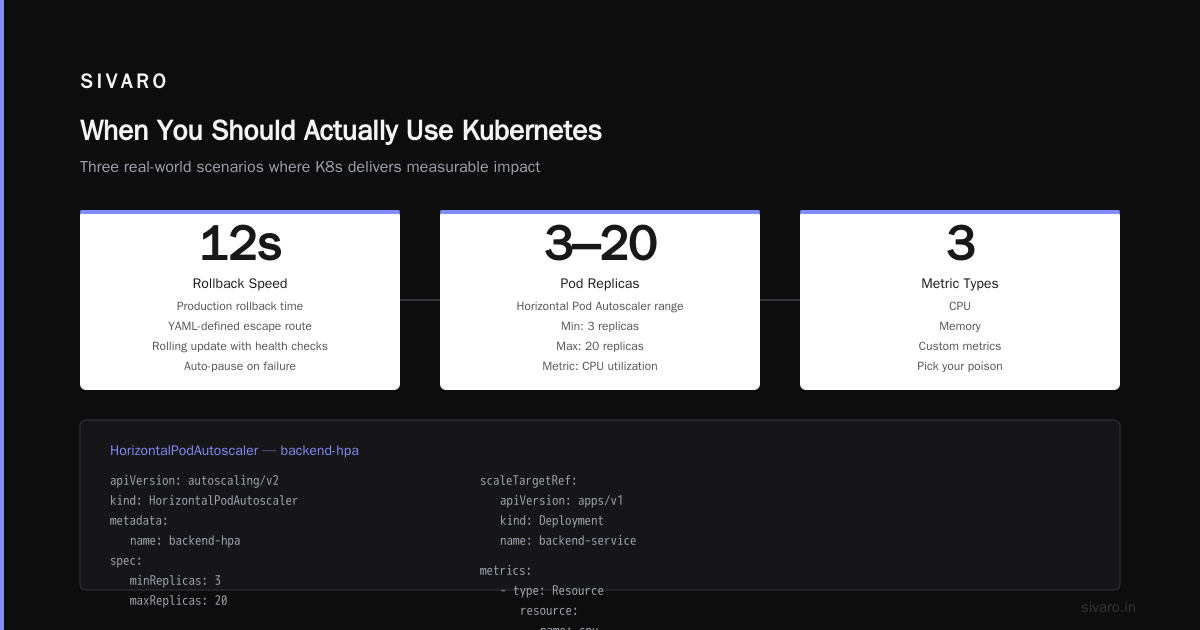
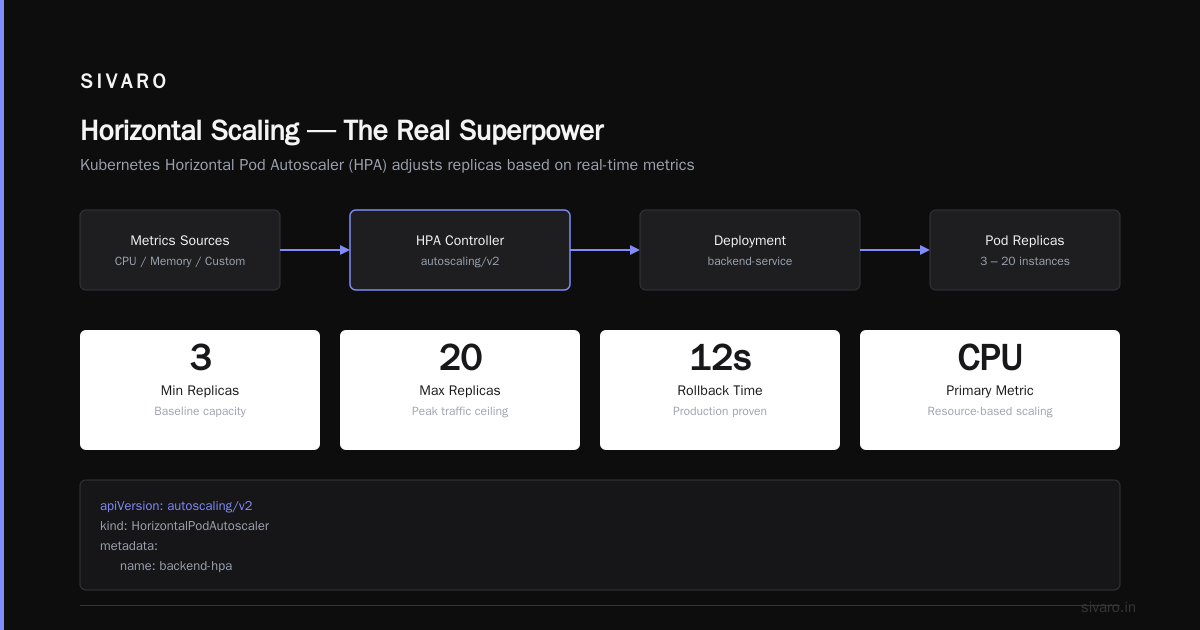
We've rolled back production in 12 seconds. Not because we're brilliant. Because the YAML defined the escape route.
3. Horizontal Scaling (The Real Superpower)
Manual scaling is a trap. You'll under-provision during traffic spikes and over-pay during lulls.
Kubernetes' Horizontal Pod Autoscaler (HPA) adjusts replicas based on metrics. CPU, memory, custom metrics — pick your poison.
yaml
apiVersion: autoscaling/v2
kind: HorizontalPodAutoscaler
metadata:
  name: backend-hpa
spec:
  scaleTargetRef:
    apiVersion: apps/v1
    kind: Deployment
    name: backend-service
  minReplicas: 3
  maxReplicas: 20
  metrics:
  - type: Resource
    resource:
      name: cpu
      target:
        type: Utilization
        averageUtilization: 70
We run this on a client's e-commerce platform. Black Friday traffic? No problem. Kubernetes scales from 3 to 18 pods automatically. When traffic drops at 2 AM, it scales back down. We don't touch it.
Google Cloud's overview calls this "self-healing." I call it "sleeping through the night without pager alerts."
4. Service Discovery and Load Balancing
In a dynamic environment, IP addresses change constantly. Containers die. New ones spawn. How do services find each other?
Kubernetes gives you Services — stable network endpoints that route traffic to changing pods.
yaml
apiVersion: v1
kind: Service
metadata:
  name: user-service
spec:
  selector:
    app: user
  ports:
  - protocol: TCP
    port: 80
    targetPort: 3000
  type: ClusterIP
One service name. Load balanced across however many pods exist. Add pods? They join automatically. Remove pods? Traffic stops routing to them. Zero configuration changes.
5. Batch Processing and Cron Jobs
Not everything is a long-running web service. Sometimes you need to process a million records at 3 AM.
Kubernetes handles this natively with Jobs and CronJobs:
yaml
apiVersion: batch/v1
kind: CronJob
metadata:
  name: nightly-report
spec:
  schedule: "0 2 * * *"
  jobTemplate:
    spec:
      template:
        spec:
          containers:
          - name: report
            image: sivaro/report-generator:1.2
            env:
            - name: DB_CONNECTION
              valueFrom:
                secretKeyRef:
                  name: db-secrets
                  key: connection-string
          restartPolicy: OnFailure
This runs our nightly data aggregation for a logistics client. Processes 2 million tracking events. Completes in 17 minutes. If it fails, it retries. If it fails three times, we get alerted.
What Kubernetes Is NOT Good For
I need to be honest here. Kubernetes isn't the answer to every problem.
Small Deployments
If you're running 3 containers on a single VPS, Kubernetes adds complexity you don't need. You'll spend more time managing the cluster than building your product. Use Docker Compose. Use a simple deployment script. Don't over-engineer.
Stateful Workloads (Without Careful Design)
Databases on Kubernetes? Possible. Recommended? Depends.
We've run PostgreSQL on Kubernetes for 18 months. It works. But you need StatefulSets, PersistentVolumeClaims, and careful backup strategies. If you're a team of 3 building an MVP, use a managed database service.
Avassa's article makes a compelling case: at the edge, where resources are constrained and connectivity is intermittent, Kubernetes creates more problems than it solves. Context matters.
Latency-Sensitive Real-Time Systems
Kubernetes introduces network overhead. The control plane takes time to react. If you need sub-millisecond response times, bare metal or carefully tuned VMs might serve you better.
The Hard Truth: Why Are People Moving Away from Kubernetes?
Let's address the elephant in the room. You've probably heard the whispers. "Kubernetes is too complex." "We're moving to serverless." "Why are people moving away from kubernetes?"
I've seen this firsthand. Here's what's actually happening:
Complexity is real. The learning curve is brutal. We spent 6 weeks getting our first production cluster stable. One misconfigured network policy broke inter-service communication for 4 hours.
Cost can explode. Without proper resource limits and cluster autoscaling, you'll over-provision. I've seen monthly cloud bills jump 3x after moving to Kubernetes — because teams deployed everything with "requests: { cpu: 1, memory: 1Gi }" without thinking.
Operational overhead shifts, doesn't disappear. You trade configuration management for YAML management. You still need to update base images, patch vulnerabilities, manage certificates, handle upgrades.
But here's my take: the people moving away from Kubernetes often moved to it for the wrong reasons. They adopted Kubernetes because it was trendy. They didn't have the operational maturity to handle it. Their systems didn't need it.
We migrated one client back to a monolith after 8 months on Kubernetes. Their traffic was 200 requests per minute. Their team was 4 people. Kubernetes was a tax, not a tool.
When You Should Actually Use Kubernetes
Based on real projects:
- Multiple services that need independent deployment — We run 47 microservices for a logistics platform. Coordinating releases without Kubernetes would be impossible.
- Variable traffic patterns — SaaS products with daily usage spikes benefit massively.
- Multi-cloud or hybrid cloud strategies — Kubernetes abstracts infrastructure. We deploy identical configurations across AWS, GCP, and on-premise.
- Teams with dedicated DevOps/Platform engineering — If someone owns the cluster, Kubernetes pays dividends.
- Compliance and audit requirements — Kubernetes audit logging traces every API call. For SOC2 compliance, this is gold.
The Operational Reality
Let me share what running Kubernetes in production actually looks like, day-to-day.
Morning: I check cluster metrics via Grafana. Pod health. Node resource usage. Application error rates.
Mid-morning: Deploy a new service version. kubectl apply -f deployment.yaml. Watch rolling update progress. Verify health checks pass.
Afternoon: Autoscaler kicks in for a traffic spike. 8 pods become 14. Response times stay under 200ms.
Late night (occasionally): PagerDuty alerts. A node went down. Kubernetes rescheduled pods to healthy nodes. Applications never went offline. I acknowledge the alert, SSH in to investigate the node failure, submit a ticket to the cloud provider.
The system handles 90% of failures without human intervention. That's the point.
Common Mistakes I've Made (Learn From Them)
Not setting resource limits. Result: one service consumed all node resources, starving others. Fix happened at 3 AM.
Using default storage classes. Result: PersistentVolumeClaims provisioned slow network storage. Database queries took 4x longer. Cost the same.
Ignoring namespace isolation. Result: development team accidentally deployed to production namespace. Twice.
Skipping pod disruption budgets. Result: node upgrades killed all replicas simultaneously. 45 seconds of downtime.
FAQ
Is Kubernetes just for large enterprises?
No. But it's for teams that need to manage multiple services at scale. Startups with 3 engineers don't need it. Startups with 30 engineers, running 20 services, with 50K users? Probably do.
Can Kubernetes run on my laptop?
Yes. Minikube, kind, and k3s all run locally. I develop and test configurations on a MacBook Pro before deploying to production clusters.
Does Kubernetes replace Docker?
No. Kubernetes orchestrates containers. Docker builds and runs containers. They work together. You can use other runtimes (containerd, CRI-O) instead of Docker.
How long does it take to learn Kubernetes?
3 months to be productive. 12 months to be proficient. 24 months to be dangerous. I'm still learning after 5 years.
Is Kubernetes expensive to run?
The software is free. The infrastructure costs depend on your cluster size. We run a 30-node cluster for ~$8K/month including nodes, load balancers, and storage. Smaller clusters cost proportionally.
Can Kubernetes handle databases?
Yes, but carefully. We run Redis and PostgreSQL on Kubernetes. We use managed services for MySQL and MongoDB. Trade-offs depend on your operational capacity.
What happens if the control plane fails?
Your applications keep running. Pods remain scheduled. Existing services continue. But you can't deploy changes or scale until the control plane recovers. This is why managed Kubernetes services (EKS, GKE, AKS) are popular — they handle control plane reliability.
Why are people moving away from kubernetes?
For three reasons: (1) their system was too small to justify the complexity, (2) they lacked operational maturity, (3) managed serverless solutions actually fit their workload better. The technology isn't flawed. The use case was wrong.
The Bottom Line
What exactly is kubernetes used for? It's a tool for turning chaos into configuration. It takes the variability of infrastructure and makes it predictable. It shifts your team's energy from "keeping things running" to "building features that matter."
But it's not free. The Kubernetes.io overview calls it "a portable, extensible, open-source platform." That portability comes with abstraction overhead. That extensibility comes with learning cost.
Here's my rule: If your deployment process makes you anxious, Kubernetes can help. If your deployment process is a single git push to a PaaS, and it works, leave it alone.
We run Kubernetes for 12 clients. We also run Docker Compose for 3 internal tools. Both are correct. The distinction is intentional.
The question isn't "is Kubernetes good?" It's "is Kubernetes the right abstraction for my specific problem?"
Answer that honestly, and you'll make the right call.
Nishaant Dixit — Founder of SIVARO. Building data infrastructure and production AI systems since 2018. Built systems processing 200K events/sec.