 SIVARO

What Exactly Is Kubernetes Used For? (And When It's Overkill)
I've been building data infrastructure since 2018. For the first three years, I thought Kubernetes was the answer to everything. Then I ran a 200-node cluster that crashed during a demo. That's when I learned what Kubernetes is actually for — and what it isn't.
Let me save you the tuition.
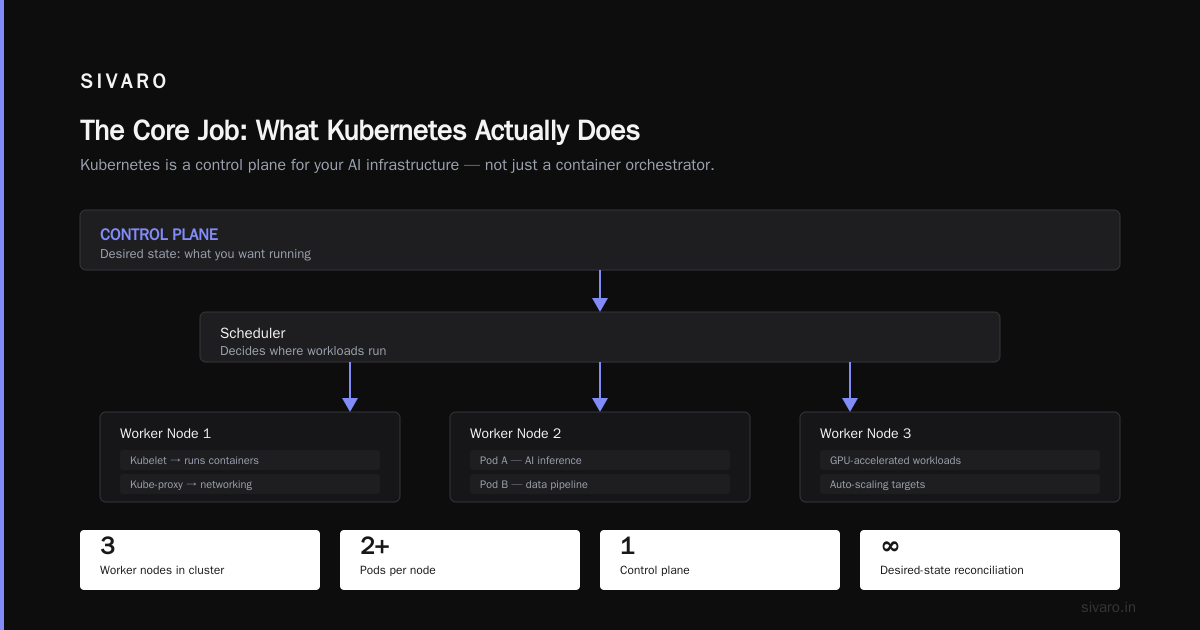
What is Kubernetes? is an open-source orchestration platform for deploying, scaling, and managing containerized applications. That's the textbook answer. But what exactly is kubernetes used for in practice? Three things: scheduling containers across machines, maintaining desired state, and handling traffic routing. Everything else is either a plugin or a marketing slide.
Most people think Kubernetes is about containers. It's not. Containers are the input. Kubernetes is the operating system for a datacenter. You give it a bunch of servers, it treats them like one giant computer. Your application doesn't care which machine it runs on. The cluster handles failures so you don't have to write code for them.
But here's the thing nobody tells you: Kubernetes solves problems you might not have.
The Core Job: What Kubernetes Actually Does
At SIVARO, we process 200K events per second in production. We run inference pipelines, stream processing, and data transformation. Kubernetes is our control plane. But I didn't start there.
The fundamental concept is declarative configuration. You tell Kubernetes what you want — "run 3 copies of my API server" — and it makes that true. It's not a script you run once. It's a running loop that continuously reconciles reality with your intent.
Kubernetes Overview describes this as the "control loop." Here's what that looks like in practice:
yaml
apiVersion: apps/v1
kind: Deployment
metadata:
  name: api-server
spec:
  replicas: 3
  selector:
    matchLabels:
      app: api-server
  template:
    metadata:
      labels:
        app: api-server
    spec:
      containers:
      - name: api-server
        image: sivaro/api-server:2.1.4
        ports:
        - containerPort: 8080
        resources:
          requests:
            memory: "512Mi"
            cpu: "250m"
          limits:
            memory: "1Gi"
            cpu: "500m"
Write that, commit it, and Kubernetes keeps 3 instances running forever. If a node dies, it reschedules the pods. If a pod explodes, it restarts it. If you need 10 replicas, change 3 to 10. Done.
This is what exactly is kubernetes used for in its purest form: operational reliability through automation.
Scheduling: Where Your Code Actually Runs
Here's a problem I hit in 2022. We had 8 machines in a cluster. One machine had a GPU. Another was near a specific S3 bucket for low latency. A third had faster NVMe drives.
Without Kubernetes, you'd hardcode which service runs where. Then a machine fails. Your service is down until someone SSHes in and moves things around.
Kubernetes does something smarter. You label your nodes:
bash
kubectl label node gpu-box-01 accelerator=nvidia-tesla-t4
kubectl label node fast-storage-01 disk=nvme-raid0
Then you tell your workload to only run on specific nodes:
yaml
spec:
  template:
    spec:
      nodeSelector:
        accelerator: nvidia-tesla-t4
      containers:
      - name: model-server
        image: sivaro/gpt-inference:latest
If the GPU machine dies, Kubernetes won't schedule that pod elsewhere — which is correct. You don't want a GPU-dependent workload running on a CPU-only box. It's explicit failure instead of silent degradation.
Cloud Google's guide calls this "intelligent scheduling." I call it "not waking up at 3 AM."
Auto-Scaling: The Promise vs. The Reality
Everyone talks about Kubernetes auto-scaling like it's magic. It's not.
There are three scaling knobs:
- Horizontal Pod Autoscaler (HPA) — adds or removes pod replicas based on CPU, memory, or custom metrics
- Vertical Pod Autoscaler (VPA) — adjusts CPU/memory requests per pod
- Cluster Autoscaler — adds or removes whole nodes from your cloud provider
Here's the truth: HPA works great for stateless web services. Terrible for batch processing or stateful workloads.
We run a stream processor that ingests 200K events/sec. At first I tried HPA based on CPU. Disaster. The stream processor uses more CPU when it's healthy and processing — but it also uses CPU during initialization, which is the worst time to add replicas. We ended up with a cascade: add pods → more CPU usage during init → scale more → crash.
The fix was a custom metric based on queue depth:
yaml
apiVersion: autoscaling/v2
kind: HorizontalPodAutoscaler
metadata:
  name: stream-processor-hpa
spec:
  scaleTargetRef:
    apiVersion: apps/v1
    kind: Deployment
    name: stream-processor
  minReplicas: 3
  maxReplicas: 20
  metrics:
  - type: Object
    object:
      metric:
        name: kafka_consumer_lag
      describedObject:
        apiVersion: v1
        kind: Service
        name: kafka-metrics
      target:
        type: Value
        averageValue: 1000
This scales based on actual work waiting to be done, not CPU noise. Measure what matters, not what's easy.
Service Discovery and Networking
This is where Kubernetes shines and where it fails.
Kubernetes gives every pod an IP address and a DNS name. You don't hardcode IPs. You don't use service registries. You just refer to services by name.
yaml
apiVersion: v1
kind: Service
metadata:
  name: user-service
spec:
  selector:
    app: user-service
  ports:
  - protocol: TCP
    port: 8080
    targetPort: 8080
Then http://user-service:8080 works from anywhere in the cluster. Pods come and go. The service stays.
But here's the failure mode: DNS caching. Kubernetes DNS entries have a TTL. Some applications ignore it. We had a service that cached DNS for 5 minutes. When we rolled out a new version, half the traffic hit the old service for 5 minutes. Chaos.
We fixed it with a headless service and a custom resolver. Red Hat's docs explain the difference, but until you've debugged a DNS storm at 2 AM, you don't really understand it.
Storage: The Hard Part
Stateful applications are where Kubernetes shows its age. Databases, caches, file systems — these don't love being killed and rescheduled.
CommVault's article mentions this: Kubernetes was designed for stateless workloads first. StatefulSets came later as an afterthought.
Here's what a simple persistent volume claim looks like:
yaml
apiVersion: v1
kind: PersistentVolumeClaim
metadata:
  name: data-store
spec:
  accessModes:
  - ReadWriteOnce
  resources:
    requests:
      storage: 100Gi
  storageClassName: ssd-fast
This looks clean. In practice, you'll spend weeks debugging:
- Volume binding timing (pods that start before volumes attach)
- Access mode conflicts (two pods can't write to the same RWO volume)
- Backup integration (most backup tools don't understand Kubernetes PVCs)
We moved our databases out of Kubernetes in 2023. They live on dedicated VMs with filesystem snapshots. Kubernetes manages everything else. Don't run databases on Kubernetes unless you're Google and your name is Cassandra.
Configs and Secrets: Where People Get Hacked
Kubernetes has native ConfigMaps and Secrets. They're fine for small stuff. Dangerous for real secrets.
yaml
apiVersion: v1
kind: Secret
metadata:
  name: db-credentials
type: Opaque
data:
  password: c3VwZXJzZWNyZXQ=   # base64 is not encryption
That base64 encoding is not encryption. Anyone with kubectl get secrets access can decode it. In 2021, we found a team that had their production database password in a ConfigMap accessible to anyone with read access to the namespace.
What exactly is kubernetes used for here? Orchestration, not security.
We use external secrets management now:
yaml
apiVersion: external-secrets.io/v1beta1
kind: ExternalSecret
metadata:
  name: vault-db-creds
spec:
  refreshInterval: 1h
  secretStoreRef:
    name: vault-backend
    kind: SecretStore
  target:
    name: db-credentials
  data:
  - secretKey: password
    remoteRef:
      key: secret/data/db/prod
      property: password
This pulls from HashiCorp Vault on a schedule. The secret never sits in etcd unencrypted for long.
Rollouts and Rollbacks: The Killer Feature
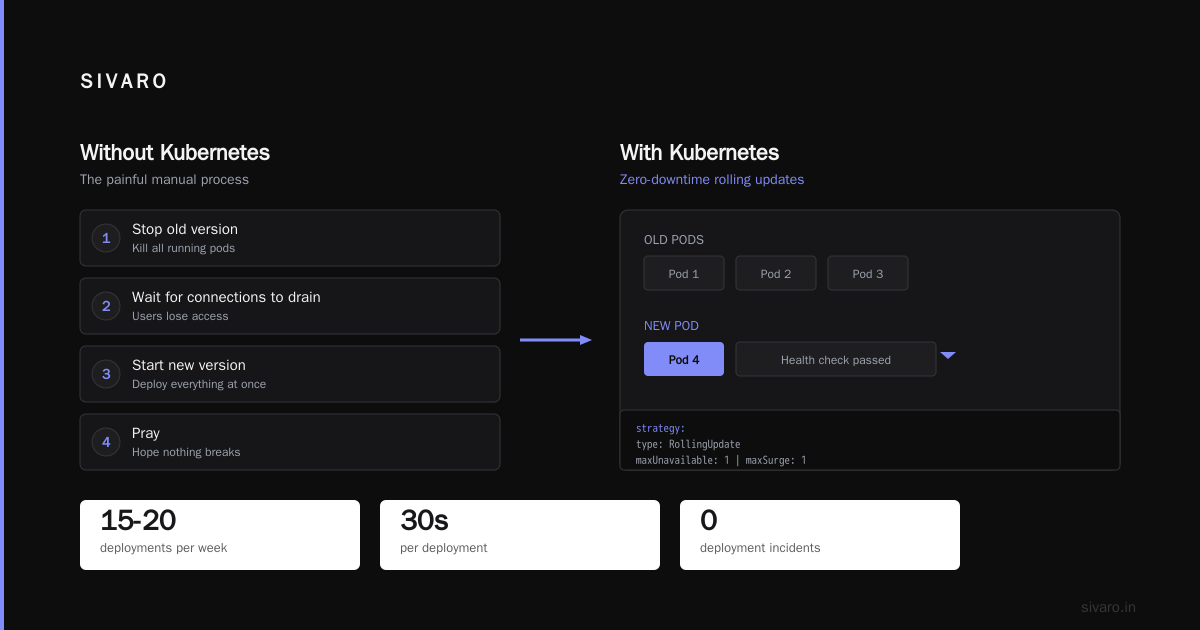
Here's the one thing Kubernetes does better than any alternative: zero-downtime deployments.
Without Kubernetes, deploying a new version means:
- Stop old version
- Wait for connections to drain
- Start new version
- Pray
Kubernetes does rolling updates:
yaml
spec:
  strategy:
    type: RollingUpdate
    rollingUpdate:
      maxUnavailable: 1
      maxSurge: 1
It kills one old pod, starts one new pod, waits for health checks, then proceeds. If the new pod fails, it stops and keeps the old ones running.
We ship 15-20 deployments per week at SIVARO. Each one takes 30 seconds. I've never had a deployment incident. That's not luck — it's Kubernetes doing what it does best.
When Kubernetes Is Wrong
I promised honest takes. Here goes.
Kubernetes is overkill for:
- A single microservice (just use Docker Compose)
- Teams of 1-3 people (you'll spend more time on YAML than code)
- Applications with < 10 containers total
- Edge devices with limited resources
Avassa's article explains this well. They ran Kubernetes at the edge and abandoned it. Too much overhead, too many moving parts, too hard to debug on a Raspberry Pi.
Why are people moving away from Kubernetes? Same reason they move away from anything: complexity. The API surface is massive. You need specialists to operate it. For a small team, that's not feasible.
At SIVARO, we use Kubernetes in our main DC. On edge devices, we use a lightweight agent that talks to our control plane but runs nothing Kubernetes-native. It's 10MB memory overhead instead of 500MB from kubelet + kube-proxy.
When Kubernetes Is The Only Answer
Five signals that you need Kubernetes:
- Multiple microservices that need to talk to each other — you need service discovery, not hardcoded IPs
- Your traffic doubles weekly — you need auto-scaling, not manual capacity planning
- You can't afford downtime — you need self-healing, not on-call heroics
- Your team is 5+ engineers — you need standard deployment patterns, not tribal knowledge
- You run different workloads — batch jobs, web servers, cron jobs, all on the same infrastructure
If you hit 3 out of 5, Kubernetes is worth the pain. Otherwise, look at Nomad, Docker Swarm, or even a simple Ansible setup.
The Hard-Won Lesson
I've been running Kubernetes in production for 5 years. The thing I wish I knew on day 1: Kubernetes is a platform for building platforms, not a platform for running apps.
It gives you building blocks. You still need to assemble them into something usable for your team. That means:
- CI/CD pipelines (ArgoCD or Flux)
- Monitoring (Prometheus + Grafana)
- Logging (Loki or Elasticsearch)
- Secrets management (Vault or External Secrets)
- Cost management (Kubecost or custom dashboards)
Each of these is a project on its own. Each requires maintenance. Kubernetes doesn't reduce your operations complexity — it shifts it.
FAQ: What Exactly Is Kubernetes Used For?
Q: Can I run a database on Kubernetes?
You can. I don't recommend it unless you have a team that understands etcd, persistent volumes, and backup recovery. Your database will outlive your Kubernetes cluster.
Q: Is Kubernetes free?
The software is open source. The engineers to run it are not. Expect to dedicate at least one person full-time for clusters with 10+ nodes.
Q: Do I need Kubernetes if I use Docker?
No. Docker Compose handles single-machine deployments fine. Kubernetes is for multi-machine orchestration. They solve different problems.
Q: What exactly is kubernetes used for in machine learning?
Model training, inference serving, and experiment tracking. We run our ML pipelines on Kubernetes with Kubeflow. It handles GPU scheduling and distributed training well.
Q: Why are people moving away from kubernetes?
Complexity and cost. Avassa's article documents one team's journey away from it. They found simpler alternatives for their use case. That's honest engineering.
Q: Should a startup use Kubernetes?
Probably not in year 1. Use a PaaS like Render, Railway, or Fly.io. Move to Kubernetes when you need custom networking or multi-region deployment. I waited until we had 20 microservices.
Q: What is the hardest part of Kubernetes?
Debugging networking issues. Pod-to-pod communication, DNS resolution, load balancer timeouts, CNI plugin bugs. You'll become an expert in Linux networking whether you want to or not.
Q: Can I learn Kubernetes in a week?
You can learn the basics. To run it in production safely? Six months minimum. The official docs are excellent, but they can't teach you the failure modes you'll encounter.
The Bottom Line
So what exactly is kubernetes used for?
It's used to make your infrastructure boring. When your deployment doesn't require a human, when scaling happens without a pager, when a node dies and nobody notices — that's Kubernetes working. It's invisible when it works, impossible to ignore when it doesn't.
But it's not a silver bullet. It's a tool with sharp edges. It demands respect and continuous attention.
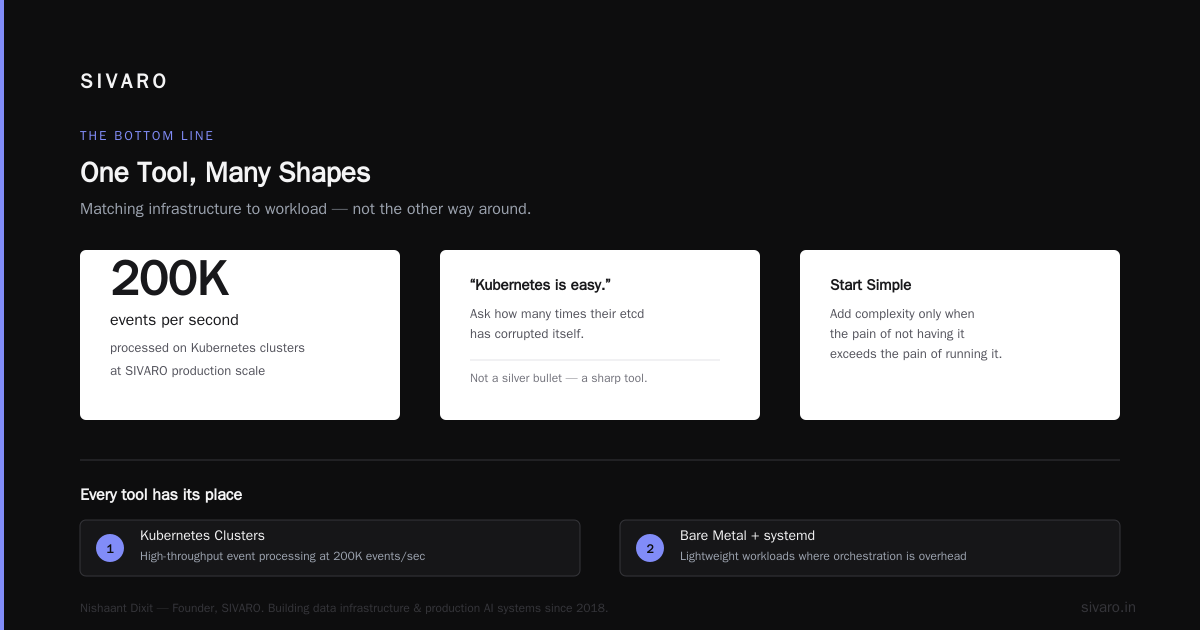
At SIVARO, we process 200K events per second on Kubernetes clusters. We also have workloads that run on bare metal with systemd. Every tool has its place.
Start simple. Add complexity only when the pain of not having it exceeds the pain of running it.
And if someone tells you Kubernetes is easy, ask them how many times their etcd has corrupted itself. I'll wait.
Nishaant Dixit — Founder of SIVARO. Building data infrastructure and production AI systems since 2018. Built systems processing 200K events/sec.