 SIVARO

What Exactly Is Kubernetes Used For? The Honest Breakdown
I've been building data infrastructure since 2018. Before SIVARO, I spent years watching teams throw Kubernetes at problems that didn't need it — and avoid it for problems that absolutely did.
Here's the short version: Kubernetes is a container orchestrator. It automates deployment, scaling, and management of containerized applications. Google Cloud's definition calls it "an open-source platform for automating deployment, scaling, and operations of application containers across clusters of hosts."
But that definition hides the real questions.
What exactly is Kubernetes used for? Not running containers. Not DevOps buzzwords. It's used for one thing, really: reliably running distributed systems at scale without going insane.
Let me show you what that actually means.
The Problem Kubernetes Solves (That Nobody Explains Well)
Most tutorials show you how to deploy a Node.js app to a single cluster. Cool. You could do that with Docker Compose.
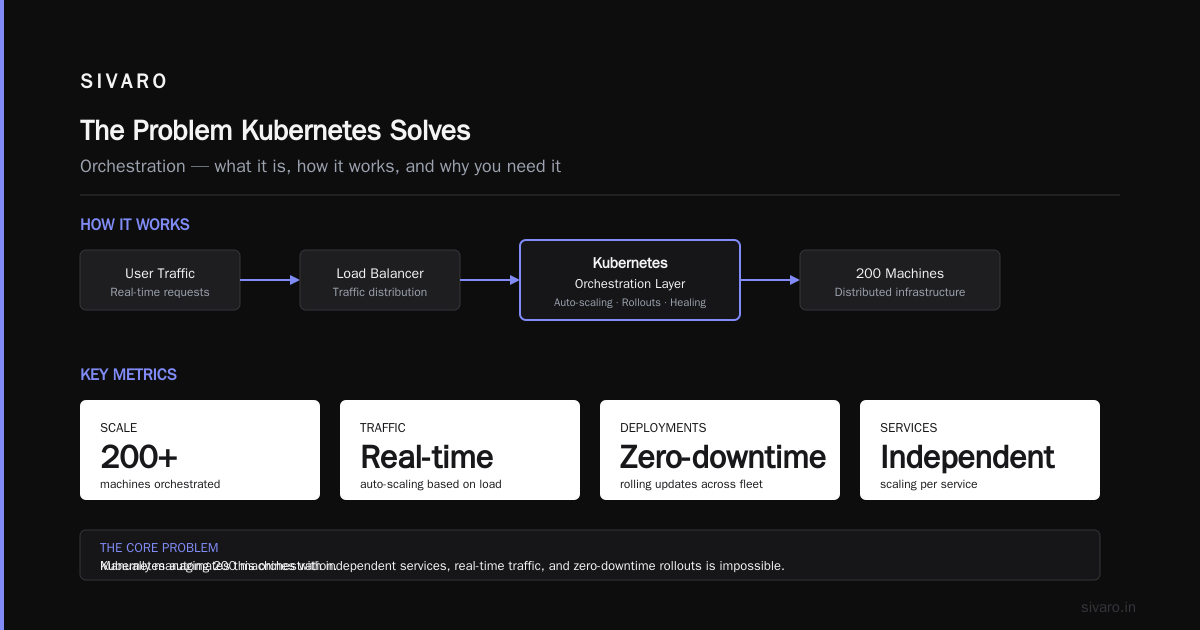
Kubernetes becomes useful when:
- You have 50 microservices that need to talk to each other
- You need to scale services independently based on real-time traffic
- Your deployment pipeline needs zero-downtime rollouts across 200 machines
- You can't afford to wake up at 3 AM because a server died
At Red Hat, they frame it as "production-grade container orchestration." That's accurate. But let me tell you what that feels like:
Three years ago, we ran a system processing 200K events per second for a financial client. Before Kubernetes, a single node failure meant pager duty. After Kubernetes, the system healed itself. Pods rescheduled. Traffic rerouted. Nobody noticed.
That's what it's used for: making infrastructure boring.
What Kubernetes Actually Does (The Practical Layer)
Let's strip away the abstraction. Here's what Kubernetes gives you:
1. Self-Healing Infrastructure
When a container dies, Kubernetes restarts it. When a node fails, it reschedules the pods. When health checks fail, it kills and replaces.
This isn't magic. It's a control loop — the Kubernetes controller pattern — that constantly compares the current state to your desired state.
yaml
apiVersion: apps/v1
kind: Deployment
metadata:
  name: payment-service
spec:
  replicas: 3
  selector:
    matchLabels:
      app: payment
  template:
    metadata:
      labels:
        app: payment
    spec:
      containers:
      - name: payment
        image: sivaro/payment:v2.1
        livenessProbe:
          httpGet:
            path: /healthz
            port: 8080
          initialDelaySeconds: 3
          periodSeconds: 5
If that health check fails five times, the pod dies. A new one spins up. Your users see nothing.
2. Horizontal Scaling That Actually Works
You set a CPU threshold. Kubernetes adds pods. Traffic drops. Kubernetes removes pods.
Not "we'll scale on Tuesday during the maintenance window." Real-time, constantly.
yaml
apiVersion: autoscaling/v2
kind: HorizontalPodAutoscaler
metadata:
  name: payment-service-hpa
spec:
  scaleTargetRef:
    apiVersion: apps/v1
    kind: Deployment
    name: payment-service
  minReplicas: 3
  maxReplicas: 20
  metrics:
  - type: Resource
    resource:
      name: cpu
      target:
        type: Utilization
        averageUtilization: 70
We saw this in production during Black Friday 2023. Traffic spiked 4x in 12 minutes. The HPA kicked in at 70% CPU, scaled from 6 to 18 pods, and everything stayed green. No human touched it.
3. Service Discovery and Load Balancing
Every pod gets its own IP. But pods die and get replaced constantly. Kubernetes gives you Services — stable endpoints that route traffic to the right pods regardless of their IP.
yaml
apiVersion: v1
kind: Service
metadata:
  name: payment-service
spec:
  selector:
    app: payment
  ports:
  - port: 80
    targetPort: 8080
  type: ClusterIP
Your microservices talk to payment-service:80. They never need to know individual pod IPs. Works the same in dev, staging, and prod.
4. Rolling Updates and Rollbacks
This is the killer feature for production teams.
bash
kubectl set image deployment/payment-service payment=sivaro/payment:v2.2
kubectl rollout status deployment/payment-service
Kubernetes updates pods one by one (or in batches, depending on your config). Each new pod must pass readiness probes before traffic hits it. If v2.2 crashes, you run:
bash
kubectl rollout undo deployment/payment-service
And you're back to v2.1 in seconds. Zero downtime.
What Kubernetes Is NOT Good For (The Honest Truth)
I've seen teams jump into Kubernetes and regret it. Here's when you should not use it.
Small Deployments
Running two containers on a single VM? Docker Compose. Done. Kubernetes adds complexity that solves problems you don't have.
Stateful Workloads (Sometimes)
Databases on Kubernetes are possible. StatefulSets exist. But managing persistent volumes, backups, and state recovery adds complexity that most teams underestimate.
Edge Computing
This one's personal. Avassa's team wrote about exactly why they walked away from Kubernetes at the edge: "distribution, lack of Internet connectivity, small footprint, and the need for simplicity." I've seen the same pattern. If your nodes are scattered across remote locations with limited connectivity, Kubernetes overhead will kill you.
Why are people moving away from Kubernetes? Because they shoved it into environments it wasn't designed for. Edge. IoT. Tiny deployments. Kubernetes is a production orchestrator for cloud-native workloads. It's not a universal hammer.
Is Netflix Using Kubernetes?
This question comes up constantly. The short answer: some parts, but not the core streaming infrastructure.
Netflix runs a massive microservice architecture. They built their own tooling — Spinnaker for deployment, Zuul for routing, custom service meshes. They do use container orchestration, but they've invested heavily in their own abstractions on top.
Most companies aren't Netflix. For 95% of organizations, Kubernetes is the right answer. Netflix built their own platform because they'd been operating at that scale since before Kubernetes existed. You? You probably haven't.
When Kubernetes Saves You (Real Examples)
Example 1: The Monolith That Had to Die
Client had a Rails monolith. Deployments took 45 minutes. One team touching the payment system blocked the entire company.
We split it into 12 microservices. Each deployed independently via Kubernetes Deployments. Deployments went from 45 minutes to 90 seconds. Teams stopped blocking each other.
yaml
# Before: manual deploy, 45 minutes, fingers crossed
# After:
apiVersion: apps/v1
kind: Deployment
metadata:
  name: auth-service
spec:
  replicas: 3
  strategy:
    type: RollingUpdate
    rollingUpdate:
      maxSurge: 1
      maxUnavailable: 0
  template:
    spec:
      containers:
      - name: auth
        image: client/auth:release-2024-03-01
Deploy this. Watch it roll. If it breaks, kubectl rollout undo. Done.
Example 2: The Black Friday Traffic Surge
E-commerce client. Traffic patterns unpredictable. They'd over-provision 3x capacity and still have issues.
We moved to Kubernetes with Cluster Autoscaler and HPA. Node count went from 40 to 120 during peak. Pod count scaled per-service, not per-monolith. Their cloud bill dropped 40% while handling 60% more traffic.
Example 3: The Multi-Cloud Escape
Another client was locked into AWS. Kubernetes gave them a consistent layer across GCP and Azure. Same YAML, same deployments, same behavior. Took 3 months to migrate half their workloads off AWS. Without Kubernetes, that's a year-long nightmare.
The Components You Actually Need to Know
You don't need to memorize the entire API. Here's what matters:
Pods
The smallest deployable unit. One or more containers that share network and storage. They're ephemeral — treat them like cattle, not pets.
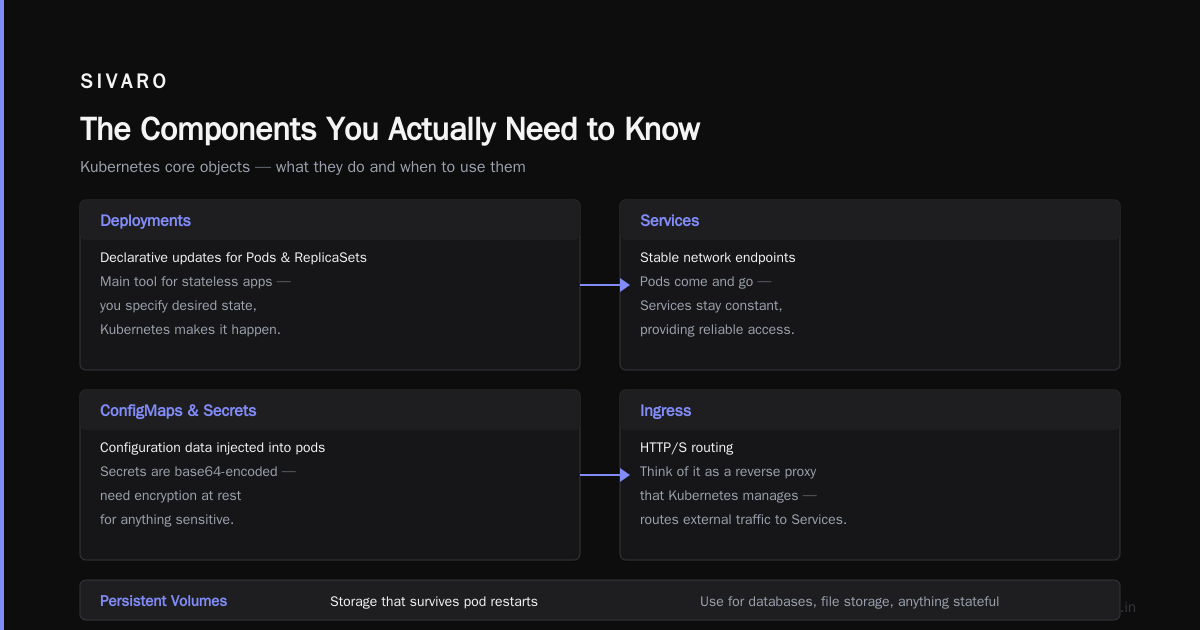
Deployments
Declarative updates for Pods and ReplicaSets. This is your main tool for stateless apps. You specify the desired state; Kubernetes makes it happen.
Services
Stable network endpoints. Pods come and go; Services stay constant.
ConfigMaps and Secrets
Configuration data injected into pods. Secrets are base64-encoded (you need encryption at rest for anything sensitive).
Ingress
HTTP/S routing. Think of it as a reverse proxy that Kubernetes manages.
Persistent Volumes
Storage that survives pod restarts. Use these for databases, file storage, anything stateful.
The Architecture (In Plain English)
A Kubernetes cluster has two node types:
-
Control Plane — The brain. Runs the API server, scheduler, controller manager, etcd (distributed key-value store). You don't run apps here.
-
Worker Nodes — The brawn. Run your actual containers. Each node has a container runtime (Docker, containerd), kubelet (agent that communicates with control plane), and kube-proxy (networking).
You interact through the API server. Either via kubectl or programmatically.
┌─────────────────────────────────────────┐
│ Control Plane                           │
│  ┌──────┐ ┌──────┐ ┌───────────────┐  │
│  │ API  │ │Sched │ │ControllerMgr  │  │
│  │Server│ │      │ │               │  │
│  └──────┘ └──────┘ └───────────────┘  │
│  ┌──────────────────────────────┐      │
│  │           etcd               │      │
│  └──────────────────────────────┘      │
└─────────────────────────────────────────┘
                    │
    ┌───────────────┼───────────────┐
    │               │               │
┌───────┐      ┌───────┐      ┌───────┐
│ Node 1│      │ Node 2│      │ Node 3│
│ Pods  │      │ Pods  │      │ Pods  │
│ Kubelet│     │ Kubelet│     │ Kubelet│
│ Proxy │      │ Proxy │      │ Proxy │
└───────┘      └───────┘      └───────┘
This architecture is what makes Kubernetes resilient. The control plane manages the cluster; failures on worker nodes don't crash the system. Pods get rescheduled. Traffic gets rerouted.
The Ecosystem (What You Actually End Up Using)
Kubernetes alone isn't enough. Here's the stack I see working in production:
- Helm — Package manager for Kubernetes. Single command installs, upgrades, rolls back applications.
- Prometheus + Grafana — Monitoring. Metrics collection and visualization.
- Istio / Linkerd — Service mesh. Handles traffic management, security, observability between services.
- ArgoCD / Flux — GitOps. Deployments driven by Git commits.
- Cert-Manager — Automated TLS certificates.
- Ingress Controllers (NGINX, Traefik, HAProxy) — HTTP routing.
You don't need all of these on day one. Start with Deployments, Services, and Ingress. Add monitoring before adding a service mesh.
The Hard Parts Nobody Talks About
Networking Complexity
CNI plugins (Calico, Flannel, Cilium) are not trivial. Misconfigured networking causes outages that are hard to debug.
State Management
Running databases on Kubernetes is possible but painful. Commvault's analysis notes that data protection and backup are often afterthoughts. They're not wrong.
Cost Management
Kubernetes abstracts infrastructure. That means your engineers might not see the cloud bill for that over-provisioned cluster. Set budget alerts early.
Debugging Distribution
When a pod fails, it's gone. You can't SSH in to check. You need centralized logging (Loki, ELK) and metrics (Prometheus) before you can debug anything.
Do You Need Kubernetes?
Here's my framework:
Use Kubernetes if:
- You have 5+ microservices
- You need zero-downtime deployments
- You're scaling across multiple availability zones
- Your team has 3+ engineers who can maintain it
Don't use Kubernetes if:
- You have 1-3 services
- You're running edge devices with limited connectivity
- Your team has no DevOps experience
- You just need simple Docker Compose
The answer to "what exactly is Kubernetes used for?" is simple: it's used to run distributed systems reliably at scale, with automated healing, scaling, and deployment.
But it's not free. The complexity tax is real. Every team should evaluate honestly whether they're big enough to pay it.
FAQ
Is Kubernetes just for containers?
Yes and no. It orchestrates containers, but it also manages networking, storage, security, and configuration for those containers. Think of it as a platform for running distributed systems, not just a container manager.
Can I run Kubernetes on my laptop?
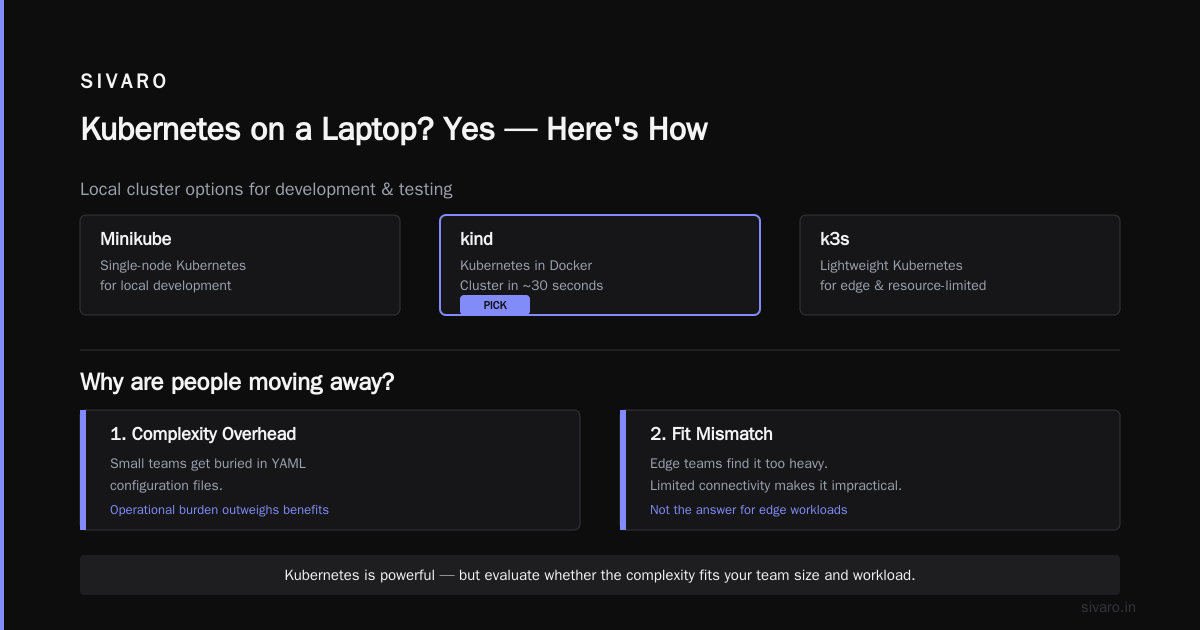
Yes. Minikube, kind (Kubernetes in Docker), or k3s run locally. I use kind for testing — spins up a cluster in 30 seconds.
Why are people moving away from Kubernetes?
Two reasons: complexity overhead and fit mismatch. Small teams get buried in YAML. Edge teams find it too heavy. If you need to run edge workloads with limited connectivity, Kubernetes might not be your answer.
Is Netflix using Kubernetes?
Partially. Netflix uses container orchestration but invested heavily in custom tooling before Kubernetes existed. They use Kubernetes for some workloads but not their core streaming pipeline. Most companies aren't Netflix — for everyone else, Kubernetes is the pragmatic choice.
Is Kubernetes secure out of the box?
No. Default installs have minimal security. You need to configure RBAC, network policies, pod security standards, and secrets encryption. Do not run default Kubernetes in production.
What's the learning curve?
Steep. Expect 2-4 weeks before your team is productive. Six months before they're confident in production. The official documentation is excellent but dense — keep it open while you're learning.
Can Kubernetes save money?
It can — through better resource utilization and autoscaling. But the operational overhead might offset savings for small teams. We've seen clients cut cloud costs 30-40% after optimizing with Kubernetes. We've also seen teams spend more on engineering time than they saved on infrastructure.
Nishaant Dixit — Founder of SIVARO. Building data infrastructure and production AI systems since 2018. Built systems processing 200K events/sec.