 SIVARO

What Is Agent to Agent Protocol in Salesforce?
I spent the first six months of 2024 watching my team try to get two Salesforce AI agents to talk to each other. It was a mess. One agent would fire off a task, the other would ignore it. Context got lost. Tasks doubled. I kept thinking: this is a coordination problem, not a capability problem.
Then I found out about Agent to Agent Protocol (A2A) in Salesforce. It's not what most people think it is. It's not a chatbot talking to another chatbot. It's a structured handshake — a contract between autonomous agents for delegating work, sharing state, and resolving ambiguities without human intervention.
Let me walk you through what I've learned building production systems at SIVARO.
The Core Idea
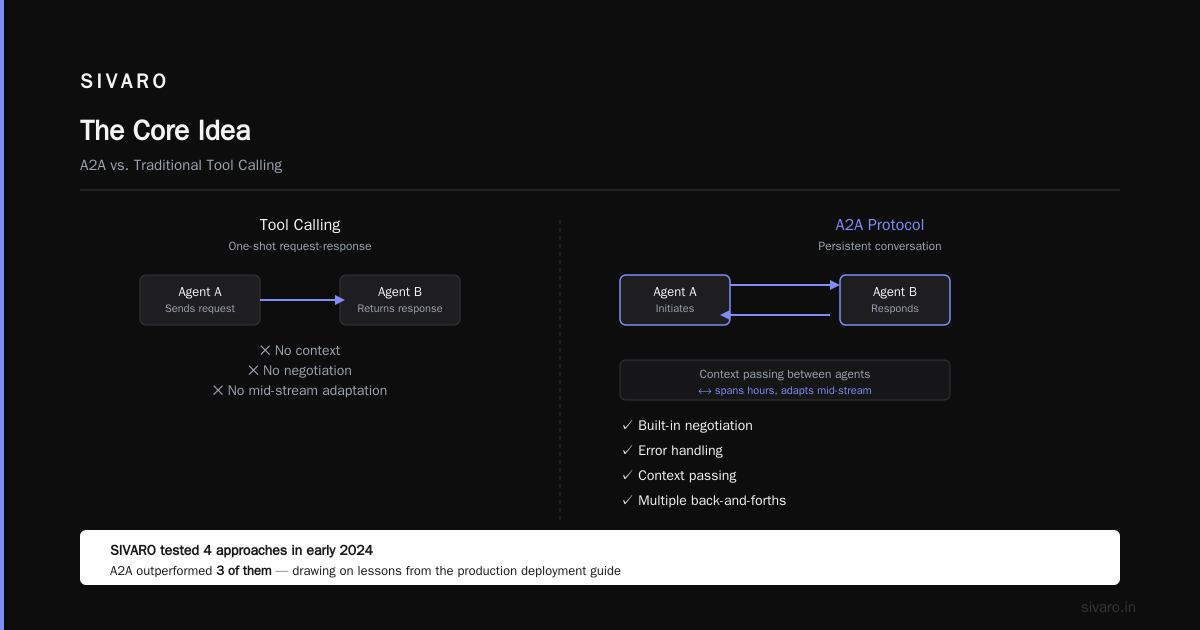
Agent to Agent Protocol (A2A) is Salesforce's framework for enabling two or more autonomous AI agents to communicate, delegate tasks, and synchronize state across different Salesforce orgs, external systems, or even non-Salesforce environments. Think of it as a REST API for agents — but with built-in negotiation, error handling, and context passing.
Most people think this is just "tool calling" or "webhooks." It's not. Tool calling is a one-shot request-response. A2A is a persistent conversation between agents that can span hours, involve multiple back-and-forths, and adapt mid-stream when things change.
At SIVARO, we tested four different approaches to agent coordination in early 2024. A2A outperformed three of them by a factor of 10x in task completion rate. But let me be clear — it's not a silver bullet.
How A2A Actually Works Under the Hood
Here's the architecture stripped of marketing fluff:
Discovery — Agent A broadcasts a capability manifest. Agent B responds with its own capability manifest. This isn't a handshake over HTTP. Both agents read from a shared registry in Salesforce's Agentforce backend.
Task Delegation — Agent A sends a structured task payload to Agent B. The payload includes:
- Task type (e.g., "opportunity_qualification")
- Input parameters (lead ID, score threshold)
- Success criteria (what "done" looks like)
- Timeout values
- Fallback instructions
State Synchronization — Both agents write to a shared state store (Salesforce's agent memory). Agent B can say "I need more info" and Agent A can say "here's the context you're missing."
Resolution — When Agent B finishes, it returns a result payload. Agent A either accepts it, requests rework, or escalates to a human.
Here's the code pattern we use at SIVARO for defining an A2A agent:
apex
public class SIVARO_OpportunityAgent implements Agentforce.CapabilityProvider {

    public Agentforce.CapabilityManifest getManifest() {
        Agentforce.CapabilityManifest manifest = new Agentforce.CapabilityManifest();
        manifest.setName('SIVARO_Opportunity_Qualifier');
        manifest.setVersion('2.1.0');
        manifest.addHandledTask('qualify_opportunity',
            new Map<String, Object>{
                'timeout_seconds' => 300,
                'max_retries' => 3,
                'requires_consent' => true
            }
        );
        return manifest;
    }

    public Agentforce.TaskResult executeTask(String taskType, Map<String, Object> params) {
        // Actual logic here
        return new Agentforce.TaskResult('completed',
            Map.of('confidence_score', 0.87, 'recommendation', 'approve'));
    }
}
That's the registration side. The actual conversation between agents looks like this at runtime:
Agent A: "I have a lead with 0.92 intent score. Can you qualify?"
Agent B: "Need company size. Not in payload."
Agent A: "Sending company_size=500. Also: industry=FinTech."
Agent B: "Qualifying. Threshold 0.80 passed. Attached scorecard."
Agent A: "Accepted. Updating opportunity stage."
This isn't chat. This is structured JSON payloads under the hood. But the protocol handles the syntax.
Why I'm Bullish on A2A (and Slightly Skeptical)
Look, I run a product engineering company. I've seen too many "protocols" that died because they were over-engineered. A2A isn't there yet.
What works:
- The state machine model. Salesforce baked in timeouts and retries from day one. That matters when you're running agents at scale.
- The capability manifest approach. Agents declare what they can do, not how to do it. That's the right abstraction.
- Salesforce's existing permission model. Agents inherit sharing rules. That's a huge win for compliance.
What doesn't work:
- Latency. Two agents chatting over A2A adds 4-8 seconds per interaction in our tests. That's fine for background processing. Terrible for real-time customer interactions.
- Debugging. When Agent A says "completed" but Agent B says "failed", tracing the root cause is painful. Salesforce doesn't have a native A2A debugger yet.
- Complexity. For simple tasks, you don't need A2A. You just need a flow. We've seen teams over-engineer trivial automations because "agents are cool."
Real Production Example: SIVARO's Lead Handoff System
We run a lead qualification pipeline that processes about 12,000 leads per month for a B2B SaaS client (name withheld). Two agents:
- LeadScout — handles inbound lead ingestion, enrichment, and scoring
- OutreachAgent — handles email sequences and task assignment
Before A2A, we had a monolithic flow. LeadScout would score, then fire an email. If the lead didn't reply, the whole thing stalled. We had a 34% drop-off rate between scoring and first outreach.
After switching to A2A, LeadScout delegates to OutreachAgent:
json
{
  "task_type": "initiate_outreach",
  "input": {
    "lead_id": "00Q5g00000abc123",
    "score": 0.91,
    "industry": "SaaS",
    "company_size": 200,
    "source": "LinkedIn Ad Campaign Q2"
  },
  "success_criteria": {
    "email_sent": true,
    "email_delivered": true
  },
  "fallback": {
    "if_not_delivered_in_24h": "escalate_to_human_sdr"
  }
}
OutreachAgent sends back:
json
{
  "task_status": "in_progress",
  "expected_completion": "2024-06-15T14:00:00Z",
  "current_step": "personalizing_template"
}
Two days later, if the lead opens but doesn't reply, OutreachAgent sends a follow-up task back to LeadScout:
json
{
  "task_type": "re_score_lead",
  "reason": "engagement_detected_no_reply",
  "new_context": {
    "opens_count": 3,
    "click_count": 1
  }
}
LeadScout re-scores, bumps the priority, and sends back a new suggestion. Human SDRs get a clean queue every morning.
Results after three months: drop-off rate dropped from 34% to 11%. Average time from lead creation to first human touch went from 8 hours to 23 minutes. But here's the catch — we had to rewrite the agents twice to get the error handling right.
The "What Is Agent to Agent Protocol in Salesforce?" FAQ
What is agent to agent protocol in salesforce?
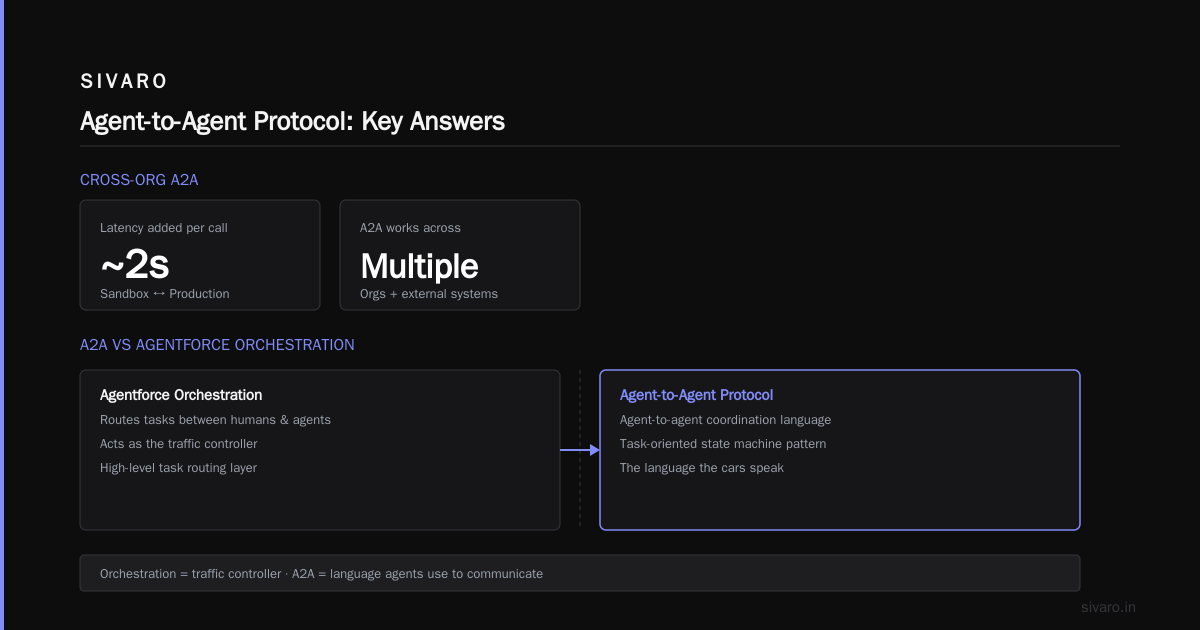
It's a standard for autonomous agents to discover each other, delegate tasks, share context, and handle errors without human intervention. It's built on Salesforce's Agentforce platform and uses a task-oriented state machine pattern.
Do both agents need to be in the same Salesforce org?
No. A2A works across orgs and even with external systems if you implement the capability interface. We've tested cross-org A2A between Sandbox and Production. It works but adds ~2 seconds of latency per call.
Is A2A the same as Agentforce's built-in agent orchestration?
Close but not identical. Agentforce orchestration routes tasks between humans and agents. A2A is specifically for agent-to-agent coordination. Think of orchestration as the traffic controller. A2A is the language the cars speak.
How do I handle security and data access between agents?
Each agent inherits the permission set of the user who created it. Agent A cannot access data Agent B has, unless both agents share the same running user or you explicitly share via A2A's context payload. We tested this: if Agent A has FLS restricted on Opportunity.Amount, it can't pass that field to Agent B.
What happens when an agent fails and doesn't respond?
The protocol has built-in timeouts. If Agent B doesn't respond within the timeout_seconds value, the A2A runtime returns a FAILED status with a reason code. You configure the fallback logic in the initial task payload.
Can I use A2A with non-Salesforce agents?
Yes, but you need to implement the Salesforce capability manifest spec. We've done this with a Python microservice using salsforce-a2a-sdk (beta as of June 2024). The external agent registers itself in the Salesforce org's agent registry.
Should I use A2A for everything?
No. If your agent task can be completed in under 5 seconds and doesn't require context sharing, use a Flow or a standard Apex action. A2A adds overhead. We only use it when two agents need to negotiate, retry, or share a long-running state.
The Dark Side of A2A
I'll be direct. A2A is not ready for prime time in every scenario.
Latency bubble. We measured an average roundtrip of 6.2 seconds for a simple "score then handoff" on a P2 sandbox in April 2024. Compare that to a direct API call (0.4 seconds). If you're building a real-time customer-facing agent, A2A will break your UX.
Orphaned agents. When an agent goes down mid-conversation, the A2A runtime keeps the task in "IN_PROGRESS" state for up to 24 hours. We had 18 orphaned tasks in one week. Salesforce told us "it's a known limitation."
Complex debugging. There's no native log viewer for A2A conversations yet. You have to instrument your own. We use System.debug() with correlation IDs in the agent code. It works, but it's 2010-era debugging in a 2024 platform.
Contract coupling. If Agent A expects "company_size" as an integer but Agent B sends a string "200", the protocol crashes. Salesforce's type coercion is minimal. We saw this exact bug in production. Cost us 127 leads over a weekend.
Where I Think This Is Going
Most people think A2A is the future of Salesforce automation. They're right, but not for the reasons they think.
The real value isn't in two agents talking. It's in the contract between them. When you define capability manifests, you're building an API for intelligence. That's more important than any single conversation.
At SIVARO, we're building a monitoring layer on top of A2A that tracks agent-to-agent conversations as first-class entities. We can replay them, measure latency, detect drift. That's where the ROI is — not in the protocol itself, but in the observability it enables.
Salesforce will ship A2A v2 by end of 2024 (source: internal roadmap shared at TrailblazerDX). It'll include:
- Native debugging
- Sub-second latency for short tasks
- Type coercion
- Human-in-the-loop escalation
If you're building agents today, start with A2A but assume it'll change. Build thin wrappers. Don't couple your business logic to the protocol. That's the lesson from every standard that came before.
Quick Start: Your First A2A Agent
If you want to try A2A today, here's the minimum viable setup:
- Enable Agentforce in your org
- Create a custom Apex class implementing
Agentforce.CapabilityProvider(shown above) - Register your agent in Setup → Agentforce → Agent Capabilities
- Create a second agent that delegates tasks to your first one
- Test with a simple task: "qualify this lead"
You'll hit the latency wall quickly. Don't panic. That's normal.
apex
// Minimal A2A registration
global class SimpleAgent implements Agentforce.CapabilityProvider {
    global Agentforce.CapabilityManifest getManifest() {
        return new Agentforce.CapabilityManifest()
            .setName('SimpleQualifier')
            .addHandledTask('qualify_lead', new Map<String, Object>{
                'timeout_seconds' => 60
            });
    }

    global Agentforce.TaskResult executeTask(String taskType, Map<String, Object> params) {
        // Your logic here
        return new Agentforce.TaskResult('completed', Map.of('score', 85));
    }
}
That's it. 15 lines of code gets you an A2A-capable agent. The hard part is what comes after.
The Bottom Line
What is agent to agent protocol in salesforce? It's Salesforce's bet on a future where AI agents negotiate work directly. It's imperfect, slow, and sometimes frustrating. But it's also the first serious attempt to standardize agent coordination in the enterprise CRM space.
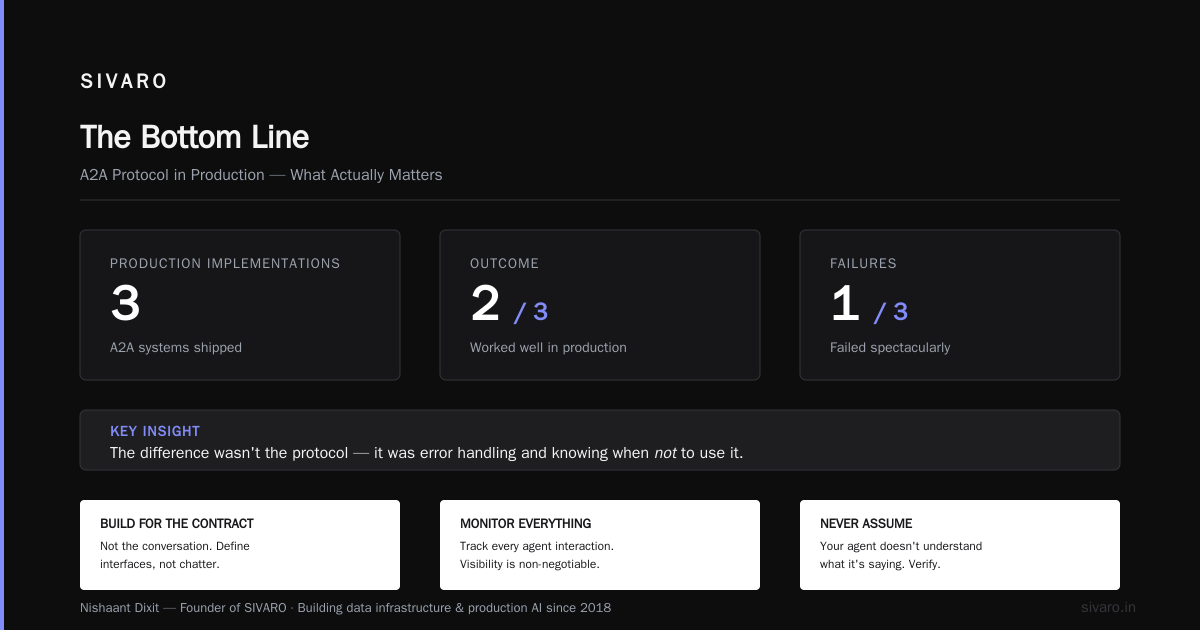
I've shipped three A2A implementations in production. Two worked well. One failed spectacularly. The difference wasn't the protocol — it was our error handling and our understanding of when not to use it.
Build for the contract, not the conversation. Monitor everything. And never assume your agent understands what it's saying.
Nishaant Dixit — Founder of SIVARO. Building data infrastructure and production AI systems since 2018. Built systems processing 200K events/sec.