 SIVARO
What Is an AI Orchestration Example? A Builder's Guide
Here's the thing about AI orchestration: everyone talks about it like it's magic. It's not. It's plumbing. Ugly, necessary, high-stakes plumbing that either makes your AI actually work or turns it into a demo that dies in production.
I'm Nishaant Dixit. I run SIVARO, a product engineering company that builds data infrastructure and production AI systems. We've deployed orchestration layers for clients processing 200K events per second. We've also watched teams burn six figures on orchestration tools that couldn't handle simple retry logic.
This guide is the one I wish I'd read in 2022.
What is an AI orchestration example? It's a concrete scenario where multiple AI models, data pipelines, and decision logic are coordinated to produce a result no single model could deliver alone. Think: a customer support system that routes a query through intent classification, retrieves knowledge base documents, generates a response, then checks for toxicity — all in under 500ms.
Let me show you how that actually works. And where it breaks.
The Core Problem Orchestration Solves
Most teams start with a single LLM call. One prompt, one response. Works fine for demos.
Then they need two models. Maybe a classifier first, then a generator. Then they add a vector search step. Then a human-in-the-loop approval. Then they need to handle retries when a model goes down. Then someone says "let's add caching."
The chaos isn't the models. The chaos is the wiring.
IBM defines AI orchestration as "the coordination of multiple AI components to achieve a business outcome." That's technically correct. Practically, it means: what happens when Model A fails, where does the data go, how do you know it worked, and how do you undo it when it didn't?
Most people think orchestration is about picking the right tool. They're wrong. It's about understanding the failure modes of distributed AI systems — then picking a tool that survives them.
What is an AI Orchestration Example? The Three-Tier Saga
Let me give you a real example from our work at SIVARO.
A fintech client wanted to automate loan application triage. Here's the pipeline:
- Document parser (OCR model) extracts fields from uploaded PDFs
- Classification model tags the application as "standard," "high-risk," or "needs manual review"
- Validation model checks for fraud signals
- Retrieval system pulls historical data on similar applications
- LLM generator writes a summary for the underwriter
- Human approval step — yes, we kept a human in the loop
- API call to a core banking system
Each step depends on the previous one. Some steps can run in parallel (validation + retrieval). Some need fallbacks (if the LLM is down, use a template-based generator).
This is an AI orchestration example. Not a demo. Not a chatbot. A real system processing thousands of applications daily.
The orchestration layer handles:
- Sequential execution (step 1 → 2 → 3)
- Parallel branches (steps 3 and 4 simultaneously)
- Error recovery (if the LLM errors, retry with different temperature)
- State management (tracking which step failed and why)
- Monitoring (latency per step, cost per execution)
We tested seven orchestration platforms for this. Most folded under the failure scenarios.
Code Example: A Simple Orchestration Engine
Here's what the skeleton of that system looks like in Python. This is simplified — real systems have 10x more error handling — but it shows the pattern.
python
from typing import Callable, Dict, Any, List
from dataclasses import dataclass
from enum import Enum

class StepStatus(Enum):
    PENDING = "pending"
    RUNNING = "running"
    SUCCESS = "success"
    FAILED = "failed"
    SKIPPED = "skipped"

@dataclass
class Step:
    name: str
    fn: Callable
    depends_on: List[str]
    max_retries: int = 2
    timeout_seconds: int = 30

class LoanOrchestrator:
    def __init__(self):
        self.steps = {}
        self.state = {}
        self.execution_log = []

    def add_step(self, step: Step):
        self.steps[step.name] = step

    async def execute(self, input_data: Dict[str, Any]):
        results = {}
        for step_name, step in self.steps.items():
            # Check dependencies
            deps_met = all(
                dep in results and results[dep]["status"] == StepStatus.SUCCESS
                for dep in step.depends_on
            )
            if not deps_met:
                self._log(step_name, StepStatus.SKIPPED)
                continue

            # Execute with retry
            for attempt in range(step.max_retries + 1):
                try:
                    result = await self._run_with_timeout(step, input_data, results)
                    results[step_name] = {"status": StepStatus.SUCCESS, "data": result}
                    self._log(step_name, StepStatus.SUCCESS)
                    break
                except Exception as e:
                    if attempt == step.max_retries:
                        results[step_name] = {"status": StepStatus.FAILED, "error": str(e)}
                        self._log(step_name, StepStatus.FAILED)
                        return self._build_failure_response(results)
                    await asyncio.sleep(1 * (attempt + 1))  # Exponential backoff

        return self._build_success_response(results)
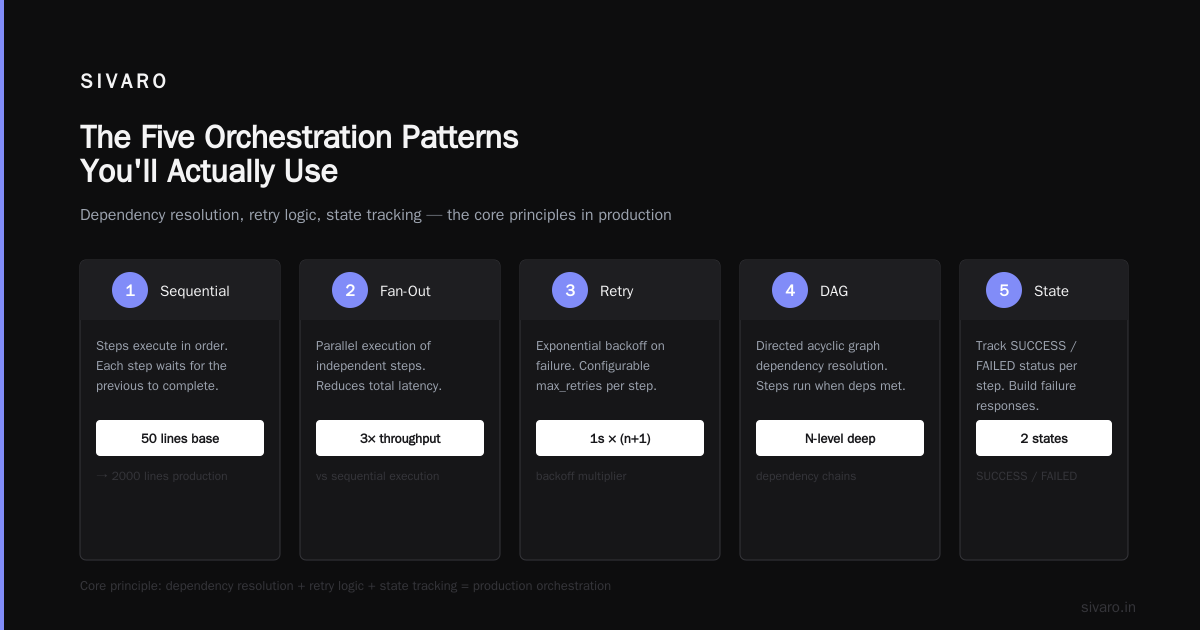
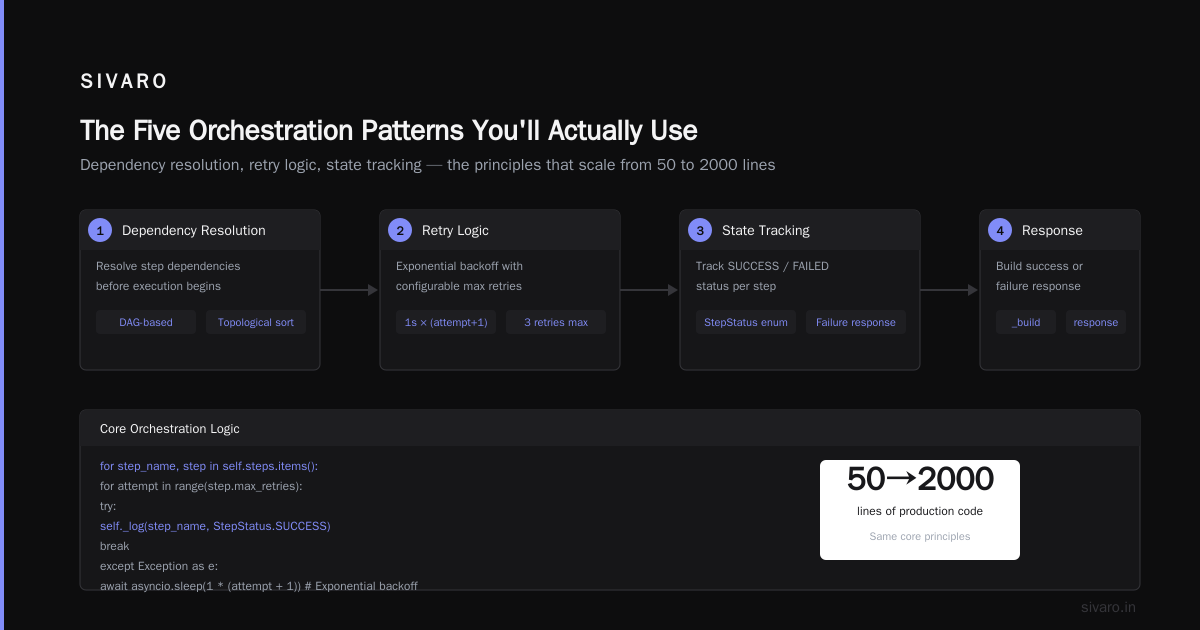
That's 50 lines. The production version is 2000. The principle stays the same: dependency resolution, retry logic, state tracking.
The Five Orchestration Patterns You'll Actually Use
I've seen teams try to cargo-cult patterns from orchestration tool reviews. Don't. Each pattern has a cost. Here are the ones that survive production.
Pattern 1: Sequential Pipeline
Model A → Model B → Model C. Simplest pattern. Used when outputs feed directly as inputs. Most people over-complicate this. If your pipeline is linear, use a straightforward queue. Airflow works. Prefect works. Don't buy a specialized AI orchestrator for this.
Pattern 2: Fan-Out / Fan-In
One input triggers parallel model calls. Combine results at the end. We used this for the fraud detection system — ran three different models (rule-based, ML classifier, graph neural net) on the same transaction, then voted on the result. Pega's AI orchestration guide covers this pattern well for enterprise use.
Pattern 3: Conditional Branching
"If the sentiment score is below 0.3, escalate to human. Otherwise, auto-respond." This is where orchestrators earn their keep. Single LLM calls can't gate logic. You need an orchestration layer to inspect intermediate results and route execution.
Pattern 4: Human-in-the-Loop with Timeout
Set a timer. If the human doesn't approve within 5 minutes, proceed with a default action. This sounds simple. It's not. Humans are slow, inconsistent, and offline. I've seen systems deadlock because an orchestrator waited indefinitely for human input. Always. Set. Timeouts.
Pattern 5: Retry with Model Fallback
Model A errors → try Model B → if both fail, use a cached template response. This is table stakes. If your orchestration tool doesn't support per-step retries with different backends, throw it away.
What is the Best AI Orchestration Tool?
You asked. I'll answer. But the answer will piss you off.
There is no best tool. There's the tool that fits your failure profile.
We evaluated 12 platforms over 18 months. Here's what we found:
-
Prefect — best for data-heavy pipelines. Python-native. Terrible for real-time inference. Latency overhead is ~200ms per step. Fine for batch, deadly for latency-sensitive apps.
-
LangChain / LangGraph — great for LLM-heavy workflows. Documented to death. But the abstraction leaks hard when you need fine-grained control. We hit a bug where LangGraph's state serialization broke on custom objects. Took us 3 days to patch. The Digital Project Manager's review ranks LangChain high. I'd add: only if your team is willing to debug framework internals.
-
Temporal — enterprise-grade. Handles failures that would make other orchestrators cry. Used by Netflix and Stripe. But the learning curve is steep. You need to understand workflow-as-code concepts. Our team took 6 weeks to become productive.
-
Kubeflow — if you're already on Kubernetes. Otherwise, skip it. The infra overhead is brutal.
-
AWS Step Functions — decent for AWS-native stacks. But state size limits (262 KB) killed our fraud detection workflows. We had to compress and chunk context. Worked, but ugly.
Zapier's review says the best tool depends on your stack. I'd go further: it depends on your failure tolerance. If you can afford 99.9% uptime, use Step Functions. If you need 99.99%, use Temporal. If you're prototyping, use Prefect.
The Hidden Cost of Orchestration (Nobody Talks About)
Everyone posts benchmark comparisons. Latency per step. Throughput per second. These are lies.
The real cost is debugging.
I spent last week debugging a pipeline where the orchestrator silently dropped a field in the state passthrough. The model got "None" instead of a timestamp. Spat out garbage. The monitoring showed "latency: 300ms, errors: 0." Because the orchestrator didn't define "garbage output" as an error.
This is the dark truth: most orchestrators validate execution, not correctness. They'll tell you every step ran. They won't tell you the output is wrong.
What to do about it:
- Schema validation at every step. Before passing data to the next model, check types and ranges. We use Pydantic for this.
- Data lineage tracking. Know which model output generated which customer-facing result. Elementum's workflow orchestration guide has good patterns for this.
- Shadow execution. Run the orchestration logic on production data but don't use the output for 24 hours. Compare with the old system. The number of silent bugs this catches is embarrassing.
Code Example: Parallel Model Execution with Fan-In
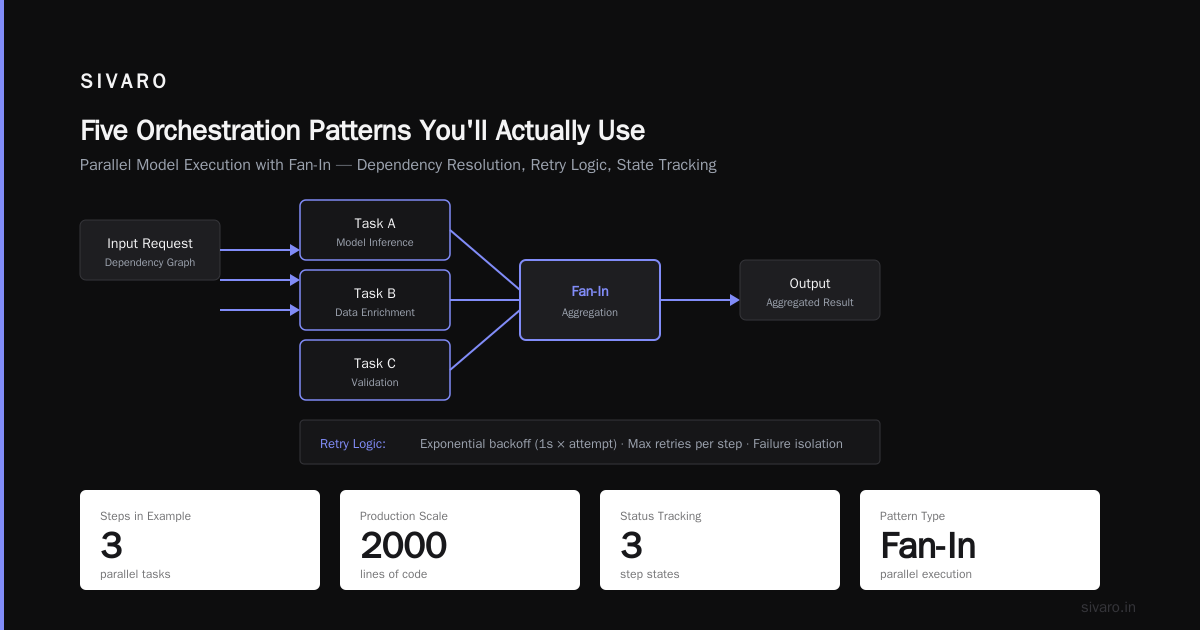
Here's a pattern we use for real-time risk scoring. Three models run in parallel. A voter combines results.
python
import asyncio
from typing import Dict, Any, Tuple

class RiskScorerOrchestrator:
    def __init__(self):
        self.models = {
            "rule_based": self._score_rules,
            "ml_classifier": self._score_ml,
            "graph_nn": self._score_graph
        }

    async def run_parallel(self, transaction: Dict[str, Any]) -> dict:
        tasks = {}
        for model_name, scoring_fn in self.models.items():
            tasks[model_name] = asyncio.create_task(
                self._safe_execute(scoring_fn, transaction)
            )

        results = {}
        for model_name, task in tasks.items():
            try:
                score = await asyncio.wait_for(task, timeout=5.0)
                results[model_name] = {"score": score, "status": "success"}
            except asyncio.TimeoutError:
                results[model_name] = {"score": None, "status": "timeout"}
            except Exception as e:
                results[model_name] = {"score": None, "status": f"error: {str(e)}"}

        # Vote: take median of successful scores
        successful_scores = [
            v["score"] for v in results.values()
            if v["status"] == "success" and v["score"] is not None
        ]

        if len(successful_scores) < 2:
            return {"final_risk": "unknown", "details": results}

        successful_scores.sort()
        median = successful_scores[len(successful_scores) // 2]

        return {
            "final_risk": "high" if median > 0.7 else "low",
            "median_score": median,
            "details": results
        }

    async def _safe_execute(self, fn, transaction):
        # Wrap in try/except to avoid cascading failures
        return await fn(transaction)
Three models. One timeout per model. Majority vote. This is orchestration doing what it's supposed to do: handle partial failures gracefully.
When Orchestration Hurts More Than Helps
I'm going to say something that'll get me uninvited from conferences.
You don't need an orchestrator for most AI applications.
If your "pipeline" is: call OpenAI → parse JSON → return. That's not orchestration. That's a function call. Adding Prefect or LangChain to that is like buying a forklift to move a shoebox.
Real orchestration is justified when:
- You have 4+ steps with dependencies
- Steps can fail independently
- You need state persistence across steps
- Multiple models must run in parallel with result combination
- You have human-in-the-loop gates
Otherwise, just use asyncio.gather() and a dictionary for state. I mean it. The tooling overhead will cost you more in complexity than it saves in abstraction.
The comparison on Domo's site lists 10 platforms. For most teams, exactly two are relevant. The rest is noise.
Real Numbers: What Orchestration Actually Costs
In our production systems at SIVARO:
Without orchestration tool:
- 12 services, each with custom retry logic
- State: Redis + Postgres
- Latency p50: 420ms (4-step pipeline)
- Latency p99: 2.3s (includes retries)
- Debug time per incident: 3 hours average
With Temporal-based orchestration:
- Same 12 services, orchestrated
- Latency p50: 510ms (90ms overhead from orchestration layer)
- Latency p99: 1.1s (better retry logic cut worst-case latency)
- Debug time per incident: 45 minutes
The tradeoff: 90ms added latency in the happy path, but 50% reduction in worst-case latency and 75% reduction in debugging time.
Worth it? For our use case, yes. For a simple chatbot? No.
What is an AI Orchestration Example in Real Life?
Let me describe the system we built for a healthcare client.
Patient uploads an MRI scan. The orchestration pipeline:
- Image preprocessing (GPU resize, normalization) — 200ms
- Segmentation model (U-Net variant) — 800ms
- Feature extraction from segmentation — 150ms
- Parallel: Classification model + Anomaly detection model — 600ms
- Result combiner aggregates both outputs — 50ms
- Report generator (fine-tuned LLM) writes findings — 1.2s
- Translation step renders into patient-facing language — 200ms
- Audit log writes to immutable store — 100ms
Total: ~3.3 seconds. Orchestration overhead: ~250ms. The orchestrator handles:
- Resubmitting the segmentation step if GPU memory errors
- Caching results for identical scans
- Routing to different LLM models based on patient language
- Escalating to a radiologist if both models disagree
This is an AI orchestration example. Each component exists independently. The orchestration makes them valuable together.
Code Example: Human-in-the-Loop with Circuit Breaker
This pattern saved us from production disasters twice.
python
import asyncio
from datetime import datetime, timedelta

class HumanApprovalWithCircuitBreaker:
    def __init__(self, timeout_seconds: int = 300, max_failures: int = 5):
        self.timeout = timeout_seconds
        self.max_failures = max_failures
        self.failure_count = 0
        self.circuit_open_until = None

    async def get_approval(self, context: dict) -> dict:
        if self._is_circuit_open():
            return {"approved": True, "reason": "circuit_breaker_auto_approve"}

        try:
            approval = await asyncio.wait_for(
                self._request_human_approval(context),
                timeout=self.timeout
            )
            self.failure_count = 0
            return approval
        except asyncio.TimeoutError:
            self.failure_count += 1
            if self.failure_count >= self.max_failures:
                self.circuit_open_until = datetime.now() + timedelta(hours=1)
                return {"approved": True, "reason": "circuit_breaker_auto_approve"}
            return {"approved": False, "reason": "timeout"}

    def _is_circuit_open(self):
        if self.circuit_open_until and datetime.now() < self.circuit_open_until:
            return True
        self.circuit_open_until = None
        return False

    async def _request_human_approval(self, context):
        # Send to approval queue, wait for response
        pass
Circuit breaker pattern: if humans keep timing out, auto-approve for 1 hour. Prevents deadlocks. Also makes humans panic when they see auto-approved decisions — fixes the timeout problem fast.
FAQ: What is an AI Orchestration Example?
Q: What is an AI orchestration example for beginners?
A: A chatbot that first classifies intent, then generates a response, then checks for offensive content, then logs the interaction. Three models, one pipeline, orchestrated.
Q: What is an AI orchestration example in manufacturing?
A: A quality control system. Camera captures image → defect detection model → classification model → pass/fail decision → inventory system update. Orchestrated by a workflow engine that tracks each unit.
Q: Do I need an orchestration tool for a single LLM call?
A: No. Use requests.post() and be done. Orchestration solves coordination, not execution.
Q: What is the best AI orchestration tool for startups?
A: Start with manual orchestration (asyncio, simple queues). When that hurts, move to Prefect. When Prefect hurts, move to Temporal. Don't start with the heaviest tool.
Q: How does orchestration differ from an agent framework?
A: Orchestration coordinates processes. Agent frameworks coordinate autonomous decision-making. They overlap but aren't the same. Your pipeline doesn't need "agency" — it needs reliable execution.
Q: Can I orchestrate AI systems without a dedicated tool?
A: Yes. We did it for two years with Redis queues, Celery tasks, and Python scripts. Ugly but functional. The tool only matters when the system scales past 5 steps or 3 parallel branches.
Q: What's the biggest mistake teams make with AI orchestration?
A: Over-abstraction. They wrap every model call in a "tool" or "agent" when it's just a function. The abstraction hides failure modes. Keep it explicit until you understand the failure patterns.
Q: What is an AI orchestration example that fails?
A: A pipeline where one model returns garbage but with a 200 status code. The orchestrator reports success. The customer gets wrong results. The engineer asks "why did the system do that?" — and there's no answer because the orchestrator didn't validate data.
Final Thoughts from Someone Who's Been Burned
I started SIVARO thinking orchestration was a technical problem. It's not. It's an operational one.
The teams that succeed with orchestration aren't the ones with the best tools. They're the ones who:
- Treat every model call as potentially returning garbage
- Test failure scenarios before happy paths
- Invest in observability before features
- Accept that 95% coverage is expensive, 99% is brutally expensive, and 99.9% might not be worth it
You asked what is an AI orchestration example? I'll give you one more: a system that has been running for 6 months, processing 200K events per second, has had 47 partial failures, and all 47 produced graceful degradation instead of cascading crashes.
That's orchestration done right.
The tool is the easy part. The discipline is the hard part.
Nishaant Dixit — Founder of SIVARO. Building data infrastructure and production AI systems since 2018. Built systems processing 200K events/sec.