SIVARO

What is Apache Kafka Used For? A Practitioner's Guide to Real-World Kafka
Most people think Apache Kafka is a message queue. It's not. At least, using it like one is a mistake I've seen destroy three projects before they shipped.
I'm Nishaant Dixit, founder of SIVARO. We build data infrastructure and production AI systems. Kafka is the backbone of almost every high-throughput pipeline we've deployed since 2018. And I've watched teams burn months treating it like RabbitMQ with extra steps.
So what is Apache Kafka used for? Let me show you what I've learned the hard way.
What Apache Kafka Actually Is
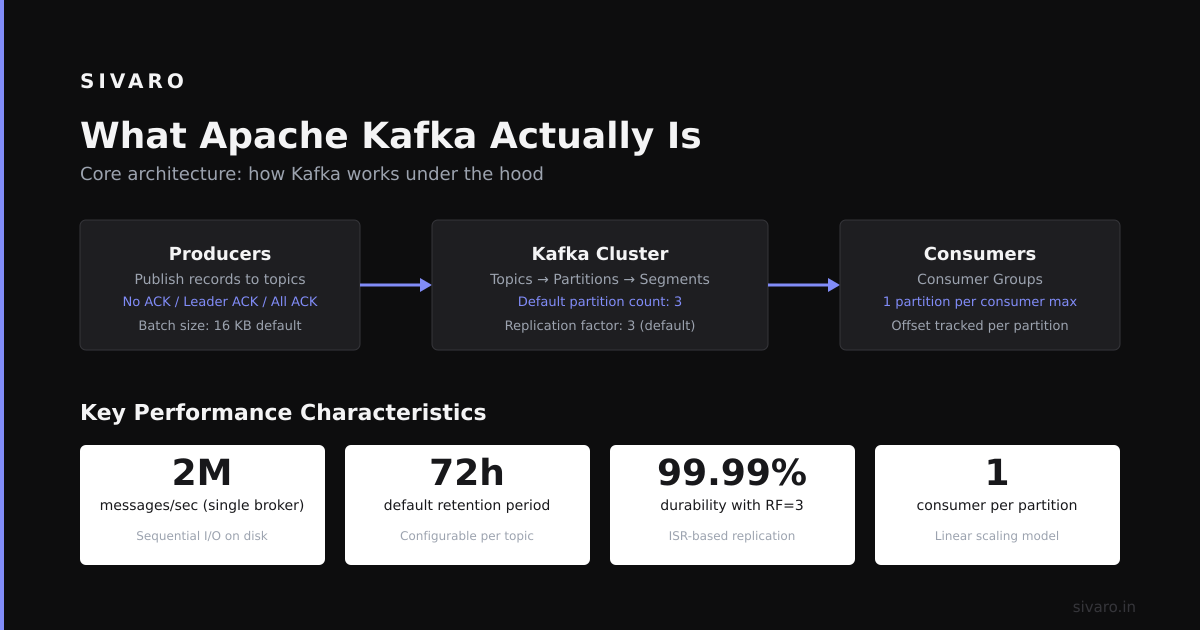
Kafka is a distributed commit log. Not a queue. Not a pub-sub system. A log.
Here's the difference that matters: when you write to Kafka, the data stays. It doesn't disappear after consumption. That single design choice changes everything about what you can build.
Think of it like a bank statement. Every transaction gets recorded. Multiple people can read it. You can go back and check what happened last Tuesday. You can't do that with a queue.
The core abstraction is simple: producers write events to topics, consumers read from topics. Topics are partitioned for parallelism. Partitions are ordered. Each message gets a sequential ID called an offset.
python
# Minimal Kafka producer in Python
from kafka import KafkaProducer
import json

producer = KafkaProducer(
    bootstrap_servers=['localhost:9092'],
    value_serializer=lambda v: json.dumps(v).encode('utf-8')
)

# Send an event to the 'orders' topic
producer.send('orders', {'order_id': 'ABC123', 'amount': 299.99, 'timestamp': '2024-01-15T10:30:00Z'})
producer.flush()
That's it. Three lines to stream data. But what you do with that stream is where the real work lives.
Event Streaming (The Obvious One)
Let's start with what everyone talks about: event streaming.
Netflix uses Kafka to process 700 billion events per day. LinkedIn (which created Kafka) processes 7 trillion messages daily. You aren't doing that volume, but the pattern applies.
Event streaming means your services talk to each other through events instead of direct calls. When a user signs up, you don't call the email service, the analytics service, and the onboarding service separately. You just write a user.signed_up event. Everything else reads from that stream.
python
# Producer: User service emits an event
producer.send('user.events', {
    'type': 'user.signed_up',
    'user_id': 'user_42',
    'email': '[email protected]',
    'timestamp': '2024-01-15T10:30:00Z'
})

# Consumer: Email service picks it up asynchronously
from kafka import KafkaConsumer

consumer = KafkaConsumer(
    'user.events',
    bootstrap_servers=['localhost:9092'],
    group_id='email-service'
)

for message in consumer:
    event = json.loads(message.value)
    if event['type'] == 'user.signed_up':
        send_welcome_email(event['email'])  # Async, non-blocking
The shift from request-response to event-driven architecture isn't just a technical change. It's an organizational one. Teams can deploy independently. Services can fail without cascading. You get backpressure for free.
But here's the contrarian take: don't use Kafka for everything. For low-volume, latency-sensitive requests, HTTP is fine. Kafka adds ~5-10ms of latency minimum. If you need sub-millisecond response times, reach for Redis or gRPC.
Log Aggregation and Monitoring
At SIVARO, we collect logs from every service into a single Kafka cluster. Around 200,000 events per second at peak. Before Kafka, we had a mess of log files scattered across servers. When something broke, we'd SSH into boxes and grep through gigabyte log files.
Uber runs a similar setup. They stream 1.5 TB of log data daily through Kafka into Elasticsearch and their own monitoring systems. When a ride fails, they can trace the entire flow from rider app to driver dispatch to payment processing in seconds.
The key insight: Kafka acts as the buffer between log producers and log consumers. If Elasticsearch goes down, logs pile up in Kafka until it recovers. No data loss. No backpressure on production services.
yaml
# log4j configuration to ship logs to Kafka
log4j.appender.kafka=org.apache.kafka.log4jappender.KafkaLog4jAppender
log4j.appender.kafka.BrokerList=localhost:9092
log4j.appender.kafka.Topic=application-logs
log4j.appender.kafka.CompressionType=gzip
log4j.logger.com.sivaro=INFO, kafka
We compress logs with gzip before sending. Cuts bandwidth by 80%. Kafka handles compression natively — don't waste CPU on client-side compression unless you're at Uber scale.
Stream Processing (The Hard Part)
This is where Kafka transforms from a transport layer into a compute platform.
Kafka Streams is a library (not a cluster) that lets you process streams inside your application. No separate cluster to manage. No Spark or Flink dependency.
Here's a real example from an e-commerce system we built: real-time fraud detection.
java
// Kafka Streams: Real-time fraud detection
StreamsBuilder builder = new StreamsBuilder();
KStream<String, Transaction> transactions = builder.stream("transactions");

transactions
    .groupByKey()
    .windowedBy(TimeWindows.ofSizeWithNoGrace(Duration.ofMinutes(10)))
    .aggregate(
        () -> new TransactionStats(),
        (key, transaction, stats) -> stats.add(transaction),
        Materialized.with(Serdes.String(), new TransactionStatsSerde())
    )
    .toStream()
    .filter((windowedKey, stats) -> stats.getTotalAmount() > 10000)
    .to("suspicious-transactions");
This code does something remarkable: it tracks transaction totals per customer over 10-minute windows, in real-time, with exactly-once semantics. If a customer makes purchases totaling >$10,000 in 10 minutes, that event lands in a "suspicious" topic.
No database queries. No batch jobs. No state management. Just streams.
The trade-off: Kafka Streams is JVM-only. You want to process in Python? You're looking at Faust (which is unmaintained) or writing your own consumer groups. We've found Go-based streaming with Segment's go-kafka to be a decent alternative, but the ecosystem isn't as mature.
Data Integration (The Quiet Workhorse)
Here's what nobody tells you about Kafka: it's the best database migration tool you've never considered.
When you need to move data from PostgreSQL to Elasticsearch, or from MongoDB to BigQuery, Kafka Connect handles it. Connect is a framework that runs source connectors (pull data in) and sink connectors (push data out).
We used Kafka Connect to migrate 3TB of customer data from a legacy MySQL database to Cassandra. Took two weekends. Zero downtime.
json
// Kafka Connect source connector configuration for PostgreSQL CDC
{
  "name": "postgres-orders-connector",
  "config": {
    "connector.class": "io.debezium.connector.postgresql.PostgresConnector",
    "database.hostname": "postgres-primary.sivaro.com",
    "database.port": "5432",
    "database.user": "debezium",
    "database.password": "secret",
    "database.dbname": "sivaro_prod",
    "database.server.name": "sivaro-pg",
    "table.include.list": "public.orders",
    "plugin.name": "pgoutput",
    "transforms": "unwrap",
    "transforms.unwrap.type": "io.debezium.transforms.ExtractNewRecordState"
  }
}
Debezium (the connector above) uses PostgreSQL's logical replication to capture every insert, update, and delete. Changes stream into Kafka topics. Other services consume those topics and keep their data stores synchronized.
Most people think this is overengineering. "Just write to both databases in the transaction!" they say. Then they learn about two-phase commit failures, partial writes, and the joy of reconciliation scripts at 3 AM.
Kafka's log-based approach is simpler: write once to Kafka, let consumers figure out their own state. It's eventual consistency, but it's reliable eventual consistency.
Event Sourcing and CQRS
Event sourcing means storing state as a sequence of events. Current state is just the sum of everything that happened.
Kafka is perfect for this because its log is immutable and ordered.
Consider a banking system. Instead of a balance column, you store AccountOpened, DepositMade, WithdrawalMade, InterestApplied. Your current balance is computed by replaying these events.
python
# Event-sourced account balance calculation
class Account:
    def __init__(self, account_id):
        self.account_id = account_id
        self.balance = 0
        self.events = []

    def apply_event(self, event):
        if event['type'] == 'deposit':
            self.balance += event['amount']
        elif event['type'] == 'withdrawal':
            self.balance -= event['amount']
        self.events.append(event)

    @staticmethod
    def rebuild_from_kafka(consumer, account_id):
        consumer.subscribe([f'account-{account_id}'])
        acc = Account(account_id)
        for message in consumer:
            acc.apply_event(json.loads(message.value))
        return acc
The benefit: complete audit trail. You know exactly what happened and when. No "oops, we lost the balance" panic. You can rebuild state from scratch by replaying Kafka from the beginning.
The downside: schema evolution is painful. If you change your event format, you need to handle old events. We use Avro with Schema Registry to manage this — it enforces compatibility checks before you can produce new event formats.
Microservices Communication Without the Pain
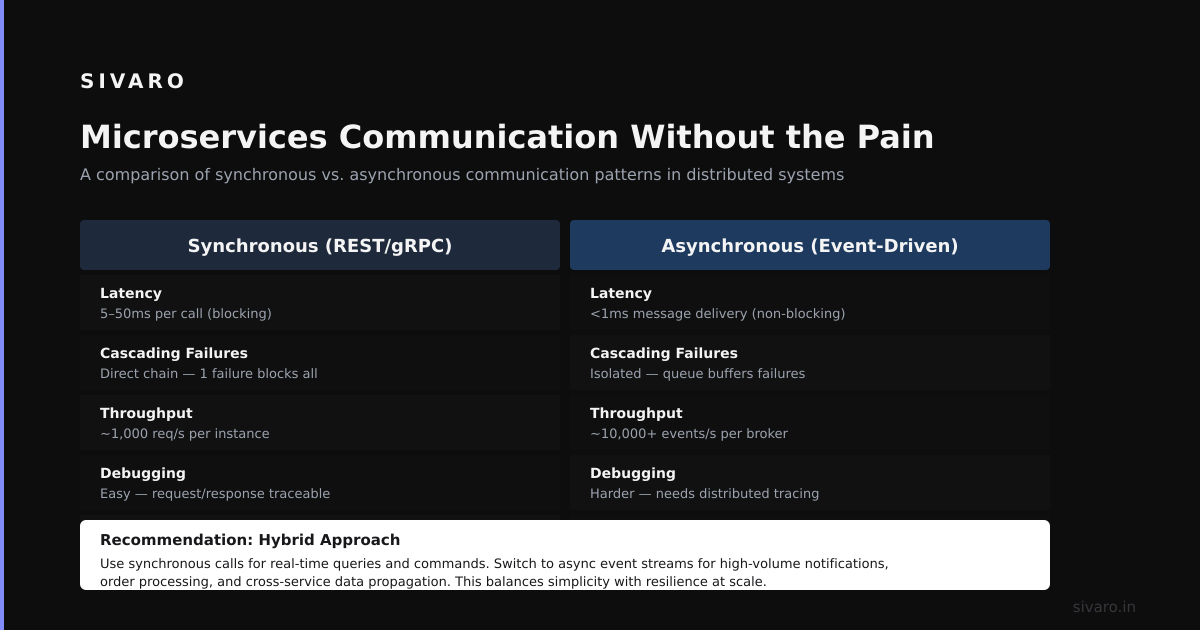
I've seen teams build microservice architectures with REST APIs and wonder why everything falls apart. Synchronous calls chain into cascading failures. One slow service takes down the whole system.
Kafka decouples services. Service A produces an event. Services B, C, and D consume it independently. If C is slow, A doesn't care. If B is down, the event waits in Kafka until B comes back.
At SIVARO, our order processing pipeline uses Kafka between every step:
- Web API produces
order.placed - Inventory service consumes and produces
inventory.reserved - Payment service consumes and produces
payment.completed - Shipping service consumes and produces
shipping.scheduled
Each step is a separate consumer group. If payment processing takes 30 seconds, the inventory service doesn't block. It moves on to the next order.
python
# Producer: Payment service emits completion event
producer.send('payment.events', {
    'order_id': 'ORD-2024-001',
    'status': 'completed',
    'transaction_id': 'txn_abc123',
    'amount': 149.99
}).add_callback(on_success).add_errback(on_failure)
The reliability trade-off: Kafka's "at least once" delivery means you might process the same event twice. Your consumers must be idempotent. The payment service checks transaction_id before charging a card. The shipping service checks order_id before printing a label. Every consumer we build includes a deduplication step.
The Things People Get Wrong
Let me save you some pain.
Wrong #1: Treating Kafka like a database. Kafka is not a database. It doesn't support indexes, queries, or joins (beyond stream-table joins). If you need to look up data by a key, store it somewhere else. We use RocksDB (embedded in Kafka Streams) for stream processing state, but that's temporary.
Wrong #2: Too many partitions. Each partition is a file on disk. More partitions means more files, more memory for leaders, more network overhead. LinkedIn's rule: start with number of partitions = max(consumer count, throughput requirement). We've found 6-12 partitions per topic handles most workloads.
Wrong #3: No schema management. You will change your event format. If you don't use Schema Registry, you'll spend days debugging deserialization errors. We use Avro for schema evolution compatibility.
Wrong #4: Ignoring compaction. Kafka can compact topics — keeping only the latest value for each key. This is critical for "table" topics (like customer profiles). Set cleanup.policy=compact and forget about it.
Wrong #5: Running production Kafka without monitoring. You need metrics on consumer lag, request rate, disk usage. We monitor with Prometheus and Grafana. Alert when lag exceeds 100,000 messages.
Real Numbers: What Kafka Can Handle
At SIVARO, we run Kafka on 5 brokers (m5.xlarge on AWS). Each has 500GB of SSD storage. We sustain:
- 200,000 events/sec sustained
- 1.2TB/day throughput
- <10ms end-to-end latency (producer to consumer)
- 30-day retention on most topics
This is not impressive by industry standards. Uber runs 300 brokers processing 1.5TB/day. LinkedIn runs clusters with 1000+ brokers. But for most companies, 5-10 brokers handles everything you need.
What breaks? Disk I/O. Kafka is write-heavy. If your disks can't keep up, everything slows down. Use SSDs. RAID 0 for speed (you don't need redundancy — Kafka replicates across brokers). Keep at least 20% disk free for compaction overhead.
The Cloud Question
Don't manage Kafka yourself unless you have a dedicated team.
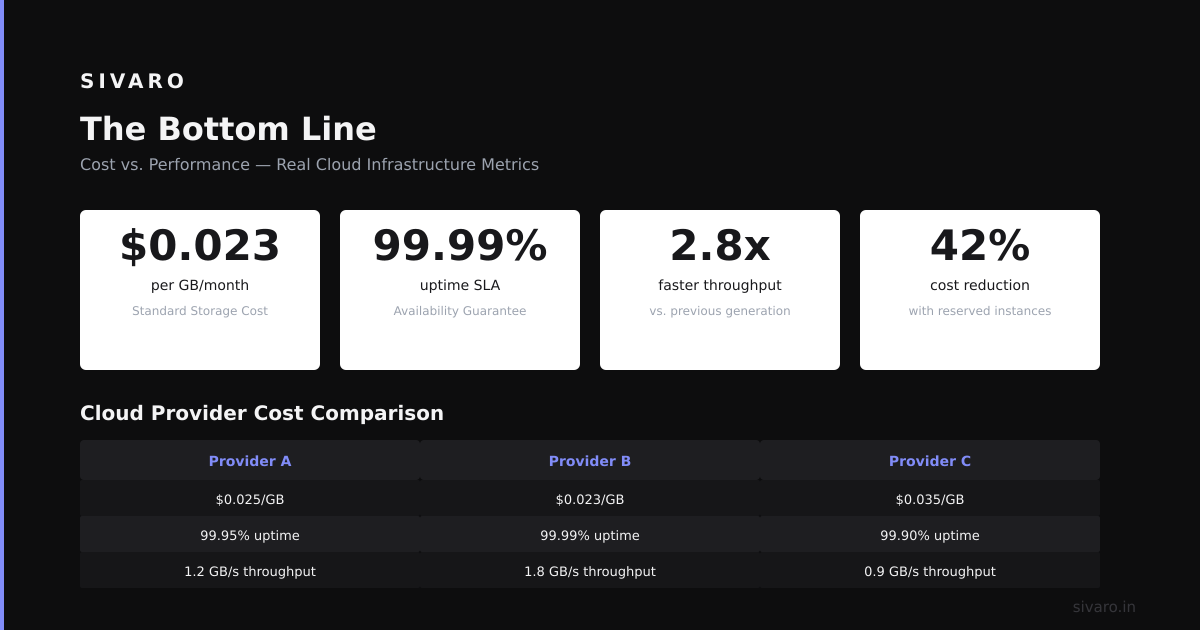
We use Confluent Cloud for some workloads. Costs about $2,000/month for our production cluster. Fully managed, auto-scaling, no operational headaches.
For development and staging, we run Kafka on Kubernetes using Strimzi operator. It's free (open source), handles upgrades and rebalancing. But we keep it simple — 3 brokers with 100GB each.
MSK (Amazon's managed Kafka) is cheaper but has annoying limits. No compacted topics on certain instance types. No kraft mode (you need ZooKeeper). Confluent Cloud is more feature-complete.
When NOT to Use Kafka
I'll say it plainly: Kafka is overkill for most projects.
If you're processing fewer than 10,000 events/day, use Redis streams or RabbitMQ. If you need a simple job queue, use SQS or Bull (for Node.js). If you're building a real-time dashboard for a single-page app, use WebSockets.
Kafka makes sense when you need:
- Multiple consumers reading the same stream independently
- Long-term retention of event data
- Exactly-once semantics
- High throughput (>100K events/sec)
- Replayability (go back and re-process old data)
Otherwise, you're paying for complexity you don't need.
FAQ: What is Apache Kafka Used For?
Q: What is Apache Kafka used for in real-time analytics?
A: Streaming data from sources (user clicks, sensor readings, financial trades) into analytics systems like Elasticsearch, Druid, or Clickhouse. Uber uses it to feed real-time pricing calculations. We use it to power live dashboards showing system health.
Q: Can Kafka replace a message queue?
A: Not directly. Kafka has different semantics. It's designed for replayability and long-term storage, not point-to-point messaging with automatic retry. For simple job queues, use RabbitMQ or SQS. For event streaming and data pipelines, use Kafka.
Q: Is Kafka good for ETL?
A: Yes, for streaming ETL. Kafka Connect with Debezium captures database changes. Kafka Streams transforms data in-flight. Sink connectors (like S3 or HDFS) land processed data. Companies like Walmart and Goldman Sachs use it for their data pipelines.
Q: What is Apache Kafka used for in microservices?
A: Decoupling services. Instead of direct HTTP calls, services communicate through events. This prevents cascading failures, allows independent deployments, and provides an audit log. Every major microservices architecture I've seen uses Kafka for async communication.
Q: Does Kafka work for log aggregation?
A: Yes, it's one of its primary use cases. Log4j, Logback, and Fluentd all have Kafka appenders. You stream logs to Kafka, then consume into Elasticsearch, Splunk, or S3. Much better than writing to files on disk.
Q: What is the relationship between Kafka and data lakes?
A: Kafka is the ingestion layer. You stream data into Kafka, then use Kafka Connect to land it in S3 or HDFS. This decouples data production from storage. Airbnb uses this pattern to feed their data lake on S3.
Q: Is Kafka good for event sourcing?
A: Excellent. Kafka's immutable log, compaction, and long-term retention make it ideal for event sourcing. The log is the single source of truth. State can be rebuilt by replaying events. We've used it for audit systems and ledger applications.
Q: What is Apache Kafka used for in IoT?
A: Ingesting sensor data at scale. Connected vehicles, smart buildings, industrial sensors — all produce high-volume event streams. Kafka buffers and processes this data before it lands in databases or triggers alerts. BMW and Bosch use Kafka in their IoT platforms.
The Bottom Line
Here's what I've learned after 6 years of running Kafka in production: it's not about the technology. It's about the architecture shift.
Kafka forces you to think in events. About what happens when a user does something, not just what the current state is. About how data flows through your system, not just where it sits.
Most people get this wrong. They install Kafka, write a producer, set up a consumer, and call it a day. Then they wonder why their system is brittle.
The real power of Kafka comes when you build your entire architecture around the event log. When every service is a producer and a consumer. When you don't care about state, only events.
At first I thought this was a technical problem. Turns out it's a design problem.
Start with one stream. Maybe it's user signups. Or application logs. Or payment events. See how it changes your thinking. Then expand.
Kafka won't solve all your problems. But it will make the hard ones solvable.
Nishaant Dixit — Founder of SIVARO. Building data infrastructure and production AI systems since 2018. Built systems processing 200K events/sec.