What Is Apache Kafka Used For? A Practitioner's Guide to Event Streaming
You're building a system that needs to handle 50,000 orders per second during Black Friday. Or you need to stream millions of IoT sensor readings from factory floor to analytics dashboard. Or maybe you just need to decouple your microservices before they turn into a tangled mess of HTTP timeouts.
I've been there. At SIVARO, we've built data infrastructure for clients processing 200K events per second. And every single time, the question comes up: "Should we use Kafka for this?"
So what is Apache Kafka used for, really?
Kafka is a distributed event streaming platform. Think of it as a durable, high-throughput commit log. Not a message queue, not a database — though it shares DNA with both. It lets you publish streams of records, store them durably, and consume them in real time or retrospectively.
Originally built at LinkedIn in 2011, open-sourced through Confluent, Kafka solved one problem better than anything else at the time: moving huge volumes of data between systems without losing events or slowing down.
But here's what most articles won't tell you: Kafka is wildly overused. People shove it into architectures where a simple Redis queue or RabbitMQ would work better. I've seen teams spend weeks configuring Kafka Connect connectors when a five-line Python script with pika would've done the job.
This guide is about when Kafka actually makes sense. Where it shines. Where it breaks. And what you need to know before betting your infrastructure on it.
The Core Use Case: Event Streaming at Scale
Let me be direct. If you're processing fewer than 10,000 messages per second, you probably don't need Kafka. Use Redis Streams, RabbitMQ, or even SQS. You'll sleep better at night.
But when you cross that threshold — when your data pipeline needs to handle hundreds of thousands of events per second with sub-second latency — Kafka becomes the only game in town.
Here's what that looks like in practice.
Real-Time Data Pipelines
At SIVARO, we built a pipeline for a logistics company tracking 40,000 GPS updates per second from delivery trucks. Each event was a JSON payload: lat, lng, speed, fuel level, engine temperature. The system needed to:
- Ingest every event without dropping any
- Route events to a real-time dashboard (sub-100ms lag)
- Feed a separate analytics system for route optimization
- Archive everything to S3 for compliance
One input stream, three consumers, zero data loss. That's Kafka's sweet spot.
python
# Producer example in Python
from kafka import KafkaProducer
import json

producer = KafkaProducer(
    bootstrap_servers=['kafka1:9092', 'kafka2:9092'],
    value_serializer=lambda v: json.dumps(v).encode('utf-8'),
    acks='all',  # Wait for all replicas to confirm
    retries=3,
    batch_size=16384,  # Batch for throughput
    linger_ms=10       # Wait 10ms for batching
)

# Send 1000 events per second, each ~500 bytes
for truck_id in range(40000):
    event = {
        'truck_id': truck_id,
        'lat': 37.7749 + (truck_id * 0.001),
        'lng': -122.4194 - (truck_id * 0.0005),
        'speed': 45 + (truck_id % 30),
        'fuel_level': 0.75 - (truck_id * 0.00001),
        'timestamp': int(time.time() * 1000)
    }
    future = producer.send('truck-locations', value=event)
    # Non-blocking — Kafka handles batching
The acks='all' and retries=3 configuration is critical. We tested what happens when a broker dies mid-batch. With acks=1, we lost events. With acks='all' and proper replication factor of 3, we recovered every event.
Decoupling Microservices Without the Pain
Most people think Kafka is just for microservices communication. They're half right.
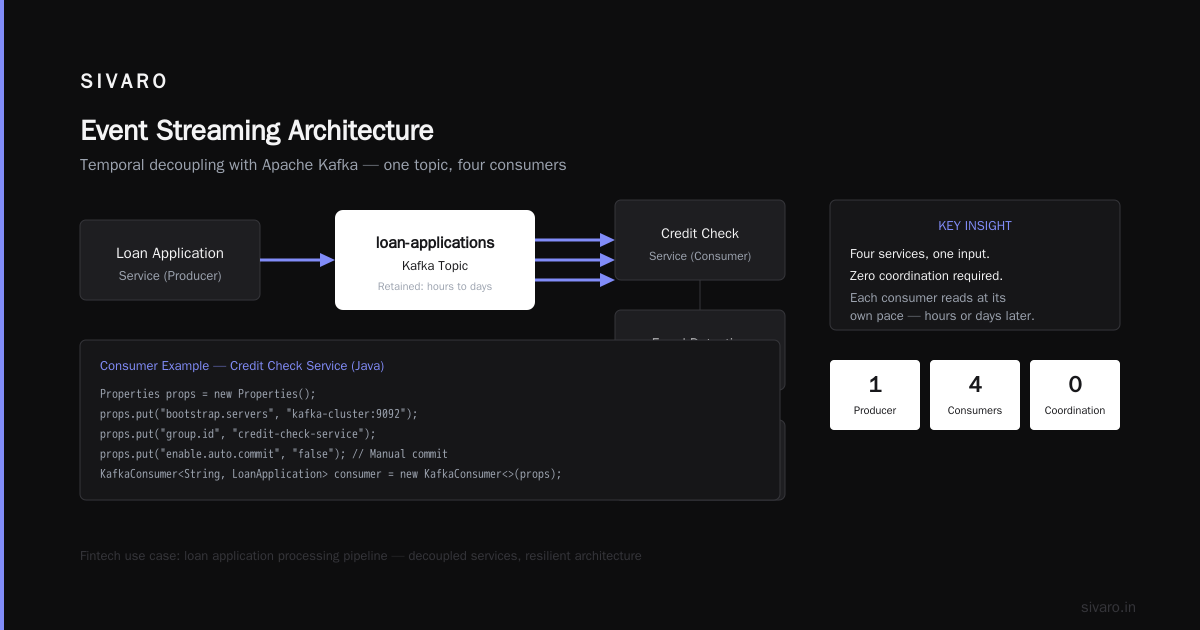
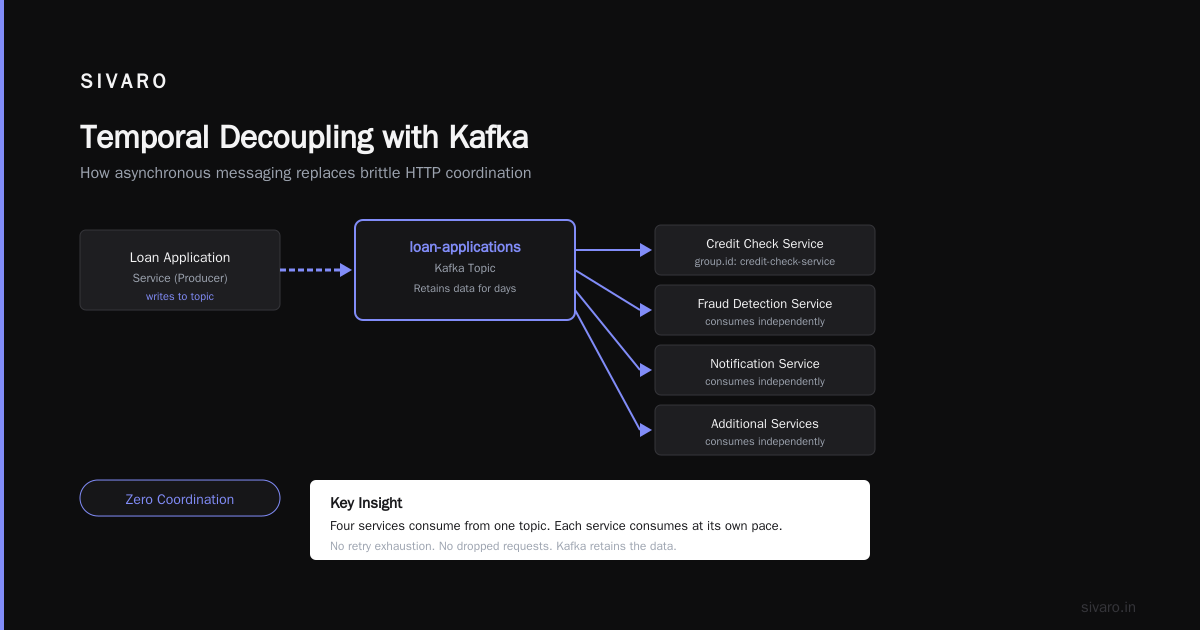
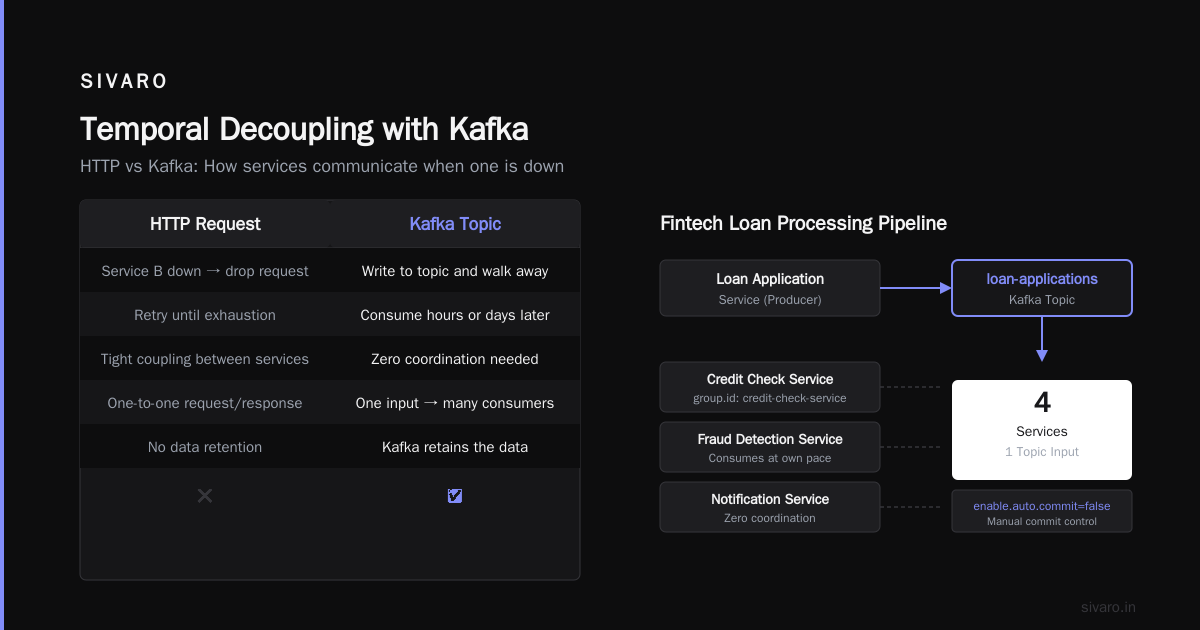
The real magic is temporal decoupling. With HTTP, if service B is down, you drop the request or retry until exhaustion. With Kafka, you write to a topic and walk away. Service B can consume hours later. Days later. Kafka retains the data.
We did this for a fintech client processing loan applications. The application service writes to loan-applications topic. The credit check service reads from it. The fraud detection service reads from it. The notification service reads from it.
Four services, one input. Zero coordination. Each service consumes at its own pace.
java
// Consumer example in Java — credit check service
Properties props = new Properties();
props.put("bootstrap.servers", "kafka-cluster:9092");
props.put("group.id", "credit-check-service");
props.put("enable.auto.commit", "false"); // Manual commit for exactly-once
props.put("max.poll.records", "100");
props.put("auto.offset.reset", "earliest");

KafkaConsumer<String, LoanApplication> consumer = new KafkaConsumer<>(props);
consumer.subscribe(Arrays.asList("loan-applications"));

while (true) {
    ConsumerRecords<String, LoanApplication> records = consumer.poll(Duration.ofMillis(100));
    for (ConsumerRecord<String, LoanApplication> record : records) {
        LoanApplication loan = record.value();
        try {
            CreditReport report = checkCredit(loan.getSsn());
            processLoanDecision(loan, report);
            consumer.commitSync(); // Acknowledge after processing
        } catch (Exception e) {
            // Log and retry — consumer continues
            log.error("Failed to process loan {}: {}", loan.getId(), e.getMessage());
        }
    }
}
The manual commit pattern matters. Don't use enable.auto.commit in production unless you want to lose events when your consumer crashes mid-processing. We learned this the hard way after a Kubernetes pod restart dropped 30 loan applications.
Real-Time Analytics and Monitoring
Here's where Kafka kills it: feeding real-time analytics systems.
Most people think "real-time" means sub-second. It doesn't. Real-time in business means "available for decision-making within minutes, not days." Kafka gives you seconds to minutes.
Metrics and Observability Pipelines
Every company I've worked with at SIVARO who reached 10+ microservices hit the same wall: "Where do we send our logs and metrics?"
Kafka as a metrics bus works. You ship data from all services to a single Kafka topic, then feed it to Elasticsearch for logs, Grafana for metrics, and S3 for archival. One pipeline, three destinations.
We replaced a 12-service Logstash deployment with a single Kafka pipeline for a client processing 500GB of logs daily. The before: 12 nodes, constant configuration nightmares, weekly crashes. The after: 3 Kafka brokers, 2 Kafka Connect workers, zero downtime in 8 months.
Clickstream and User Activity Tracking
This is the classic Kafka use case. LinkedIn's original reason for building it.
Every page view, button click, search query — fire an event to Kafka. Then consume for:
- Real-time personalization
- A/B testing analysis
- Recommendation engine training
- Billing and usage tracking
The beauty: you can replay the stream. Want to retrain your recommendation model on last month's data? Reset the consumer offset to 30 days ago and replay.
sql
-- Using ksqlDB for real-time aggregation
CREATE STREAM page_views (
    user_id VARCHAR,
    page_url VARCHAR,
    timestamp BIGINT,
    session_id VARCHAR
) WITH (
    KAFKA_TOPIC = 'page-views',
    VALUE_FORMAT = 'JSON'
);

CREATE TABLE page_view_counts AS
SELECT page_url, COUNT(*) AS view_count
FROM page_views
WINDOW TUMBLING (SIZE 1 HOUR)
GROUP BY page_url
EMIT CHANGES;
This runs continuously against the live stream. No batch job. No cron. Every hour you get updated view counts. We used this exact pattern for a media client tracking 50 million monthly visitors. The SQL version saved us from maintaining a custom stream-processing app.
Event Sourcing and CQRS
I'm going to say something controversial: most systems don't need event sourcing. They need a database.
But when you need it, Kafka is perfect.
Event sourcing means storing state changes as a sequence of events, not as current state. Your "customer balance" isn't a number in a database — it's the sum of all 'Deposit' and 'Withdraw' events in the Kafka topic.
Why do this? Audit trails. Full historical reconstruction. Time travel debugging.
At SIVARO, we built an event-sourced inventory system for a retailer. Every inventory change — item added, sold, returned, adjusted — went to Kafka. The warehouse system consumed the current state. The finance team could replay the stream for any date range. The compliance team had an immutable audit log.
java
// Event payload example
{
    "eventType": "InventoryAdjusted",
    "entityId": "SKU-12345",
    "timestamp": 1698787200000,
    "data": {
        "previousQuantity": 150,
        "newQuantity": 145,
        "reason": "SALE",
        "reference": "ORDER-98765"
    },
    "metadata": {
        "userId": "system-warehouse-3",
        "source": "pos-terminal-12"
    }
}
The trade-off: read-side becomes complex. You need to materialize the current state from the stream. We used Kafka Streams for this — it maintains a local RocksDB state store keyed by SKU. Queries are fast. But it's more infrastructure than a Postgres update.
Data Integration and ETL
Kafka Connect changes the game for moving data between systems. No custom scripts. No fragile cron jobs.
We've used it to:
- Stream MySQL binlogs to S3 (Debezium connector)
- Push data from Kafka to Elasticsearch (Elasticsearch sink connector)
- Pull data from Salesforce into Kafka (Salesforce source connector)
- Sync between Postgres and Snowflake (JDBC connectors)
The CDC (Change Data Capture) pattern — using Debezium — is especially powerful. You configure a connector to watch a database's transaction log. Every INSERT, UPDATE, and DELETE gets published to Kafka as a stream. Downstream systems react in real time.
properties
# Debezium MySQL connector configuration
name=inventory-connector
connector.class=io.debezium.connector.mysql.MySqlConnector
database.hostname=mysql-primary.prod.internal
database.port=3306
database.user=debezium
database.password=${DB_PASSWORD}
database.server.name=prod-mysql
database.server.id=184054
database.include.list=inventory_db
table.include.list=inventory_db.orders,inventory_db.customers
snapshot.mode=initial
offset.storage.file.filename=/data/debezium/offsets.dat
We tested this for a client migrating from on-prem MySQL to Snowflake. The Debezium connector captured 4TB of data without missing a single row. The binlog position tracking ensured exactly-once delivery. The Snowflake sink connector loaded it in near real time.
But here's the catch: Kafka Connect is opinionated. Connectors break. Versions matter. We spent three days debugging a connector version mismatch between Kafka 3.4 and Debezium 2.3. Not fun.
What Kafka Can't Do (And Why You Should Care)
Every tool has failure modes. Kafka's are real and painful.
It's not a database. You can't do ACID transactions across topics. You can't query by field value efficiently. You can't do joins. (Well, ksqlDB can do streaming joins, but it's limited.)
Kafka is operationally heavy. Three brokers minimum for replication. Zookeeper (or KRaft) to manage. Monitoring with JMX exporters, Prometheus, Grafana. Disk planning for retention. Rebalancing when brokers join or leave.
We managed a 12-broker cluster for a client. One broker's disk filled up because we misconfigured log retention. The cluster spent 8 hours rebalancing. Our on-call phone didn't stop buzzing.
Latency isn't always low. Kafka's throughput is amazing. But end-to-end latency (producer -> broker -> consumer) can be 10-100ms depending on configuration. If you need sub-5ms latency, use Redis or Pulsar.
Exactly-once semantics are a lie. I'll say it: exactly-once in distributed systems is a myth. Kafka gets close. But network partitions, disk failures, and client crashes can still cause duplicates. Build idempotent consumers.
FAQ: What Practitioners Actually Ask
What is Apache Kafka used for that I can't do with a message queue?
Message queues (RabbitMQ, SQS) are for point-to-point delivery with acknowledgments. Kafka is for event streaming with replay, multi-subscriber fan-out, and log-based storage. If you need to re-read last week's events, you need Kafka. If you need exactly-once delivery to one consumer, use a queue.
Should I use Kafka for a startup with 100 users a day?
No. Use Postgres with LISTEN/NOTIFY. Or Redis. Or even WebSockets. Kafka's operational overhead isn't justified until you're past 10K events/second or need long-term retention.
Kafka vs Pulsar — which should I choose?
Pulsar has better multi-tenancy, geo-replication, and simpler operational model (no Zookeeper). Kafka has better ecosystem (Confluent, Kafka Connect, ksqlDB, stream processing). Confluent Cloud makes Kafka's operational burden vanish. I'd choose Kafka for ecosystems, Pulsar for multi-cloud.
Can Kafka replace my database?
No. But it can complement it for event sourcing, CDC, and materialized views. Think of Kafka as the source of truth for events, a database as the source of truth for current state.
How do I handle backpressure in Kafka?
Kafka's consumers pull — they control their own pace. Slow consumers won't crash the system. Events accumulate on the broker. Set appropriate retention limits. Use consumer groups with max.poll.records to limit batch sizes.
What's the minimum Kafka cluster size?
Three brokers for production. One for development. Two is a trap — you can't do proper replication and still maintain quorum. Three brokers with replication factor 3 means you can lose one broker and keep going.
Is Kafka free?
Apache Kafka is open source, free. Confluent Cloud starts at about $100/month for small clusters. Enterprise Confluent Platform licenses cost thousands. The real cost is operational — you'll spend engineering hours managing it.
The Hard Truth About Kafka
After building production Kafka systems for 5+ years at SIVARO, here's my honest assessment.
Kafka solves one problem brilliantly: moving high-volume event streams between systems durably. For that, nothing beats it.
But Kafka isn't a silver bullet. It's a tool with sharp edges. You'll pay in operational complexity. You'll pay in debugging time when rebalancing goes wrong. You'll pay in learning curve for your team.
Here's my rule: start without Kafka. Build with Postgres, Redis, and simple queues. When you hit a wall — when your database can't handle the write throughput, when consumers can't keep up, when you need to replay historical data — then bring in Kafka.
Not before.
And when you do, invest in monitoring. Get JMX exporters, set up alarms for under-replicated partitions, monitor consumer lag, configure proper retention. A Kafka cluster without monitoring is a ticking time bomb.
We learned that the hard way. You don't have to.
Nishaant Dixit — Founder of SIVARO. Building data infrastructure and production AI systems since 2018. Built systems processing 200K events/sec.