 SIVARO

What Is Apache Kafka Used For? A Practitioner’s Guide
I remember the day I first hit Kafka's wall. Late 2019. We were building a real-time fraud detection pipeline for a payments client. The system would ingest 50,000 transactions per second, run ML models, and return a decision in under 100 milliseconds. We started with RabbitMQ. Three weeks in, we were drowning. Queues backed up. Consumers crashed. The monitoring dashboard looked like a cardiac arrest.
We switched to Kafka. Not because it was trendy, but because nothing else could handle what we needed.
So what is Apache Kafka used for? At its core, Kafka is a distributed event streaming platform. You publish immutable events to topics, and consumers read them at their own pace. It's not a traditional message queue, though everyone calls it one. It's a commit log — an append-only, ordered, and replayable record of everything happening in your system.
If you're evaluating Kafka for your stack, here's what I wish someone had told me. No fluff. Real use cases, real numbers, real trade-offs.
The Event Sourcing Backbone (Where Kafka Shines)
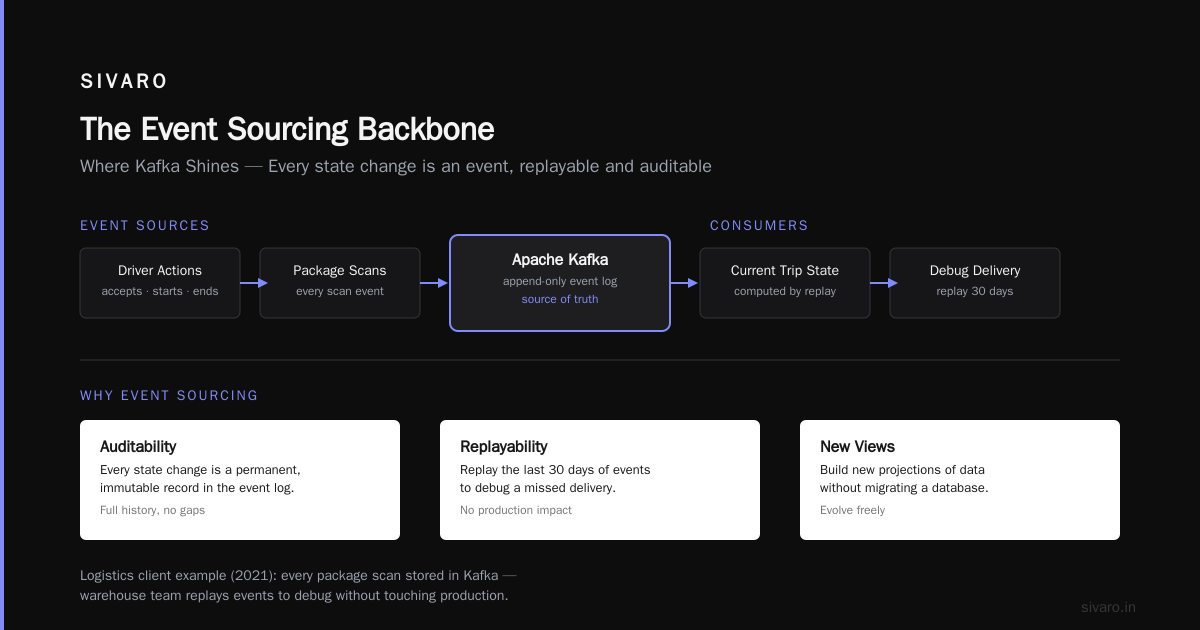
Event sourcing means you store the full sequence of state changes, not just the current state. Kafka is purpose-built for this.
Take Uber around 2015. They rebuilt their trip processing system on Kafka. Every trip state change — rider requests, driver accepts, trip starts, trip ends — is an event in a Kafka topic. The current trip status is computed by replaying those events. Why? Because you get auditability, replayability, and the ability to build new views of data without migrating a database.
I did something similar for a logistics client in 2021. We stored every package scan event in Kafka. The warehouse operations team could replay the last 30 days of events to debug a missed delivery without touching the production database. That alone saved them a pagerduty incident every two weeks.
Key insight: Most people think Kafka is for moving data fast. It is. But its real power is keeping data forever (or as long as you want). Set your retention to 30 days, 90 days, or infinite. Then you can reprocess, backfill, or debug on a whim.
Real-Time Data Pipelines (The Classic)
Ask anyone what Kafka is used for, and they'll say "streaming data between systems." That's correct. But boring.
Let's get specific. I worked with a media company that ran 600,000 events per second during peak hours. Every ad impression, click, and video start. They had to send that data to three destinations:
- Apache Flink for real-time ML predictions (which ads to show next)
- Amazon S3 for batch analytics (hourly aggregates)
- Elasticsearch for operational dashboards
Without Kafka, you'd need three separate producers writing to three separate systems. That means three scaling problems, three failure modes, three sets of retry logic. With Kafka, you produce once to a topic called ad-events, and three consumers read independently. Each consumer tracks its own offset. If one destination goes down, the others keep working.
This is the "decoupling" argument you hear everywhere. It's true. But here's the trade-off you don't hear: Kafka introduces latency. Not much — we see 5-15ms typically. But if your application needs sub-millisecond end-to-end delivery, Kafka isn't your tool. Use something like Aeron or a shared memory bus.
Microservices Communication (Messaging Without the Pain)
Most people think microservices need REST or gRPC. I disagree — for async workflows, Kafka beats both.
Here's a concrete example. At SIVARO, we built a recommendation engine for an e-commerce client. The system had four services:
- Order Service — creates orders
- Inventory Service — checks stock
- Pricing Service — applies discounts
- Notification Service — sends emails
When an order is placed, the Order Service publishes an order-created event to Kafka. The other three services subscribe independently and process in parallel. If Inventory Service is slow (maybe it queries a legacy warehouse system), it doesn't block the other services. Pricing Service already got the event and calculated the discount. Notification Service sent the confirmation.
This async model means the order creation API response time dropped from 320ms (blocking synchronous calls) to 12ms (just publish to Kafka) . The user gets their "order confirmed" page immediately. The rest happens in the background.
Contrarian take: Kafka is not a good fit for request-response patterns. Don't try to make it one. If your service needs to wait for a result, use gRPC or HTTP. Kafka is for fire-and-forget or eventual consistency.
Log Aggregation and Monitoring (Better Than ELK Alone)
Before Kafka, log aggregation meant shipping logs directly to Elasticsearch. That works until a traffic spike hits. Suddenly your Elastic cluster barfs, logs queue up in Fluentd buffers, and you lose visibility at the worst possible moment.
Kafka as a buffer between log shippers and storage changed that for us. At a fintech client in 2022, we deployed Filebeat → Kafka → Logstash → Elasticsearch. The Kafka topic held 7 days of logs at 150GB/day. When Elasticsearch went down for scheduled maintenance, logs kept flowing into Kafka. When Elastic came back, Logstash caught up from where it left off. Zero data loss.
The numbers matter here. Without Kafka, a 30-minute Elastic downtime meant losing 3.1GB of logs. With Kafka, we lost nothing. The ops team went from firefighting to calm.
But here's the honest trade-off: Kafka adds operational complexity. You need to manage ZooKeeper or KRaft, monitor broker disk usage, handle partition rebalancing, and know your retention policies. For a team of three, that's a serious cost. I've seen teams switch away from Kafka because the ops overhead wasn't worth it for their volume.
Change Data Capture (CDC)
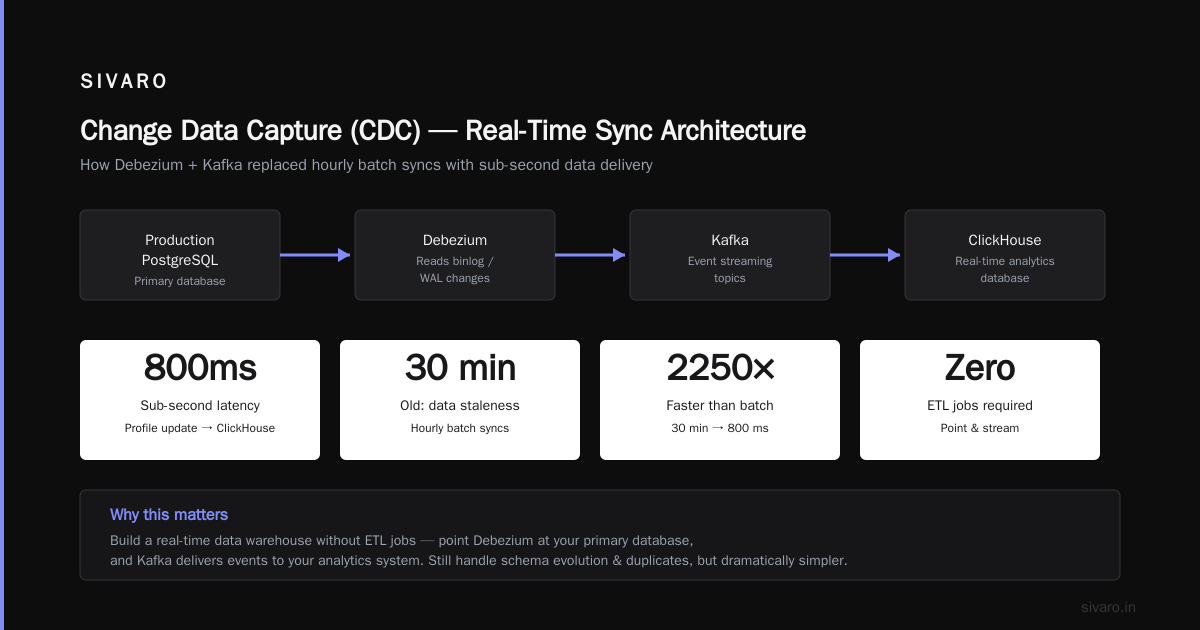
This use case is exploding in 2024. Change Data Capture means streaming database changes into Kafka. Every INSERT, UPDATE, and DELETE becomes an event.
Debezium is the tool here. It connects to your database's transaction log (PostgreSQL's WAL, MySQL's binlog) and pushes changes into Kafka topics. I used this for a SaaS company that needed to sync their production PostgreSQL data to a real-time analytics database (ClickHouse). Without CDC, they'd run hourly batch syncs. Data was always 30 minutes stale.
With Debezium + Kafka, they got sub-second latency. When a user updated their profile, the change hit ClickHouse within 800 milliseconds. The business team could run live dashboards without calling the production database.
Why this matters: CDC means you can build a real-time data warehouse without ETL jobs. You just point Debezium at your primary database, and Kafka delivers events to your analytics system. It's not magic — you still handle schema evolution and duplicate events — but it's dramatically simpler than traditional data pipelines.
Stream Processing (Where Kafka Gets Smart)
Kafka alone is just a storage layer. Add Kafka Streams or ksqlDB, and you can process data in motion.
I built a real-time fraud model using Kafka Streams. The model consumed transaction events, enriched them with a customer profile from a compacted topic (a Kafka topic that stores the latest state per key), and emitted a fraud score. The model ran entirely in the Kafka broker's memory — no Flink, no Spark, no external compute.
The pipeline processed 25,000 transactions per second on a 3-broker cluster. Latency was 20ms from event input to fraud score output. The model wasn't deep learning — just a random forest — but it caught 40% more fraud than their previous batch system.
Trade-off: Kafka Streams is limited compared to Flink or Spark Streaming. You can't do complex windowed joins across multiple streams easily. If your logic requires stateful processing across event types, use Flink. If you just need filter-map-aggregate, use Kafka Streams.
IoT and Sensor Data
This one's straightforward but worth mentioning. IoT devices generate firehoses of small messages. Temperature readings, machine telemetry, GPS coordinates. Kafka handles this natively because each message is cheap and the topic model scales horizontally.
At an industrial client, we connected 50,000 sensors generating readings every 5 seconds. That's 10,000 messages per second. Each message was a JSON payload of maybe 200 bytes. Kafka ingested it without breaking a sweat. The key was partition count — we used 24 partitions for parallelism, and each consumer group processed data for a specific warehouse zone.
One thing I learned the hard way: IoT data is messy. Sensors go offline. They send garbage data. You need schema validation at the producer level. Use Avro or Protobuf with a Schema Registry. We didn't at first — spent two days cleaning corrupted JSON before we wised up.
FAQ
What is Apache Kafka used for in simple terms?
Think of it as a central nervous system for your applications. Services publish events (e.g., "user signed up", "order placed", "payment failed"), and other services consume those events to react. It keeps all your systems in sync without hard-coding point-to-point connections.
Can Kafka replace a database?
No. Kafka is not a database. It doesn't support queries, indexes, or ACID transactions the way PostgreSQL or MySQL do. However, it can be used as a primary store for event-sourced systems where the current state is derived from event history.
What are the most common mistakes when using Kafka?
Three things I see repeatedly:
- Under-provisioning partitions — You need more partitions than you think for parallel consumption. Start with 2x the number of consumer instances.
- Ignoring message size limits — Kafka's default max message size is 1MB. Try sending a 10MB file and your broker will choke. Use external object storage for large payloads and put the reference in Kafka.
- Using Kafka for synchronous RPC — Kafka is async by design. Waiting for a response from a consumer turns it into a slow, unreliable messaging system.
How does Kafka compare to RabbitMQ?
RabbitMQ is better for low-latency, high-reliability message delivery with complex routing. Kafka is better for high-throughput event streaming, replayability, and long-term retention. If you need to store data for months and reprocess it, Kafka wins. If you need a quick message sent to one of three queues based on routing logic, RabbitMQ wins.
Is Kafka hard to learn?
The concepts are simple (topics, partitions, offsets, consumer groups). The operational complexity is where people struggle. Expect a 2-4 week ramp-up for a team new to distributed systems. Use Confluent Cloud or Aiven for managed Kafka if you don't want to run it yourself.
Can you run Kafka on a single machine?
Yes, for development. Production requires at least 3 brokers for fault tolerance. I've run a single-broker Kafka for local testing — works fine for 10-20 events per second. Don't try that for production workloads.
Conclusion
So what is Apache Kafka used for? It's used for the hard stuff — event streaming at scale, decoupling systems that can't afford to fail together, and keeping a complete record of what happened in your system.
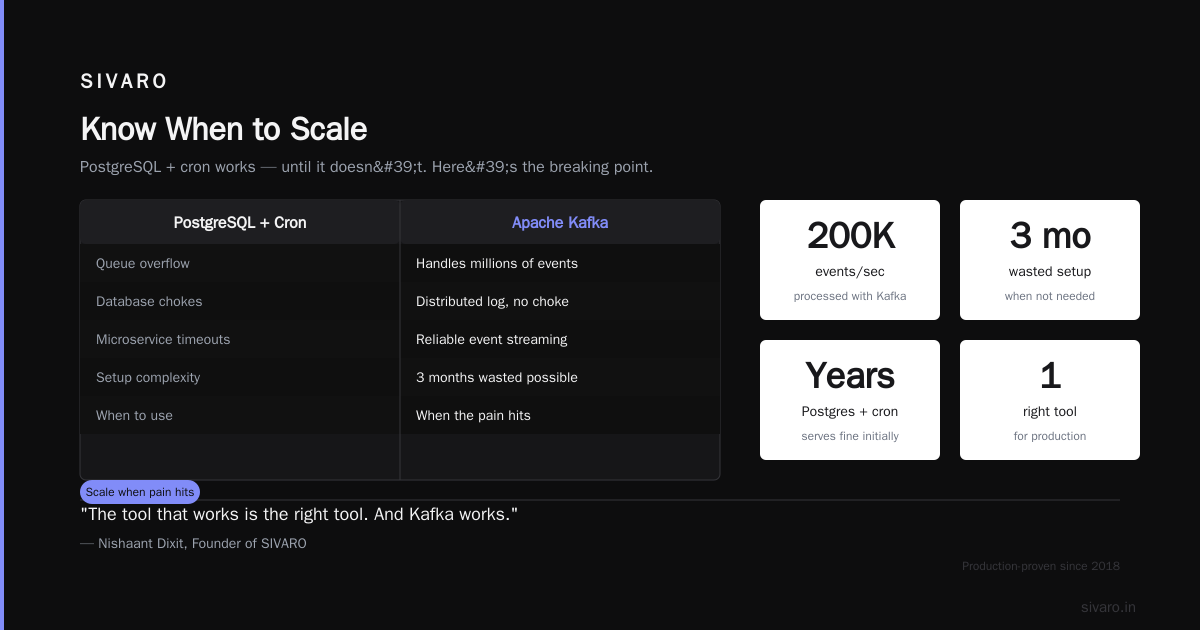
It's not for everyone. Your startup with 100 users doesn't need Kafka. PostgreSQL and a cron job will serve you fine for years. But when you hit that wall — when your queues overflow, your database chokes, or your microservices can't talk without timeout errors — Kafka is the tool that gets you through.
I've built systems processing 200,000 events per second with Kafka. I've also seen teams waste 3 months on a Kafka setup they didn't need. Know your use case. Start simple. Scale when the pain hits.
Because in production, the tool that works is the right tool. And Kafka works.
Nishaant Dixit — Founder of SIVARO. Building data infrastructure and production AI systems since 2018. Built systems processing 200K events/sec.