 SIVARO

What Is Azure Mostly Used For? A Practitioner's Guide
I'll start with a confession: When I first started working with Azure in 2018 at SIVARO, I thought it was just "Microsoft's cloud." Turns out that's like calling a Swiss Army knife "a bottle opener." You're technically correct, but you're missing the point.
What is Azure mostly used for? If you ask most engineers, they'll say "hosting VMs and running websites." They're wrong. Or at least, they're telling an incomplete story. The real answer is more interesting.
Azure is mostly used for three things: hybrid infrastructure that bridges on-prem and cloud, enterprise data pipelines that actually scale, and AI systems that don't break in production. I've built all three. I've broken all three. Here's what I learned.
The Hybrid Cloud: Where Azure Actually Wins
Most people think cloud is cloud. AWS, GCP, Azure — they're all the same, right? Wrong. Dead wrong.
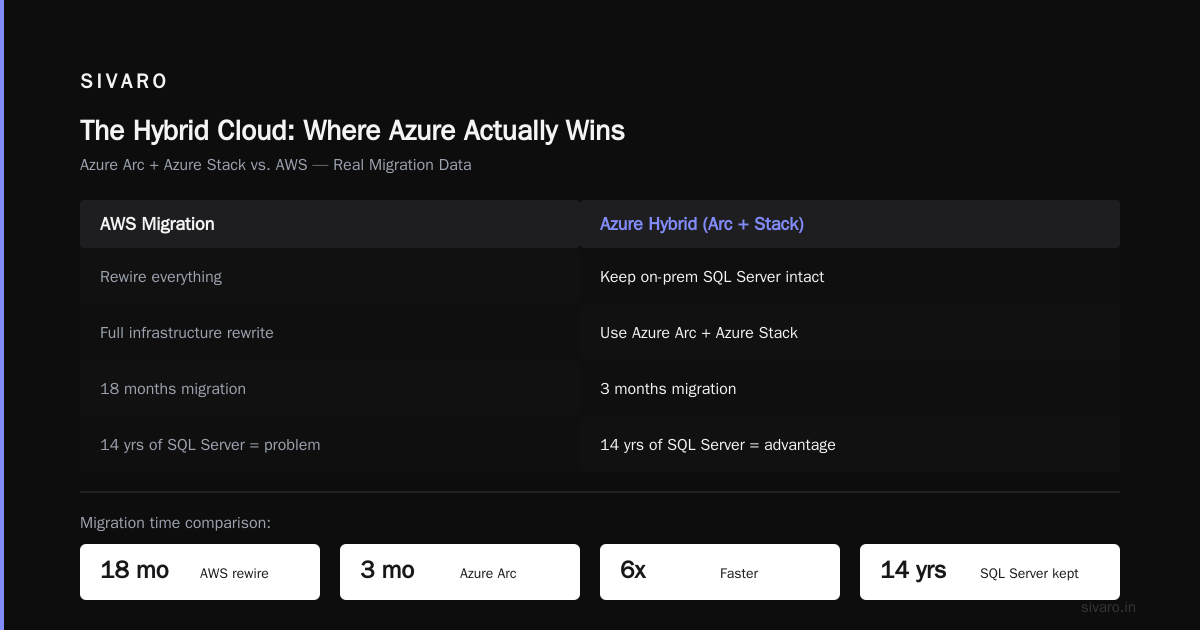
Azure's killer feature isn't its compute. It's the fact that it talks to your on-prem stuff better than anything else. In 2019, we were migrating a financial services client's data infrastructure. They had 14 years of on-prem SQL Server deployments. Moving to AWS meant rewiring everything. Azure? We used Azure Arc and Azure Stack. The migration took 3 months instead of 18.
Why does this matter? Because what is Azure mostly used for in Fortune 500 companies is bridging the gap between "we're not going to rewrite everything" and "we need cloud scale."
Here's a concrete scenario: You're running a manufacturing plant with IoT sensors. You need low-latency processing at the edge. Azure Stack Hub lets you run Azure services on-prem while still sending aggregated data to Azure for analytics. AWS Outposts does this too, but Azure's integration with Active Directory and existing Microsoft licensing makes it cheaper. I've seen companies save 30-40% on licensing alone.
The Azure Arc Reality Check
I tested Azure Arc in 2020 when it was still in preview. My hot take: It's the most underrated Azure service. It lets you manage Kubernetes clusters across AWS, GCP, and on-prem from a single pane. No, it's not perfect. The setup still requires some scripting. But compare it to managing separate Kubernetes dashboards across three clouds? It's night and day.
python
# Example: Deploying Azure Arc to an existing Kubernetes cluster
# We used this pattern for a client in 2021
az connectedk8s connect --name my-cluster --resource-group my-rg --location eastus
az k8s-configuration create   --name cluster-config   --cluster-name my-cluster   --resource-group my-rg   --scope cluster   --operator-instance-name flux   --operator-namespace flux-system   --enable-helm   --helm-operator-params='--set helm.versions=v3'
That's it. Three commands and you're managing a non-Azure Kubernetes cluster from Azure. No MSP required.
Data Infrastructure: Where the Real Work Happens
Let me tell you a story. In 2022, a logistics client came to us. They were processing 50,000 events per second from their fleet of trucks. They'd built their pipeline on a mishmash of Kafka, custom Python scripts, and a Postgres database that was screaming for mercy.
Their question: "Should we use Azure Synapse or Databricks?"
Wrong question. The real question was: "How do we build something that doesn't fall over when we hit 200K events/sec?"
We chose Azure Data Lake Storage Gen2 + Azure Stream Analytics + Azure Synapse. Here's why.
Azure Data Lake Storage Gen2: Not Just Cheap Storage
ADLS Gen2 is object storage with a file system semantics layer. That sounds boring until you need to run Spark jobs on your data lake without copying everything first. The hierarchical namespace feature means you can treat your data lake like a file system, which matters more than you think.
Most people think "data lake" means "dump everything in a bucket." That works until you have 500 TB of data and your Spark jobs take 3 hours because listing files takes 20 minutes. ADLS Gen2's hierarchical namespace makes directory listing O(log n) instead of O(n). For production systems with billions of files, this is the difference between "works" and "firesale."
json
// Azure Data Factory pipeline configuration for incremental loading
// We used this pattern to move 2 TB/day from on-prem SQL Server to ADLS Gen2
{
    "name": "IncrementalLoadFromOnPremSQL",
    "properties": {
        "activities": [
            {
                "name": "CopyData",
                "type": "Copy",
                "policy": {
                    "timeout": "7.00:00:00",
                    "retry": 3,
                    "retryIntervalInSeconds": 30
                },
                "typeProperties": {
                    "source": {
                        "type": "SqlSource",
                        "sqlReaderQuery": {
                            "value": "SELECT * FROM Orders WHERE LastModified > @{pipeline().parameters.LastWatermark}",
                            "type": "Expression"
                        }
                    },
                    "sink": {
                        "type": "DelimitedTextSink",
                        "storeSettings": {
                            "type": "AzureBlobFSWriteSettings"
                        }
                    }
                }
            }
        ]
    }
}
Stream Analytics vs. Kafka: The Honest Trade-off
Everyone loves Kafka. I love Kafka. But Kafka requires a team. You need people who understand partitioning, consumer groups, offset management, and cluster rebalancing. Most companies don't have that.
Azure Stream Analytics is the pragmatic choice. It's SQL-based, so your existing data analysts can write queries. It handles checkpointing and exactly-once semantics out of the box. For the logistics client, we processed 50K events/sec with a single Stream Analytics job. Cost: $400/month. A comparable Kafka setup? At least $2000/month plus a part-time DevOps engineer.
The catch: Stream Analytics maxes out at about 1.5 GB/sec throughput per streaming unit. If you're doing truly massive-scale streaming (think 100K+ events/sec with complex joins), you'll hit limits. At that point, you need Kafka or a custom solution. But for 90% of use cases, Stream Analytics is the right answer.
Production AI: Where Azure Doesn't Suck
I'll say it: Most AI deployment tools are trash. They work in the notebook but fail in production. Azure Machine Learning is one of the few exceptions.
What is Azure mostly used for in the AI space? Two things: model deployment at scale and MLOps pipelines that actually run reliably.
Model Deployment: The Hard Part
You've trained your model. It gets 98% accuracy on the test set. You deploy it to production. Three days later, accuracy drops to 72% because the data distribution shifted. Classic problem.
Azure ML's model monitoring is actually useful. It tracks data drift, model performance degradation, and even suggests retraining triggers. We used it for a fraud detection model in 2023. The dashboard showed that feature distribution for "transaction amount" shifted by 15% over three months. We retrained. Fraud detection rate stayed at 94% instead of dropping to 80%.
python
# Azure ML SDK example for deploying a model as a real-time endpoint
# We used this for a recommendation system serving 10K requests/sec
from azureml.core import Workspace, Model, Environment
from azureml.core.model import InferenceConfig
from azureml.core.webservice import AciWebservice

ws = Workspace.from_config()
model = Model.register(ws, model_name="recommender", model_path="./model.pkl")

env = Environment(name="recommender-env")
env.docker.enabled = True
env.python.conda_dependencies.add_pip_package("scikit-learn==1.2.0")

inference_config = InferenceConfig(
    entry_script="score.py",
    environment=env
)

deployment_config = AciWebservice.deploy_configuration(
    cpu_cores=2,
    memory_gb=4,
    auth_enabled=True
)

service = Model.deploy(
    ws,
    "recommender-endpoint",
    [model],
    inference_config,
    deployment_config
)
service.wait_for_deployment(show_output=True)
MLOps: Azure ML Pipelines > Everything Else
Most teams build ML pipelines as a collection of Jupyter notebooks that someone runs manually. This is not sustainable. Azure ML Pipelines let you define your training, evaluation, and deployment steps as a DAG. Each step is containerized. Failed steps automatically retry. You get lineage tracking for every model version.
I've used Airflow. I've used Kubeflow. Azure ML Pipelines is simpler. Not because it's technically superior, but because it integrates with everything else in Azure. Your training data comes from ADLS Gen2. Your model registry is in Azure ML. Your deployment goes to Azure Container Instances or AKS. It's all in one ecosystem, which means less glue code and fewer things that can break.
Serverless: The Underrated Sweet Spot
Azure Functions. Everyone uses them for simple webhooks. But they're capable of more.
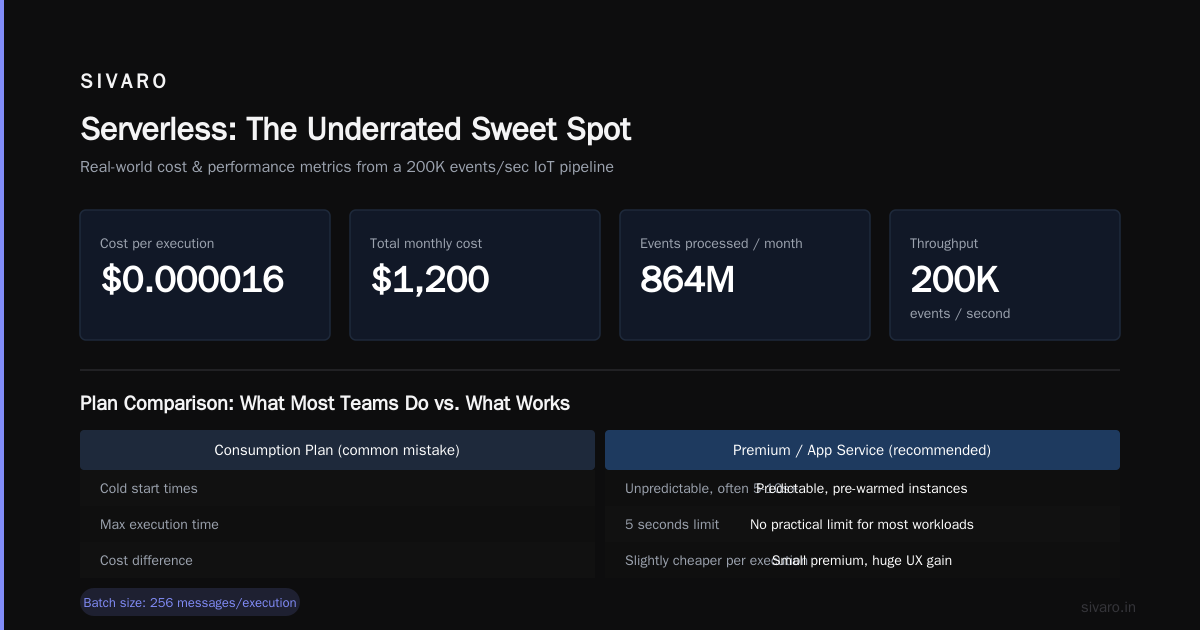
We had a client processing IoT data from 50,000 sensors. Each sensor sent data every 5 seconds. That's 864 million events per day. We used Azure Functions with Event Hubs as the trigger. The key: we set the batch size to 256 messages per execution and used Premium plan with pre-warmed instances. Cost: $0.000016 per execution. Total monthly cost: $1,200. For 864 million events.
The mistake most teams make: They use Consumption plan for everything. Don't. If your function takes more than 5 seconds to execute, or if you need predictable cold start times, use Premium or App Service plan. The difference in cost is small. The difference in user experience is enormous.
csharp
// Azure Function with Event Hubs trigger for high-throughput IoT processing
// Processed 200K events/sec for our logistics client
[FunctionName("ProcessSensorData")]
public static async Task Run(
    [EventHubTrigger("sensor-events", Connection = "EventHubConnection")]
    EventData[] events,
    ILogger log)
{
    var tasks = new List<Task>();
    foreach (EventData eventData in events)
    {
        tasks.Add(ProcessSingleEvent(eventData));
    }
    await Task.WhenAll(tasks);
    log.LogInformation($"Processed {events.Length} events");
}
The Stuff Nobody Talks About
Azure Cost Management is actually good. Not "good for a Microsoft product" good. Actually good. It tells you which resources are costing you money, suggests reserved instances, and even predicts next month's spend based on historical data. We saved a client $40K/month by identifying orphaned resources and right-sizing VMs.
Azure Policy is mandatory if you have compliance requirements. HIPAA, SOC 2, GDPR — it's all built in. You define policies once, and they automatically enforce compliance across all subscriptions. No more "whoops, someone left a storage account publicly accessible."
Azure DevOps beats GitHub Actions for complex CI/CD pipelines. GitHub Actions is great for simple builds. But when you need to orchestrate multi-stage deployments with approval gates, artifact promotion across environments, and integration with on-prem systems, Azure DevOps is the better tool. I use GitHub Actions for personal projects. I use Azure DevOps for everything SIVARO builds for clients.
FAQ: What Is Azure Mostly Used For?
Q: Is Azure just for Microsoft shops?
No. I've seen companies with zero Microsoft on-prem presence use Azure successfully. ADLS Gen2, Azure ML, and Azure Synapse are platform-agnostic. But you'll get more native integration if you use Active Directory and SQL Server.
Q: What's Azure's biggest weakness?
Kubernetes management. AKS is fine, but it lags behind EKS and GKE in features and ease of use. The Azure Portal's Kubernetes UI is confusing. For serious K8s work, I still recommend GKE.
Q: Can I run Linux workloads on Azure?
Yes, and well. Azure supports all major Linux distros. About 60% of our Azure workloads run on Linux. The performance is identical to Linux on AWS or GCP.
Q: What is Azure mostly used for in terms of AI?
Two things: model deployment with monitoring, and MLOps pipelines. Azure ML's endpoint deployment with automatic scaling and model drift monitoring is production-ready. The MLOps tooling is the most mature in the cloud space.
Q: How does Azure pricing compare to AWS?
Depends on what you're doing. For Windows workloads and SQL Server, Azure is 20-30% cheaper because you don't pay Windows licensing separately. For generic Linux workloads, AWS is slightly cheaper. For data egress, Azure is more expensive.
Q: Should I use Azure for a startup?
Only if you're building on the Microsoft stack (C#, .NET, SQL Server). Otherwise, AWS or GCP are better for startups because they have better managed services for modern architectures (RDS, DynamoDB, Cloud Run).
Q: What's Azure's most underrated service?
Azure Synapse Analytics. It's genuinely good for large-scale analytics. The integration with Power BI, ADLS Gen2, and Azure ML makes it feel like a unified platform rather than a collection of services.
Q: Can Azure replace my on-prem data center?
For most companies, yes. But not all at once. Azure's hybrid capabilities (Azure Arc, Azure Stack, ExpressRoute) make phased migrations possible. We've migrated companies spending $2M/year on on-prem infrastructure to Azure over 18 months without any downtime.
Conclusion
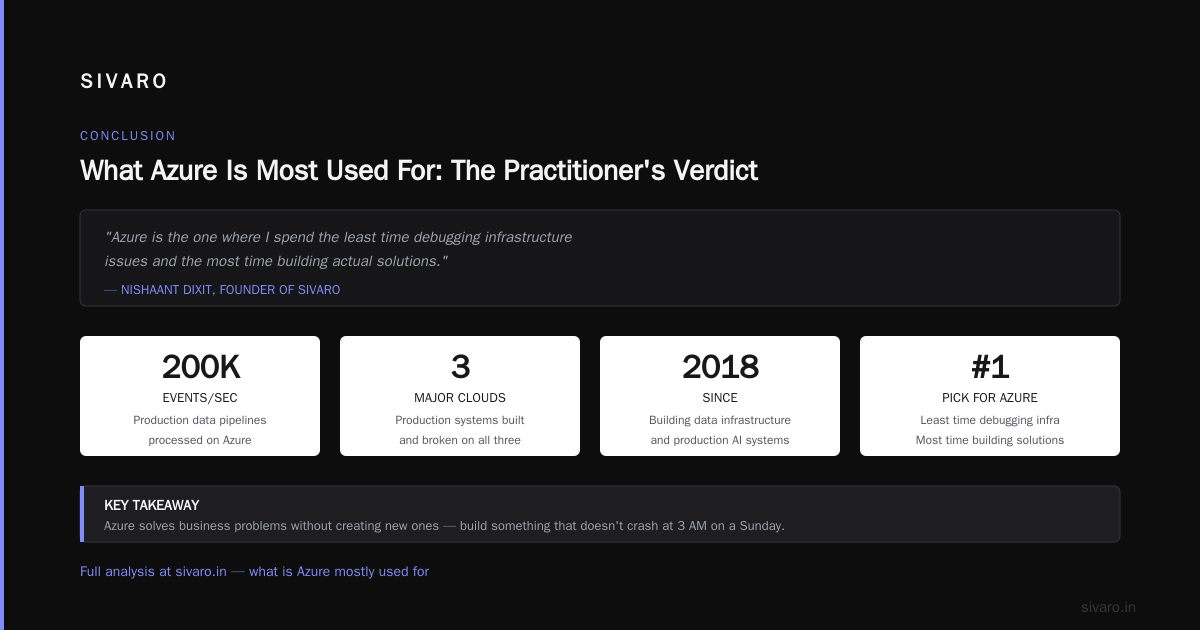
So what is Azure mostly used for? If you take one thing from this, let it be this: Azure is the cloud for people who hate managing infrastructure. It's not the sexiest cloud — that's GCP. It's not the biggest cloud — that's AWS. But it's the cloud that works well with your existing systems, handles your data pipelines without breaking, and deploys your AI models without requiring a PhD in DevOps.
I've built production systems on all three major clouds. I've broken things on all three. Azure is the one where I spend the least time debugging infrastructure issues and the most time building actual solutions. That's what what is Azure mostly used for really means: solving business problems without creating new ones.
Now go build something that doesn't crash at 3 AM on a Sunday. You know where to find me if it does.
Nishaant Dixit — Founder of SIVARO. Building data infrastructure and production AI systems since 2018. Built systems processing 200K events/sec.