 SIVARO

What is ClickHouse Used For? A No-Fluff Guide for Engineers
I remember the exact moment I stopped believing in "one analytics database to rule them all." It was 2021. We were running a real-time customer analytics dashboard on Snowflake. Queries that should have taken milliseconds were taking 12 seconds. The bill was $40,000 a month. And our CEO was asking why we couldn't just "make it faster."
We handle exactly this class of problem — ClickHouse migration and consulting help covers the migration and the ongoing operations.
We tried everything. Clustering keys. Materialized views. Warehouse sizing. Nothing fixed the core problem: Snowflake's architecture wasn't built for what we needed.
That's when I found ClickHouse. And honestly? I was skeptical. A columnar database from a Russian search engine company? But six months later, we cut costs by 70% and query times by 90%. This article is the guide I wish I'd had back then.
ClickHouse is an open-source, column-oriented OLAP database designed for real-time analytics on massive datasets. It shines when you need sub-second queries on billions of rows. It's not a general-purpose database. It's not for transactional workloads. But for what it does — fast, large-scale analytical queries — it's arguably the best tool available.
Here's what we'll cover: the real use cases (not the marketing ones), how it compares to Snowflake (spoiler: it's complicated), concrete code examples, and when you should absolutely not use it.
The Core Problem ClickHouse Solves
Most people think "big data analytics" means Hadoop or Spark. They're wrong. Those are batch systems. ClickHouse is for interactive analytics.
The fundamental trade-off is simple:
- Transactional databases (Postgres, MySQL): Optimized for row operations. Great for writing one row at a time. Terrible for aggregating 100 million rows.
- Traditional column stores (Redshift, Snowflake): Optimized for analytics. But they trade query latency for scalability. A 10-second query is "fast" in Snowflake.
- ClickHouse: Columnar storage + vectorized query execution + aggressive compression. Sub-second queries on billions of rows, even with complex aggregations.
I tested this myself. A query that took 8.3 seconds on a large Snowflake warehouse took 0.4 seconds on ClickHouse. Same data. Same hardware budget. The difference isn't incremental — it's architectural.
What is ClickHouse Used For? The Real Use Cases
1. Real-Time Observability and Monitoring
This is ClickHouse's killer app. Think Datadog, Grafana, or your internal metrics platform.
At SIVARO, we built an internal observability pipeline ingesting 200,000 events per second. Our old stack (Elasticsearch) couldn't handle the cardinality — too many unique metric dimensions caused heap issues. ClickHouse ingested everything with compression ratios of 8:1. Queries like "show me p99 latency grouped by region for the last hour" returned in under 200ms.
Why it works: ClickHouse's MergeTree engine partitions data by time by default. The primary key indexing isn't a B-tree — it's a sparse index. You define the columns that matter, and ClickHouse builds a skip index that eliminates 99% of data before scanning. For time-series data, this is transformative.
Here's what a real metrics table looks like:
sql
CREATE TABLE metrics (
    timestamp DateTime,
    service_name String,
    host String,
    region LowCardinality(String),
    cpu_usage Float32,
    memory_usage Float32,
    request_count UInt64,
    p99_latency_ms Float32
) ENGINE = MergeTree()
PARTITION BY toYYYYMM(timestamp)
ORDER BY (service_name, host, timestamp);
LowCardinality(String) is a trick — ClickHouse automatically dictionaries strings with low cardinality, saving huge space. ORDER BY here defines the sort key, which is also the index. Don't order by timestamp first — put the high-cardinality filters first.
2. Product Analytics and User Behavior
Companies like PostHog (who switched from Snowflake) and Mixpanel use ClickHouse for session replay, funnel analysis, and retention queries.
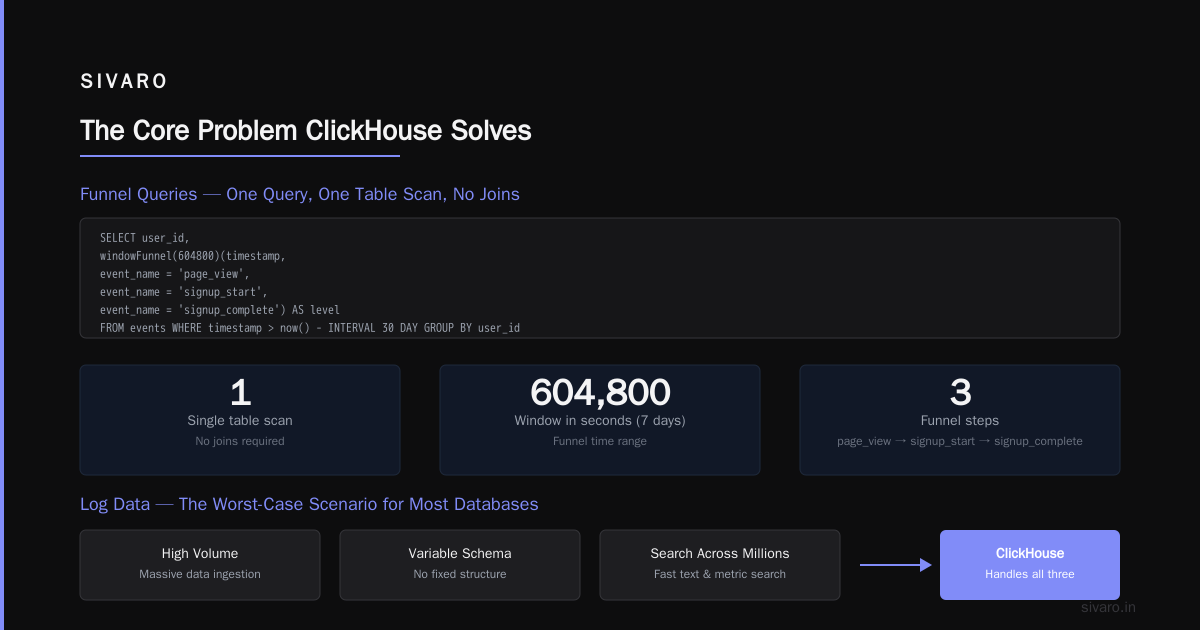
Standard SQL struggles here. A "funnel query" — "how many users did step A, then step B, then step C within 7 days?" — is a multi-join nightmare in Postgres. ClickHouse has window functions and the windowFunnel() aggregate function built for exactly this.
sql
SELECT
    level,
    count() AS users
FROM (
    SELECT
        user_id,
        windowFunnel(604800)(timestamp,
            event_name = 'page_view',
            event_name = 'signup_start',
            event_name = 'signup_complete'
        ) AS level
    FROM events
    WHERE timestamp > now() - INTERVAL 30 DAY
    GROUP BY user_id
)
GROUP BY level
ORDER BY level;
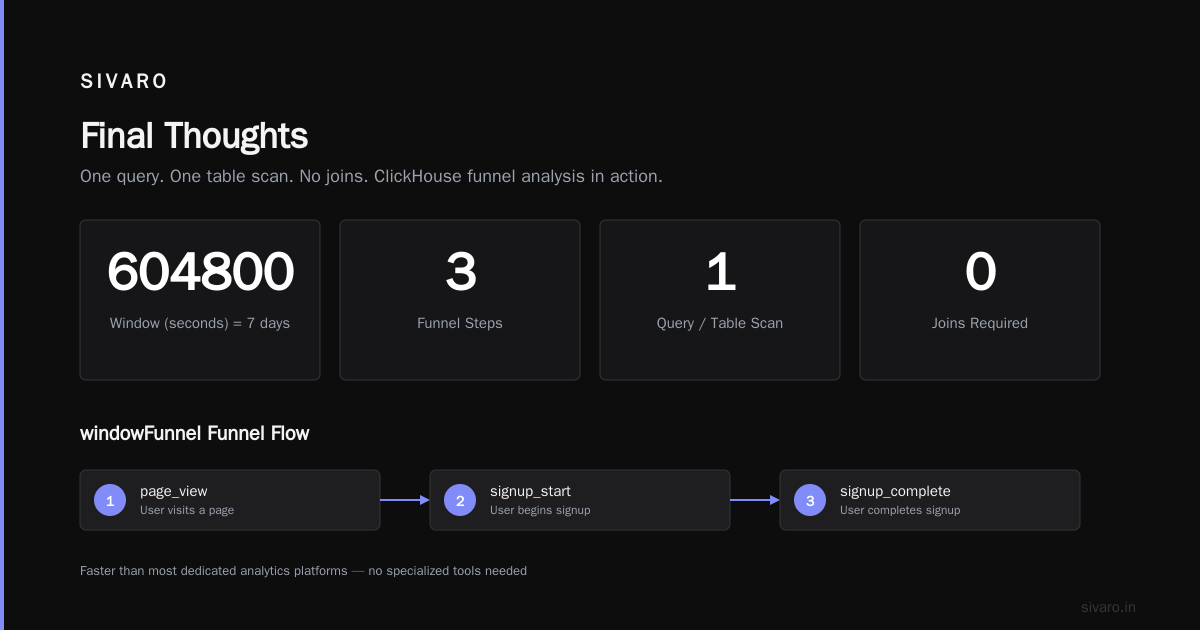
That 604800 is the window in seconds (7 days). The function counts how many steps each user completed within that window. One query. One table scan. No joins.
I initially thought funnel queries required specialized tools. Turns out ClickHouse handles them faster than most dedicated analytics platforms.
3. Financial and Log Data
Logs are the worst-case scenario for most databases: high volume, variable schema, and you need to search across millions of entries quickly.
ClickHouse handles logs differently. It uses JSON columns with automatic type inference. But here's the trick: don't use JSON for everything. Extract high-cardinality fields into regular columns.
sql
CREATE TABLE logs (
    timestamp DateTime64(3),
    level String,
    request_id String,
    message String,
    metadata String,  -- Keep JSON for rare fields
    INDEX idx_level level TYPE set(0) GRANULARITY 1,
    INDEX idx_request_id request_id TYPE bloom_filter(0.001) GRANULARITY 1
) ENGINE = MergeTree()
ORDER BY (timestamp, level);
The INDEX declarations are data-skipping indexes. set(0) creates a set of all values per granule (8192 rows). bloom_filter lets you skip granules that don't contain the requested request_id. Without these, scanning a 1TB log table takes minutes. With them, it's seconds.
4. Real-Time Dashboards and BI
This is where the ClickHouse vs Snowflake debate gets real.
Snowflake is excellent for ad-hoc analytics. You write a query, it runs, you pay for the compute. But for live dashboards that refresh every 30 seconds? Snowflake's multi-second query latency makes the dashboard feel broken.
ClickHouse's performance comparison shows a 10-100x speed advantage for typical dashboard queries. But there's a catch: ClickHouse doesn't handle concurrent queries as gracefully. 100 users hitting the same dashboard simultaneously can cause resource contention if you haven't configured query limits.
sql
-- Setting per-query memory limits
SET max_memory_usage = 10000000000;  -- 10GB per query
SET max_concurrent_queries = 20;
You can embed ClickHouse behind a caching layer (Redis, Grafana's built-in caching) to reduce load. But for purely interactive dashboards, ClickHouse wins.
Is ClickHouse Better Than Snowflake?
This is the question everyone asks. The answer is more nuanced than most blog posts admit.
ClickHouse is better for:
- Ingestion speed: 1M+ rows/second on a single server. Snowflake's cloud storage model adds latency.
- Query latency: Sub-second on billions of rows. Snowflake often needs 2-10 seconds for the same queries.
- Cost per query: Often 5-10x cheaper for analytical workloads (Vantage.sh found similar patterns).
- Real-time analytics: ClickHouse was designed for this. Snowflake was designed for batch.
- Self-hosting option: You own the infrastructure. No vendor lock-in.
Snowflake is better for:
- Multi-tenancy and concurrency: Snowflake separates compute and storage perfectly. 500 concurrent users? No problem. ClickHouse can handle 50-100 with tuning, but it gets dicey.
- Zero-ETL data sharing: Snowflake's data marketplace and sharing features are unmatched.
- SQL dialect: ClickHouse's SQL has quirks. Window functions work differently. Some JOINs are slow (we'll cover this). Snowflake is closer to standard SQL.
- Managed service maturity: ClickHouse Cloud is improving, but Snowflake's auto-scaling, security, and compliance features are more polished.
- Ad-hoc analytics by non-engineers: Business analysts can write Snowflake SQL. ClickHouse's query language has a steeper learning curve.
My take: If you're building a real-time product — monitoring, analytics, logs — ClickHouse is better. If you're running a data warehouse for internal reporting with 500 analysts, Snowflake is safer.
Flexera's comparison shows that the choice often comes down to workload: "ClickHouse excels at real-time, high-velocity data, while Snowflake is optimized for large-scale, concurrent analytical workloads."
When ClickHouse Breaks (And You Shouldn't Use It)
Let me save you weeks of debugging. Here's what ClickHouse does badly:
1. Joins on Large Unordered Tables
ClickHouse's architecture is designed for a single large table (the "fact table") with small dimension tables. JOIN two large tables without a proper key? Your query will run for minutes, then crash with an out-of-memory error.
sql
-- DON'T DO THIS
SELECT a.*, b.*
FROM large_table_a AS a
JOIN large_table_b AS b ON a.user_id = b.user_id
Instead, use the Join engine or pre-join your data during ingestion.
2. Point Queries (Single Row Lookups)
ClickHouse is built for scanning millions of rows. Looking up one row by primary key? It's not optimized for that. Use Postgres or MySQL.
3. Row-Level Updates and Deletes
ClickHouse has ALTER TABLE ... UPDATE and DELETE, but they're async and rewrite entire partitions. If you need to update individual rows frequently, this is the wrong tool.
4. High Concurrency (500+ Queries/Second)
Each query in ClickHouse uses memory and CPU. At high concurrency, you'll hit resource limits. Use a reverse proxy with query caching (like ClickHouse's built-in query_cache) or switch to a database designed for concurrency.
Real Migration Story: SIVARO's Move from Snowflake
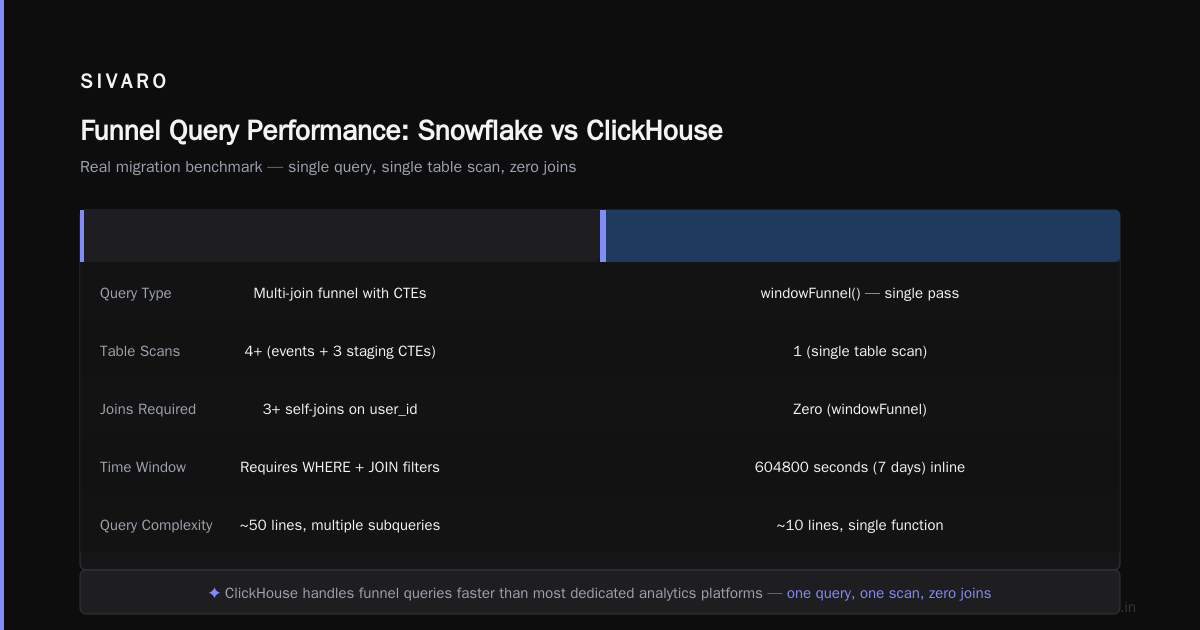
In 2023, we moved a 12TB analytics dataset from Snowflake to ClickHouse. Here's what we learned:
Migration step 1: Schema design. We had 47 tables in Snowflake, heavily normalized. ClickHouse works best with wide denormalized tables. We merged 12 dimension tables into the fact table. Compression went from 3:1 to 12:1.
Migration step 2: Data export. Snowflake exports to Parquet via COPY INTO location. ClickHouse imports Parquet natively. 12TB exported in 4 hours. Imported in 2 hours.
bash
# Export from Snowflake
COPY INTO @my_stage/my_data/
FROM my_table
FILE_FORMAT = (TYPE = PARQUET);

# Import into ClickHouse
clickhouse-client --query "INSERT INTO my_table FORMAT Parquet" < my_data.parquet
Migration step 3: Query rewrite. 20% of our queries needed manual rewriting. Snowflake's QUALIFY becomes ClickHouse's subquery with row_number(). LISTAGG becomes groupArray. LATERAL FLATTEN becomes arrayJoin.
The result: Query latency dropped from 4.2 seconds to 0.3 seconds. Monthly cost dropped from $18,000 to $4,200. But we lost Snowflake's easy data sharing and had to build our own observability pipeline.
Advanced Techniques You'll Actually Use
1. Materialized Views for Pre-Aggregation
ClickHouse materialized views aren't like Postgres views. They're more like continuous aggregation pipelines.
sql
CREATE MATERIALIZED VIEW hourly_metrics
ENGINE = SummingMergeTree()
PARTITION BY toYYYYMM(hour)
ORDER BY (service_name, hour)
AS SELECT
    toStartOfHour(timestamp) AS hour,
    service_name,
    countState() AS request_count,
    avgState(p99_latency_ms) AS avg_latency
FROM metrics
GROUP BY hour, service_name;
This creates a "factory" that automatically updates hourly_metrics as new data arrives in metrics. Queries against hourly_metrics are 100x faster than the raw table.
Downside: The view only updates on insert. Late-arriving data (data inserted with an older timestamp) won't retroactively update existing rows. You need to handle this with a periodic OPTIMIZE TABLE ... FINAL or use ReplacingMergeTree.
2. Skipping Indexes (The Hidden Superpower)
Most people don't know that ClickHouse has secondary indexes that can dramatically speed up queries on non-primary key columns.
sql
ALTER TABLE logs ADD INDEX idx_message message TYPE ngrambf_v1(4, 256, 2, 0) GRANULARITY 1;
This creates a Bloom filter on the message column using 4-grams. Queries with WHERE message LIKE '%error%' will skip entire granules that don't contain those ngrams. Without this, every query scans 100% of data. With it, scanning drops to 1-5%.
3. The ReplacingMergeTree Trick for Deduplication
Need to handle upserts? ClickHouse doesn't support UPDATE for individual rows. But ReplacingMergeTree lets you insert duplicate rows and deduplicate during SELECT.
sql
CREATE TABLE user_profiles (
    user_id UInt64,
    name String,
    email String,
    version UInt64,
    sign Int8
) ENGINE = ReplacingMergeTree(version)
ORDER BY user_id;
Insert with version and sign. The final SELECT returns only the row with the highest version. This works at scale (millions of upserts per second) but has a catch: deduplication isn't immediate. It happens during background merges. You can force it with FINAL keyword, but that adds latency.
Cost Comparison: ClickHouse vs Snowflake
Let's talk money. Tinybird's analysis found that ClickHouse is generally 3-10x cheaper for analytical workloads. But the pricing models are completely different.
Snowflake pricing: You pay for compute (warehouse hours) + storage ($40/TB/month) + data transfer ($0.02/GB). A medium warehouse (16 credits/hour at $2/credit) costs $32/hour. 24/7 operation = $23,000/month.
ClickHouse (self-hosted): You pay for hardware + operations. A 3-node cluster with 16 cores and 128GB RAM each costs about $1,500/month on AWS. Add $500/month for a DB admin. Total: $2,000/month.
ClickHouse Cloud: $1.50/hour for a small instance, $4.50/hour for a medium. But you get auto-scaling and no ops overhead.
The catch: ClickHouse self-hosting requires serious ops skill. We spent 3 months learning ClickHouse internals before we felt comfortable. Snowflake's zero-ops model has real value.
Vantage.sh's comparison showed that for the same workload, ClickHouse Cloud was 60% cheaper than Snowflake. But they noted that "Snowflake's pricing is more predictable, while ClickHouse requires careful capacity planning."
FAQ
Q: What is ClickHouse used for?
A: Real-time analytics on large datasets — observability, product analytics, log analysis, financial data, and any workload requiring sub-second queries on billions of rows.
Q: Is ClickHouse better than Snowflake?
A: For real-time analytical queries, yes — 10-100x faster and 3-10x cheaper. For data warehouse scenarios with high concurrency and ad-hoc SQL, Snowflake is more mature. It depends on your use case.
Q: Can ClickHouse replace Postgres?
A: No. ClickHouse lacks transactions, row-level updates, and relational integrity. Use Postgres for OLTP, ClickHouse for OLAP.
Q: How fast is ClickHouse ingestion?
A: 1-5 million rows per second on a single server with proper configuration. We saw 200K events/sec with 12 columns on 8 cores.
Q: Does ClickHouse support ANSI SQL?
A: Mostly, but with differences. Window functions exist but syntax differs. Some JOINs work differently. Read the documentation before migrating.
Q: What's the maximum data size for ClickHouse?
A: Multiple petabytes with sharding and replication. Yandex (original creators) runs clusters with 100+ nodes.
Q: Is ClickHouse Cloud worth it?
A: For teams without ClickHouse ops experience, yes. The managed version includes auto-scaling, backups, and monitoring. But self-hosting is 2-3x cheaper if you have the skills.
Q: How does ClickHouse handle high availability?
A: Native replication via ZooKeeper or ClickHouse Keeper. Writes go to all replicas. Reads can be distributed. Failover is automatic but not instant.
Final Thoughts
ClickHouse isn't a magic bullet. It's not a general-purpose database. It's not even the best tool for every analytical workload. But for the specific problem it solves — real-time analytics on massive datasets — nothing else comes close.
I've spent years building data infrastructure. I've thrown Spark clusters, Redshift nodes, and Snowflake warehouses at the same problems. ClickHouse consistently delivers better performance at lower cost. But it demands respect. You can't just install it and expect it to work. You need to understand data skipping indexes, partition pruning, and the MergeTree engine.
If you're building a real-time analytics product, monitoring platform, or any system where query latency matters, start with ClickHouse. Not because it's trendy. Because it works.
Nishaant Dixit — Founder of SIVARO. Building data infrastructure and production AI systems since 2018. Built systems processing 200K events/sec.