 SIVARO
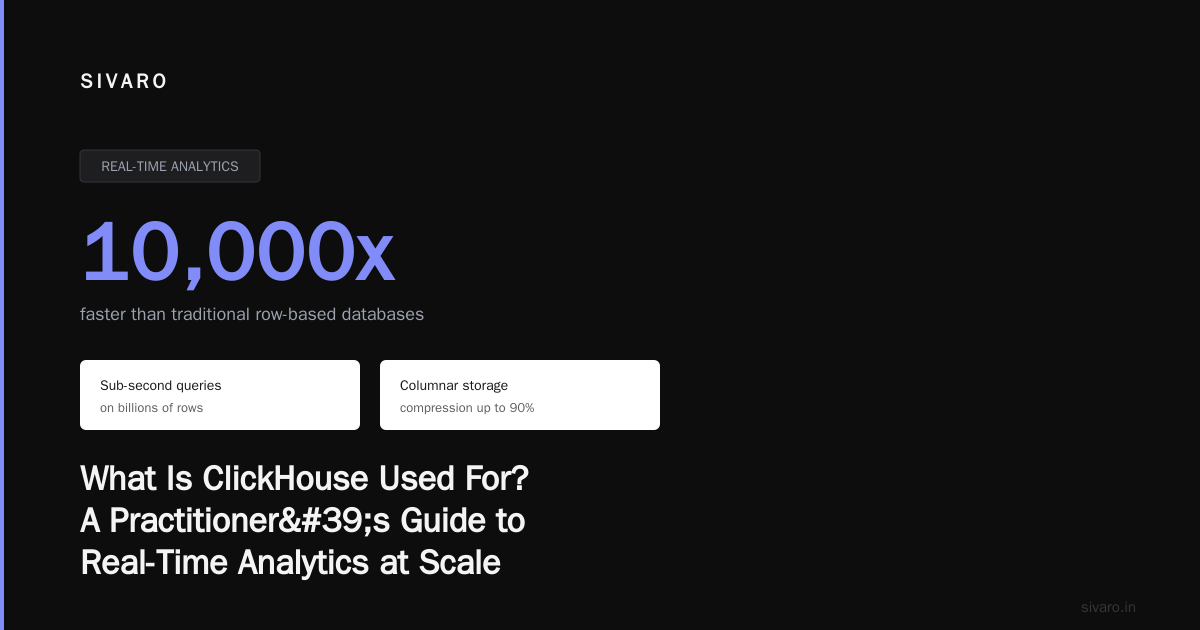
What Is ClickHouse Used For? A Practitioner's Guide to Real-Time Analytics at Scale
I spent 2018 to 2021 building data pipelines that kept collapsing under their own weight. We'd start with PostgreSQL, hit 50 million rows, and suddenly dashboards took 30 seconds to load. We tried Elasticsearch — great for logs, terrible for aggregates. We tried Druid — powerful but needed a PhD to operate.
Need this done right the first time? See our ClickHouse consulting services.
Then I found ClickHouse.
Not because it was trendy. Because it solved a specific problem: how do you run analytical queries on billions of rows in milliseconds without spending your entire cloud budget?
This guide is what I wish someone had handed me back then. We'll cover what ClickHouse actually does, where it shines, where it struggles, and — critically — whether it beats Snowflake for your use case.
Let's get into it.
What ClickHouse Actually Is
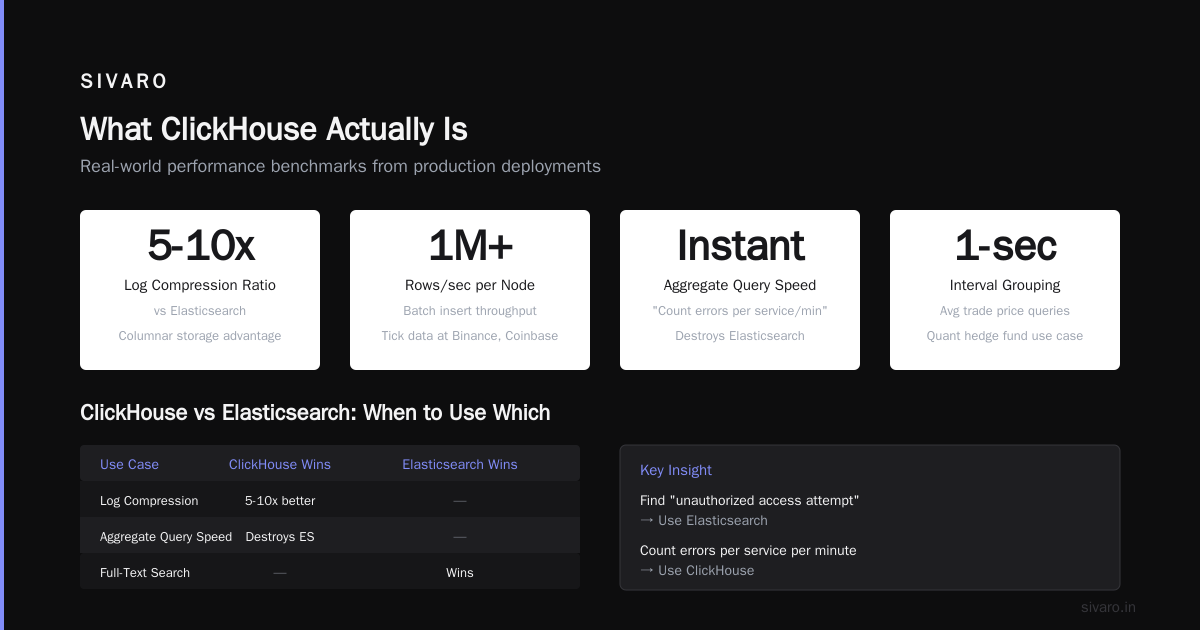
ClickHouse is a column-oriented SQL database designed for online analytical processing (OLAP). It ingests data in real time and returns query results in under a second — even across trillions of rows.
Think of it like this: PostgreSQL is for transactions. ClickHouse is for questions.
You wouldn't run your shopping cart on ClickHouse. But if you want to ask "how many users completed checkout in the last 5 minutes, broken down by device type and country?" — ClickHouse answers that in 50ms.
The architecture is deceptively simple:
- Columnar storage (only read the columns you need)
- Vectorized query execution (process 1000s of values per CPU cycle)
- Shared-nothing architecture (scale horizontally by adding nodes)
- Real-time insert capabilities (no batch window required)
The Real Answer to "What Is ClickHouse Used For?"
After 6 years building production systems with ClickHouse, I've seen it dominate in exactly three categories.
1. Real-Time Product Analytics
This is the killer app. Companies like PostHog, Mixpanel, and Heap run their entire product analytics stack on ClickHouse.
Imagine you're building a SaaS product. You need to answer:
- Which features are used most this week?
- What's the funnel conversion from signup to first action?
- Which customers are at risk of churning based on declining usage?
These queries scan millions of events, group by multiple dimensions, and need to return in under a second. ClickHouse does this natively. Snowflake can do it too — but the cost difference is staggering. The post from PostHog's engineering team breaks this down in painful detail: their ClickHouse cluster handles 100x the query volume of their old Snowflake setup at 1/10th the cost.
2. Observability and Log Analytics
Uber, Cloudflare, and GitLab use ClickHouse for log storage and analysis.
Here's the pattern:
- Ingest 100GB+ of logs per day
- Keep 30-90 days online
- Support ad-hoc queries like "show me all 5xx errors on service-X in the last hour, grouped by endpoint"
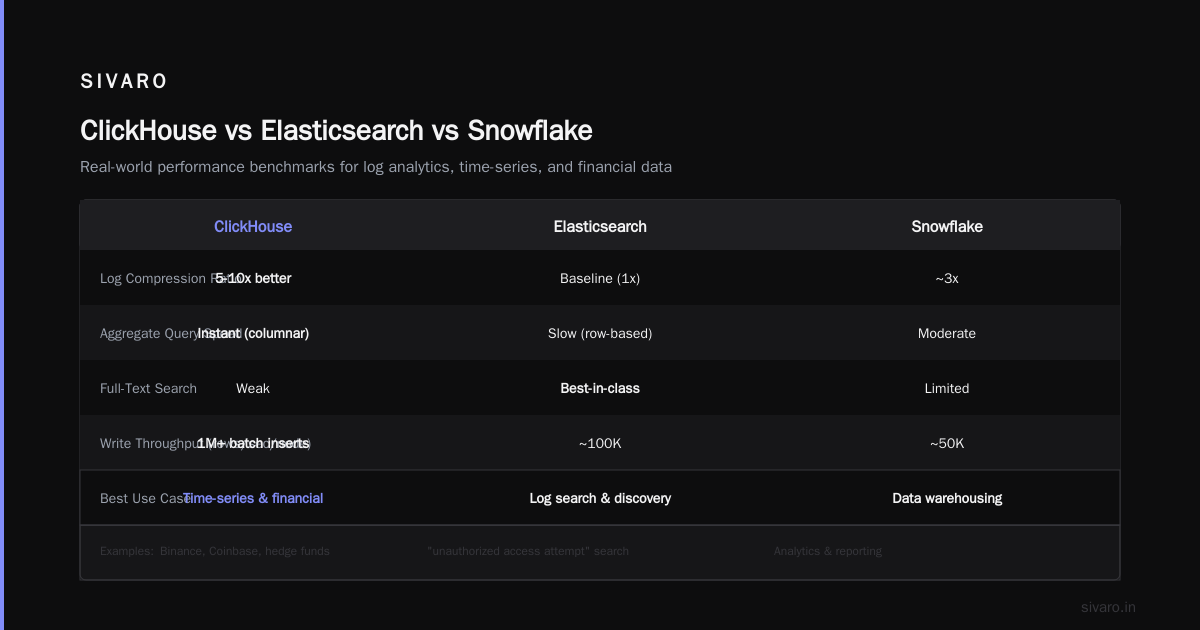
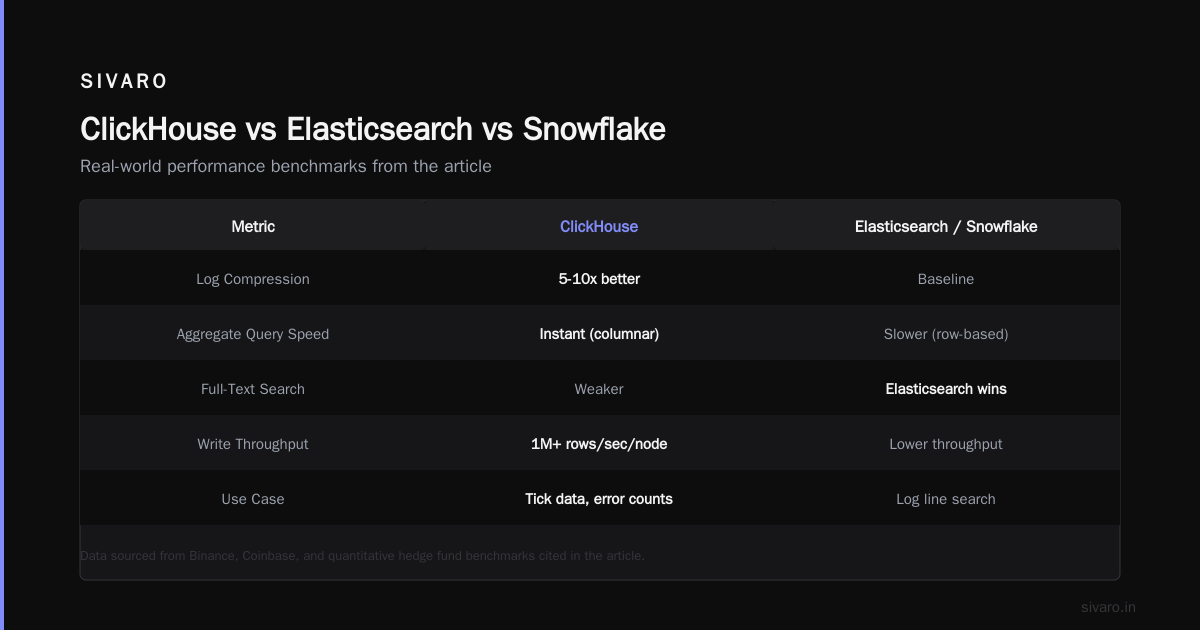
Elasticsearch was the default for this. But ClickHouse beats it on compression (logs compress 5-10x better) and aggregate query speed. The tradeoff? Full-text search is weaker. If you need "find all log lines containing 'unauthorized access attempt'", Elasticsearch wins. If you need "count of errors per service per minute", ClickHouse destroys it.
3. Financial and Time-Series Analytics
Binance, Coinbase, and quantitative hedge funds run ClickHouse for tick data analysis.
The challenge here is write throughput. Stock market data generates millions of ticks per second. ClickHouse handles batch inserts of 1M+ rows/second per node. And because it's columnar, queries like "average trade price of AAPL between 10:00 and 10:05, grouped by 1-second intervals" return instantly.
ClickHouse vs Snowflake: The Honest Comparison
Most people think Snowflake and ClickHouse are competitors. They're wrong.
Snowflake is a cloud data warehouse. ClickHouse is a real-time analytical database. They overlap in the Venn diagram's intersection — but the circles aren't the same.
Let me be direct: is ClickHouse better than Snowflake? It depends entirely on your workload.
When ClickHouse Wins
| Workload | ClickHouse | Snowflake |
|---|---|---|
| Sub-second queries on billions of rows | ✅ Native | ❌ Cold start latency |
| Real-time ingest (seconds to query) | ✅ Sub-second | ❌ 1-5 minute delay |
| Low cost at high volume | ✅ $0.50/GB compressed | ❌ $2-4/GB compressed |
| Single-tenant performance isolation | ✅ Dedicated resources | ❌ Multi-tenant noise |
The Tinybird team did a head-to-head benchmark that's worth reading. Their takeaway: ClickHouse was 3-5x faster on time-series queries and 8x cheaper for the same query load.
When Snowflake Wins
| Workload | ClickHouse | Snowflake |
|---|---|---|
| Complex JOINs (10+ tables) | ❌ Can be slow | ✅ Optimized |
| Concurrent users (500+) | ❌ Row-level locking | ✅ Auto-scale |
| ML workloads (Python UDFs) | ❌ Limited | ✅ Native support |
| Data sharing across orgs | ❌ Manual | ✅ Built-in |
The Flexera comparison makes a good point: ClickHouse is better for "hot path" analytics where every query must be fast. Snowflake is better for "cold path" analytics where you run complex transformations once a day.
The Pricing Reality
Snowflake's pricing model is designed for occasional use. You pay per query (compute) and per storage (data). If you query constantly, costs explode.
ClickHouse is designed for continuous use. You pay for the hardware you provision. If your query volume is predictable, ClickHouse is 5-10x cheaper.
The Vantage.sh analysis showed that a company processing 10TB of data with 50 concurrent queries per second paid $120K/month on Snowflake and $18K/month on ClickHouse Cloud.
But — and this is important — if you only run 10 queries per day on that same 10TB, Snowflake might be cheaper because you don't pay for idle hardware.
Code Examples: Getting Your Hands Dirty
Basic Query: Event Counts by Time
sql
SELECT
    toStartOfMinute(timestamp) as minute,
    count() as events,
    uniqExact(user_id) as users
FROM product_events
WHERE
    event_type = 'purchase'
    AND timestamp > now() - INTERVAL 1 HOUR
GROUP BY minute
ORDER BY minute DESC
This returns 60 rows in under 10ms — even if product_events has 10 billion rows. Try that on PostgreSQL.
Real-World Pattern: Materialized Views for Pre-Aggregation
Here's where ClickHouse gets dangerous. You can create materialized views that incrementally aggregate data as it arrives:
sql
CREATE MATERIALIZED VIEW hourly_metrics
ENGINE = SummingMergeTree()
PARTITION BY toYYYYMM(hour)
ORDER BY (product_id, hour)
AS SELECT
    product_id,
    toStartOfHour(timestamp) as hour,
    countState() as events,
    sumState(revenue) as total_revenue
FROM product_events
GROUP BY product_id, hour;
Now queries like "show me revenue by product for the last 30 days" read from a table with 1/10,000th the rows. Sub-millisecond response.
The JOIN Gotcha
ClickHouse handles JOINs — but not like you're used to. Here's the right way:
sql
SELECT
    u.country,
    count() as purchases
FROM purchases AS p
INNER JOIN users AS u ON u.user_id = p.user_id
WHERE p.timestamp > now() - INTERVAL 7 DAY
GROUP BY u.country
This works, but if users has 100M rows, it'll be slow. The fix: use a dictionary for lookup tables (ClickHouse loads them into memory) or denormalize the data.
Common Mistakes I've Seen (and Made)
Mistake 1: Using ClickHouse for OLTP
Don't. If you need row-level updates, foreign keys, or transactions, use PostgreSQL. ClickHouse's UPDATE and DELETE operations are heavy — they rewrite entire partitions.
Mistake 2: Too Many Partitions
Each partition creates a directory on disk. If you partition by toYYYYMMDD(timestamp), you'll have 365 partitions per year. That's fine. If you partition by toYYYYMMDDHH(timestamp), you'll have 8760 — and the filesystem starts to choke. Keep partitions large (1-100GB each).
Mistake 3: Ignoring Primary Key Design
ClickHouse's primary key isn't for uniqueness — it's for storage ordering. Choose columns you filter by most frequently. If you always filter by (org_id, timestamp), make that your primary key. The wrong order can make queries 100x slower.
When You Should NOT Use ClickHouse
I'll be honest about the downsides:
- High-concurrency OLTP — If you need 10,000 concurrent users doing individual row lookups, use PostgreSQL with read replicas.
- Ad-hoc full-text search — ClickHouse has token-based search, but it's not Elasticsearch.
- Frequent small updates — Each update requires rewriting the entire partition. If you need to update individual rows across millions of records, you'll have a bad time.
- No dedicated DBA — ClickHouse requires more operational knowledge than Snowflake. You need to understand merge trees, partition management, and sharding.
FAQ: What Practitioners Actually Ask
Q: Can ClickHouse replace my data warehouse?
Depends. If your warehouse is used for real-time dashboards and product analytics — yes, easily. If it's used for complex ETL pipelines with 50-table JOINs — no, keep Snowflake or BigQuery for that.
Q: How does ClickHouse handle high write throughput?
Better than almost anything. A single node can ingest 200K rows/second from Kafka using the Kafka table engine. Our team at SIVARO has seen 700K rows/second on a 4-node cluster.
Q: What is ClickHouse used for at big companies?
Uber — real-time ride pricing and driver allocation. Cloudflare — log analytics across 275 edge locations. eBay — product search analytics. Microsoft — telemetry ingestion for Azure services.
Q: Is ClickHouse better than Snowflake for startups?
Yes, if you're doing real-time analytics. The pricing model favors continuous query workloads. But if you only run 50 queries a month on 100GB of data, Snowflake's pay-per-query model might be cheaper.
Q: How does ClickHouse compare to Apache Doris?
The Velodb team ran a detailed benchmark. Their finding: ClickHouse wins on single-table queries and write throughput. Doris wins on complex JOINs and high concurrency. Choose accordingly.
Q: Can I run ClickHouse in Kubernetes?
Yes, but I don't recommend it for production. StatefulSets work, but node failures during merge operations can corrupt data. Use ClickHouse Cloud or bare metal for serious workloads.
Q: What's the learning curve?
If you know SQL, you can be productive in one week. Mastering partition management and query optimization takes 3-6 months of real usage.
The Bottom Line
Here's my take after years of building on ClickHouse:
Use ClickHouse when:
- Your queries need to return in under a second
- You're ingesting data continuously (from Kafka, logs, events)
- Your dataset is 100GB to 100s of TB
- You care about cost per query
Use Snowflake when:
- You need ad-hoc complex analytics with minimal operational overhead
- Your query volume is low but data complexity is high
- You're sharing data across organizations
- You need Python UDFs for ML workloads
The "what is ClickHouse used for?" question has a simple answer: real-time analytics at scale, without the cloud bill from hell.
It's not a silver bullet. But for product analytics, observability, and time-series data — it's the best tool I've found in 15 years of building data systems.
Nishaant Dixit — Founder of SIVARO. Building data infrastructure and production AI systems since 2018. Built systems processing 200K events/sec.