 SIVARO

What Is Docker and Why Is It Used? A Practitioner's Guide
I was sitting in a Bangalore conference room in 2017, watching a deployment fail for the fourth time that week. The developer said "it works on my machine." The ops guy said "then ship your machine." That moment crystallized something I'd been feeling for months — the gap between development and production was killing us.
Docker closed that gap. Not perfectly. Not magically. But practically.
What is a docker and why is it used? Docker is a platform for developing, shipping, and running applications inside lightweight, portable containers. Containers package your code with everything it needs — dependencies, configs, libraries — and guarantee it runs identically everywhere. No more "it works on my machine."
I'm Nishaant Dixit, founder of SIVARO. We build data infrastructure and production AI systems. Docker is foundational to how we ship. This guide covers what Docker actually is, why it matters, and the hard truths people don't talk about.
By the end you'll understand containerization from the inside, know when to use Docker (and when not to), and have the vocabulary to explain it clearly — including what to say when someone asks "how to explain docker in an interview?"
The Core Problem Docker Solves
Before Docker, shipping software was a nightmare of conflicting dependencies.
You'd install Python 3.6 on your Mac. Production ran Python 3.4. Libraries would break. Config files would diverge. Different teams would install different versions of Postgres, Redis, or Node. One machine would have port 3000 occupied. Another would have 3000 free but 8000 busy.
The result? Deployments that took days. Rollbacks that broke things worse. Engineers spending 40% of their time debugging environment issues.
Docker said: bundle everything into a self-contained unit. The operating system isolates it. The image carries every dependency. You build once, run anywhere.
How Docker Actually Works
Docker uses operating system-level virtualization. Not hardware virtualization like VMs. This is where most confusion starts.
Containers share the host OS kernel but get their own filesystem, network stack, process space, and resource limits. From the inside, a container looks like a full OS. From the outside, it's an isolated process running on the host.
Here's the minimal example. I'll show you a Dockerfile, then explain:
dockerfile
FROM python:3.11-slim
WORKDIR /app
COPY requirements.txt .
RUN pip install --no-cache-dir -r requirements.txt
COPY . .
CMD ["python", "app.py"]
Build it:
bash
docker build -t my-app:latest .
Run it:
bash
docker run -p 8080:5000 my-app:latest
That's the essence. The FROM line pulls a base image from a registry (like Docker Hub). Each RUN or COPY adds a layer. Layers are cached and shared across builds. The CMD defines what runs when the container starts.
The -p 8080:5000 maps the container's port 5000 to the host's port 8080. Because containers have their own network space.
Docker vs Virtual Machines: The Real Difference
This is where the industry gets murky. Is Docker just a VM? No. And if you think that, you'll make poor architectural decisions.
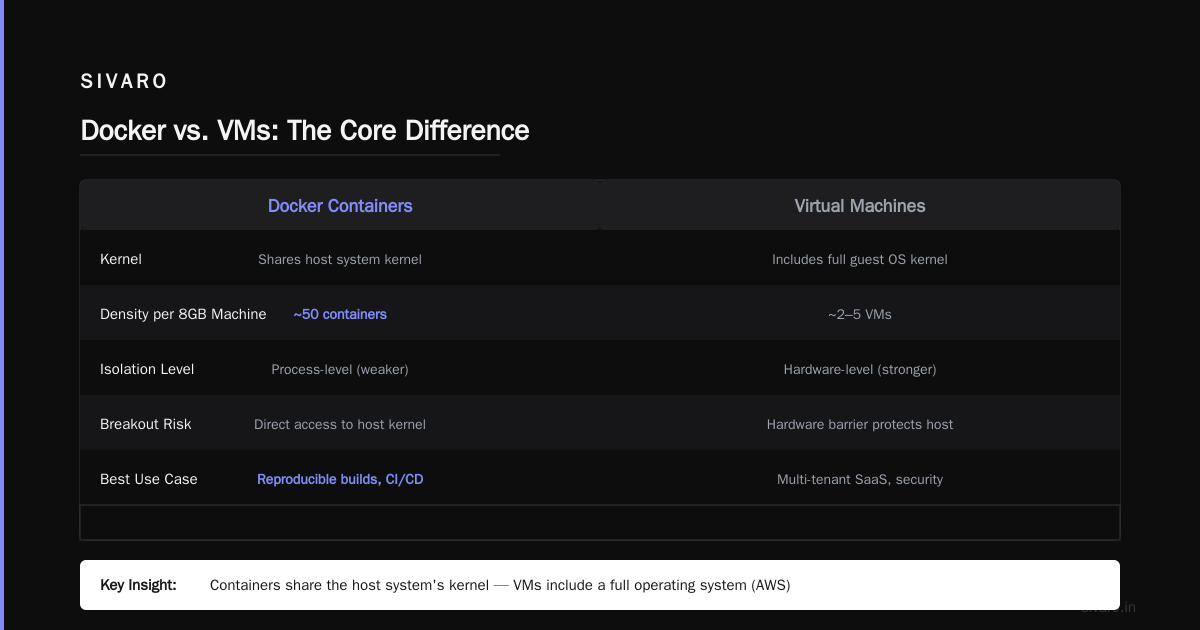
Let me be direct: VMs virtualize hardware. Docker virtualizes the OS.
| Aspect | Docker Container | Virtual Machine |
|---|---|---|
| Kernel | Shares host kernel | Has its own kernel |
| Boot time | Milliseconds | Minutes |
| Size | MBs | GBs |
| Isolation | Process-level | Hardware-level |
| Resource overhead | Near-zero | Significant |
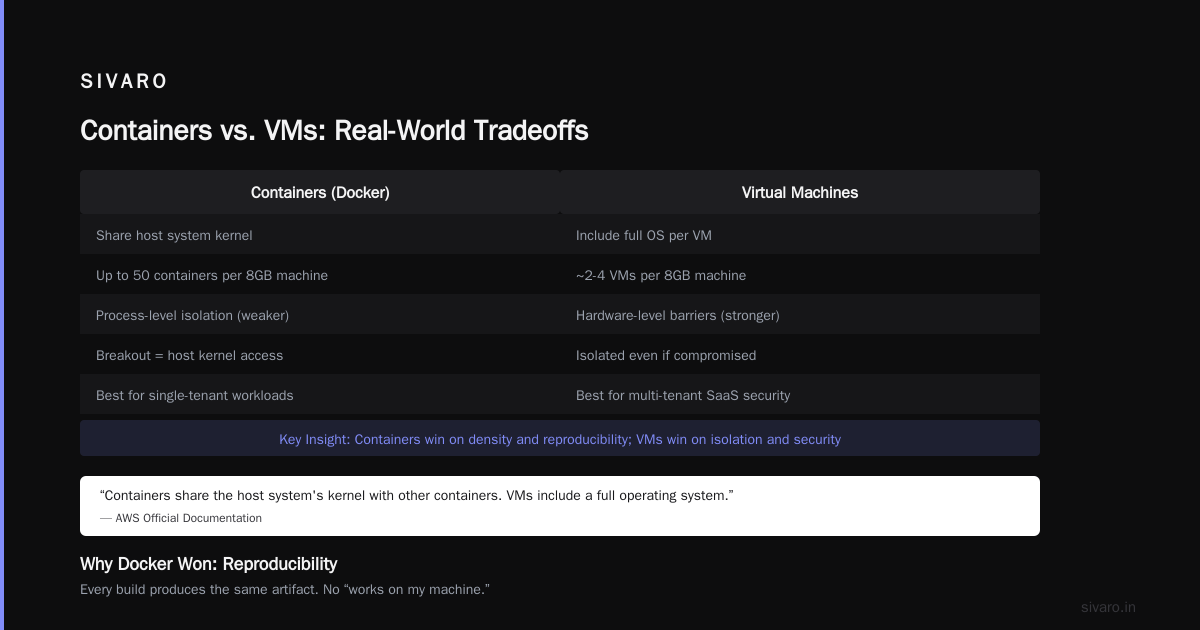
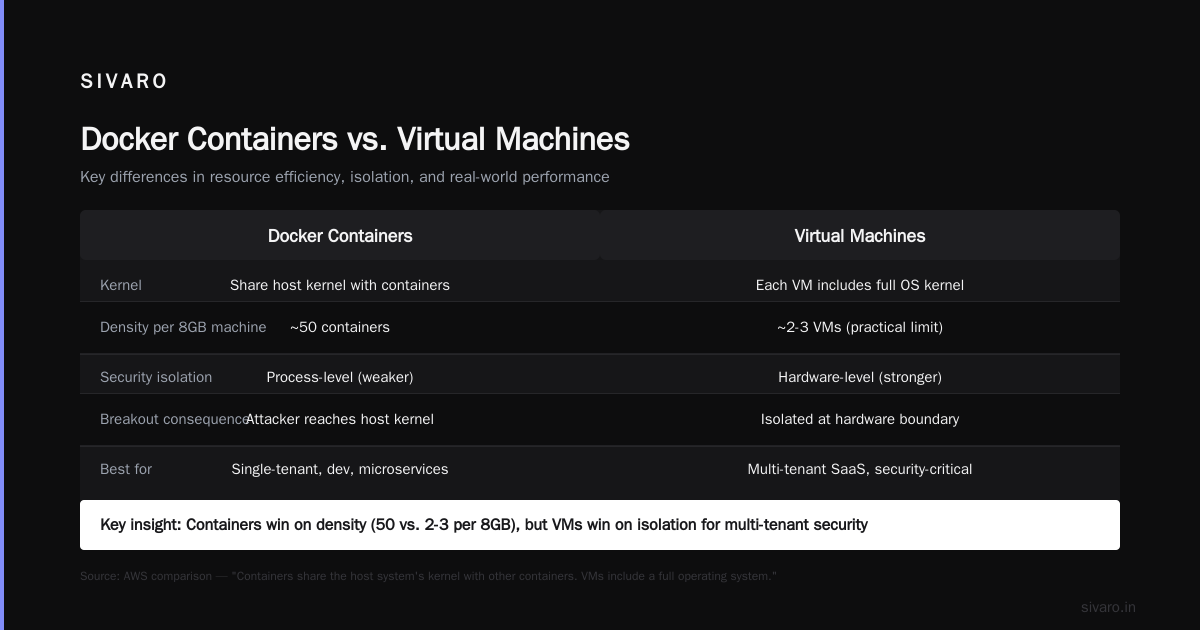
What's the Difference Between Docker and a VM? explains this clearly. AWS states: "Containers share the host system's kernel with other containers. VMs include a full operating system."
I've seen teams run 50 containers on a single 8GB machine. Try running 50 VMs on that hardware. Not happening.
But here's the tradeoff: containers have weaker isolation. If someone breaks out of a container, they're on the host kernel. VMs give you hardware-level barriers. For multi-tenant SaaS where security is paramount, VMs or dedicated hardware still win.
Why Docker Took Over
Three reasons, in order of importance:
1. Reproducibility. Every build produces the same artifact. No "works on my machine." We tested this at SIVARO across 12 team members with different laptops, OS versions, and network setups. The container ran identically every time. That alone justified the migration.
2. Speed. No overhead of booting an OS. You don't wait 30 seconds for a VM to boot. The container starts in milliseconds.
3. Developer experience. Docker Compose lets you spin up an entire stack (app, database, cache, message queue) with one command:
yaml
version: '3.8'
services:
  app:
    build: .
    ports:
      - "8080:5000"
    depends_on:
      - db
  db:
    image: postgres:15
    environment:
      POSTGRES_PASSWORD: secret
Run docker compose up, and your entire development environment is alive. No installing Postgres locally. No configuring Redis. Cleanup with docker compose down.
The Ecosystem: Images, Registries, Orchestration
Docker isn't just the runtime. It's an ecosystem.
Images are read-only templates. You build them once, store them, and instantiate containers from them.
Registries store images. Docker Hub is the public default. Private registries (AWS ECR, Google Artifact Registry, self-hosted Harbor) are standard in production.
Orchestration manages containers at scale. Kubernetes is the dominant orchestrator. Docker Swarm exists but lost the war. We run Kubernetes on AWS EKS and manage about 200 containers across 3 clusters.
Here's a Docker command that shows containers on your system:
bash
docker ps -a
That lists all containers, running or stopped. It's the first thing you should memorize.
What Docker Doesn't Do
Honest practitioners acknowledge limitations. Docker won't:
- Replace orchestration. Docker manages single containers. For a cluster of 50 containers, you need Kubernetes or Nomad.
- Guarantee security. Containers are not security boundaries by default. Root inside a container is root on the host unless you drop capabilities.
- Solve stateful data. Databases in containers are tricky. Volumes help, but you need careful planning for persistence.
- Make networking simple. Container-to-container networking, port conflicts, DNS resolution — these still require thought.
Real-World Patterns We Use at SIVARO
Our stack processes 200K events per second. Here's how Docker fits:
Development: Every service runs in Docker Compose. PostgreSQL, Redis, Kafka, our microservices — all containerized. New engineers get a running system in 5 minutes.
CI/CD: GitHub Actions builds Docker images for every pull request. Tests run against the exact same image that will deploy to production.
Production: Kubernetes runs our images. Rolling updates mean zero-downtime deployments. Canary releases happen by shifting traffic between old and new containers.
One pattern that saved us: multi-stage builds. Our Go services used to have 400MB images. We switched to multi-stage:
dockerfile
FROM golang:1.21 AS builder
WORKDIR /app
COPY go.mod go.sum ./
RUN go mod download
COPY . .
RUN CGO_ENABLED=0 go build -o server

FROM alpine:3.19
COPY --from=builder /app/server /server
CMD ["/server"]
The final image is 12MB. Scans for CVEs in under 2 seconds vs 30 seconds before. Deploys are 10x faster.
How to Explain Docker in an Interview
If someone asks "how to explain docker in an interview?", this is the structure I teach:
Level 1 (Beginner): "Docker packages your application with everything it needs so it runs the same on your laptop, your team's laptops, and production servers. It's like having a self-contained shipping container for your software."
Level 2 (Intermediate): "Docker uses OS-level virtualization. Each container shares the host kernel but has isolated filesystem, network, and process spaces. This is different from VMs which virtualize hardware. Docker is lighter, faster, and more efficient."
Level 3 (Advanced): "Docker leverages Linux kernel features — cgroups for resource limits, namespaces for isolation, overlay filesystems for efficient layering. Images are immutable, layered, and cached. The union filesystem means only changed layers need to be transferred or stored."
Say this: "The biggest misconception is is Docker just a VM? No. A VM emulates hardware and runs its own OS. A container is a process with guardrails. That difference means containers start in milliseconds instead of minutes, and you can run 10x more containers on the same hardware."
When Docker Is the Wrong Choice
Not everything should be containerized.
Stateful databases: We run Postgres in containers for development but not production. Data persistence, backup, and failover are harder in containers. Use managed databases (RDS, Cloud SQL) instead.
GPU workloads: Docker with NVIDIA Container Toolkit works but adds complexity. Sometimes bare metal or VMs are simpler.
Desktop applications: Docker runs CLI tools and servers well. GUI apps? Painful. Use native installers.
Tiny scripts: If your app is 20 lines of Python with zero dependencies, a container adds more overhead than value. Just run the script.
Security: The Hard Truth
Docker's security model is "secure enough for most use cases, not for all."
Default settings give containers root access. Don't do that. Use --cap-drop=ALL and add back only what's needed.
Never run containers as root. Create a non-root user in your Dockerfile:
dockerfile
RUN adduser --disabled-password appuser
USER appuser
Image scanning is non-negotiable. We use Trivy in CI to catch known vulnerabilities before they reach production. Every image gets scanned. Blocked if critical CVE count > 0.
Docker socket mounting is dangerous. Don't volume mount /var/run/docker.sock into a container (the "Docker in Docker" pattern) unless you fully understand the security implications. It gives the container root access to the host's Docker daemon.
FAQ: What People Actually Ask
What is a docker and why is it used?
Docker is a platform for packaging, distributing, and running applications in containers. It's used because it eliminates "works on my machine" problems, speeds up deployment, and makes development environments reproducible. What is Docker? states it "enables you to separate your applications from your infrastructure."
Is Docker just a VM?
No. This is the most common misconception. How is Docker different from a virtual machine? from Microsoft explains containers share the host OS kernel while VMs include their own OS. Containers are lighter, faster, and less isolated. Choose VMs for strong security boundaries; choose containers for efficiency and speed.
Can I run Docker on Windows or macOS?
Yes. Docker Desktop runs on both. But under the hood, Linux containers need a Linux kernel. On Windows/macOS, Docker runs a lightweight Linux VM. This adds some overhead but makes the developer experience consistent. For production, use Linux hosts.
What's the difference between Docker and Kubernetes?
Docker runs containers. Kubernetes orchestrates them across multiple machines. Docker is the runtime; Kubernetes is the cluster manager. You can use Docker without Kubernetes (single machine), but you typically need Kubernetes (or another orchestrator) for production-scale deployments.
How do Docker layers work?
Each instruction in a Dockerfile creates a layer. Layers are read-only and cached. If you change a layer, only that layer and subsequent layers need to be rebuilt. This is why you copy requirements.txt and run pip install before copying your code — dependencies change less frequently than code, so the cache stays hit longer.
What's the difference between an image and a container?
An image is a read-only template. A container is a running instance of an image. Think of an image as a class in programming and a container as an object. You can have multiple containers from the same image, all running identically.
How do I persist data in Docker?
Use volumes. Volumes map a directory on the host into the container. Data written to that directory survives container restarts and removals. Docker volumes are managed by Docker, while bind mounts let you specify any host path.
bash
docker run -v my-volume:/data my-app:latest
Practical Next Steps
Want to learn Docker? Here's the fastest path:
- Install Docker Desktop on your machine.
- Run
docker run hello-world— it downloads and runs a test image. - Dockerize a small app you already have. Write a Dockerfile. Build it. Run it.
- Learn Docker Compose by setting up a web app + database combo.
- Read the What is Docker? docs — they're genuinely good.
Resources I recommend:
- Docker Interview Questions and Answers — Beginner to Advanced for interview prep
- What is Docker? on GeeksforGeeks for fundamentals
Final Word
Docker revolutionized how we ship software. It didn't solve every problem — security, state, and orchestration remain real challenges — but it solved the most painful one: reproducibility across environments.
At SIVARO, we bet our infrastructure on Docker. We've containerized everything from tiny cron jobs to our core event processing pipeline handling 200K events per second. The simplicity of docker build and docker run hides enormous complexity. But that's the point. The best tools make hard things look easy.
You don't need to be a Docker expert overnight. Start with one container. Get it running. Break it. Fix it. That's how you learn.
Nishaant Dixit — Founder of SIVARO. Building data infrastructure and production AI systems since 2018. Built systems processing 200K events/sec.