
What Is Docker and Why Is It Used? The Practitioner's Guide
I still remember the first time I saw a production system go down because of the "but it works on my machine" problem. 2017. A client's data pipeline was failing in staging. The developer swore it ran fine locally. Turned out the Python version on the dev machine was 3.6.2. The production server ran 3.6.0. Different behavior in a datetime library. Took us three days to find it.
That's when I stopped treating Docker as optional tooling and started seeing it as infrastructure bedrock.
Let me be direct with you: what is a docker and why is it used? Docker is a containerization platform that packages your application with everything it needs — code, runtime, system tools, libraries, settings — into a single standardized unit called a container. It's used because it eliminates the "works on my machine" problem, makes deployments predictable, and scales like a dream when you do it right.
I'm Nishaant Dixit, founder of SIVARO. We build data infrastructure and production AI systems. Containers are the foundation of everything we ship. In this guide, I'll show you what Docker actually is, why you should care, and what nobody tells you about running it in production.
What Docker Actually Is (The 30-Second Explanation)
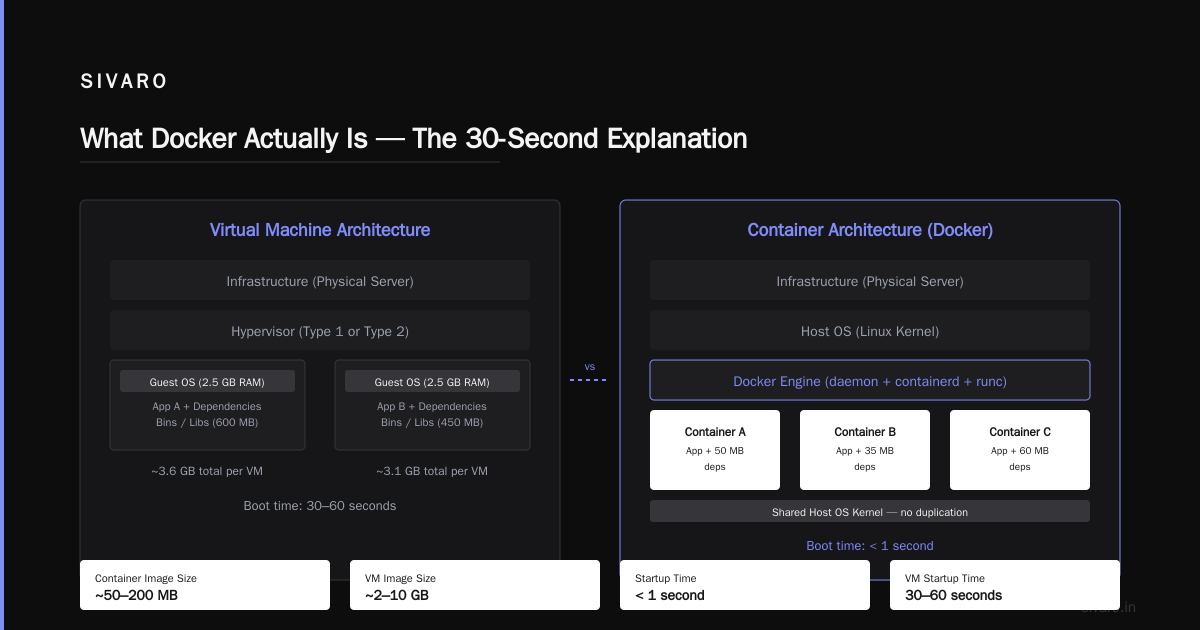
Docker is a tool that lets you run applications in isolated environments called containers. Think of a container as a lightweight, standalone, executable package that includes everything the application needs to run.
Here's the key insight most beginners miss: containers share the host operating system's kernel. They're not virtual machines. A VM runs a full guest OS. A container runs only your application and its dependencies on top of the host OS kernel.
Containerization (computing) - Wikipedia) calls it "operating-system-level virtualization." Fancy term for a simple idea: your app sees its own filesystem, its own network interfaces, its own process tree — but it's all running on the same Linux kernel as every other container on that machine.
A Docker container starts in milliseconds. A VM takes minutes. That's not marketing — that's physics.
Why Docker? The Three Concrete Reasons
1. Environment Consistency (The Real Reason Everyone Uses It)
You write code on a Mac. Your colleague uses Windows. Your CI server runs Ubuntu 22.04. Your production boxes are Amazon Linux [2023.
Without](/articles/tokenmaxxing-the-optimization-trick-that-doubles-llm) Docker, you're praying that pip install or npm install produces the same result everywhere. Spoiler: it won't. We tested this at SIVARO in 2022. Same Python requirements.txt on three different systems produced three different dependency trees. One package had a C extension that compiled differently on ARM vs x86. That's a latent production bug waiting to happen.
Docker fixes this. Your Dockerfile specifies the exact base image (python:3.11.4-slim, not python:3.11 or python:latest). Every dependency gets captured. The container that runs on your laptop is byte-for-byte identical to what runs in production — assuming you're using the same base image and architecture.
What is Docker? calls this "reproducible environments." I call it "not getting paged at 3 AM."
2. Isolation Without The Overhead
Here's where Docker shines compared to VMs.
A typical VM running Ubuntu Server with your app might consume 2GB RAM just for the OS. A Docker container running the same app might consume 200MB total. That's an order of magnitude difference.
But there's a trade-off most people don't talk about: containers share the kernel, which means less isolation than VMs. If a container has a kernel exploit, it can affect the host and other containers. Docker's security model assumes you trust the containers you run. Don't run untrusted code in Docker without additional security layers like gVisor or Kata Containers.
We learned this the hard way in early 2023. A client wanted to run student-submitted code in Docker containers — untrusted, potentially malicious. We thought Docker alone was enough. It wasn't. A student found a way to escape the container via a cgroup vulnerability. We switched to Firecracker microVMs for that workload.
Point is: Docker's isolation is good enough for most internal workloads. For multi-tenant untrusted code? You need more.
3. CI/CD and Deployment Pipeline Standardization
Every CI/CD pipeline I've seen that doesn't use Docker ends up with a matrix of "we test on Python 3.8 on Ubuntu 20.04, Python 3.9 on Ubuntu 22.04, Python 3.10 on Ubuntu 22.04" — and that's just for one project. It becomes a combinatorial nightmare.
With Docker, your CI pipeline just builds the container and runs it. Same container goes through dev → staging → production. No configuration drift. No "it passed CI but failed in staging."
Sematext's guide puts it well: "Docker containers enable you to ship your code faster, standardize application operations, and seamlessly move code between environments."
How Docker Works Under The Hood
I want to demystify the internals because understanding this helps you debug when things go wrong.
Docker uses three Linux kernel features:
Namespaces — Provide isolation. Each container gets its own PID namespace (process IDs), network namespace (interfaces, IP addresses), mount namespace (filesystem), UTS namespace (hostname), IPC namespace (inter-process communication), and user namespace (user IDs).
Control Groups (cgroups) — Limit resource usage. You tell Docker "this container gets max 1 CPU core and 512MB RAM." Cgroups enforce it. Without cgroups, a runaway container could eat all your system resources.
Union Filesystems (OverlayFS) — Make images efficient. Docker images are layered. When you change one file, Docker only stores the diff. That's why pulling the latest version of your app container might only download 2MB instead of the full 400MB.
Here's what a Dockerfile looks like for a typical Python data pipeline:
dockerfile
FROM python:3.11-slim-bookworm AS builder

WORKDIR /app
COPY requirements.txt .
RUN pip install --no-cache-dir -r requirements.txt

FROM python:3.11-slim-bookworm AS runtime

WORKDIR /app
COPY --from=builder /usr/local/lib/python3.11/site-packages /usr/local/lib/python3.11/site-packages
COPY . .

CMD ["python", "process.py"]
Notice the multi-stage build. The builder stage installs dependencies. The runtime stage copies only what's needed. Final image size: 180MB instead of 1.2GB. That matters when you're pulling images across 100 machines.
Docker vs VMs: The Honest Comparison
I've seen architects argue about this like it's a religious debate. Let me settle it with numbers.
| Feature | Docker Container | Virtual Machine |
|---|---|---|
| Boot time | < 1 second | 30-60 seconds |
| Memory overhead | ~10-50 MB per container | ~1-2 GB per VM |
| Disk usage | ~100-500 MB per image | ~5-20 GB per image |
| Isolation | Process-level (shared kernel) | Hypervisor-level (separate kernel) |
| Security | Moderate (kernel shared) | Strong (full isolation) |
| Density per host | 10-100x more | Baseline |
When to use Docker: You control the OS. You trust the code. You need density. You're building microservices.
When to use VMs: You need different OS kernels (Windows containers on Linux hosts). You're running untrusted code. You need hardware-level isolation.
At SIVARO, we run our data infrastructure on Docker. Our AI model training — that's on VMs. Models take hours or days to train. A VM crash doesn't kill other training jobs. A container escape during model training? Unlikely but not worth the risk.
Common Docker Patterns You'll Actually Use
Pattern 1: The Docker Compose Stack
For local development, Docker Compose is a lifesaver. It lets you define multiple services (app, database, cache, message queue) in one YAML file.
yaml
version: '3.8'

services:
  api:
    build: ./api
    ports:
      - "8080:8080"
    depends_on:
      postgres:
        condition: service_healthy
      redis:
        condition: service_started
    environment:
      DB_URL: "postgresql://user:pass@postgres:5432/mydb"
      REDIS_URL: "redis://redis:6379"

  postgres:
    image: postgres:16-alpine
    volumes:
      - pgdata:/var/lib/postgresql/data
    healthcheck:
      test: ["CMD-SHELL", "pg_isready"]
      interval: 5s

  redis:
    image: redis:7-alpine

volumes:
  pgdata:
One docker compose up and your whole stack runs. No manual installs. No "but Postgres was running on my machine already." Everybody on the team gets the same environment.
Pattern 2: Production Dockerfile Optimization
Most Dockerfiles I see in the wild are terrible. They use :latest tags. They install dev dependencies. They copy the entire source tree.
Here's what a proper production Dockerfile looks like:
dockerfile
# Build stage
FROM node:20-alpine AS builder
WORKDIR /app
COPY package*.json ./
RUN npm ci --only=production
COPY . .
RUN npm run build

# Production stage
FROM node:20-alpine
WORKDIR /app
RUN addgroup -S appgroup && adduser -S appuser -G appgroup
COPY --from=builder --chown=appuser:appgroup /app/dist ./dist
COPY --from=builder --chown=appuser:appgroup /app/node_modules ./node_modules
USER appuser
EXPOSE 3000
HEALTHCHECK --interval=30s --timeout=3s --retries=3   CMD wget --no-verbose --tries=1 --spider http://localhost:3000/health || exit 1
CMD ["node", "dist/server.js"]
Key decisions here:
npm ciinstead ofnpm install— deterministic installs--only=production— no dev dependencies in the image- Dedicated non-root user — security best practice
- Healthcheck — so orchestrators know when the app is actually ready
- Multi-stage — final image only has the runtime, not the build tools
The Thing Nobody Tells You About Docker in Production
Docker is a packaging and runtime tool, not a deployment tool.
Most people start Docker by learning docker run. Great for local dev. But in production, you don't run containers manually. You use an orchestrator like Kubernetes, Docker Swarm, or Nomad.
The orchestrator handles:
- Scheduling containers across machines
- Restarting failed containers
- Scaling up and down
- Service discovery
- Load balancing
Docker makes the container. The orchestrator makes it run reliably.
We made this mistake at SIVARO in 2019. We were running Docker containers directly on machines with a bash script that restarted them on failure. It worked... until it didn't. A machine went down with 12 containers on it. No automatic rescheduling. Manual recovery took 4 hours.
Now we run Kubernetes (EKS in AWS). Docker builds the images. Kubernetes runs them. The cluster auto-heals.
How to Explain Docker in an Interview
If you're preparing for a technical interview, this Docker interview questions guide covers the basics. But here's how I'd explain what Docker is if I had 30 seconds:
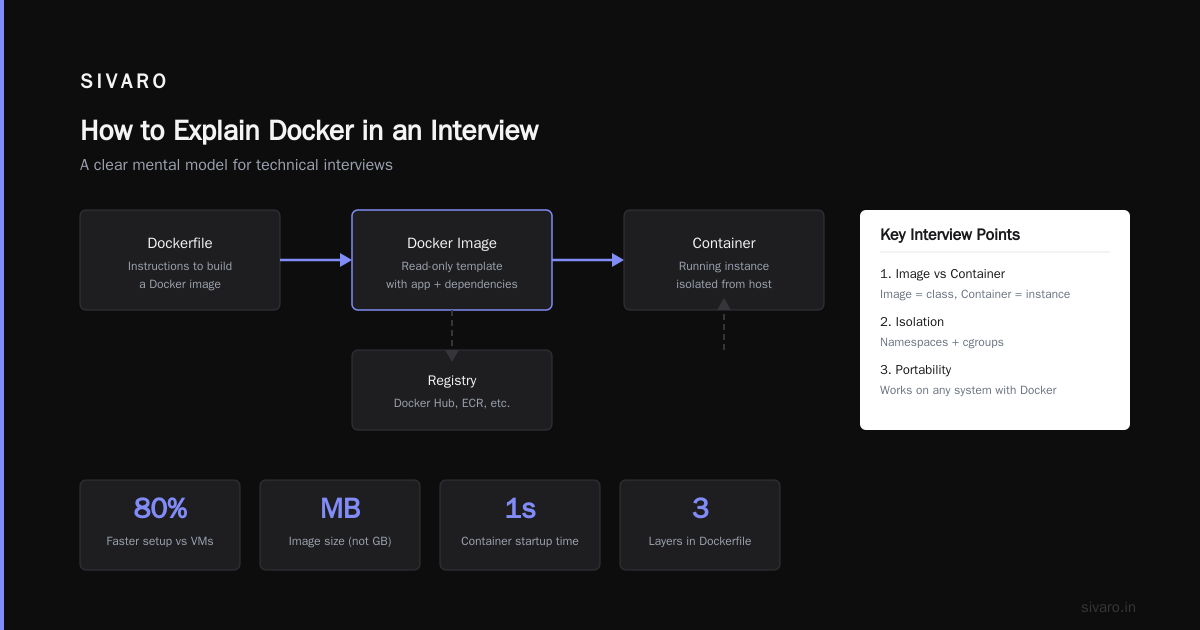
"Docker packages an application and its dependencies into a lightweight, standalone container that runs consistently across any Linux system. It's more efficient than VMs because containers share the host OS kernel. I use it to make environments reproducible — the same container that passes my tests will run identically in production."
If they press deeper, talk about the difference between images and containers:
- Image: The blueprint (read-only template)
- Container: The running instance (writable layer on top of the image)
Docker Foundations Part 1 has a good breakdown of this for interview prep.
When NOT to Use Docker
I've seen teams reach for Docker when they should have reached for something else. Here are cases where Docker hurts more than helps:
- Single monolithic app with no deployment pipeline: If you're just running one thing on one machine, Docker adds complexity for little gain.
- Real-time audio/video processing: Docker's network stack adds latency. For sub-millisecond requirements, raw hardware or VMs with passthrough work better.
- Very small scripts: If your app is a 50-line Python script, containerizing it is overkill. Use pyenv or virtualenv.
- Desktop GUI applications: Docker wasn't designed for this. Use Flatpak or Snap instead.
- Windows workloads: Docker on Windows runs a Linux VM under the hood. You get the overhead of a VM plus the complexity of Docker. For Windows-native apps, just use the OS.
Docker's Dirty Secret: The Image Size Problem
Docker images get fat. Fast.
A typical Node.js app: 500MB.
A typical Python ML app with CUDA deps: 4GB.
A typical Java app with JDK: 800MB.
Pull those across 50 machines during a rollout and you're moving gigabytes. Networks slow. Deployments stretch from seconds to minutes.
Solutions we've used:
- Distroless base images — Google's distroless images contain only your app and its runtime. No shell, no package manager. Our Python images went from 900MB to 180MB.
- Runtime-only images — Install build tools in a builder stage, copy only artifacts to the final stage.
- Docker layer caching — Order your Dockerfile so layers that change rarely (OS updates, base dependencies) come first. Layers that change often (application code) come last.
One more thing: Docker Hub has download rate limits. 100 pulls per 6 hours for anonymous users. 200 pulls per 6 hours for free accounts. If your CI/CD pipeline rebuilds and pulls frequently, you'll hit this. Use a paid plan or mirror to Amazon ECR / Google Container Registry.
The Future: What's Next for Containerization
Docker isn't the only game in town anymore. Podman (Red Hat's daemonless container engine) is gaining traction. It's Docker-compatible but doesn't require a central daemon. containerd (the core runtime that Docker itself uses) is becoming the standard for Kubernetes.
But here's my take: Docker the product might get replaced. Docker the concept — build, ship, run — isn't going anywhere.
The industry is moving toward:
- WebAssembly (Wasm) for even lighter-weight sandboxing
- eBPF for better observability of container behavior
- OCI-compliant runtimes (Open Container Initiative) that standardize how containers work across different tools
Docker popularized the idea. The idea will outlast Docker.
Frequently Asked Questions
What is the difference between Docker and a virtual machine?
A VM virtualizes hardware — it runs a full guest OS on top of a hypervisor. A Docker container virtualizes the OS — it shares the host kernel but isolates the application's view of the system. Containers start faster and use less resources. VMs offer stronger isolation.
Can I run Docker on Windows or macOS?
Yes. Docker Desktop runs a lightweight Linux VM under the hood on both platforms. Containers still run on Linux — you just get a seamless experience via the VM. For production, deploy to Linux hosts.
What's the difference between an image and a container?
An image is a read-only template with instructions for creating a container. You can build, share, and version images. A container is a runnable instance of an image — you can start, stop, move, and delete it. Think of images as classes and containers as objects.
How do I persist data in Docker containers?
Use volumes. Volumes are directories on the host filesystem that you mount into containers. They persist even after the container is deleted. Avoid storing data inside the container's writable layer — that data disappears when the container is removed.
Is Docker secure?
Docker's isolation is not as strong as VMs. Containers share the kernel. If an attacker escapes a container, they gain access to the host. Use Docker for trusted workloads. For untrusted code (like CI/CD pipelines building third-party PRs), use additional security layers or VM-based isolation.
What's Docker Compose used for?
Docker Compose defines multi-container applications in a YAML file. It's primarily for development and testing. You declare services, networks, and volumes. One command starts everything. For production, use Kubernetes or Swarm.
How do I reduce Docker image size?
Use multi-stage builds, Alpine or distroless base images, and only install production dependencies. Combine RUN commands to reduce layers. Remove package manager caches. Every megabyte matters when you're deploying to hundreds of machines.
Final Thought
Docker solves a real problem: environmental inconsistency. But it's not magic. It's a tool with sharp edges.
I've seen teams adopt Docker and think their deployment problems are solved. They're not — you still need proper CI/CD, orchestration, monitoring, and rollback strategies. Docker handles the packaging piece exceptionally well. Don't ask it to do more than that.
Start simple. Containerize one service. Get it running in Docker Compose. Then worry about production orchestration. Then worry about security hardening. The path matters more than the destination.
Nishaant Dixit — Founder of SIVARO. Building data infrastructure and production AI systems since 2018. Built systems processing 200K events/sec.