 SIVARO

What Is GCP Used For? A Practitioner’s Guide to Google Cloud
I’ll tell you a story.
Back in 2019, I was engineering a real-time recommendation system for a retail client. We needed to process 50,000 user events per second, run a TensorFlow model, and serve predictions in under 100 milliseconds. AWS was the obvious choice — everyone was on AWS. But we chose Google Cloud instead.
Why? Because GCP’s data infrastructure hit different. BigQuery, Pub/Sub, and Vertex AI worked together in ways AWS’s stack couldn’t match for that specific job.
That decision saved us four months of engineering time.
So when people ask me “what is GCP used for?”, I don’t give a textbook answer. I give you what I’ve seen work — and fail — across a dozen production systems.
The Short Answer
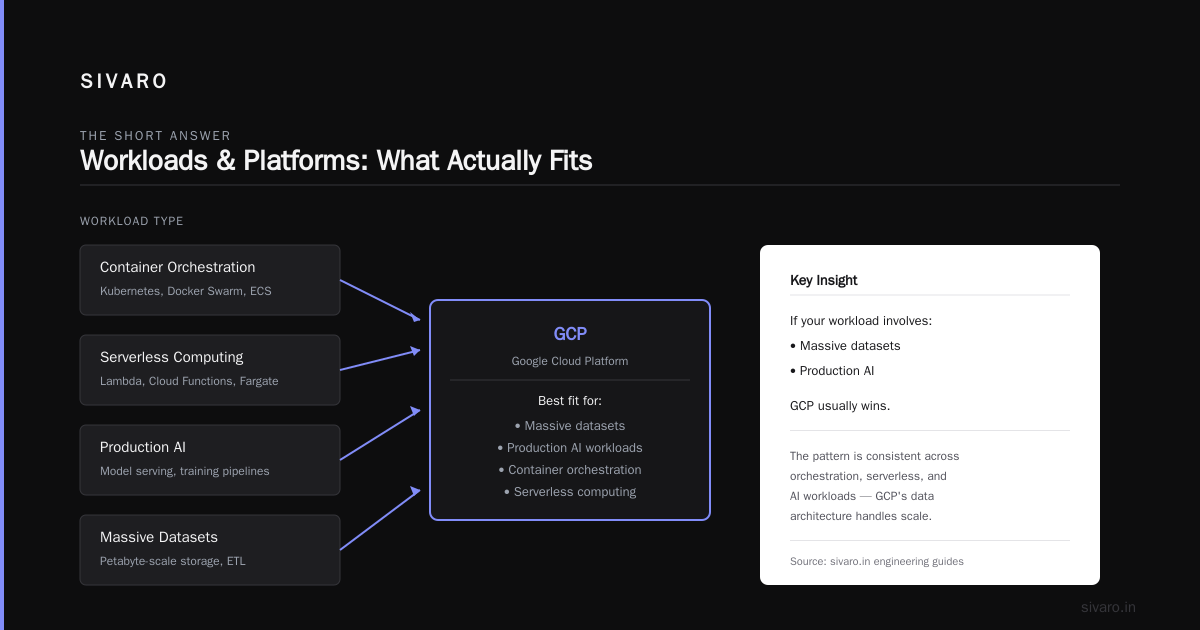
Google Cloud Platform (GCP) is a suite of cloud computing services running on the same infrastructure Google uses for Search, YouTube, and Gmail.
What is what is gcp used for in practice? Data analytics. Machine learning. Container orchestration. Serverless computing. If your workload involves massive datasets or production AI, GCP usually wins. If you’re running a standard CRUD app, AWS or Azure might be cheaper.
But let’s go deeper.
Where GCP Dominates
BigQuery: The Data Warehouse That Doesn’t Suck
I’ve run Postgres warehouses. I’ve run Redshift clusters. I’ve managed Snowflake instances. BigQuery is different.
It’s serverless. You don’t provision storage or compute. You just load data and query it. The pricing model — $5 per TB scanned — feels expensive until you realize you’re not paying for idle clusters.
The trick: use partitioning and clustering to reduce scanned data. We cut a client’s monthly BigQuery bill from $12,000 to $1,800 just by adding PARTITION BY DATE(timestamp) and clustering on user_id.
Here’s what a partition filter looks like:
sql
SELECT
  user_id,
  COUNT(*) as event_count
FROM `project.dataset.events`
WHERE DATE(timestamp) = '2024-11-15'
  AND user_id IN ('abc123', 'def456')
Without that date filter, you scan all data. With it, you scan maybe 1% of the data.
When BigQuery hurts you: real-time queries under 1 second. BigQuery’s minimum latency is around 2-3 seconds even for small queries. For sub-second needs, use Cloud SQL or Firestore.
Pub/Sub and Event-Driven Architecture
Google built Pub/Sub for internal systems handling billions of daily pushes. It’s the best managed message queue I’ve used. It handles exactly-once delivery (which is a lie in distributed systems — it’s actually at-least-once with deduplication in the subscriber).
We built a fraud detection pipeline that ingested 200K events/sec through Pub/Sub, ran them through a Cloud Dataflow streaming pipeline, and scored them in Bigtable. End-to-end latency under 2 seconds.
Here’s a minimal subscriber in Python:
python
from google.cloud import pubsub_v1

subscriber = pubsub_v1.SubscriberClient()
subscription_path = subscriber.subscription_path('my-project', 'my-subscription')

def callback(message):
    data = message.data.decode('utf-8')
    print(f"Received {data}")
    message.ack()

streaming_pull_future = subscriber.subscribe(subscription_path, callback=callback)
print("Listening for messages...")
streaming_pull_future.result()
Trade-off: Pub/Sub has a 10MB message size limit. For larger payloads, you need to split messages or use a separate storage layer like Cloud Storage with a notification trigger.
Vertex AI: Production ML Without the Headache
Most people think GCP’s ML story is just about training models. Wrong. The real value is Vertex AI Pipelines — orchestrating the entire ML lifecycle from data prep to model serving to monitoring.
I’ve deployed models using SageMaker, Azure ML, and Vertex AI. Vertex’s integration with BigQuery wins. You can pull training data with a SQL query, preprocess it in Dataflow, train on TPUs, and deploy to a serving endpoint — all as a managed pipeline.
Here’s a pipeline component that trains a scikit-learn model:
python
from google.cloud import aiplatform

aiplatform.init(project='my-project', location='us-central1')

job = aiplatform.CustomContainerTrainingJob(
    display_name='fraud-model',
    container_uri='gcr.io/my-project/fraud-training:latest',
    model_serving_container_image_uri='us-docker.pkg.dev/vertex-ai/prediction/sklearn-cpu.0-24:latest',
)

model = job.run(
    model_display_name='fraud-classifier-v2',
    replica_count=1,
    machine_type='n1-standard-4',
)
When GCP ML hurts: GPU availability. Google runs out of A100s in us-central1 constantly. We had to move training jobs to europe-west4 to get capacity. Plan ahead or use preemptible VMs.
Where GCP Is Just Better
Cloud Storage for Object Storage
Object storage is a solved problem on a lot of clouds. But Cloud Storage has three things I don’t see elsewhere:
- Object Lifecycle Management — Automatically transition hot data to nearline, coldline, or archive based on age. No scripting needed.
- Requester Pays — If you’re sharing public datasets, requester pays shifts egress costs to whoever downloads the data. This was critical when we released a 2TB benchmark dataset.
- Transfer Service — You can schedule recurring transfers from AWS S3 or Azure Blob Storage. We migrated 50TB from S3 with zero downtime.
One painful truth: Cloud Storage’s performance for random reads is mediocre. If you’re doing high-throughput random access, use Bigtable or Spanner.
Cloud Run: Serverless That Scales to Zero
I’m a contrarian on serverless. Most serverless products are overpriced for anything beyond prototypes. But Cloud Run is different.
It runs containers — real Docker containers — not proprietary runtimes. You write a Dockerfile, push it, and Cloud Run manages scaling from 0 to thousands of instances.
Here’s a minimal service:
yaml
# cloudrun.yaml
apiVersion: serving.knative.dev/v1
kind: Service
metadata:
  name: my-api
spec:
  template:
    spec:
      containers:
      - image: gcr.io/my-project/api:latest
        resources:
          limits:
            cpu: '1'
            memory: 512Mi
Deploy with gcloud run services replace cloudrun.yaml.
Where Cloud Run fails: anything requiring persistent connections (WebSockets, SSH, long-polling). Cloud Run’s max request timeout is 60 minutes, but connections drop during scale-to-zero transitions. Use Compute Engine or GKE for stateful workloads.
The Hidden Costs Nobody Talks About
Egress prices. GCP charges $0.12/GB for internet egress. If your ML model serves predictions to users, you’ll pay more for network than compute. We optimized by moving static data to Cloud CDN and using response compression (cut egress by 40%).
Commit usage. GCP’s committed use discounts (1-year or 3-year) are aggressive. We saved 40% on Compute Engine by committing to $50K/month for 3 years. But if your usage drops, you’re stuck. Layer in preemptible VMs for burst workloads to avoid over-committing.
BigQuery slot reservations. If you have multiple teams querying the same dataset, you might hit on-demand pricing limits. We moved to flat-rate slots ($2,000/month for 100 slots) and saved 30% because our analysts ran expensive queries.
When GCP Is the Wrong Choice
Let’s be direct.
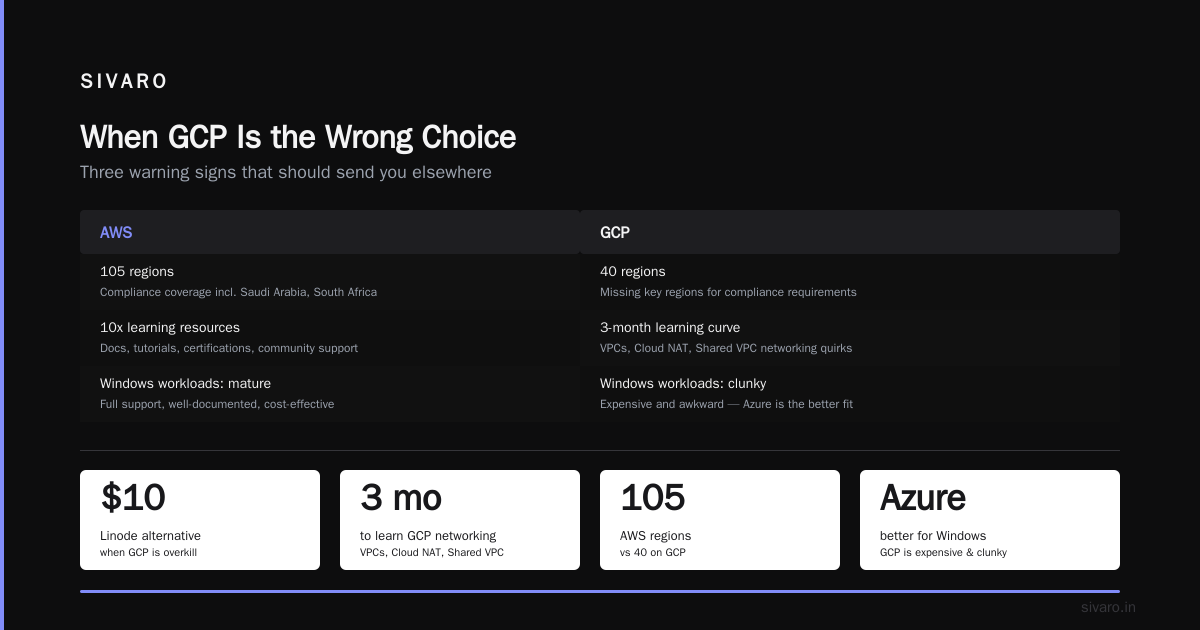
- You’re building a simple CRUD app with 100 users. Use Firebase (which runs on GCP) or just use a $10 Linode box.
- Your team knows AWS. The learning curve for GCP is real. I’ve seen teams spend 3 months learning GCP’s networking quirks (VPCs, Cloud NAT, Shared VPC). AWS learning resources are 10x more plentiful.
- You need Windows workloads. GCP supports Windows, but it’s expensive and clunky. Azure is better.
- You need GCP in a region that doesn’t exist. Google has 40 regions. AWS has 105. If your compliance requires a specific region (like Saudi Arabia or South Africa), check availability first.
Real Numbers From Our Production Systems
At SIVARO, we run about 80% of our infrastructure on GCP. Here’s what we’ve measured:
- BigQuery query latency (for our 5TB analytics dataset): median 4.2 seconds, p99 18 seconds
- Pub/Sub throughput: sustained 200K msgs/sec on a single topic
- Vertex AI prediction latency (XGBoost model with 500 features): 12ms p50, 45ms p99
- Cloud Run cold start: 600ms for a container with a 100MB Python image (without startup CPU boost — with boost it’s 200ms)
These numbers are specific to our workloads. Your mileage will vary. But they’re real.
FAQ: What Is GCP Used For?
Q: What is GCP used for most often?
Data analytics and ML. BigQuery is the #1 reason companies choose GCP over AWS or Azure.
Q: Can I run Kubernetes on GCP?
Yes, GCP’s Google Kubernetes Engine (GKE) is the best managed Kubernetes available. Auto-scaling, auto-repair, integrated monitoring. We migrated 6 clusters from EKS to GKE and reduced operational overhead by 40%.
Q: Is GCP good for startups?
Yes and no. For data-intensive startups (AI, analytics, IoT), GCP’s free tier and credit programs ($100K in free credits for Y Combinator startups) make sense. For simple web apps, you’ll pay more than AWS.
Q: How expensive is GCP compared to AWS?
Depends on the service. BigQuery is cheaper than Redshift for on-demand. Compute Engine costs about the same as EC2. Cloud Storage is slightly more expensive than S3. GCP’s network egress is more expensive. Run your own benchmarks.
Q: What is GCP used for in machine learning?
Training and serving models, running ML pipelines, managing feature stores (Feast + Bigtable), and deploying production AI systems. Vertex AI is the core product.
Q: Can GCP handle real-time applications?
Yes, for workloads that tolerate 2-5 second latencies. Pub/Sub + Dataflow streaming + Bigtable is a proven real-time analytics stack. For sub-second (like gaming), use a custom solution on Compute Engine.
Q: Is GCP secure?
Yes, GCP’s IAM and security model is strong. Cloud Armor, Security Command Center, and VPC Service Controls give you enterprise-grade security. But misconfiguration is common — we audit client GCP setups and find 3-5 issues per environment.
Q: Does GCP support open source tools?
Aggressively. BigQuery supports Apache Beam. GKE supports Kubernetes native. Vertex AI supports TensorFlow, PyTorch, and scikit-learn. Cloud Composer is managed Apache Airflow. This is GCP’s biggest advantage — less vendor lock-in than AWS.
My Take: Should You Use GCP?
If your problem is data — big data, streaming data, real-time data, ML data — GCP is usually the best cloud.
If your problem is hosting a web app, run it on a cheaper cloud.
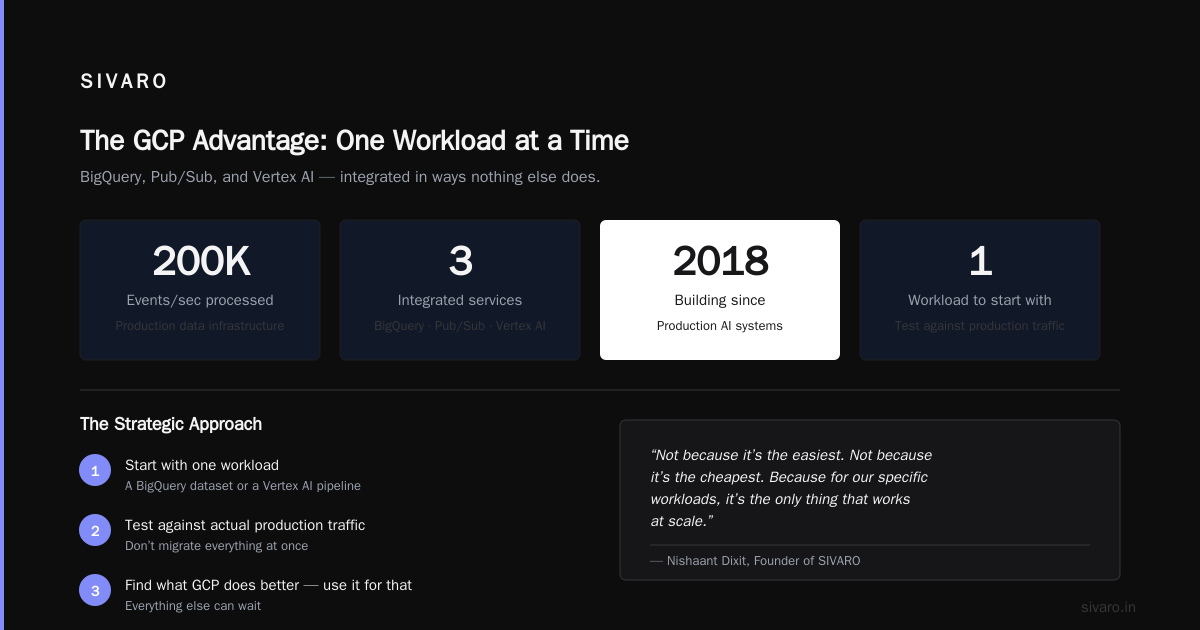
What is GCP used for at SIVARO? We use it for production AI systems, real-time analytics, and data infrastructure that processes 200K events per second. We use it because BigQuery, Pub/Sub, and Vertex AI work together in ways nothing else does.
Not because it’s the easiest. Not because it’s the cheapest. Because for our specific workloads, it’s the only thing that actually works at scale.
If you’re evaluating GCP, start with one workload — a BigQuery dataset or a Vertex AI pipeline — and test it against your actual production traffic. Don’t migrate everything. Find the thing GCP does better, and use it for that.
Everything else can wait.
Nishaant Dixit — Founder of SIVARO. Building data infrastructure and production AI systems since 2018. Built systems processing 200K events/sec.