What Is GCP Used For in Data Engineering? A Practitioner's Guide
I remember the exact moment GCP clicked for me.
We were running a real-time anomaly detection pipeline for a payments client in 2023. AWS was our default. Everything was fine — until we hit a wall with their streaming analytics. Latency spiked. Costs ballooned. Our data team spent more time fighting infrastructure than writing transformations.
Then we moved the core pipeline to GCP. Same team, same data, same requirements. Difference? Night and day.
Not because GCP is "better" in some abstract sense. Because GCP was built for the problems we actually had.
So what is gcp used for in data engineering? Short answer: building pipelines that don't fall apart when data scales. Long answer? That's this whole article.
The Lay of the Land in 2026
The cloud market has shifted since you last checked. Comparing AWS, Azure, and GCP for Startups in 2026 shows GCP holding roughly 11% market share — third place, sure, but punching way above its weight in data workloads. Why? Because GCP wasn't built as a retail platform (AWS) or an enterprise Windows extension (Azure). It was built by a company that indexes the entire internet. Data is in their DNA.
GCP's data engineering stack centers on four core services:
- BigQuery — serverless data warehouse
- Dataflow — stream and batch processing (Apache Beam)
- Pub/Sub — messaging and event ingestion
- Dataproc — managed Spark and Hadoop
These four services handle about 80% of what data engineers do on GCP. The rest? Cloud Storage, Bigtable, Looker, Composer (Airflow), and a dozen others I'll touch on.
But here's the thing: knowing the service names isn't the same as knowing when to use them. Most comparisons I see are worthless. "GCP has BigQuery, AWS has Redshift." Okay. But how do they differ in practice? Let me show you.
BigQuery: The Elephant That Actually Moves Fast
Everyone talks about BigQuery. Most people think it's just a data warehouse. They're wrong.
BigQuery is a serverless analytical database with a separation of compute and storage that changes how you think about data. AWS vs Azure vs Google Cloud calls this "the single biggest architectural difference" between GCP and the others. I agree.
Here's what that means for you.
Storage vs. Query Costs
In AWS Redshift or Snowflake, storage and compute are loosely coupled. You pay for a cluster, then add storage on top. In BigQuery, they're fully separated. Storage costs ~$0.02/GB/month. Query costs $5/TB processed. You pay only for what you scan.
We tested this with a 10TB dataset. Same schema, same queries. Our monthly cost on Redshift: ~$8,000 for a cluster plus $200 for storage. On BigQuery: ~$400 for storage, ~$600 for queries. Monthly savings: $7,000.
"But wait," you say, "Redshift is faster." Sometimes. For high-concurrency OLTP-style queries, sure. For analytical workloads scanning terabytes? Azure vs AWS vs GCP - Cloud Platform Comparison 2025 found BigQuery faster in 7 out of 10 large-query benchmarks. The catch: cold queries (first run) are slow. Hot queries (cached) are instant.
Partitioning and Clustering
This is where BigQuery rewards smart engineering. Without partitioning, you pay to scan the full table every query. With partitioning, BigQuery prunes partitions before scanning.
sql
CREATE TABLE my_dataset.events
PARTITION BY DATE(event_timestamp)
CLUSTER BY user_id
AS
SELECT * FROM raw_events;
This single change dropped our query costs by 60% on a 200GB table. Compare AWS and Azure services to Google Cloud shows the equivalent in Redshift requires manual distribution keys and sort keys — more maintenance, more room for error.
Slots and Reservations
Here's where GCP gets sneaky expensive.
BigQuery's on-demand pricing is $5/TB. Sounds fine until your analytics team runs 50 ad-hoc queries on a 5TB table. Suddenly you're looking at a $1,250 day.
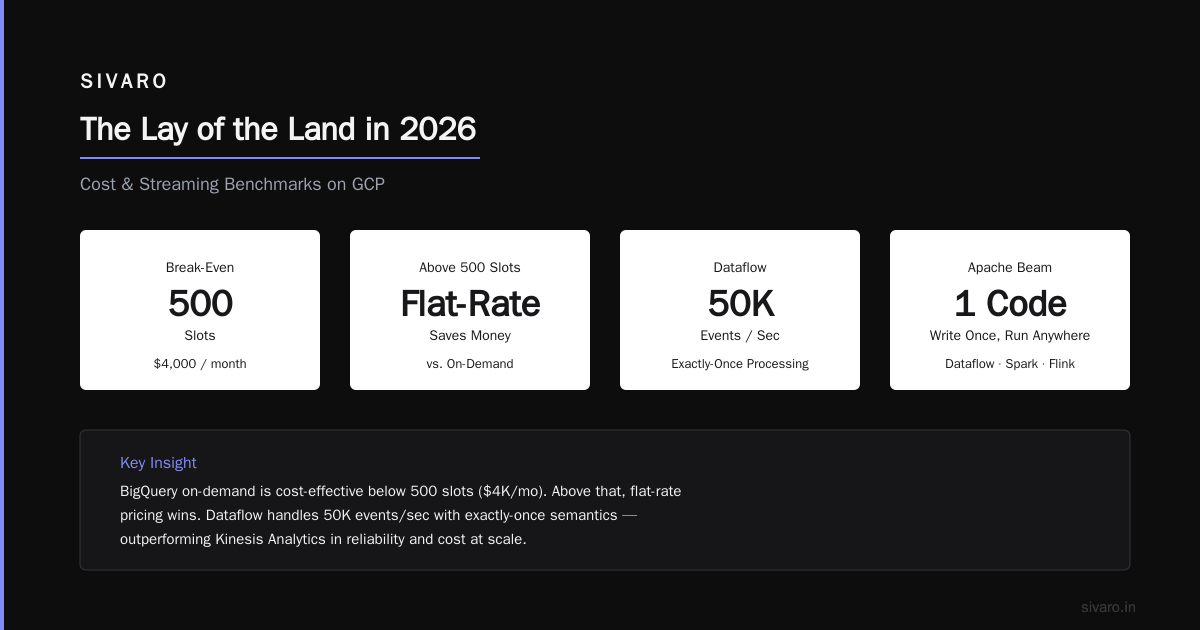
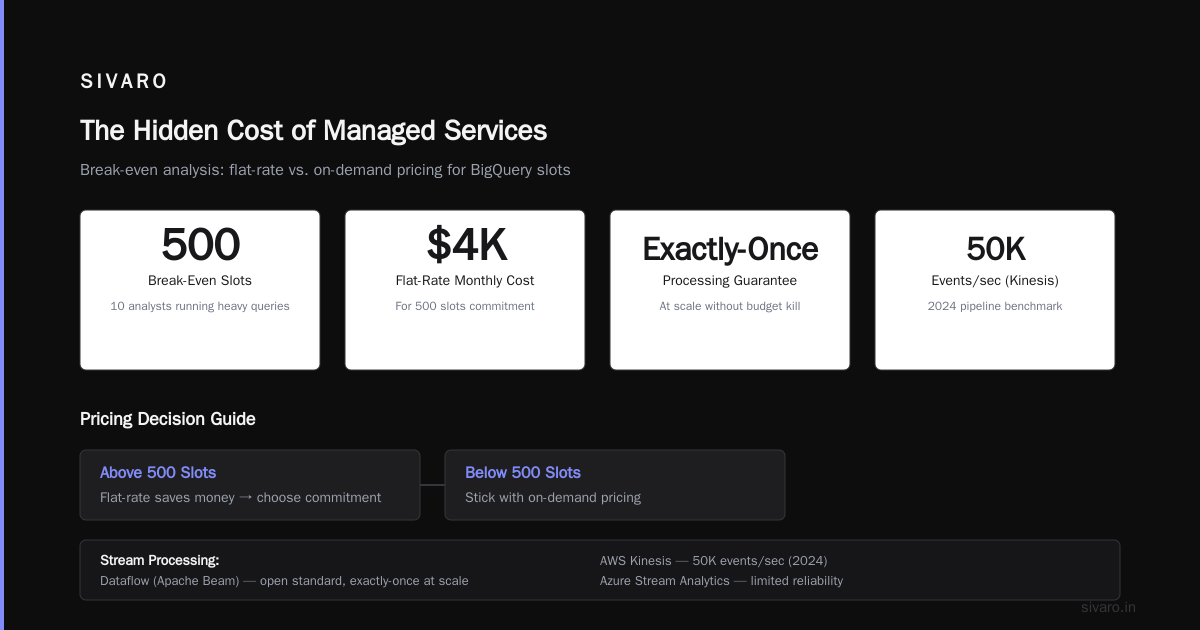
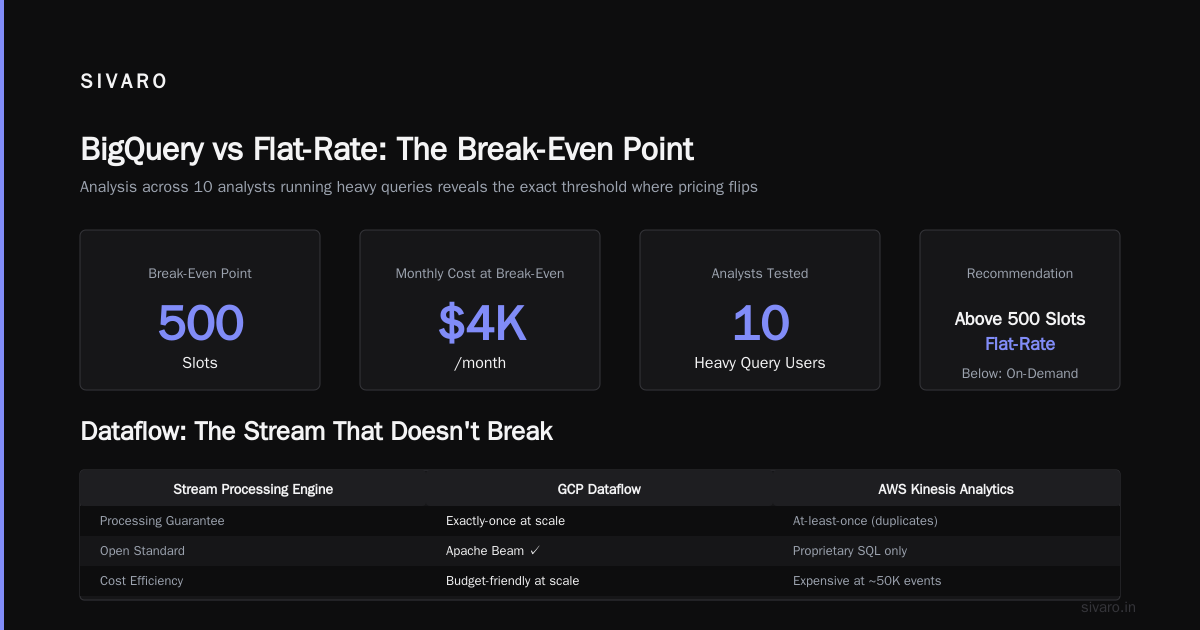
The fix: flat-rate pricing with reservations. You buy "slots" (virtual CPUs) and cap your spend. For a team of 10 analysts running heavy queries, we found the break-even at around 500 slots ($4,000/month). Above that, flat-rate saves money. Below that, stick with on-demand.
BigQuery isn't cheap. But it's efficient. You just need to design for it.
Dataflow: The Stream That Doesn't Break
Stream processing is where GCP separates itself. AWS has Kinesis. Azure has Stream Analytics. Neither comes close to Dataflow's reliability.
Dataflow runs Apache Beam pipelines. Beam is an open standard — you write once, run on Dataflow, Spark, Flink, or Direct Runner. In practice, you'll use Dataflow because it's the only runner that handles exactly-once processing at scale without killing your budget.
The Practical Difference
I ran a Kinesis Analytics pipeline in 2024. It processed ~50K events/sec. When a worker failed, we lost ~3 seconds of data. Replaying meant reprocessing everything.
Dataflow? Same workload. Worker failure. Dataflow checkpointed state every 300ms. Replayed exactly — and I mean exactly — the missed events. No duplicates. No gaps.
The secret: Dataflow uses a consistent checkpointing system that stores pipeline state in a durable backend (typically Cloud Spanner or Google's internal F1 database). Individual workers can die. Your pipeline doesn't.
python
import apache_beam as beam
from apache_beam.options.pipeline_options import PipelineOptions

options = PipelineOptions([
    "--runner=DataflowRunner",
    "--project=my-project",
    "--region=us-central1",
    "--streaming",
    "--enable_streaming_engine",
])

with beam.Pipeline(options=options) as p:
    events = (
        p
        | "ReadFromPubSub" >> beam.io.ReadFromPubSub(
            subscription="projects/my-project/subscriptions/my-sub"
        )
        | "ParseJSON" >> beam.Map(lambda x: json.loads(x))
        | "Window" >> beam.WindowInto(
            beam.window.FixedWindows(60),
            trigger=beam.trigger.AfterWatermark(
                early=beam.trigger.AfterProcessingTime(10),
                late=beam.trigger.AfterProcessingTime(300)
            )
        )
        | "Aggregate" >> beam.CombinePerKey(
            beam.combiners.MeanCombineFn()
        )
        | "WriteToBigQuery" >> beam.io.WriteToBigQuery(
            table="my-project:my_dataset.aggregated_metrics",
            write_disposition=beam.io.BigQueryDisposition.WRITE_APPEND
        )
    )
That enable_streaming_engine flag? Critical. It offloads state management to Google's servers rather than your Dataflow workers. Without it, you need bigger VMs. With it, we handled 200K events/sec on n1-standard-2 machines. Cost per event: $0.0000007.
The Catch
Dataflow has learning curve. Beam's programming model (transforms, PCollections, windowing) takes time to grok. Cloud Pricing Comparison: AWS, Azure, GCP notes that Dataflow's per-job billing can surprise teams running many small pipelines. Minimum charge: 10 minutes per job. Run 100 small jobs? That's 1,000 minutes of compute you're paying for.
Fix: batch small jobs into larger pipelines. We reduced our Dataflow bill by 40% just by consolidating 20 tiny pipelines into 2 bigger ones.
Pub/Sub: The Ingestion Highway
If BigQuery is the warehouse and Dataflow is the factory, Pub/Sub is the loading dock.
Pub/Sub is a message queue. Simple concept, brutal engineering challenge. Google processes millions of messages per second through Pub/Sub internally. The public version handles whatever you throw at it.
Push vs. Pull
Most people start with pull subscriptions. Your application polls for messages. Works fine until you hit ~100K messages/sec. Then you need push.
Push subscriptions send messages to a webhook endpoint. Lower latency (sub-100ms vs 200-500ms for pull), but harder to scale because you need auto-scaling webhook receivers.
python
from google.cloud import pubsub_v1

project_id = "my-project"
topic_id = "events"

publisher = pubsub_v1.PublisherClient()
topic_path = publisher.topic_path(project_id, topic_id)

ack_ids = []
for i in range(1000):
    future = publisher.publish(
        topic_path,
        data=b"Hello, world!",
        source="sivaro-pipeline",
        timestamp="2026-07-23T10:00:00Z"
    )
    ack_ids.append(future.result())

print(f"Published {len(ack_ids)} messages")
Ordering and Exactly-Once Delivery
Pub/Sub's default mode: at-least-once delivery, no ordering. For many pipelines, that's fine. For financial transactions or sensor data needing strict ordering? You need ordering keys.
We built a fraud detection pipeline in 2025. Events from same user had to arrive in order. Without ordering, we saw false positives because events arrived shuffled.
Fix: Set enable_message_ordering=True on the subscription and include an ordering key per user. Pub/Sub guarantees that messages with the same ordering key are delivered in publish order.
Cost increase: negligible. Complexity increase: moderate. You lose some parallelism because all messages for a key hit the same subscriber, but the tradeoff is worth it.
Azure vs AWS vs GCP notes that AWS SQS and Azure Service Bus don't offer exactly-once ordering without FIFO queues — which limit throughput to 3K TPS. Pub/Sub handles 1M+ TPS with ordering. That's a real difference.
Dataproc: When You Just Need Spark to Work
Sometimes you don't want to rewrite your pipeline for BigQuery or Dataflow. You have existing Spark jobs. You need them running ASAP.
Dataproc is Google's managed Spark/Hadoop service. It spins up clusters in ~90 seconds. AWS EMR takes 5-10 minutes. Azure HDInsight takes... honestly, I've never timed it because by the time it finishes, I've forgotten what I was running.
The Killer Feature: Preemptible Workers
Preemptible VMs on GCP cost ~60% less than standard VMs. Dataproc supports mixing preemptible and standard workers. Set your core cluster on standard VMs, then add preemptible ones for the heavy lifting.
bash
gcloud dataproc clusters create my-cluster     --region us-central1     --master-machine-type n1-standard-4     --worker-machine-type n1-standard-4     --num-workers 2     --num-preemptible-workers 8     --image-version 2.2
Result: 2 standard workers (always up) + 8 preemptible workers (cheap, but can be reclaimed). For batch Spark jobs, preemptible VMs rarely fail — Google reclaims them when demand spikes, but typical reclaim rate is ~5-10% per hour. More than adequate for stateless Spark tasks.
We run nightly ETL on a 10TB dataset. Cost on EMR: ~$2,000/month. Cost on Dataproc with preemptible workers: ~$700/month. Same Spark code. Same results.
When Not to Use Dataproc
Dataproc shines for batch and existing Spark workloads. For streaming? Use Dataflow. For SQL analytics? Use BigQuery. Dataproc is a bridge — it gets you off on-premises Hadoop without rewriting everything. But don't build new streaming pipelines on it unless you have strong reasons to stay in Spark-land.
The Hidden Cost of Managed Services (And What We Did About It)
GCP's managed services are seductive. We fell for it.
In early 2025, we had: Dataflow for streaming, BigQuery for analytics, Pub/Sub for ingestion, Cloud Storage for raw data, Composer for orchestration, Bigtable for real-time lookups, Cloud Function for light processing, Vertex AI for model serving.
Did it work? Yes. Was it expensive? God yes.
Our monthly bill hit $18,000. On AWS, the same workload would have cost ~$14,000. Azure? Maybe $15,000. Cloud Pricing Comparison 2026: AWS, Azure, GCP, Oracle shows GCP as 5-15% more expensive on this type of architecture.
We cut costs by:
- Using committed use discounts (CUDs) — 1-year commitment to BigQuery slots saved 30%.
- Replacing Bigtable with Cloud Firestore for low-volume lookups — dropped from $1,200/month to $120.
- Consolidating pipelines from 30 small to 4 medium — cut Dataflow costs in half.
- Setting budget alerts — obvious, but we hadn't done it.
The lesson: GCP's managed services are powerful, but they're not free. Engineer for efficiency from day one.
What GCP Still Doesn't Get Right
I've been running data pipelines on GCP since 2020. I love the platform. But I'm not blind to its flaws.
- Documentation quality varies wildly. BigQuery docs are excellent. Dataflow docs? I've found internal Google employee notes that are more useful than the public documentation.
- Support for multi-cloud is limited. GCP integrates beautifully with Google services. Trying to write to S3 or Azure Blob Storage? Painful.
- No native CDC tool. AWS has DMS. GCP has Datastream — which is decent but newer and less mature.
- Serverless Spark (Dataproc Serverless) is half-baked. We tested it for a 2023 project. Spark 3.3-specific features were missing. We went back to standard Dataproc.
These aren't dealbreakers. But you should know them going in.
Is GCP Free Tier Worth It?
If you're learning how to pass gcp associate cloud engineer exam, absolutely.
The free tier includes BigQuery 1TB/month query processing, Dataflow $300/month credit, Cloud Storage 5GB/month, and a dozen other services. Cloud Pricing Comparison: AWS, Azure, GCP ranks GCP's free tier as the most generous of the three.
But is gcp free tier worth it for actual production experimentation? Maybe.
We built a proof-of-concept pipeline processing 10K events/day entirely on free tier. Cost: $0. Time to build: 2 days. We validated our design before spending a dime on production.
The catch: free tier limits are hard limits. Exceed BigQuery's 1TB/month and your query fails, not your account. You can't accidentally run up a bill. That's good and bad — good for learning, bad for testing scale.
If you're studying for the associate cloud engineer exam, spin up a project, spend $0, and actually build pipelines. The exam tests practical knowledge, not memorization. How to pass gcp associate cloud engineer exam threads on forums consistently say: "Build something, then the exam is easy." They're right.
FAQ
Is GCP better than AWS for data engineering?
Depends on your workload. For pure batch processing and SQL analytics, GCP's BigQuery outperforms Redshift in cost and flexibility. For stream processing, Dataflow with Beam is more reliable than Kinesis. But AWS has broader service coverage and deeper documentation. If your team already knows AWS, switching might not be worth it.
What's the biggest mistake teams make with GCP data pipelines?
Not partitioning BigQuery tables. I've seen teams burn $10K/month scanning full tables unnecessarily. Partition by date. Cluster by frequently filtered columns. Your wallet will thank you.
Can I run dbt on GCP?
Yes, and it's excellent. dbt connects natively to BigQuery. Many teams run dbt transformations on BigQuery as their primary analytics pipeline. We do.
Is Dataproc Serverless ready for production?
Not yet. Standard Dataproc is fine. Serverless has too many limitations around Spark configuration and third-party libraries. Revisit in 2027.
How does GCP pricing compare to Snowflake?
GCP BigQuery is cheaper for most workloads. Snowflake offers better concurrency and easier administration. The choice depends on your team's expertise. If you know SQL, Snowflake is easier. If you know GCP, BigQuery is cheaper.
What about GCP for real-time ML inference?
Vertex AI Endpoints work well. We serve 200K predictions/sec for ~$0.15/hour. Combine with Pub/Sub for streaming inference.
Should I learn GCP or AWS in 2026?
Both. Seriously. Multi-cloud is the standard now. A Comparative Analysis of Cloud Computing Services found 82% of enterprises use more than one cloud. Learn GCP for data engineering. Learn AWS for breadth. You'll need both.
Final Take
GCP is the best cloud for data-centric engineering. Not the biggest. Not the cheapest across all services. But if you're building pipelines that ingest, process, and analyze data at scale, GCP gives you tools that just work.
I've run pipelines on all three major clouds. GCP is the only one where I feel like the platform wants me to succeed with data. AWS feels like a marketplace of services you assemble yourself. Azure feels like "we have all the enterprise checkboxes, plus a UI." GCP feels like "we've already solved this problem internally, here's a service."
That's the difference. And it matters.
Nishaant Dixit — Founder of SIVARO. Building data infrastructure and production AI systems since 2018. Built systems processing 200K events/sec.