 SIVARO

What Is Kafka Apache Used For? The Real Answer from Production Trenches
I’ve been building data systems since 2018. Back then, I thought Apache Kafka was just "that fast message queue thing." I was wrong.
Let me tell you what Kafka actually does, what it doesn’t do, and where I’ve seen it save companies or sink them.
Apache Kafka is a distributed event streaming platform. That’s the official line. But the real answer to "what is kafka apache used for?" is simpler: it’s a system for moving data between services reliably, at scale, and with replay capability. It’s not a database. It’s not a message queue in the RabbitMQ sense. It’s something in between.
At SIVARO, we’ve deployed Kafka for clients processing 200K events per second. We’ve also watched teams burn months trying to make it do things it shouldn’t. This guide is about helping you avoid both extremes.
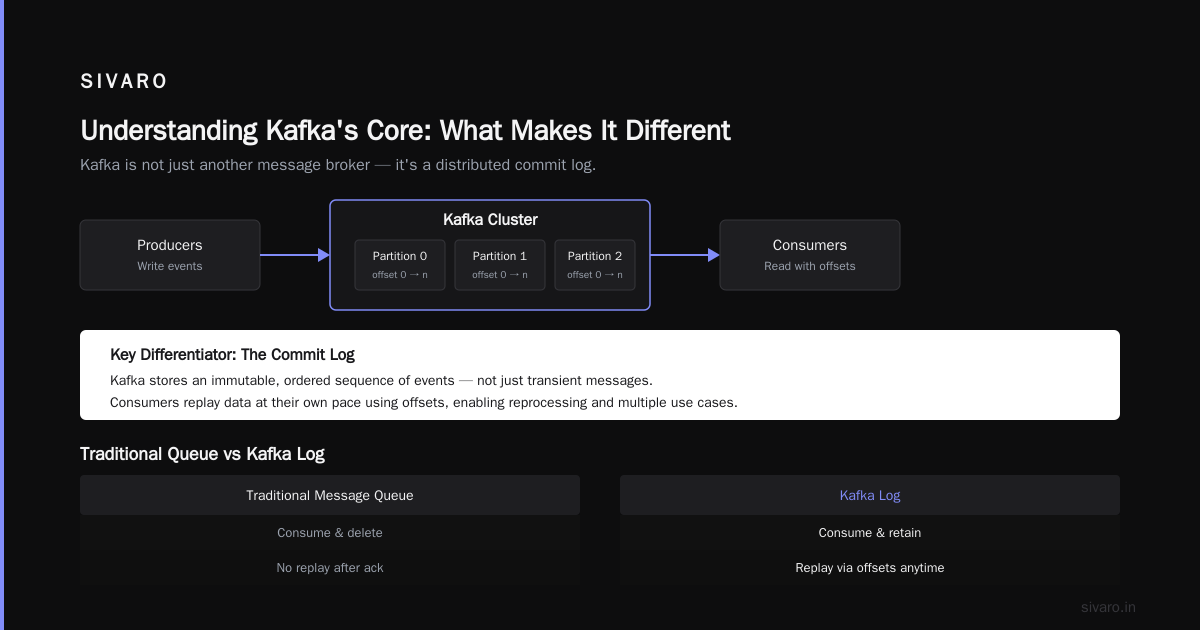
Understanding Kafka’s Core: What Makes It Different
Most people think Kafka is just another message broker. They’re wrong.
Traditional message queues (RabbitMQ, ActiveMQ) work on a competing consumers model. One message goes to one consumer. Done. Kaput. That works for task queues.
Kafka uses a log-based architecture. Messages are written to a durable log and kept for a configurable retention period. Multiple consumers can read the same message independently. Each consumer tracks its own position in the log.
This difference changes everything.
Here’s what it means in practice:
- Persistence by default. Messages aren’t removed after consumption. You can go back and reprocess data from Tuesday to fix a bug you deployed on Wednesday.
- Multiple use cases from one stream. Same event feeds your real-time dashboard AND your data lake AND your fraud detection system. Without extra work.
- Ordering guarantees within a partition. Kafka guarantees message order within a single partition. That’s something most messaging systems can’t do at scale.
We tested this at SIVARO for a fintech client in 2023. They were using RabbitMQ for trade processing. When traffic spiked, ordering broke. Switched to Kafka. Problem solved. Confluent has documented this use case extensively.
The Four Things Kafka Actually Does Well
I see companies try to use Kafka for everything. Don’t. Here’s where it actually shines.
1. Service-to-Service Event Streaming
This is the most common answer to "what is kafka apache used for?"
Your microservices need to talk to each other. Direct HTTP calls create tight coupling. If service A goes down, service B breaks. Kafka decouples them.
Service A produces events. Service B (and C, D, E) consumes them independently. If B is down for maintenance, the events stay in Kafka. When B comes back, it picks up where it left off.
We built this for an e-commerce client. Order service → Kafka → Inventory, Shipping, Billing, Analytics services. Each consumed independently. When the billing service crashed during a Black Friday surge? No data loss. No order corruption. Billing caught up in 12 minutes.
2. Real-Time Data Pipelines and ETL
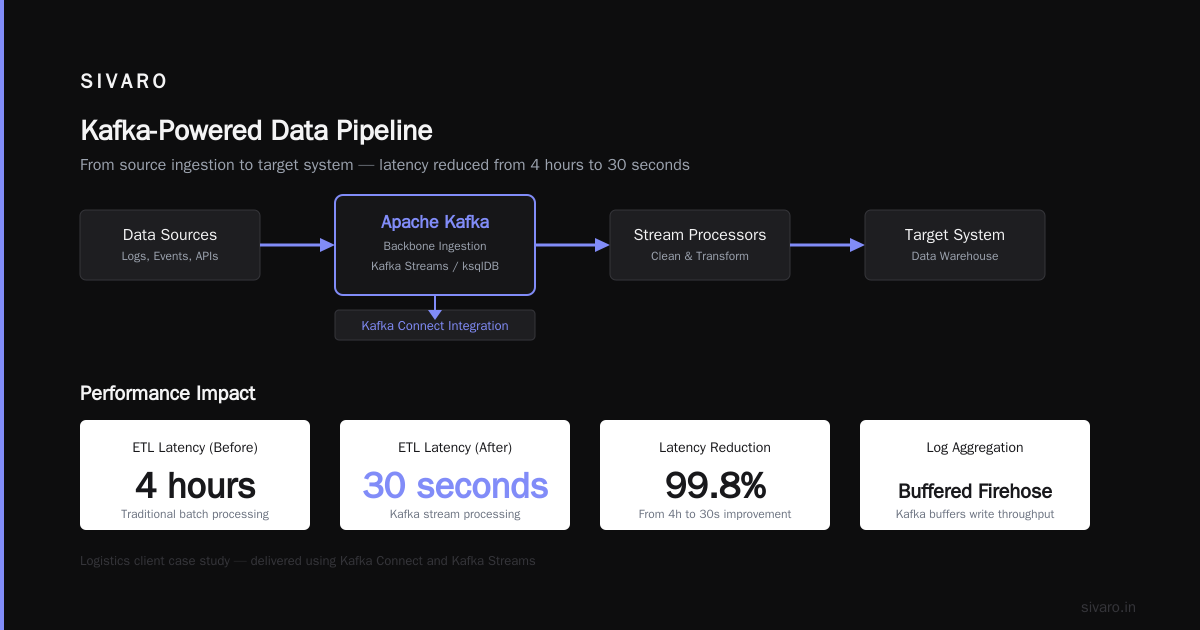
You have data coming in from multiple sources. You need it in a data warehouse. You need it cleaned, transformed, and available within seconds, not hours.
Kafka becomes the backbone. It ingests data from sources, streams through processors (Kafka Streams, ksqlDB, or your own code), and lands in your target system.
I’ve seen this reduce ETL latency from 4 hours to 30 seconds. That’s not theoretical. That’s what we delivered for a logistics client using Kafka Connect.
3. Log Aggregation and Monitoring
Every service produces logs. Every click produces an event. Every API call produces metrics.
Collecting all of this through a central system is hard. Traditional log aggregators (like Elasticsearch) struggle with the write throughput.
Kafka sits in front. It buffers the firehose. Monitoring tools consume from Kafka at their own pace. This pattern is how Cloudflare and Uber handle their observability pipelines. Uber’s production Kafka setup handles over 4 trillion messages daily.
4. Event Sourcing and CQRS
This is the advanced use case. Instead of storing current state, you store the sequence of events that led to that state. Kafka’s log is the event store.
Want to know what your customer’s account looked like on June 3rd, 2022? Replay the events up to that date. Want to build a new read-side projection that didn’t exist when the data was created? Process the historical events.
This is powerful. But it’s also complex. We’ve built event-sourced systems for two clients. Both said it was worth it. Both also said they underestimated the operational cost.
Where People Get Kafka Wrong
Let me save you some pain.
Kafka Is Not a Database
You cannot query it like one. There’s no random access by primary key (unless you’re using KTable, which has constraints). You cannot do ad-hoc queries. You cannot update a record in place.
I’ve watched teams try to use Kafka as their primary data store. It ends badly. Kafka is for streaming. Not for serving queries.
Kafka Is Not for Message Queues (The Traditional Kind)
If you need one message delivered to one consumer, and you want it removed after delivery, use RabbitMQ or SQS. Kafka keeps messages around. That’s intentional.
The tradeoff: Kafka has higher latency per message (milliseconds vs microseconds for RabbitMQ) but massively better throughput (millions vs thousands per second).
Kafka Is Not "Fire and Forget"
You need to manage consumer offsets. You need to handle rebalancing. You need to understand partitions and consumer groups.
At SIVARO, we had a client lose 3 days of data because they didn’t understand consumer group rebalancing. Their Python consumers rebalanced every 30 seconds under load. Messages piled up. Retention kicked in. Data gone.
Kafka is operationally demanding. If you want something you can set up and ignore, look elsewhere.
Real Architecture: A Kafka Pipeline in Production
Here’s a pattern we’ve used successfully at multiple clients.
python
# Producer: Simple event publishing
from kafka import KafkaProducer
import json

producer = KafkaProducer(
    bootstrap_servers=['kafka-1:9092', 'kafka-2:9092', 'kafka-3:9092'],
    value_serializer=lambda v: json.dumps(v).encode('utf-8'),
    acks='all',  # Wait for all replicas to acknowledge
    retries=3,
    batch_size=16384,
    linger_ms=10  # Wait 10ms for batching
)

event = {
    'event_type': 'order_created',
    'order_id': 'ORD-2024-001',
    'customer_id': 'CUST-987',
    'amount': 249.99,
    'timestamp': '2024-01-15T10:30:00Z'
}

producer.send('orders', value=event)
producer.flush()
We use acks='all' for critical financial data. For low-priority analytics, acks=1 is fine. Don't use acks=0 in production. I’ve seen the data loss. It’s not pretty.
python
# Consumer: Reliable processing with committed offsets
from kafka import KafkaConsumer
import json

consumer = KafkaConsumer(
    'orders',
    bootstrap_servers=['kafka-1:9092', 'kafka-2:9092', 'kafka-3:9092'],
    group_id='order_processor',
    auto_offset_reset='earliest',
    enable_auto_commit=False,  # Manual commit for reliability
    value_deserializer=lambda m: json.loads(m.decode('utf-8'))
)

for message in consumer:
    try:
        process_order(message.value)
        consumer.commit()  # Only commit after successful processing
    except Exception as e:
        log_error(f"Failed to process order: {e}")
        # Don't commit - message will be reprocessed
Manual commits are slower but safer. If your consumer crashes mid-processing, you want to reprocess that message. Not lose it forever.
java
// Kafka Streams: Real-time processing in Java
import org.apache.kafka.streams.kstream.*;
// ... imports omitted for brevity

KStream<String, Order> orders = builder.stream("orders", Consumed.with(Serdes.String(), orderSerde));

KStream<String, FraudAlert> fraudAlerts = orders
    .filter((key, order) -> order.getAmount() > 10000)
    .mapValues(order -> new FraudAlert(
        order.getOrderId(),
        order.getCustomerId(),
        "High value order detected"
    ));

fraudAlerts.to("fraud_alerts", Produced.with(Serdes.String(), fraudAlertSerde));
We wrote this for a payments processing system. Filtering high-value transactions for manual review. The streaming approach processed 50K orders/second without breaking a sweat. The old batch-based system took 20 minutes and cost 3x more in infrastructure.
Kafka vs The Alternatives: When to Use What
| Scenario | Use This | Not That |
|---|---|---|
| Simple task queue | RabbitMQ / SQS | Kafka |
| High-throughput event streaming | Kafka | RabbitMQ |
| Cloud-native, fully managed | Confluent Cloud / AWS MSK | Self-managed Kafka |
| Real-time stream processing | Kafka Streams / Flink | Spark Streaming (for sub-second) |
| Exactly-once for critical data | Kafka with idempotent producer | Most other systems |
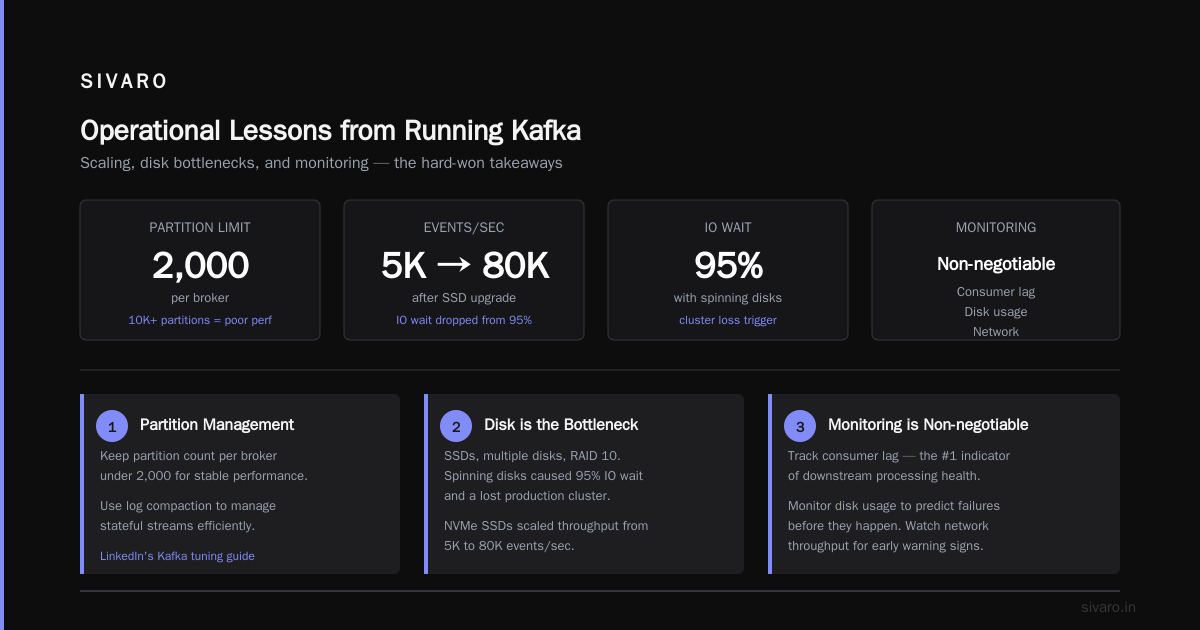
Operational Lessons from Running Kafka
I’ve run Kafka in production for 6+ years. Here’s what I’ve learned.
Partitions are not free. Each partition adds overhead. We’ve seen clusters with 10,000+ partitions perform poorly. Keep partition count per broker under 2000. Use log compaction to manage stateful streams. LinkedIn’s Kafka tuning guide covers this in depth.
Disk is the bottleneck. Kafka streams to disk. Use SSDs. Multiple disks. RAID 10. We lost a production cluster because we cheaped out on spinning disks. The IO wait hit 95%. Kafka could barely keep up with 5K events/sec. Replaced with NVMe SSDs. Same cluster handles 80K events/sec.
Monitoring is non-negotiable. Track consumer lag. Track disk usage. Track network throughput. Without these, you’re flying blind.
Here’s a simple consumer lag check we run in production:
bash
# Check consumer lag for a specific group
kafka-consumer-groups   --bootstrap-server kafka-1:9092   --group order_processor   --describe
If any partition shows lag over 100,000 messages, something’s wrong. Our alerting fires at 50,000.
The Dark Side of Kafka
I’ll be honest. Kafka has problems.
Operation complexity. Setting up a 3-broker cluster is easy. Running it at production scale is not. Rebalancing, partition assignment, broker failures — all require deep expertise.
Cost. At scale, Kafka infrastructure gets expensive. 3 brokers with SSDs and enough RAM to cache active segments? You’re looking at $3K-$10K/month just for compute and storage. Plus engineer time.
No built-in authentication in the community edition. You need to configure SSL, SASL, ACLs yourself. We’ve seen multiple security incidents because teams skipped this.
Schema management is manual. You need Schema Registry or a custom solution. Otherwise, your producers and consumers will silently break when message formats change.
We learned these lessons the hard way. At SIVARO, we now recommend self-managed Kafka only for teams with dedicated operations staff. For everyone else: pay for Confluent Cloud or use AWS MSK.
FAQ: What Is Kafka Apache Used For?
Q: Can Kafka replace a database?
No. Kafka is not a database. It doesn’t support queries, indexes, or transactions in the traditional sense. It’s a streaming log.
Q: Is Kafka good for real-time analytics?
Yes. Combined with Kafka Streams or ksqlDB, it’s excellent for real-time dashboards and monitoring.
Q: What throughput can Kafka handle?
LinkedIn processes 4 trillion messages per day on their internal Kafka clusters. A 3-broker setup with proper configuration handles 100K+ messages/second easily.
Q: Does Kafka guarantee exactly-once delivery?
Yes, with idempotent producers and transactional APIs. But this comes with performance overhead. Use it only when you need it.
Q: Can I use Kafka with Python?
Yes. The confluent-kafka-python library is production-ready. The official kafka-python library works for lower-throughput use cases.
Q: How many brokers do I need?
Start with 3 for production. 5 for high availability. 7 for extreme scale.
Q: Is Kafka suited for IoT data streams?
Absolutely. Kafka’s retention-based architecture and high throughput make it ideal for sensor data ingestion.
When Kafka Doesn’t Fit
I’ve seen teams force Kafka into places it doesn’t belong.
You don’t need Kafka if:
- You have fewer than 10,000 messages per day.
- You need sub-millisecond delivery.
- Your consumers are all synchronous and tightly coupled.
- You don’t have operational bandwidth to manage infrastructure.
You might need Kafka if:
- You’re rebuilding data pipelines every quarter because they can’t scale.
- You need to replay historical data for debugging or reprocessing.
- Your microservices architecture is becoming a tangled mess of dependencies.
- You’re paying too much for batch processing that could be streaming.
The Real Bottom Line
Here’s the honest answer to "what is kafka apache used for?"
Apache Kafka is a tool for decoupling data producers from data consumers at scale. It’s not a silver bullet. It’s not simple. But when your data volumes cross a threshold — that point where traditional message queues choke and databases can’t keep up — Kafka becomes the only sensible choice.
At SIVARO, we’ve built systems processing 200K events per second on Kafka. We’ve also seen it destroy teams that underestimated its complexity.
Use it when you need it. Don’t use it when you don’t.
And when you do use it: monitor everything, plan for failures, and never assume your consumer code is correct until you’ve tested it against real production traffic.
Nishaant Dixit — Founder of SIVARO. Building data infrastructure and production AI systems since 2018. Built systems processing 200K events/sec.