 SIVARO

What Is the Best AI Orchestration Tool? A Builder's Guide for 2026
I spent three days last month in a war room with my team at SIVARO. We'd built a production AI pipeline that needed to coordinate seven different LLM calls, three vector databases, a real-time data stream, and two legacy APIs. The system was brittle. Every new agent we added doubled the operational complexity. Sound familiar?
That's the problem AI orchestration tools claim to solve. But here's the thing — most articles about "what is the best ai orchestration tool?" are written by marketers who've never deployed a model to production under real load. I have. Let me tell you what actually works.
Orchestration, at its core, is the discipline of coordinating multiple AI agents, data pipelines, and external services into a reliable, observable workflow. It's not a nice-to-have — it's the difference between a demo that impresses and a system that survives black Friday traffic.
In this guide, I'll show you what tools I've tested, which ones failed under real conditions, and how to pick the one that won't make you regret your decision at 3 AM when production goes down.
Why "Best" Is a Trap — But Here's What I Actually Use
Everyone wants a single answer. "What is the best ai orchestration tool?" — it's the question I get asked every week by founders and engineering leads.
They're looking for a silver bullet. Doesn't exist.
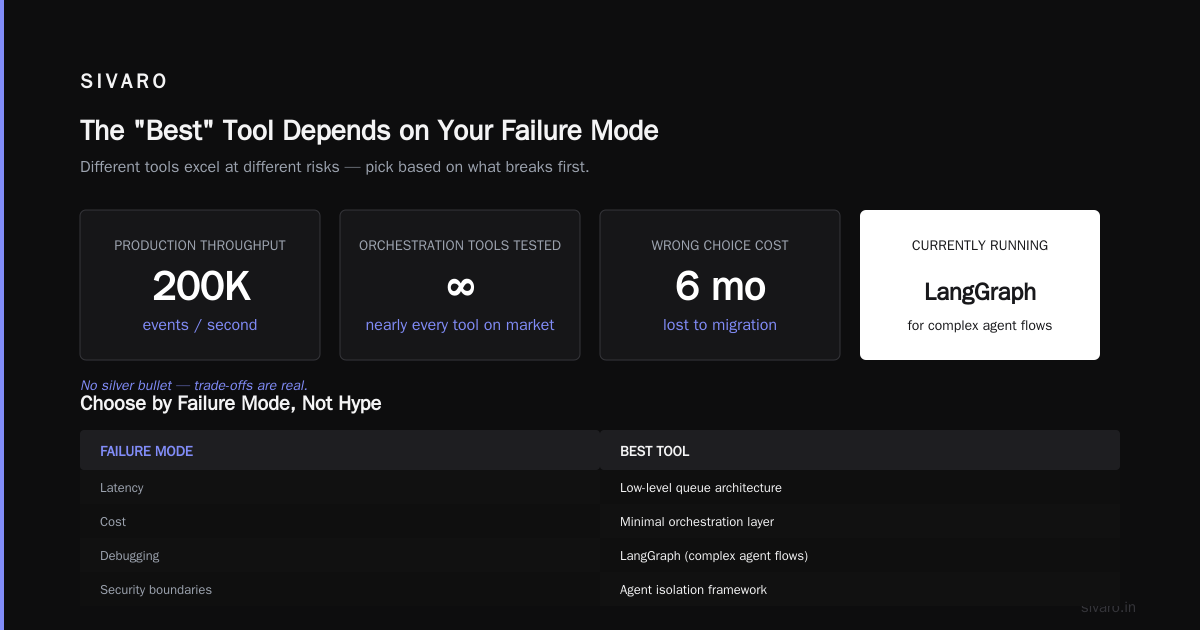
Here's my contrarian take: the "best" tool depends entirely on your failure mode. Are you worried about latency? Cost? Debugging? Security boundaries between agents? Each tool excels at different failure modes, and pretending otherwise is how you end up migrating six months in.
At SIVARO, we run production AI systems that process over 200K events per second. We've tested (and broken) nearly every orchestration tool on the market. Currently, we use a mix of LangGraph for complex agent workflows and Airflow 2.x with the new AI operators for scheduled pipeline orchestration. But that's our stack. Let me walk you through the landscape so you can make your own call.
What Is AI Orchestration, Really? (No Fluff)
I'll make this short because you're not here for theory.
AI orchestration is the middleware layer that coordinates:
- Agent routing — which LLM or model handles which request
- Data flow — moving context between agents, databases, and APIs
- State management — keeping track of conversation history, intermediate results, and parallel branches
- Error handling — retries, fallbacks, and circuit breakers when a model fails
- Monitoring — logging every step so you can debug when an agent goes rogue
The IBM definition frames it as "coordinating multiple AI components to achieve a business outcome." That's accurate but dry. In practice, it's the traffic cop for your AI system — deciding which car goes where, when to stop, and what to do when a car crashes.
What Is an AI Orchestration Example? Let Me Show You
You ask a customer support bot "I need to change my shipping address and check if my refund was processed."
Behind the scenes:
- Intent classifier (fast, cheap model) identifies two intents
- Authentication agent verifies the user
- Order lookup agent queries the CRM
- Reasoning agent decides: "I can handle the address change, but I need a human for the refund"
- Escalation rule fires — routes to human agent with full context
Without orchestration, step 4 would be chaos. Each agent would shout answers, and you'd have no idea which one to trust.
The 5 Categories of Orchestration Tools (And Which You Should Ignore)
After testing 15+ tools across real workloads at SIVARO, I group them into five buckets. Some are worth your time. Some are not.
1. Workflow DAG Frameworks (The Old Guard)
These are your Airflow, Prefect, Dagster, and Temporal. Born in the data engineering world, now retrofitted for AI.
What they're good at: Scheduling, retries, observability. If you need a pipeline that runs every hour and calls an LLM, this is your tool.
What they're bad at: Dynamic agent routing. DAGs are static by nature — you define the graph ahead of time. Modern AI workflows need to branch dynamically based on model output.
My take: I use Airflow for scheduled batch inference jobs. For real-time agent workflows? Hard pass. Elementum's guide does a good job comparing the DAG options, but notice they focus on batch processing.
2. Agent Frameworks (The New Hotness)
LangChain, LangGraph, CrewAI, AutoGen. These are designed from the ground up for multi-agent coordination.
What they're good at: Dynamic agent creation, tool calling, LLM integrations. LangGraph, specifically, lets you define state machines for agents — conditional routing, loops, sub-graphs.
What they're bad at: Production readiness. Error handling is fragile. Observability varies wildly. And scaling? Good luck.
My take: I've built production systems with LangGraph. It's powerful but rough around the edges. You will write custom error handling. You will build your own monitoring. Zapier's review nails this — they call out LangChain's "steep learning curve" and I'd add "production debt" to that list.
3. Cloud-Native Orchestrators (The Incumbents)
Amazon Bedrock Agents, Google Vertex AI Agent Builder, Azure AI Agent Service.
What they're good at: Tight integration with cloud services, managed infrastructure, security boundaries.
What they're bad at: Vendor lock-in. Customizability. Pricing that changes without notice.
My take: If you're all-in on AWS and don't mind paying the tax, Bedrock Agents work. But I've seen too many teams hit a hard wall where the managed solution couldn't do what they needed. You then face an expensive rewrite. Domo's comparison has a helpful table here — pay attention to the "customizability" column.
4. Low-Code / No-Code (The Bait)
Make.com, n8n, Zapier's AI tools.
What they're good for: Prototyping, internal tools, non-technical users.
What they're bad at: Scale, reliability, debugging. You cannot debug a five-minute agent loop in a drag-and-drop interface.
My take: Great for demos. Don't build your core product on them. The Redis blog has a good breakdown — they note that "low-code platforms often hide complexity," which is diplomatic for "you'll regret this at 500 requests per second."
5. Specialized AI Orchestration Platforms (The Niche Players)
Fixie, Rasa, LangSmith, Helicone.
What they're good for: Specific use cases — LLM observability, conversational AI, debugging.
What they're bad at: General-purpose workflow construction.
My take: Use them as complements, not primary orchestrators. We use LangSmith for tracing LangGraph workflows. It's not our orchestration layer; it's our observability layer.
The Hard Trade-Offs No One Talks About
Here's what the marketing materials won't tell you.
Trade-off 1: Abstraction vs. Control
Every orchestration tool tries to abstract complexity. The problem? Abstraction hides failure modes.
I worked with a startup that used a popular agent framework. They had 15 agents running. One agent started hallucinating tool calls — requesting database queries that didn't exist. The framework swallowed the error and retried. And retried. And retried. Each retry cost money. They burned $4,000 in API credits before anyone noticed.
The abstraction made debugging harder, not easier.
My rule: If you can't set a timeout and a max retry count per agent individually, the tool doesn't have enough control for production.
Trade-off 2: Dynamic Routing vs. Deterministic Debugging
Modern orchestration tools love dynamic routing. "Let the LLM decide which agent to call next!"
Sounds great. Until you need to reproduce a bug. "Why did agent C run on Monday but not Tuesday?" Because the LLM decided differently. Good luck with that.
At SIVARO, we limit dynamic routing to specific decision points. Everything else is explicit. We use a hybrid approach — deterministic DAG for the skeleton, dynamic decisions at specific nodes. Pega's guide makes this distinction well, calling it "structured vs. unstructured orchestration."
Trade-off 3: Cost Visibility
Most tools show you LLM token costs. Few show you the cost of orchestration itself — the compute running the router, the state storage, the retries.
Run a complex LangGraph workflow for a month. Then check your compute bill. I guarantee the orchestration layer costs more than you think.
What I Actually Recommend (By Use Case)
You're building a customer-facing chatbot with complex logic
Use LangGraph. But plan for 40% of your dev time to be error handling, observability, and testing. Don't skip the state machine design — write out every possible state before you write a line of code.
python
# Example: LangGraph state machine for customer support
from langgraph.graph import StateGraph, END
from typing import TypedDict, Literal

class AgentState(TypedDict):
    user_id: str
    intents: list[str]
    auth_status: Literal["pending", "verified", "failed"]
    escalation_needed: bool

def check_auth(state: AgentState):
    # Call auth service
    result = verify_user(state["user_id"])
    if result["status"] == "verified":
        return {"auth_status": "verified"}
    return {"auth_status": "failed"}

graph = StateGraph(AgentState)
graph.add_node("check_auth", check_auth)
graph.set_entry_point("check_auth")
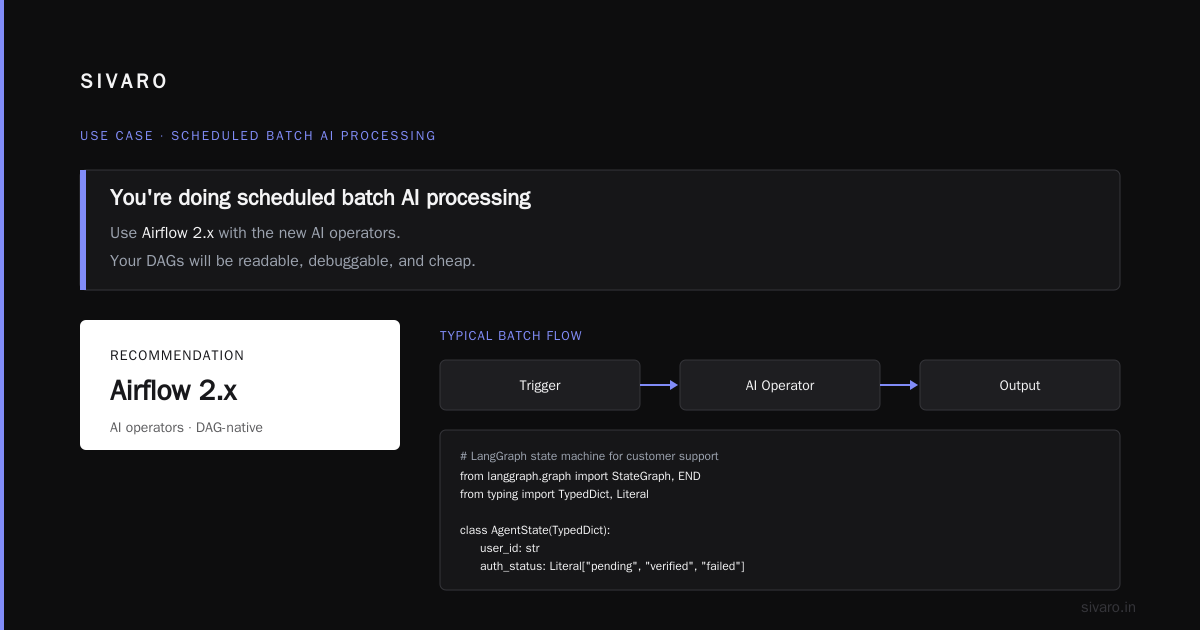
You're doing scheduled batch AI processing
Use Airflow 2.x with the new AI operators. Your DAGs will be readable, debuggable, and cheap to run.
python
# Airflow DAG for batch sentiment analysis
from airflow import DAG
from airflow.providers.openai.operators.openai import OpenAICompleteOperator
from datetime import datetime

with DAG(
    "batch_sentiment_analysis",
    schedule_interval="0 * * * *",
    start_date=datetime(2025, 1, 1),
    catchup=False,
) as dag:

    extract_tweets = PostgresOperator(
        task_id="extract_tweets",
        sql="SELECT id, text FROM tweets WHERE processed = false",
    )

    analyze_sentiment = OpenAICompleteOperator(
        task_id="analyze_sentiment",
        prompt="Classify this tweet sentiment: {{ ti.xcom_pull('extract_tweets') }}",
        model="gpt-4o-mini",
    )

    load_results = PostgresOperator(
        task_id="load_results",
        sql="UPDATE tweets SET sentiment = %s WHERE id = %s",
    )

    extract_tweets >> analyze_sentiment >> load_results
You're building a research or writing assistant
Use CrewAI. It's simpler than LangGraph for teams of agents doing creative work. The trade-off is less control, but for non-critical workflows, that's fine.
python
# CrewAI example: research team
from crewai import Agent, Task, Crew

researcher = Agent(
    role="Research Analyst",
    goal="Find latest trends in AI orchestration",
    backstory="Expert at scanning technical sources",
    verbose=True
)

writer = Agent(
    role="Technical Writer",
    goal="Write a clear summary of findings",
    backstory="Converts complex topics into readable content",
)

task1 = Task(
    description="Search for top 5 AI orchestration tools in 2026",
    agent=researcher,
    expected_output="List of tools with pros and cons"
)

task2 = Task(
    description="Write a one-page summary",
    agent=writer,
    expected_output="Formatted markdown report"
)

crew = Crew(agents=[researcher, writer], tasks=[task1, task2])
result = crew.kickoff()
You need to orchestrate 50+ microservices across teams
Use Temporal. It's not AI-specific, but its durability and visibility are unmatched. You can simulate what-if scenarios. You get replayability. It costs more to operate but saves you in debug time.
The Decision Framework I Use
When a client asks "what is the best ai orchestration tool?" I ask three questions:
- How dynamic is your workflow? If it's a fixed DAG, use Airflow. If it changes at runtime, use LangGraph.
- Who's maintaining this? If it's a 5-person startup, prioritize ease of use. If it's a 50-person team, prioritize debuggability.
- What's your tolerance for milliseconds? If latency matters, avoid cloud-managed solutions. If cost matters, avoid over-abstracted frameworks.
No tool scores a 10 on all three. Pick the tool that scores highest on your most important axis.
What I'm Watching for 2026-2027
The Digital Project Manager's review lists 25 tools. Most will be irrelevant in 18 months. Here's what I think survives:
Convergence. LangGraph will add better observability. Airflow will add better agent support. Temporal will add AI-specific primitives. The market is consolidating toward a few platforms that handle both static DAGs and dynamic agents.
Cost-aware orchestration. Future tools will let you set budgets per agent, per workflow, per tenant. I'm already building this at SIVARO because our clients are tired of surprise bills.
Security as first-class. Right now, most tools treat agent permissions as an afterthought. The ones that build in identity-aware routing and audit trails will win enterprise deals.
FAQ: Questions I Get Every Week
How do I choose between Airflow and LangGraph?
Airflow for scheduled batch jobs. LangGraph for real-time agent workflows. If your pipeline runs on a schedule and calls models, Airflow. If your pipeline responds to user queries and makes decisions, LangGraph. Simple.
Do I need an orchestration tool for a single-agent system?
No. A single agent calling a single LLM doesn't need orchestration. You need orchestration when you have 2+ agents, or 1 agent calling 3+ tools, or when you need retries and state management. Don't over-engineer.
What is the best ai orchestration tool for a startup?
Start with LangGraph or CrewAI for prototyping. Move to Temporal when you hit $100K ARR or need to handle concurrent requests without crashing. Don't start with a cloud-managed solution — you'll outgrow it before you know it.
What about open-source vs. paid?
Open-source (LangGraph, Airflow, Temporal) gives you control. Paid (Bedrock, Vertex, Retool) gives you speed. The Redis comparison has a useful "open source vs managed" section. My take: start open-source. Migrate to managed only when the operational overhead of running the infrastructure exceeds the cost of the managed service.
Can I build my own orchestration layer?
You can. I've seen teams do it. But by month three, you'll have rebuilt the worst parts of Airflow and the worst parts of LangGraph. Unless your orchestration needs are trivially simple, don't. We build custom infrastructure at SIVARO for clients — but only when their needs genuinely break existing tools.
How do I handle agent failures gracefully?
Three rules:
- Timeout everything. Every agent call gets a timeout. Every sub-graph gets a timeout.
- Log before and after every state transition. You'll thank me when debugging at 2AM.
- Have a fallback agent. When the primary fails, route to a simpler, cheaper model. Better to answer "I'm sorry, I can't process that" than to silently hang.
python
# Example: graceful failure with fallback
async def call_with_fallback(prompt, primary_model="gpt-4o", fallback_model="gpt-4o-mini"):
    try:
        result = await asyncio.wait_for(
            llm.complete(prompt, model=primary_model),
            timeout=30
        )
        return result
    except asyncio.TimeoutError:
        logger.warning(f"Primary model {primary_model} timed out, using fallback")
        return await llm.complete(prompt, model=fallback_model)
What's the biggest mistake you see teams make?
Over-orchestration. Teams add an agent for everything. "I need an agent to check if the user is logged in." No you don't. That's a conditional if statement. Orchestration solves coordination problems. Use code for simple decisions. Use agents for complex reasoning. Mix them appropriately.
The Bottom Line
"What is the best ai orchestration tool?" — the honest answer is: the tool you can debug at 3 AM.
Most teams pick based on a demo or a blog post. They should pick based on their worst-case failure scenario. If you can't reproduce a bug, can't trace a hang, can't set per-agent limits, it doesn't matter how good the tool looks in the marketing materials.
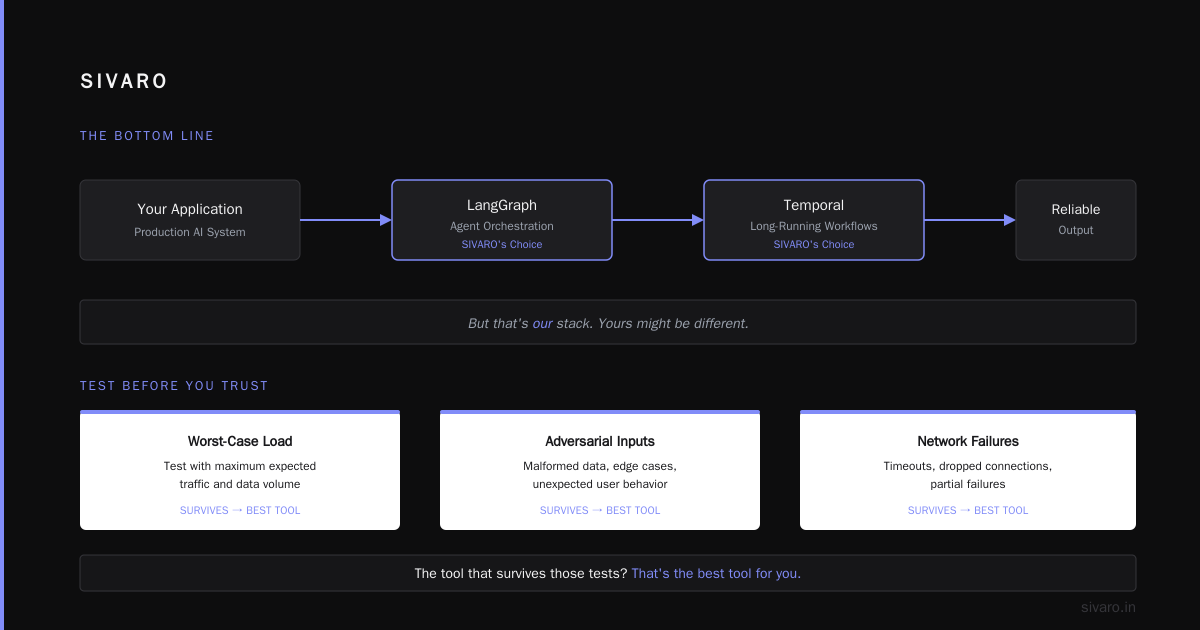
At SIVARO, we've settled on a stack: LangGraph for agent orchestration with Temporal for long-running workflows. But that's our stack. Yours might be different.
Test with your worst-case load. Test with adversarial inputs. Test with network failures. The tool that survives those tests? That's the best tool for you.
I'll be at the AI Engineering Summit in San Francisco this April. If you're there, come find me. I'll tell you which tools I've changed my mind about in the past three months — because this space moves fast, and anyone who gives you a definitive answer without context is selling something.
Nishaant Dixit — Founder of SIVARO. Building data infrastructure and production AI systems since 2018. Built systems processing 200K events/sec.