 SIVARO

What Is the Best AI Orchestration Tool? (Honest Answers From a Builder)
I've been asking myself this question since 2021. Back then, most "AI orchestration" meant piping three Python scripts together with Airflow. Today? The landscape is unrecognizable.
Here's the honest answer upfront: There is no single best AI orchestration tool. Anyone who tells you otherwise either hasn't tested enough tools or is selling something.
But I can tell you which tool is best for your specific situation. Because after building production AI systems at SIVARO since 2018 — processing 200K events/sec across data infrastructure stacks — I've watched teams make the same three mistakes picking orchestration tools. Let me save you from them.
First, a quick definition so we're aligned: AI orchestration coordinates multiple AI models, data pipelines, and human-in-the-loop decisions into a single workflow. It's the difference between having five smart engineers who don't talk to each other, and having a well-run team meeting where everyone contributes at the right time. IBM defines it as "automating, coordinating, and managing the execution of AI workflows across different systems."
I'll walk you through what actually matters, which tools deliver, and where most analysis goes wrong. By the end, you'll know exactly how to evaluate "what is the best ai orchestration tool?" for your stack.
Why Most Teams Pick the Wrong Tool
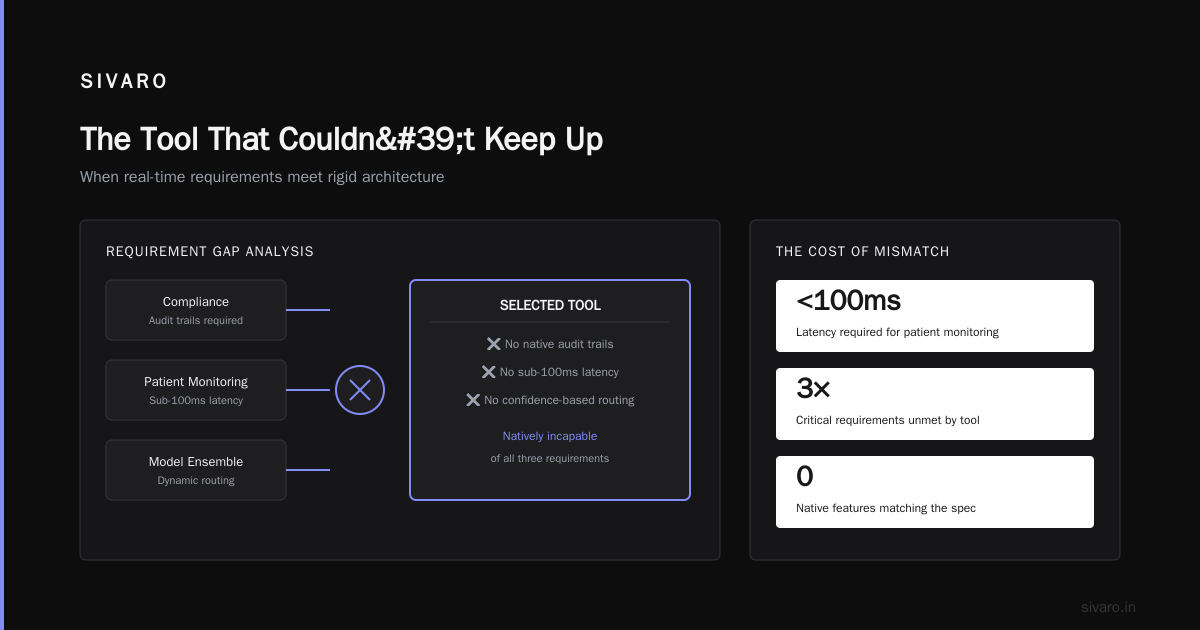
Last year, I consulted for a healthcare startup. They'd spent six months on a "best AI orchestration tool" evaluation. Picked something popular. Moved to production.
Week one: everything broke.
The tool handled their simple LLM calls fine. But their HIPAA compliance required audit trails. Their real-time patient monitoring needed sub-100ms latency. Their model ensemble required dynamic routing based on confidence scores.
The tool couldn't do any of this natively. They'd optimized for the wrong criteria.
Most people think "best" means "most features" or "most popular." They're wrong because:
- Features you don't use are technical debt
- Popularity correlates with marketing budgets, not performance
- Your specific failure modes determine your tool choice
I've seen teams discard LangChain because they found the abstractions leaky. I've seen others swear by it because they needed rapid prototyping. Both are right.
Let me show you what actually matters.
What Makes an Orchestration Tool "Good" in Production
After deploying over 30 AI systems in production, here are the non-negotiable criteria I use. Ignore anything that doesn't fit your exact use case.
Latency and Throughput Requirements
Your tool choice depends entirely on your latency budget.
Real-time customer service? You need sub-second inference chains. That rules out tools with heavy overhead. Batch document processing? You can tolerate minutes per workflow.
At SIVARO, we process 200K events/sec through our production systems. The orchestration layer adds ~15ms of overhead. If a tool adds 100ms? Unusable.
Redis's comparison of 8 orchestration platforms shows that agent-based tools like CrewAI and AutoGen add significant latency per agent decision. For real-time systems, you want direct pipeline orchestration without agent overhead.
State Management and Error Recovery
This is the boring part that kills projects.
Your LLM will fail. Your API will timeout. Your upstream data source will change schema.
Does your orchestration tool handle partial failures? Can it resume workflows from checkpoints? Or does it start from scratch when something fails?
I watched a fintech company lose $40K in compute credits because their orchestration tool couldn't resume failed batch jobs. Every failure meant re-processing millions of tokens.
Human-in-the-Loop Support
Most orchestration tools assume everything is automated. Production AI requires humans.
- When model confidence drops below 70%, route to a human
- When two models disagree, escalate for arbitration
- When regulatory review is required, pause the workflow
Pega's guide to AI orchestration emphasizes that enterprise tools need robust human handoff capabilities. Many open-source tools treat this as an afterthought.
Observability and Debugging
You can't fix what you can't see.
Does the tool provide distributed tracing across model calls? Can you replay failed workflows step-by-step? Does it log model inputs and outputs without breaking your budget?
I'll take a tool with mediocre features but excellent observability over one with perfect features and no visibility.
The Major Players: What Actually Works
Let me break down the tools I've tested personally. I'll be blunt about what each does well and where they fail.
LangChain and LangGraph
Best for: Rapid prototyping, LLM-heavy workflows, agent chains
LangChain is the most popular orchestration framework. It's also the most controversial.
The good: incredible ecosystem. Hundreds of integrations. Massive community. If you need to chain five LLM calls together with minimal code, LangChain is the fastest path.
The bad: the abstractions are leaky. I've spent hours debugging why a simple chain returns garbage because LangChain's internal state management silently dropped context. The API changes every release. Production deployments require significant hardening.
Zapier's review of AI orchestration tools calls LangChain "the Swiss Army knife" but notes that enterprise teams often outgrow it.
python
# LangChain example: Simple RAG pipeline
from langchain.chains import RetrievalQA
from langchain.llms import OpenAI
from langchain.vectorstores import Chroma

# This works great for demos
qa_chain = RetrievalQA.from_chain_type(
    llm=OpenAI(temperature=0),
    chain_type="stuff",
    retriever=Chroma().as_retriever()
)

# But production needs error handling, retries, and observability
# That's not built-in — you add it yourself
result = qa_chain.run("What is the capital of France?")
Verdict: Perfect for prototyping. Requires significant investment for production. If your team can handle the maintenance, it's viable. Most teams can't.
CrewAI
Best for: Multi-agent systems, role-based workflows, research tasks
CrewAI lets you define AI agents with specific roles (researcher, writer, critic) and have them collaborate. It's intuitive and the API is clean.
The problem: agent-based orchestration adds latency per decision. Each agent "thinks" about what to do next. For a simple three-agent workflow, you're looking at 5-10 seconds minimum.
The Digital Project Manager's list of 25 tools ranks CrewAI highly for "creative and research tasks" but warns against using it for real-time applications.
python
# CrewAI example: Multi-agent research team
from crewai import Agent, Task, Crew

researcher = Agent(
    role='Senior Research Analyst',
    goal='Find accurate information quickly',
    backstory='Expert in data analysis',
    verbose=True
)

writer = Agent(
    role='Technical Writer',
    goal='Create clear documentation',
    backstory='Former tech journalist',
    verbose=True
)

task = Task(
    description='Research and document AI orchestration tools',
    agent=researcher,
    expected_output='Comprehensive analysis'
)

crew = Crew(
    agents=[researcher, writer],
    tasks=[task],
    verbose=True
)

result = crew.kickoff()
Verdict: Excellent for specific use cases. Terrible for latency-sensitive systems. Know your tolerance before adopting.
Prefect
Best for: Data pipeline orchestration with AI components, enterprise reliability
Prefect is my go-to for systems that need to be boringly reliable. It handles state management, retries, scheduling, and monitoring out of the box.
The AI-specific features are newer, but the core orchestration engine is battle-tested. Banks use it. Data teams use it. It doesn't break.
The trade-off: it's not built specifically for AI. You'll write more glue code than LangChain.
Elementum's analysis of workflow tools puts Prefect in the top tier for "enterprise-grade reliability."
python
# Prefect example: AI workflow with retries
from prefect import flow, task
from prefect.tasks import task_input_hash
from openai import OpenAI

@task(retries=3, retry_delay_seconds=10)
def call_llm(prompt: str) -> str:
    client = OpenAI()
    response = client.chat.completions.create(
        model="gpt-4",
        messages=[{"role": "user", "content": prompt}]
    )
    return response.choices[0].message.content

@task
def validate_output(text: str) -> bool:
    # Check for hallucination patterns
    return len(text) > 0 and "error" not in text.lower()

@flow
def ai_orchestration_pipeline(input_text: str):
    result = call_llm(input_text)
    is_valid = validate_output(result)

    if not is_valid:
        result = call_llm.with_options(retries=5)(input_text)

    return result
Verdict: Best for teams that need reliability over sparkle. If your AI system is part of a larger data pipeline, Prefect wins.
Airflow (with AI Operators)
Best for: Batch processing, scheduled pipelines, teams already using Airflow
I have a complicated relationship with Airflow. It's everywhere. It's also painful.
The good: if your organization already runs Airflow, plugging AI into existing pipelines is straightforward. The scheduling and dependency management are world-class.
The bad: Airflow wasn't designed for real-time or interactive AI workflows. Each task spins up a new process. Latency accumulates. Debugging ML model issues through Airflow logs is torture.
Domo's comparison of 10 platforms notes that Airflow handles "high-volume batch processing" well but struggles with "interactive AI applications."
python
# Airflow example: Batch document processing with AI
from airflow import DAG
from airflow.operators.python import PythonOperator
from datetime import datetime

def extract_text_from_document(file_path):
    # Extract text from PDF/DOCX
    return extracted_text

def summarize_with_llm(text):
    import openai
    response = openai.ChatCompletion.create(
        model="gpt-3.5-turbo",
        messages=[{"role": "user", "content": f"Summarize: {text[:4000]}"}]
    )
    return response.choices[0].message.content

with DAG(
    'document_summarization',
    start_date=datetime(2024, 1, 1),
    schedule_interval='@daily',
    catchup=False
) as dag:
    extract = PythonOperator(
        task_id='extract_text',
        python_callable=extract_text_from_document
    )

    summarize = PythonOperator(
        task_id='summarize',
        python_callable=summarize_with_llm
    )

    extract >> summarize
Verdict: Only if you already have Airflow. Don't start fresh with it for AI workloads.
Semantic Kernel (Microsoft)
Best for: Enterprise .NET shops, Azure ecosystem, structured AI workflows
Microsoft's Semantic Kernel is underrated. It handles orchestration, planning, and memory natively. If you're in the Azure ecosystem, it integrates with everything.
The catch: it's opinionated. You follow Microsoft's patterns. Their auto-function calling is impressive but rigid. Teams outside .NET should look elsewhere.
What Is an AI Orchestration Example?
Let me ground this with a concrete example I built recently.
A logistics client needed to process incoming shipping documents. Each document needed:
- OCR extraction (Azure Form Recognizer)
- Data validation (custom model)
- Risk scoring (ensemble of three LLMs)
- Human review if risk score > 0.7
- Database write and notification
The orchestration tool had to handle:
- Parallel calls to three LLMs
- Voting logic on their outputs
- Conditional human handoff
- Audit logging for compliance
- Retry with exponential backoff on API failures
We used a custom pipeline with Prefect for state management and LangChain for LLM abstractions. The human handoff went through a custom Slack bot.
This is what AI orchestration looks like in practice: a series of decisions about when to call which model, how to handle failures, and where to insert human judgment. The tool is just infrastructure for those decisions.
The Hidden Cost of Orchestration Tools
Here's what no comparison article tells you.
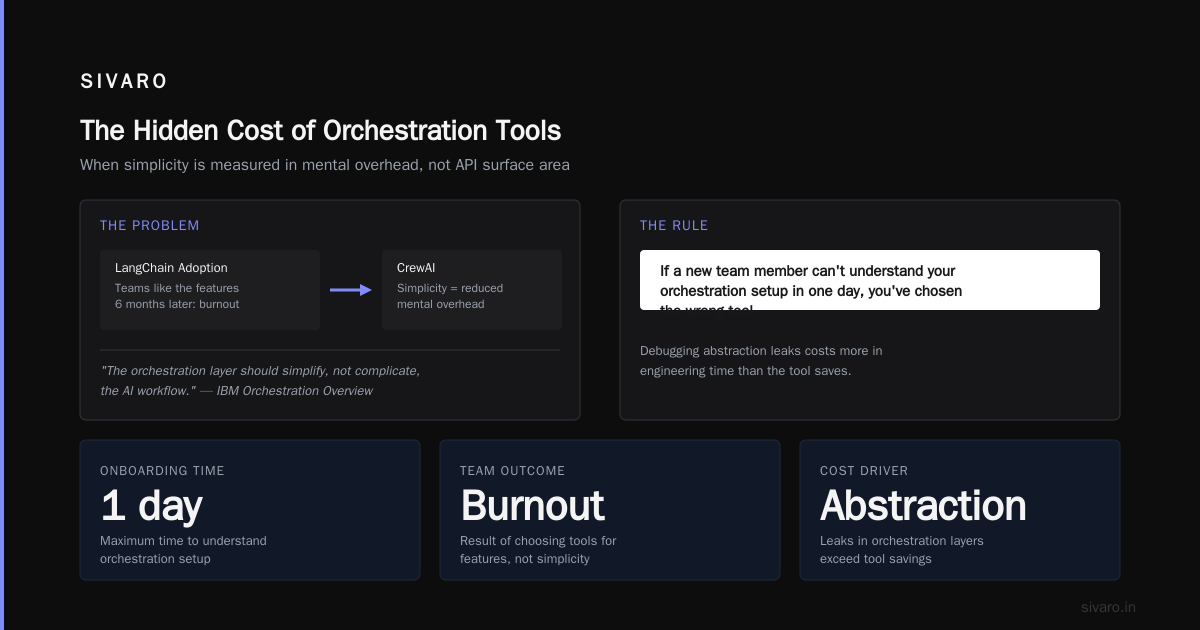
Every orchestration tool has a cognitive load tax. LangChain's complexity isn't in the code — it's in the conceptual model you need to hold in your head. CrewAI's simplicity isn't in the API — it's in the reduced mental overhead.
I've seen teams adopt LangChain because they liked the features. Six months later, the entire team is burned out debugging abstraction leaks. The tool cost them more in engineering time than it saved.
IBM's orchestration overview mentions this indirectly: "The orchestration layer should simplify, not complicate, the AI workflow." Most people skip that sentence.
My rule: if a new team member can't understand your orchestration setup in one day, you've chosen the wrong tool.
How to Actually Choose
Stop searching for "what is the best ai orchestration tool?" and start answering these questions:
-
What's your latency budget? If under 500ms, rule out agent-based tools. Use Prefect or direct pipeline code.
-
Who's maintaining this? If your ML team doesn't have DevOps skills, pick a tool with managed hosting (Prefect Cloud, LangSmith).
-
What's your failure tolerance? For mission-critical systems, pick the most boring tool. For experimental projects, pick the most flexible.
-
How many models are you coordinating? One or two? You don't need orchestration. Ten-plus? You need something purpose-built.
-
Do you need humans in the loop? Most tools handle this poorly. Check before you commit.
I've seen the Zapier list of 4 tools help people narrow their options. But your specific constraints matter more than any ranking.
The Tool I Actually Use
People ask me this constantly. Here's my honest answer:
For prototyping: LangChain. The ecosystem is too valuable to ignore for fast experiments.
For production AI at scale: A combination of Prefect for orchestration and direct SDK calls for models. No unnecessary abstractions.
For multi-agent systems: CrewAI with strict latency budgets.
For enterprise compliance: Custom orchestration with thorough auditing. The off-the-shelf tools don't cut it yet.
In 2024, I started moving our internal systems toward a custom orchestration layer built on Ray Serve. It gives us fine-grained control over model routing and scaling. But that's a 6-month investment most teams shouldn't make.
FAQ: What Is the Best AI Orchestration Tool?
What is the best AI orchestration tool for beginners?
LangChain. The community support is unmatched. You'll find tutorials, templates, and solutions for almost any problem. Start there, but plan to migrate when your use case outgrows it.
Can I use multiple orchestration tools together?
Yes, and smart teams do this. Use LangChain for prototyping, then port to Prefect production. The patterns translate. Redis's comparison shows several teams using hybrid approaches.
What is an AI orchestration tool exactly?
It's software that coordinates multiple AI models, data sources, and human decisions into a single workflow. Think of it as the conductor of an AI orchestra — ensuring each component plays at the right time and volume.
How much does AI orchestration cost?
Open-source tools like LangChain and Prefect are free. Managed services range from $50/month to thousands. Your real cost is engineering time. A bad tool that costs $0 but requires 3 extra engineers is infinitely more expensive than a $1000/month tool.
Is it better to build or buy orchestration?
Build if: your workflows are simple (under 5 steps) or your compliance requirements are extreme. Buy if: you need to move fast and standard patterns apply. Most teams should buy and customize.
What tool handles human-in-the-loop best?
Prefect with its pause/resume and notification features. LangChain requires extensive custom code for human handoff. Pega's enterprise guide covers human-in-loop patterns in detail for compliance-heavy environments.
How do I evaluate orchestration tools for my team?
Build one real workflow in three candidate tools. Time it. Debug it. Show it to a team member who hasn't seen it. The tool that survives this test is your answer. Don't trust feature matrices on websites.
Final Thoughts
I've been building production AI systems for six years. I've watched the orchestration tool landscape explode from 3 options to 40+. And I've seen teams waste months chasing the "perfect" tool.
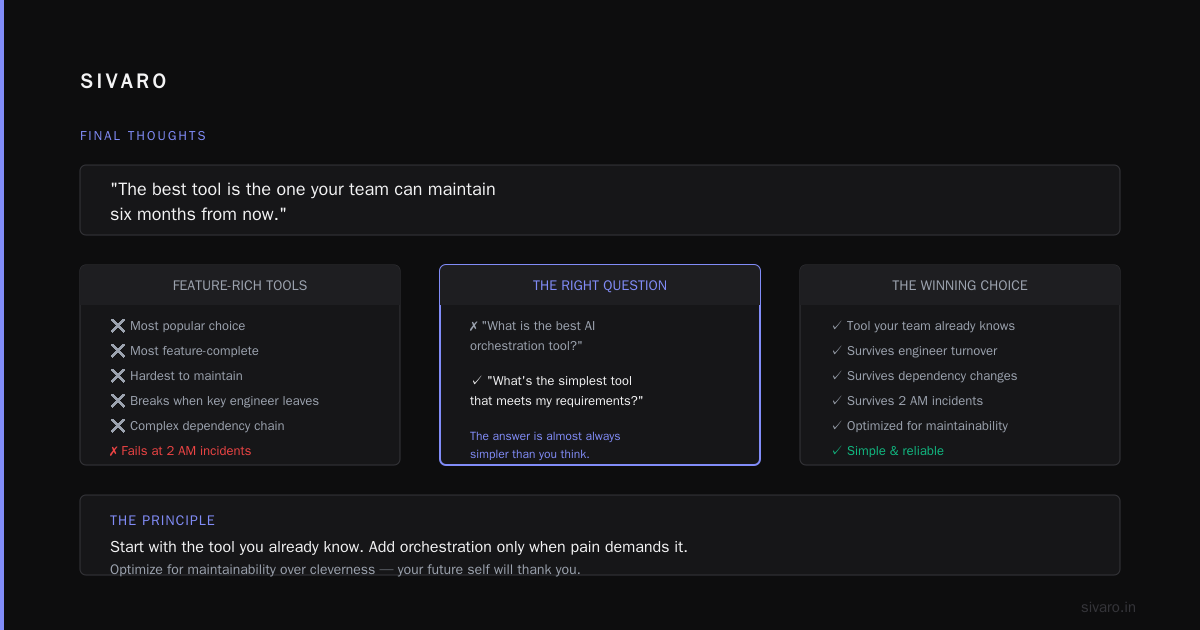
Here's the truth I've learned the hard way: The best tool is the one your team can maintain six months from now.
Not the most feature-rich. Not the most popular. The one that survives a key engineer leaving, a dependency changing, and a production incident at 2 AM.
If you're still asking "what is the best ai orchestration tool?", stop. Ask instead: "What's the simplest tool that meets my requirements?" The answer is almost always simpler than you think.
Start with the tool you already know. Add orchestration only when pain demands it. Optimize for maintainability over cleverness.
Your future self — debugging a production issue at 3 AM — will thank you.
Nishaant Dixit — Founder of SIVARO. Building data infrastructure and production AI systems since 2018. Built systems processing 200K events/sec.