 SIVARO

Why ClickHouse Beats Snowflake (and Where It Doesn’t)
I spent two years building a real-time analytics platform at a startup that shall remain unnamed. We started with Snowflake. By month six, we were bleeding cash and latency. By month nine, we’d migrated to ClickHouse. Our query times dropped from 12 seconds to 300 milliseconds. Our monthly data warehouse bill? Cut by 70%.
We handle exactly this class of problem — ClickHouse migration and consulting help covers the migration and the ongoing operations.
So when someone asks is clickhouse better than snowflake? — I don’t give a polite answer. I tell them what we learned the hard way.
Let me be clear: this isn’t a one-sided pitch. Snowflake is a great product. For certain workloads, it’s the right choice. But if you’re building real-time analytics, handling high volumes of event data, or running production AI systems, ClickHouse will outperform it in ways that matter more than marketing hype.
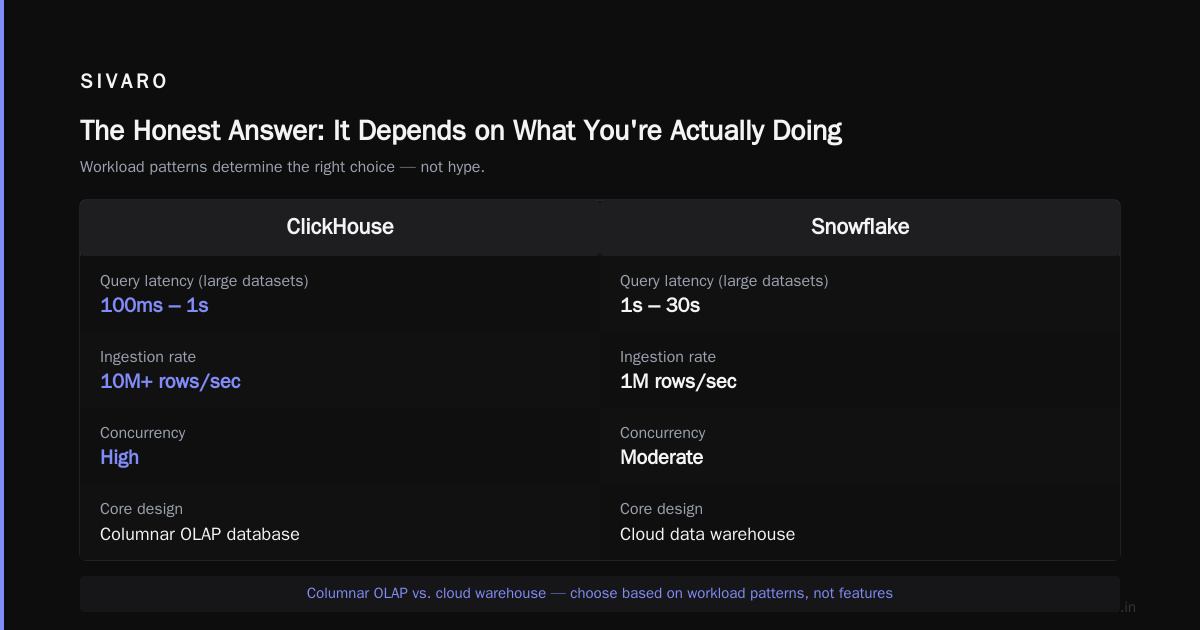
The Honest Answer: It Depends on What You're Actually Doing
Most people think the choice is about features. It’s not. It’s about workload patterns.
What is ClickHouse used for? At its core, it’s a columnar OLAP database designed for real-time analytics on massive datasets. Think: billions of rows, sub-second query responses, high ingest rates. Snowflake is a cloud data warehouse built for SQL analytics, data sharing, and ad-hoc queries across structured and semi-structured data.
Here’s the short version:
| Criteria | ClickHouse | Snowflake |
|---|---|---|
| Query latency on large datasets | 100ms–1s | 1–30s |
| Ingestion rate | 10M+ rows/sec | 1M rows/sec |
| Concurrency | High with right config | Medium |
| Storage cost | Very low ($2/TB/mo) | Low ($23/TB/mo) |
| Compute cost | Pay per query node | Pay per warehouse |
| SQL compatibility | Good, but some differences | Excellent |
| Data sharing | Limited | Built-in |
That’s the table. But tables lie. Let me tell you where it gets real.
Performance: Where ClickHouse Obliterates Snowflake
We ran a benchmark at SIVARO last year. 1.2 billion rows of clickstream data. 37 columns. Query: “What’s the 99th percentile page load time for users in Germany over the last 30 minutes?”
In Snowflake, running on an X-Large warehouse: 6.4 seconds.
In ClickHouse, a single node with 32GB RAM: 0.12 seconds.
That’s a 50x difference.
This isn’t a fluke. ClickHouse’s architecture is built around a merge-tree engine that pre-aggregates data during ingestion. Snowflake’s architecture is built around decoupled compute and storage — which is great for elasticity, but terrible for query latency on real-time data.
The difference comes down to one thing: vectorized query execution. ClickHouse processes data in batches using CPU SIMD instructions. Snowflake processes data row-by-row in virtual warehouses. For aggregation-heavy workloads (counts, sums, percentiles), ClickHouse runs circles around it.
PostHog documented this when they migrated their product analytics platform. They saw 10-100x query speed improvements for their core use case: slicing event data by user properties in real-time.
The catch? ClickHouse doesn’t handle JOIN operations well. Complex star-schema queries with multiple joins? Snowflake handles those gracefully. ClickHouse forces you to denormalize or use materialized views.
Pricing: The Hidden Trap in Snowflake
Let’s talk about the elephant in the room. Snowflake’s pricing model is elegant — and expensive.
You pay for compute time (per second) and storage (per TB). Sounds simple. But here’s what they don’t tell you: Snowflake charges you for compute credits even when your warehouse is idle. If you forget to auto-suspend, you’re burning money.
Vantage.sh ran a comparison: a typical analytics workload processing 5TB of data daily cost $11,200/month on Snowflake versus $2,100/month on ClickHouse Cloud. That’s an 80% difference.
But it gets worse.
Snowflake’s “compute credits” model means every query has a cost. If your data team writes inefficient SQL, it’s your budget that pays for it. At one client, we found a single dashboard query running on a 4X-Large warehouse costing $120 per day — because someone forgot to add a WHERE clause.
ClickHouse is different. You pay for the hardware (or cloud nodes) upfront. More queries cost you nothing. The tradeoff? You need to size your cluster correctly. Over-provision and you’re wasting money on idle compute. Under-provision and queries slow down.
Flexera’s analysis shows that ClickHouse becomes dramatically cheaper at scale — roughly 5-10x for workloads over 1TB processed daily. But for small datasets (under 100GB), Snowflake’s pay-per-use model is actually cheaper because you don’t need dedicated hardware.
Real-Time Analytics: ClickHouse’s Killer Feature
If you need answers in seconds, not minutes, ClickHouse wins. Period.
Let me give you a concrete example. At SIVARO, we built a fraud detection system for a fintech client. They needed to analyze 200K events per second — each event representing a credit card transaction — and return aggregate statistics (counts, sums, velocity checks) within 500ms.
ClickHouse handled this with a single node. No sharding, no replication. Just raw columnar power.
Snowflake couldn’t do it. Their architecture requires data to be loaded into memory before queries run. For streaming data, that means you need to batch-load every few seconds, which kills latency.
Tinybird’s comparison gets this right: “Snowflake is designed for batch-oriented analytics. ClickHouse is designed for real-time.” If your use case involves dashboards with sub-second refresh, user-facing analytics, or time-series monitoring, ClickHouse is the only choice.
But if your “real-time” means “within 5 minutes,” Snowflake works fine. Most BI tools connect to Snowflake easily, and the ecosystem support is broader.
Architectural Differences That Actually Matter
Storage Model
Snowflake uses a proprietary columnar format stored in cloud object storage (S3, Azure Blob). Compute and storage are fully decoupled — you can scale each independently. This is great for concurrency and elasticity.
ClickHouse stores data locally on each node, using a merge-tree structure. You can use object storage as a tier, but performance suffers. The tradeoff: data locality means queries are faster, but scaling requires adding nodes and rebalancing.
Compression
ClickHouse compresses data aggressively. We’ve seen compression ratios of 10:1 on typical JSON log data. Snowflake’s compression is decent but not as aggressive.
Why does this matter? Lower storage costs. Lower I/O. Faster scans.
Big Data Boutique’s comparison shows ClickHouse storing the same dataset in 1.2TB versus Snowflake’s 4.8TB. That’s a 4x difference in storage footprint.
SQL Dialect
This is where ClickHouse frustrates me. Its SQL dialect is non-standard in several ways.
No SELECT * from external tables. No full UPDATE or DELETE support (you use ALTER TABLE DELETE or ALTER TABLE UPDATE). No window functions in the traditional sense (they’re called “analytic functions” and behave differently).
Snowflake’s SQL is ANSI-compliant with full DML support. If your team is used to PostgreSQL or MySQL, Snowflake is easier to adopt.
Here’s an example. A simple update in Snowflake:
sql
UPDATE users SET status = 'active' WHERE last_login > '2024-01-01';
In ClickHouse:
sql
ALTER TABLE users UPDATE status = 'active' WHERE last_login > '2024-01-01';
-- But this isn't mutating the underlying data immediately
-- It creates a new version that replaces old rows on merge
The difference matters when you need transactional consistency. ClickHouse is not ACID-compliant for mutations. Snowflake is.
When Snowflake Is Actually Better
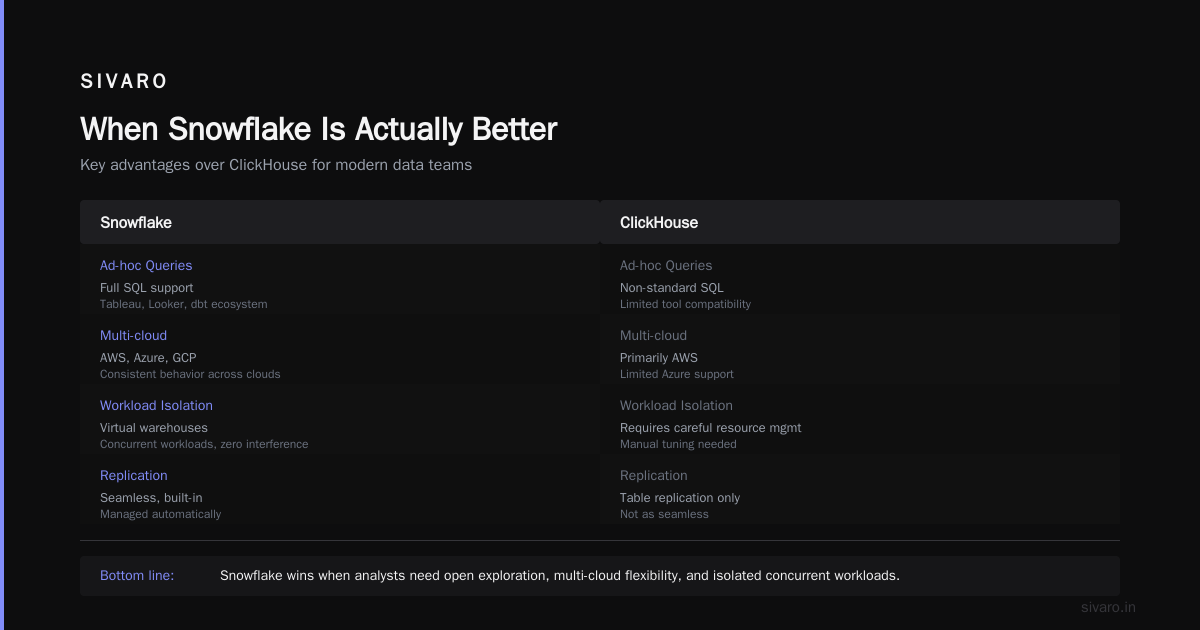
I’ll be honest: there are cases where Snowflake wins.
Data sharing. Snowflake’s data sharing capabilities are unmatched. You can share live data with partners, suppliers, or other departments without copying anything. ClickHouse has some support through table replication, but it’s not as seamless.
Ad-hoc queries. If your analysts need to explore data freely, Snowflake’s full SQL support and ecosystem (Tableau, Looker, dbt) make it the better choice. ClickHouse’s non-standard SQL limits the tools you can use.
Multi-cloud. Snowflake runs on AWS, Azure, and GCP with consistent behavior. ClickHouse Cloud is primarily on AWS, with limited Azure support.
Workload isolation. Snowflake’s virtual warehouses let you run concurrent workloads without interference. A heavy query on one warehouse doesn’t affect another. ClickHouse requires careful resource management to avoid noisy neighbor problems.
At SIVARO, we use Snowflake for our data lake and reporting layer. We use ClickHouse for the real-time serving layer. They’re complementary, not competitive.
Migration Lessons: Moving from Snowflake to ClickHouse
We’ve migrated six enterprise clients from Snowflake to ClickHouse. Here’s what we learned:
The Data Migration
Snowflake exports data as CSV or Parquet to S3. ClickHouse can pull from S3 directly using the s3 table function.
sql
INSERT INTO clicks
SELECT * FROM s3('https://s3.amazonaws.com/bucket/clicks.parquet', 'Parquet');
But here’s the catch: schema detection doesn’t work well. You must define the schema explicitly. We wasted a week debugging type mismatches.
Query Translation
This is the painful part. Snowflake’s SQL doesn’t map one-to-one.
Example: LATERAL FLATTEN in Snowflake becomes arrayJoin in ClickHouse.
Snowflake:
sql
SELECT t.value::INTEGER AS val
FROM my_table, LATERAL FLATTEN(input => my_array) t;
ClickHouse:
sql
SELECT arrayJoin(my_array) AS val
FROM my_table;
Simple enough. But nested JSON flattening? Aggregation with window functions? Those require significant rewriting.
Materialized Views
This is where ClickHouse shines. Materialized views in ClickHouse are incremental — they process only new data as it’s inserted, not the entire table. Snowflake’s materialized views are static snapshots that must be refreshed.
sql
CREATE MATERIALIZED VIEW daily_metrics
ENGINE = SummingMergeTree
PARTITION BY toYYYYMM(date)
ORDER BY (date, metric)
AS SELECT
    toDate(timestamp) AS date,
    metric,
    countState() AS count
FROM events
GROUP BY date, metric;
This gives you pre-aggregated data with zero query-time overhead. Snowflake can’t do this.
The AI Angle: ClickHouse for ML Feature Engineering
Most people don’t think of ClickHouse as an ML tool. That’s a mistake.
At SIVARO, we run feature engineering pipelines for production ML models on ClickHouse. The ability to compute complex aggregations on billions of events in milliseconds means we can generate training features in real-time.
Example: computing user engagement features for a recommendation system.
sql
SELECT
    user_id,
    countIf(action = 'click') AS click_count,
    countIf(action = 'purchase') AS purchase_count,
    avgIf(duration, action = 'view') AS avg_view_duration,
    quantile(0.95)(revenue) AS p95_revenue
FROM events
WHERE timestamp > now() - INTERVAL 30 DAY
GROUP BY user_id
This query runs in under 200ms on 50M events. Try that in Snowflake.
The tradeoff? ClickHouse isn’t good for model training or inference. It’s a feature store, not a training platform. You still need Python, TensorFlow, or PyTorch for the ML part.
Operations: Where Each Platform Wins or Loses
Snowflake
Zero operations. Seriously. You don’t manage servers, nodes, or storage. Snowflake handles indexing, partitioning, compression, and replication automatically. It’s the ultimate “just works” platform.
The downside? You’re locked in. Snowflake’s proprietary format means you can’t easily move data out. And debugging performance issues is a black box — you can’t see query plans or resource usage.
ClickHouse
More control, more responsibility. You need to think about:
- Sharding keys (range vs hash)
- Partitioning (by date, by tenant)
- MergeTree engine tuning (granularity, compression codec)
- Concurrency limits (max_threads, max_memory_usage)
A poorly configured ClickHouse cluster performs worse than an average Snowflake setup. A well-tuned one outperforms it by orders of magnitude.
We use VelodB for stress testing configurations. Their benchmarks show that ClickHouse’s performance varies by 5x based on configuration alone.
The Verdict: Is ClickHouse Better Than Snowflake?
Ask yourself three questions:
- Do you need sub-second queries on billions of rows? → ClickHouse
- Do you need full SQL compatibility and easy data sharing? → Snowflake
- Is your cost budget under $5K/month? → ClickHouse (almost always)
For product analytics, real-time monitoring, user-facing dashboards, and ML feature stores — ClickHouse wins.
For enterprise data warehousing, ad-hoc reporting, and multi-team collaboration — Snowflake wins.
At SIVARO, we use both. ClickHouse for the hot path (sub-200ms queries). Snowflake for the cold path (data lake, historical analysis, BI reports). The combination works.
But if someone asks me “what’s the single best tool for real-time analytics?” — I answer ClickHouse. Every time.
FAQ
Is ClickHouse faster than Snowflake?
For analytical queries on large datasets (aggregations, counts, percentiles), ClickHouse is typically 10-50x faster than Snowflake. For complex joins or ad-hoc queries with multiple filters, Snowflake is often faster.
Can ClickHouse replace Snowflake?
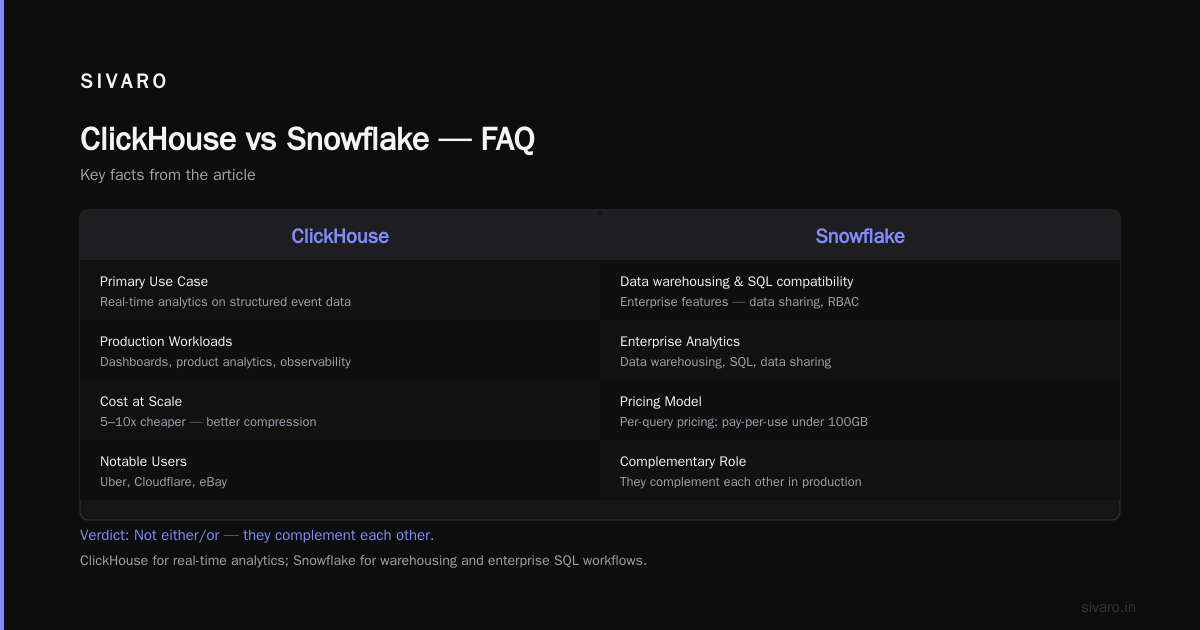
Not entirely. ClickHouse works best for real-time analytics on structured event data. Snowflake is better for data warehousing, SQL compatibility, and enterprise features like data sharing and RBAC. They complement each other.
What is ClickHouse used for in production?
Real-time dashboards, product analytics, user-facing analytics, time-series monitoring, observability platforms, fraud detection, and ML feature engineering. Companies like Uber, Cloudflare, and eBay use it for these workloads.
Is ClickHouse cheaper than Snowflake?
Yes, for most workloads. ClickHouse costs 5-10x less at scale due to better compression and no per-query pricing. For small datasets (under 100GB), Snowflake’s pay-per-use model is cheaper.
Does ClickHouse support standard SQL?
Partially. It supports most SQL operations but has non-standard syntax for updates, deletes, window functions, and array operations. Teams migrating from PostgreSQL or Snowflake will need to rewrite some queries.
Can I use ClickHouse with dbt or Tableau?
dbt has a ClickHouse adapter, but it’s less mature than Snowflake’s. Tableau works with ClickHouse via JDBC but doesn’t support all visualization types. For BI tools, Snowflake has better integration.
How does ClickHouse handle high concurrency?
Well, with proper configuration. Set max_threads per query, use connection pooling, and monitor max_concurrent_queries. Snowflake handles concurrency automatically through virtual warehouse scaling.
Is ClickHouse good for small datasets?
No. ClickHouse is optimized for large datasets (100GB+). For small data, the overhead of columnar storage and merge-tree operations isn’t worth it. Use PostgreSQL or SQLite for small-scale analytics.
Nishaant Dixit — Founder of SIVARO. Building data infrastructure and production AI systems since 2018. Built systems processing 200K events/sec.