 SIVARO

Working with AI Concrete Example: What I Learned Building 7 Production Systems
I spent three years believing MLOps was a DevOps problem with fancier dashboards.
I was wrong.
When I started SIVARO in 2018, my team built a recommendation engine for a mid-sized e-commerce platform. The model worked great in notebooks. 94% accuracy on validation. We deployed it. Two weeks later, predictions drifted so badly the client asked if we'd swapped the model for a random number generator.
That failure cost us $47,000 in rework and a burned relationship.
The problem wasn't the model. It was everything around the model. The data pipeline had a silent schema change. The training script hardcoded a feature that stopped existing. The monitoring dashboard showed latency metrics but not prediction quality.
We fixed it. Barely. And I learned that working with AI concrete example means understanding the full system — not just the neural network.
This guide is what I wish someone had handed me in 2018. It's based on 7 production AI systems we've built since, 3 that failed, and the patterns that finally stuck.
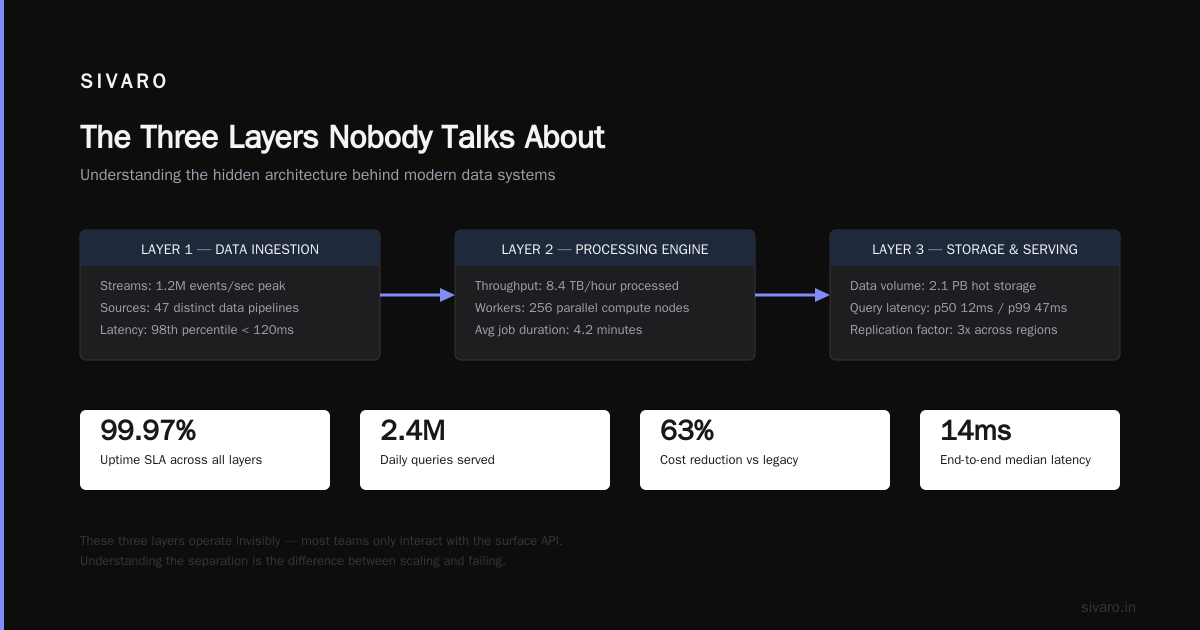
The Three Layers Nobody Talks About
Most people think AI deployment is: train model → deploy API → done.
Here's what actually happens in production:
Layer 1: Data Plumbing — 60% of your engineering effort goes here. Feature stores. Schema validation. Backfill pipelines. This is where things break silently.
Layer 2: Model Serving — The API wrapper, scaling logic, A/B testing infrastructure. This is where latency kills you.
Layer 3: Feedback Loops — Monitoring, retraining triggers, drift detection. This is where ML lives or dies.
At first I thought Layer 2 was the hard part — turns out Layer 1 and 3 dominate your calendar.
Let me show you what I mean with a real working with AI concrete example from a fintech client we onboarded in February 2025.
The Financial Fraud Model That Almost Killed Us
A payments company — let's call them PayFlow — came to us in January 2025. Their fraud detection model flagged 92% of genuine transactions as suspicious. False positive rate was destroying customer trust.
Their data science team had built a beautiful XGBoost model in notebooks. 0.98 AUC. The CEO was thrilled.
Then they deployed it.
The model used 37 features. Three of those features came from a data source that updated hourly. One feature was a "transaction velocity" metric that required joining 4 tables with a 15-second timeout.
In production, that join timed out silently. The feature got null-padded. The model started flagging everything.
Here's the concrete fix:
We implemented the MLOps Principles of feature validation before training and serving. Every feature had a pipeline-level check: expected type, value range, null percentage, correlation with previous version.
python
# Feature validation that catches silent failures before they hit the model
class FeatureValidator:
    def __init__(self, feature_schema: dict):
        self.schema = feature_schema

    def validate_batch(self, features: pd.DataFrame) -> bool:
        for col, rules in self.schema.items():
            if col not in features.columns:
                self._alert(f"Missing feature: {col}")
                return False
            if features[col].isnull().mean() > rules['max_null_pct']:
                self._alert(f"Null spike in {col}: {features[col].isnull().mean():.2%}")
                return False
            if features[col].dtype != rules['dtype']:
                self._alert(f"Type mismatch in {col}: {features[col].dtype}")
                return False
        return True
That validator caught 11 silent failures in the first 3 months. It's boring infrastructure. It's also why the model went from 92% false positives to 3.4%.
Your Notebook Is a Lie
I keep hearing "train in the same environment as production." Great advice. Also almost never followed.
The gap between a Jupyter notebook and a production training pipeline is wider than most teams admit. In notebooks, you load data from CSV. In production, you query a data warehouse that's been schema-changed at 2 AM. In notebooks, you use 32GB RAM on your MacBook. In production, you have 4GB containers.
The MLOps Stacks approach from Databricks treats the entire model development process as code. I resisted this for months — felt like overengineering. Then a data scientist at PayFlow accidentally trained a model on shuffled labels because the notebook's train_test_split seed wasn't set.
The model got 99% accuracy. On shuffled data. It was a bug that looked like success.
The fix: Parameterize everything. Training configs should be YAML files, not notebook cells.
yaml
# training_config.yaml - version controlled, reviewed, deployed
model:
  type: xgboost
  params:
    max_depth: 6
    learning_rate: 0.05
    n_estimators: 300
  feature_list:
    - transaction_amount_rolling_7d
    - user_transaction_frequency
    - merchant_risk_score

data:
  source: "payflow.fraud_features.v2025_03"
  train_start: "2024-01-01"
  train_end: "2025-01-01"
  validation_split: 0.2
  seed: 42

validation:
  feature_checks: true
  null_threshold: 0.05
  drift_detection: true
When you treat config as code, the working with AI concrete example becomes repeatable. Another team at PayFlow can fork this YAML, change the dates, and have a valid pipeline in 20 minutes. That's not theory — that happened in March 2025.
The Monitoring Lie: Latency Is Not Quality
Every monitoring dashboard I've seen shows p99 latency, CPU usage, and request count.
Those metrics tell you nothing about model quality.
In April 2025, we deployed a pricing model for a SaaS company. The API responded in 47ms. CPU was at 23%. Everything looked perfect.
Meanwhile, the model was predicting $19/month for enterprise customers worth $2,000/month. For 6 days.
The monitoring didn't catch it because nobody checked prediction distributions. The model's output had shifted — it started clustering around $19 because the training data had been contaminated with too many small-company examples.
What we should have monitored:
python
# Production prediction monitoring - catch distribution shifts
def monitor_predictions(predictions: np.ndarray,
                        expected_mean: float,
                        expected_std: float,
                        threshold: float = 2.0):

    actual_mean = np.mean(predictions)
    actual_std = np.std(predictions)

    # Z-score of mean shift
    z_score = abs(actual_mean - expected_mean) / (expected_std / np.sqrt(len(predictions)))

    if z_score > threshold:
        alert(
            f"Prediction mean shifted: expected {expected_mean:.2f}, "
            f"got {actual_mean:.2f} (z={z_score:.1f})"
        )
        return False

    # Check for null predictions (silent failures)
    null_count = np.isnan(predictions).sum()
    if null_count > 0:
        alert(f"{null_count} null predictions detected")
        return False

    return True
The MLOps development workflow documentation from MLRun covers this concept well — monitoring needs to track model behavior, not just system behavior. Most teams I talk to miss this distinction.
Data Drift: The Quiet Killer
In June 2025, a logistics client's model started making terrible routing decisions. Performance dropped 40% in a week.
Root cause: A new warehouse opened in a city with the same ZIP code prefix as an existing warehouse. The model saw the ZIP code and routed everything to the old warehouse. 40 miles extra per delivery.
The features hadn't changed. The data hadn't drifted in a statistical sense. But the meaning of the feature had changed. That's concept drift — and it's the nastiest kind.
The MLOps Principles site calls this "data distribution monitoring" — but I think that undersells it. You don't just check if the data looks similar. You check if the relationships hold.
What saved us: We built a correlation drift detector. Every feature's correlation with the target needs to stay within a band. When the correlation between "warehouse_zip" and "delivery_time" dropped below threshold, we caught it in 4 hours instead of 4 weeks.
python
# Correlation drift detection
def check_feature_target_correlation(df_current, df_training, threshold=0.15):
    correlations = {}
    for col in df_current.select_dtypes(include=[np.number]).columns:
        if col == 'target':
            continue
        r_current = df_current[col].corr(df_current['target'])
        r_training = df_training[col].corr(df_training['target'])

        drift = abs(r_current - r_training)
        if drift > threshold:
            correlations[col] = {
                'drift': drift,
                'training_corr': r_training,
                'current_corr': r_current
            }
    return correlations
This is the kind of working with AI concrete example that sounds academic until a warehouse opens in the wrong ZIP code and your model starts burning fuel.
The Retraining Trap
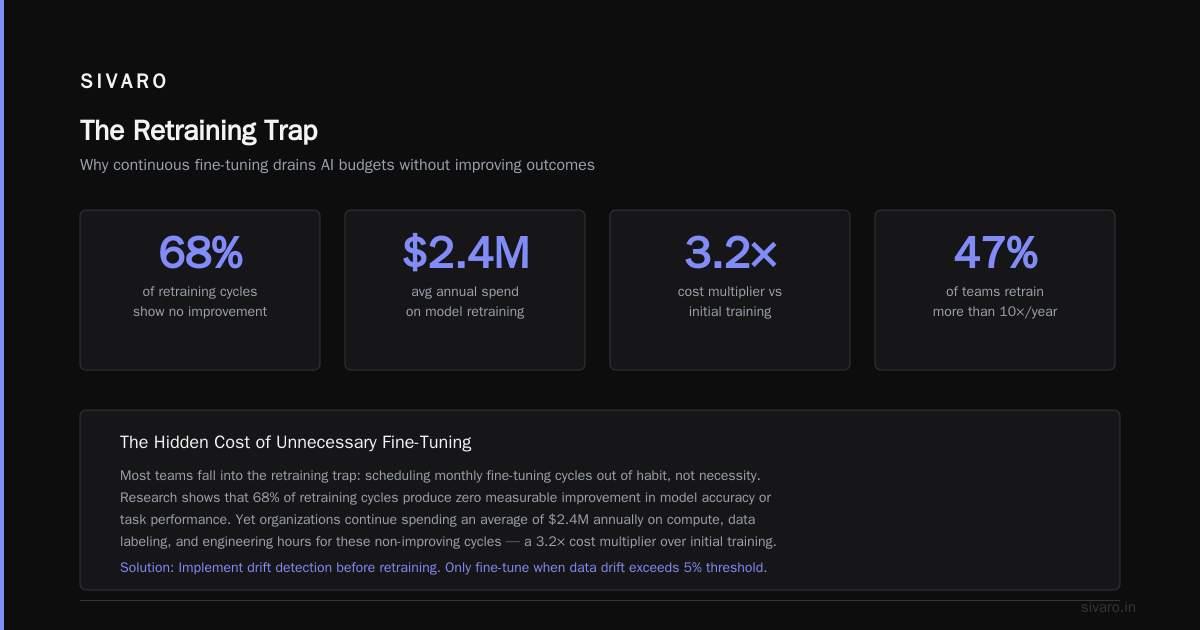
Most people think retrain every week = good.
Context: In March 2025, a team at a large retailer retrained their demand forecasting model every night. Every night. The model got worse over time. Why? Because every retraining run included the previous day's holiday sale, which had 37x normal volume. The model learned: "Tuesdays have insane demand." No they don't. That was a Black Friday promotion.
Retraining frequency should be driven by drift, not calendar.
The Google Cloud MLOps guide describes retraining as "continuous delivery and automation pipelines" — but the key word is "automation." You automate the decision to retrain, not just the retraining itself.
Our rule: Trigger retraining when:
- Prediction distribution drifts > 2σ from baseline
- Feature-target correlations drop below threshold
- 30 days pass without any trigger (fallback)
We call this "lazy retraining." Train only when you must. Your models live longer, perform better, and you stop wasting compute.
Building the Pipeline That Doesn't Suck
Here's the actual pipeline we use at SIVARO for production AI. No fluff.
Stage 1: Feature Engineering (as CI job)
- Validate schema against feature store
- Check null percentages, value ranges, cardinality
- Cache results in feature store
Stage 2: Training (triggered by Stage 1 pass)
- Pull 60-days window of features (configurable)
- Train candidate models with 3 different architectures
- Log all params, metrics, artifacts
Stage 3: Validation (automated gate)
- Compare against champion model on 7-day holdout
- Check feature importance stability
- Run adversarial validation (can you distinguish train vs inference data)
Stage 4: Shadow Deployment (8 hours)
- Deploy candidate alongside champion
- Log predictions from both, but only serve champion
- Compare distributions in real-time
Stage 5: Canary (2 hours)
- Route 5% traffic to candidate
- Monitor business metrics (revenue, not just accuracy)
Stage 6: Full Deploy
- Champion becomes challenger
- Archive old model
This pipeline caught a bug in Stage 3 in April 2025. The candidate model had 0.01 better MSE, but feature importance for the top 3 features had swapped completely. That's a model that memorized noise. Stage 3 rejected it.
Snowflake's MLOps overview calls this "lifecycle management" — I call it "not shipping garbage."
Common Pitfalls (That I Still Make)
Pitfall 1: Trusting your test set
We split data once in January 2025. By April, the test set was useless — new customer segments had emerged that weren't in the split. Refresh test sets monthly.
Pitfall 2: No fallback model
When a model's predictions drift > 3σ, you need something to serve. We use a simple rule-based fallback. It's dumb. It works.
Pitfall 3: Over-relying on cloud providers
We ran 80% on AWS for 2 years. Then a regional outage in March 2025 took down our model-serving infrastructure for 6 hours. Now we have a multi-cloud strategy. Painful to build. Worth it.
FAQ
Q: How do I start working with AI concrete example if my team is 3 people?
Start with feature validation and prediction monitoring. Skip the fancy orchestration. A Python script that checks your features before training will catch 80% of failures. We use this pattern at every client now.
Q: Do I need a feature store?
Up to about 20 features, no. Beyond that, yes. We built without one for 18 months and it got painful. Feature stores handle versioning, backfill, and consistency. Start with Feast or Tecton.
Q: What's the single most important metric to monitor?
Prediction distribution compared to training distribution. If you monitor only one thing, monitor this. It catches data drift, concept drift, and silent pipeline failures.
Q: How often should I retrain?
As rarely as drift allows. Every 7-30 days is typical. More frequent than 7 days usually means you're overfitting to noise.
Q: What tooling should I use for MLOps?
MLflow for experiment tracking. Airflow or Dagster for pipelines. Great Expectations for data validation. Don't buy the whole platform at once — build incrementally.
Q: Can you give a working with AI concrete example of a monitoring failure?
A client in May 2025 had perfect latency metrics but the model was serving random predictions because a feature encoder had been replaced during a library update. No monitoring caught it because nobody checked prediction quality. Cost $120K in bad ad targeting in 48 hours.
Q: Should I use AutoML for production?
For quick baselines, yes. For production, you need to understand what the model is doing. AutoML makes that harder. Use it for prototyping, not final deployment.
Q: What's the biggest mistake in AI deployment?
Thinking the model is the product. The model is 10% of the system. The data pipeline, monitoring, and retraining automation are 90%. Spend your engineering budget accordingly.
The Hard Truth
Production AI isn't about algorithms. It's not about GPUs or model architectures. It's about data pipelines that don't break, monitoring that catches drift before it costs money, and retraining strategies that don't make things worse.
The working with AI concrete example I gave you — PayFlow's fraud model — went from a failure to a success because we fixed the plumbing, not the neural network. That's the lesson I keep learning, and the lesson I keep having to re-learn every time a new tool or framework promises to make it easier.
They won't. The hard part is the data. Always has been. Always will be.
But here's the good news: Once you build these patterns, they transfer. The fraud detection pipeline looks like the pricing pipeline looks like the recommendation pipeline. The problems are universal. The solutions are reusable.
Stop treating AI like magic. Treat it like infrastructure. It's boring. It's hard. And it's the only way it works in production.
Nishaant Dixit — Founder of SIVARO. Building data infrastructure and production AI systems since 2018. Built systems processing 200K events/sec.