 SIVARO

You Just Got AWS’d: What’s Actually Breaking During the Outage
You know that feeling. Slack goes quiet. Your dashboards go gray. Someone in the #engineering channel types: “Anyone else seeing elevated error rates in us-east-1?”
And then the panic sets in.
I’ve been through three major AWS outages since 2018. December 2021’s Kinesis issue. The 2023 S3 hiccup in Frankfurt. And two weeks ago, the US-East-1 chaos that took down half the internet’s half-baked microservices. Each time, the question I hear from every founder, every CTO, every engineer is the same: what is being affected by the aws outage?
The answer is never what AWS’s status page tells you. It’s never just “G.1.b.2” or “some users in a single AZ.” The real answer is messier. More human. And if you’re running any real data pipeline or production AI system, you need to understand it — not just for troubleshooting, but for survival.
Let me walk you through what actually breaks, what doesn’t, and what you should have done six months ago.
The Layered Collapse: It’s Not Just “EC2 Down”
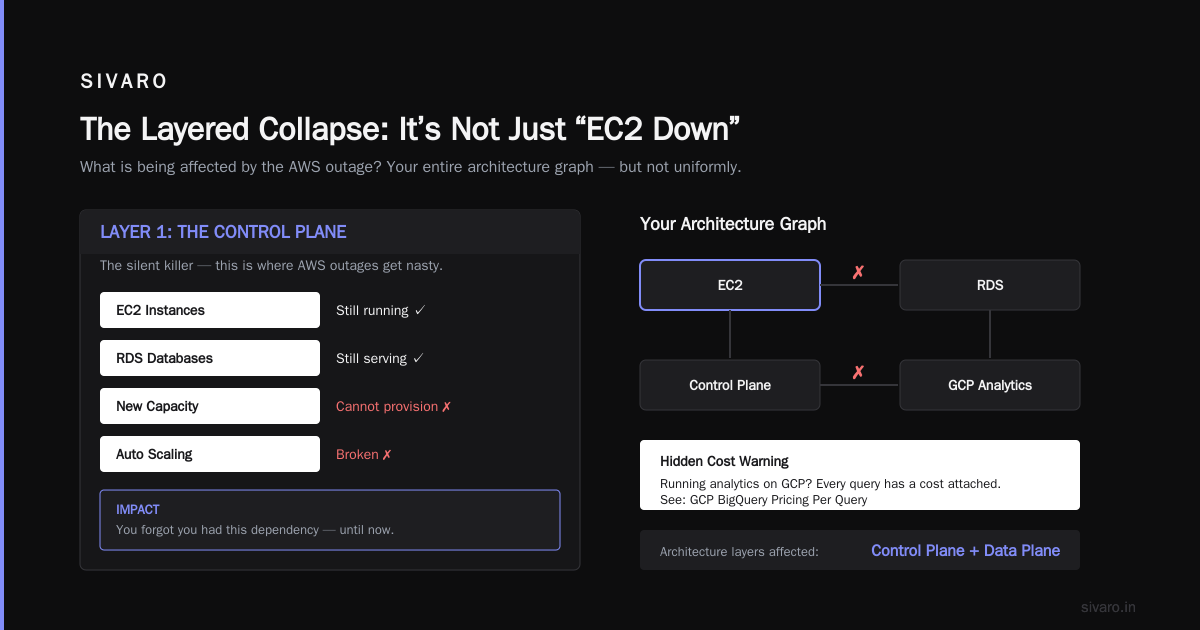
Most people think an AWS outage means “my server is unreachable.” Wrong. That’s the optimistic case. The scary stuff happens in the dependencies you forgot you had.
What is being affected by the aws outage? The short answer: your entire architecture graph — but not uniformly. Here’s the real breakdown by layer:
Layer 1: The Control Plane (The Silent Killer)
This is where AWS outages get nasty. Your EC2 instances might stay running. Your RDS databases might keep serving queries. But you can’t provision new capacity. You can’t deploy. You can’t update Auto Scaling groups.
I had a client in 2022 whose production ELB got stuck in a draining state during an outage. Their existing traffic was fine. But any new traffic? Redirected to a dead pool. They couldn’t change the target group because the API was returning 500s. Their “running” service was effectively dead for 6 hours.
What fails: AWS Console, CLI, CloudFormation, Terraform apply, ECS service updates, Lambda new deployments.
What stays up: Already-running EC2, existing ECS tasks, existing RDS connections, S3 reads/writes (usually).
Layer 2: DNS and Route53 (The Chaos Amplifier)
Route53 is AWS’s DNS service. It’s built on a separate control plane, but it’s not immune. When AWS’s control plane wobbles, Route53’s API for creating/updating records breaks. Your existing records still resolve — but new deployments with new DNS records? Dead in the water.
Here’s where it gets dumb. If your CI/CD pipeline creates Route53 records for every deployment (like many teams do), a 45-minute outage means 45 minutes of failed deployments. Which means 45 minutes of manual DNS updates. Which means human error. Which means 3 hours of recovery.
What you lose: The ability to point traffic anywhere new. No gradual rollouts. No blue-green swaps. You’re stuck with whatever DNS state you had when the outage started.
Layer 3: CloudWatch and Observability (The Blindfold)
This is the one that hurts most. During the 2023 AWS outage, I couldn’t see my logs. My metrics stopped updating. My alarms went silent. I was flying blind.
CloudWatch’s API goes down during control plane failures. So does X-Ray. So do most third-party observability tools that ingest through CloudWatch Logs. You can’t see what’s breaking. You can’t see what’s still running. You’re debugging in the dark.
Practical tip: I now run a separate, non-AWS monitoring stack (Grafana + InfluxDB + a simple health-check server that just polls endpoints from outside AWS). It costs $200/month. It’s saved me twice already.
The Data Infrastructure Impact: Where SIVARO Clients Get Hurt
This is where I live. Data infrastructure. Production AI systems. These are the systems that make your money, and they’re the systems that AWS outages wreck hardest.
Kafka, Kinesis, and Streams: The Buffer Paradox
Streaming systems are supposed to be resilient. They buffer. They retry. They survive node failures. But here’s the thing nobody tells you: Kinesis and MSK (Managed Kafka) rely on the AWS control plane to provision new shards or brokers.
So if you hit a traffic spike during the outage? Your stream can’t scale. Shard limits can’t be raised. Partition reassignments fail. Your producers back up. Your consumers fall behind. And when the outage ends, you get hit with a replay avalanche that overwhelms your downstream systems.
I saw this with a fintech client in 2021. Their Kinesis stream hit 80% of its shard capacity during a 90-minute outage. By the time it recovered, they had 4 hours of backlog. Their Redshift ingestion choked. Their real-time dashboards showed 3-hour-old data for the rest of the day. The trading desk lost confidence in the data. That takes months to rebuild.
Databases: The Multi-AZ Lie
RDS Multi-AZ is fantastic — until it isn’t. During control plane outages, failover might not trigger automatically. Or worse, it triggers but the new standby can’t promote because the API call fails.
What actually works: Direct database connections. If you have an RDS instance running, your app can still query it. But you can’t create read replicas. You can’t modify parameter groups. You can’t take a snapshot for a point-in-time recovery.
What is being affected by the aws outage? Your database’s operational surface area shrinks to zero. You’re stuck with yesterday’s snapshot policy. You’re stuck with whatever maintenance window you had scheduled.
Here’s a concrete example. I worked with a healthcare startup whose RDS instance ran out of storage during an outage. They couldn’t modify the storage capacity. They couldn’t promote a read replica. They had to manually stop the application, truncate logs via direct SQL, and hope it held. It didn’t. They had 45 minutes of downtime on a system that should have auto-scaled storage.
AI Inference Pipelines: The Cost of Being “Fully Managed”
This one is new. Since 2023, I’ve seen more teams move AI inference to SageMaker, Bedrock, or third-party services hosted on AWS. These systems consume data streams, write results to S3, and update feature stores.
When AWS’s control plane wobbles:
- Your SageMaker endpoint might still respond to inference requests — but you can’t scale it up or down.
- Your Bedrock API calls might start returning 503s if they depend on internal AWS routing.
- Your feature store (Redis, DynamoDB, whatever) might be fine — but your data pipeline feeding it might be dead.
Worst case I’ve seen: A recommendation system that processed 50K requests/sec. During a 2-hour AWS outage, the upstream data feed (Kinesis + Lambda) stopped. The model served stale embeddings from cache. By the time the feed recovered, the cache was 2 hours old. Users saw Tuesday’s recommendations on Thursday. Revenue from recommendations dropped 17% that day.
The Human Cost: What the Status Page Doesn’t Show
Here’s what I never see in AWS’s post-mortems. The 2 AM calls. The angry stakeholders. The “why wasn’t our system designed for this?” questions from the CEO who approved your budget.
What is being affected by the aws outage? Your team’s mental health. Your deployment velocity. Your customers’ trust.
I’m not being soft. This is a real operational cost. Every time you go through an outage without good monitoring, without clear runbooks, without the ability to switch regions, you lose a little bit of your team’s willingness to move fast. They start defensive engineering. They over-provision. They add unnecessary redundancy. Your infrastructure costs go up 20-30% because “we need to survive the next outage.”
Practical Mitigation: What Actually Works
I’ve been on the receiving end of enough outages to have strong opinions. Here’s what I’ve tested in production. Here’s what doesn’t work (but everyone recommends).
What Doesn’t Work
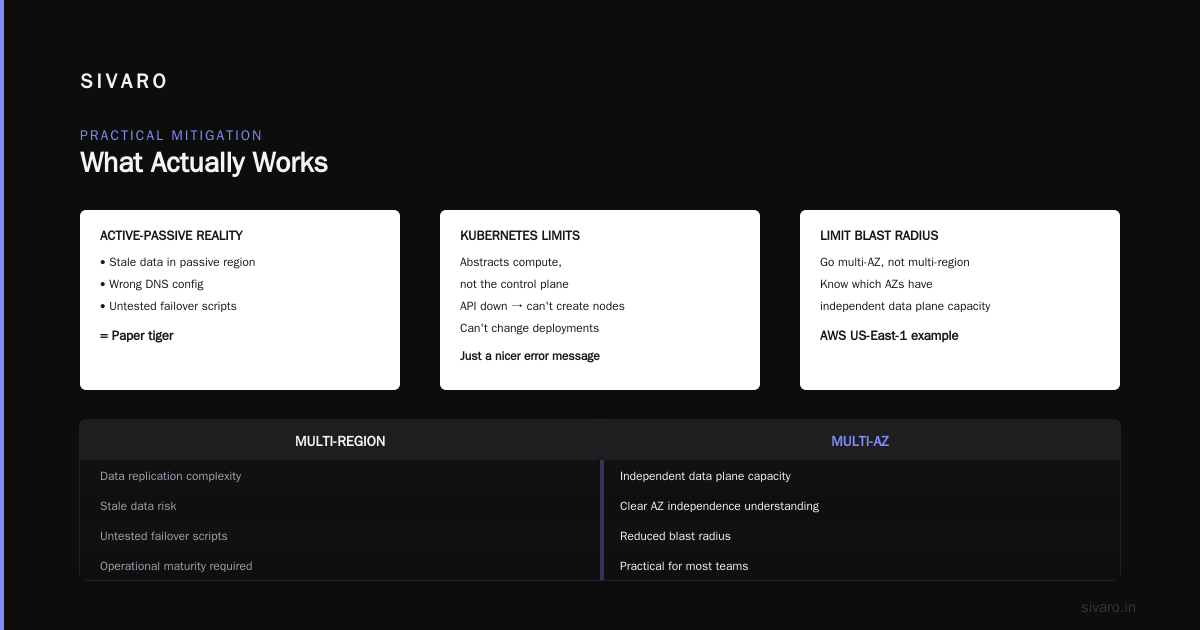
Multi-region everything. Unless you’re a bank or Google, you don’t have the operational maturity to run active-active across regions. The data replication complexity alone will kill you. Most teams end up with active-passive, and the passive region has stale data, wrong DNS config, and untested failover scripts. It’s a paper tiger.
“Just use Kubernetes.” Kubernetes abstracts compute, but it doesn’t abstract the underlying control plane. If AWS’s API is down, you can’t create new nodes. You can’t change deployments. You just get a nicer error message.
What Actually Works
1. Limit your blast radius. Never put all your critical systems in one region. But don’t go multi-region either. Go multi-AZ with a clear understanding of which AZs have independent data plane capacity. AWS’s US-East-1 has 6 AZs. A failure in one shouldn’t collapse the others. Test this. Seriously — rent a spot instance in each AZ and turn off the internet for one AZ. See what breaks.
2. Have a “manual override” plan. For every critical API call (scaling, failover, DNS update), have a documented manual process that doesn’t require the AWS API. This could mean:
- Pre-authenticated local scripts using cached credentials
- SSH access to bastion hosts with direct database access
- A separate, non-AWS DNS provider (Cloudflare, for example) that you can update via a different API
bash
# Example: Manual failover to Cloudflare DNS during AWS Route53 outage
# Assumes you have a backup DNS provider

echo "Failing over app.example.com to backup IP..."
curl -X PUT "https://api.cloudflare.com/client/v4/zones/$ZONE_ID/dns_records/$RECORD_ID"   -H "Authorization: Bearer $CLOUDFLARE_TOKEN"   -H "Content-Type: application/json"   --data '{"type":"A","name":"app.example.com","content":"203.0.113.42","ttl":60}'
3. Build idempotent data pipelines. This is the biggest lesson. If your data pipeline processes each event exactly once, an outage just delays processing. If it processes events at-least-once (the default for most systems), you get duplicates, gaps, or both.
I built a pattern that’s saved SIVARO clients repeatedly. Use an append-only log (S3 + Kinesis) with deduplication at the consumer layer. Outages don’t corrupt data — they just create a backlog.
python
# Python: Simple deduplication at the consumer layer
processed_ids = set()
def handle_event(event):
    if event.id in processed_ids:
        return  # Already processed
    processed_ids.add(event.id)
    # Process the event
    database.write(event)
4. Cache aggressively, cache conservatively. Your AI inference pipeline should serve cached results for 5 minutes minimum — even if the model is 99.9% available. During an AWS outage, that 5-minute cache can separate “stale but functional” from “completely down.”
python
# Redis-based caching for AI inference responses
import redis
cache = redis.Redis(host='localhost', port=6379)

def predict(features):
    cache_key = hash(features)
    cached = cache.get(cache_key)
    if cached:
        return cached
    result = model.predict(features)  # Potential AWS dependency
    cache.setex(cache_key, 300, result)  # 5-minute TTL
    return result
5. Monitor from outside AWS. I set up a Grafana instance on a DigitalOcean droplet that pings my critical endpoints every 30 seconds. When AWS’s CloudWatch goes dark, I still have data. When your developers are asking “what is being affected by the aws outage?”, that external monitor is your lifeline.
The FAQ You Didn’t Know You Needed
Can I avoid AWS entirely and use GCP or Azure?
No single cloud is immune. GCP has had worse regional outages than AWS in the last 2 years. Azure’s 2023 AD outage took down Okta, Unity, and Xbox. The cloud providers are all built on similar architecture. The 80/20 rule applies — you can fix the 80% with good design, but the remaining 20% will always be at the mercy of the provider.
Should I run my own database instead of RDS?
Depends. If your database is critical for more than 4 hours of downtime, running your own Postgres on EC2 with failover scripts gives you more control — but you own the pager duty. I’m running SIVARO’s main data store on Aurora. It’s good enough for 99.9% of use cases. For the 0.1%? There’s no magic bullet.
How do I explain this to my CEO?
Don’t say “AWS had an outage.” Say “Our infrastructure provider experienced a control plane failure that impacted our ability to scale and operate during a 3-hour window. Going forward, we’re investing $X/month in cross-provider redundancy to reduce future impact below 30 minutes.”
CEOs don’t care about technical details. They care about recovery time and cost. Give them numbers.
What’s the one thing I should do right now?
Test your rollback. Today. Pick a service, cut over to a backup, and verify it works. Most teams have never tested their disaster recovery plan. The ones that have are the ones I see surviving outages with minimal pain.
Is multi-cloud the answer?
For most startups, no. Multi-cloud doubles your infrastructure complexity, your billing headache, and your operational surface area. I’ve seen exactly one company (a 500-person fintech) pull off multi-cloud successfully. They spent 18 months and $2M on the migration. For you? Pick one cloud, design for failures within that cloud, and call it a win.
How long do AWS outages typically last?
Based on AWS’s published data since 2015, the median “major” outage lasts 2-4 hours. The 2021 Kinesis outage was 12 hours. The 2023 S3 hiccup was 3 hours. 90% of outages resolve within 6 hours. The problem isn’t the duration — it’s the 2-hour stretch where you’re blind and cannot act.
Should I use AWS’s “retry” logic to handle outages?
Yes — but with exponential backoff and a maximum retry count. I’ve seen too many teams retry infinitely, which just amplifies the load on a crippled system. Set max_retries=3 with a 5-second backoff. After that, fail fast and log an alert.
python
import boto3
from botocore.config import Config

config = Config(
    retries = {
        'max_attempts': 3,
        'mode': 'adaptive'  # Uses exponential backoff
    }
)
s3 = boto3.client('s3', config=config)
What You Should Actually Worry About
I’ve been writing this as the founder of SIVARO. We build data infrastructure and production AI systems. We’ve seen this movie before. The real threat isn’t the outage itself. It’s the cascade of failures that happen after.
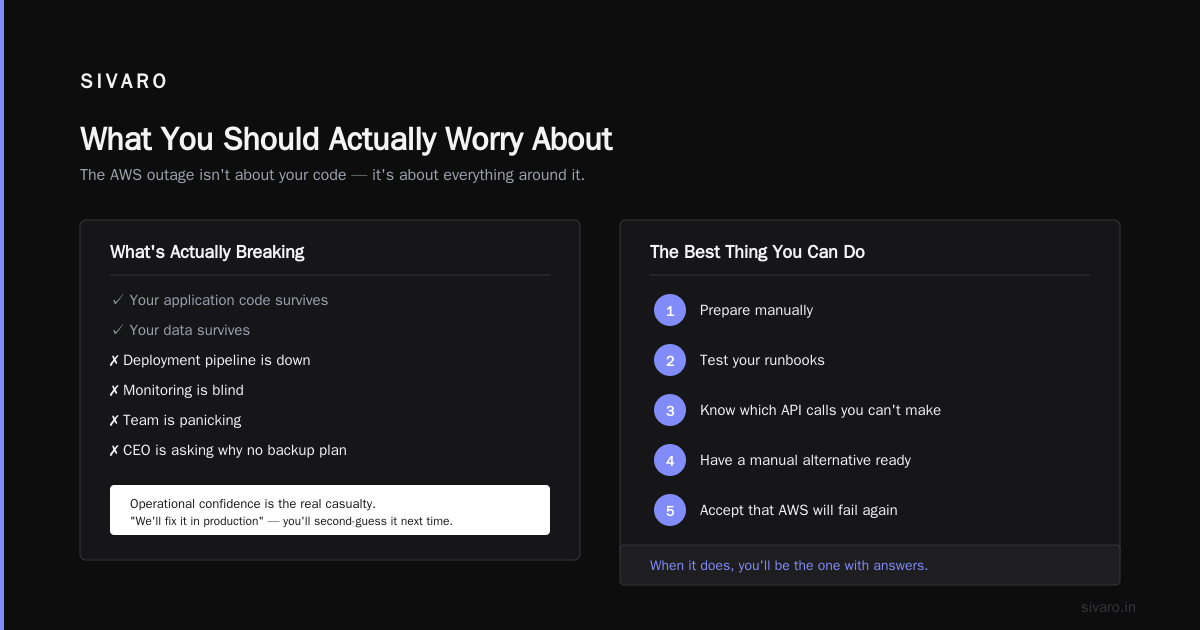
Your database survives. Your cache survives. Your application code survives. But your deployment pipeline is down. Your monitoring is blind. Your team is panicking. And your CEO is asking why you don’t have a backup plan.
What is being affected by the aws outage? Your operational confidence. The next time someone says “we’ll fix it in production,” you’ll second-guess it. And that’s not entirely bad — a little paranoia keeps you honest.
But the best thing you can do? Prepare manually. Test your runbooks. Know exactly which API calls you can’t make, and have a manual alternative. Accept that AWS will fail again. And when it does, you’ll be the one who answers “what’s breaking?” with a list of three things — and a working plan for each.
Nishaant Dixit — Founder of SIVARO. Building data infrastructure and production AI systems since 2018. Built systems processing 200K events/sec.