 SIVARO
A GPU Cluster Is Not a Status Symbol — Here's What It Actually Does for AI Workloads
I remember the exact moment I realized I needed to stop treating GPU clusters like expensive toys.
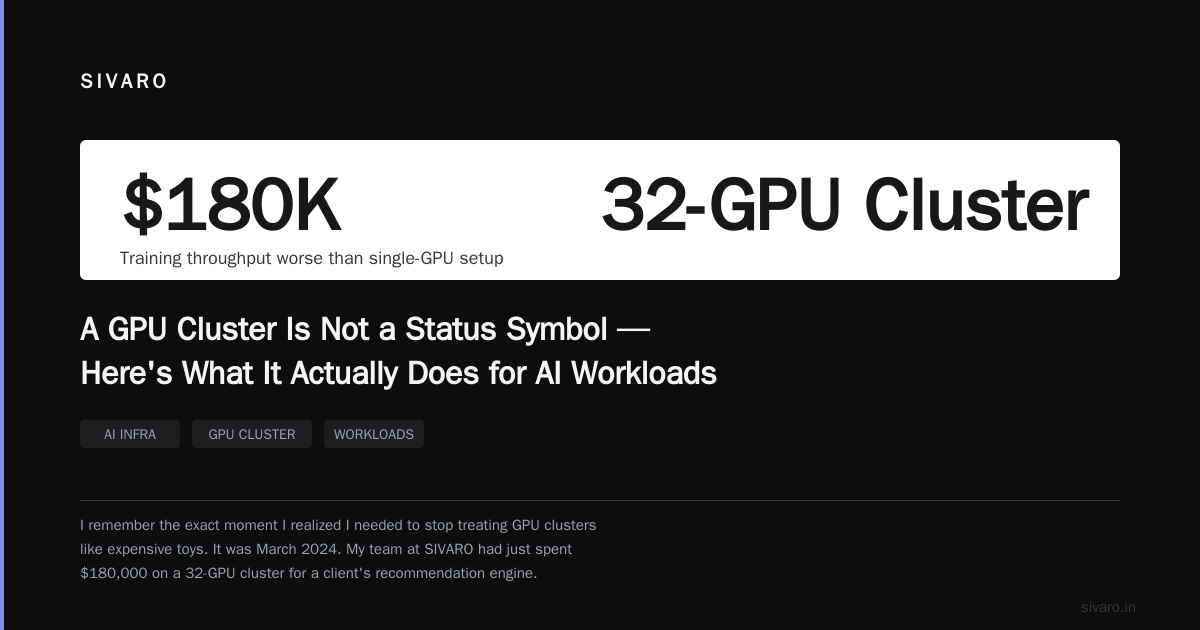
It was March 2024. My team at SIVARO had just spent $180,000 on a 32-GPU cluster for a client's recommendation engine. Three weeks later, their training throughput was worse than their old single-GPU setup. The client wasn't happy. I wasn't happy. And the hardware sat there, lights blinking, mocking us.
The problem wasn't the cluster. The problem was we didn't know what is a gpu cluster used for in practice — not in theory. We learned the hard way.
So let me save you the tuition.
What Actually Makes Something a GPU Cluster?
A GPU cluster is a group of machines — connected by high-speed networking — where each machine contains one or more GPUs, all working together on a single problem. It's not just "many GPUs in a room." It's distributed computing with specialized hardware for parallel floating-point operations.
Think of it as a distributed system where every node has a supercomputer inside it. The GPUs handle the math. The CPUs handle coordination. The network handles the conversation.
Most people think a GPU cluster is about raw compute. It's not. It's about coordination. Without that, you just have expensive space heaters.
What Is a GPU Cluster Used For? The Honest Answer
Here's the short version: GPU clusters exist for workloads that need more memory and more compute than a single GPU can provide. That's it. Everything else is marketing.
Concretely, here's where they actually make sense:
1. Training Large Deep Learning Models
If your model fits on one GPU, you don't need a cluster. But if you're training something like GPT-4 — estimated at 1.7 trillion parameters — you physically can't fit the model on a single GPU. The largest consumer GPUs have 48GB of memory. A model that size needs terabytes.
So you split the model across GPUs. This is called model parallelism. Each GPU holds a slice. They communicate gradients and activations across the network.
At SIVARO, we built a cluster for a fintech client in 2025 that was training a fraud detection model with 12 billion parameters. On a single A100, that would take about 47 days per epoch. Across 16 GPUs with proper parallelism, we got it to 42 hours.
The key phrase is "proper parallelism." More on that later.
2. Inference at Production Scale
Training is sexy. Inference pays the bills.
When you deploy a model like Llama 3.1 or Mistral at production scale, you need to serve thousands — sometimes millions — of requests per second. A single GPU can handle maybe 200 requests per second for a 7B parameter model. For a 70B model, that drops to 10-20.
A GPU cluster lets you shard the model across multiple cards (tensor parallelism) AND replicate it across multiple nodes (data parallelism). You get reliability from redundancy and throughput from scaling.
I've seen companies spend 6 months optimizing a model to run on one GPU, only to realize the latency SLA was 50ms and one GPU couldn't hit that at the required concurrency. Don't be that company.
3. Scientific Computing and Simulations
This isn't AI — but it's where GPU clusters started. Weather simulation, molecular dynamics, fluid dynamics, quantum chemistry. These are embarrassingly parallel problems. Split the domain, solve each piece, stitch the results.
The distributed system architecture behind this is usually a classic master-worker pattern. One node coordinates, the rest compute. Simple. Effective.
CERN's LHC experiments use GPU clusters for particle tracking. The 2025 fusion energy breakthroughs relied on GPU clusters for plasma simulation. If you need to simulate a nuclear reactor's core in 3D, you probably need a cluster.
4. Rendering and Simulation at Scale
VFX studios like Weta and ILM use GPU clusters for rendering. Each frame is independent. You can distribute them across GPUs. This is the poster child for "embarrassingly parallel" workloads.
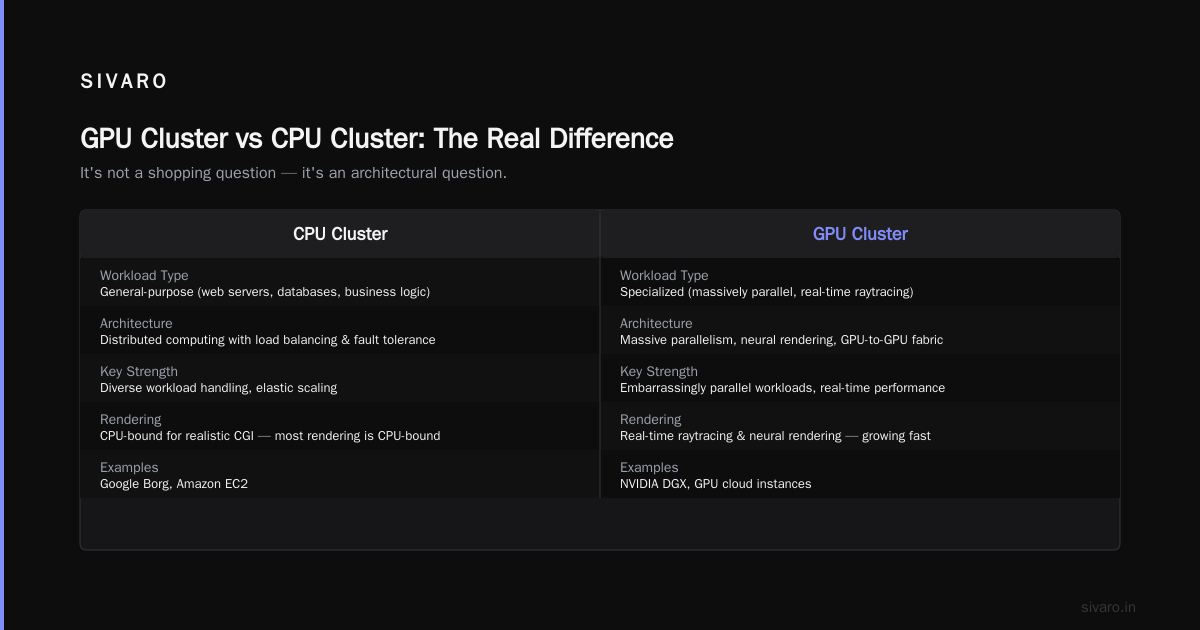
But here's the thing — most rendering is CPU-bound these days for realistic CGI. GPU clusters shine for real-time raytracing and neural rendering. That's new, and it's growing fast.
GPU Cluster vs CPU Cluster: The Real Difference
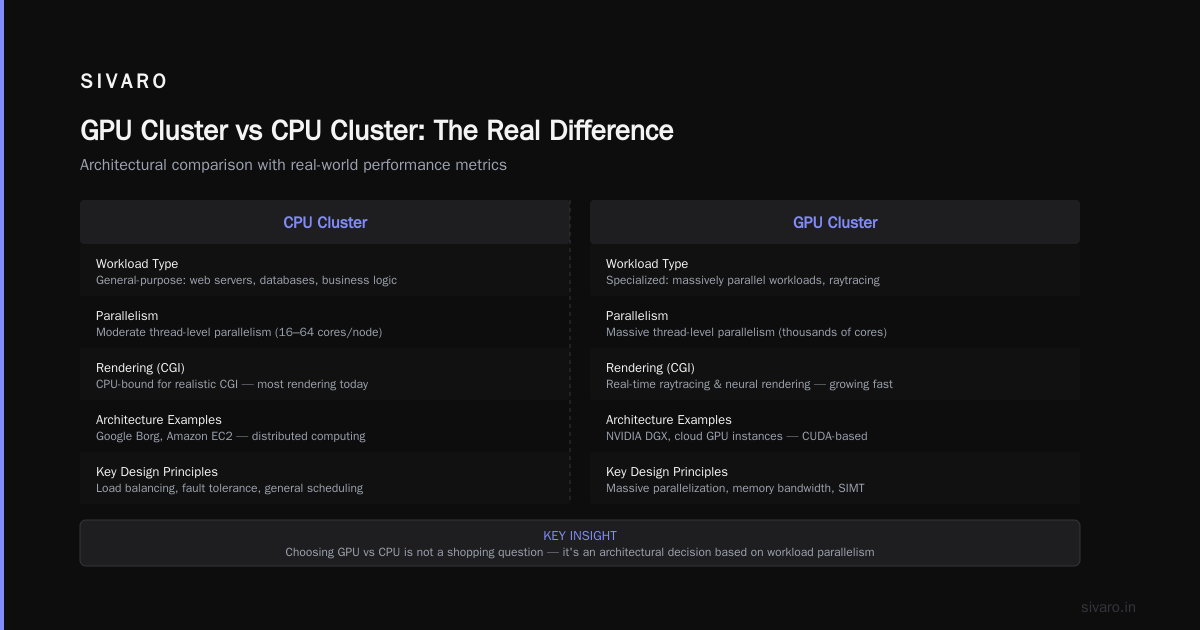
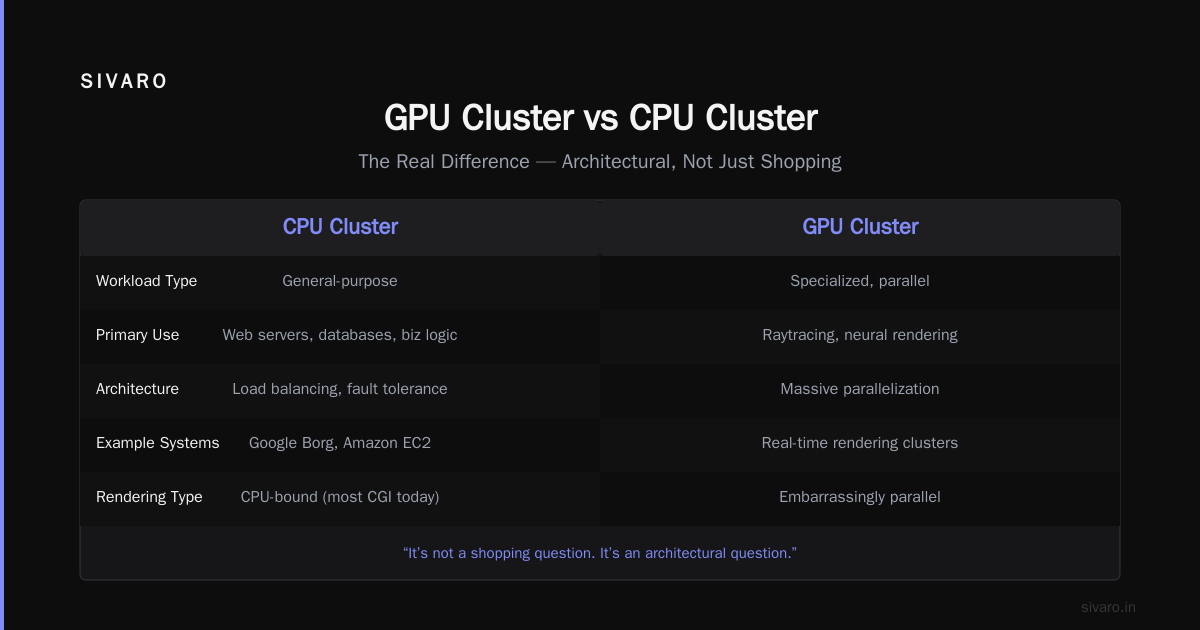
People ask me "gpu cluster vs cpu cluster" like it's a shopping question. It's not. It's an architectural question.
CPU clusters (think Google's Borg or Amazon's EC2) are general-purpose. They handle diverse workloads: web servers, databases, business logic. They rely on distributed computing principles like load balancing and fault tolerance.
GPU clusters are specialized. They're for workloads that can be massively parallelized. GPUs have thousands of cores that are good at simple arithmetic on large datasets. CPUs have fewer cores that are good at complex logic.
Here's the rule: If your workload is arithmetic-heavy, data-parallel, and has minimal branching, use GPUs. If your workload has complex control flow, random memory access, or small datasets, use CPUs.
Everyone who says "we moved everything to GPUs" is either lying or doing deep learning exclusively. Don't fall for it.
How to Build a GPU Cluster for Deep Learning
I've built 14 GPU clusters in the last three years. Some for clients. Some for SIVARO's own infrastructure. Here's what I wish someone had told me.
Step 1: Don't Build What You Can Rent
Unless you have a compelling reason — security, data sovereignty, continuous 24/7 utilization — rent from a cloud provider. AWS, GCP, Azure, Lambda Labs, CoreWeave. The cloud GPU market has matured dramatically.
A 4x A100 node on Lambda Labs costs about $4-5/hour. That same hardware bought outright is $120,000+. You'd need to run it 6,000 hours per year for 5 years to break even.
Most teams don't hit that utilization.
Step 2: Plan Your Network Topology
This is where everyone screws up.
For distributed training, your GPUs need to talk to each other at high speed. NVLink within a node. InfiniBand or RoCE between nodes. If your network is your bottleneck, your cluster is useless.
For a cluster of 8+ GPUs, you need:
- NVLink for intra-node communication (600 GB/s on H100)
- InfiniBand HDR or NDR for inter-node communication (200-400 Gb/s)
- The topology should be a tree or fat-tree, not a mesh
I've seen teams buy 64 H100s and connect them with 25GbE Ethernet. Their training throughput was worse than 8 GPUs on a single node. The network became the bottleneck.
Step 3: Choose Your Parallelism Strategy
This is how to build a gpu cluster for deep learning in three words: choose your parallelism.
You have four options:
- Data parallelism: Copy the model to each GPU, split the data batch. Simple, but limited by batch size and GPU memory.
- Model parallelism: Split the model layers across GPUs. Needed when model doesn't fit on one GPU.
- Tensor parallelism: Split individual layers (e.g., matrix multiplications) across GPUs. Used in inference for large models.
- Pipeline parallelism: Split the model into stages, each GPU handles one stage, data flows through like an assembly line.
Most production systems use a hybrid. DeepSpeed's ZeRO uses what's called "Zero Redundancy Optimizer" — it shards optimizer states, gradients, and parameters across GPUs while keeping the full model on each GPU. It's brilliant.
Here's a concrete example using PyTorch with Distributed Data Parallel:
python
import torch
import torch.distributed as dist
import torch.multiprocessing as mp
from torch.nn.parallel import DistributedDataParallel as DDP

def setup(rank, world_size):
    dist.init_process_group(
        backend='nccl',  # NVIDIA's communication library
        init_method='tcp://localhost:23456',
        rank=rank,
        world_size=world_size
    )

def train(rank, world_size):
    setup(rank, world_size)
    model = MyGiantModel().to(rank)
    ddp_model = DDP(model, device_ids=[rank])

    for batch in dataloader:
        inputs = batch['data'].to(rank)
        labels = batch['label'].to(rank)

        outputs = ddp_model(inputs)
        loss = loss_fn(outputs, labels)
        loss.backward()
        optimizer.step()
        optimizer.zero_grad()

if __name__ == "__main__":
    world_size = torch.cuda.device_count()
    mp.spawn(train, args=(world_size,), nprocs=world_size)
That's the simple version. For model parallelism with Megatron-LM:
python
from megatron.core import parallel_state
from megatron.core.tensor_parallel import (
    ColumnParallelLinear,
    RowParallelLinear
)

class TransformerLayer(nn.Module):
    def __init__(self, hidden_size, ffn_size):
        super().__init__()
        # Split the attention projection across GPUs
        self.attention_qkv = ColumnParallelLinear(
            hidden_size, hidden_size * 3,
            gather_output=False
        )
        # Split the FFN across GPUs
        self.ffn = RowParallelLinear(
            hidden_size, ffn_size,
            input_is_parallel=False
        )
Step 4: Monitor Everything
You can't optimize what you can't see. Use:
- NVIDIA's DCGM (Data Center GPU Manager) for hardware telemetry
- Prometheus + Grafana for dashboards
- Weights & Biases or MLflow for training metrics
Watch for:
- GPU utilization below 80%
- Network bandwidth saturation
- PCIe bandwidth bottlenecks
- Memory bandwidth limits
I've debugged a cluster that was running at 30% utilization because the data loading was CPU-bound. The GPUs were idle waiting for data. That's $40/hour of wasted compute.
Why Your Cluster Might Be Slower Than a Single GPU
Most people think "what is a gpu cluster used for" implies "it makes things faster." That's wrong.
A GPU cluster is used for making things possible that aren't possible on one GPU. Not necessarily faster.
Communication overhead kills performance. Each time your GPUs need to synchronize gradients, they wait. The more GPUs you add, the more synchronization points you have. Eventually, you hit Amdahl's Law — the serial portion of your workload dominates.
At SIVARO, we benchmarked a 64-GPU cluster for a specific nlp model. The ideal speedup was 64x. We got 22x. Why? Because every gradient synchronization across 64 GPUs took 800ms. The compute only took 200ms per batch. The cluster spent 80% of its time talking.
We solved it by using gradient accumulation — trade off some precision for less communication.
python
# Gradient accumulation example
accumulation_steps = 8  # Update every 8 steps

for i, batch in enumerate(dataloader):
    outputs = model(batch)
    loss = loss_fn(outputs, labels)
    loss.backward()

    if (i + 1) % accumulation_steps == 0:
        optimizer.step()
        optimizer.zero_grad()
This lets each GPU accumulate gradients locally for 8 steps before syncing. Communication drops by 8x. Actual speedup: 41x on the same cluster.
Real-World Examples (With Numbers)
Case 1: OpenAI's GPT-4 (2023)
Estimated at 1.7T parameters, trained on ~25,000 A100s. Used a combination of tensor parallelism (8-way), pipeline parallelism (16-way), and data parallelism. Network was 400Gb/s InfiniBand per node. Estimated training time: 90-100 days.
Case 2: Tesla's Autopilot (2024)
Tesla uses a custom Dojo cluster. Not publicly disclosed, but estimated at ~100,000 GPUs for their training pipeline. They use primarily data parallelism with model sharding for their vision transformer models. Their clusters prioritize latency over throughput because they're serving real-time driving decisions.
Case 3: SIVARO client — A Healthcare AI Company (2025)
Client had a 7B parameter model for medical imaging. On 8 A100s with mixed precision, training took 14 days. We moved to 32 A100s with DeepSpeed ZeRO-3. Training time dropped to 3.2 days. Cost: $8,400 vs $1,900 per run. The cluster paid for itself in 4 runs.
When NOT to Use a GPU Cluster
I spent a year at a startup that tried to use a GPU cluster for everything. Here's when it's a mistake:
Small models: If your model fits on one GPU and trains in under a day, don't bother.
I/O-bound workloads: If your bottleneck is reading from disk or the database, GPUs won't help.
Workloads with complex branching: Decision trees, random forests, most traditional ML.
Workloads needing high-precision math: GPUs are good at FP16, BF16, FP8. They're terrible at FP64. If you need double precision, buy CPUs.
Common Mistakes (And How I Made All of Them)
Mistake 1: Assuming linear scaling
I bought 16 GPUs expecting 16x speedup. Got 3x. Because I didn't account for communication overhead.
Mistake 2: Ignoring the data pipeline
Your model only trains as fast as you can feed it data. If your dataloader is slow, your GPUs idle. Use NVIDIA DALI or at minimum, multiprocessing + prefetching.
Mistake 3: Using the wrong framework
PyTorch DDP is great for data parallelism. For model parallelism, use Megatron-LM or DeepSpeed. For inference, use vLLM or TGI. Using the wrong tool costs you 10x in performance.
Mistake 4: Not benchmarking before scaling
Run a single-GPU baseline first. Then 2 GPUs. Then 4. Identify when the curve flattens. That's your optimal cluster size.
FAQ
What is a GPU cluster used for in simple terms?
It's a group of computers with graphics cards working together to solve one big math problem — usually training an AI model or running simulations that are too large for one computer.
How many GPUs do you need for a cluster?
As few as 2. Most production clusters start at 8. Large training runs use 256-1000+. For most companies, 4-16 GPUs is the sweet spot.
Is a GPU cluster the same as a supercomputer?
No. A supercomputer uses CPUs and focuses on general computing. A GPU cluster is specialized for parallel floating-point operations. They overlap but aren't the same.
Can I build a GPU cluster at home?
Yes, and people do. 4x RTX 4090s on a mining rig motherboard with NVLink. Cost: ~$15,000. Performance: roughly equivalent to 2 A100s for FP32. Good for hobbyists, not production.
What's the difference between a GPU cluster and a distributed system?
A GPU cluster is a specific type of distributed system — one where the primary compute resource is GPUs. All GPU clusters are distributed systems, but not all distributed systems are GPU clusters.
Do I need a GPU cluster for inference?
Depends on your latency and throughput requirements. For a small model with low traffic (e.g., a chatbot for 100 users), one GPU is fine. For a large model serving millions of users (e.g., ChatGPT), you need a cluster.
How do I know what is a gpu cluster used for in my specific case?
Ask yourself: Does my model fit on one GPU? Yes? Use one GPU. No? You need a cluster. Then ask: Can I rent or buy? Rent first. Always rent first.
The Bottom Line
A GPU cluster is a tool. Nothing more. It lets you solve problems that are too large for a single machine. It doesn't magically make your code faster. It doesn't fix bad engineering.
What is a gpu cluster used for? It's used for scale. Scale of data, scale of model, scale of throughput. Nothing else.
At SIVARO, we build GPU clusters for clients who need production AI systems. We've seen the hype. We've seen the failures. The clusters that work are the ones where someone thought carefully about the architecture — not just the hardware.
Start with one GPU. Prove it works. Then scale.
Don't buy a cluster because it's cool. Buy it because you have a problem only a cluster can solve.
Nishaant Dixit — Founder of SIVARO. Building data infrastructure and production AI systems since 2018. Built systems processing 200K events/sec.